set clock MITSUBISHI OUTLANDER SPORT 2017 3.G Owners Manual
[x] Cancel search | Manufacturer: MITSUBISHI, Model Year: 2017, Model line: OUTLANDER SPORT, Model: MITSUBISHI OUTLANDER SPORT 2017 3.GPages: 399, PDF Size: 14.61 MB
Page 258 of 399
7
Comfort controlsVents .........................................
.......................................................7-2
Manual air conditioning-Type 1
(if so equipped) ............................7-4
Manual air conditioning-Type 2
(if so equipped) ............................7-9
Automatic air conditioning-Type1 (if so equipped) ......................7-14Automatic air conditioning-Type2 (if so equipped) ......................7-19 Important air conditioning op
erating tips ......................................7-24
Air purifier ......................
...............................................................7-25
AM/FM radio/CD player (if so equipped) .....................................7-25 Handling of Discs .
.................................................
........................7-29
Audio Files (MP3/WMA/
AAC) ....................................................7-31
Important Points on Safety fo
r the Customer ................................7-35
Operation Keys ...............
...............................................................7-35
Listen to Radio ......
.................................................
........................7-38
Listen to Satellite Radio (if so equipped) .......................................7-40 Listen to CDs ..................
...............................................................7-42
Listen to MP3s ......
.................................................
........................7-43
Listen to an iPod ...
.................................................
........................7-44
Listen to Audio Files on
a USB Device .........................................7-46
To play iPod/USB memory device tracks via voice operation (vehicles with Bluetooth
® 2.0 interface)
...................................7-49
Listen to Bluetooth Audio (i
f so equipped) ....................................7-52
Display Indicator ..
.................................................
........................7-54
Audio Quality and Volume Balance Adjustment ...........................7-55System Settings .....
.................................................
........................7-56
Troubleshooting ..............
...............................................................7-60
Clock (if so equipped)
............................................
........................7-62
General information about
your radio ...........................................7-63
BK0239500US.bo
ok 1 ページ 2016年5月13日 金曜日 午前8時53分
Page 261 of 399
Manual air conditioning-T
ype 1 (if so equipped)
7-4 Comfort controls
7
N00730301370
N00730500258 N00736500175
When the ignition switch or the operation mode is in ON, select the blower speed by turning the blower speed selection dial.Turning the dial clockwise will increase the blower speed; turning the dial counterclock- wise will decrease it. When the dial is set tothe “OFF” position, all fan-driven airflow will stop.
N00736600222
Turn the temperature control dial clockwise to make the air warmer. Turn it counterclock-wise to make the air cooler.
Manual air conditioning- Ty p e 1
(if so equipped)
CAUTION The engine speed may increase when the air conditioning is operating.With an increased engine speed, a continu- ously variable transmission (CVT) vehicle will creep to a greater degree than with alower engine speed. Fully depress the brake pedal to prevent the vehicle from creeping.
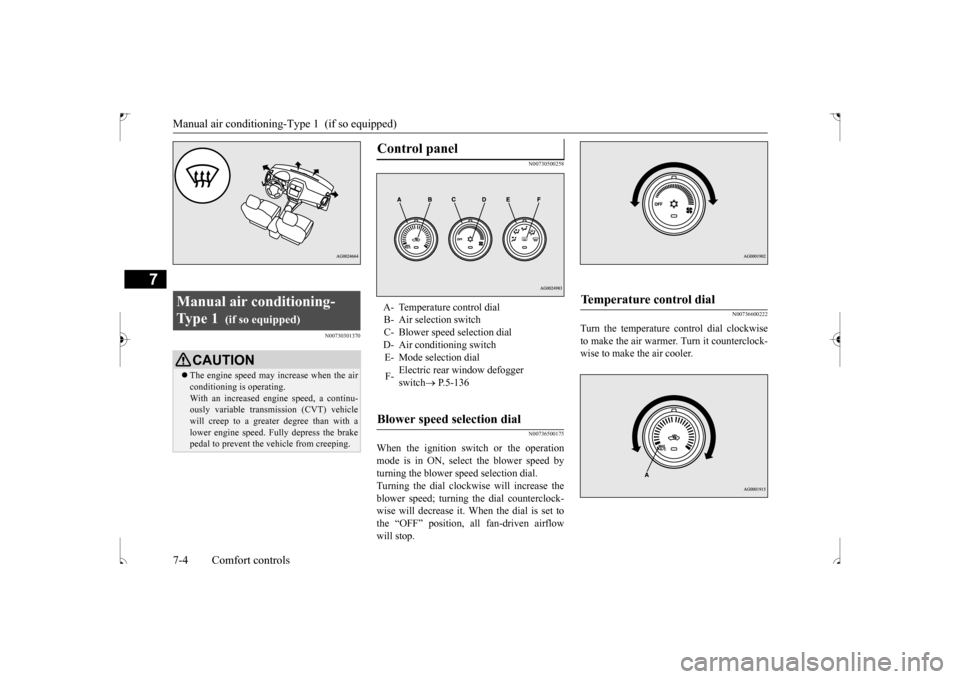
Control panel
A- Temperature control dial B- Air selection switch C- Blower speed selection dialD- Air conditioning switch E- Mode selection dial F-
Electric rear window defogger switch
P.5-136
Blower speed selection dial
Temperature control dial
BK0239500US.bo
ok 4 ページ 2016年5月13日 金曜日 午前8時53分
Page 264 of 399
Manual air conditioning-Type 1 (if so equipped)
Comfort controls 7-7
7
N00731101287
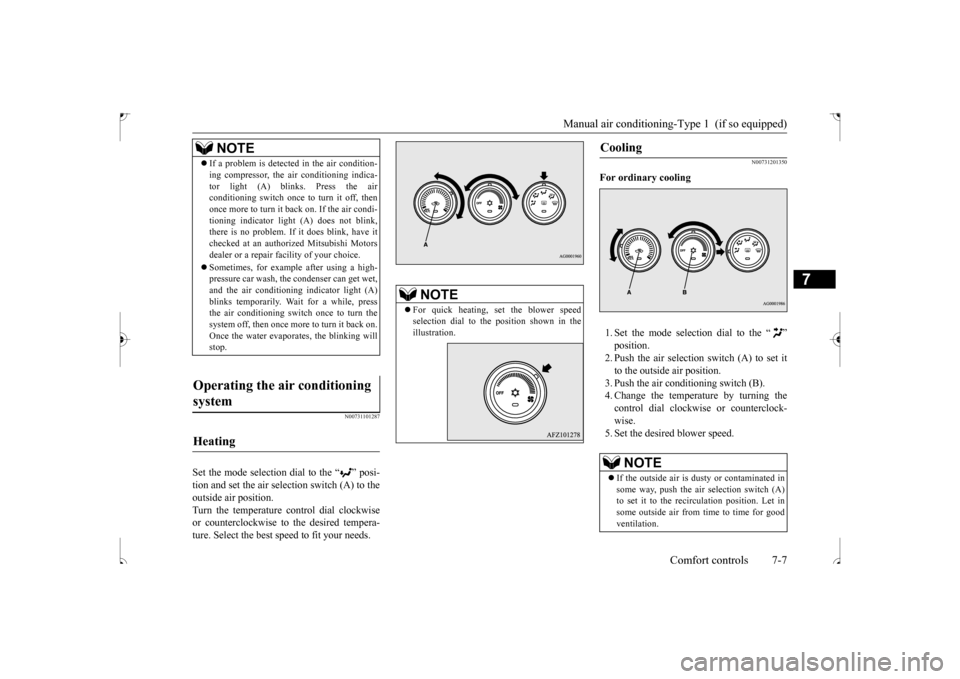
Set the mode selection dial to the “ ” posi- tion and set the air sel
ection switch (A) to the
outside air position. Turn the temperature control dial clockwise or counterclockwise to the desired tempera-ture. Select the best speed to fit your needs.
N00731201350
For ordinary cooling 1. Set the mode selection dial to the “ ” position.2. Push the air selection switch (A) to set itto the outside air position. 3. Push the air conditioning switch (B). 4. Change the temperature by turning thecontrol dial clockwise or counterclock- wise. 5. Set the desired blower speed.
NOTE
If a problem is detected in the air condition- ing compressor, the air conditioning indica- tor light (A) blinks. Press the air conditioning switch once to turn it off, then once more to turn it back on. If the air condi-tioning indicator light (A) does not blink, there is no problem. If it does blink, have it checked at an authorized Mitsubishi Motorsdealer or a repair facility of your choice. Sometimes, for example after using a high- pressure car wash, the condenser can get wet, and the air conditioning indicator light (A) blinks temporarily. Wait for a while, pressthe air conditioning switch once to turn the system off, then once more to turn it back on. Once the water evaporates, the blinking willstop.
Operating the air conditioning system
Heating
NOTE
For quick heating, set the blower speed selection dial to the position shown in the illustration.
Cooling
NOTE
If the outside air is dusty or contaminated in some way, push the air selection switch (A) to set it to the recirculation position. Let insome outside air from time to time for good ventilation.
BK0239500US.bo
ok 7 ページ 2016年5月13日 金曜日 午前8時53分
Page 267 of 399
Manual air conditioning-T
ype 2 (if so equipped)
7-10 Comfort controls
7
N00736500188
When the ignition switch or the operation mode is in ON, select the blower speed by turning the blower speed selection dial. Turning the dial clockwise will increase theblower speed; turning the dial counterclock-wise will decrease it. When the dial is set to the “OFF” position, all fan-driven airflow will stop.
N00736600176
Turn the temperature control dial clockwiseto make the air warmer. Turn it counterclock-wise to make the air cooler.
N00736700207
To change the amount of
air flowing from the
vents, turn the mode selection dial. Refer to “Changing the mode selection” on page 7-2.
N00736800396
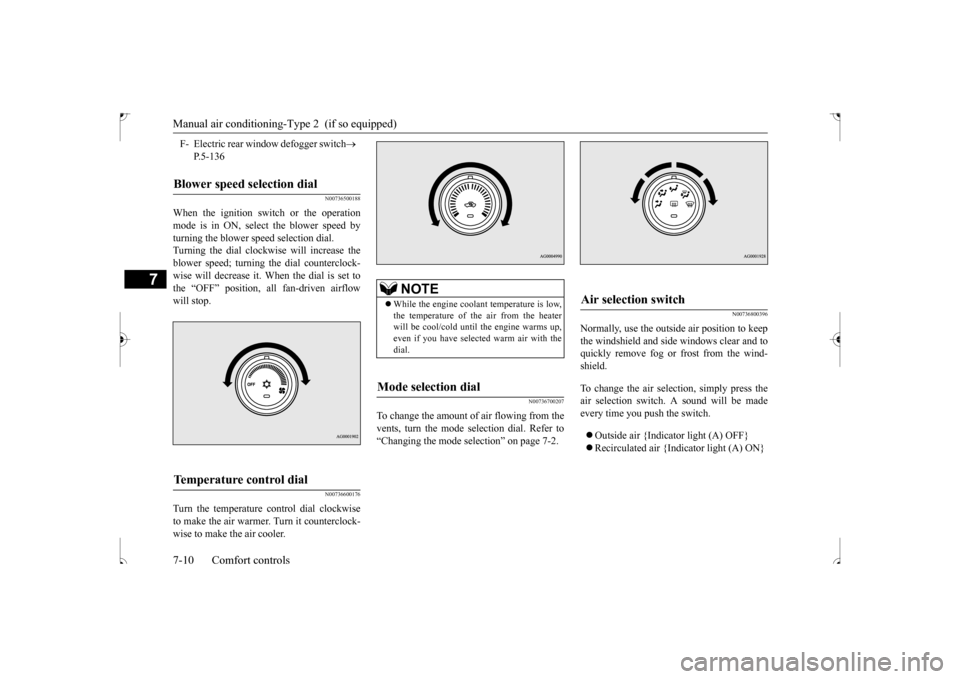
Normally, use the outside air position to keepthe windshield and side windows clear and toquickly remove fog or frost from the wind- shield. To change the air selection, simply press the air selection switch. A sound will be made every time you push the switch. Outside air {Indicator light (A) OFF} Recirculated air {Indicator light (A) ON}
F- Electric rear window defogger switch
P.5-136
Blower speed selection dial
Temperature control dial
NOTE
While the engine coolant temperature is low, the temperature of the air from the heater will be cool/cold until the engine warms up,even if you have selected warm air with the dial.
Mode selection dial
Air selection switch
BK0239500US.bo
ok 10 ページ 2016年5月13日 金曜日 午前8時53分
Page 269 of 399
Manual air conditioning-T
ype 2 (if so equipped)
7-12 Comfort controls
7
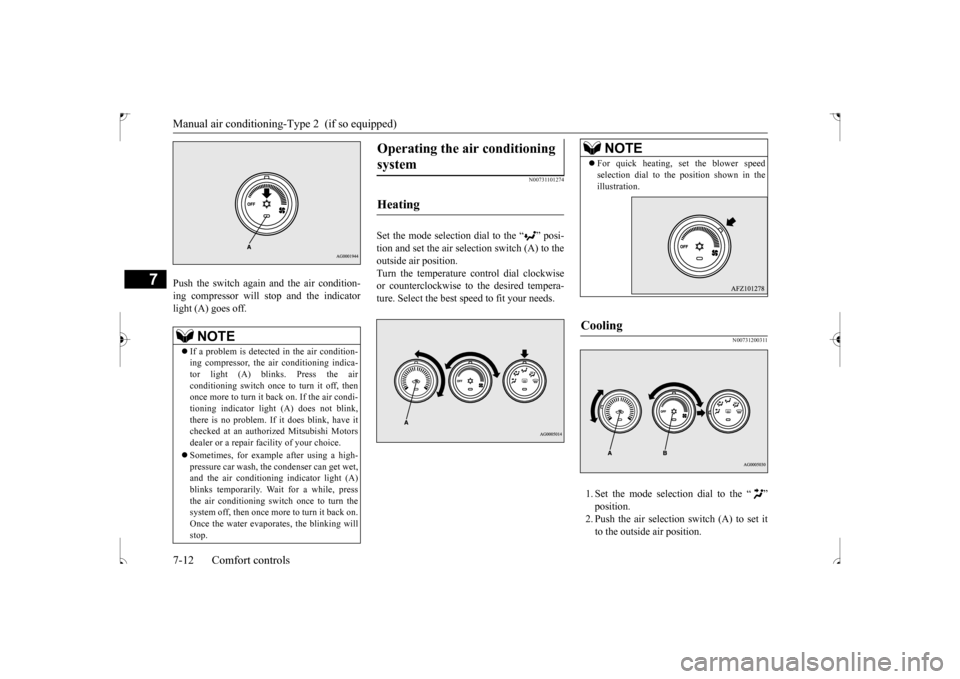
Push the switch again and the air condition- ing compressor will stop and the indicator light (A) goes off.
N00731101274
Set the mode selection dial to the “ ” posi-tion and set the air selection switch (A) to theoutside air position.Turn the temperature control dial clockwise or counterclockwise to the desired tempera- ture. Select the best speed to fit your needs.
N00731200311
1. Set the mode selection dial to the “ ”position.2. Push the air selection switch (A) to set it to the outside air position.
NOTE
If a problem is detected in the air condition- ing compressor, the air conditioning indica-tor light (A) blinks. Press the air conditioning switch once to turn it off, then once more to turn it back on. If the air condi-tioning indicator light (A) does not blink, there is no problem. If it does blink, have it checked at an authorized Mitsubishi Motorsdealer or a repair facility of your choice. Sometimes, for example after using a high- pressure car wash, the condenser can get wet, and the air conditioning indicator light (A) blinks temporarily. Wait for a while, pressthe air conditioning switch once to turn the system off, then once more to turn it back on. Once the water evaporates, the blinking willstop.
Operating the air conditioning system
Heating
NOTE
For quick heating, set the blower speed selection dial to the position shown in the illustration.
Cooling
BK0239500US.bo
ok 12 ページ 2016年5月13日 金曜日 午前8時53分
Page 270 of 399
Manual air conditioning-Type 2 (if so equipped)
Comfort controls 7-13
7
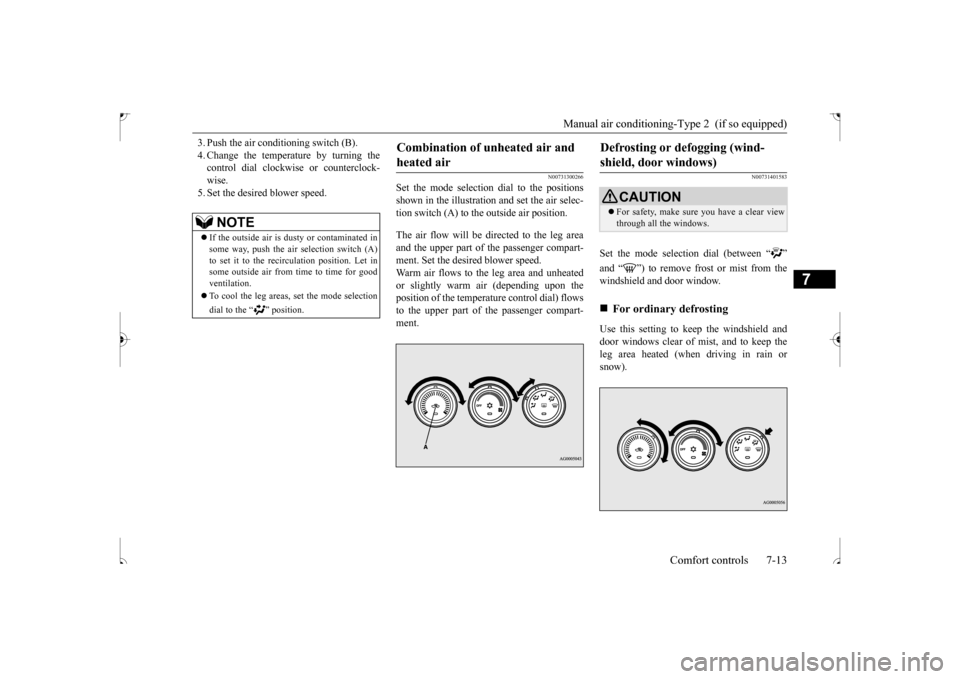
3. Push the air conditioning switch (B). 4. Change the temperature by turning the control dial clockwise or counterclock- wise.5. Set the desired blower speed.
N00731300266
Set the mode selection dial to the positions shown in the illustration and set the air selec- tion switch (A) to the outside air position. The air flow will be directed to the leg area and the upper part of the passenger compart- ment. Set the desired blower speed. Warm air flows to the leg area and unheatedor slightly warm air (depending upon theposition of the temperature control dial) flows to the upper part of the passenger compart- ment.
N00731401583
Set the mode selection dial (between “ ” and “ ”) to remove frost or mist from the windshield and door window. Use this setting to keep the windshield and door windows clear of mist, and to keep the leg area heated (when driving in rain or snow).
NOTE
If the outside air is dusty or contaminated in some way, push the air selection switch (A) to set it to the recirculation position. Let insome outside air from time to time for good ventilation. To cool the leg areas, set the mode selection dial to the “ ” position.
Combination of unheated air and heated air
Defrosting or defogging (wind-shield, door windows)
CAUTION For safety, make sure you have a clear view through all the windows.
For ordinary defrosting
BK0239500US.bo
ok 13 ページ 2016年5月13日 金曜日 午前8時53分
Page 272 of 399
Automatic air conditioning-Type1 (if so equipped)
Comfort controls 7-15
7
N00736900153
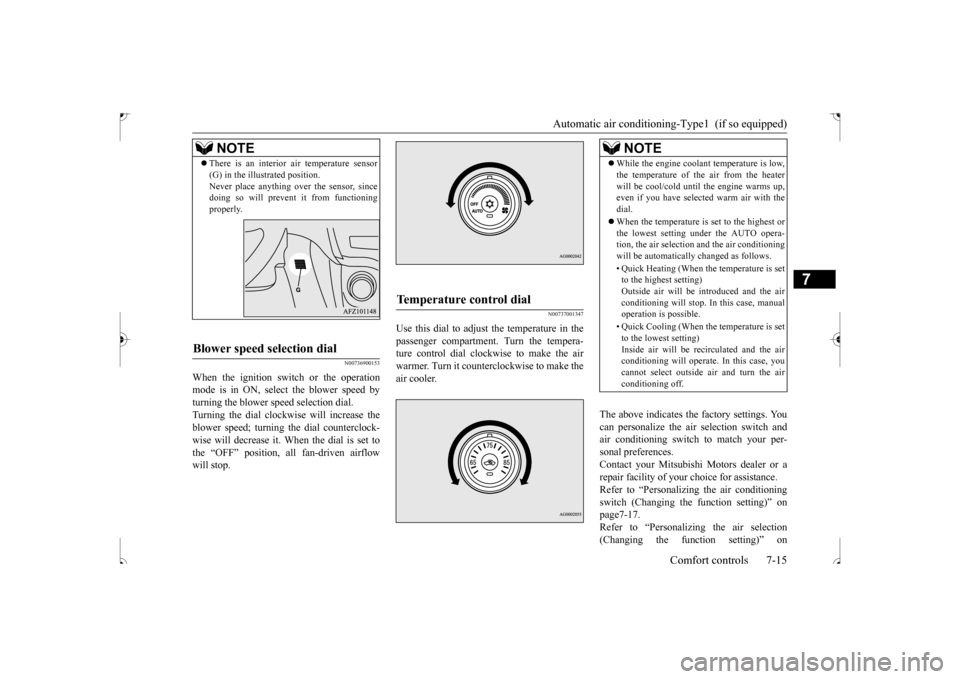
When the ignition switch or the operation mode is in ON, select the blower speed by turning the blower speed selection dial.Turning the dial clockwise will increase the blower speed; turning the dial counterclock- wise will decrease it. When the dial is set tothe “OFF” position, all fan-driven airflow will stop.
N00737001347
Use this dial to adjust the temperature in the passenger compartment. Turn the tempera-ture control dial clockwise to make the air warmer. Turn it counterclockwise to make the air cooler.
The above indicates the factory settings. You can personalize the air selection switch and air conditioning switch to match your per-sonal preferences. Contact your Mitsubishi Motors dealer or a repair facility of your choice for assistance.Refer to “Personalizing the air conditioning switch (Changing the function setting)” on page7-17.Refer to “Personalizing the air selection (Changing the function setting)” on
NOTE
There is an interior air temperature sensor (G) in the illustrated position. Never place anything over the sensor, since doing so will prevent it from functioning properly.
Blower speed selection dial
Temperature control dial
NOTE
While the engine coolant temperature is low, the temperature of the air from the heater will be cool/cold until the engine warms up, even if you have selected warm air with the dial. When the temperature is set to the highest or the lowest setting under the AUTO opera-tion, the air selection and the air conditioning will be automatically changed as follows. • Quick Heating (When the temperature is set to the highest setting) Outside air will be introduced and the airconditioning will stop. In this case, manual operation is possible. • Quick Cooling (When the temperature is set to the lowest setting) Inside air will be recirculated and the airconditioning will operate. In this case, you cannot select outside air and turn the air conditioning off.
BK0239500US.bo
ok 15 ページ 2016年5月13日 金曜日 午前8時53分
Page 277 of 399
Automatic air conditioning
-Type2 (if so equipped)
7-20 Comfort controls
7
N00711801611
N00736900166
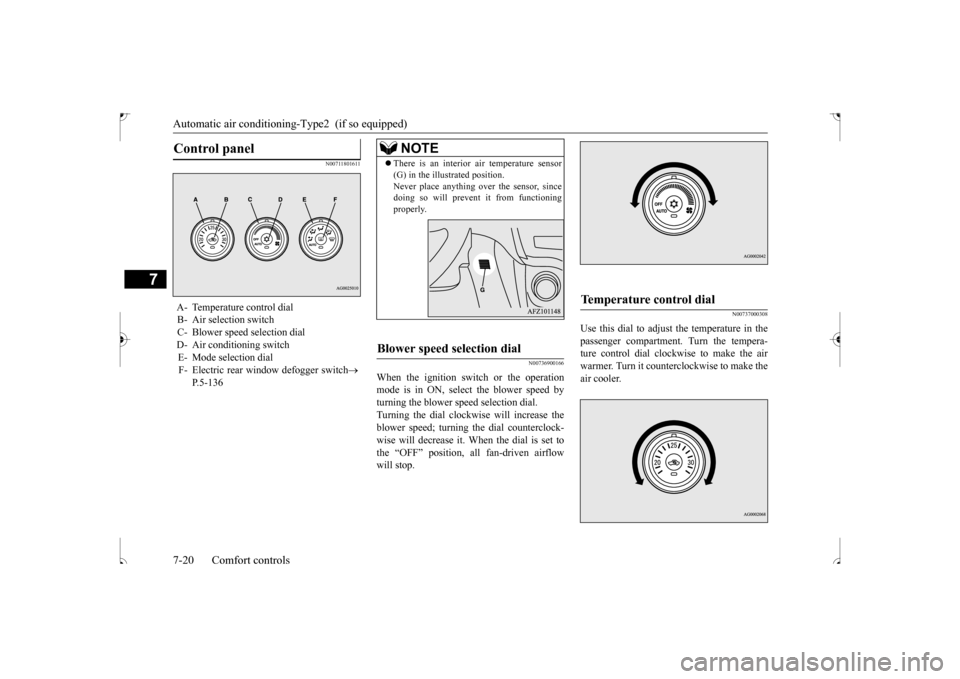
When the ignition switch or the operation mode is in ON, select the blower speed by turning the blower speed selection dial.Turning the dial clockwise will increase the blower speed; turning the dial counterclock- wise will decrease it. When the dial is set tothe “OFF” position, all fan-driven airflow will stop.
N00737000308
Use this dial to adjust the temperature in the passenger compartment. Turn the tempera-ture control dial clockwise to make the air warmer. Turn it counterclockwise to make the air cooler.
Control panel
A- Temperature control dial B- Air selection switch C- Blower speed selection dialD- Air conditioning switch E- Mode selection dial F- Electric rear window defogger switch
P.5-136
NOTE
There is an interior air temperature sensor (G) in the illustrated position. Never place anything over the sensor, since doing so will prevent it from functioning properly.
Blower speed selection dial
Temperature control dial
BK0239500US.bo
ok 20 ページ 2016年5月13日 金曜日 午前8時53分
Page 293 of 399
Operation Keys 7-36 Comfort controls
7
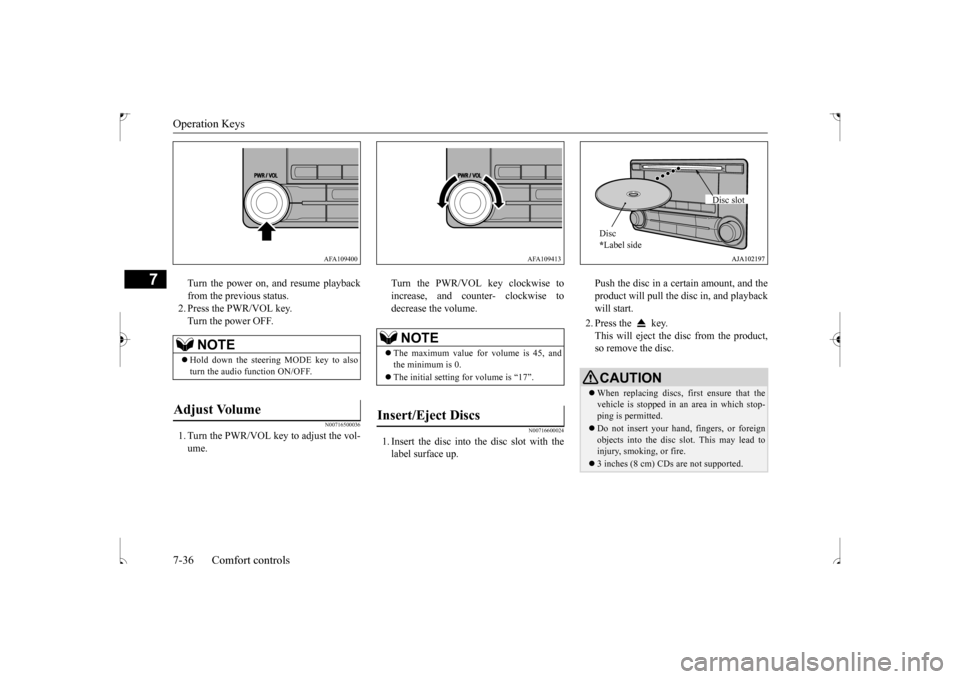
Turn the power on, and resume playback from the previous status. 2. Press the PWR/VOL key.Turn the power OFF.
N00716500036
1. Turn the PWR/VOL key to adjust the vol-ume.
Turn the PWR/VOL key clockwise to increase, and counter- clockwise to decrease the volume.
N00716600024
1. Insert the disc into the disc slot with the label surface up.
Push the disc in a certain amount, and the product will pull the disc in, and playback will start. 2. Press the key. This will eject the disc from the product, so remove the disc.
NOTE
Hold down the steering MODE key to also turn the audio function ON/OFF.
Adjust Volume
AFA109400
NOTE
The maximum value for volume is 45, and the minimum is 0. The initial setting for volume is “17”.
Insert/Eject Discs
AFA109413
CAUTIONWhen replacing discs, first ensure that the vehicle is stopped in an area in which stop- ping is permitted. Do not insert your hand, fingers, or foreign objects into the disc slot. This may lead to injury, smoking, or fire. 3 inches (8 cm) CDs are not supported.Disc * Label side
Disc slot
BK0239500US.bo
ok 36 ページ 2016年5月13日 金曜日 午前8時53分
Page 296 of 399

Listen to Radio
Comfort controls 7-39
7
Turn the /SEL key to the frequency to lis- ten to. Collective search for stations that can be received.
Press the SCAN key. When a station is received, this is played for 5 seconds, then the product searches for the next station. Register the broadcast station in advance, and select this at a later time. 1. Tune in to the frequency to register. 2. Hold down any of the keys from the 1RPT key to the 6 key. A “Beep” sounds, and the preset key is registered.
During RBDS broadcast reception, select CAT (category content), and automaticallyscan for stations. 1. During FM reception, press the CAT key. This switches to the CAT selection mode. 2. Press the CAT key to select CAT. 3. Press the key or key. The CAT (category content) indicator willflash, and station selection will automati- cally start. When a station is r
eceived, the frequency
is displayed.
During RBDS broadcast reception, select CAT (category content) to perform a collec- tive search for stations. 1. During FM reception, press the CAT key.
NOTE
Bands switch in the order AM, FM1, FM2, SIR1
*, SIR2
*, SIR3
*, and SIR4
*.
If no signal is received, bands will not be switched to SIR2, SIR3, or SIR4.
* : When a satellite tuner is connectedManual/Seek Station Selection
/SEL key (counter-clockwise)
Reduces the frequency being received.
/SEL key (clockwise)
Increases the frequency being received.
key
(hold down)
Release the button to start seek station selection, and when a station is received, scanning stops.
key
(hold down)Scan Station Selection
NOTE
Press this button again while receiving the station to cancel scan searching.
Preset Memory
NOTE
The preset memory can register a maximum of 6 stations for each band. If a preset key that already has a station reg- istered is selected, the new station will be registered. Pressing the preset key will select the previ- ously registered frequency.
CAT Search
NOTE
This receives the station detected first. 10 seconds after reception, CAT search mode will be cancelled. To receive a different station, press the key or key again.
CAT Scan
BK0239500US.bo
ok 39 ページ 2016年5月13日 金曜日 午前8時53分