Washer MITSUBISHI PAJERO IV 2011 Owners Manual
[x] Cancel search | Manufacturer: MITSUBISHI, Model Year: 2011, Model line: PAJERO IV, Model: MITSUBISHI PAJERO IV 2011Pages: 377, PDF Size: 29.43 MB
Page 3 of 377
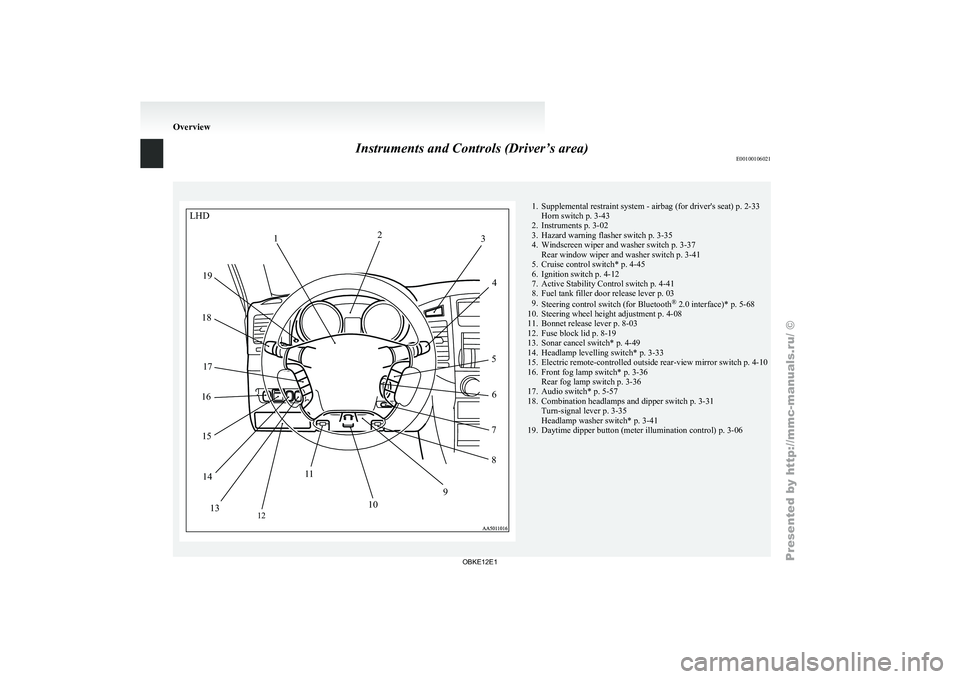
Instruments and Controls (Driver’s area)
E00100106021 1. Supplemental restraint system - airbag (for driver's seat) p. 2-33
Horn switch p. 3-43
2. Instruments p. 3-02
3. Hazard warning flasher switch p. 3-35
4.
Windscreen wiper and washer switch p. 3-37Rear window wiper and washer switch p. 3-41
5. Cruise control switch* p. 4-45
6. Ignition switch p. 4-12
7. Active Stability Control switch p. 4-41
8. Fuel tank filler door release lever p. 03
9. Steering control switch (for Bluetooth ®
2.0 interface)* p. 5-68
10. Steering wheel height adjustment p. 4-08
11. Bonnet release lever p. 8-03
12. Fuse block lid p. 8-19
13. Sonar cancel switch* p. 4-49
14. Headlamp levelling switch* p. 3-33
15. Electric remote-controlled outside rear-view mirror switch p. 4-10
16. Front fog lamp switch* p. 3-36 Rear fog lamp switch p. 3-36
17. Audio switch* p. 5-57
18. Combination headlamps and dipper switch p. 3-31 Turn-signal lever p. 3-35
Headlamp washer switch* p. 3-41
19. Daytime dipper button (meter illumination control) p. 3-06 OverviewLHD
2
1 3
4
5 6
7
8
9
10
1
1
12
13
14
15
16
17
18
19
OBKE12E1
Page 4 of 377
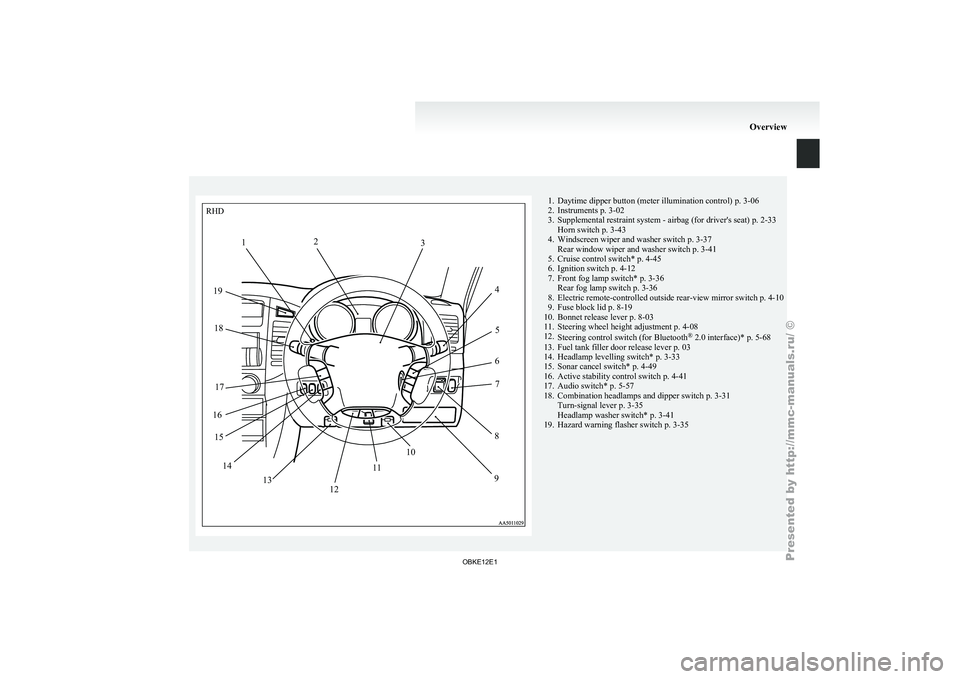
1. Daytime dipper button (meter illumination control) p. 3-06
2. Instruments p. 3-02
3. Supplemental restraint system - airbag (for driver's seat)
p. 2-33
Horn switch p. 3-43
4. Windscreen wiper and washer switch p. 3-37 Rear window wiper and washer switch p. 3-41
5. Cruise control switch* p. 4-45
6. Ignition switch p. 4-12
7. Front fog lamp switch* p. 3-36 Rear fog lamp switch p. 3-36
8. Electric remote-controlled outside rear-view mirror switch p. 4-10
9. Fuse block lid p. 8-19
10. Bonnet release lever p. 8-03
11. Steering wheel height adjustment p. 4-08
12. Steering control switch (for Bluetooth ®
2.0 interface)* p. 5-68
13. Fuel tank filler door release lever p. 03
14. Headlamp levelling switch* p. 3-33
15. Sonar cancel switch* p. 4-49
16. Active stability control switch p. 4-41
17. Audio switch* p. 5-57
18. Combination headlamps and dipper switch p. 3-31 Turn-signal lever p. 3-35
Headlamp washer switch* p. 3-41
19. Hazard warning flasher switch p. 3-35 OverviewRHD
1 2
3
45
6 7
8
9
12 10
1
1
13
14
15
16 17
18
19
OBKE12E1
Page 9 of 377
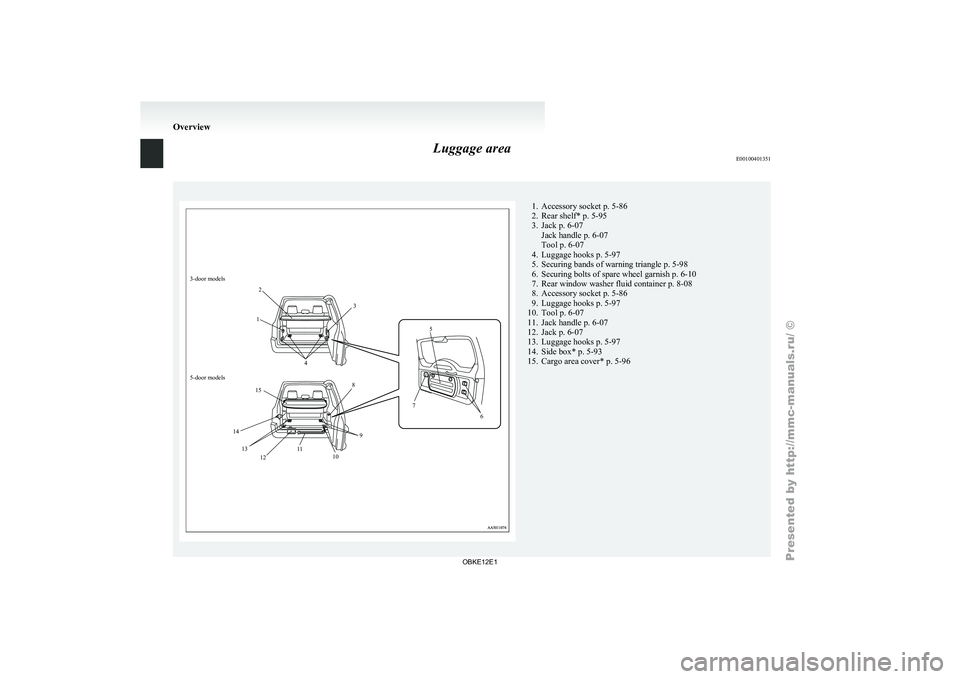
Luggage area
E001004013513-door models
12
3
4 5
6
7
8
9
10
12 11
13
14 15
5-door models 1. Accessory socket p. 5-86
2. Rear shelf* p. 5-95
3.
Jack p. 6-07
Jack handle p. 6-07
Tool p. 6-07
4.
Luggage hooks p. 5-97
5. Securing bands of warning triangle p. 5-98
6. Securing bolts of spare wheel garnish p. 6-10
7. Rear window washer fluid container p. 8-08
8. Accessory socket p. 5-86
9. Luggage hooks p. 5-97
10. Tool p. 6-07
11. Jack handle p. 6-07
12. Jack p. 6-07
13. Luggage hooks p. 5-97
14. Side box* p. 5-93
15. Cargo area cover* p. 5-96 Overview
OBKE12E1
Page 10 of 377
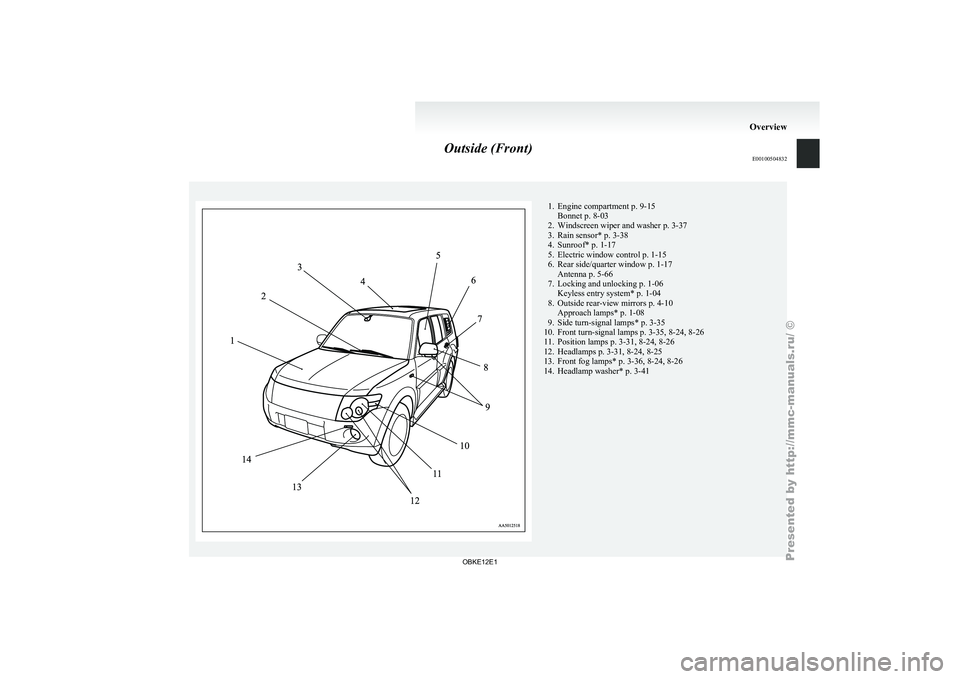
Outside (Front)
E00100504832 1. Engine compartment p. 9-15
Bonnet p. 8-03
2. Windscreen wiper and washer p. 3-37
3. Rain sensor* p. 3-38
4.
Sunroof* p. 1-17
5. Electric window control p. 1-15
6. Rear side/quarter window p. 1-17 Antenna p. 5-66
7. Locking and unlocking p. 1-06 Keyless entry system* p. 1-04
8. Outside rear-view mirrors p. 4-10 Approach lamps* p. 1-08
9. Side turn-signal lamps* p. 3-35
10. Front turn-signal lamps p. 3-35, 8-24, 8-26
11. Position lamps p. 3-31, 8-24, 8-26
12. Headlamps p. 3-31, 8-24, 8-25
13. Front fog lamps* p. 3-36, 8-24, 8-26
14. Headlamp washer* p. 3-41 Overview
OBKE12E1
Page 11 of 377
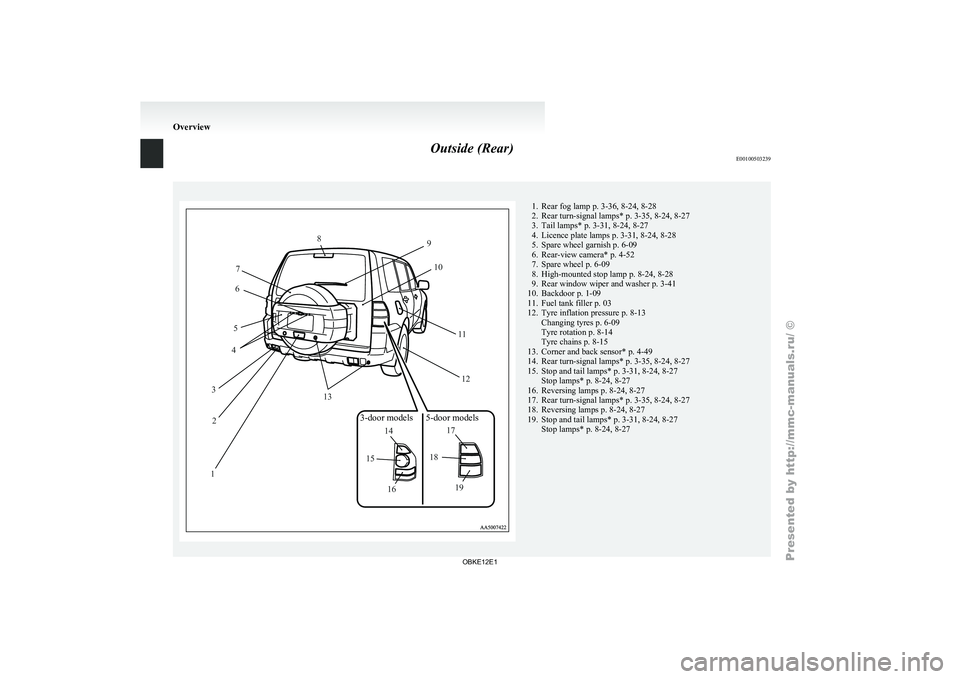
Outside (Rear)
E0010050323912
3 4
5 6
7 8
9
10
1112
13
14
15
16 17
18
19
3-door models 5-door models 1. Rear fog lamp p. 3-36, 8-24, 8-28
2. Rear turn-signal lamps*
p. 3-35, 8-24, 8-27
3.
Tail lamps* p. 3-31, 8-24, 8-27
4. Licence plate lamps p. 3-31, 8-24, 8-28
5. Spare wheel garnish p. 6-09
6. Rear-view camera* p. 4-52
7. Spare wheel p. 6-09
8. High-mounted stop lamp p. 8-24, 8-28
9. Rear window wiper and washer p. 3-41
10. Backdoor p. 1-09
11. Fuel tank filler p. 03
12. Tyre inflation pressure p. 8-13 Changing tyres p. 6-09
Tyre rotation p. 8-14
Tyre chains p. 8-15
13. Corner and back sensor* p. 4-49
14. Rear turn-signal lamps* p. 3-35, 8-24, 8-27
15. Stop and tail lamps* p. 3-31, 8-24, 8-27 Stop lamps* p. 8-24, 8-27
16. Reversing lamps p. 8-24, 8-27
17. Rear turn-signal lamps* p. 3-35, 8-24, 8-27
18. Reversing lamps p. 8-24, 8-27
19. Stop and tail lamps* p. 3-31, 8-24, 8-27 Stop lamps* p. 8-24, 8-27 Overview
OBKE12E1
Page 28 of 377
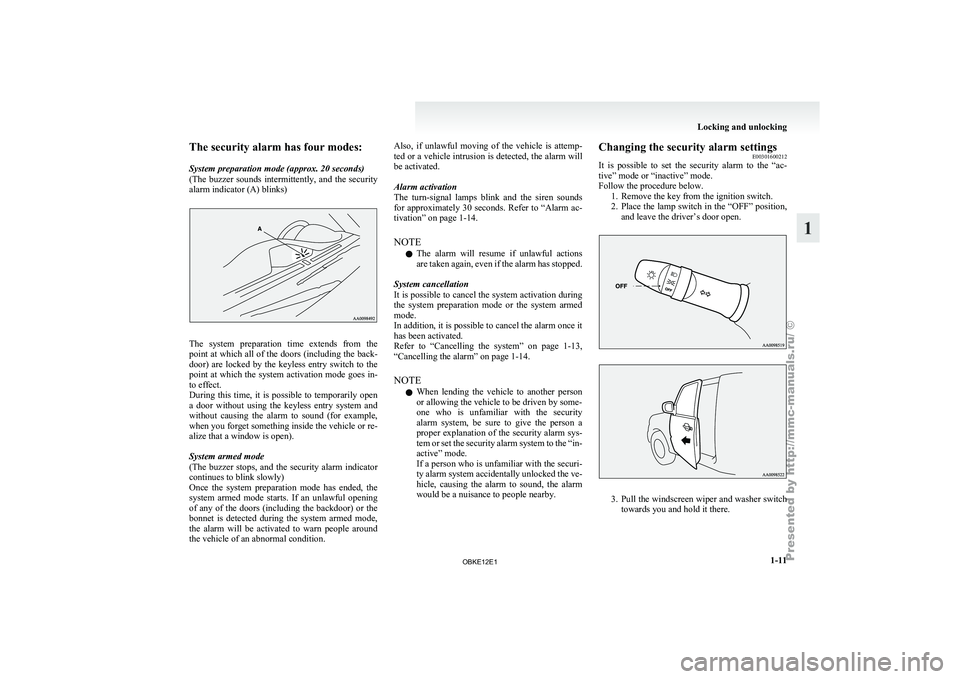
The security alarm has four modes:
System preparation mode (approx. 20 seconds)
(The buzzer
sounds
intermittently, and the security
alarm indicator (A) blinks) The system preparation time extends from the
point at
which
all of the doors (including the back-
door) are locked by the keyless entry switch to the
point at which the system activation mode goes in-
to effect.
During this time, it is possible to temporarily open
a door without using the keyless entry system and
without causing the alarm to sound (for example,
when you forget something inside the vehicle or re-
alize that a window is open).
System armed mode
(The buzzer stops, and the security alarm indicator
continues to blink slowly)
Once the system preparation mode has ended, the
system armed mode starts. If an unlawful opening
of any of the doors (including the backdoor) or the
bonnet is detected during the system armed mode,
the alarm will be activated to warn people around
the vehicle of an abnormal condition. Also, if unlawful moving of the vehicle is attemp-
ted or
a
vehicle intrusion is detected, the alarm will
be activated.
Alarm activation
The turn-signal lamps blink and the siren sounds
for approximately 30 seconds. Refer to “Alarm ac-
tivation” on page 1-14.
NOTE
l The alarm will resume if unlawful actions
are taken again, even if the alarm has stopped.
System cancellation
It is possible to cancel the system activation during
the system preparation mode or the system armed
mode.
In addition, it is possible to cancel the alarm once it
has been activated.
Refer to “Cancelling the system” on page 1-13,
“Cancelling the alarm” on page 1-14.
NOTE l When lending the vehicle to another person
or allowing the vehicle to be driven by some-
one who is unfamiliar with the security
alarm system, be sure to give the person a
proper explanation of the security alarm sys-
tem or set the security alarm system to the “in-
active” mode.
If a person who is unfamiliar with the securi-
ty alarm system accidentally unlocked the ve-
hicle, causing the alarm to sound, the alarm
would be a nuisance to people nearby. Changing the security alarm settings
E00301600212
It is possible
to set the security alarm to the “ac-
tive” mode or “inactive” mode.
Follow the procedure below. 1. Remove the key from the ignition switch.
2. Place the lamp switch in the “OFF” position,and leave the driver’s door open. 3. Pull
the windscreen wiper and washer switch
towards you and hold it there. Locking and unlocking
1-11 1
OBKE12E1
Page 29 of 377
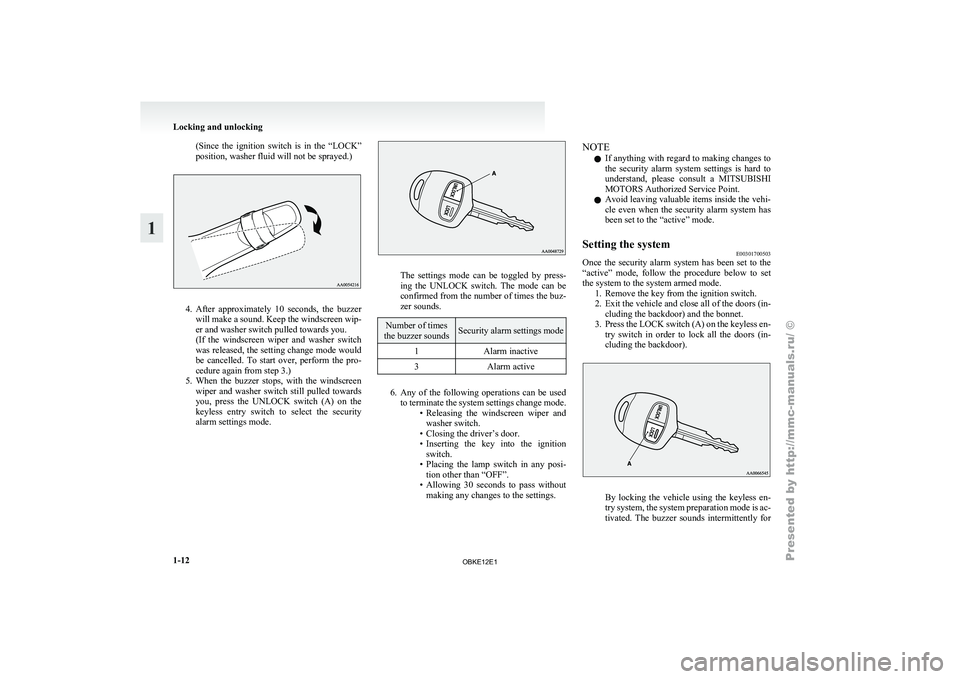
(Since the ignition switch is in the “LOCK”
position, washer fluid will not be sprayed.)
4. After approximately 10 seconds, the buzzer
will make
a sound. Keep the windscreen wip-
er and washer switch pulled towards you.
(If the windscreen wiper and washer switch
was released, the setting change mode would
be cancelled. To start over, perform the pro-
cedure again from step 3.)
5. When the buzzer stops, with the windscreen wiper and washer switch still pulled towards
you, press the UNLOCK switch (A) on the
keyless entry switch to select the security
alarm settings mode. The settings mode can be toggled by press-
ing the
UNLOCK
switch. The mode can be
confirmed from the number of times the buz-
zer sounds. Number of times
the buzzer sounds Security alarm settings mode
1 Alarm inactive
3 Alarm active 6. Any of the following operations can be used
to terminate
the system settings change mode.
• Releasing the windscreen wiper and washer switch.
• Closing the driver’s door.
• Inserting the key into the ignition switch.
• Placing the lamp switch in any posi- tion other than “OFF”.
• Allowing 30 seconds to pass without making any changes to the settings. NOTE
l If
anything with
regard to making changes to
the security alarm system settings is hard to
understand, please consult a MITSUBISHI
MOTORS Authorized Service Point.
l Avoid leaving valuable items inside the vehi-
cle even when the security alarm system has
been set to the “active” mode.
Setting the system E00301700503
Once the security alarm system has been set to the
“active” mode, follow
the procedure below to set
the system to the system armed mode. 1. Remove the key from the ignition switch.
2. Exit the vehicle and close all of the doors (in-cluding the backdoor) and the bonnet.
3. Press the LOCK switch (A) on the keyless en- try switch in order to lock all the doors (in-
cluding the backdoor). By locking the vehicle using the keyless en-
try system,
the
system preparation mode is ac-
tivated. The buzzer sounds intermittently for Locking and unlocking
1-12
1
OBKE12E1
Page 30 of 377
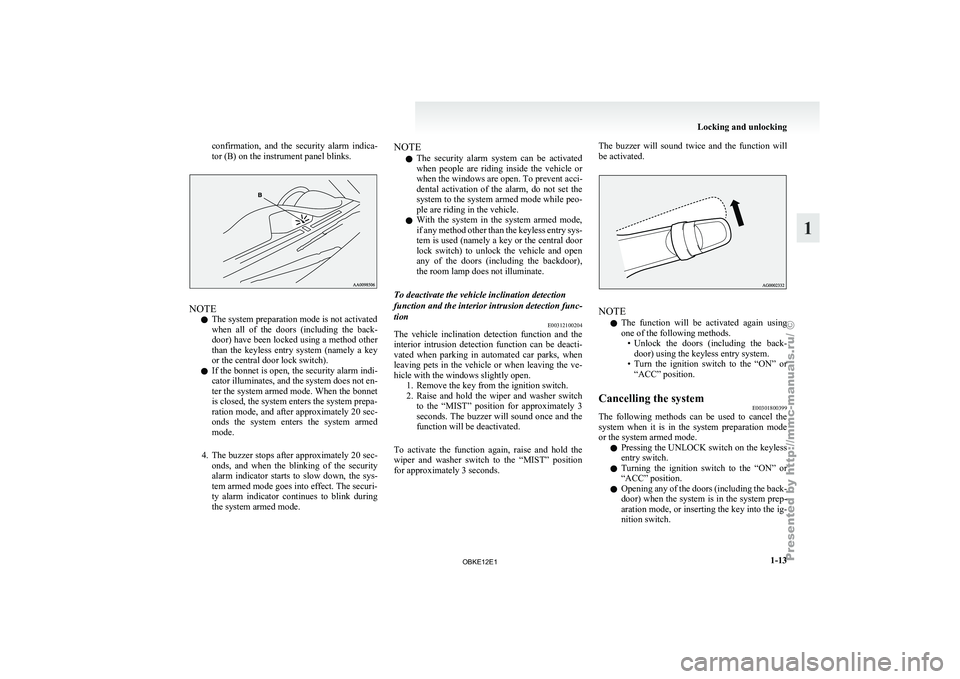
confirmation, and the security alarm indica-
tor (B) on the instrument panel blinks.
NOTE
l The system preparation mode is not activated
when
all of
the doors (including the back-
door) have been locked using a method other
than the keyless entry system (namely a key
or the central door lock switch).
l If the bonnet is open, the security alarm indi-
cator illuminates, and the system does not en-
ter the system armed mode. When the bonnet
is closed, the system enters the system prepa-
ration mode, and after approximately 20 sec-
onds the system enters the system armed
mode.
4. The buzzer stops after approximately 20 sec- onds, and when the blinking of the security
alarm indicator starts to slow down, the sys-
tem armed mode goes into effect. The securi-
ty alarm indicator continues to blink during
the system armed mode. NOTE
l The security
alarm
system can be activated
when people are riding inside the vehicle or
when the windows are open. To prevent acci-
dental activation of the alarm, do not set the
system to the system armed mode while peo-
ple are riding in the vehicle.
l With the system in the system armed mode,
if any method other than the keyless entry sys-
tem is used (namely a key or the central door
lock switch) to unlock the vehicle and open
any of the doors (including the backdoor),
the room lamp does not illuminate.
To deactivate the vehicle inclination detection
function and the interior intrusion detection func-
tion E00312100204
The vehicle inclination detection function and the
interior intrusion
detection
function can be deacti-
vated when parking in automated car parks, when
leaving pets in the vehicle or when leaving the ve-
hicle with the windows slightly open. 1. Remove the key from the ignition switch.
2. Raise and hold the wiper and washer switchto the “MIST” position for approximately 3
seconds. The buzzer will sound once and the
function will be deactivated.
To activate the function again, raise and hold the
wiper and washer switch to the “MIST” position
for approximately 3 seconds. The buzzer will sound twice and the function will
be activated.
NOTE
l The
function will
be activated again using
one of the following methods. • Unlock the doors (including the back-door) using the keyless entry system.
• Turn the ignition switch to the “ON” or “ACC” position.
Cancelling the system E00301800399
The following methods can be used to cancel the
system when it
is in the system preparation mode
or the system armed mode.
l Pressing the UNLOCK switch on the keyless
entry switch.
l Turning the ignition switch to the “ON” or
“ACC” position.
l Opening any of the doors (including the back-
door) when the system is in the system prep-
aration mode, or inserting the key into the ig-
nition switch. Locking and unlocking
1-13 1
OBKE12E1
Page 82 of 377
Instruments...................................................................................
3-02
Indication and warning lamps....................................................... 3-07
Indication lamps ........................................................................... 3-08
Warning lamps .............................................................................. 3-09
Centre information display* ......................................................... 3-11
Combination headlamps and dipper switch ..................................3-31
Headlamp levelling ....................................................................... 3-33
Turn-signal lever........................................................................... 3-35
Hazard warning flasher switch ..................................................... 3-35
Fog lamp switch............................................................................
3-36
Wiper and washer switch .............................................................. 3-37
Wiper de-icer switch* ................................................................... 3-42
Rear window demister switch....................................................... 3-42
Horn switch................................................................................... 3-43Instruments and controls
3
OBKE12E1
Page 118 of 377
Wiper and washer switch
E00507101191CAUTION
l
If the
washer is used in cold weather, the
washer fluid sprayed against the glass
may freeze, which may hinder visibility.
Warm the glass with the defroster or rear
window demister before using the washer.
Windscreen wipers E00516900273
Except for vehicles with rain sensor
The windscreen wipers can be operated with the ig-
nition switch in the “ON” or “ACC” position. If the blades are frozen to the windscreen or rear
window, do
not
operate the wipers until the ice has
melted and the blades are freed, otherwise the wip-
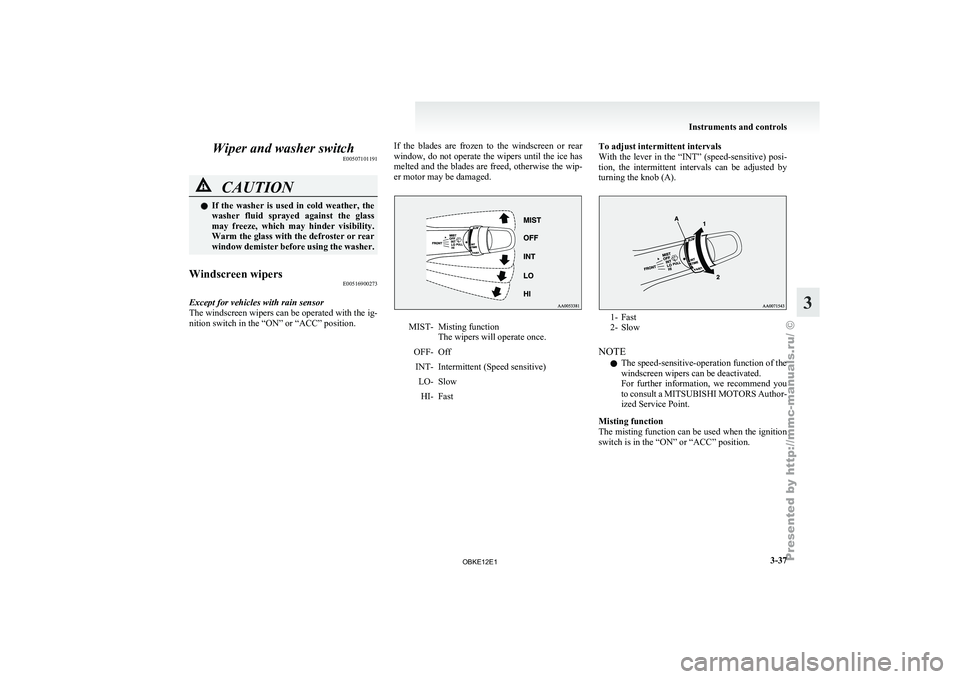
er motor may be damaged. MIST- Misting function
The wipers will operate once.
OFF- Off INT- Intermittent (Speed sensitive) LO- SlowHI- Fast To adjust intermittent intervals
With the lever
in the “INT” (speed-sensitive) posi-
tion, the intermittent intervals can be adjusted by
turning the knob (A). 1- Fast
2- Slow
NOTE l The speed-sensitive-operation function of the
windscreen wipers can be deactivated.
For
further
information, we recommend you
to consult a MITSUBISHI MOTORS Author-
ized Service Point.
Misting function
The misting function can be used when the ignition
switch is in the “ON” or “ACC” position. Instruments and controls
3-37 3
OBKE12E1