bonnet MITSUBISHI PAJERO IV 2011 Owners Manual
[x] Cancel search | Manufacturer: MITSUBISHI, Model Year: 2011, Model line: PAJERO IV, Model: MITSUBISHI PAJERO IV 2011Pages: 377, PDF Size: 29.43 MB
Page 3 of 377
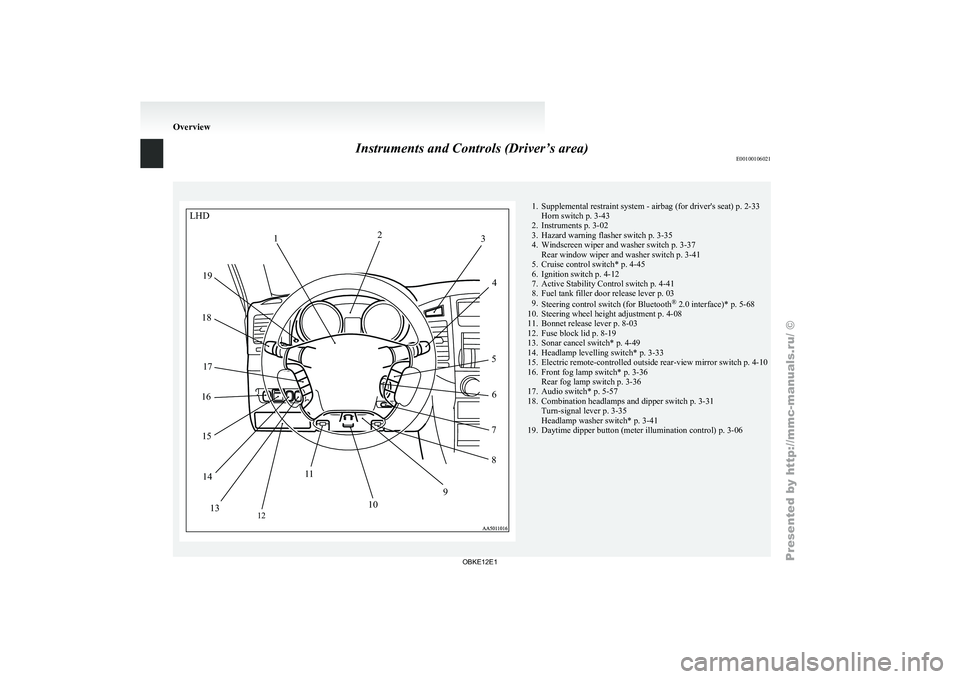
Instruments and Controls (Driver’s area)
E00100106021 1. Supplemental restraint system - airbag (for driver's seat) p. 2-33
Horn switch p. 3-43
2. Instruments p. 3-02
3. Hazard warning flasher switch p. 3-35
4.
Windscreen wiper and washer switch p. 3-37Rear window wiper and washer switch p. 3-41
5. Cruise control switch* p. 4-45
6. Ignition switch p. 4-12
7. Active Stability Control switch p. 4-41
8. Fuel tank filler door release lever p. 03
9. Steering control switch (for Bluetooth ®
2.0 interface)* p. 5-68
10. Steering wheel height adjustment p. 4-08
11. Bonnet release lever p. 8-03
12. Fuse block lid p. 8-19
13. Sonar cancel switch* p. 4-49
14. Headlamp levelling switch* p. 3-33
15. Electric remote-controlled outside rear-view mirror switch p. 4-10
16. Front fog lamp switch* p. 3-36 Rear fog lamp switch p. 3-36
17. Audio switch* p. 5-57
18. Combination headlamps and dipper switch p. 3-31 Turn-signal lever p. 3-35
Headlamp washer switch* p. 3-41
19. Daytime dipper button (meter illumination control) p. 3-06 OverviewLHD
2
1 3
4
5 6
7
8
9
10
1
1
12
13
14
15
16
17
18
19
OBKE12E1
Page 4 of 377
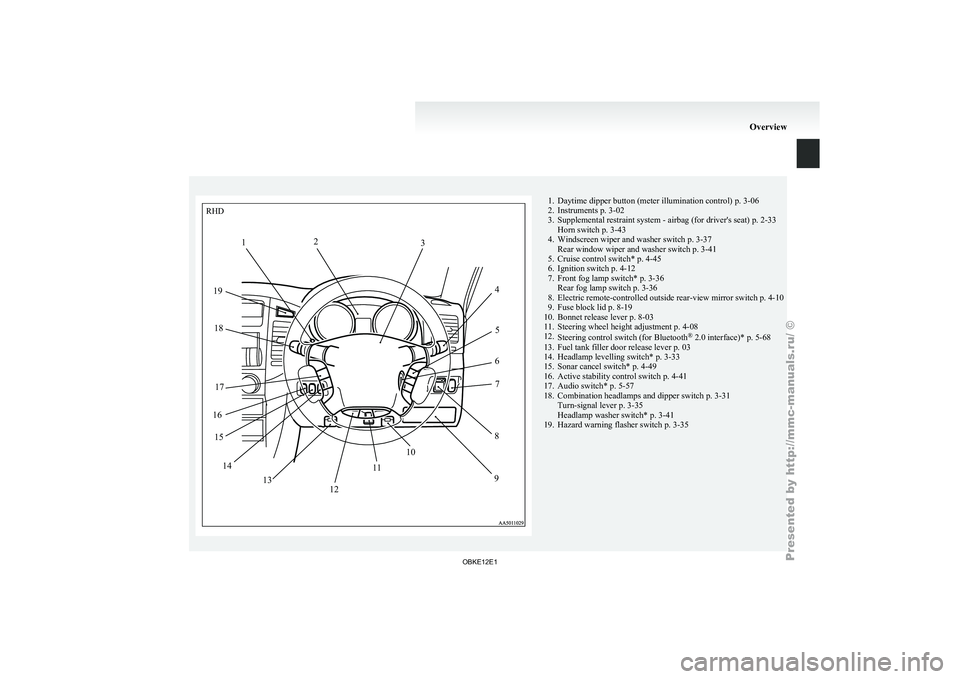
1. Daytime dipper button (meter illumination control) p. 3-06
2. Instruments p. 3-02
3. Supplemental restraint system - airbag (for driver's seat)
p. 2-33
Horn switch p. 3-43
4. Windscreen wiper and washer switch p. 3-37 Rear window wiper and washer switch p. 3-41
5. Cruise control switch* p. 4-45
6. Ignition switch p. 4-12
7. Front fog lamp switch* p. 3-36 Rear fog lamp switch p. 3-36
8. Electric remote-controlled outside rear-view mirror switch p. 4-10
9. Fuse block lid p. 8-19
10. Bonnet release lever p. 8-03
11. Steering wheel height adjustment p. 4-08
12. Steering control switch (for Bluetooth ®
2.0 interface)* p. 5-68
13. Fuel tank filler door release lever p. 03
14. Headlamp levelling switch* p. 3-33
15. Sonar cancel switch* p. 4-49
16. Active stability control switch p. 4-41
17. Audio switch* p. 5-57
18. Combination headlamps and dipper switch p. 3-31 Turn-signal lever p. 3-35
Headlamp washer switch* p. 3-41
19. Hazard warning flasher switch p. 3-35 OverviewRHD
1 2
3
45
6 7
8
9
12 10
1
1
13
14
15
16 17
18
19
OBKE12E1
Page 10 of 377
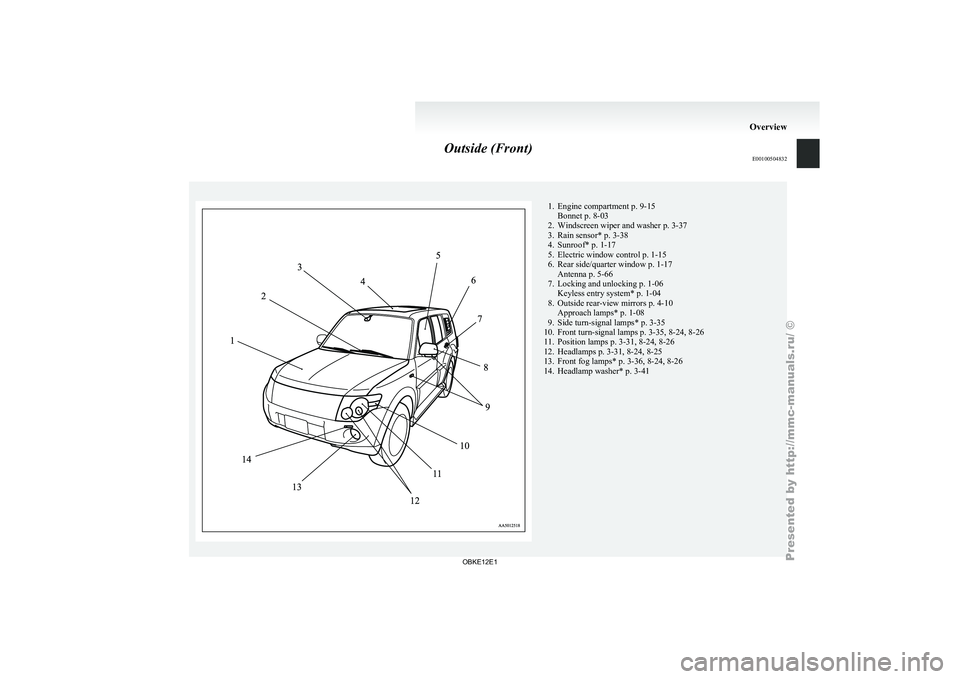
Outside (Front)
E00100504832 1. Engine compartment p. 9-15
Bonnet p. 8-03
2. Windscreen wiper and washer p. 3-37
3. Rain sensor* p. 3-38
4.
Sunroof* p. 1-17
5. Electric window control p. 1-15
6. Rear side/quarter window p. 1-17 Antenna p. 5-66
7. Locking and unlocking p. 1-06 Keyless entry system* p. 1-04
8. Outside rear-view mirrors p. 4-10 Approach lamps* p. 1-08
9. Side turn-signal lamps* p. 3-35
10. Front turn-signal lamps p. 3-35, 8-24, 8-26
11. Position lamps p. 3-31, 8-24, 8-26
12. Headlamps p. 3-31, 8-24, 8-25
13. Front fog lamps* p. 3-36, 8-24, 8-26
14. Headlamp washer* p. 3-41 Overview
OBKE12E1
Page 27 of 377
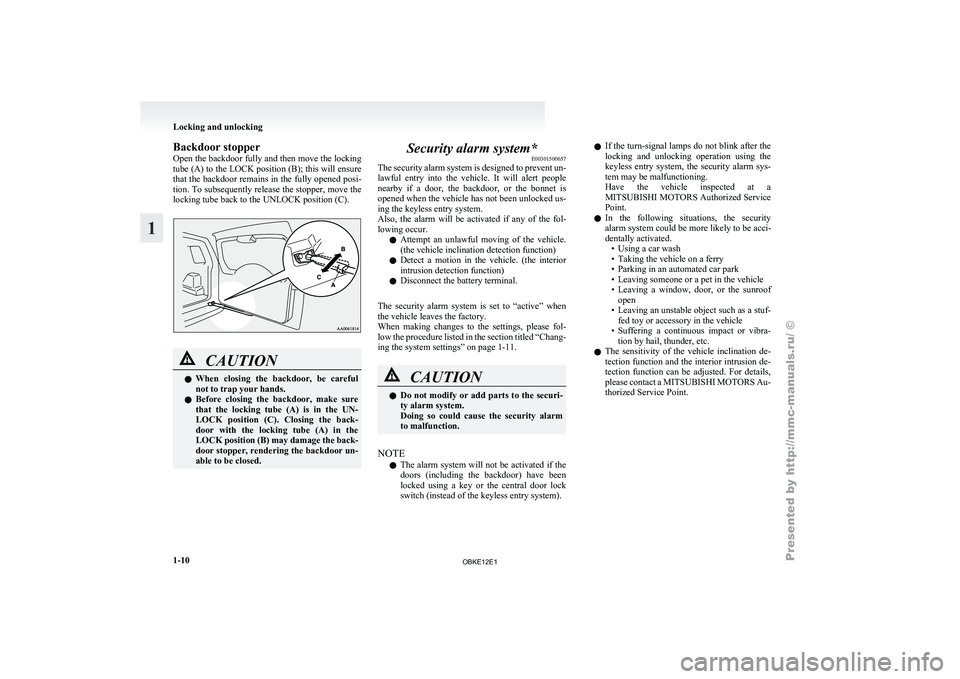
Backdoor stopper
Open the
backdoor
fully and then move the locking
tube (A) to the LOCK position (B); this will ensure
that the backdoor remains in the fully opened posi-
tion. To subsequently release the stopper, move the
locking tube back to the UNLOCK position (C). CAUTION
l
When closing the
backdoor, be careful
not to trap your hands.
l Before closing the backdoor, make sure
that the locking tube (A) is in the UN-
LOCK position (C). Closing the back-
door with the locking tube (A) in the
LOCK position (B) may damage the back-
door stopper, rendering the backdoor un-
able to be closed. Security alarm system*
E00301500657
The security alarm
system is designed to prevent un-
lawful entry into the vehicle. It will alert people
nearby if a door, the backdoor, or the bonnet is
opened when the vehicle has not been unlocked us-
ing the keyless entry system.
Also, the alarm will be activated if any of the fol-
lowing occur.
l Attempt an unlawful moving of the vehicle.
(the vehicle inclination detection function)
l Detect a motion in the vehicle. (the interior
intrusion detection function)
l Disconnect the battery terminal.
The security alarm system is set to “active” when
the vehicle leaves the factory.
When making changes to the settings, please fol-
low the procedure listed in the section titled “Chang-
ing the system settings” on page 1-11. CAUTION
l
Do not
modify
or add parts to the securi-
ty alarm system.
Doing so could cause the security alarm
to malfunction.
NOTE l The
alarm system
will not be activated if the
doors (including the backdoor) have been
locked using a key or the central door lock
switch (instead of the keyless entry system). l
If the
turn-signal
lamps do not blink after the
locking and unlocking operation using the
keyless entry system, the security alarm sys-
tem may be malfunctioning.
Have the vehicle inspected at a
MITSUBISHI MOTORS Authorized Service
Point.
l In the following situations, the security
alarm system could be more likely to be acci-
dentally activated.
• Using a car wash
• Taking the vehicle on a ferry
• Parking in an automated car park
• Leaving someone or a pet in the vehicle
• Leaving a window, door, or the sunroofopen
• Leaving an unstable object such as a stuf- fed toy or accessory in the vehicle
• Suffering a continuous impact or vibra- tion by hail, thunder, etc.
l The sensitivity of the vehicle inclination de-
tection function and the interior intrusion de-
tection function can be adjusted. For details,
please contact a MITSUBISHI MOTORS Au-
thorized Service Point. Locking and unlocking
1-10
1
OBKE12E1
Page 28 of 377
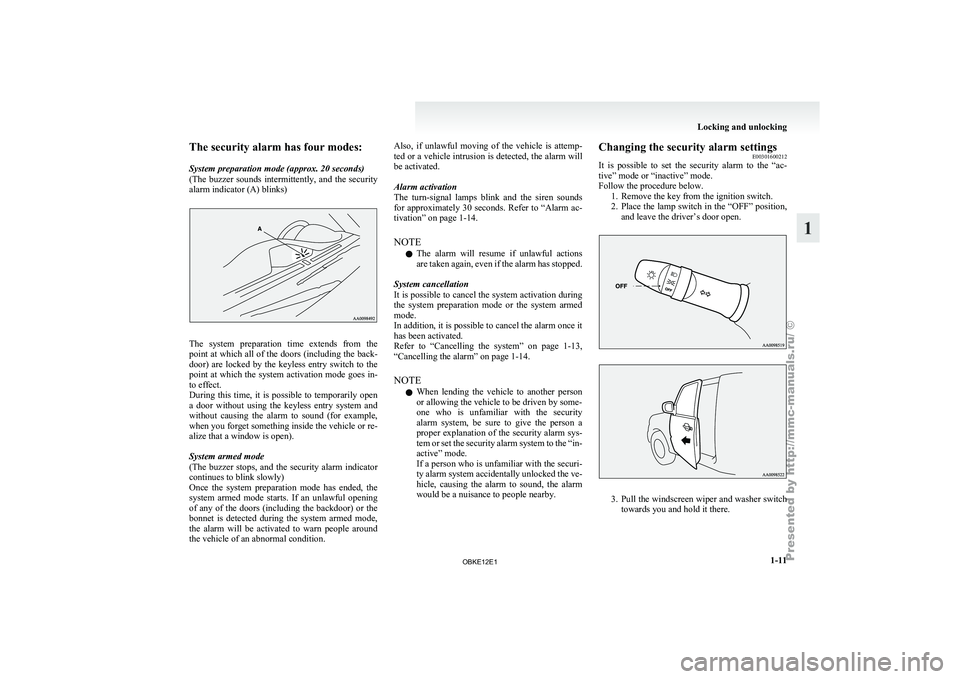
The security alarm has four modes:
System preparation mode (approx. 20 seconds)
(The buzzer
sounds
intermittently, and the security
alarm indicator (A) blinks) The system preparation time extends from the
point at
which
all of the doors (including the back-
door) are locked by the keyless entry switch to the
point at which the system activation mode goes in-
to effect.
During this time, it is possible to temporarily open
a door without using the keyless entry system and
without causing the alarm to sound (for example,
when you forget something inside the vehicle or re-
alize that a window is open).
System armed mode
(The buzzer stops, and the security alarm indicator
continues to blink slowly)
Once the system preparation mode has ended, the
system armed mode starts. If an unlawful opening
of any of the doors (including the backdoor) or the
bonnet is detected during the system armed mode,
the alarm will be activated to warn people around
the vehicle of an abnormal condition. Also, if unlawful moving of the vehicle is attemp-
ted or
a
vehicle intrusion is detected, the alarm will
be activated.
Alarm activation
The turn-signal lamps blink and the siren sounds
for approximately 30 seconds. Refer to “Alarm ac-
tivation” on page 1-14.
NOTE
l The alarm will resume if unlawful actions
are taken again, even if the alarm has stopped.
System cancellation
It is possible to cancel the system activation during
the system preparation mode or the system armed
mode.
In addition, it is possible to cancel the alarm once it
has been activated.
Refer to “Cancelling the system” on page 1-13,
“Cancelling the alarm” on page 1-14.
NOTE l When lending the vehicle to another person
or allowing the vehicle to be driven by some-
one who is unfamiliar with the security
alarm system, be sure to give the person a
proper explanation of the security alarm sys-
tem or set the security alarm system to the “in-
active” mode.
If a person who is unfamiliar with the securi-
ty alarm system accidentally unlocked the ve-
hicle, causing the alarm to sound, the alarm
would be a nuisance to people nearby. Changing the security alarm settings
E00301600212
It is possible
to set the security alarm to the “ac-
tive” mode or “inactive” mode.
Follow the procedure below. 1. Remove the key from the ignition switch.
2. Place the lamp switch in the “OFF” position,and leave the driver’s door open. 3. Pull
the windscreen wiper and washer switch
towards you and hold it there. Locking and unlocking
1-11 1
OBKE12E1
Page 29 of 377
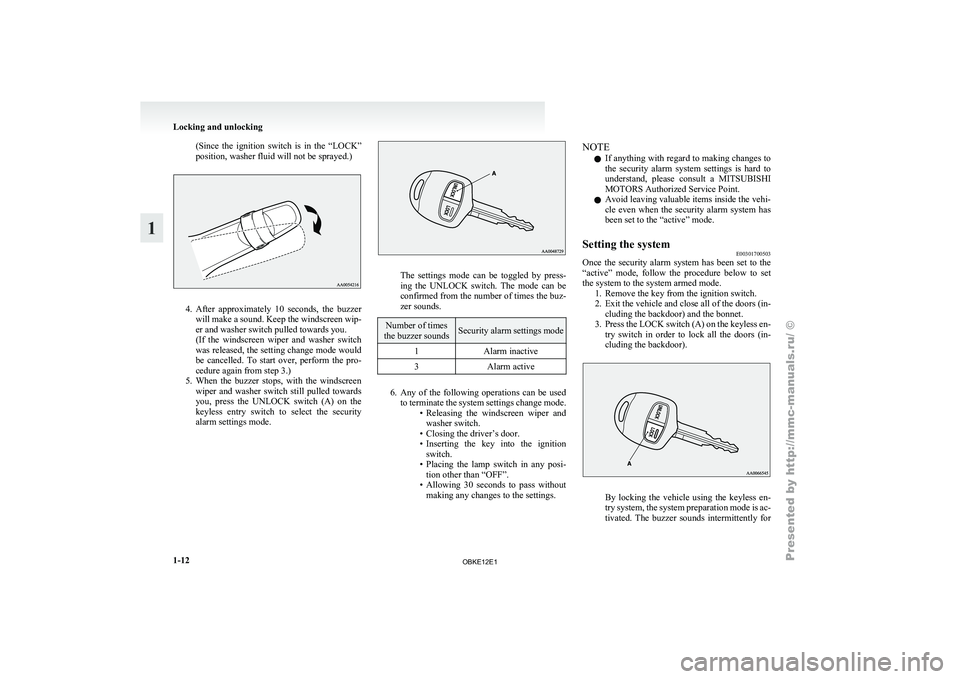
(Since the ignition switch is in the “LOCK”
position, washer fluid will not be sprayed.)
4. After approximately 10 seconds, the buzzer
will make
a sound. Keep the windscreen wip-
er and washer switch pulled towards you.
(If the windscreen wiper and washer switch
was released, the setting change mode would
be cancelled. To start over, perform the pro-
cedure again from step 3.)
5. When the buzzer stops, with the windscreen wiper and washer switch still pulled towards
you, press the UNLOCK switch (A) on the
keyless entry switch to select the security
alarm settings mode. The settings mode can be toggled by press-
ing the
UNLOCK
switch. The mode can be
confirmed from the number of times the buz-
zer sounds. Number of times
the buzzer sounds Security alarm settings mode
1 Alarm inactive
3 Alarm active 6. Any of the following operations can be used
to terminate
the system settings change mode.
• Releasing the windscreen wiper and washer switch.
• Closing the driver’s door.
• Inserting the key into the ignition switch.
• Placing the lamp switch in any posi- tion other than “OFF”.
• Allowing 30 seconds to pass without making any changes to the settings. NOTE
l If
anything with
regard to making changes to
the security alarm system settings is hard to
understand, please consult a MITSUBISHI
MOTORS Authorized Service Point.
l Avoid leaving valuable items inside the vehi-
cle even when the security alarm system has
been set to the “active” mode.
Setting the system E00301700503
Once the security alarm system has been set to the
“active” mode, follow
the procedure below to set
the system to the system armed mode. 1. Remove the key from the ignition switch.
2. Exit the vehicle and close all of the doors (in-cluding the backdoor) and the bonnet.
3. Press the LOCK switch (A) on the keyless en- try switch in order to lock all the doors (in-
cluding the backdoor). By locking the vehicle using the keyless en-
try system,
the
system preparation mode is ac-
tivated. The buzzer sounds intermittently for Locking and unlocking
1-12
1
OBKE12E1
Page 30 of 377
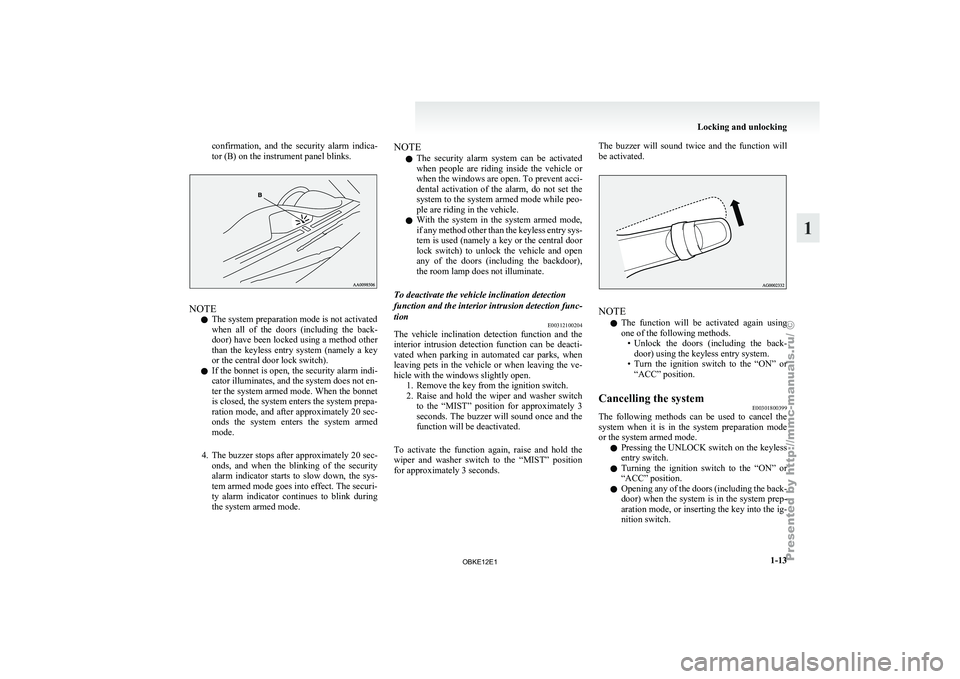
confirmation, and the security alarm indica-
tor (B) on the instrument panel blinks.
NOTE
l The system preparation mode is not activated
when
all of
the doors (including the back-
door) have been locked using a method other
than the keyless entry system (namely a key
or the central door lock switch).
l If the bonnet is open, the security alarm indi-
cator illuminates, and the system does not en-
ter the system armed mode. When the bonnet
is closed, the system enters the system prepa-
ration mode, and after approximately 20 sec-
onds the system enters the system armed
mode.
4. The buzzer stops after approximately 20 sec- onds, and when the blinking of the security
alarm indicator starts to slow down, the sys-
tem armed mode goes into effect. The securi-
ty alarm indicator continues to blink during
the system armed mode. NOTE
l The security
alarm
system can be activated
when people are riding inside the vehicle or
when the windows are open. To prevent acci-
dental activation of the alarm, do not set the
system to the system armed mode while peo-
ple are riding in the vehicle.
l With the system in the system armed mode,
if any method other than the keyless entry sys-
tem is used (namely a key or the central door
lock switch) to unlock the vehicle and open
any of the doors (including the backdoor),
the room lamp does not illuminate.
To deactivate the vehicle inclination detection
function and the interior intrusion detection func-
tion E00312100204
The vehicle inclination detection function and the
interior intrusion
detection
function can be deacti-
vated when parking in automated car parks, when
leaving pets in the vehicle or when leaving the ve-
hicle with the windows slightly open. 1. Remove the key from the ignition switch.
2. Raise and hold the wiper and washer switchto the “MIST” position for approximately 3
seconds. The buzzer will sound once and the
function will be deactivated.
To activate the function again, raise and hold the
wiper and washer switch to the “MIST” position
for approximately 3 seconds. The buzzer will sound twice and the function will
be activated.
NOTE
l The
function will
be activated again using
one of the following methods. • Unlock the doors (including the back-door) using the keyless entry system.
• Turn the ignition switch to the “ON” or “ACC” position.
Cancelling the system E00301800399
The following methods can be used to cancel the
system when it
is in the system preparation mode
or the system armed mode.
l Pressing the UNLOCK switch on the keyless
entry switch.
l Turning the ignition switch to the “ON” or
“ACC” position.
l Opening any of the doors (including the back-
door) when the system is in the system prep-
aration mode, or inserting the key into the ig-
nition switch. Locking and unlocking
1-13 1
OBKE12E1
Page 31 of 377
NOTE
l If
the bonnet
is opened during the system prep-
aration mode, the system preparation mode
is suspended. The system returns to the sys-
tem preparation mode when the bonnet is
closed.
l If the battery terminals are disconnected
while the system is in the system preparation
mode, the memory will be erased.
l It is possible to register up to 4 remote con-
trol switches. As long as they are registered,
any of the 4 remote control switches, other
than the one used to activate the system, can
be used to cancel the system.
If you want to register additional remote con-
trol switches, please contact a MITSUBISHI
MOTORS Authorized Service Point.
l The activation distance for the keyless entry
system is approximately 4 m.
If it is not possible to lock or unlock the vehi-
cle by pressing the switch at the correct dis-
tance or the security alarm system cannot be
set or cancelled using the switch, the battery
may need to be replaced.
For further information, please consult a
MITSUBISHI MOTORS Authorized Service
Point.
If you replace the battery yourself, refer to
“Procedure for replacing the remote control
switch battery” on page 1-05. l
If
the
UNLOCK switch is pressed and no
door is (including the backdoor) opened with-
in 30 seconds, the doors will automatically re-
lock. In this case as well, the system prepara-
tion mode will go into effect.
The time between pressing the UNLOCK
switch and automatic locking can be adjus-
ted. Consult a MITSUBISHI MOTORS Au-
thorized Service Point.
Alarm activation E00301900840
When the system is in the system armed mode, the
alarm will be
activated as follows if the vehicle is
unlocked and any of the doors (including the back-
door) or bonnet is opened using a method other
than pressing the UNLOCK switch on the keyless
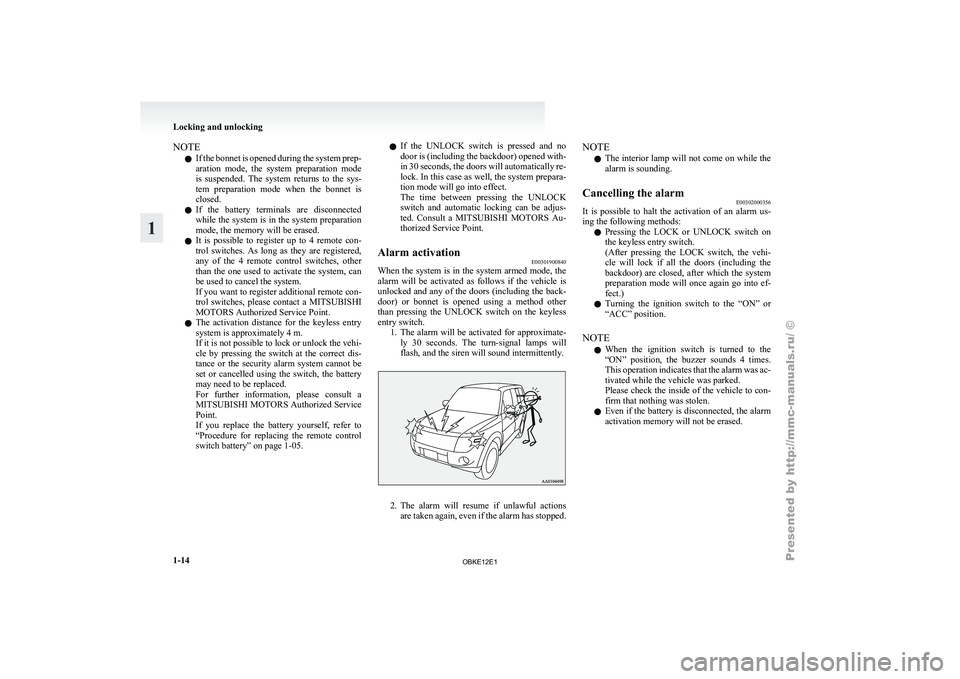
entry switch. 1. The alarm will be activated for approximate-ly 30 seconds. The turn-signal lamps will
flash, and the siren will sound intermittently. 2. The alarm will resume if unlawful actions
are taken
again, even if the alarm has stopped. NOTE
l The
interior lamp
will not come on while the
alarm is sounding.
Cancelling the alarm E00302000356
It is possible to halt the activation of an alarm us-
ing the following methods:
l Pressing the
LOCK
or UNLOCK switch on
the keyless entry switch.
(After pressing the LOCK switch, the vehi-
cle will lock if all the doors (including the
backdoor) are closed, after which the system
preparation mode will once again go into ef-
fect.)
l Turning the ignition switch to the “ON” or
“ACC” position.
NOTE l When the ignition switch is turned to the
“ON” position, the buzzer sounds 4 times.
This operation indicates that the alarm was ac-
tivated while the vehicle was parked.
Please check the inside of the vehicle to con-
firm that nothing was stolen.
l Even if the battery is disconnected, the alarm
activation memory will not be erased. Locking and unlocking
1-14
1
OBKE12E1
Page 285 of 377
CAUTION
l
Take care not to get the jumper cable
caught in the cooling fan or other rotat-
ing part in the engine compartment.
l Use the proper cables suitable for the bat-
tery size to prevent overheating of the ca-
bles.
l Check the jumper cables for damage and
corrosion before use.
7. Start the engine in the vehicle which has the
booster battery,
let the engine idle a few mi-
nutes, then start the engine in the vehicle
with the discharged battery. CAUTION
l
Keep the engine
of the vehicle giving assis-
tance running.
8. After the engine is started, disconnect the ca-
bles in
the reverse order and keep the engine
running for several minutes. WARNING
l If the
battery
has to be charged while fit-
ted in the vehicle, disconnect the vehicle
side negative (-) terminal connected to the
battery.
l Keep sparks, cigarettes and flames away
from the battery because the battery may
produce an explosion.
l Use adequate ventilation when charging
or using the battery in an enclosed space. WARNING
l Remove all the
caps before charging the
battery.
l Electrolyte is corrosive diluted sulphuric
acid. If electrolyte (battery acid) comes in-
to contact with your hands, eyes, clothes
and the painted surface of your vehicle, it
should be thoroughly flushed with water.
If electrolyte gets in your eyes, flush them
with water immediately and thoroughly,
and get prompt medical attention.
NOTE l If
the vehicle
is put in motion without fully
charging the battery, it might cause the loss
of smooth engine operation and the anti-lock
brake warning lamp to illuminate. Refer to
“Anti-lock brake system (ABS)” on page
4-39. Engine overheating
E00800600991
If the water
temperature gauge indication remains
in the overheating zone for a long time, the engine
may be overheating. If this occurs, take the follow-
ing corrective measures: 1. Stop the vehicle in a safe place.
2. Check whether steam is coming from the en-gine compartment.
[If steam does not come from the engine com-
partment]
With the engine still running, raise the bon-
net to ventilate the engine compartment.
[If steam is coming from the engine compart-
ment]
Stop the engine, and when the steam stops,
raise the bonnet to ventilate the engine com-
partment. Restart the engine. WARNING
l Do not
open
the bonnet while steam is com-
ing from the engine compartment. It
could cause steam or hot water to spurt
out, causing burns. Hot water could spurt
out even when there is no steam coming
out, and some parts will be very hot. Be
very careful when opening the bonnet.
l Be careful of hot steam, which could be
blowing off the reserve tank cap.
l Do not attempt to remove the radiator
cap while the engine is hot. For emergencies
6-04
6
OBKE12E1
Page 304 of 377
NOTE
l If
genuine leather
is wet with water or is wash-
ed in water, wipe off water as quickly as pos-
sible with a dry, soft cloth. If left damp, mil-
dew may grow.
l The genuine leather surface may be damaged
if a nylon brush or synthetic fibre is rubbed
hard against it.
l Organic solvents such as benzine, kerosene,
alcohol and petrol, acid or alkaline solvents
may discolour the genuine leather surface.
Be sure to use neutral detergents.
l Remove dirty patches or oil substances quick-
ly as they can stain genuine leather.
l The genuine leather surface may harden and
shrink if it is exposed to direct sun for long
hours. When your vehicle is parked, place it
in the shade as much as possible.
l When the temperature of the vehicle interior
rises in summer, vinyl products left on the
genuine leather seat may deteriorate and
stick to the seat. Cleaning the exterior of your
vehicle E00900700195
If the
following
is left on your vehicle, it may
cause corrosion, discolouration and stains, wash
the vehicle as soon as possible.
l Seawater, road deicing products.
l Soot and dust, iron powder from factories,
chemical substance (acids, alkalis, coal-tar,
etc.).
l Droppings from birds, carcasses of insects,
tree sap, etc.
Washing E00900901875
Chemicals contained in the dirt and dust picked up
from the road
surface can damage the paint coat
and body of your vehicle if left in prolonged contact.
Frequent washing and waxing is the best way to pro-
tect your vehicle from this damage. This will also
be effective in protecting it from environmental el-
ements such as rain, snow, salt air, etc.
Do not wash the vehicle in direct sunlight. Park the
vehicle in the shade and spray it with water to re-
move dust. Next, using an ample amount of clean
water and a car washing brush or sponge, wash the
vehicle from top to bottom.
Use a mild car washing soap if necessary. Rinse
thoroughly and wipe dry with a soft cloth. After
washing the vehicle, carefully clean the joints and
flanges of the doors, bonnet, etc., where dirt is like-
ly to remain. CAUTION
l
When washing the
under side of your ve-
hicle or wheel, be careful not to injure
your hands.
l If your vehicle has rain sensor wipers,
place the wiper switch lever in the “OFF”
position to deactivate the rain sensor be-
fore washing the vehicle. Otherwise, the
wipers will operate in the presence of wa-
ter spray on the windscreen and may get
damaged as a result.
l Refrain from excessively using a car wash
as its brushes may scratch the paint sur-
face, causing it to lose its gloss.
Scratches will be especially visible on
darker coloured vehicles.
l Never spray or splash water on the electri-
cal components in the engine compart-
ment, as this may adversely affect engine
starting.
Exercise caution also when washing the
underbody; be careful not to spray water
into the engine compartment.
l Some types of hot water washing equip-
ment apply high pressure and heat to the
vehicle. They may cause heat distortion
and damage to the vehicle resin parts and
may result in flooding of the vehicle inte-
rior. Therefore;
• Maintain a distance of approx. 50 cmor more between the vehicle body and
the washing nozzle.
• When washing around the door glass, hold the nozzle at a distance of more
than 50 cm and at right angles to the
glass surface. Vehicle care
7-03 7
OBKE12E1