transfer case MITSUBISHI PAJERO IV 2011 Owners Manual
[x] Cancel search | Manufacturer: MITSUBISHI, Model Year: 2011, Model line: PAJERO IV, Model: MITSUBISHI PAJERO IV 2011Pages: 377, PDF Size: 29.43 MB
Page 160 of 377
Inspection and maintenance
following rough road operation E00606700048
After operating the
vehicle in rough road condi-
tions, be sure to perform the following inspection
and maintenance procedures:
l Check that the vehicle has not been damaged
by rocks, gravel, etc.
l Carefully wash the vehicle with water.
After washing, drive the vehicle slowly
while lightly depressing the brake pedal in or-
der to dry out the brakes. If the brakes still
do not function properly, we recommend you
to have the brakes checked as soon as possible
l Remove the insects, dried grass, etc. clog-
ging the radiator core.
l After crossing a stream, be sure to have the
following items inspected at a MITSUBISHI
MOTORS Authorized Service Point and take
the necessary measures.
• Check the brake system and, if necessary,have it serviced.
• Check the engine, transmission, transfer, and differential oil or grease level and tur-
bidity. If the oil or grease is milky, it indi-
cates water contamination. Replace it
with new oil or grease.
• Grease the propeller shaft.
• Check the inside of the vehicle. If ingress of water is found, dry the carpet etc.
• Inspect the headlamps. If the headlamp bulb is flooded with water, we recom-
mend you to have it drained. Cautions on handling of 4-wheel
drive vehicles E00606800401
Tyres and wheels
Since the driving
torque can be applied to the 4
wheels, the performance of the vehicle when oper-
ating in 4-wheel drive is greatly affected by the con-
dition of the tyres.
Pay close attention to the tyres.
l Install specified tyres on all wheels. Refer to
“Tyres and wheels” on page 9-12.
l Be sure to fit all 4 tyres and wheels of the
same size and type.
When replacement of any of the tyres or
wheels is necessary, replace all of them.
l All tyres should be rotated whenever the
wear difference between the front and rear
tyres is recognizable.
Good vehicle performance cannot be expected if
there is a difference in wear between tyres. Refer to
“Tyre rotation” on page 8-14. l Check the tyre inflation pressure regularly.
l If the tyre inflation pressure is inappropriate,
the transfer gear may make some noise and
shock while changing the drive mode. CAUTION
l
Always use tyres
of the same size, same
type, and same brand, and which have no
wear differences. Using tyres which differ
in size, type, brand or the degree of wear
will cause excessive loading, resulting in
possible damage to the drive system.
Towing
If towing is
necessary, we recommend you to have
it done by your MITSUBISHI MOTORS Author-
ized Service Point or a commercial tow truck service.
In the following cases, transport the vehicle using a
tow truck.
l The engine runs but the vehicle does not
move or abnormal noise is produced.
l Inspection of the vehicle’s underside reveals
that oil or some other fluid is leaking.
Only when you cannot receive a towing service
from a MITSUBISHI MOTORS Authorized Serv-
ice Point or commercial tow truck service, tow
your vehicle carefully in accordance with the in-
structions given in “Towing” on page 6-15. Starting and driving
4-35 4
OBKE12E1
Page 259 of 377

MUTE function
E00760300041
At any time
during a call, you can mute the vehicle
microphone.
Pressing the SPEECH button and then saying
“Mute” during a call will turn ON the MUTE func-
tion and mute the microphone.
Saying “Mute off” in the same way will turn off
the MUTE function and cancel the mute on the mi-
crophone.
Switching between hands-free mode and private
mode E00761400036
The Bluetooth ®
2.0 interface
can switch between
Hands-free mode (Hands-free calls) and private
mode (calls using cellular phone).
If you press the SPEECH button and say “Transfer
call” during a Hands-free call, you can stop the
Hands-free mode and talk in private mode.
To return to Hands-free mode, press the SPEECH
button again and say “Transfer call”.
Phone book function E00763700017
The Bluetooth ®
2.0 interface
has 2 types of unique
phone books that are different from the phone book
stored in the cellular phone. They are the vehicle
phone book and the mobile phone book.
These phone books are used to register telephone
numbers and to make calls to desired numbers via
the voice recognition function.
NOTE
l Disconnecting the battery cable will not de-
lete information registered in the phone book. Vehicle phone book
E00763800135
This phone book
is used when making calls with
the voice recognition function.
Up to 32 names can be registered in the vehicle
phone book per language.
Also, each entry has 4 locations associated with:
home, work, mobile and other. You can register
one telephone number for each location.
You can register a desired name as a name for any
phone book entry registered in the vehicle phone
book.
Names and telephone numbers can be changed lat-
er on.
The vehicle phone book can be used with all paired
cellular phones.
To register a telephone number in the vehicle
phone book
You can register a telephone number in the vehicle
phone book in the following 2 ways: Reading out a
telephone number, and selecting and transferring 1
phone book entry from the phone book of the cellu-
lar phone.
To register by reading out a telephone number
1. Press the SPEECH button.
2. Say “Phone book.”
3. The voice guide will say “Select one of thefollowing: new entry, edit number, edit
name, list names, delete, erase all, or import
contact.” Say “New entry.”
4. The voice guide will say “Name please.” Say your preferred name to register it. NOTE
l If
the maximum
number of entries are al-
ready registered, the voice guide will say
“The phone book is full. Would you like to
delete a name?” Say “Yes” if you want to de-
lete a registered name.
Say “No,” to return to the main menu.
5. When the name has been registered, the voice guide will say “home, work, mobile, or
other?” Say the location for which you want
to register a telephone number.
NOTE l When the confirmation function is on, the
voice guide will say “
rect?” Answer “Yes.”
Answer “No” to return to location selection
in Step 5.
If a telephone number has been registered for
the selected location, the voice guide will say
“The current number is
number please.”
If you do not want to change the telephone
number, say “cancel” or the original number
to keep it registered.
6. The voice guide will say “Number please.” Say the telephone number to register it.
NOTE l In the case of English, the system will recog-
nise both “zero” and “oh” (Letter “o”) for the
number “0.”
7. The voice guide will repeat the telephone number you have just read, and then register
the number. For pleasant driving
5-76
5
OBKE12E1
Page 260 of 377
When the telephone number has been regis-
tered, the voice
guide will say “Number
saved. Would you like to add another num-
ber for this entry?”
To add another telephone number for a new
location for the current entry, answer “Yes.”
The system will return to location selection
in Step 5.
Answer “No” to end the registration process
and return to the main menu.
NOTE l When the confirmation function is on, after
repeating the telephone number you have
read, the voice guide will ask “Is this cor-
rect?” Answer “Yes.”
Answer “No” to return to telephone number
registration in step 6.
To select and transfer one phone book entry
from the phone book of the cellular phone
You can select 1 phone book entry from the phone
book of the cellular phone and register it in the ve-
hicle phone book.
NOTE l Transfer is not permitted unless the vehicle
is parked.
Before transferring, make sure that the vehi-
cle is parked in a safe location.
l All or part of data may not be transferred,
even when the cellular phone supports Blue-
tooth ®
, depending on the compatibility of the
device. l
The
maximum supported telephone number
length is 19 digits. Any telephone number of
20 digits or more will be truncated to the
first 19 digits.
l If telephone numbers contain characters oth-
er than 0 to 9, *, # or +, these characters are
deleted before the transfer.
l For the connection settings on the cellular
phone side, refer to the instructions for the
cellular phone.
1. Press the SPEECH button.
2. Say “Phone book.”
3. The voice guide will say “Select one of the following: new entry, edit number, edit
name, list names, delete, erase all, or import
contact.” Say “Import contact.”
4. The voice guide will say “Would you like to import a single entry or all contacts?” Say
“Single entry.”
The Bluetooth ®
2.0 interface will become
ready to receive transferred phone book data.
NOTE l If the maximum number of entries are al-
ready registered, the voice guide will say
“The phone book is full. Would you like to
delete a name?” Say “Yes” if you want to de-
lete a registered name.
Say “No,” to return to the main menu.
5. After the voice guide says “Ready to receive a contact from the phone. Only a home, a
work, and a mobile number can be impor-
ted,” the Bluetooth ®
2.0 interface will re-
ceive the phone book data from the Blue-
tooth ®
compatible cellular phone. 6.
Operate the
Bluetooth ®
compatible cellular
phone to set it up so that the phone book en-
try you want to register in the vehicle phone
book can be transferred to the Bluetooth ®
2.0
interface.
NOTE l If the Bluetooth ®
2.0 interface cannot recog-
nise the Bluetooth ®
compatible cellular
phone or the connection takes too much
time, the voice guide will say “Import con-
tact has timed out” and then the system will
cancel the registration. In such case, start
over again from Step 1.
l Pressing the HANG-UP button or pressing
and holding the SPEECH button will cancel
the registration.
7. When the reception is complete, the voice guide will say “
source> numbers have been imported. What
name would you like to use for these num-
bers?”
Say the name you want to register for this
phone book entry.
NOTE l If the entered name is already used for other
phone book entry or similar to a name used
for other phone book entry, that name cannot
be registered. For pleasant driving
5-77 5
OBKE12E1
Page 299 of 377
CAUTION
l
When the vehicle with A/T is to be towed
by another vehicle with all the wheels on
the ground, make sure that the towing
speed and distance given below are never
exceeded, avoiding damage to the trans-
mission.
Petrol-powered vehicles
Towing speed: 50 km/h (31 mph)
Towing distance: 50 km (31 miles)
Diesel-powered vehicles
Towing speed: 30 km/h (19 mph)
Towing distance: 80 km (50 miles)
For the towing speed and the towing dis-
tance, follow the local driving laws and
regulations.
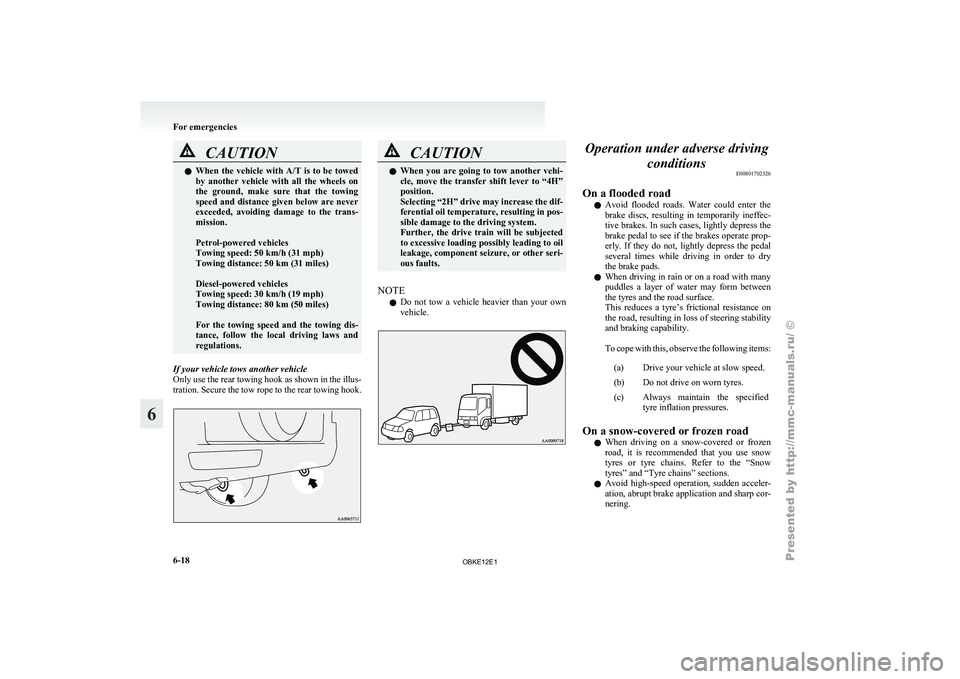
If your vehicle tows another vehicle
Only use the
rear towing hook as shown in the illus-
tration. Secure the tow rope to the rear towing hook. CAUTION
l
When you are
going to tow another vehi-
cle, move the transfer shift lever to “4H”
position.
Selecting “2H” drive may increase the dif-
ferential oil temperature, resulting in pos-
sible damage to the driving system.
Further, the drive train will be subjected
to excessive loading possibly leading to oil
leakage, component seizure, or other seri-
ous faults.
NOTE l Do
not tow
a vehicle heavier than your own
vehicle. Operation under adverse driving
conditions E00801702326
On a flooded road l Avoid flooded
roads.
Water could enter the
brake discs, resulting in temporarily ineffec-
tive brakes. In such cases, lightly depress the
brake pedal to see if the brakes operate prop-
erly. If they do not, lightly depress the pedal
several times while driving in order to dry
the brake pads.
l When driving in rain or on a road with many
puddles a layer of water may form between
the tyres and the road surface.
This reduces a tyre’s frictional resistance on
the road, resulting in loss of steering stability
and braking capability.
To cope with this, observe the following items:
(a) Drive your vehicle at slow speed.
(b) Do not drive on worn tyres.
(c) Always maintain the specified tyre inflation pressures.
On a snow-covered or frozen road l When driving
on
a snow-covered or frozen
road, it is recommended that you use snow
tyres or tyre chains. Refer to the “Snow
tyres” and “Tyre chains” sections.
l Avoid high-speed operation, sudden acceler-
ation, abrupt brake application and sharp cor-
nering. For emergencies
6-18
6
OBKE12E1