CD player MITSUBISHI SHOGUN 2017 (in English) User Guide
[x] Cancel search | Manufacturer: MITSUBISHI, Model Year: 2017, Model line: SHOGUN, Model: MITSUBISHI SHOGUN 2017Pages: 394, PDF Size: 19 MB
Page 262 of 394
When the confirmation function is on,the system will ask you again whether
the music player that you want to con- nect to is correct. Answer “Yes” to con- tinue and connect to the music player.
Answer “No,” and the voice guide will say “Please say.”
Say the number of the music player that
you want to connect to.NOTEl You can connect to a music player at any
time by pressing the SPEECH button andsaying the number, even before all of thepaired numbers and device tags of corre-
sponding music players are read out by the
system.
5. The selected music player will be con-
nected to the Bluetooth ®
2.0 interface.
The voice guide will say “
selected” and then the system will return to the main menu.
Deleting a device
Use the following procedure to delete a
paired Bluetooth ®
device from the Blue-
tooth ®
2.0 interface.
1. Press the SPEECH button.
2. Say “Setup.”
3. Say “Pairing Options.”
4. The voice guide will say “Select one of
the following: pair, edit, delete, or list.”
Say “Delete.”
5. After the voice guide says “Please say,”
the numbers of the devices and device
tags of corresponding devices will be read out in order, starting with the de-
vice that has been most recently connec- ted. After it completes reading all pairs,
the voice guide will say “or all.”
Say the number of the device that you
want to delete from the system.
If you want to delete all paired phones
from the system, say “All.”
6. For confirmation purposes, the voice
guide will say “Deleting
Answer “Yes” to delete the phone(s). Answer “No,” the system will return to Step 4.
7. The voice guide will say “Deleted,” and
then the system will end the device dele-
tion process.NOTEl If the device deletion process fails for some
reason, the voice guide will say “Delete failed” and then the system will cancel delet- ing the device.To check a paired Bluetooth ®
device
E00760800017
You can check a paired Bluetooth ®
device by
following the steps below. 1. Press the SPEECH button.
2. Say “Setup.”
3. Say “Pairing Options.”
4. The voice guide will say “Select one of
the following: pair, edit, delete, or list.”
Say “List.”
5. The voice guide will read out device tags of corresponding devices in order, start-
ing with the Bluetooth ®
device that has
been most recently connected.
6. After the device tags of all paired Blue-
tooth ®
devices have been read, the sys-
tem will say “End of list, would you like
to start from the beginning?”
To hear the list again from the begin- ning, answer “Yes.” When you are done,
answer “No” to return to the main menu.Bluetooth ®
2.0 interface*
7-60OVWX17E1For pleasant driving7
Page 263 of 394
NOTElIf you press and release the SPEECH button
and say “Continue” or “Previous” while the list is being read, the system will advance or
rewind the list.
Say “Continue” to proceed to the device with the next highest number or “Previous”
to return to the phone with the previous
number.
l You can change the device tag by pressing
and releasing the SPEECH button and then
saying “Edit” while the list is being read.
l You can change the phone to be connected
by pressing and releasing the SPEECH but-
ton and then saying “Select phone” while the list is being read.
l You can change the music player to be con-
nected by pressing and releasing the SPEECH button and then saying “Select mu-
sic player” while the list is being read.Changing a device tag
E00760900018
You can change the device tag of a paired
cellular phone or music player.
Follow the steps below to change a device
tag. 1. Press the SPEECH button.
2. Say “Setup.”
3. Say “Pairing Options.”
4. The voice guide will say “Select one of
the following: pair, edit, delete, or list.”
Say “Edit.”
5. The voice guide will say “Please say,”
and read out the numbers of the Blue-
tooth ®
devices and device tags of corre-
sponding devices in order, starting with
the Bluetooth ®
that has been most re-
cently connected.
After all paired device tags have been read, the voice guide will say “Whichdevice, please?” Say the number of the
device tag you want to change.NOTEl You can press and release the SPEECH but-
ton while the list is being read, and immedi- ately say the number of the device tag you
want to change.
6. The voice guide will say “New name,
please.” Say the name you want to regis-
ter as a new device tag.
When the confirmation function is on, the voice guide will say “
Answer “No,” you can say the new de-
vice tag you want to register again.
7. The device tag is changed. When the change is complete, the voice
guide will say “New name saved” and
then the system will return to the main menu.
Operating a music player con-
nected via Bluetooth ®
E00761001345
For the operation of a music player connected
via Bluetooth ®
, refer to “Listen to Bluetooth
Audio” on page 7-36. On vehicles equipped
with MITSUBISHI Multi-Communication
System (MMCS), DISPLAY AUDIO or Smartphone Link Display Audio, refer to separate owner’s manual.
How to make or receive hands-
free calls
E00761100020
You can make or receive hands-free calls us-
ing a Bluetooth ®
compatible cellular phone
connected to the Bluetooth ®
2.0 interface.
You can also use the phone books in the
Bluetooth ®
2.0 interface to make calls with-
out dialling telephone numbers.
To make a call ® p. 7-62
SEND function ® p. 7-63
Receiving calls ® p. 7-63
MUTE function ® p. 7-63
Switching between hands-free mode and pri-
vate mode ® p. 7-64
Bluetooth ®
2.0 interface*
7-61OVWX17E1For pleasant driving7
Page 265 of 394
5.If only one telephone number is regis-
tered under the name you just said, the
voice guide proceeds to Step 6.
If two or more telephone numbers are registered that match the name you just
said, the voice guide will say “Would you like to call
location to call.NOTEl If the name you selected has matching data
in the vehicle phone book but no telephone
number is registered under the selected loca- tion, the voice guide will say “{home/work/
mobile/other} not found for
Would you like to add location or try again?”
Say “Try again,” and the system will return to Step 3.
Say “Add location” and you can register an
additional telephone number under the selec-
ted location.
l If the name you selected has matching data
in the mobile phone book but no telephone
number is registered under the selected loca- tion, the voice guide will say “{home/work/
mobile/other} not found for
Would you like to try again?”
Answer “Yes,” and the system will return to Step 3.
Answer “No,” and the call will be cancelled. Start over again from Step 1.6. The voice guide will say “Calling
tem will dial the telephone number.NOTEl When the confirmation function is on, the
system will ask if the name and location of the receiver are correct.
If the name is correct, answer “Yes.”
If you want to change the name or location
to call, answer “No.” The system will return to Step 3.
Redialing
You can redial the last number called, based
on the history of dialed calls in the paired cel-
lular phone.
Use the following procedure to redial. 1. Press the SPEECH button.
2. Say “Redial.”
SEND function
E00761300035
During a call, press the SPEECH button to
enter voice recognition mode, then say “
For example, if during a call you need to sim-
ulate the press of a phone button as a re-
sponse to an automated system, press the SPEECH button and speak “1 2 3 4 pound SEND” and the 1234# will be sent on your
cellular phone.Receiving calls
E00761600012
If an incoming phone call is received while the ignition switch is in the “ACC” or “ON”
position, the audio system will be automati- cally turned on and switched to the incomingcall, even when the audio system was origi-
nally off.
The voice guide announcement for the in- coming call will be output from the front pas- senger’s seat speaker.
If the CD player or radio was playing when
the incoming call was received, the audio
system will mute the sound from the CD player or radio and output only the incomingcall.
To receive the call, press the PICK-UP but-
ton on the steering wheel control switch.
When the call is over, the audio system will
return to its previous state.
MUTE function
E00760301077
At any time during a call, you can mute the vehicle microphone.
Bluetooth ®
2.0 interface*
7-63OVWX17E1For pleasant driving7
Page 274 of 394
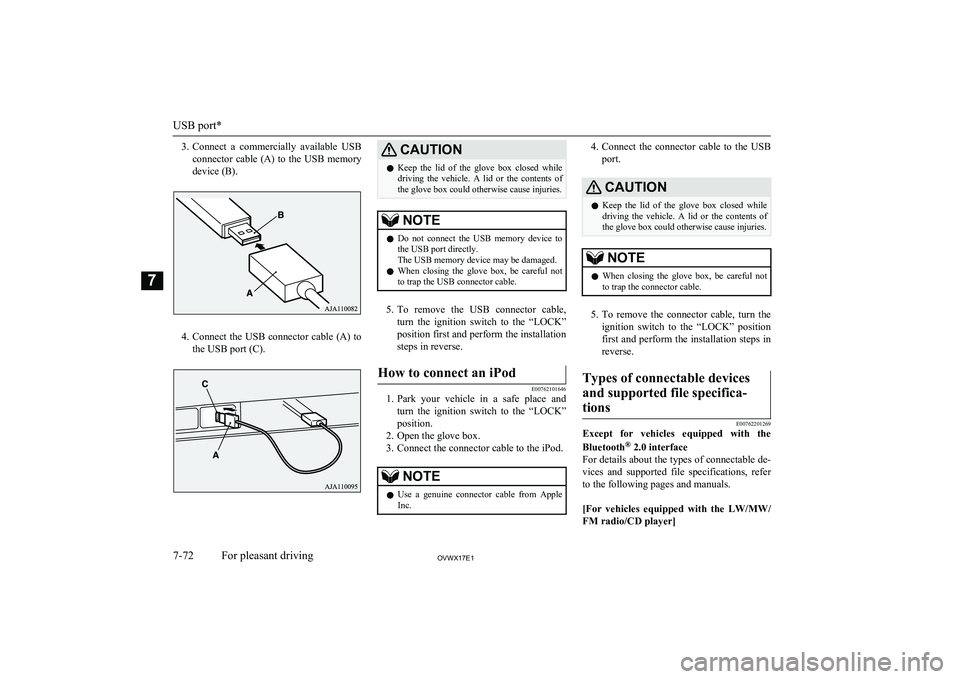
3.Connect a commercially available USB
connector cable (A) to the USB memory
device (B).
4. Connect the USB connector cable (A) to
the USB port (C).
CAUTIONl Keep the lid of the glove box closed while
driving the vehicle. A lid or the contents of the glove box could otherwise cause injuries.NOTEl Do not connect the USB memory device to
the USB port directly.
The USB memory device may be damaged.
l When closing the glove box, be careful not
to trap the USB connector cable.
5. To remove the USB connector cable,
turn the ignition switch to the “LOCK”
position first and perform the installation steps in reverse.
How to connect an iPod
E00762101646
1. Park your vehicle in a safe place and
turn the ignition switch to the “LOCK”
position.
2. Open the glove box.
3. Connect the connector cable to the iPod.
NOTEl Use a genuine connector cable from Apple
Inc.4. Connect the connector cable to the USB
port.CAUTIONl Keep the lid of the glove box closed while
driving the vehicle. A lid or the contents of
the glove box could otherwise cause injuries.NOTEl When closing the glove box, be careful not
to trap the connector cable.
5. To remove the connector cable, turn the
ignition switch to the “LOCK” position
first and perform the installation steps in reverse.
Types of connectable devices
and supported file specifica-tions
E00762201269
Except for vehicles equipped with the Bluetooth ®
2.0 interface
For details about the types of connectable de- vices and supported file specifications, referto the following pages and manuals.
[For vehicles equipped with the LW/MW/
FM radio/CD player]
USB port*
7-72OVWX17E1For pleasant driving7
Page 275 of 394
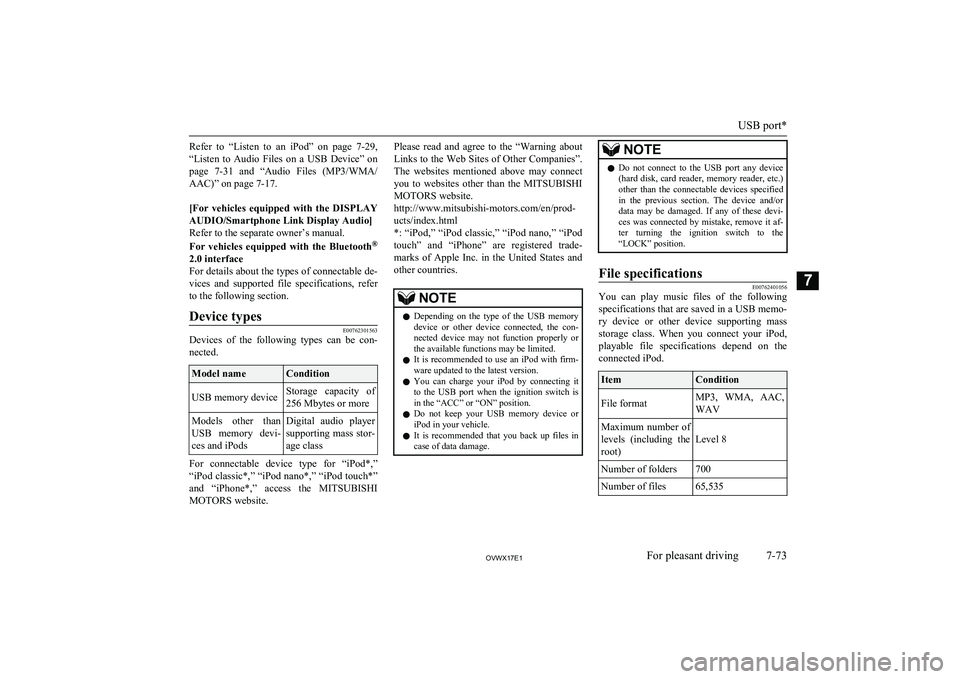
Refer to “Listen to an iPod” on page 7-29,
“Listen to Audio Files on a USB Device” on page 7-31 and “Audio Files (MP3/WMA/
AAC)” on page 7-17.
[For vehicles equipped with the DISPLAY AUDIO/Smartphone Link Display Audio]Refer to the separate owner’s manual.
For vehicles equipped with the Bluetooth ®
2.0 interface
For details about the types of connectable de- vices and supported file specifications, referto the following section.Device types
E00762301563
Devices of the following types can be con-
nected.
Model nameConditionUSB memory deviceStorage capacity of
256 Mbytes or moreModels other than
USB memory devi- ces and iPodsDigital audio player
supporting mass stor-
age class
For connectable device type for “iPod*,”
“iPod classic*,” “iPod nano*,” “iPod touch*”
and “iPhone*,” access the MITSUBISHI
MOTORS website.
Please read and agree to the “Warning about
Links to the Web Sites of Other Companies”.
The websites mentioned above may connect you to websites other than the MITSUBISHI
MOTORS website.
http://www.mitsubishi-motors.com/en/prod- ucts/index.html
*: “iPod,” “iPod classic,” “iPod nano,” “iPod
touch” and “iPhone” are registered trade- marks of Apple Inc. in the United States and
other countries.NOTEl Depending on the type of the USB memory
device or other device connected, the con-
nected device may not function properly or the available functions may be limited.
l It is recommended to use an iPod with firm-
ware updated to the latest version.
l You can charge your iPod by connecting it
to the USB port when the ignition switch is in the “ACC” or “ON” position.
l Do not keep your USB memory device or
iPod in your vehicle.
l It is recommended that you back up files in
case of data damage.NOTEl Do not connect to the USB port any device
(hard disk, card reader, memory reader, etc.)other than the connectable devices specified
in the previous section. The device and/or data may be damaged. If any of these devi-ces was connected by mistake, remove it af-
ter turning the ignition switch to the “LOCK” position.File specifications
E00762401056
You can play music files of the following
specifications that are saved in a USB memo-ry device or other device supporting mass
storage class. When you connect your iPod, playable file specifications depend on the connected iPod.
ItemConditionFile formatMP3, WMA, AAC,
WAVMaximum number of levels (including the root)
Level 8
Number of folders700Number of files65,535
USB port*
7-73OVWX17E1For pleasant driving7
Page 367 of 394
A
Accessory (Installation).....................................2-04
Accessory socket............................................... 7-77
Active stability & traction control (ASTC)....... 6-40
Additional equipment...................................... 10-18
Air conditioning Front automatic air conditioning................... 7-03
Important operation tips for the air conditioning................................................. 7-11
Rear air conditioning.....................................7-09
Air purifier (with deodorizing function)........... 7-11
Airbag................................................................ 4-36 Caution for installing the child re-straint on vehicle with a front pas-
senger’s airbag.....................................4-25,4-39
Antenna............................................................. 7-50
Anti-lock brake system (ABS).......................... 6-37 Warning lamp................................................6-38
Approach lamps.................................................3-08
Armrest..................................................... 4-08,4-10
Ashtray.............................................................. 7-75
Audio LW/MW/FM radio/CD player...................... 7-12
To listen to a disc in the Video En- tertainment System...................................... 7-39
Troubleshooting............................................ 7-47
Auto-cutout function......................................... 7-81
Automatic headlamp levelling.......................... 5-41
Automatic high-beam system............................ 5-36 Automatic high-beam system warning lamp 5-39
Automatic transmission
Fluid............................................................ 11-14
Selector lever operation................................ 6-15
Selector lever position...................................6-17
Sports mode.................................................. 6-17
B
Backdoor........................................................... 3-09
Battery............................................................. 10-09 Charge warning display................................ 5-12
Discharged battery (Emergency starting)..... 8-02
Specifications.............................................. 11-11
Bleeding the fuel system................................... 8-06
Bluetooth® 2.0 interface................................... 7-50
Bonnet............................................................. 10-03
Brake Anti-lock brake............................................. 6-37
Brake assist system....................................... 6-36
Braking.......................................................... 6-35
Fluid.................................................. 10-08,11-14
Parking brake................................................ 6-04
Power brakes................................................. 6-35
Warning lamp................................................5-10
Bulb capacity........................................ 10-23,10-25
C
Card holder................................................7-75,7-83
Cargo loads........................................................6-59
Catalytic converter.......................................... 10-02 Cautions on handling of 4-wheel drive vehicles................................................... 6-33
Central door locks............................................. 3-07
Centre console box............................................ 7-83
Centre information display................................ 5-12
Changing a fuse............................................... 10-22 Charge warning display.....................................5-12Check engine warning lamp.............................. 5-11Child restraint.................................................... 4-26 Caution for installing the child re-straint on vehicle with a front pas-
senger’s airbag.....................................4-25,4-39
Child-protection rear doors............................... 3-08
Cigarette lighter................................................. 7-76
Cleaning Aluminium wheels........................................ 9-05Chrome parts................................................. 9-05
Exterior of your vehicle................................ 9-03
Genuine leather............................................. 9-03
Interior of your vehicle................................. 9-02
Plastic, vinyl leather, etc............................... 9-02
Polishing....................................................... 9-04
Sunroof.......................................................... 9-06
Washing........................................................ 9-03
Waxing.......................................................... 9-04
Coat hooks......................................................... 7-88
Combination headlamps and dipper switch...... 5-34
Convenient hook............................................... 7-87
Coolant (engine)....................................10-06,11-14
Cruise control.................................................... 6-44
Cup holder......................................................... 7-85
Curtain airbag system........................................ 4-44
D
Daytime dipper button.......................................5-07
Daytime running lamps..................................... 5-35
Demister (rear window).................................... 5-50
Diesel particulate filter (DPF)........................... 6-14
Alphabetical index
12- 1
OVWX17E1Alphabetical index