audio MITSUBISHI SHOGUN 2017 Owner's Manual (in English)
[x] Cancel search | Manufacturer: MITSUBISHI, Model Year: 2017, Model line: SHOGUN, Model: MITSUBISHI SHOGUN 2017Pages: 394, PDF Size: 19 MB
Page 4 of 394
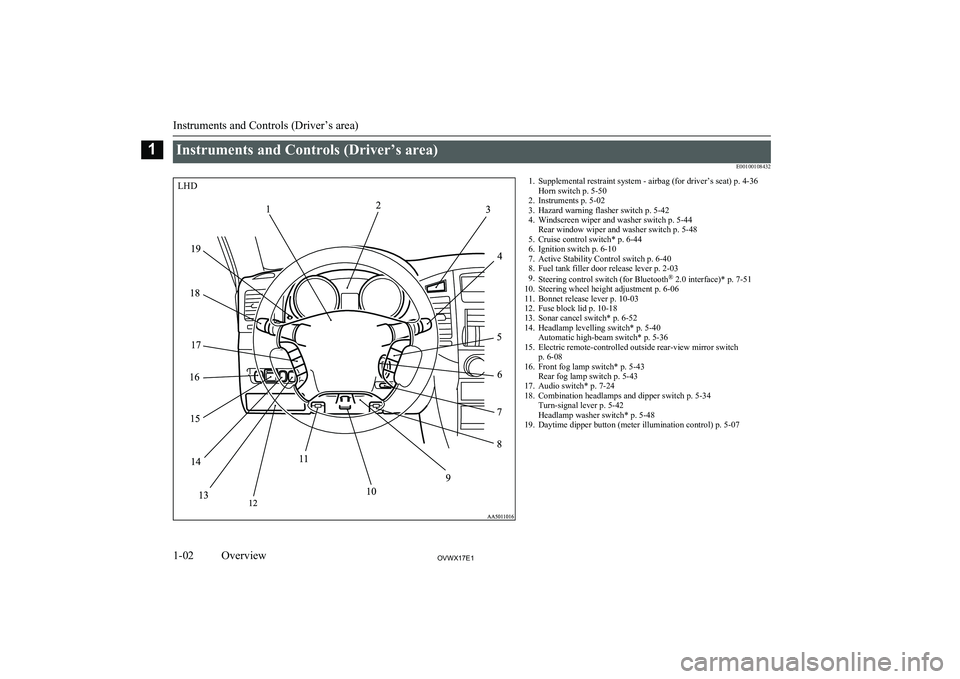
Instruments and Controls (Driver’s area)E001001084321. Supplemental restraint system - airbag (for driver’s seat) p. 4-36Horn switch p. 5-50
2. Instruments p. 5-02
3. Hazard warning flasher switch p. 5-42
4. Windscreen wiper and washer switch p. 5-44 Rear window wiper and washer switch p. 5-48
5. Cruise control switch* p. 6-44
6. Ignition switch p. 6-10
7. Active Stability Control switch p. 6-40
8. Fuel tank filler door release lever p. 2-03
9. Steering control switch (for Bluetooth ®
2.0 interface)* p. 7-51
10. Steering wheel height adjustment p. 6-06
11. Bonnet release lever p. 10-03
12. Fuse block lid p. 10-18
13. Sonar cancel switch* p. 6-52
14. Headlamp levelling switch* p. 5-40 Automatic high-beam switch* p. 5-36
15. Electric remote-controlled outside rear-view mirror switch p. 6-08
16. Front fog lamp switch* p. 5-43 Rear fog lamp switch p. 5-43
17. Audio switch* p. 7-24
18. Combination headlamps and dipper switch p. 5-34 Turn-signal lever p. 5-42
Headlamp washer switch* p. 5-48
19. Daytime dipper button (meter illumination control) p. 5-07
Instruments and Controls (Driver’s area)
1-02OVWX17E1Overview1LHD
Page 5 of 394
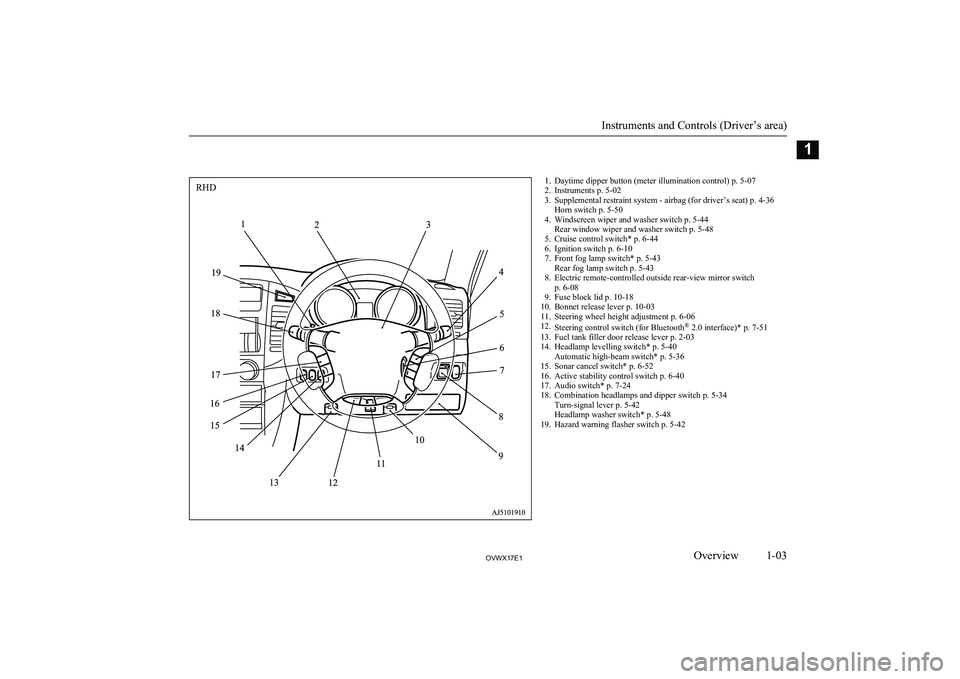
1. Daytime dipper button (meter illumination control) p. 5-07
2. Instruments p. 5-02
3. Supplemental restraint system - airbag (for driver’s seat) p. 4-36 Horn switch p. 5-50
4. Windscreen wiper and washer switch p. 5-44 Rear window wiper and washer switch p. 5-48
5. Cruise control switch* p. 6-44
6. Ignition switch p. 6-10
7. Front fog lamp switch* p. 5-43 Rear fog lamp switch p. 5-43
8. Electric remote-controlled outside rear-view mirror switch p. 6-08
9. Fuse block lid p. 10-18
10. Bonnet release lever p. 10-03
11. Steering wheel height adjustment p. 6-06
12. Steering control switch (for Bluetooth ®
2.0 interface)* p. 7-51
13. Fuel tank filler door release lever p. 2-03
14. Headlamp levelling switch* p. 5-40 Automatic high-beam switch* p. 5-36
15. Sonar cancel switch* p. 6-52
16. Active stability control switch p. 6-40
17. Audio switch* p. 7-24
18. Combination headlamps and dipper switch p. 5-34 Turn-signal lever p. 5-42
Headlamp washer switch* p. 5-48
19. Hazard warning flasher switch p. 5-42
Instruments and Controls (Driver’s area)
1-03OVWX17E1Overview1RHD
Page 6 of 394
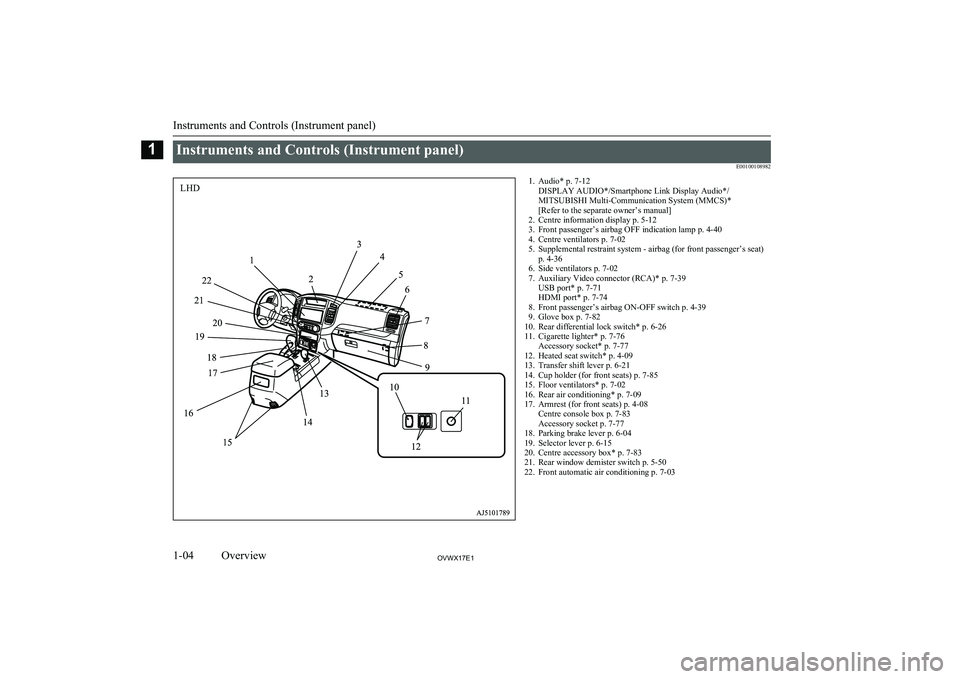
Instruments and Controls (Instrument panel)E001001089821. Audio* p. 7-12DISPLAY AUDIO*/Smartphone Link Display Audio*/
MITSUBISHI Multi-Communication System (MMCS)*
[Refer to the separate owner’s manual]
2. Centre information display p. 5-12
3. Front passenger’s airbag OFF indication lamp p. 4-40
4. Centre ventilators p. 7-02
5. Supplemental restraint system - airbag (for front passenger’s seat) p. 4-36
6. Side ventilators p. 7-02
7. Auxiliary Video connector (RCA)* p. 7-39 USB port* p. 7-71
HDMI port* p. 7-74
8. Front passenger’s airbag ON-OFF switch p. 4-39
9. Glove box p. 7-82
10. Rear differential lock switch* p. 6-26
11. Cigarette lighter* p. 7-76 Accessory socket* p. 7-77
12. Heated seat switch* p. 4-09
13. Transfer shift lever p. 6-21
14. Cup holder (for front seats) p. 7-85
15. Floor ventilators* p. 7-02
16. Rear air conditioning* p. 7-09
17. Armrest (for front seats) p. 4-08 Centre console box p. 7-83
Accessory socket p. 7-77
18. Parking brake lever p. 6-04
19. Selector lever p. 6-15
20. Centre accessory box* p. 7-83
21. Rear window demister switch p. 5-50
22. Front automatic air conditioning p. 7-03
Instruments and Controls (Instrument panel)
1-04OVWX17E1Overview1LHD
Page 7 of 394
![MITSUBISHI SHOGUN 2017 Owners Manual (in English) 1. Audio* p. 7-12DISPLAY AUDIO*/Smartphone Link Display Audio*/
MITSUBISHI Multi-Communication System (MMCS)*
[Refer to the separate owner’s manual]
2. Front automatic air conditioning p. 7-03
3. Re](/img/19/34886/w960_34886-6.png "MITSUBISHI SHOGUN 2017 Owners Manual (in English) 1. Audio* p. 7-12DISPLAY AUDIO*/Smartphone Link Display Audio*/
MITSUBISHI Multi-Communication System (MMCS)*
[Refer to the separate owner’s manual]
2. Front automatic air conditioning p. 7-03
3. Re")
1. Audio* p. 7-12DISPLAY AUDIO*/Smartphone Link Display Audio*/
MITSUBISHI Multi-Communication System (MMCS)*
[Refer to the separate owner’s manual]
2. Front automatic air conditioning p. 7-03
3. Rear window demister switch p. 5-50
4. Centre accessory box* p. 7-83
5. Selector lever p. 6-15
6. Parking brake lever p. 6-04
7. Armrest (for front seats) p. 4-08 Centre console box p. 7-83
Accessory socket p. 7-77
8. Rear air conditioning* p. 7-09
9. Floor ventilators* p. 7-02
10. Cup holder (for front seats) p. 7-85
11. Transfer shift lever p. 6-21
12. Cigarette lighter* p. 7-76 Accessory socket* p. 7-77
13. Heated seat switch* p. 4-09
14. Rear differential lock switch* p. 6-26
15. Glove box p. 7-82
16. Front passenger’s airbag ON-OFF switch p. 4-39
17. Auxiliary Video connector (RCA)* p. 7-39 USB port* p. 7-71
HDMI port* p. 7-74
18. Side ventilators p. 7-02
19. Supplemental restraint system - airbag (for front passenger’s seat) p. 4-36
20. Centre ventilators p. 7-02
21. Front passenger’s airbag OFF indication lamp p. 4-40
22. Centre information display p. 5-12
Instruments and Controls (Instrument panel)
1-05OVWX17E1Overview1RHD
Page 20 of 394
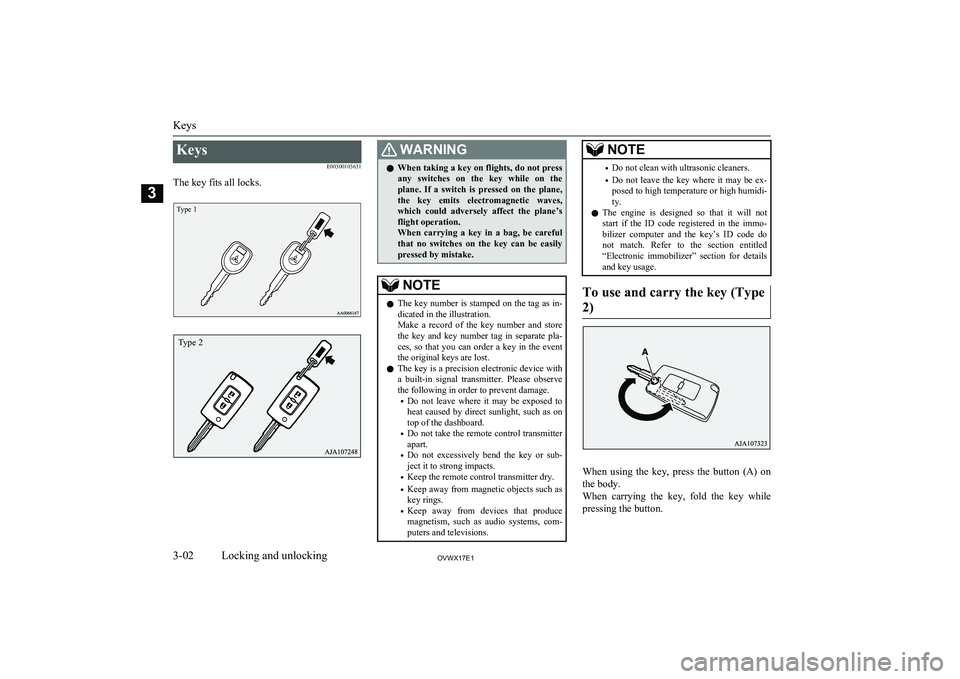
KeysE00300103631
The key fits all locks.
Type 1
WARNINGl When taking a key on flights, do not press
any switches on the key while on the plane. If a switch is pressed on the plane,the key emits electromagnetic waves,which could adversely affect the plane’s
flight operation.
When carrying a key in a bag, be careful that no switches on the key can be easily
pressed by mistake.NOTEl The key number is stamped on the tag as in-
dicated in the illustration.
Make a record of the key number and store the key and key number tag in separate pla-
ces, so that you can order a key in the event the original keys are lost.
l The key is a precision electronic device with
a built-in signal transmitter. Please observe the following in order to prevent damage.
• Do not leave where it may be exposed to
heat caused by direct sunlight, such as on
top of the dashboard.
• Do not take the remote control transmitter
apart.
• Do not excessively bend the key or sub-
ject it to strong impacts.
• Keep the remote control transmitter dry.
• Keep away from magnetic objects such as
key rings.
• Keep away from devices that produce
magnetism, such as audio systems, com-
puters and televisions.NOTE• Do not clean with ultrasonic cleaners.
• Do not leave the key where it may be ex-
posed to high temperature or high humidi-ty.
l The engine is designed so that it will not
start if the ID code registered in the immo- bilizer computer and the key’s ID code do
not match. Refer to the section entitled “Electronic immobilizer” section for details
and key usage.
To use and carry the key (Type
2)
When using the key, press the button (A) on the body.
When carrying the key, fold the key while
pressing the button.
Keys
3-02OVWX17E1Locking and unlocking3Type 2
Page 65 of 394
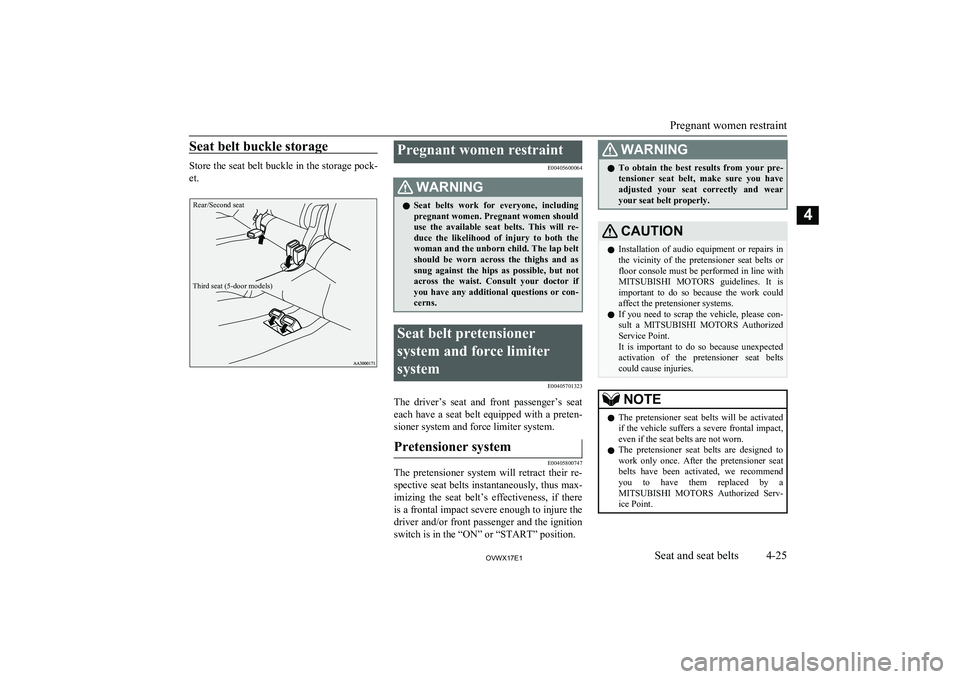
Seat belt buckle storage
Store the seat belt buckle in the storage pock-
et.
Rear/Second seatThird seat (5-door models)
Pregnant women restraint
E00405600064WARNINGlSeat belts work for everyone, including
pregnant women. Pregnant women should
use the available seat belts. This will re- duce the likelihood of injury to both thewoman and the unborn child. The lap belt
should be worn across the thighs and as snug against the hips as possible, but not
across the waist. Consult your doctor if you have any additional questions or con-
cerns.Seat belt pretensioner
system and force limiter
system E00405701323
The driver’s seat and front passenger’s seateach have a seat belt equipped with a preten- sioner system and force limiter system.
Pretensioner system
E00405800747
The pretensioner system will retract their re-
spective seat belts instantaneously, thus max-imizing the seat belt’s effectiveness, if there
is a frontal impact severe enough to injure the
driver and/or front passenger and the ignition
switch is in the “ON” or “START” position.
WARNINGl To obtain the best results from your pre-
tensioner seat belt, make sure you have
adjusted your seat correctly and wear your seat belt properly.CAUTIONl Installation of audio equipment or repairs in
the vicinity of the pretensioner seat belts or
floor console must be performed in line with MITSUBISHI MOTORS guidelines. It is
important to do so because the work could affect the pretensioner systems.
l If you need to scrap the vehicle, please con-
sult a MITSUBISHI MOTORS Authorized
Service Point.
It is important to do so because unexpected activation of the pretensioner seat belts
could cause injuries.NOTEl The pretensioner seat belts will be activated
if the vehicle suffers a severe frontal impact, even if the seat belts are not worn.
l The pretensioner seat belts are designed to
work only once. After the pretensioner seat
belts have been activated, we recommend you to have them replaced by a
MITSUBISHI MOTORS Authorized Serv-
ice Point.
Pregnant women restraint
4-25OVWX17E1Seat and seat belts4
Page 95 of 394
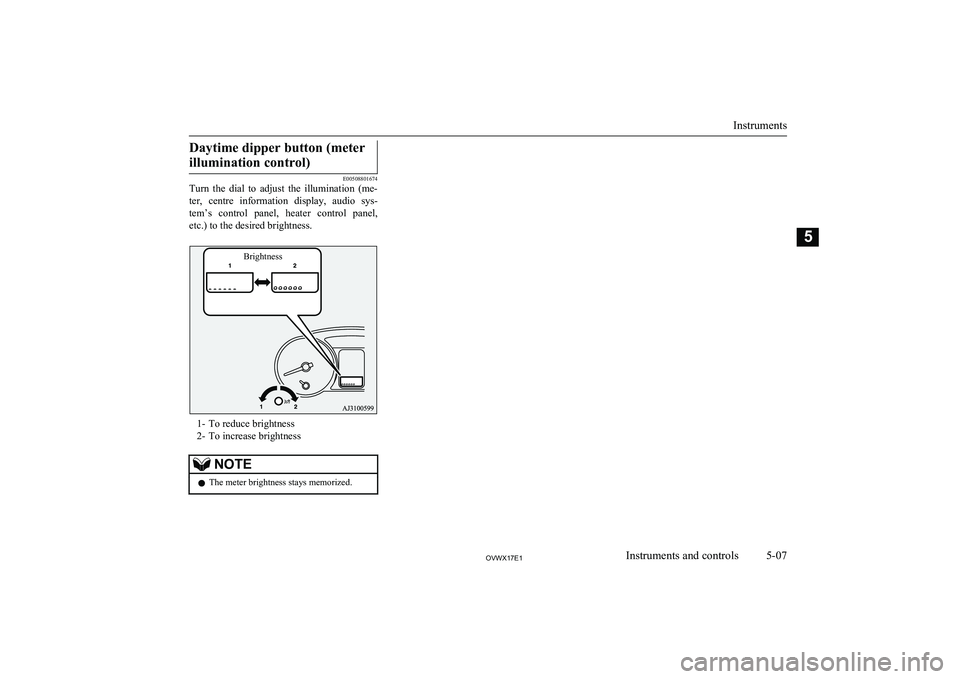
Daytime dipper button (meterillumination control)
E00508801674
Turn the dial to adjust the illumination (me-
ter, centre information display, audio sys-
tem’s control panel, heater control panel, etc.) to the desired brightness.
1- To reduce brightness
2- To increase brightness
NOTEl The meter brightness stays memorized.
Instruments
5-07OVWX17E1Instruments and controls5Brightness
Page 110 of 394
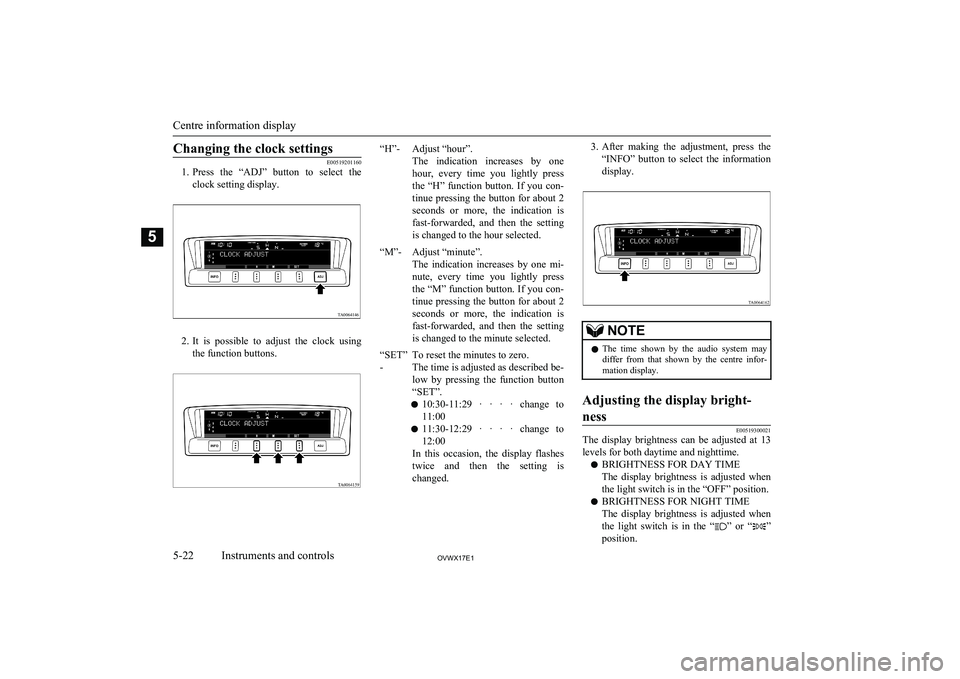
Changing the clock settings
E00519201160
1. Press the “ADJ” button to select the
clock setting display.
2. It is possible to adjust the clock using
the function buttons.
“H”-Adjust “hour”.
The indication increases by one
hour, every time you lightly press the “H” function button. If you con-tinue pressing the button for about 2 seconds or more, the indication is fast-forwarded, and then the settingis changed to the hour selected.“M”-Adjust “minute”.
The indication increases by one mi-
nute, every time you lightly press
the “M” function button. If you con- tinue pressing the button for about 2 seconds or more, the indication is fast-forwarded, and then the settingis changed to the minute selected.“SET”
-To reset the minutes to zero.
The time is adjusted as described be-
low by pressing the function button
“SET”.
l 10:30-11:29 · · · · change to
11:00
l 11:30-12:29 · · · · change to
12:00
In this occasion, the display flashes twice and then the setting is changed.3. After making the adjustment, press the
“INFO” button to select the information display.NOTEl The time shown by the audio system may
differ from that shown by the centre infor-
mation display.Adjusting the display bright-
ness
E00519300021
The display brightness can be adjusted at 13
levels for both daytime and nighttime.
l BRIGHTNESS FOR DAY TIME
The display brightness is adjusted when the light switch is in the “OFF” position.
l BRIGHTNESS FOR NIGHT TIME
The display brightness is adjusted when the light switch is in the “
” or “”
position.
Centre information display
5-22OVWX17E1Instruments and controls5TA0064146
Page 194 of 394
CAUTIONlThe distances given are to be used for refer-
ence only, as errors may be caused by vari- ous factors, such as temperature, humidity,
or the shape of the obstacles.Changing the detection areas
E00615800032
The detection areas can be changed as fol-
lows:
Vehicles with a towing bar
While the operation of the system is stopped
at the “SONAR” switch, push the “SONAR”
switch approximately 3 seconds or more, and release it. The buzzer sounds twice to indi-
cate that the detection area has been changed.
Vehicles without a towing bar
While the operation of the system is stopped at the “SONAR” switch, push the “SONAR”
switch approximately 3 seconds or more, and
release it. The buzzer sounds once to indicate
that the detection area has been changed.
NOTEl The detection area will not change if you
keep the “SONAR” switch pushed for 10
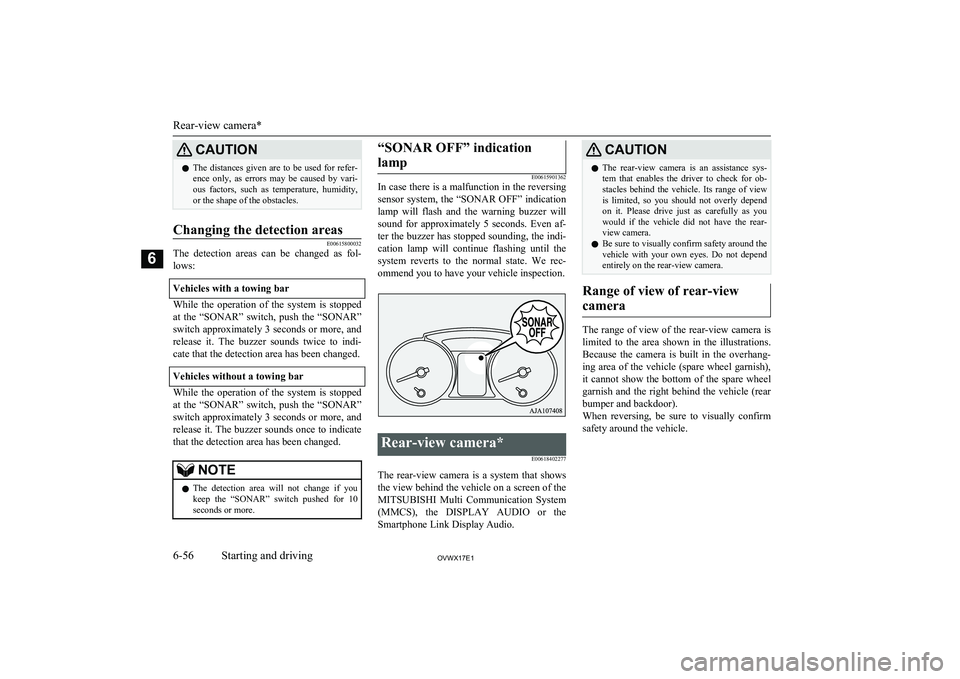
seconds or more.“SONAR OFF” indication
lamp
E00615901362
In case there is a malfunction in the reversing
sensor system, the “SONAR OFF” indicationlamp will flash and the warning buzzer willsound for approximately 5 seconds. Even af-ter the buzzer has stopped sounding, the indi-
cation lamp will continue flashing until the
system reverts to the normal state. We rec- ommend you to have your vehicle inspection.
Rear-view camera*
E00618402277
The rear-view camera is a system that showsthe view behind the vehicle on a screen of the
MITSUBISHI Multi Communication System
(MMCS), the DISPLAY AUDIO or the
Smartphone Link Display Audio.
CAUTIONl The rear-view camera is an assistance sys-
tem that enables the driver to check for ob- stacles behind the vehicle. Its range of view
is limited, so you should not overly depend on it. Please drive just as carefully as you
would if the vehicle did not have the rear-
view camera.
l Be sure to visually confirm safety around the
vehicle with your own eyes. Do not depend entirely on the rear-view camera.
Range of view of rear-view
camera
The range of view of the rear-view camera is
limited to the area shown in the illustrations.
Because the camera is built in the overhang- ing area of the vehicle (spare wheel garnish),it cannot show the bottom of the spare wheel
garnish and the right behind the vehicle (rear bumper and backdoor).
When reversing, be sure to visually confirm
safety around the vehicle.
Rear-view camera*
6-56OVWX17E1Starting and driving6
Page 195 of 394
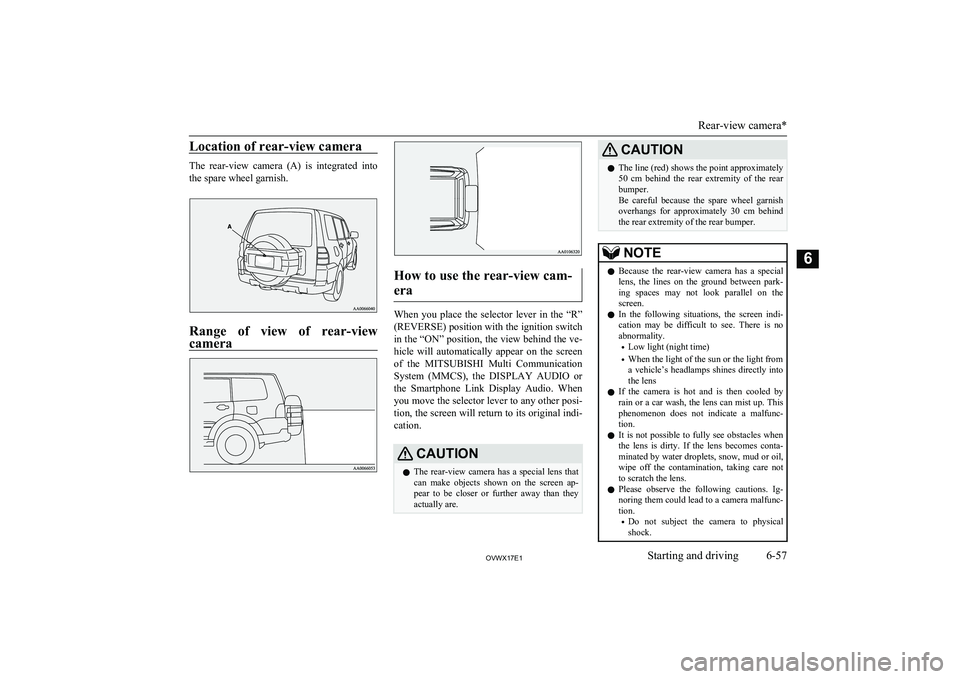
Location of rear-view camera
The rear-view camera (A) is integrated intothe spare wheel garnish.
Range of view of rear-viewcamera
How to use the rear-view cam-
era
When you place the selector lever in the “R”
(REVERSE) position with the ignition switch in the “ON” position, the view behind the ve-
hicle will automatically appear on the screen of the MITSUBISHI Multi Communication
System (MMCS), the DISPLAY AUDIO or
the Smartphone Link Display Audio. When you move the selector lever to any other posi-tion, the screen will return to its original indi-
cation.
CAUTIONl The rear-view camera has a special lens that
can make objects shown on the screen ap-
pear to be closer or further away than they
actually are.CAUTIONl The line (red) shows the point approximately
50 cm behind the rear extremity of the rear
bumper.
Be careful because the spare wheel garnish overhangs for approximately 30 cm behind
the rear extremity of the rear bumper.NOTEl Because the rear-view camera has a special
lens, the lines on the ground between park-
ing spaces may not look parallel on the screen.
l In the following situations, the screen indi-
cation may be difficult to see. There is no abnormality.
• Low light (night time)
• When the light of the sun or the light from
a vehicle’s headlamps shines directly into
the lens
l If the camera is hot and is then cooled by
rain or a car wash, the lens can mist up. This
phenomenon does not indicate a malfunc- tion.
l It is not possible to fully see obstacles when
the lens is dirty. If the lens becomes conta- minated by water droplets, snow, mud or oil,
wipe off the contamination, taking care not to scratch the lens.
l Please observe the following cautions. Ig-
noring them could lead to a camera malfunc-
tion.
• Do not subject the camera to physical
shock.
Rear-view camera*
6-57OVWX17E1Starting and driving6