Bulb MITSUBISHI TRITON 2011 User Guide
[x] Cancel search | Manufacturer: MITSUBISHI, Model Year: 2011, Model line: TRITON, Model: MITSUBISHI TRITON 2011Pages: 369, PDF Size: 26.15 MB
Page 324 of 369
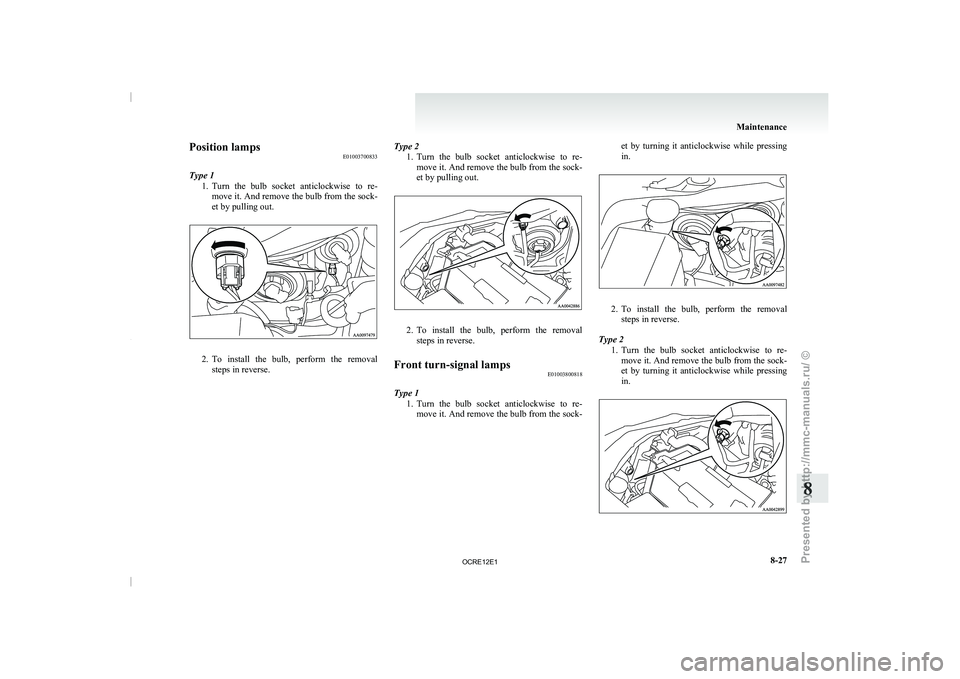
Position lamps
E01003700833
Type 1 1. Turn the bulb socket anticlockwise
to re-
move it. And remove the bulb from the sock-
et by pulling out. 2. To install the bulb, perform the removal
steps in reverse. Type 2
1. Turn the bulb socket anticlockwise to re-
move it. And remove the bulb from the sock-
et by pulling out. 2. To install the bulb, perform the removal
steps in reverse.
Front turn-signal lamps E01003800818
Type 1 1. Turn the bulb
socket anticlockwise
to re-
move it. And remove the bulb from the sock- et by turning it anticlockwise while pressing
in.
2. To install the bulb, perform the removal
steps in reverse.
Type 2 1. Turn the bulb
socket anticlockwise to re-
move it. And remove the bulb from the sock-
et by turning it anticlockwise while pressing
in. Maintenance
8-27 8
OCRE12E1
Presented by http://mmc-manuals.ru/ \251
Page 325 of 369
2. To install the bulb, perform the removal
steps in reverse.
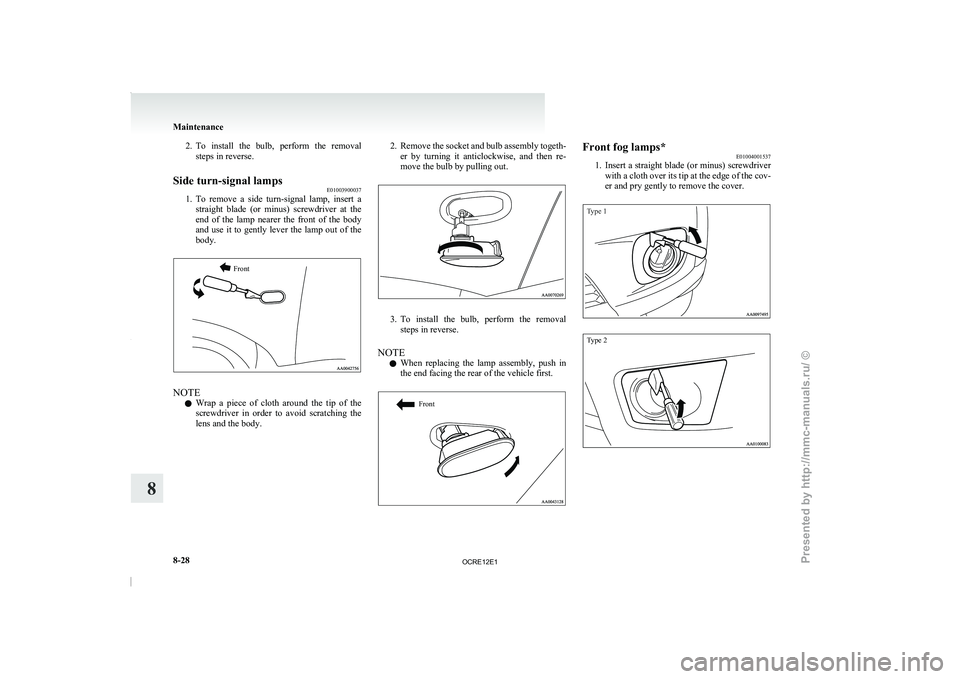
Side turn-signal lamps E01003900037
1. To remove a side
turn-signal lamp, insert a
straight blade (or minus)
screwdriver at the
end of the lamp nearer the front of the body
and use it to gently lever the lamp out of the
body.
Front NOTE
l Wrap
a piece of cloth
around the tip of the
screwdriver in order to avoid scratching the
lens and the body. 2. Remove
the socket and bulb assembly togeth-
er by turning it
anticlockwise, and then re-
move the bulb by pulling out. 3. To install the bulb, perform the removal
steps in reverse.
NOTE l When replacing the
lamp
assembly, push in
the end facing the rear of the vehicle first.
Front Front fog lamps*
E01004001537
1. Insert a straight blade (or
minus) screwdriver
with a cloth over its tip at the edge of the cov-
er and pry gently to remove the cover.
Type 1
Type 2 Maintenance
8-28
8
OCRE12E1
Presented by http://mmc-manuals.ru/ \251
Page 326 of 369
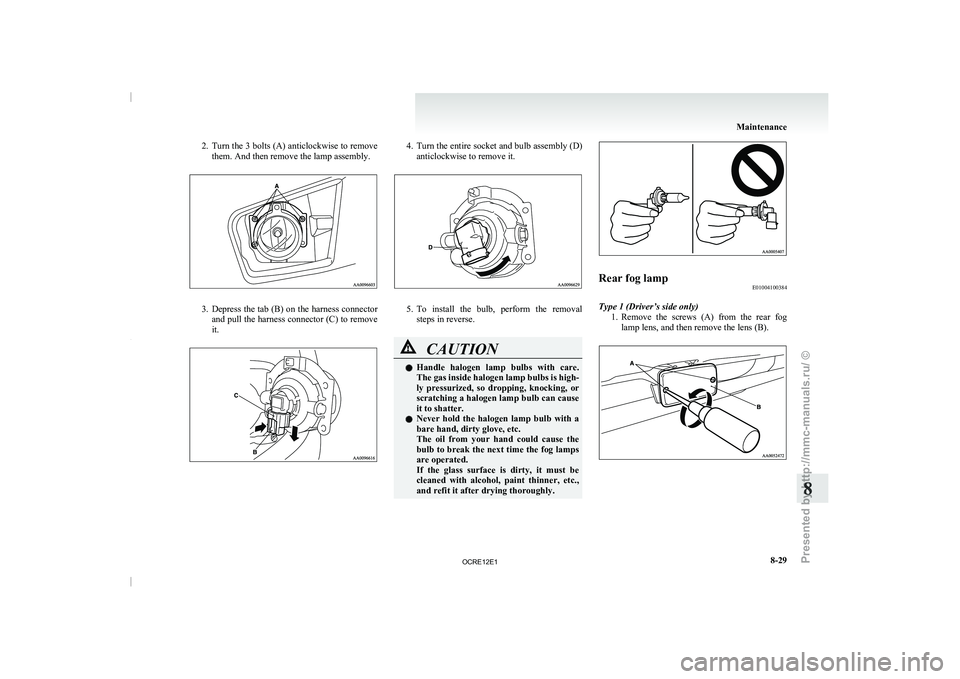
2. Turn the 3 bolts (A) anticlockwise to remove
them. And then remove the lamp assembly. 3. Depress the tab (B) on the harness connector
and pull the harness
connector (C) to remove
it. 4. Turn the entire socket and bulb assembly (D)
anticlockwise to remove it. 5. To install the bulb, perform the removal
steps in reverse. CAUTION
l
Handle halogen lamp bulbs
with
care.
The gas inside halogen lamp bulbs is high-
ly pressurized, so dropping, knocking, or
scratching a halogen lamp bulb can cause
it to shatter.
l Never hold the halogen lamp bulb with a
bare hand, dirty glove, etc.
The oil from your hand could cause the
bulb to break the next time the fog lamps
are operated.
If the glass surface is dirty, it must be
cleaned with alcohol, paint thinner, etc.,
and refit it after drying thoroughly. Rear fog lamp
E01004100384
Type 1 (Driver’s side only) 1. Remove the screws (A) from
the rear fog
lamp lens, and then remove the lens (B). Maintenance
8-29 8
OCRE12E1
Presented by http://mmc-manuals.ru/ \251
Page 327 of 369
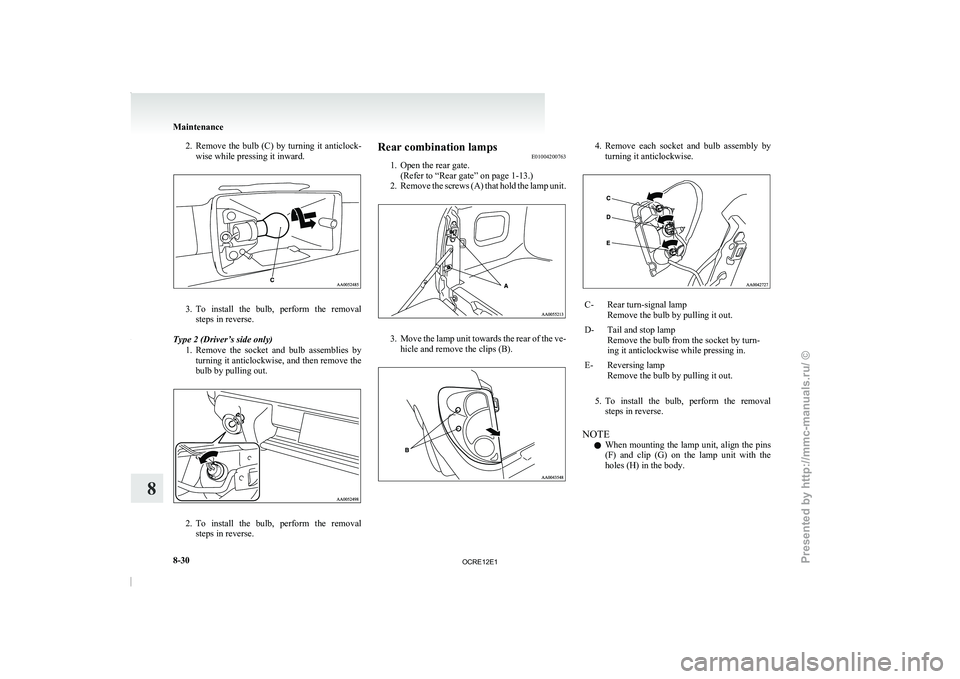
2. Remove the bulb (C) by turning it anticlock-
wise while pressing it inward. 3. To install the bulb, perform the removal
steps in reverse.
Type 2 (Driver’s side only) 1. Remove the socket
and bulb assemblies by
turning it anticlockwise, and then remove the
bulb by pulling out. 2. To install the bulb, perform the removal
steps in reverse. Rear combination lamps
E01004200763
1. Open the rear gate.
(Refer to “Rear gate” on page 1-13.)
2. Remove the
screws (A) that hold the lamp unit. 3. Move the lamp unit towards the rear of the ve-
hicle and remove the clips (B). 4. Remove each socket and bulb assembly by
turning it anticlockwise. C- Rear turn-signal lamp
Remove the bulb by pulling it out.
D- Tail and stop lamp Remove the bulb from the socket by turn-
ing it anticlockwise while pressing in.
E- Reversing lamp Remove the bulb by pulling it out.
5. To install the bulb, perform the removal
steps in reverse.
NOTE l When mounting the
lamp
unit, align the pins
(F) and clip (G) on the lamp unit with the
holes (H) in the body. Maintenance
8-30
8
OCRE12E1
Presented by http://mmc-manuals.ru/ \251
Page 328 of 369
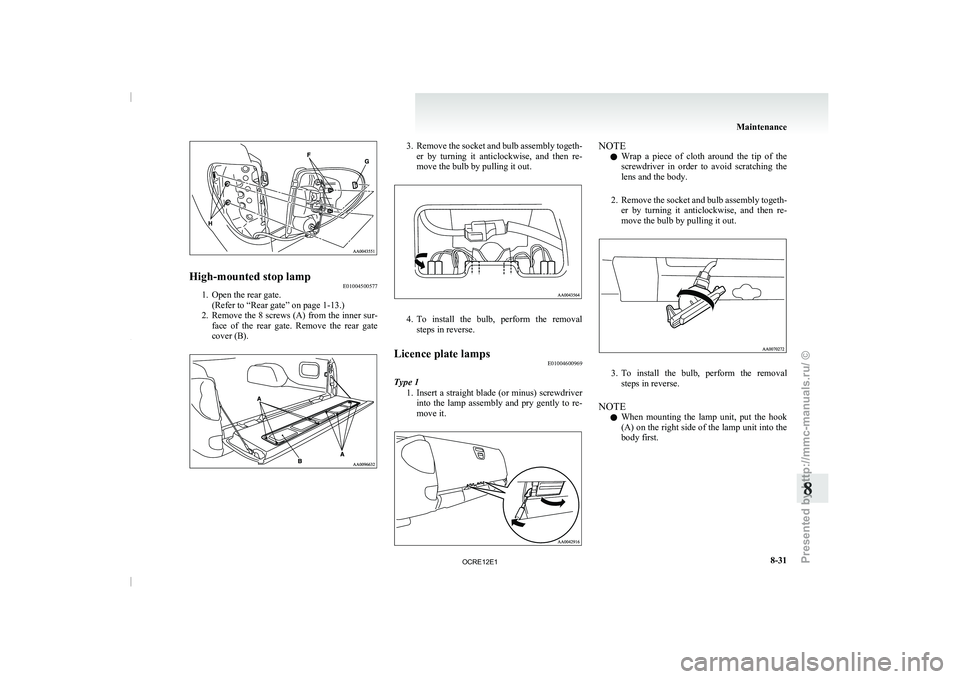
High-mounted stop lamp
E01004500577
1. Open the rear gate.
(Refer to “Rear gate” on page 1-13.)
2. Remove the 8
screws (A) from the inner sur-
face of the rear gate. Remove the rear gate
cover (B). 3. Remove the socket and bulb assembly togeth-
er by turning it
anticlockwise, and then re-
move the bulb by pulling it out. 4. To install the bulb, perform the removal
steps in reverse.
Licence plate lamps E01004600969
Type 1 1. Insert a straight blade
(or
minus) screwdriver
into the lamp assembly and pry gently to re-
move it. NOTE
l Wrap
a piece of cloth
around the tip of the
screwdriver in order to avoid scratching the
lens and the body.
2. Remove the socket and bulb assembly togeth- er by turning it anticlockwise, and then re-
move the bulb by pulling it out. 3. To install the bulb, perform the removal
steps in reverse.
NOTE l When mounting the
lamp
unit, put the hook
(A) on the right side of the lamp unit into the
body first. Maintenance
8-31 8
OCRE12E1
Presented by http://mmc-manuals.ru/ \251
Page 329 of 369
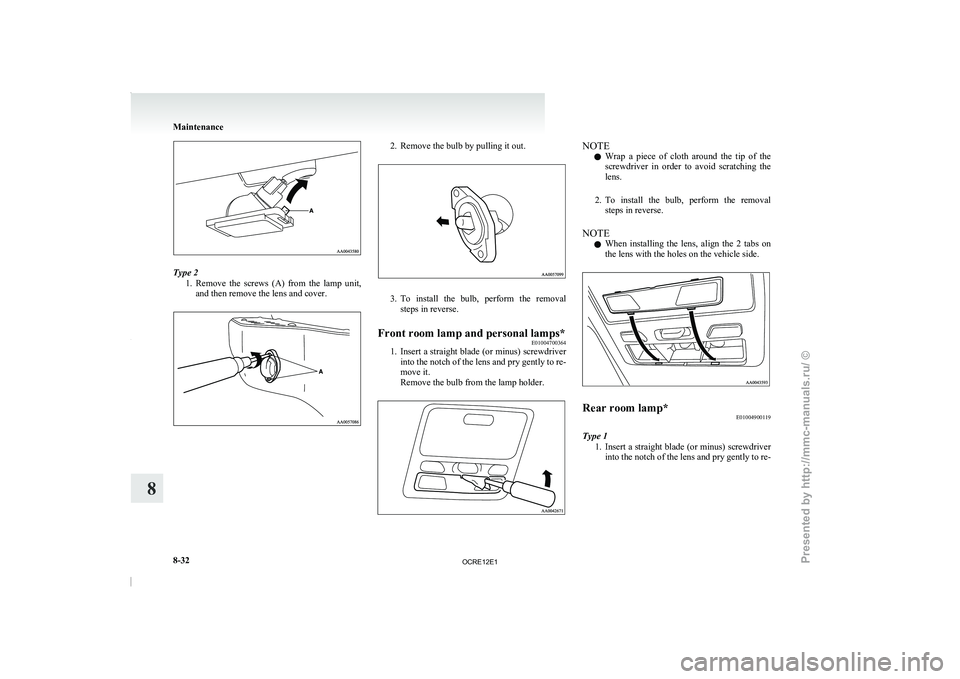
Type 2
1. Remove the screws (A) from
the lamp unit,
and then remove the lens and cover. 2. Remove the bulb by pulling it out.
3. To install the bulb, perform the removal
steps in reverse.
Front room lamp and personal lamps* E01004700364
1. Insert a straight blade
(or minus) screwdriver
into the notch of
the lens and pry gently to re-
move it.
Remove the bulb from the lamp holder. NOTE
l Wrap
a piece of cloth
around the tip of the
screwdriver in order to avoid scratching the
lens.
2. To install the bulb, perform the removal steps in reverse.
NOTE l When installing the lens, align the 2 tabs on
the lens with the holes on the vehicle side. Rear room lamp*
E01004900119
Type 1 1. Insert a straight blade (or
minus) screwdriver
into the notch of the lens and pry gently to re- Maintenance
8-32
8
OCRE12E1
Presented by http://mmc-manuals.ru/ \251
Page 330 of 369
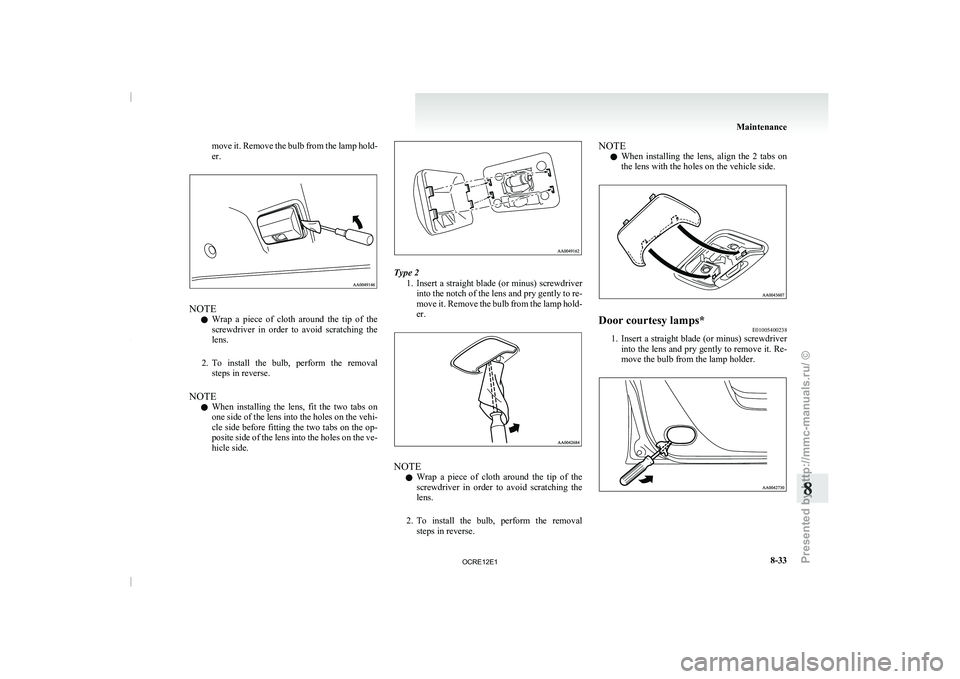
move it. Remove the bulb from the lamp hold-
er.
NOTE
l Wrap
a piece of cloth
around the tip of the
screwdriver in order to avoid scratching the
lens.
2. To install the bulb, perform the removal steps in reverse.
NOTE l When installing the lens, fit the two tabs on
one side of the lens into the holes on the vehi-
cle side before fitting the two tabs on the op-
posite side of the lens into the holes on the ve-
hicle side. Type 2
1. Insert a straight blade (or
minus) screwdriver
into the notch of the lens and pry gently to re-
move it. Remove the bulb from the lamp hold-
er. NOTE
l Wrap
a piece
of cloth
around the tip of the
screwdriver in order to avoid scratching the
lens.
2. To install the bulb, perform the removal steps in reverse. NOTE
l When installing the lens,
align
the 2 tabs on
the lens with the holes on the vehicle side. Door courtesy lamps*
E01005400238
1. Insert a straight blade (or minus) screwdriver
into the lens and
pry gently to remove it. Re-
move the bulb from the lamp holder. Maintenance
8-33 8
OCRE12E1
Presented by http://mmc-manuals.ru/ \251
Page 331 of 369
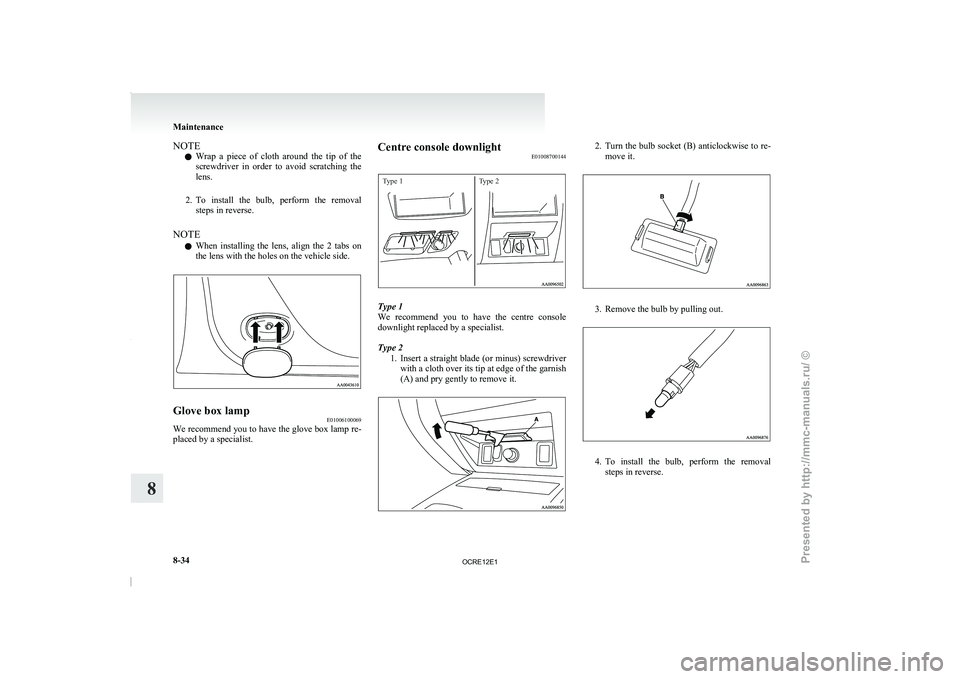
NOTE
l Wrap
a piece of cloth
around the tip of the
screwdriver in order to avoid scratching the
lens.
2. To install the bulb, perform the removal steps in reverse.
NOTE l When installing the lens, align the 2 tabs on
the lens with the holes on the vehicle side. Glove box lamp
E01006100069
We recommend you to have the glove box lamp re-
placed by a specialist. Centre console downlight
E01008700144
Type 1Type 2 Type 1
We recommend you to
have
the centre console
downlight replaced by a specialist.
Type 2
1. Insert a straight blade (or minus) screwdriverwith a cloth over its tip at edge of the garnish
(A) and pry gently to remove it. 2. Turn the bulb socket (B) anticlockwise to re-
move it. 3. Remove the bulb by pulling out.
4. To install the bulb, perform the removal
steps in reverse. Maintenance
8-34
8
OCRE12E1
Presented by http://mmc-manuals.ru/ \251
Page 356 of 369
4
4-wheel drive operation 4-39
AAccessory (Installation) 04
Accessory socket 5-72
Active Stability & Traction Control (ASTC) 4-47
Additional equipment 8-19
Air conditioning
Automatic air conditioning 5-08
Important operation tips for the air condition-
ing 5-12
Manual air conditioning 5-03
Air purifier 5-12
Airbag 2-27
Antenna 5-50
Anti-lock brake system (ABS) 4-44 Warning lamp 4-45
Armrest (Double cab) 2-07
Ashtray 5-70
Audio Audio system anti-theft feature
5-48
Error codes 5-42
Handling of compact discs 5-48
LW/MW/FM electronic tuning radio with CD
player 5-13
Steering wheel remote control switch 5-40
Automatic air conditioning 5-08
Automatic transmission 4A/T 4-17 Fluid 8-07,9-22
Overdrive control switch 4-18
Selector lever operation 4-17,4-21
Selector lever position 4-18
Selector lever position indicator 4-17
Automatic transmission Sports Mode 5A/T 4-21 Fluid 8-07,9-22 Selector lever operation 4-21
Selector lever position indicator 4-22
Selector lever positions 4-22 Sports mode 4-23
Sports mode indicator 4-23
B Battery 8-10
Discharged battery (Emergency starting) 6-02
Specification 9-17
Bleeding the fuel system 6-05
Bluetooth® 2.0 interface 5-51
Bonnet 8-03
Bottle holder 5-79
Brake Anti-lock brake 4-44
Brake assist system 4-44
Braking 4-43
Fluid 8-08,9-22
Parking brake 4-07
Parking brake lever stroke
8-16
Pedal free play 8-16
Warning lamp 3-08
C Cargo loads 4-54
Catalytic converter 8-02
Cautions on handling of 4-wheel drive vehi-
cles 4-41
Central door locks 1-07
Centre console downlight 5-75
Bulb capacity 8-24
Replacement 8-34
Centre information display
3-10
Changing a fuse 8-22
Changing gears 4-15
Check engine warning lamp 3-08 Child restraint 2-13
Child-protection rear doors 1-08
Cigarette lighter 5-71
Cleaning
Exterior of your vehicle 7-03
Genuine leather 7-02
Interior of your vehicle
7-02
Plastic, vinyl leather, etc 7-02
Sunroof 7-05
Waxing 7-04
Clock 3-19,5-73
Clutch Fluid 8-09,9-22
Pedal free play 8-15
Coat hook 5-80
Combination headlamps and dipper switch 3-30
Convenient hook 5-80
Coolant (engine) 8-06,9-22
Cruise control 4-50 Switch 4-50
Cup holder 5-78
Curtain airbag system 2-35
D Demister (rear window) 3-40
Diesel particulate filter (DPF) 4-14
Differential oil 9-22
Digital clock 3-19,5-73
Dimensions 9-03
Dipper (High/Low beam change)
3-31
Door courtesy lamps 5-75 Replacement
8-33
Doors Central door locks 1-07
Child-protection 1-08
Lock and unlock 1-06
Driving, alcohol and drugs 4-02 Alphabetical index
1
OCRE12E1
Presented by http://mmc-manuals.ru/ \251
Page 357 of 369
E
Easy select 4WD 4-26
Economical driving 4-02
Electric window control 1-08 Switch 1-08
Electrical system 9-17 Electronic immobilizer (Anti-theft starting sys-
tem) 1-03
Emergency starting 6-02
Engine specifications
9-15
Engine Coolant 8-06,9-22
Number 9-02
Oil 8-04,9-22
Overheating 6-04
Specifications 9-15
Used engine oils safety instructions and disposal
information 05
Water temperature gauge 3-05
Error codes 5-42
Exterior and interior lamp operation 8-18
FFirst-aid kit and warning triangle band for secur-
ing 5-80
Floor console box 5-76
Fluid
Automatic transmission fluid 8-07,9-22Brake fluid 8-08,9-22
Clutch fluid 8-09,9-22
Engine coolant 8-06,9-22
Power steering fluid 8-09,9-22
Washer fluid 8-08,9-22
For cold and snowy weather 8-19
Front console box 5-76
Front fog lamps Bulb capacity 8-24
Indication lamp
3-07
Replacement
8-28
Switch 3-34
Front room lamp Bulb capacity 8-25
Replacement 8-32
Front seat 2-03
Front turn-signal lamps Bulb capacity
8-24
Replacement 8-27
Fuel consumption 9-20
Fuel Filling the fuel tank 02
Fuel filter indication lamp 3-07
Fuel gauge 3-04
Fuel selection 02
Low fuel warning lamp 3-04
Modification/alterations to the electrical or fuel
systems 04
Tank capacity 02
Fuses 8-20
Fusible links 8-19
G Gauges 3-02
General maintenance 8-18
General vehicle data 9-03
Genuine parts 05
Glove box 5-76
Glove box lamp
Bulb capacity 8-24
Replacement 8-34
H Handling of compact discs 5-48
Hazard warning flasher switch 3-34Hazard warning indication lamps 3-07
Head restraints 2-08
Headlamp levelling switch 3-32
Headlamps
Bulb capacity 8-24
Headlamp flasher 3-31
Replacement 8-25
Switch 3-30
Washer switch 3-39
Heated mirror 4-11
Heated seats 2-06
Heater 5-03
High-mounted stop lamp Bulb capacity 8-24
Replacement
8-31
Hinges and latches lubrication 8-19
Hooks Coat hook 5-80
Convenient hook 5-80
Horn switch 3-40
I If the vehicle breaks down 6-02
Ignition switch 4-11
Indication and warning lamps 3-06
Indication lamps 3-07
Inside rear-view mirror 4-09
Inspection and maintenance following rough road
operation 4-41
Installation of accessories 04
Instruments 3-02
Interior lamps 5-73
J Jack handle 6-12
Storage 6-07
Jacking up the vehicle 6-13 Alphabetical index
2
OCRE12E1
Presented by http://mmc-manuals.ru/ \251