fuel MITSUBISHI TRITON 2011 User Guide
[x] Cancel search | Manufacturer: MITSUBISHI, Model Year: 2011, Model line: TRITON, Model: MITSUBISHI TRITON 2011Pages: 369, PDF Size: 26.15 MB
Page 89 of 369
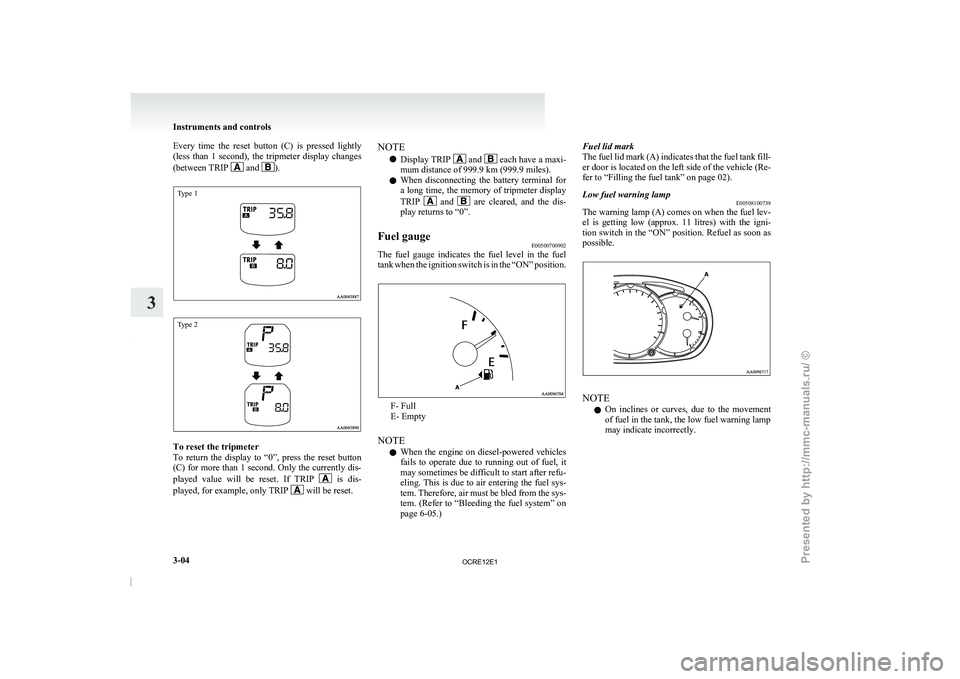
Every time the reset button (C) is pressed lightly
(less than 1 second), the
tripmeter display changes
(between TRIP and ).
Type 1
Type 2
To reset the tripmeter
To return the display
to
“0”, press the reset button
(C) for more than 1 second. Only the currently dis-
played value will be reset. If TRIP is dis-
played, for example, only TRIP will be reset.NOTE
l Display TRIP and each have a maxi-
mum distance of 999.9 km (999.9 miles).
l When disconnecting the battery
terminal for
a long time, the memory of tripmeter display
TRIP and are cleared, and the dis-
play returns to “0”.
Fuel gauge E00500700902
The fuel gauge indicates the fuel level in the fuel
tank when the ignition switch
is in the “ON” position. F- Full
E- Empty
NOTE l When
the engine on diesel-powered
vehicles
fails to operate due to running out of fuel, it
may sometimes be difficult to start after refu-
eling. This is due to air entering the fuel sys-
tem. Therefore, air must be bled from the sys-
tem. (Refer to “Bleeding the fuel system” on
page 6-05.) Fuel lid mark
The fuel lid mark (A)
indicates that the fuel tank fill-
er door is located on the left side of the vehicle (Re-
fer to “Filling the fuel tank” on page 02).
Low fuel warning lamp E00508100739
The warning lamp (A) comes on when the fuel lev-
el is getting low (approx.
11 litres) with the igni-
tion switch in the “ON” position. Refuel as soon as
possible. NOTE
l On
inclines or curves, due
to the movement
of fuel in the tank, the low fuel warning lamp
may indicate incorrectly. Instruments and controls
3-04
3
OCRE12E1
Presented by http://mmc-manuals.ru/ \251
Page 91 of 369
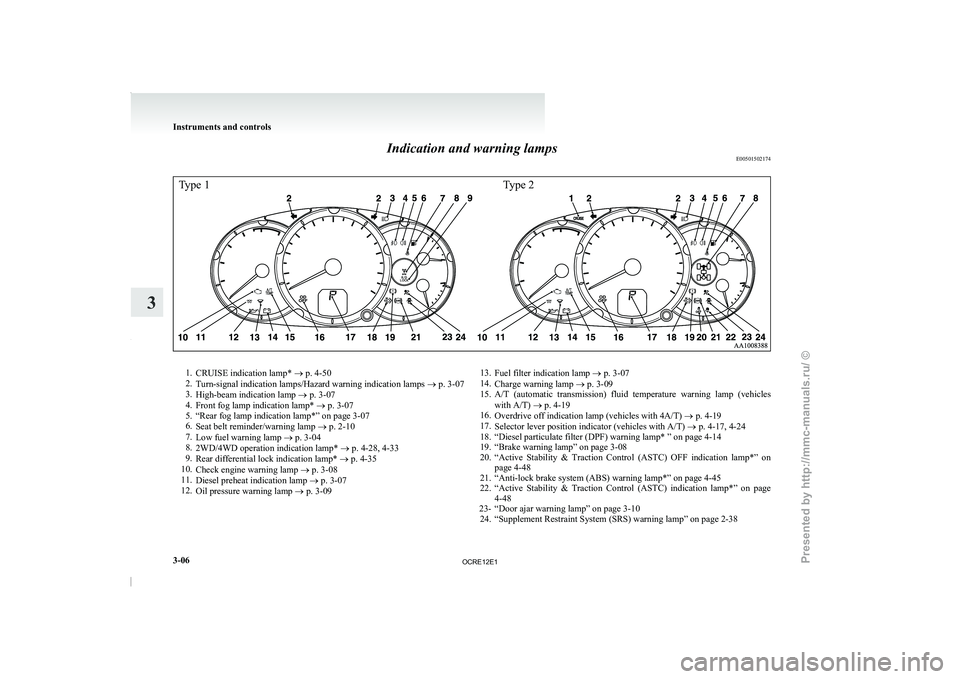
Indication and warning lamps
E00501502174Type 1Type 21.
CRUISE indication lamp* ® p. 4-50
2. Turn-signal indication lamps/Hazard warning indication lamps ®
p. 3-07
3. High-beam indication lamp ® p. 3-07
4. Front fog lamp indication lamp* ® p. 3-07
5. “Rear fog lamp indication lamp*” on page 3-07
6. Seat belt reminder/warning lamp ® p. 2-10
7. Low fuel warning lamp ® p. 3-04
8. 2WD/4WD operation indication lamp* ® p. 4-28, 4-33
9. Rear differential lock indication lamp* ® p. 4-35
10. Check engine warning lamp ® p. 3-08
11. Diesel preheat indication lamp ® p. 3-07
12. Oil pressure warning lamp ® p. 3-09 13.
Fuel filter indication lamp ® p. 3-07
14. Charge warning lamp ® p. 3-09
15.
A/T (automatic transmission) fluid temperature warning lamp (vehicleswith A/T) ® p. 4-19
16. Overdrive off indication lamp (vehicles with 4A/T) ® p. 4-19
17. Selector lever position indicator (vehicles with A/T) ® p. 4-17, 4-24
18. “Diesel particulate filter (DPF) warning lamp* ” on page 4-14
19. “Brake warning lamp” on page 3-08
20. “Active Stability & Traction Control (ASTC) OFF indication lamp*” on page 4-48
21. “Anti-lock brake system (ABS) warning lamp*” on page 4-45
22. “Active Stability & Traction Control (ASTC) indication lamp*” on page 4-48
23- “Door ajar warning lamp” on page 3-10 24. “Supplement Restraint System (SRS) warning lamp” on page 2-38 Instruments and controls
3-06
3
OCRE12E1
Presented by http://mmc-manuals.ru/ \251
Page 92 of 369
Indication lamps
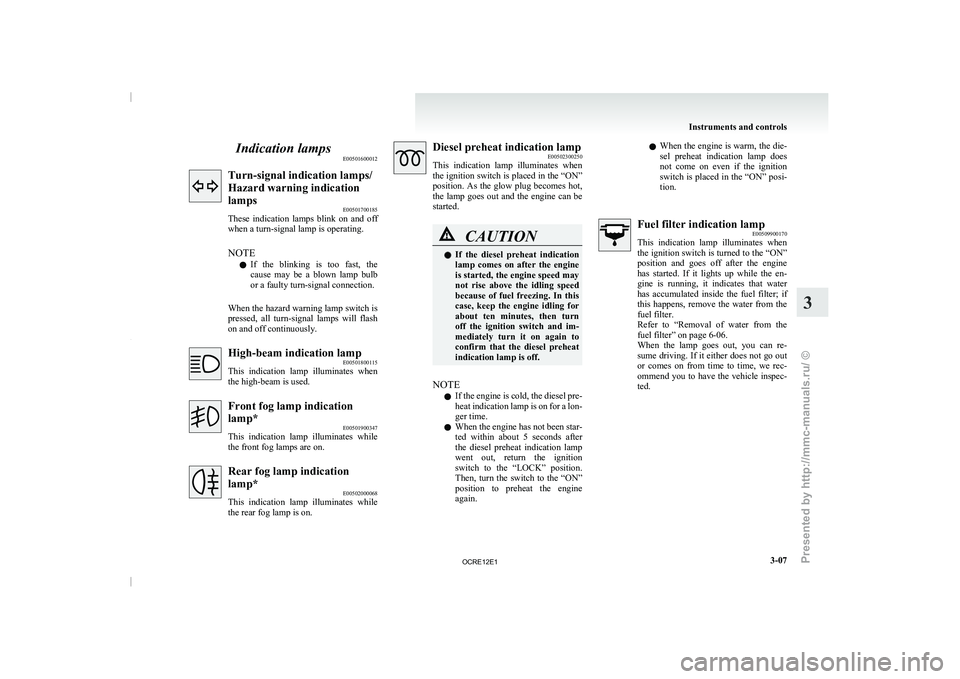
E00501600012Turn-signal indication lamps/
Hazard warning indication
lamps
E00501700185
These indication lamps blink on
and off
when a turn-signal lamp is operating.
NOTE
l If the blinking is too fast, the
cause may be a blown lamp bulb
or a faulty turn-signal connection.
When the hazard warning lamp switch is
pressed, all turn-signal lamps will flash
on and off continuously. High-beam indication lamp
E00501800115
This indication lamp illuminates when
the high-beam is used. Front fog lamp indication
lamp*
E00501900347
This indication lamp
illuminates while
the front fog lamps are on. Rear fog lamp indication
lamp*
E00502000068
This indication lamp illuminates while
the rear fog lamp is on. Diesel preheat indication lamp
E00502300250
This indication lamp illuminates when
the
ignition switch is placed in the “ON”
position. As the glow plug becomes hot,
the lamp goes out and the engine can be
started. CAUTION
l
If the diesel preheat
indication
lamp
comes on after the engine
is started, the engine speed may
not rise above the idling speed
because of fuel freezing. In this
case, keep the engine idling for
about ten minutes, then turn
off the ignition switch and im-
mediately turn it on again to
confirm that the diesel preheat
indication lamp is off.
NOTE l If
the engine is cold,
the diesel pre-
heat indication lamp is on for a lon-
ger time.
l When the engine has not been star-
ted within about 5 seconds after
the diesel preheat indication lamp
went out, return the ignition
switch to the “LOCK” position.
Then, turn the switch to the “ON”
position to preheat the engine
again. l
When
the engine is
warm,
the die-
sel preheat indication lamp does
not come on even if the ignition
switch is placed in the “ON” posi-
tion. Fuel filter indication lamp
E00509900170
This indication lamp illuminates when
the
ignition switch is turned to the “ON”
position and goes off after the engine
has started. If it lights up while the en-
gine is running, it indicates that water
has accumulated inside the fuel filter; if
this happens, remove the water from the
fuel filter.
Refer to “Removal of water from the
fuel filter” on page 6-06.
When the lamp goes out, you can re-
sume driving. If it either does not go out
or comes on from time to time, we rec-
ommend you to have the vehicle inspec-
ted. Instruments and controls
3-07 3
OCRE12E1
Presented by http://mmc-manuals.ru/ \251
Page 93 of 369
Warning lamps
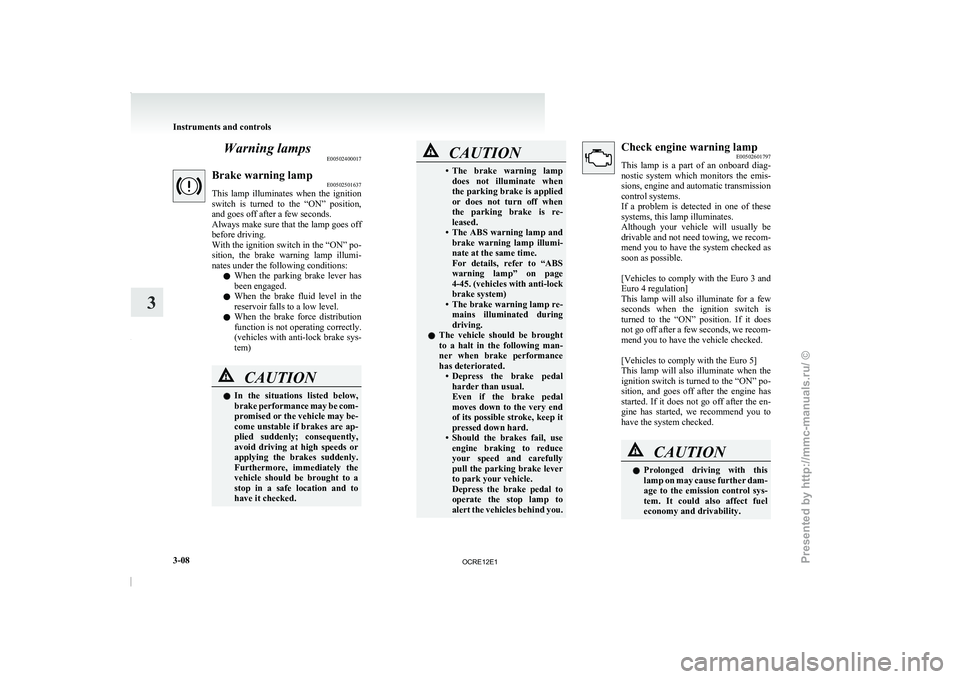
E00502400017Brake warning lamp
E00502501637
This lamp illuminates when the
ignition
switch is turned to the “ON” position,
and goes off after a few seconds.
Always make sure that the lamp goes off
before driving.
With the ignition switch in the “ON” po-
sition, the brake warning lamp illumi-
nates under the following conditions:
l When the parking brake lever has
been engaged.
l When the brake fluid level in the
reservoir falls to a low level.
l When the brake force distribution
function is not operating correctly.
(vehicles with anti-lock brake sys-
tem) CAUTION
l
In the situations listed
below,
brake
performance may be com-
promised or the vehicle may be-
come unstable if brakes are ap-
plied suddenly; consequently,
avoid driving at high speeds or
applying the brakes suddenly.
Furthermore, immediately the
vehicle should be brought to a
stop in a safe location and to
have it checked. CAUTION
• The brake warning lamp
does not illuminate when
the
parking brake is applied
or does not turn off when
the parking brake is re-
leased.
• The ABS warning lamp and brake warning lamp illumi-
nate at the same time.
For details, refer to “ABS
warning lamp” on page
4-45. (vehicles with anti-lock
brake system)
• The brake warning lamp re- mains illuminated during
driving.
l The vehicle should be brought
to a halt in the following man-
ner when brake performance
has deteriorated.
• Depress the brake pedalharder than usual.
Even if the brake pedal
moves down to the very end
of its possible stroke, keep it
pressed down hard.
• Should the brakes fail, use engine braking to reduce
your speed and carefully
pull the parking brake lever
to park your vehicle.
Depress the brake pedal to
operate the stop lamp to
alert the vehicles behind you. Check engine warning lamp
E00502601797
This lamp is a part
of an onboard diag-
nostic system which monitors the emis-
sions, engine and automatic transmission
control systems.
If a problem is detected in one of these
systems, this lamp illuminates.
Although your vehicle will usually be
drivable and not need towing, we recom-
mend you to have the system checked as
soon as possible.
[Vehicles to comply with the Euro 3 and
Euro 4 regulation]
This lamp will also illuminate for a few
seconds when the ignition switch is
turned to the “ON” position. If it does
not go off after a few seconds, we recom-
mend you to have the vehicle checked.
[Vehicles to comply with the Euro 5]
This lamp will also illuminate when the
ignition switch is turned to the “ON” po-
sition, and goes off after the engine has
started. If it does not go off after the en-
gine has started, we recommend you to
have the system checked. CAUTION
l
Prolonged driving with this
lamp
on
may cause further dam-
age to the emission control sys-
tem. It could also affect fuel
economy and drivability. Instruments and controls
3-08
3
OCRE12E1
Presented by http://mmc-manuals.ru/ \251
Page 98 of 369
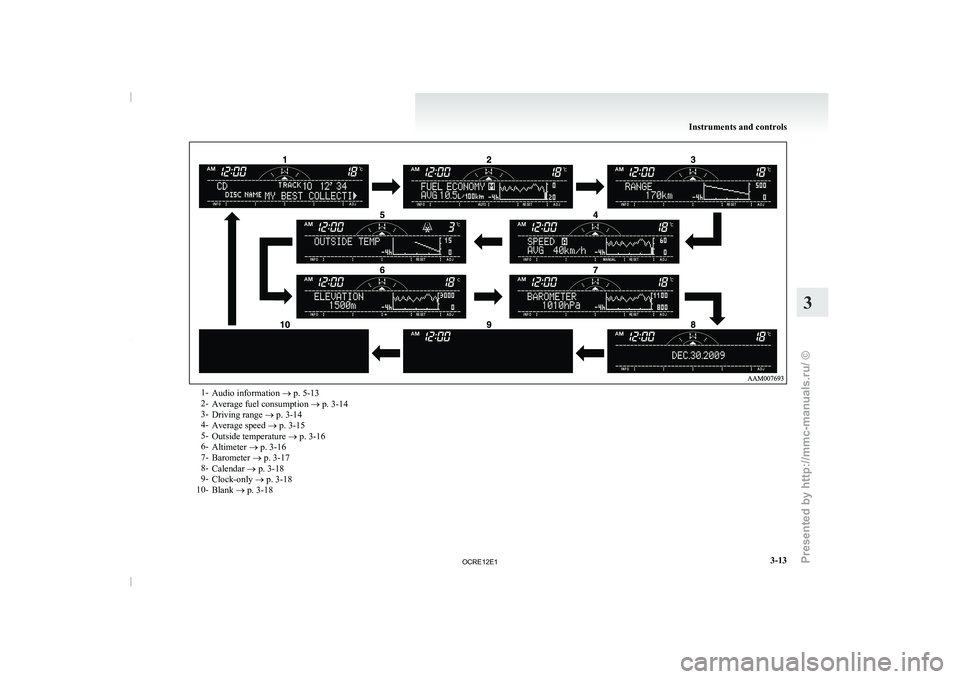
1-
Audio information ® p. 5-13
2- Average fuel consumption ® p. 3-14
3- Driving range ®
p. 3-14
4- Average speed ® p. 3-15
5- Outside temperature ® p. 3-16
6- Altimeter ® p. 3-16
7- Barometer ® p. 3-17
8- Calendar ® p. 3-18
9- Clock-only ® p. 3-18
10- Blank ® p. 3-18 Instruments and controls
3-13 3
OCRE12E1
Presented by http://mmc-manuals.ru/ \251
Page 99 of 369
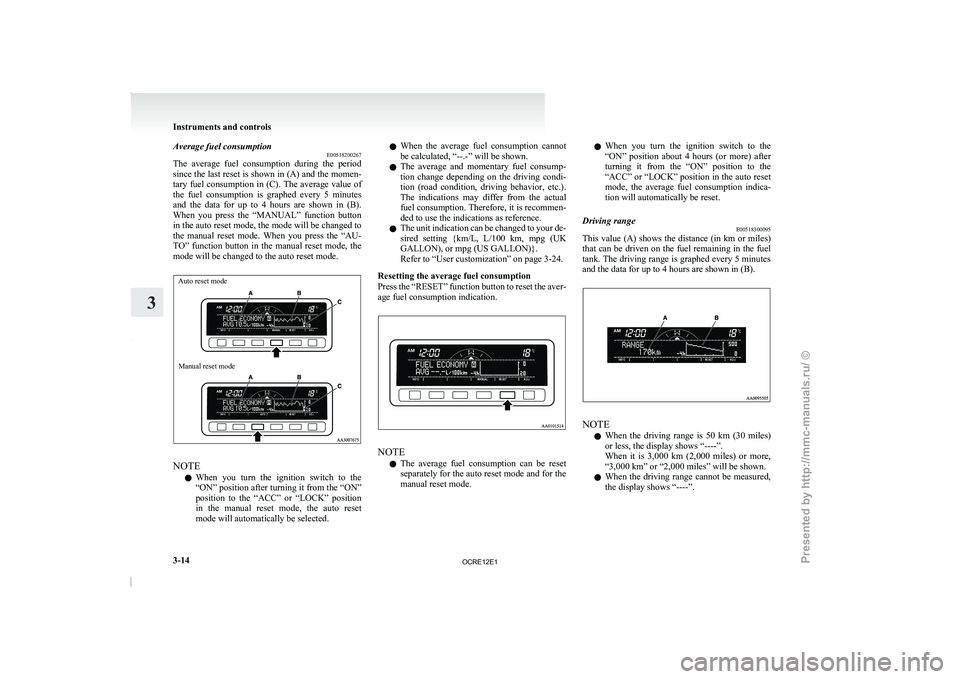
Average fuel consumption
E00518200267
The average fuel consumption during
the period
since the last reset is shown in (A) and the momen-
tary fuel consumption in (C). The average value of
the fuel consumption is graphed every 5 minutes
and the data for up to 4 hours are shown in (B).
When you press the “MANUAL” function button
in the auto reset mode, the mode will be changed to
the manual reset mode. When you press the “AU-
TO” function button in the manual reset mode, the
mode will be changed to the auto reset mode.
Auto reset mode
Manual reset mode NOTE
l When
you turn the ignition
switch to the
“ON” position after turning it from the “ON”
position to the “ACC” or “LOCK” position
in the manual reset mode, the auto reset
mode will automatically be selected. l
When
the average fuel
consumption
cannot
be calculated, “--.-” will be shown.
l The average and momentary fuel consump-
tion change depending on the driving condi-
tion (road condition, driving behavior, etc.).
The indications may differ from the actual
fuel consumption. Therefore, it is recommen-
ded to use the indications as reference.
l The unit indication can be changed to your de-
sired setting {km/L, L/100 km, mpg (UK
GALLON), or mpg (US GALLON)}.
Refer to “User customization” on page 3-24.
Resetting the average fuel consumption
Press the “RESET” function button to reset the aver-
age fuel consumption indication. NOTE
l The
average fuel consumption can
be reset
separately for the auto reset mode and for the
manual reset mode. l
When you turn the
ignition
switch to the
“ON” position about 4 hours (or more) after
turning it from the “ON” position to the
“ACC” or “LOCK” position in the auto reset
mode, the average fuel consumption indica-
tion will automatically be reset.
Driving range E00518300095
This value (A) shows the distance (in km or miles)
that can be driven on
the fuel remaining in the fuel
tank. The driving range is graphed every 5 minutes
and the data for up to 4 hours are shown in (B). NOTE
l When
the driving range is
50 km (30 miles)
or less, the display shows “----”.
When it is 3,000 km (2,000 miles) or more,
“3,000 km” or “2,000 miles” will be shown.
l When the driving range cannot be measured,
the display shows “----”. Instruments and controls
3-14
3
OCRE12E1
Presented by http://mmc-manuals.ru/ \251
Page 100 of 369
l
The driving range is
shown based on the ac-
cumulated fuel consumption data, however,
may be changed depending on the driving con-
dition (road condition, driving behavior,
etc.). If the battery terminals are disconnec-
ted, the accumulated fuel consumption data
will be erased. It is recommended to use the
indication as reference.
l When the vehicle is fueled, the driving range
will be updated. However, if the amount of
fueling is small, the indication may not be cor-
rect. Therefore, fill up the tank as much as
possible in case of fueling.
l When the vehicle is stopped on a steep slope,
the value of the driving range may increase.
This is caused by the fuel movement inside
the tank on the slope and is not deemed as a
failure.
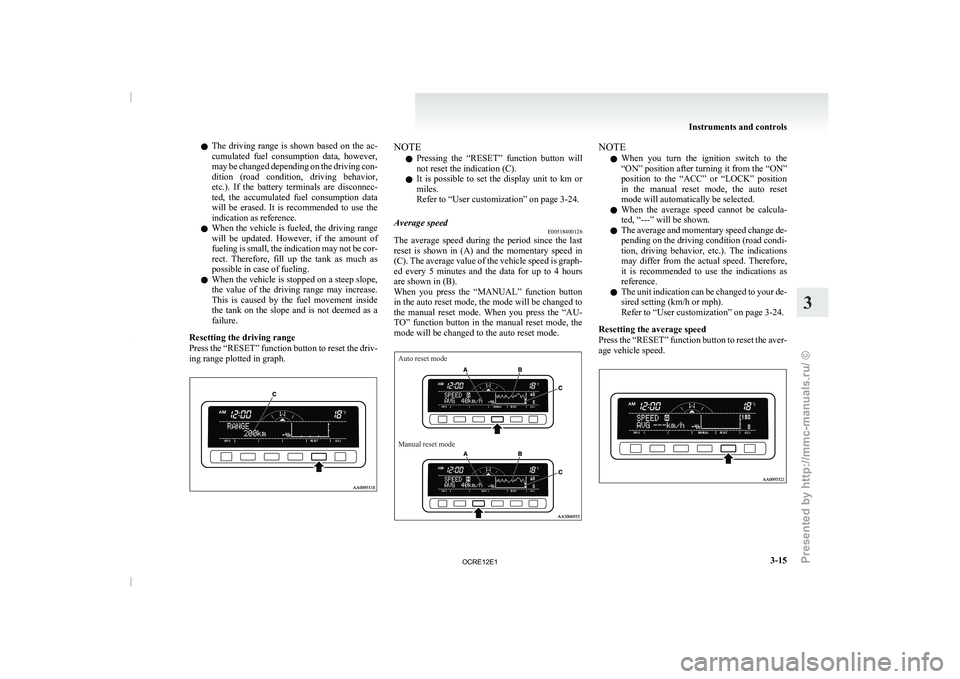
Resetting the driving range
Press the “RESET” function button to reset the driv-
ing range plotted in graph. NOTE
l Pressing
the “RESET” function button
will
not reset the indication (C).
l It is possible to set the display unit to km or
miles.
Refer to “User customization” on page 3-24.
Average speed E00518400126
The average speed during the period since the last
reset is shown in
(A)
and the momentary speed in
(C). The average value of the vehicle speed is graph-
ed every 5 minutes and the data for up to 4 hours
are shown in (B).
When you press the “MANUAL” function button
in the auto reset mode, the mode will be changed to
the manual reset mode. When you press the “AU-
TO” function button in the manual reset mode, the
mode will be changed to the auto reset mode.
Auto reset mode
Manual reset mode NOTE
l When
you turn the ignition
switch to the
“ON” position after turning it from the “ON”
position to the “ACC” or “LOCK” position
in the manual reset mode, the auto reset
mode will automatically be selected.
l When the average speed cannot be calcula-
ted, “---” will be shown.
l The average and momentary speed change de-
pending on the driving condition (road condi-
tion, driving behavior, etc.). The indications
may differ from the actual speed. Therefore,
it is recommended to use the indications as
reference.
l The unit indication can be changed to your de-
sired setting (km/h or mph).
Refer to “User customization” on page 3-24.
Resetting the average speed
Press the “RESET” function button to reset the aver-
age vehicle speed. Instruments and controls
3-15 3
OCRE12E1
Presented by http://mmc-manuals.ru/ \251
Page 110 of 369
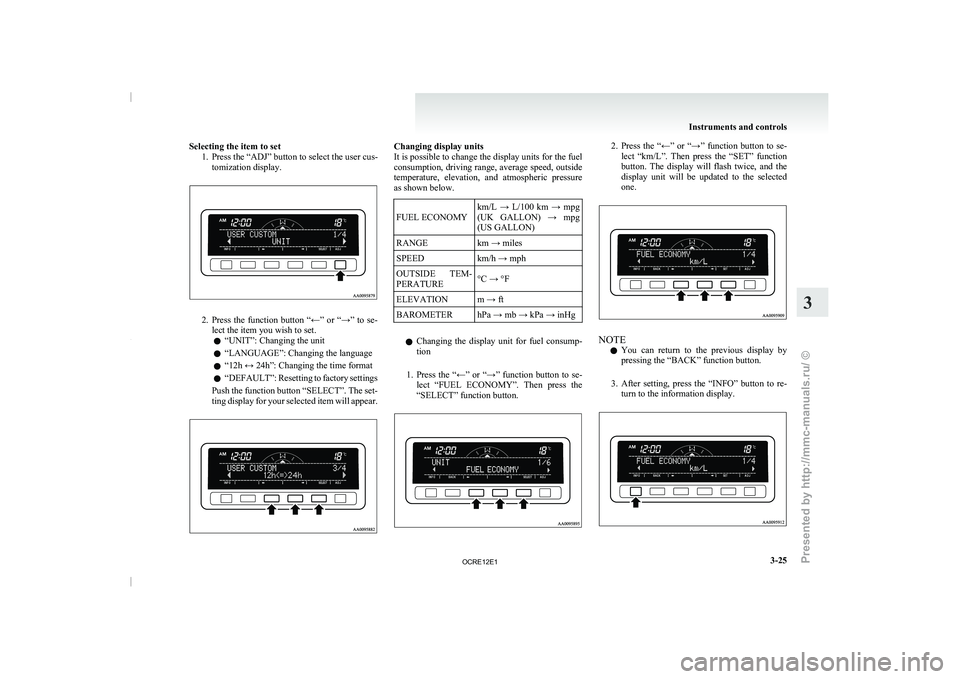
Selecting the item to set
1. Press the “ADJ” button to select the user cus-tomization display. 2. Press the function button “←” or “→” to se-
lect the item you wish to set.
l “UNIT”: Changing the unit
l “LANGUAGE”: Changing the language
l “12h ↔ 24h”: Changing the time format
l “DEFAULT”: Resetting to
factory
settings
Push the function button “SELECT”. The set-
ting display for your selected item will appear. Changing display units
It is possible to change the display units for the fuel
consumption, driving range, average speed,
outside
temperature, elevation, and atmospheric pressure
as shown below.
FUEL ECONOMY km/L → L/100 km → mpg
(UK GALLON) → mpg
(US GALLON)
RANGE km → miles
SPEED km/h → mph
OUTSIDE TEM-
PERATURE °C → °F
ELEVATION
m → ft
BAROMETER hPa → mb → kPa → inHg
l Changing the display unit for
fuel consump-
tion
1. Press the “←” or “→” function button to se- lect “FUEL ECONOMY”. Then press the
“SELECT” function button. 2. Press the “←” or “→” function button to se-
lect “km/L”. Then press
the “SET” function
button. The display will flash twice, and the
display unit will be updated to the selected
one. NOTE
l You
can return to the
previous display by
pressing the “BACK” function button.
3. After setting, press the “INFO” button to re- turn to the information display. Instruments and controls
3-25 3
OCRE12E1
Presented by http://mmc-manuals.ru/ \251
Page 112 of 369
NOTE
l The factory settings are as follows:
•Fuel consumption: L/100 km (62 mph)
• Driving range: km
• Average speed: km/h
•
Outside temperature: °C
• Elevation: m
• Atmospheric pressure: hPa
• Display language: English
• Time notation: 12-hour
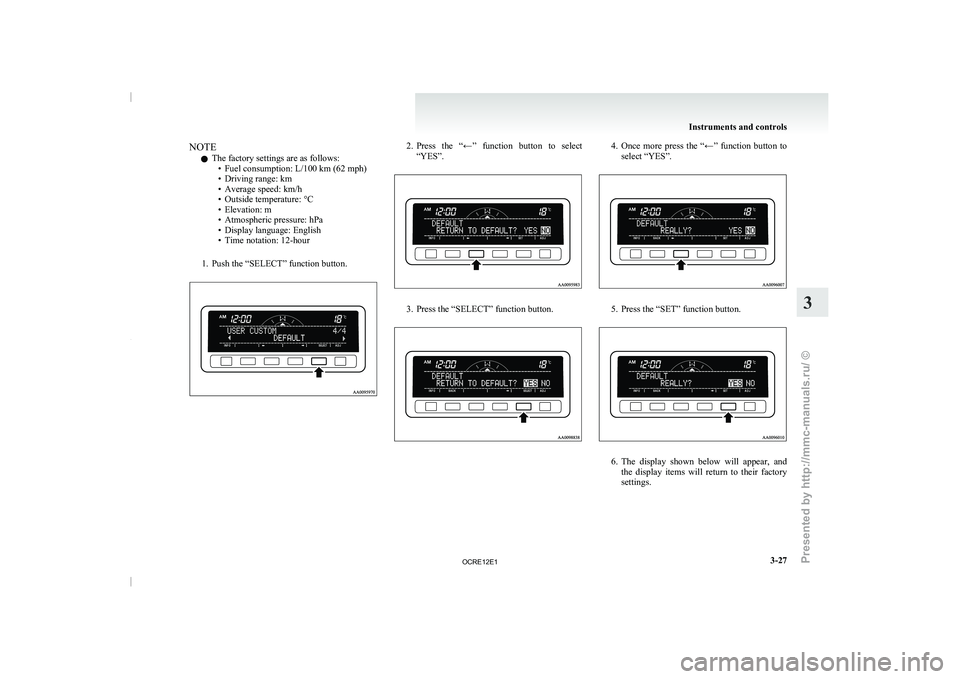
1. Push the “SELECT” function button. 2. Press the “←” function button to select
“YES”. 3. Press the “SELECT” function button. 4. Once more press the “←” function button to
select “YES”. 5. Press the “SET” function button.
6. The display shown below will appear, and
the display items will
return to their factory
settings. Instruments and controls
3-27 3
OCRE12E1
Presented by http://mmc-manuals.ru/ \251
Page 127 of 369
Economical driving
E00600100620
For economical driving, there are
some technical re-
quirements that have to be met. The prerequisite
for low fuel consumption is a properly adjusted en-
gine. In order to achieve longer life of the vehicle
and the most economical operation, we recommend
you to have the vehicle checked at regular intervals
in accordance with the service standards.
Fuel economy and generation of exhaust gas and
noise are highly influenced by personal driving hab-
its as well as the particular operating conditions.
The following points should be observed in order
to minimize wear of brakes, tyres and engine as
well as to reduce environmental pollution.
Starting
Avoid rapid acceleration and sudden starts; such op-
eration will result in higher fuel consumption.
Shifting
Shift only at an appropriate speed and engine
speed. Always use the highest gear possible.
The transfer shift lever should be set to “2H” when
driving 4WD vehicles on normal roads and express
ways to obtain best possible fuel economy.
City traffic
Frequent starting and stopping increases the aver-
age fuel consumption. Use roads with smooth traf-
fic flow whenever possible. When driving on con-
gested roads, avoid use of a low gear at high en-
gine speeds.
Idling
The vehicle consumes fuel even during idling.
Avoid extended idling whenever possible. Speed
The higher the vehicle
speed,
the more fuel con-
sumed. Avoid driving at full speed. Even a slight re-
lease of the accelerator pedal will save a significant
amount of fuel.
Tyre inflation pressure
Check the tyre inflation pressures at regular inter-
vals. Low tyre inflation pressure increases road re-
sistance and fuel consumption. In addition, low
tyre pressures adversely affect tyre wear and driv-
ing stability.
Load
Do not drive with unnecessary articles in the cargo
area. Especially during city driving where frequent
starting and stopping is necessary, the increased
weight of the vehicle will greatly affect fuel con-
sumption.
Cold engine starting
Starting of a cold engine consumes more fuel.
Unnecessary fuel consumption is also caused by
keeping a hot engine running. After the engine is
started, commence driving as soon as possible.
Air conditioning*
The use of the air conditioning will increase the
fuel consumption. Driving, alcohol and drugs
E00600200012
Driving after drinking alcohol is
one of the most fre-
quent causes of accidents.
Your driving ability can be seriously impaired even
with blood alcohol levels far below the legal mini-
mum. If you have been drinking, don’t drive. Ride
with a designated non-drinking driver, call a cab or
a friend, or use public transportation.
Drinking coffee or taking a cold shower will not
make you sober.
Similarly, prescription and nonprescription drugs af-
fect your alertness, perception and reaction time.
Consult with your doctor or pharmacist before driv-
ing while under the influence of any of these medi-
cations. WARNING
l NEVER DRINK AND DRIVE.
Your perceptions are less
accurate,
your
reflexes are slower and your judgment is
impaired. Starting and driving
4-02
4
OCRE12E1
Presented by http://mmc-manuals.ru/ \251