ESP NISSAN 350Z 2003 Z33 Owners Manual
[x] Cancel search | Manufacturer: NISSAN, Model Year: 2003, Model line: 350Z, Model: NISSAN 350Z 2003 Z33Pages: 227, PDF Size: 2.39 MB
Page 57 of 227

scribed above, have it checked by your
NISSAN dealer.NISSAN VEHICLE IMMOBILIZER
SYSTEM (NVIS)The Nissan Vehicle Immobilizer System will not
allow the engine to start without the use of the
registered Nissan Vehicle Immobilizer System
key.
If the engine fails to start using the registered
Nissan Vehicle Immobilizer System key, it may be
due to interference caused by another Nissan
Vehicle Immobilizer System key, an automated
toll road device or automated payment device on
the key ring. Restart the engine using the follow-
ing procedures:
1. Leave the ignition switch in the ON position
for approximately 5 seconds.
2. Turn the ignition switch to the OFF or LOCK
position and wait approximately 10 seconds.
3. Repeat step 1 and 2 again.
4. Restart the engine while holding the device
(which may have caused the interference)
separate from the registered Nissan Vehicle
Immobilizer System key.
If this procedure allows the engine to start,
NISSAN recommends placing the registeredNissan Vehicle Immobilizer System key on a
separate key ring to avoid interference from
other devices.
Statement related to section 15 of FCC
rules for Nissan Vehicle Immobilizer Sys-
tem (CONT ASSY-BCM, ANT ASSY-
IMMOBILIZER)
This device complies with part 15 of the
FCC Rules and RSS-210 of Industry
Canada. Operation is subject to the follow-
ing two conditions;
(1) This device may not cause harmful in-
terference, and (2) this device must accept
any interference received, including inter-
ference that may cause undesired opera-
tion of the device.
CHANGES OR MODIFICATIONS NOT EX-
PRESSLY APPROVED BY THE MANUFAC-
TURE RESPONSIBLE FOR COMPLIANCE
COULD VOID THE USER'S AUTHORITY TO
OPERATE THE EQUIPMENT.
Security indicator lightThis light blinks whenever the ignition switch is in
the LOCK, OFF or ACC position. This function
indicates the security system equipped on the
vehicle is operational.
If the Nissan Vehicle Immobilizer System is
malfunctioning, this light will remain on while the
ignition key is in the ON position.
If the light still remains on and/or the
engine will not start, see your NISSAN
dealer for Nissan Vehicle Immobilizer Sys-
tem service as soon as possible. Please
bring all Nissan Vehicle Immobilizer Sys-
SIC1699
2-18
Instruments and controls
Z
02.9.13/Z33-D/V5.0
X
Page 72 of 227
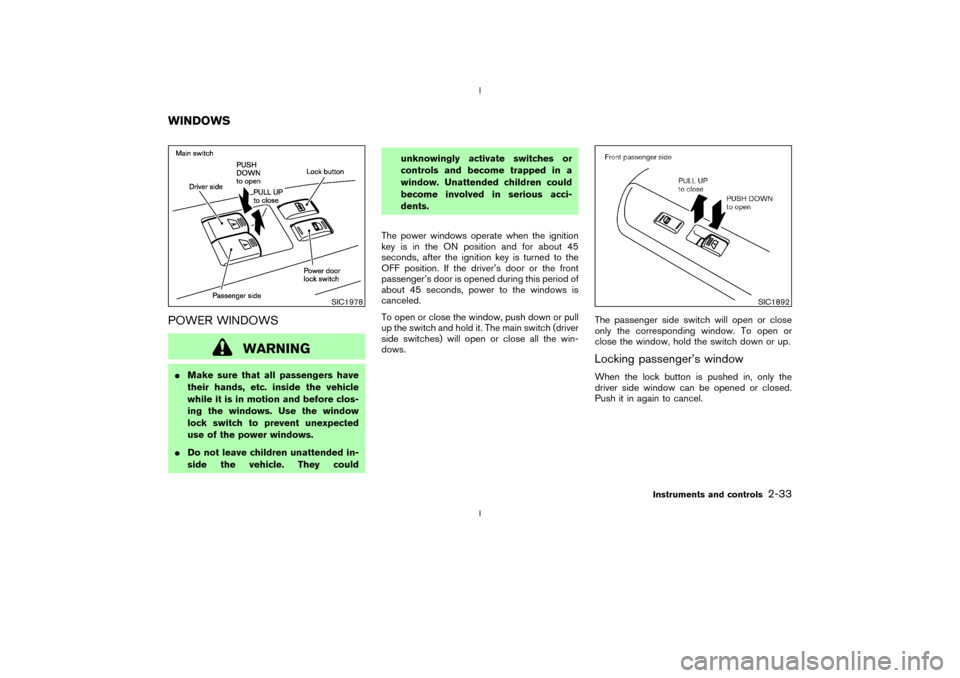
POWER WINDOWS
WARNING
IMake sure that all passengers have
their hands, etc. inside the vehicle
while it is in motion and before clos-
ing the windows. Use the window
lock switch to prevent unexpected
use of the power windows.
IDo not leave children unattended in-
side the vehicle. They couldunknowingly activate switches or
controls and become trapped in a
window. Unattended children could
become involved in serious acci-
dents.
The power windows operate when the ignition
key is in the ON position and for about 45
seconds, after the ignition key is turned to the
OFF position. If the driver's door or the front
passenger's door is opened during this period of
about 45 seconds, power to the windows is
canceled.
To open or close the window, push down or pull
up the switch and hold it. The main switch (driver
side switches) will open or close all the win-
dows.The passenger side switch will open or close
only the corresponding window. To open or
close the window, hold the switch down or up.
Locking passenger's windowWhen the lock button is pushed in, only the
driver side window can be opened or closed.
Push it in again to cancel.
SIC1978
SIC1892
WINDOWS
Instruments and controls
2-33
Z
02.9.13/Z33-D/V5.0
X
Page 79 of 227

been programmed into HomeLink
. Consult the
Owner's Manual of each device or call the
manufacturer or dealer of those devices for
additional information.
When your vehicle is recovered, you will
need to reprogram the HomeLink
Univer-
sal Transceiver with your new transmitter
information.
FCC Notice:
This device complies with FCC rules part
15. Operation is subject to the following
two conditions: (1) This device may not
cause harmful interference and (2) This
device must accept any interference that
may be received, including interference
that may cause undesired operation.
The transmitter has been tested and com-
plies with FCC and DOC/MDC rules.
Changes or modifications not expressly
approved by the party responsible for com-
pliance could void the user's authority to
operate the device.
DOC: ISTC 1763K1313
FCC I.D.: CB2V67690
2-40
Instruments and controls
Z
02.9.13/Z33-D/V5.0
X
Page 104 of 227

FM RADIO RECEPTIONRange: FM range is normally limited to 25 to 30
miles (40 to 48 km), with monaural (single
channel) FM having slightly more range than
stereo FM. External influences may sometimes
interfere with FM station reception even if the FM
station is within 25 miles (40 km). The strength
of the FM signal is directly related to the distance
between the transmitter and receiver. FM signals
follow a line-of-sight path, exhibiting many of the
same characteristics as light. For example they
will reflect off objects.
Fade and drift: As your vehicle moves away froma station transmitter, the signals will tend to fade
and/or drift.
Static and flutter: During signal interference from
buildings, large hills or due to antenna position,
usually in conjunction with increased distance
from the station transmitter, static or flutter can
be heard. This can be reduced by adjusting the
treble control counterclockwise to reduce treble
response.
Multipath reception: Because of the reflective
characteristics of FM signals, direct and re-
flected signals reach the receiver at the same
time. The signals may cancel each other, result-
ing in momentary flutter or loss of sound.
AM RADIO RECEPTIONAM signals, because of their low frequency, can
bend around objects and skip along the ground.
In addition, the signals can be bounced off the
ionosphere and bent back to earth. Because of
these characteristics. AM signals are also sub-
ject to interference as they travel from transmitter
to receiver.
Fading: Occurs while the vehicle is passing
through freeway underpasses or in areas with
many tall buildings. It can also occur for several
seconds during ionospheric turbulence even in
areas where no obstacles exist.
Static: Caused by thunderstorms, electricalpower lines, electric signs and even traffic lights.
AUDIO OPERATION PRECAUTIONS
Cassette playerITo maintain good quality sound,
NISSAN recommends using cassette
tapes of 60 minutes or shorter in length.
ICassette tapes should be removed from
the player when not in use. Store cas-
settes in their protective cases and
away from direct sunlight, heat, dust,
moisture and magnetic sources.
IDirect sunlight can cause the cassette to
become deformed. The use of deformed
cassettes may cause the cassette to jam
in the player.
IDo not use cassettes with labels which
are peeling and loose. If used, the label
could jam in the player.
IIf a cassette has loose tape, insert a
pencil through one of the cassette hubs
and rewind the tape firmly around the
hubs. Loose tape may cause tape jam-
ming and wavering sound quality.
IOver a period of time, the playback
head, capstan and pinch roller may col-
lect a tape coating residue as the tape is
SAA0306
Heater, air conditioner and audio systems
4-7
Z
02.9.13/Z33-D/V5.0
X
Page 125 of 227
IMake sure the area around the vehicle is
clear.
IMaintenance items should be checked peri-
odically, for example, each time you check
engine oil.
ICheck that all windows and lights are clean.
IVisually inspect tires for their appearance and
condition. Also, check tires for proper infla-
tion.
ILock all doors.
IPosition seat and adjust head restraints.
IAdjust inside and outside mirrors.
IFasten seat belts and ask all passengers to
do likewise.
ICheck the operation of warning lights when
key is turned to the ON (3) position.1. Apply the parking brake.
2.Automatic transmission:
Move the selector lever to P (Park) or N
(Neutral). (P preferred.)
The starter is designed not to operate if the
selector lever is in one of the driving posi-
tions.
Manual transmission:
Move the shift lever to N (Neutral) position,
and depress the clutch pedal to the floor
while cranking the engine.
The starter is designed not to operate unless
the clutch pedal is fully depressed.
3. Crank the enginewith your foot off the
accelerator pedalby turning the ignition
key to START. Release the key when the
engine starts. If the engine starts, but fails to
run, repeat the above procedure.
IWhen the engine is very hard to start in
extremely cold weather or when restarting,
depress the accelerator pedal a little (ap-
proximately 1/5 to the floor) and hold it then
crank the engine. Release the key and the
accelerator pedal when the engine starts.
IWhen the engine is very hard to start be-
cause it is flooded, depress the acceleratorpedal all the way to the floor and hold it.
Crank the engine for 5 to 6 seconds. After
cranking the engine, release the accelerator
pedal. Crank the enginewith your foot off
the accelerator pedalby turning the igni-
tion key to START. Release the key when the
engine starts. If the engine starts, but fails to
run, repeat the above procedure.
CAUTION
Do not operate the starter for more than
15 seconds at a time. If the engine does
not start, turn the key off and wait 10
seconds before cranking again, other-
wise the starter could be damaged.
4.Warm-up
Allow the engine to idle for at least 30
seconds after starting. Drive at moderate
speed for a short distance first, especially in
cold weather.
BEFORE STARTING THE ENGINE STARTING THE ENGINE5-8
Starting and driving
Z
02.9.13/Z33-D/V5.0
X
Page 136 of 227
WARNING
ISafe parking procedures require that
both the parking brake be set and the
transmission placed into P (Park) for
automatic transmission models or in
an appropriate gear for manual
transmission models. Failure to do
so could cause the vehicle to move
unexpectedly or roll away and result
in an accident.
IMake sure the automatic transmis-
sion selector lever has been pushed
as far forward as it can go and cannot
be moved without depressing the
button at the end of the lever.
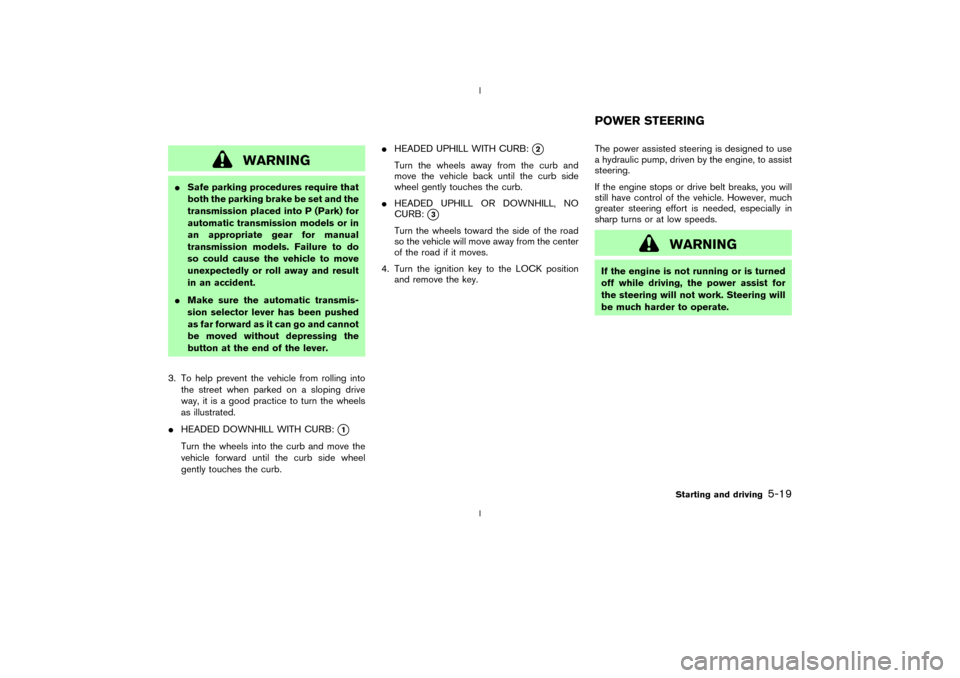
3. To help prevent the vehicle from rolling into
the street when parked on a sloping drive
way, it is a good practice to turn the wheels
as illustrated.
IHEADED DOWNHILL WITH CURB:
q1
Turn the wheels into the curb and move the
vehicle forward until the curb side wheel
gently touches the curb.IHEADED UPHILL WITH CURB:
q2
Turn the wheels away from the curb and
move the vehicle back until the curb side
wheel gently touches the curb.
IHEADED UPHILL OR DOWNHILL, NO
CURB:
q3
Turn the wheels toward the side of the road
so the vehicle will move away from the center
of the road if it moves.
4. Turn the ignition key to the LOCK position
and remove the key.The power assisted steering is designed to use
a hydraulic pump, driven by the engine, to assist
steering.
If the engine stops or drive belt breaks, you will
still have control of the vehicle. However, much
greater steering effort is needed, especially in
sharp turns or at low speeds.
WARNING
If the engine is not running or is turned
off while driving, the power assist for
the steering will not work. Steering will
be much harder to operate.POWER STEERING
Starting and driving
5-19
Z
02.9.13/Z33-D/V5.0
X
Page 138 of 227
While the actuator is working, you may feel a
pulsation in the brake pedal and hear a noise or
vibration from the actuator under the hood. This
is normal and indicates that the anti-lock system
is working properly. However, the pulsation may
indicate that road conditions are hazardous and
extra care is required while driving.Self-test featureThe anti-lock brake system consists of electronic
sensors, electric pumps, and hydraulic solenoids
controlled by a computer. The computer has a
built-in diagnostic feature that tests the system
each time you start the engine and move the
vehicle at a low speed in forward or reverse.
When the self-test occurs, you may hear a clunk
noise and/or feel a pulsation in the brake pedal.
This is normal and is not an indication of any
malfunction. If the computer senses any mal-
function, it switches the anti-lock brake system
OFF and turns on the ABS warning light in the
dashboard. The brake system will then behave
normally, but without anti-lock assistance.
If the light comes on during the self check, or
while you are driving, you should take your
vehicle to your NISSAN dealer for repair at your
earliest convenience.
WARNING
The anti-lock brake system is a sophis-
ticated device, but it cannot prevent ac-
cidents resulting from careless or dan-
gerous driving techniques. It can help
maintain vehicle control during braking
on slippery surfaces, but remember that
the stopping distance on slippery sur-
faces will be longer than on normal
surfaces, even with the anti-lock sys-
tem. Stopping distances may also be
longer on rough, gravel or snow covered
roads, or if you are using tire chains.
Always maintain a safe distance from
the vehicle in front of you. Ultimately,
the responsibility for safety of yourself
and others rests in the hands of the
driver.
Tire type and condition of tires may also
affect braking effectiveness.
IWhen replacing tires, install the
specified size for the front and rear
tires.IWhen installing a spare tire, make
sure it is the proper size and type as
specified on the tire placard. See
ªVehicle identificationº in the ª9.
Technical and consumer informationº
section for tire placard location.
Starting and driving
5-21
Z
02.9.13/Z33-D/V5.0
X
Page 139 of 227
On slippery surfaces such as wet asphalt roads,
vehicle wheels may spin when the vehicle is
accelerated. This wheel spin reduces accelera-
tion, or causes the vehicle to swerve, thus
decreasing vehicle stability.
When the vehicle drive wheels begin to spin, the
traction control system (TCS) controls the en-
gine torque using an electronic control system,
and it also controls automatic control shifting if
necessary (for automatic transmission models).
This reduces spinning of the drive wheels, and
result in improved vehicle acceleration perfor-
mance. It also improves the vehicle stability by
swerving motion.
IIndicator light
If a malfunction occurs in the traction control
system, the SLIP and
indicator lights
come on in the meter panel.
As long as these indicator lights are on, the
traction control function is canceled. The
vehicle will behaves like a model without the
traction control system.
To cancel the traction control system manu-
ally, turn off the traction control system off
switch. (The
indicator light illuminates.)
WARNING
The traction control system is designed
to prevent the wheels from spinning.
However, it does not prevent vehicle
slipping or spinning due to abrupt steer-
ing operation at high speeds or by care-
less or dangerous driving techniques.
Be especially careful when driving on
slippery surfaces and always drive
safely.When driving on slippery surfaces or suddenly
avoiding obstacles on roads, the vehicle might
swerve or slip. With the vehicle dynamic control
(VDC) system, sensors detect these movements
and control the braking and engine output to
help improve vehicle stability while driving.
IWhen the vehicle dynamic control system is
operating, the slip indicator light in the meter
panel blinks.
IWhen only the traction control system (TCS)
portion of the vehicle dynamic control system
is operating, the slip indicator light will also
blink.
IIf the slip indicator light blinks, the vehicle is
under slippery conditions. Be sure to drive
carefully. See ªSlip indicator lightº and ªVe-
hicle dynamic control off indicator lightº in the
ª2. Instruments and controlsº section.
IIndicator light
If a malfunction occurs in the system, the
SLIP and
indicator lights come on in
the meter panel.
As long as these indicator lights are on, the
traction control function is canceled.
The VDC system uses a Brake Limited Slip
Differential (LSD) system to improve vehicle
traction. The brake LSD system works when one
of the driving wheels is spinning on a slippery
TRACTION CONTROL SYSTEM
(TCS) (if so equipped)VEHICLE DYNAMIC CONTROL
(VDC) SYSTEM (if so equipped)5-22
Starting and driving
Z
02.9.13/Z33-D/V5.0
X
Page 140 of 227
surface. The brake LSD system brakes the spin-
ning wheel to distribute the driving power to the
other driving wheel.
If the vehicle is operated with the vehicle dy-
namic control system turned off, all VDC and
TCS functions will be turned off. The brake LSD
system and ABS will still operate with the VDC
system off. If the brake LSD system or the ABS
is activated, the slip indicator light will blink and
you may hear a clunk noise and/or feel a pulsa-
tion in the brake pedal. This is normal.
While the VDC system is operating, you may feel
a pulsation in the brake pedal and hear a noise or
vibration from under the hood. This is normal and
indicates that the VDC system is working prop-
erly.
The computer has a built in diagnostic feature
that tests the system each time you start the
engine and move the vehicle forward or in
reverse at a slow speed. When the self-test
occurs, you may hear a clunk noise and/or feel a
pulsation in the brake pedal. This is normal and is
not an indication of a malfunction.
WARNING
IThe vehicle dynamic control systemis designed to help improve driving
stability but does not prevent acci-
dents due to abrupt steering opera-
tion at high speeds or by careless or
dangerous driving techniques. Re-
duce vehicle speed and be especially
careful when driving and cornering
on slippery surfaces and always drive
carefully.
IIf suspension parts such as shock
absorbers, struts, springs and bush-
ings are not standard equipment or
are extremely deteriorated, the ve-
hicle dynamic control off indicator
light may come on.
IWhen driving on extremely inclined
surfaces such as higher banked cor-
ners, the vehicle dynamic control sys-
tem may not operate properly or the
vehicle dynamic control off indicator
light may come on. Do not drive on
these types of roads.
IIf the tires other than the recom-
mended ones are used, the vehicle
dynamic control system may not op-erate properly or the vehicle dynamic
control off indicator light may come
on.
IThe vehicle dynamic control system
is not a substitute for winter tires or
tire chains on a snow covered road.
Starting and driving
5-23
Z
02.9.13/Z33-D/V5.0
X
Page 148 of 227
IUse the correct jack up points; never
use any other part of the vehicle for
jack support.
INever jack up the vehicle more than
necessary.
INever use blocks on or under the
jack.
IDo not start or run engine while ve-
hicle is on the jack, as it may cause
the vehicle to move. This is especially
true for vehicles with limited slip dif-
ferential carriers.
IDo not allow passengers to stay in
the vehicle while it is on the jack.
Installing the spare tire1. Clean any mud or dirt from the surface
between the wheel and hub.
2. Carefully put the wheel on and tighten the
wheel nuts finger tight. When replacing a
front tire, make sure the hole in the spare tire
wheel is aligned with the pin on the brake
rotor.
3. With the wheel nut wrench, tighten wheel
nuts alternately and evenly until they are tight.
4. Lower the vehicle slowly until the tire touches
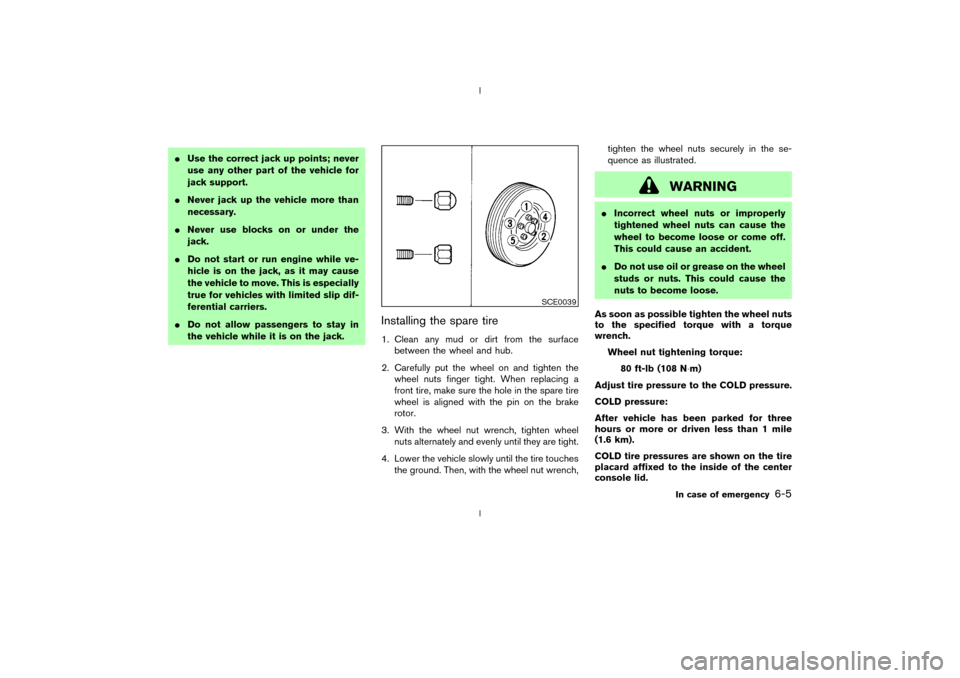
the ground. Then, with the wheel nut wrench,tighten the wheel nuts securely in the se-
quence as illustrated.
WARNING
IIncorrect wheel nuts or improperly
tightened wheel nuts can cause the
wheel to become loose or come off.
This could cause an accident.
IDo not use oil or grease on the wheel
studs or nuts. This could cause the
nuts to become loose.
As soon as possible tighten the wheel nuts
to the specified torque with a torque
wrench.
Wheel nut tightening torque:
80 ft-lb (108 N×m)
Adjust tire pressure to the COLD pressure.
COLD pressure:
After vehicle has been parked for three
hours or more or driven less than 1 mile
(1.6 km).
COLD tire pressures are shown on the tire
placard affixed to the inside of the center
console lid.
SCE0039
In case of emergency
6-5
Z
02.9.13/Z33-D/V5.0
X