ECU NISSAN 370Z 2018 Owner´s Manual
[x] Cancel search | Manufacturer: NISSAN, Model Year: 2018, Model line: 370Z, Model: NISSAN 370Z 2018Pages: 453, PDF Size: 2.19 MB
Page 47 of 453
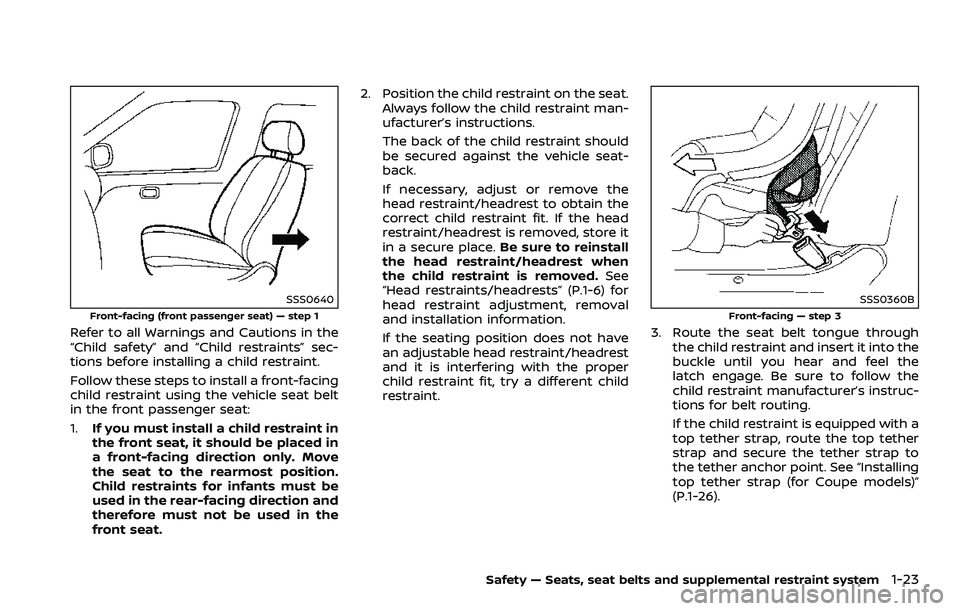
SSS0640
Front-facing (front passenger seat) — step 1
Refer to all Warnings and Cautions in the
“Child safety” and “Child restraints” sec-
tions before installing a child restraint.
Follow these steps to install a front-facing
child restraint using the vehicle seat belt
in the front passenger seat:
1.If you must install a child restraint in
the front seat, it should be placed in
a front-facing direction only. Move
the seat to the rearmost position.
Child restraints for infants must be
used in the rear-facing direction and
therefore must not be used in the
front seat. 2. Position the child restraint on the seat.
Always follow the child restraint man-
ufacturer’s instructions.
The back of the child restraint should
be secured against the vehicle seat-
back.
If necessary, adjust or remove the
head restraint/headrest to obtain the
correct child restraint fit. If the head
restraint/headrest is removed, store it
in a secure place. Be sure to reinstall
the head restraint/headrest when
the child restraint is removed. See
“Head restraints/headrests” (P.1-6) for
head restraint adjustment, removal
and installation information.
If the seating position does not have
an adjustable head restraint/headrest
and it is interfering with the proper
child restraint fit, try a different child
restraint.
SSS0360B
Front-facing — step 3
3. Route the seat belt tongue through
the child restraint and insert it into the
buckle until you hear and feel the
latch engage. Be sure to follow the
child restraint manufacturer’s instruc-
tions for belt routing.
If the child restraint is equipped with a
top tether strap, route the top tether
strap and secure the tether strap to
the tether anchor point. See “Installing
top tether strap (for Coupe models)”
(P.1-26).
Safety — Seats, seat belts and supplemental restraint system1-23
Page 49 of 453
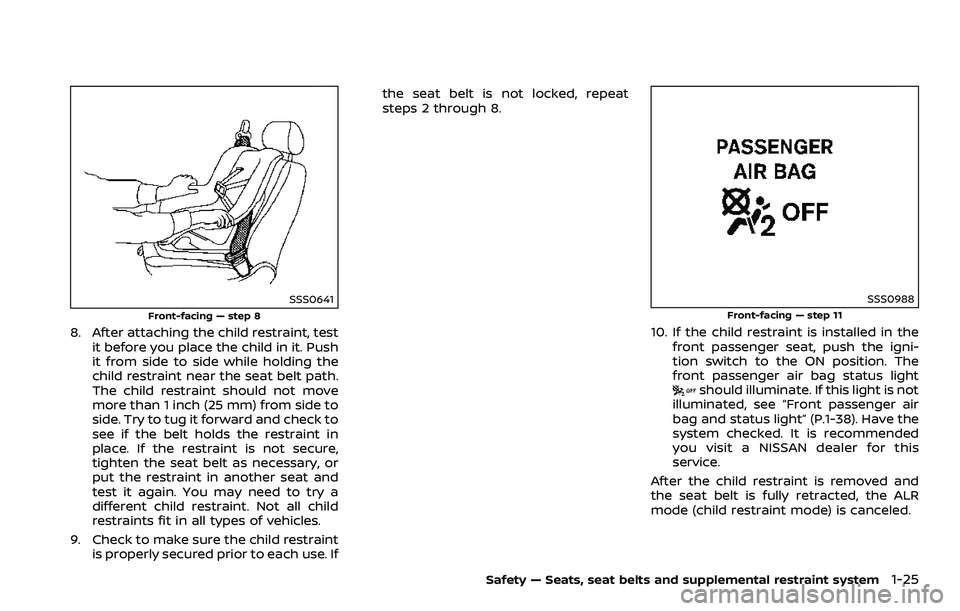
SSS0641
Front-facing — step 8
8. After attaching the child restraint, testit before you place the child in it. Push
it from side to side while holding the
child restraint near the seat belt path.
The child restraint should not move
more than 1 inch (25 mm) from side to
side. Try to tug it forward and check to
see if the belt holds the restraint in
place. If the restraint is not secure,
tighten the seat belt as necessary, or
put the restraint in another seat and
test it again. You may need to try a
different child restraint. Not all child
restraints fit in all types of vehicles.
9. Check to make sure the child restraint is properly secured prior to each use. If the seat belt is not locked, repeat
steps 2 through 8.
SSS0988Front-facing — step 11
10. If the child restraint is installed in the
front passenger seat, push the igni-
tion switch to the ON position. The
front passenger air bag status light
should illuminate. If this light is not
illuminated, see “Front passenger air
bag and status light” (P.1-38). Have the
system checked. It is recommended
you visit a NISSAN dealer for this
service.
After the child restraint is removed and
the seat belt is fully retracted, the ALR
mode (child restraint mode) is canceled.
Safety — Seats, seat belts and supplemental restraint system1-25
Page 50 of 453
1-26Safety — Seats, seat belts and supplemental restraint system
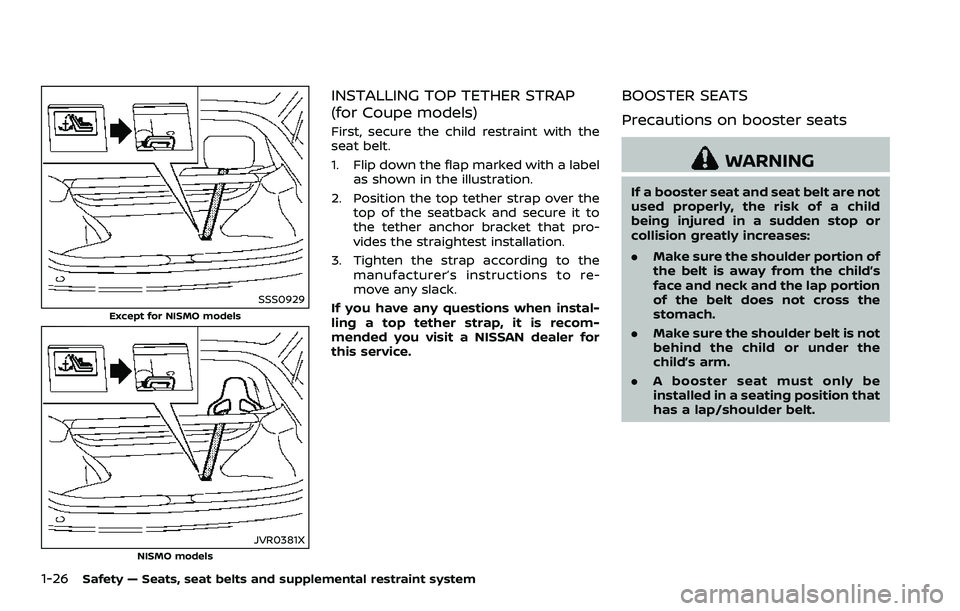
SSS0929
Except for NISMO models
JVR0381XNISMO models
INSTALLING TOP TETHER STRAP
(for Coupe models)
First, secure the child restraint with the
seat belt.
1. Flip down the flap marked with a labelas shown in the illustration.
2. Position the top tether strap over the top of the seatback and secure it to
the tether anchor bracket that pro-
vides the straightest installation.
3. Tighten the strap according to the manufacturer’s instructions to re-
move any slack.
If you have any questions when instal-
ling a top tether strap, it is recom-
mended you visit a NISSAN dealer for
this service.
BOOSTER SEATS
Precautions on booster seats
WARNING
If a booster seat and seat belt are not
used properly, the risk of a child
being injured in a sudden stop or
collision greatly increases:
. Make sure the shoulder portion of
the belt is away from the child’s
face and neck and the lap portion
of the belt does not cross the
stomach.
. Make sure the shoulder belt is not
behind the child or under the
child’s arm.
. A booster seat must only be
installed in a seating position that
has a lap/shoulder belt.
Page 52 of 453
1-28Safety — Seats, seat belts and supplemental restraint system
Booster seat installation
CAUTION
Do not use the lap/shoulder belt
Automatic Locking Retractor (ALR)
mode when using a booster seat
with the seat belts.
Refer to all Warnings and Cautions in the
“Child safety”, “Child restraints” and “Boos-
ter seats” sections earlier in this section
before installing a child restraint.
Follow these steps to install a booster
seat in the front passenger seat:
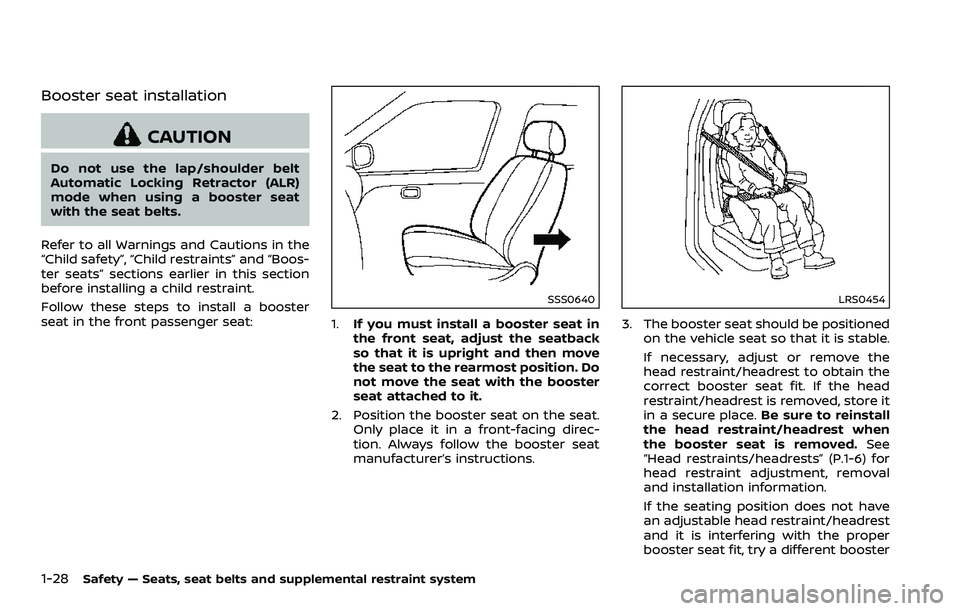
SSS0640
1. If you must install a booster seat in
the front seat, adjust the seatback
so that it is upright and then move
the seat to the rearmost position. Do
not move the seat with the booster
seat attached to it.
2. Position the booster seat on the seat. Only place it in a front-facing direc-
tion. Always follow the booster seat
manufacturer’s instructions.
LRS0454
3. The booster seat should be positioned
on the vehicle seat so that it is stable.
If necessary, adjust or remove the
head restraint/headrest to obtain the
correct booster seat fit. If the head
restraint/headrest is removed, store it
in a secure place. Be sure to reinstall
the head restraint/headrest when
the booster seat is removed. See
“Head restraints/headrests” (P.1-6) for
head restraint adjustment, removal
and installation information.
If the seating position does not have
an adjustable head restraint/headrest
and it is interfering with the proper
booster seat fit, try a different booster
Page 63 of 453
bag to be automatically turned OFF. For
small adults it may be turned OFF, how-
ever, if the occupant does not sit in the
seat properly (for example, by not sitting
upright, by sitting on an edge of the seat,
or by otherwise being out of position), this
could cause the sensor to turn the air bag
OFF. Always be sure to be seated and
wearing the seat belt properly for the
most effective protection by the seat belt
and supplemental air bag.
The occupant classification sensor is
designed to operate as described above
to turn the front passenger air bag OFF
for specified child restraints. Failing to
properly secure child restrains and to use
the ALR mode (child restraint mode) may
allow the restraint to tip or move in an
accident or sudden stop. This can also
result in the front passenger air bag
inflating in a crash instead of being OFF.
(See “Child restraints” (P.1-19) for proper
use and installation.)
If the front passenger seat is not occu-
pied, the front passenger air bag is
designed not to inflate in a crash. How-
ever, heavy objects placed on the seat
could result in air bag inflation, because of
the object being detected by the occu-
pant classification sensor. Other condi-
tions could also result in air bag inflation,
such as if a child is standing on the seat,or if two children are on the seat, contrary
to the instructions in this manual. Always
be sure that you and all vehicle occupants
are seated and restrained properly.
Using the front passenger air bag status
light, you can monitor when the front
passenger air bag is automatically turned
OFF with the seat occupied. The light will
not illuminate when the front passenger
seat is unoccupied.
If an adult occupant is in the seat but the
front passenger air bag status light is
illuminated (indicating that the air bag is
OFF), it could be that the person is a small
adult, or is not sitting on the seat
properly.
If a child restraint must be used in the
front seat, the front passenger air bag
status light may or may not be illumi-
nated, depending on the size of the child
and the type of child restraint being used.
If the front passenger air bag status light
is not illuminated (indicating that the air
bag might inflate in a crash), it could be
that the child restraint or seat belt is not
being used properly. Make sure that the
child restraint is installed properly, the
seat belt is used properly and the occu-
pant is positioned properly. If the front
passenger air bag status light is still not
illuminated, try a different child restraint.
If the front passenger air bag status light
will not illuminate even though you be-
lieve that the child restraint, the seat belts
and the occupant are properly positioned,
the system may be sensing an unoccu-
pied seat (in which case the air bag is
OFF). Your NISSAN dealer can check that
the system is OFF by using a special tool.
However, until you have confirmed with
your dealer that your air bag is working
properly, do not transport a child in this
vehicle.
The NISSAN Advanced Air Bag System
and front passenger air bag status light
will take a few seconds to register a
change in the front passenger seat sta-
tus. However, if the seat becomes unoc-
cupied, the front passenger air bag status
light will remain off.
If a malfunction occurs in the front
passenger air bag system, the supple-
mental air bag warning light
, located
in the meter and gauges area will blink.
Have the system checked. It is recom-
mended you visit a NISSAN dealer for this
service.
Safety — Seats, seat belts and supplemental restraint system1-39
Page 71 of 453

2 Instruments and controls
Cockpit ........................................................................\
........................... 2-3
Instrument panel ........................................................................\
... 2-4
Meters and gauges ...................................................................... 2-5Speedometer and odometer ......................................... 2-6
Tachometer ........................................................................\
......... 2-7
Engine coolant temperature gauge ........................ 2-7
Fuel gauge ........................................................................\
............ 2-8
Triple meter ........................................................................\
......... 2-8
Warning lights, indicator lights and
audible reminders ....................................................................... 2-10
Checking lights ........................................................................\
2-11
Warning lights ........................................................................\
... 2-11
Indicator lights ........................................................................\
2-15
Audible reminders ................................................................ 2-18
Vehicle information display ................................................. 2-19 Operational indicators ...................................................... 2-19
Warnings and alerts ............................................................ 2-21
Maintenance indicators .................................................. 2-23
Trip computer ........................................................................\
. 2-23
Security systems ........................................................................\
. 2-29
Vehicle Security System ................................................. 2-29
NISSAN Vehicle Immobilizer System ..................... 2-30
Wiper and washer switch ..................................................... 2-32
Rear window defroster switch ......................................... 2-33 Headlight and turn signal switch ................................. 2-34
Xenon headlights .............................................................. 2-34
Headlight switch ................................................................ 2-34
Turn signal switch ............................................................ 2-37
Fog light switch (if so equipped) .......................... 2-38
Horn ........................................................................\
.............................. 2-38
Heated seats (if so equipped) .......................................... 2-38
Climate controlled seats (if so equipped) .............. 2-40
Vehicle Dynamic Control (VDC) OFF switch .......... 2-41
Power outlet ........................................................................\
.......... 2-42
Storage ........................................................................\
....................... 2-43 Instrument pocket (except for navigation
system equipped models) .......................................... 2-43
Cup holders ........................................................................\
.... 2-43
Glove box ........................................................................\
......... 2-44
Console box ........................................................................\
... 2-44
Rear parcel box ................................................................... 2-45
Cargo cover (if so equipped) .................................... 2-45
Windows ........................................................................\
.................... 2-46 Power windows .................................................................. 2-46
Interior lights ........................................................................\
......... 2-50 Map lights ........................................................................\
........ 2-50
Interior light control switch ...................................... 2-50
Vanity mirror lights ................................................................... 2-51
Page 80 of 453
2-10Instruments and controls
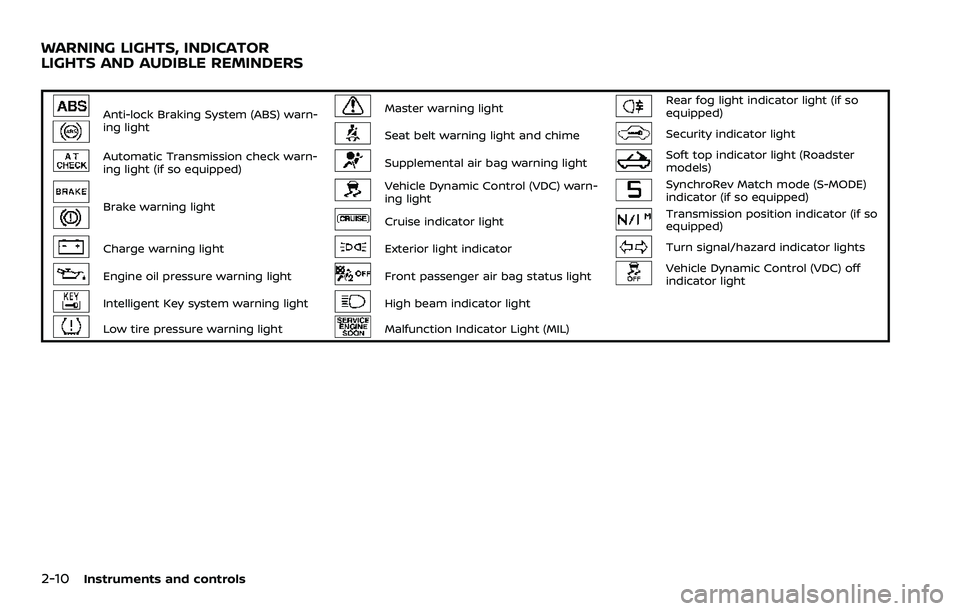
Anti-lock Braking System (ABS) warn-
ing lightMaster warning lightRear fog light indicator light (if so
equipped)
Seat belt warning light and chimeSecurity indicator light
Automatic Transmission check warn-
ing light (if so equipped)Supplemental air bag warning lightSoft top indicator light (Roadster
models)
Brake warning light
Vehicle Dynamic Control (VDC) warn-
ing lightSynchroRev Match mode (S-MODE)
indicator (if so equipped)
Cruise indicator lightTransmission position indicator (if so
equipped)
Charge warning lightExterior light indicatorTurn signal/hazard indicator lights
Engine oil pressure warning lightFront passenger air bag status lightVehicle Dynamic Control (VDC) off
indicator light
Intelligent Key system warning lightHigh beam indicator light
Low tire pressure warning lightMalfunction Indicator Light (MIL)
WARNING LIGHTS, INDICATOR
LIGHTS AND AUDIBLE REMINDERS
Page 84 of 453
2-14Instruments and controls
If you have a flat tire, replace it
with a spare tire (if so equipped)
or repair it with the tire puncture
repair kit (if so equipped) as soon
as possible. If no tire is flat and all
tires are properly inflated, it is
recommended you consult a
NISSAN dealer.
. Since the spare tire is not
equipped with the TPMS, when a
spare tire is mounted or a wheel
is replaced, the TPMS will not
function and the low tire pressure
warning light will flash for ap-
proximately 1 minute. The light
will remain on after the 1 minute.
Have your tires replaced and/or
TPMS system reset as soon as
possible. It is recommended you
visit a NISSAN dealer for these
services.
. Replacing tires with those not
originally specified by NISSAN
could affect the proper operation
of the TPMS.
CAUTION
.The TPMS is not a substitute for
the regular tire pressure check. Be sure to check the tire pressure
regularly.
. If the vehicle is being driven at
speeds of less than 16 MPH (25
km/h), the TPMS may not operate
correctly.
. Be sure to install the specified
size of tires to the four wheels
correctly.
Master warning light
When the ignition switch is in the ON
position, the master warning light illumi-
nates if any of the following are displayed
on the vehicle information display:
.No key warning
. Low fuel warning
. Low washer fluid warning
. Parking brake release warning
. Door/rear hatch/trunk open warning
. Loose fuel cap warning
. Check tire pressure warning
. Extended storage fuse warning
See “Vehicle information display” (P.2-19).
Seat belt warning light and
chime
The light and chime remind you to fasten
seat belts. The light illuminates whenever
the ignition switch is pushed to the ON
position, and will remain illuminated until
the driver’s seat belt is fastened. At the
same time, the chime will sound for about
6 seconds unless the driver’s seat belt is
securely fastened.
The seat belt warning light for the front
passenger will illuminate if the seat belt is
not fastened when the front passenger’s
seat is occupied. For approximately 5
seconds after the ignition switch is in
the ON position, the system does not
activate the warning light for the front
passenger.
See “Seat belts” (P.1-10) for precautions on
seat belt usage.
Supplemental air bag warning
light
After pushing the ignition switch to the
ON position, the supplemental air bag
warning light will illuminate. The air bag
warning light will turn off after about 7
seconds if the front air bag, side air bag
and curtain air bag systems and/or pre-
tensioner system are operational.
Page 87 of 453
Rear fog light indicator light (if
so equipped)
The rear fog light indicator light illumi-
nates when the rear fog light is on. (See
“Fog light switch” (P.2-38).)
Security indicator light
The light blinks when the ignition switch
is in the ACC, OFF or LOCK position. This
function indicates the security system
equipped on the vehicle is operational.
If the security system is malfunctioning,
this light will remain on while the ignition
switch is in the ON position. For additional
information, see “Security systems” (P.2-
29).
Soft top indicator light (Road-
ster models)
This light illuminates when the soft top is
being operated or it is stopped before
reaching a full open/close state. When the
top is fully opened or closed, the light will
turn off.
The light blinks while the soft top is not
fully opened or closed under the following
conditions:
. When the vehicle is driven. .
When the shift lever is in the R
(Reverse) position.
Be sure to fully open or close the soft top
when driving the vehicle.
The soft top can be moved with the soft
top operating switch only under all of the
following conditions:
. When the vehicle is stopped.
. When the ignition switch is ON.
. When the trunk is closed.
. When the shift lever is in a position
other than the R (Reverse) position.
CAUTION
Operate the soft top with the engine
running to prevent a discharged
battery.
When the soft top is operating, if any of
the above conditions are discontinued or
any of the following conditions are met,
the top will stop operating.
. When the shift lever is in the R
(Reverse) position.
. When the vehicle moves at a speed of
3 MPH (5 km/h) or more.
. When the battery voltage is extremely
low. .
When the temperature of the soft top
system becomes extremely high.
Release the operating switch, and push it
again under the above conditions until
the top is fully opened or closed. The soft
top indicator light will turn off when the
top operation is completely finished.
If the soft top indicator light illuminates
with the ignition switch ON, it may
indicate the electric soft top control unit
is not functioning properly. Have your
vehicle checked as soon as possible. It is
recommended you visit a NISSAN dealer
for this service.
For more details about the electric soft
top operation, see “Soft top (Roadster
models)” (P.3-23).
SynchroRev Match mode (S-
MODE) indicator (if so equipped)
This indicator will illuminate when the
SynchroRev Match mode (S-MODE) is
activated. (See “SynchroRev Match mode
(S-MODE) (if so equipped for Manual
Transmission models)” (P.5-18).)
Instruments and controls2-17
Page 91 of 453
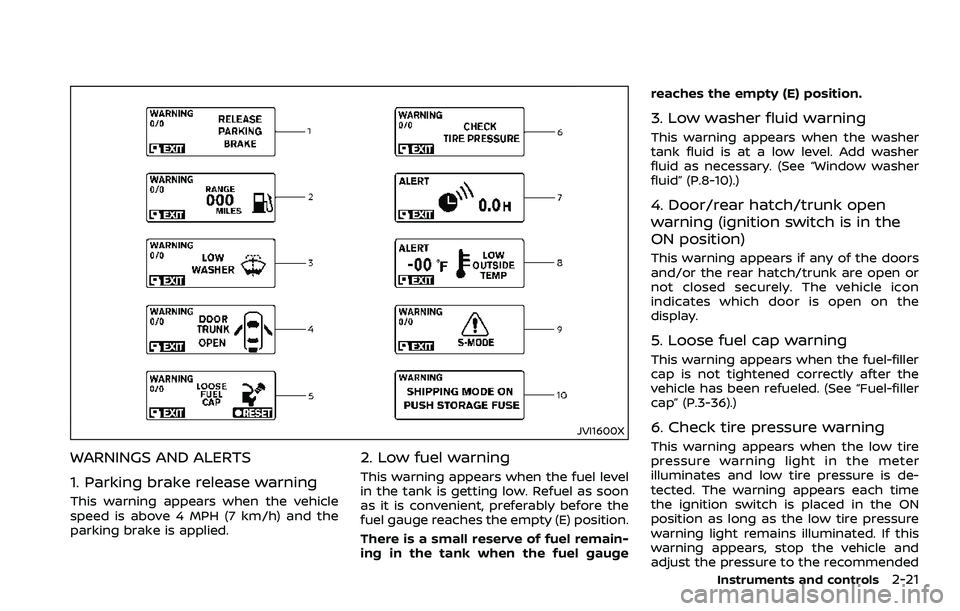
JVI1600X
WARNINGS AND ALERTS
1. Parking brake release warning
This warning appears when the vehicle
speed is above 4 MPH (7 km/h) and the
parking brake is applied.
2. Low fuel warning
This warning appears when the fuel level
in the tank is getting low. Refuel as soon
as it is convenient, preferably before the
fuel gauge reaches the empty (E) position.
There is a small reserve of fuel remain-
ing in the tank when the fuel gaugereaches the empty (E) position.
3. Low washer fluid warning
This warning appears when the washer
tank fluid is at a low level. Add washer
fluid as necessary. (See “Window washer
fluid” (P.8-10).)
4. Door/rear hatch/trunk open
warning (ignition switch is in the
ON position)
This warning appears if any of the doors
and/or the rear hatch/trunk are open or
not closed securely. The vehicle icon
indicates which door is open on the
display.
5. Loose fuel cap warning
This warning appears when the fuel-filler
cap is not tightened correctly after the
vehicle has been refueled. (See “Fuel-filler
cap” (P.3-36).)
6. Check tire pressure warning
This warning appears when the low tire
pressure warning light in the meter
illuminates and low tire pressure is de-
tected. The warning appears each time
the ignition switch is placed in the ON
position as long as the low tire pressure
warning light remains illuminated. If this
warning appears, stop the vehicle and
adjust the pressure to the recommended
Instruments and controls2-21