fuel NISSAN 370Z 2018 Owner´s Manual
[x] Cancel search | Manufacturer: NISSAN, Model Year: 2018, Model line: 370Z, Model: NISSAN 370Z 2018Pages: 453, PDF Size: 2.19 MB
Page 162 of 453
3-36Pre-driving checks and adjustments
To lock, close the fuel-filler door securely
and lock all doors by operating the door
handle request switch, the LOCK button
on the Intelligent Key, the mechanical key
or the power door lock switch.
FUEL-FILLER CAP
WARNING
.Gasoline is extremely flammable
and highly explosive under cer-
tain conditions. You could be
burned or seriously injured if it is
misused or mishandled. Always
stop engine and do not smoke or
allow open flames or sparks near
the vehicle when refueling.
. Do not attempt to top off the fuel
tank after the fuel pump nozzle
shuts off automatically. Contin-
ued refueling may cause fuel
overflow, resulting in fuel spray
and possibly a fire.
. Use only an original equipment
type fuel-filler cap as a replace-
ment. It has a built-in safety valve
needed for proper operation of
the fuel system and emission
control system. An incorrect cap
can result in a serious malfunc-
tion and possible injury. It could also cause the malfunction indi-
cator light to come on.
. Never pour fuel into the throttle
body to attempt to start your
vehicle.
. Do not fill a portable fuel contain-
er in the vehicle or trailer. Static
electricity can cause an explosion
of flammable liquid, vapor or gas
in any vehicle or trailer. To reduce
the risk of serious injury or death
when filling portable fuel contain-
ers:
— Always place the container on
the ground when filling.
— Do not use electronic devices when filling.
— Keep the pump nozzle in con- tact with the container while
you are filling it.
— Use only approved portable fuel containers for flammable
liquid.
CAUTION
. If fuel is spilled on the vehicle
body, flush it away with water to avoid paint damage.
. Insert the cap straight into the
fuel-filler tube, then tighten until
the fuel-filler cap clicks. Failure to
tighten the fuel-filler cap properly
may cause the
malfunction
indicator light (MIL) to illuminate.
If the
light illuminates be-
cause the fuel-filler cap is loose
or missing, tighten or install the
cap and continue to drive the
vehicle. The
light should turn
off after a few driving trips. If the
light does not turn off after a
few driving trips, have the vehicle
inspected. It is recommended you
visit a NISSAN dealer for this
service.
. The LOOSE FUEL CAP warning will
appear if the fuel-filler cap is not
properly tightened. It may take a
few driving trips for the message
to be displayed. Failure to tighten
the fuel-filler cap properly after
the LOOSE FUEL CAP warning
appears may cause the
Mal-
function Indicator Light (MIL) to
illuminate.
Page 163 of 453
SPA2837
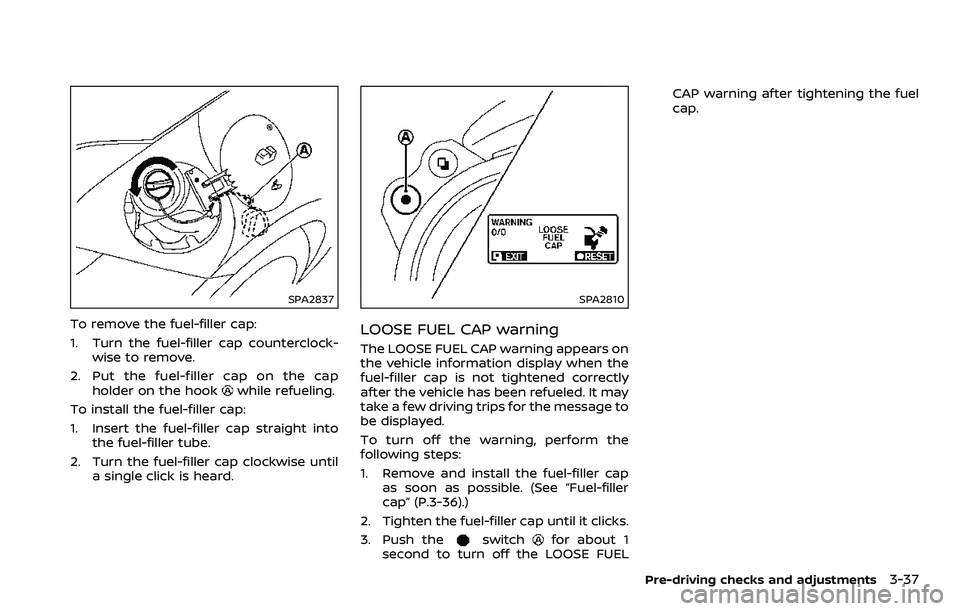
To remove the fuel-filler cap:
1. Turn the fuel-filler cap counterclock-wise to remove.
2. Put the fuel-filler cap on the cap holder on the hook
while refueling.
To install the fuel-filler cap:
1. Insert the fuel-filler cap straight into the fuel-filler tube.
2. Turn the fuel-filler cap clockwise until a single click is heard.
SPA2810
LOOSE FUEL CAP warning
The LOOSE FUEL CAP warning appears on
the vehicle information display when the
fuel-filler cap is not tightened correctly
after the vehicle has been refueled. It may
take a few driving trips for the message to
be displayed.
To turn off the warning, perform the
following steps:
1. Remove and install the fuel-filler capas soon as possible. (See “Fuel-filler
cap” (P.3-36).)
2. Tighten the fuel-filler cap until it clicks.
3. Push the
switchfor about 1
second to turn off the LOOSE FUEL CAP warning after tightening the fuel
cap.
Pre-driving checks and adjustments3-37
Page 176 of 453
4-8Center display, heater, air conditioner, audio, phone and voice recognition systems
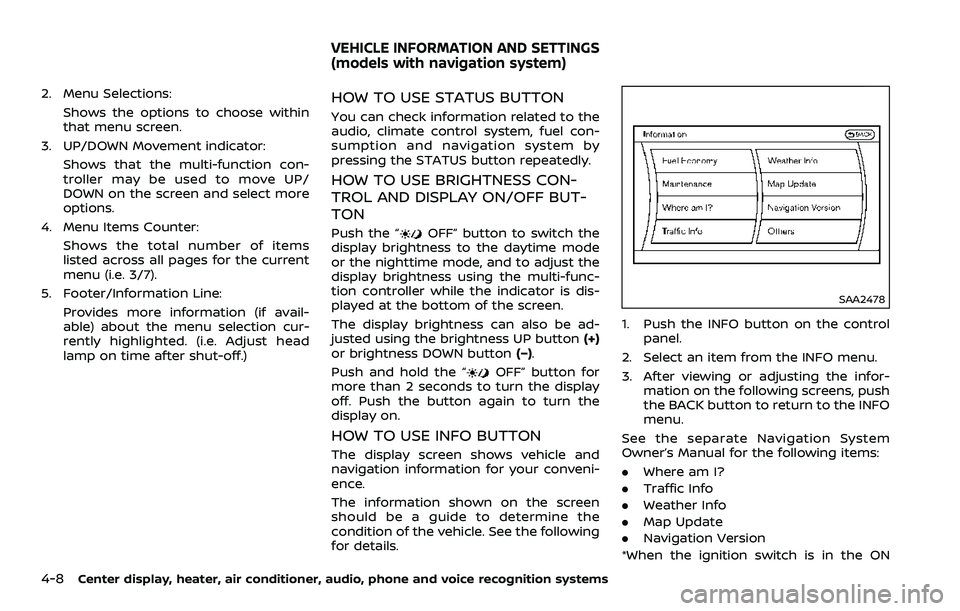
2. Menu Selections:Shows the options to choose within
that menu screen.
3. UP/DOWN Movement indicator:
Shows that the multi-function con-
troller may be used to move UP/
DOWN on the screen and select more
options.
4. Menu Items Counter: Shows the total number of items
listed across all pages for the current
menu (i.e. 3/7).
5. Footer/Information Line: Provides more information (if avail-
able) about the menu selection cur-
rently highlighted. (i.e. Adjust head
lamp on time after shut-off.)HOW TO USE STATUS BUTTON
You can check information related to the
audio, climate control system, fuel con-
sumption and navigation system by
pressing the STATUS button repeatedly.
HOW TO USE BRIGHTNESS CON-
TROL AND DISPLAY ON/OFF BUT-
TON
Push the “OFF” button to switch the
display brightness to the daytime mode
or the nighttime mode, and to adjust the
display brightness using the multi-func-
tion controller while the indicator is dis-
played at the bottom of the screen.
The display brightness can also be ad-
justed using the brightness UP button (+)
or brightness DOWN button (−).
Push and hold the “
OFF” button for
more than 2 seconds to turn the display
off. Push the button again to turn the
display on.
HOW TO USE INFO BUTTON
The display screen shows vehicle and
navigation information for your conveni-
ence.
The information shown on the screen
should be a guide to determine the
condition of the vehicle. See the following
for details.
SAA2478
1. Push the INFO button on the control
panel.
2. Select an item from the INFO menu.
3. After viewing or adjusting the infor- mation on the following screens, push
the BACK button to return to the INFO
menu.
See the separate Navigation System
Owner’s Manual for the following items:
. Where am I?
. Traffic Info
. Weather Info
. Map Update
. Navigation Version
*When the ignition switch is in the ON
VEHICLE INFORMATION AND SETTINGS
(models with navigation system)
Page 177 of 453
position, the “Navigation Version” key is
displayed after selecting the “Others” key.
SAA2479
SAA2480
Fuel Economy information
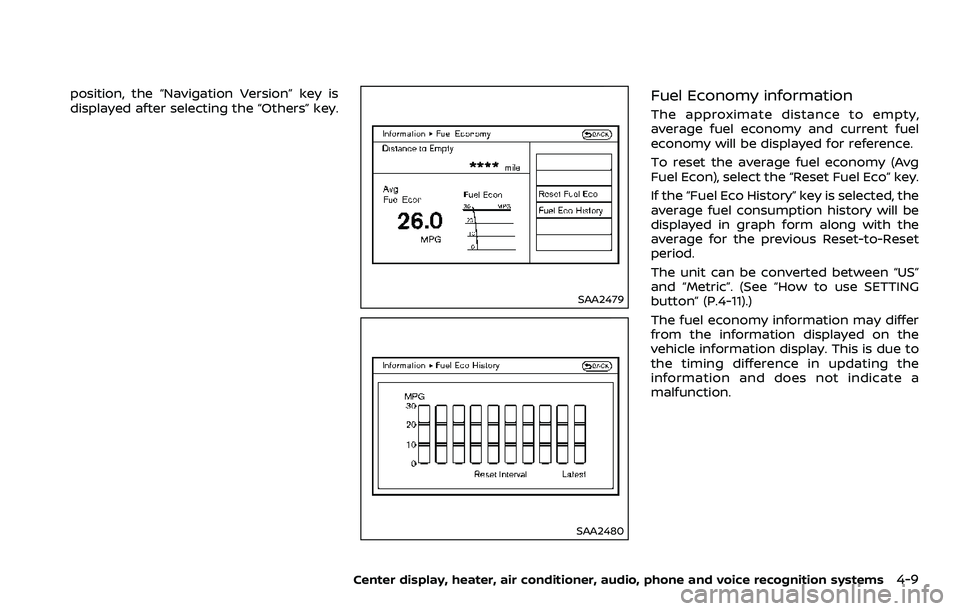
The approximate distance to empty,
average fuel economy and current fuel
economy will be displayed for reference.
To reset the average fuel economy (Avg
Fuel Econ), select the “Reset Fuel Eco” key.
If the “Fuel Eco History” key is selected, the
average fuel consumption history will be
displayed in graph form along with the
average for the previous Reset-to-Reset
period.
The unit can be converted between “US”
and “Metric”. (See “How to use SETTING
button” (P.4-11).)
The fuel economy information may differ
from the information displayed on the
vehicle information display. This is due to
the timing difference in updating the
information and does not indicate a
malfunction.
Center display, heater, air conditioner, audio, phone and voice recognition systems4-9
Page 191 of 453
.Use the displayed lines as a re-
ference. The lines are highly af-
fected by the number of
occupants, fuel level, vehicle po-
sition, road conditions and road
grade.
. Make sure that the trunk lid or
rear hatch is securely closed
when backing up.
. Do not put anything on the rear-
view camera. The rearview cam-
era is installed above the license
plate.
. When washing the vehicle with
high-pressure water, be sure not
to spray it around the camera.
Otherwise, water may enter the
camera unit causing water con-
densation on the lens, a malfunc-
tion, fire or an electric shock.
. Do not strike the camera. It is a
precision instrument. Otherwise,
it may malfunction or cause da-
mage resulting in a fire or an
electric shock.
The following are operating limitations
and do not represent a system malfunc-
tion:
. When the temperature is extremely
high or low, the screen may not clearly display objects.
. When strong light is directly coming
on the camera, objects may not be
displayed clearly.
. Vertical lines may be seen in objects
on the screen. This is due to strong
reflected light from the bumper.
. The screen may flicker under fluores-
cent light.
. The colors of objects on the RearView
Monitor may differ somewhat from
the actual color of objects.
. Objects on the monitor may not be
clear in a dark environment.
. If dirt, rain or snow accumulates on
the camera, the RearView Monitor
may not display objects clearly. Clean
the camera.
. Do not use wax on the camera win-
dow. Wipe off any wax with a clean
cloth dampened with mild detergent
diluted with water.
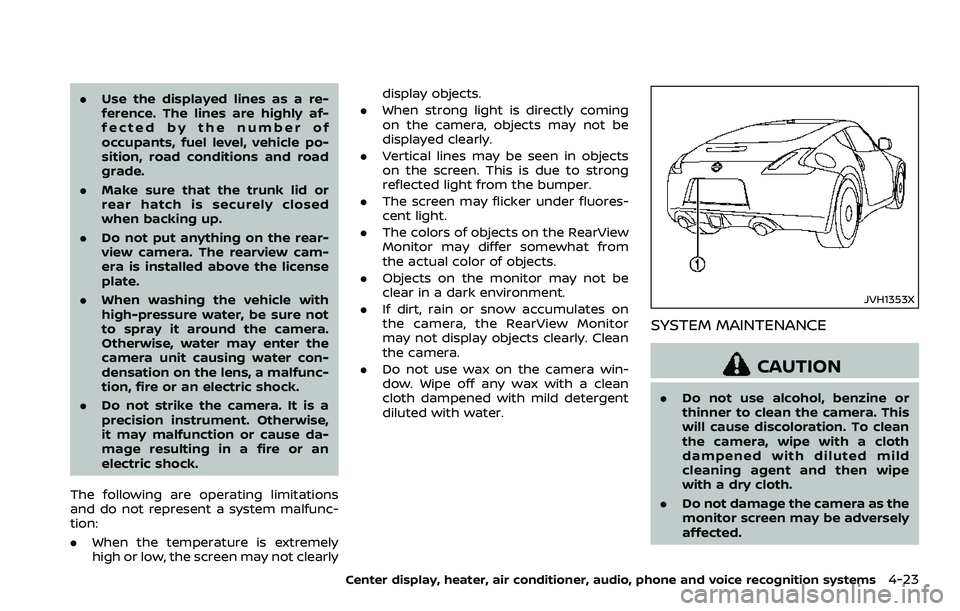
JVH1353X
SYSTEM MAINTENANCE
CAUTION
.Do not use alcohol, benzine or
thinner to clean the camera. This
will cause discoloration. To clean
the camera, wipe with a cloth
dampened with diluted mild
cleaning agent and then wipe
with a dry cloth.
. Do not damage the camera as the
monitor screen may be adversely
affected.
Center display, heater, air conditioner, audio, phone and voice recognition systems4-23
Page 274 of 453
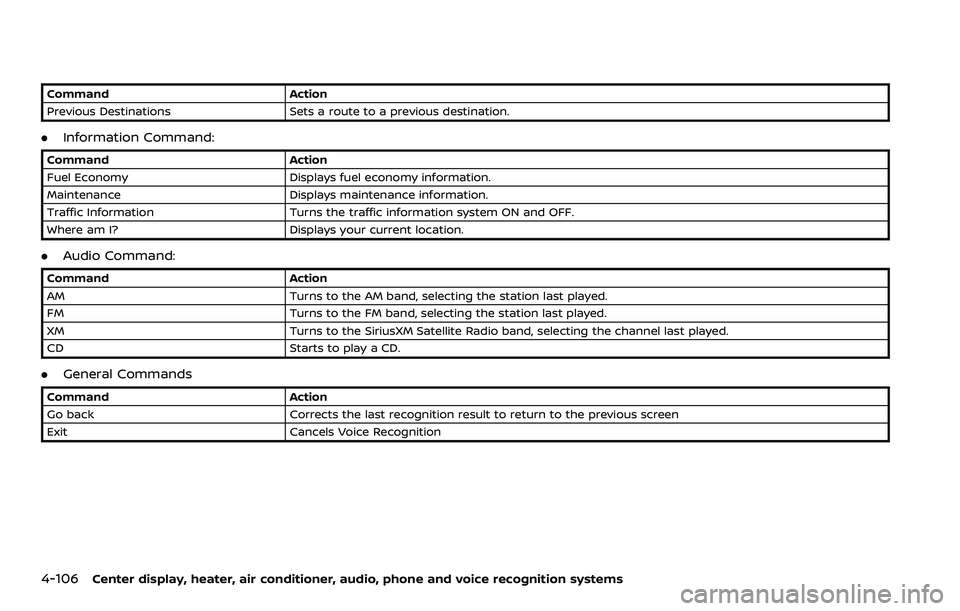
4-106Center display, heater, air conditioner, audio, phone and voice recognition systems
CommandAction
Previous Destinations Sets a route to a previous destination.
.Information Command:
Command Action
Fuel Economy Displays fuel economy information.
Maintenance Displays maintenance information.
Traffic Information Turns the traffic information system ON and OFF.
Where am I? Displays your current location.
.Audio Command:
Command Action
AM Turns to the AM band, selecting the station last played.
FM Turns to the FM band, selecting the station last played.
XM Turns to the SiriusXM Satellite Radio band, selecting the channel last played.
CD Starts to play a CD.
.General Commands
Command Action
Go back Corrects the last recognition result to return to the previous screen
Exit Cancels Voice Recognition
Page 283 of 453
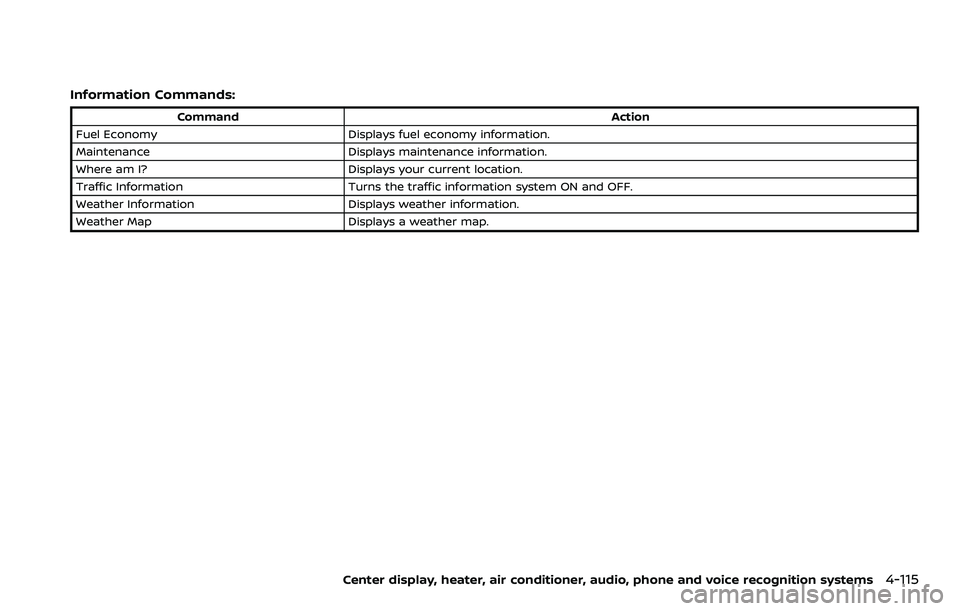
Information Commands:
CommandAction
Fuel Economy Displays fuel economy information.
Maintenance Displays maintenance information.
Where am I? Displays your current location.
Traffic Information Turns the traffic information system ON and OFF.
Weather Information Displays weather information.
Weather Map Displays a weather map.
Center display, heater, air conditioner, audio, phone and voice recognition systems4-115
Page 293 of 453
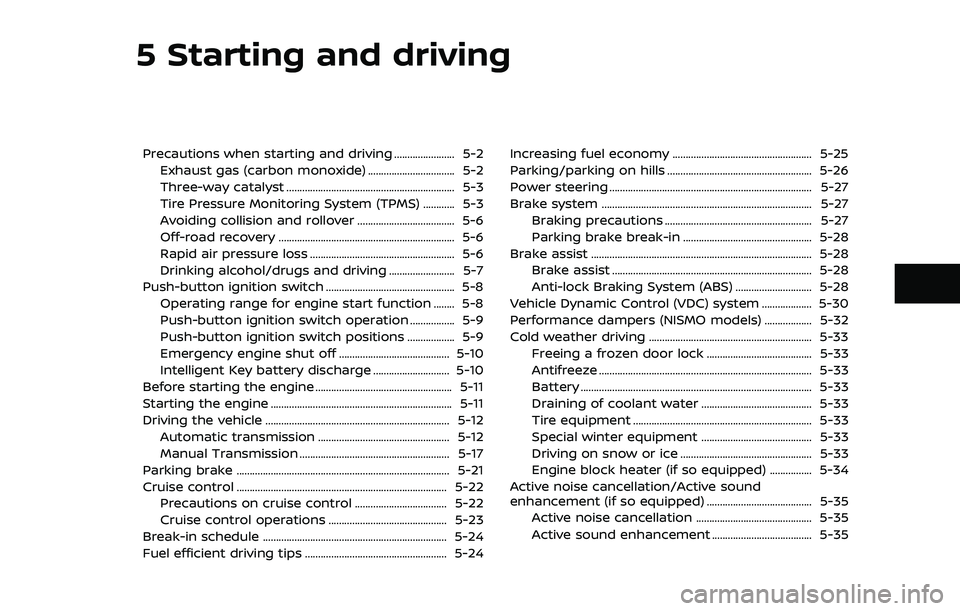
5 Starting and driving
Precautions when starting and driving ....................... 5-2Exhaust gas (carbon monoxide) ................................. 5-2
Three-way catalyst ................................................................ 5-3
Tire Pressure Monitoring System (TPMS) ............ 5-3
Avoiding collision and rollover ..................................... 5-6
Off-road recovery ................................................................... 5-6
Rapid air pressure loss ....................................................... 5-6
Drinking alcohol/drugs and driving ......................... 5-7
Push-button ignition switch ................................................. 5-8 Operating range for engine start function ........ 5-8
Push-button ignition switch operation ................. 5-9
Push-button ignition switch positions .................. 5-9
Emergency engine shut off .......................................... 5-10
Intelligent Key battery discharge ............................. 5-10
Before starting the engine .................................................... 5-11
Starting the engine ..................................................................... 5-11
Driving the vehicle ...................................................................... 5-12 Automatic transmission .................................................. 5-12
Manual Transmission ......................................................... 5-17
Parking brake ........................................................................\
......... 5-21
Cruise control ........................................................................\
........ 5-22 Precautions on cruise control ................................... 5-22
Cruise control operations ............................................. 5-23
Break-in schedule ...................................................................... 5-24
Fuel efficient driving tips ...................................................... 5-24 Increasing fuel economy ..................................................... 5-25
Parking/parking on hills ....................................................... 5-26
Power steering ........................................................................\
..... 5-27
Brake system ........................................................................\
........ 5-27
Braking precautions ........................................................ 5-27
Parking brake break-in ................................................. 5-28
Brake assist ........................................................................\
............ 5-28 Brake assist ........................................................................\
.... 5-28
Anti-lock Braking System (ABS) ............................. 5-28
Vehicle Dynamic Control (VDC) system ................... 5-30
Performance dampers (NISMO models) .................. 5-32
Cold weather driving .............................................................. 5-33 Freeing a frozen door lock ........................................ 5-33
Antifreeze ........................................................................\
......... 5-33
Battery ........................................................................\
................ 5-33
Draining of coolant water .......................................... 5-33
Tire equipment .................................................................... 5-33
Special winter equipment .......................................... 5-33
Driving on snow or ice .................................................. 5-33
Engine block heater (if so equipped) ................ 5-34
Active noise cancellation/Active sound
enhancement (if so equipped) ........................................ 5-35 Active noise cancellation ............................................ 5-35
Active sound enhancement ...................................... 5-35
Page 295 of 453
THREE-WAY CATALYST
The three-way catalyst is an emission
control device installed in the exhaust
system. Exhaust gases in the three-way
catalyst are burned at high temperatures
to help reduce pollutants.
WARNING
.The exhaust gas and the exhaust
system are very hot. Keep people,
animals or flammable materials
away from the exhaust system
components.
. Do not stop or park the vehicle
over flammable materials such as
dry grass, waste paper or rags.
They may ignite and cause a fire.
CAUTION
.Do not use leaded gasoline. De-
posits from leaded gasoline ser-
iously reduce the three-way
catalyst’s ability to help reduce
exhaust pollutants.
. Keep your engine tuned up. Mal-
functions in the ignition, fuel in-
jection, or electrical systems can cause overrich fuel flow into the
three-way catalyst, causing it to
overheat. Do not keep driving if
the engine misfires, or if notice-
able loss of performance or other
unusual operating conditions are
detected. Have the vehicle in-
spected. It is recommended you
visit a NISSAN dealer for this
service.
. Avoid driving with an extremely
low fuel level. Running out of fuel
could cause the engine to misfire,
damaging the three-way catalyst.
. Do not race the engine while
warming it up.
. Do not push or tow your vehicle
to start the engine.
TIRE PRESSURE MONITORING SYS-
TEM (TPMS)
Each tire, including the spare (if provided),
should be checked monthly when cold
and inflated to the inflation pressure
recommended by the vehicle manufac-
turer on the vehicle placard or tire infla-
tion pressure label. (If your vehicle has
tires of a different size than the size
indicated on the vehicle placard or tire
inflation pressure label, you should deter-
mine the proper tire inflation pressure for those tires.)
As an added safety feature, your vehicle
has been equipped with a Tire Pressure
Monitoring System (TPMS) that illumi-
nates a low tire pressure telltale when
one or more of your tires is significantly
under-inflated. Accordingly, when the low
tire pressure telltale illuminates, you
should stop and check your tires as soon
as possible, and inflate them to the
proper pressure. Driving on a significantly
under-inflated tire causes the tire to
overheat and can lead to tire failure.
Under-inflation also reduces fuel effi-
ciency and tire tread life, and may affect
the vehicle’s handling and stopping abil-
ity.
Please note that the TPMS is not a
substitute for proper tire maintenance,
and it is the driver’s responsibility to
maintain correct tire pressure, even if
under-inflation has not reached the level
to trigger illumination of the TPMS low
tire pressure telltale.
Your vehicle has also been equipped with
a TPMS malfunction indicator to indicate
when the system is not operating prop-
erly. The TPMS malfunction indicator is
combined with the low tire pressure tell-
tale. When the system detects a malfunc-
tion, the telltale will flash for
approximately one minute and then re-
Starting and driving5-3
Page 303 of 453
.Make sure the area around the vehicle
is clear.
. Check fluid levels such as engine oil,
coolant, brake fluid and window
washer fluid as frequently as possible,
or at least whenever you refuel.
. Check that all windows and lights are
clean.
. Visually inspect tires for their appear-
ance and condition. Also check tires
for proper inflation.
. Lock all doors.
. Position seat and adjust head re-
straints.
. Adjust inside and outside mirrors.
. Fasten seat belts and ask all passen-
gers to do likewise.
. Check the operation of warning lights
when the ignition switch is pushed to
the ON position. (See “Warning lights,
indicator lights and audible remin-
ders” (P.2-10).)1. Apply the parking brake.
2.Automatic Transmission (AT) model:
Move the shift lever to the P (Park) or N
(Neutral) position. (P is recommended.)
The starter is designed not to operate
unless the shift lever is in either of the
above positions.
Manual Transmission (MT) model:
Move the shift lever to the N (Neutral)
position. Depress the clutch pedal fully
to the floor.
The starter is designed not to operate
unless the clutch pedal is fully de-
pressed.
The Intelligent Key must be carried
when operating the ignition switch.
3. Push the ignition switch to the ON position. Depress the brake pedal (AT
model) or the clutch pedal (MT model)
and push the ignition switch to start
the engine.
To start the engine immediately, push
and release the ignition switch while
depressing the brake pedal or the
clutch pedal with the ignition switch
in any position.
.If the engine is very hard to start inextremely cold weather or when
restarting, depress the accelerator
pedal a little (approximately 1/3 to the floor) and while holding, crank
the engine. Release the accelerator
pedal when the engine starts.
.If the engine is very hard to start
because it is flooded, depress the
accelerator pedal all the way to the
floor and hold it. Push the ignition
switch to the ON position to start
cranking the engine. After 5 or 6
seconds, stop cranking by pushing
the ignition switch to OFF. After
cranking the engine, release the
accelerator pedal. Crank the engine
with your foot off the accelerator
pedal by depressing the brake
pedal and pushing the push-button
ignition switch to start the engine.
If the engine starts, but fails to run,
repeat the above procedure.
CAUTION
Do not operate the starter for more
than 15 seconds at a time. If the
engine does not start, push the
ignition switch to OFF and wait 10
seconds before cranking again,
otherwise the starter could be da-
maged.
Starting and driving5-11
BEFORE STARTING THE ENGINE STARTING THE ENGINE