key NISSAN 370Z 2019 Owner´s Manual
[x] Cancel search | Manufacturer: NISSAN, Model Year: 2019, Model line: 370Z, Model: NISSAN 370Z 2019Pages: 460, PDF Size: 2.26 MB
Page 237 of 460
SAA2506
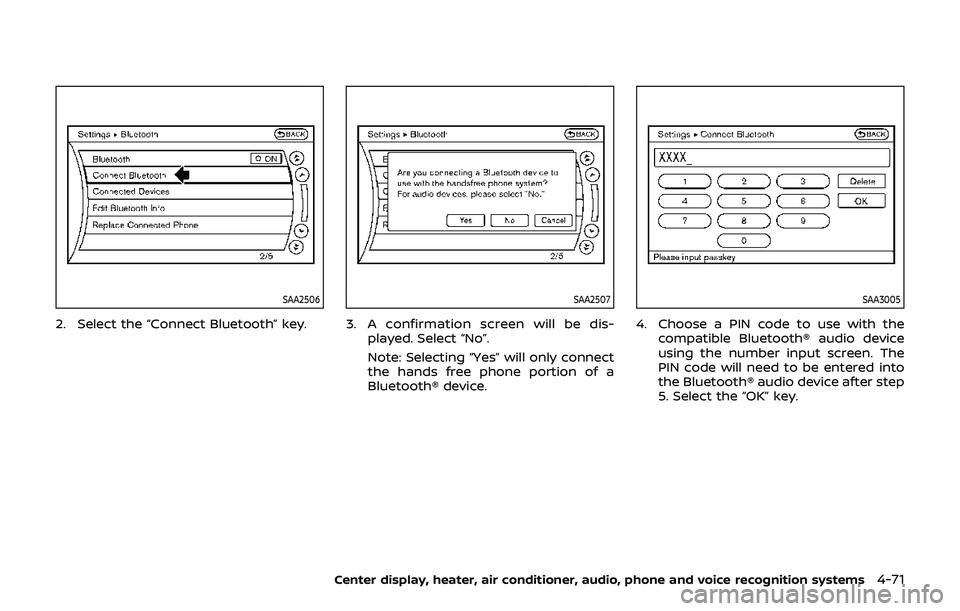
2. Select the “Connect Bluetooth” key.
SAA2507
3. A confirmation screen will be dis-played. Select “No”.
Note: Selecting “Yes” will only connect
the hands free phone portion of a
Bluetooth® device.
SAA3005
4. Choose a PIN code to use with the compatible Bluetooth® audio device
using the number input screen. The
PIN code will need to be entered into
the Bluetooth® audio device after step
5. Select the “OK” key.
Center display, heater, air conditioner, audio, phone and voice recognition systems4-71
Page 239 of 460
used to select tracks when the Blue-
tooth® audio play mode screen is shown
on the display. (“Bluetooth audio” will be
indicated on the header of the screen.)
REPEAT (RPT), RANDOM (RDM):
To change the play mode, push the
button repeatedly and the mode changes
as follows.
Normal ?Shuffle All Tracks ?Shuffle
Group ?Repeat 1 Track ?Repeat All
Tracks ?Repeat Group ?Normal
Operation keys:
To operate a Bluetooth® audio device,
select a key displayed on the operation
screen using the multi-function control-
ler.
Play
Select the “
” key to start playing when
pausing. Select this key again to pause
the audio play.
Pause
Select the “
” key to pause the Blue-
tooth® audio device. Select this key again
to resume playing.
Play Mode:
The play mode setting display will appear
when the “Menu” key is selected. Choose the preferred play mode from the
following items.
.
Shuffle
Choose “Shuffle OFF”, “Shuffle All
Tracks” and “Shuffle Group”.
. Repeat
Choose from “Repeat OFF”, “Repeat 1
Track”, “Repeat All Tracks” and “Repeat
Group”.
SAA2511
Bluetooth® settings
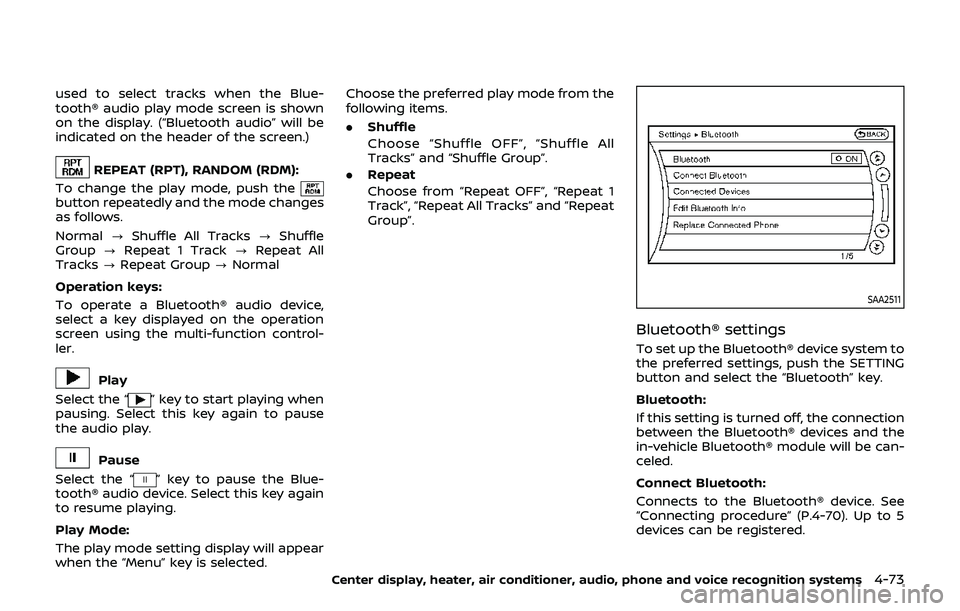
To set up the Bluetooth® device system to
the preferred settings, push the SETTING
button and select the “Bluetooth” key.
Bluetooth:
If this setting is turned off, the connection
between the Bluetooth® devices and the
in-vehicle Bluetooth® module will be can-
celed.
Connect Bluetooth:
Connects to the Bluetooth® device. See
“Connecting procedure” (P.4-70). Up to 5
devices can be registered.
Center display, heater, air conditioner, audio, phone and voice recognition systems4-73
Page 240 of 460
4-74Center display, heater, air conditioner, audio, phone and voice recognition systems
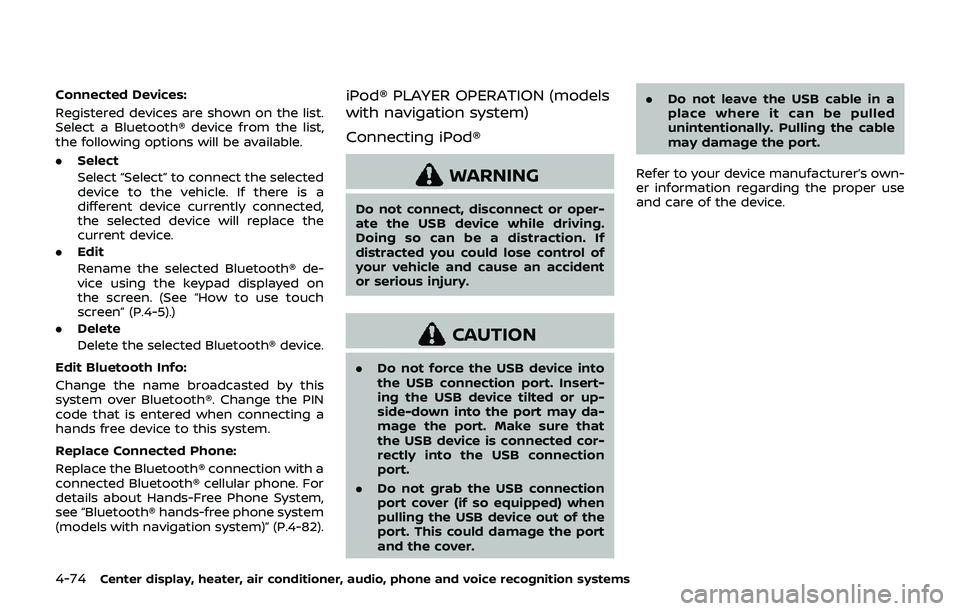
Connected Devices:
Registered devices are shown on the list.
Select a Bluetooth® device from the list,
the following options will be available.
.Select
Select “Select” to connect the selected
device to the vehicle. If there is a
different device currently connected,
the selected device will replace the
current device.
. Edit
Rename the selected Bluetooth® de-
vice using the keypad displayed on
the screen. (See “How to use touch
screen” (P.4-5).)
. Delete
Delete the selected Bluetooth® device.
Edit Bluetooth Info:
Change the name broadcasted by this
system over Bluetooth®. Change the PIN
code that is entered when connecting a
hands free device to this system.
Replace Connected Phone:
Replace the Bluetooth® connection with a
connected Bluetooth® cellular phone. For
details about Hands-Free Phone System,
see “Bluetooth® hands-free phone system
(models with navigation system)” (P.4-82).iPod® PLAYER OPERATION (models
with navigation system)
Connecting iPod®
WARNING
Do not connect, disconnect or oper-
ate the USB device while driving.
Doing so can be a distraction. If
distracted you could lose control of
your vehicle and cause an accident
or serious injury.
CAUTION
. Do not force the USB device into
the USB connection port. Insert-
ing the USB device tilted or up-
side-down into the port may da-
mage the port. Make sure that
the USB device is connected cor-
rectly into the USB connection
port.
. Do not grab the USB connection
port cover (if so equipped) when
pulling the USB device out of the
port. This could damage the port
and the cover. .
Do not leave the USB cable in a
place where it can be pulled
unintentionally. Pulling the cable
may damage the port.
Refer to your device manufacturer’s own-
er information regarding the proper use
and care of the device.
Page 243 of 460
.Red - right channel audio input
Before connecting a device to a jack, turn
off the power of the portable device.
With a compatible device connected to
the jacks, push the DISC·AUX button
repeatedly until the display switches to
the AUX mode. The output from the
device will be played through the monitor
and audio system.
SAA2496
AUX Menu
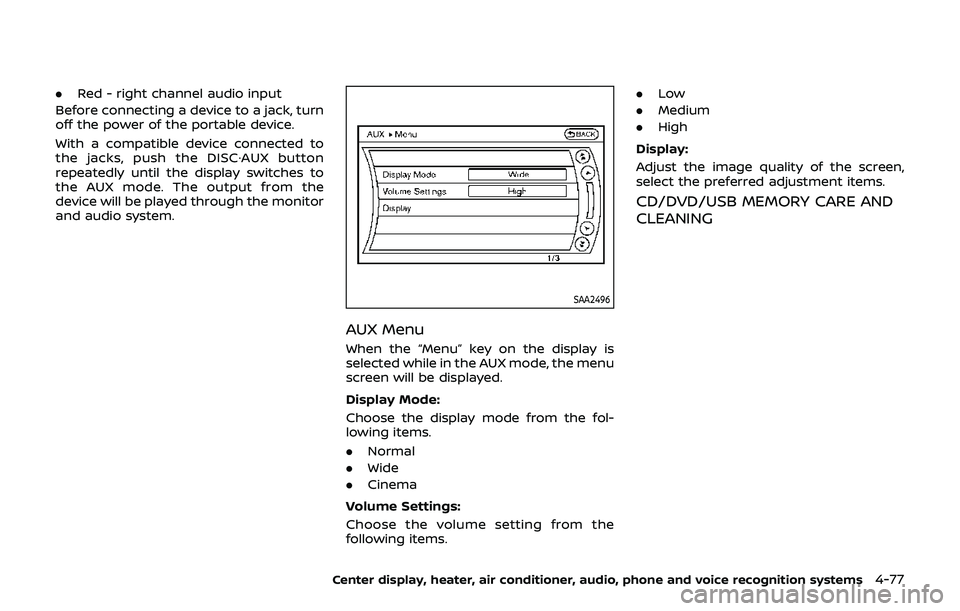
When the “Menu” key on the display is
selected while in the AUX mode, the menu
screen will be displayed.
Display Mode:
Choose the display mode from the fol-
lowing items.
. Normal
. Wide
. Cinema
Volume Settings:
Choose the volume setting from the
following items. .
Low
. Medium
. High
Display:
Adjust the image quality of the screen,
select the preferred adjustment items.
CD/DVD/USB MEMORY CARE AND
CLEANING
Center display, heater, air conditioner, audio, phone and voice recognition systems4-77
Page 250 of 460
4-84Center display, heater, air conditioner, audio, phone and voice recognition systems
SAA2518
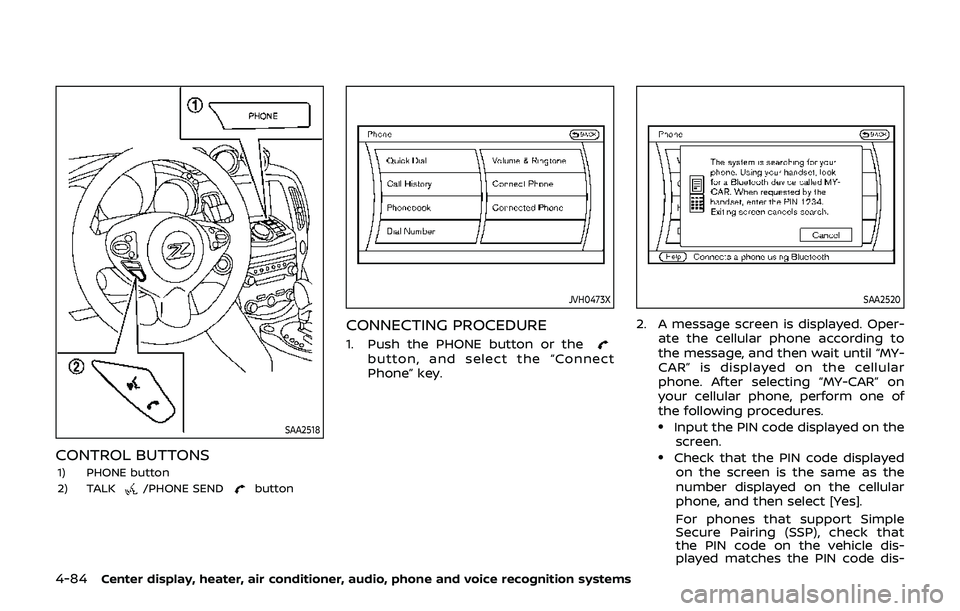
CONTROL BUTTONS
1) PHONE button
2) TALK/PHONE SENDbutton
JVH0473X
CONNECTING PROCEDURE
1. Push the PHONE button or thebutton, and select the “Connect
Phone” key.
SAA2520
2. A message screen is displayed. Oper-ate the cellular phone according to
the message, and then wait until “MY-
CAR” is displayed on the cellular
phone. After selecting “MY-CAR” on
your cellular phone, perform one of
the following procedures.
.Input the PIN code displayed on thescreen.
.Check that the PIN code displayedon the screen is the same as the
number displayed on the cellular
phone, and then select [Yes].
For phones that support Simple
Secure Pairing (SSP), check that
the PIN code on the vehicle dis-
played matches the PIN code dis-
Page 251 of 460
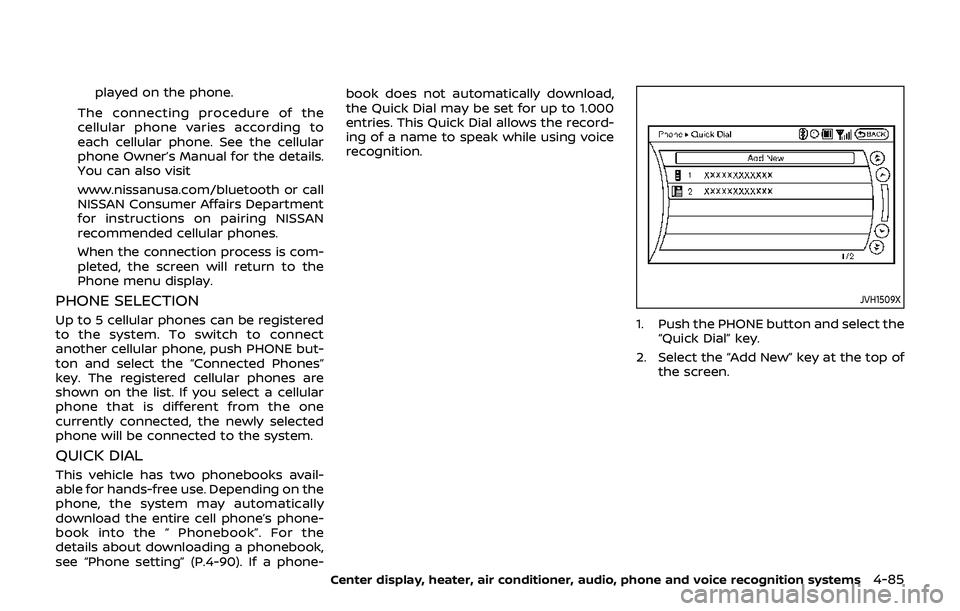
played on the phone.
The connecting procedure of the
cellular phone varies according to
each cellular phone. See the cellular
phone Owner’s Manual for the details.
You can also visit
www.nissanusa.com/bluetooth or call
NISSAN Consumer Affairs Department
for instructions on pairing NISSAN
recommended cellular phones.
When the connection process is com-
pleted, the screen will return to the
Phone menu display.
PHONE SELECTION
Up to 5 cellular phones can be registered
to the system. To switch to connect
another cellular phone, push PHONE but-
ton and select the “Connected Phones”
key. The registered cellular phones are
shown on the list. If you select a cellular
phone that is different from the one
currently connected, the newly selected
phone will be connected to the system.
QUICK DIAL
This vehicle has two phonebooks avail-
able for hands-free use. Depending on the
phone, the system may automatically
download the entire cell phone’s phone-
book into the “ Phonebook”. For the
details about downloading a phonebook,
see “Phone setting” (P.4-90). If a phone- book does not automatically download,
the Quick Dial may be set for up to 1.000
entries. This Quick Dial allows the record-
ing of a name to speak while using voice
recognition.
JVH1509X
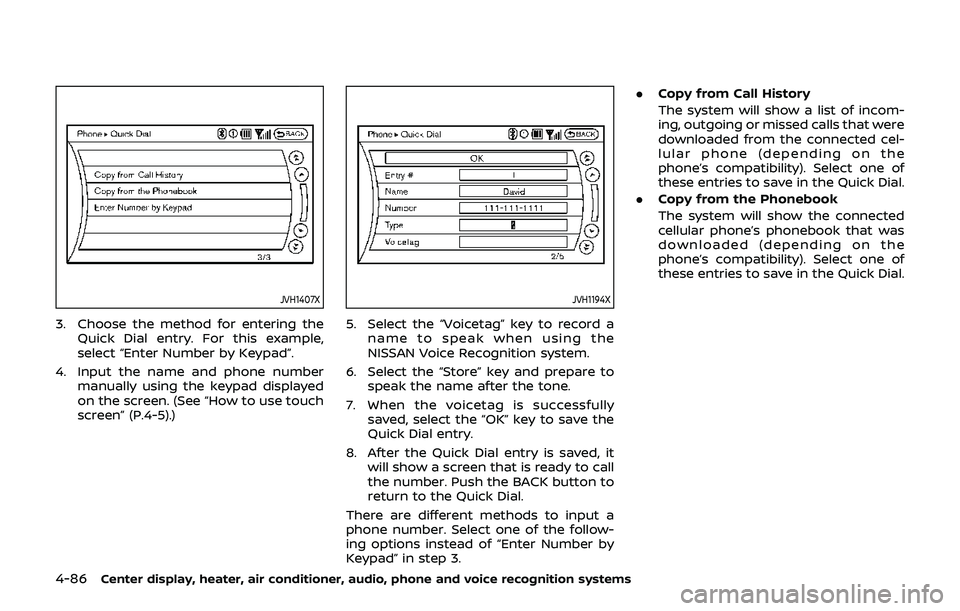
1. Push the PHONE button and select the
“Quick Dial” key.
2. Select the “Add New” key at the top of the screen.
Center display, heater, air conditioner, audio, phone and voice recognition systems4-85
Page 252 of 460
4-86Center display, heater, air conditioner, audio, phone and voice recognition systems
JVH1407X
3. Choose the method for entering theQuick Dial entry. For this example,
select “Enter Number by Keypad”.
4. Input the name and phone number manually using the keypad displayed
on the screen. (See “How to use touch
screen” (P.4-5).)
JVH1194X
5. Select the “Voicetag” key to record a
name to speak when using the
NISSAN Voice Recognition system.
6. Select the “Store” key and prepare to speak the name after the tone.
7. When the voicetag is successfully saved, select the “OK” key to save the
Quick Dial entry.
8. After the Quick Dial entry is saved, it will show a screen that is ready to call
the number. Push the BACK button to
return to the Quick Dial.
There are different methods to input a
phone number. Select one of the follow-
ing options instead of “Enter Number by
Keypad” in step 3. .
Copy from Call History
The system will show a list of incom-
ing, outgoing or missed calls that were
downloaded from the connected cel-
lular phone (depending on the
phone’s compatibility). Select one of
these entries to save in the Quick Dial.
. Copy from the Phonebook
The system will show the connected
cellular phone’s phonebook that was
downloaded (depending on the
phone’s compatibility). Select one of
these entries to save in the Quick Dial.
Page 253 of 460
JVH0480X
Editing the Quick Dial
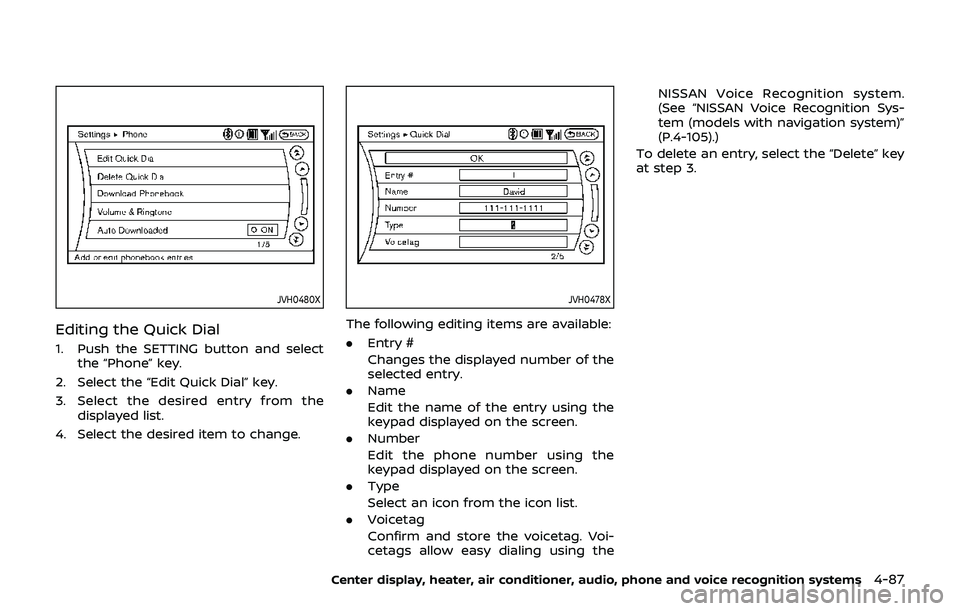
1. Push the SETTING button and selectthe “Phone” key.
2. Select the “Edit Quick Dial” key.
3. Select the desired entry from the displayed list.
4. Select the desired item to change.
JVH0478X
The following editing items are available:
. Entry #
Changes the displayed number of the
selected entry.
. Name
Edit the name of the entry using the
keypad displayed on the screen.
. Number
Edit the phone number using the
keypad displayed on the screen.
. Type
Select an icon from the icon list.
. Voicetag
Confirm and store the voicetag. Voi-
cetags allow easy dialing using the NISSAN Voice Recognition system.
(See “NISSAN Voice Recognition Sys-
tem (models with navigation system)”
(P.4-105).)
To delete an entry, select the “Delete” key
at step 3.
Center display, heater, air conditioner, audio, phone and voice recognition systems4-87
Page 254 of 460
4-88Center display, heater, air conditioner, audio, phone and voice recognition systems
JVH0479X
MAKING A CALL
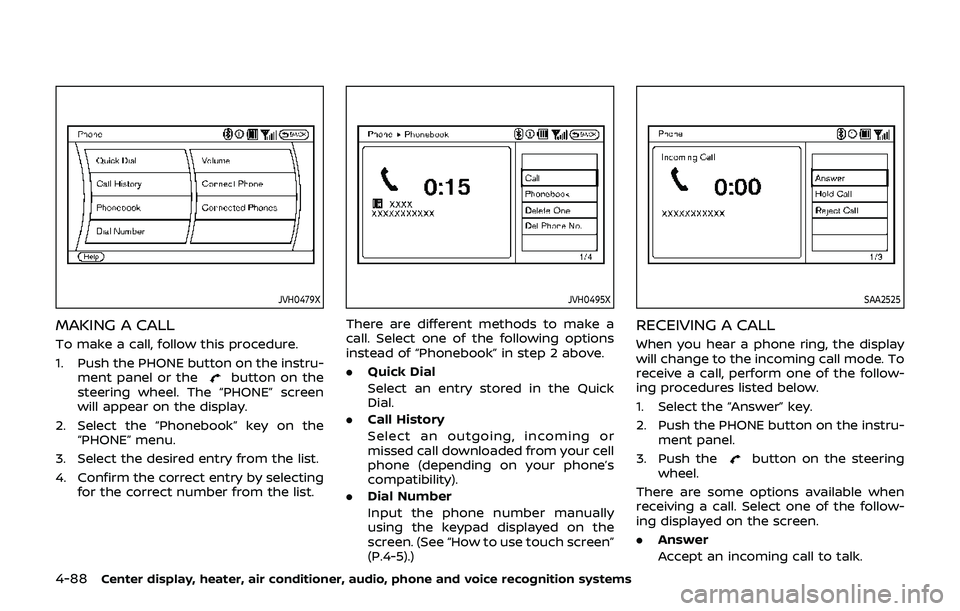
To make a call, follow this procedure.
1. Push the PHONE button on the instru-ment panel or the
button on the
steering wheel. The “PHONE” screen
will appear on the display.
2. Select the “Phonebook” key on the “PHONE” menu.
3. Select the desired entry from the list.
4. Confirm the correct entry by selecting for the correct number from the list.
JVH0495X
There are different methods to make a
call. Select one of the following options
instead of “Phonebook” in step 2 above.
.Quick Dial
Select an entry stored in the Quick
Dial.
. Call History
Select an outgoing, incoming or
missed call downloaded from your cell
phone (depending on your phone’s
compatibility).
. Dial Number
Input the phone number manually
using the keypad displayed on the
screen. (See “How to use touch screen”
(P.4-5).)
SAA2525
RECEIVING A CALL
When you hear a phone ring, the display
will change to the incoming call mode. To
receive a call, perform one of the follow-
ing procedures listed below.
1. Select the “Answer” key.
2. Push the PHONE button on the instru-
ment panel.
3. Push the
button on the steering
wheel.
There are some options available when
receiving a call. Select one of the follow-
ing displayed on the screen.
. Answer
Accept an incoming call to talk.
Page 255 of 460
.Hold Call
Put an incoming call on hold.
. Reject Call
Reject an incoming call.
To finish the call, perform one of the
following procedures listed below.
1. Select the “Hang up” key.
2. Push the PHONE button on the instru- ment panel.
3. Push the
button on the steering
wheel.
SAA3587
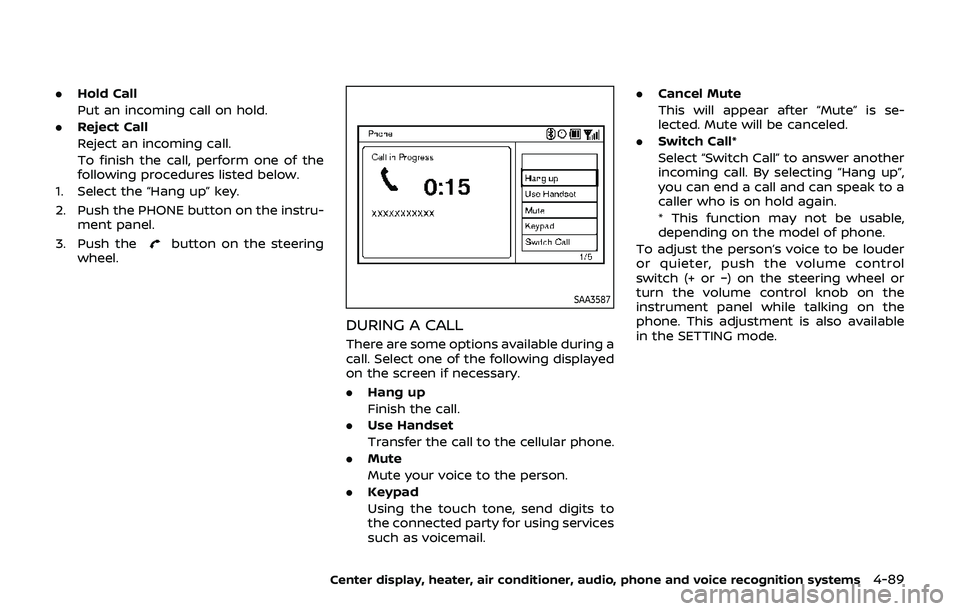
DURING A CALL
There are some options available during a
call. Select one of the following displayed
on the screen if necessary.
. Hang up
Finish the call.
. Use Handset
Transfer the call to the cellular phone.
. Mute
Mute your voice to the person.
. Keypad
Using the touch tone, send digits to
the connected party for using services
such as voicemail. .
Cancel Mute
This will appear after “Mute” is se-
lected. Mute will be canceled.
. Switch Call*
Select “Switch Call” to answer another
incoming call. By selecting “Hang up”,
you can end a call and can speak to a
caller who is on hold again.
* This function may not be usable,
depending on the model of phone.
To adjust the person’s voice to be louder
or quieter, push the volume control
switch (+ or −) on the steering wheel or
turn the volume control knob on the
instrument panel while talking on the
phone. This adjustment is also available
in the SETTING mode.
Center display, heater, air conditioner, audio, phone and voice recognition systems4-89