ECO mode NISSAN 370Z 2020 Owner´s Manual
[x] Cancel search | Manufacturer: NISSAN, Model Year: 2020, Model line: 370Z, Model: NISSAN 370Z 2020Pages: 455, PDF Size: 2.22 MB
Page 53 of 455
PRECAUTIONS ON SUPPLEMENTAL
RESTRAINT SYSTEM
This Supplemental Restraint System (SRS)
section contains important information
concerning the following systems.
.Driver and passenger supplemental
front-impact air bag (NISSAN Ad-
vanced Air Bag System)
. Front seat-mounted side-impact sup-
plemental air bag
. Roof-mounted curtain side-impact
and rollover supplemental air bag
(Coupe models)
. Door-mounted curtain side-impact
supplemental air bag (Roadster mod-
els)
. Seat belt with pretensioner
Supplemental front-impact air bag sys-
tem: The NISSAN Advanced Air Bag Sys-
tem can help cushion the impact force to
the head and chest of the driver and front
passenger in certain frontal collisions.
Front seat-mounted side-impact sup-
plemental air bag system: This system
can help cushion the impact force to the
chest and pelvis area of the driver and
front passenger in certain side impact
collisions. The front seat side-impact
supplemental air bags are designed to
inflate on the side where the vehicle is
impacted. Roof-mounted curtain side-impact and
rollover supplemental air bag system
(for Coupe models):
This system can help
cushion the impact force to the head of
the driver and front passenger in certain
side-impact or rollover collisions. In a
side-impact, the curtain air bags are
designed to inflate on the side where
the vehicle is impacted. In a rollover,
curtain air bags on both sides are de-
signed to inflate and remain inflated for a
short time.
Curtain air bags are also designed to
inflate in certain types of rollover colli-
sions or near rollovers. As a result, certain
vehicle movements may cause the cur-
tain air bags to inflate.
Door-mounted curtain side-impact
supplemental air bag system (for Road-
ster models): This system can help cush-
ion the impact force to the heads of the
driver and front passenger in certain side
impact collisions. The curtain air bags are
designed to inflate on the side where the
vehicle is impacted.
These supplemental restraint systems are
designed to supplement the crash pro-
tection provided by the driver and pas-
senger seat belts and are not a
substitute for them. Seat belts should
always be correctly worn and the occu-
pant seated a suitable distance away from the steering wheel, instrument pa-
nel and door finishers. (See “Seat belts”
(P.1-10) for instructions and precautions
on seat belt usage.)
The supplemental air bags operate only
when the ignition switch is in the ON
position.
After pushing the ignition switch to the
ON position, the supplemental air bag
warning light illuminates. The supple-
mental air bag warning light will turn
off after about 7 seconds if the systems
are operational.
Safety — Seats, seat belts and supplemental restraint system1-31
SUPPLEMENTAL RESTRAINT SYSTEM
Page 62 of 455
1-40Safety — Seats, seat belts and supplemental restraint system
ever, if the occupant does not sit in the
seat properly (for example, by not sitting
upright, by sitting on an edge of the seat,
or by otherwise being out of position), this
could cause the sensor to turn the air bag
OFF. Always be sure to be seated and
wearing the seat belt properly for the
most effective protection by the seat belt
and supplemental air bag.
The occupant classification sensor is
designed to operate as described above
to turn the front passenger air bag OFF
for specified child restraints. Failing to
properly secure child restrains and to use
the ALR mode (child restraint mode) may
allow the restraint to tip or move in an
accident or sudden stop. This can also
result in the front passenger air bag
inflating in a crash instead of being OFF.
(See “Child restraints” (P.1-20) for proper
use and installation.)
If the front passenger seat is not occu-
pied, the front passenger air bag is
designed not to inflate in a crash. How-
ever, heavy objects placed on the seat
could result in air bag inflation, because of
the object being detected by the occu-
pant classification sensor. Other condi-
tions could also result in air bag inflation,
such as if a child is standing on the seat,
or if two children are on the seat, contrary
to the instructions in this manual. Alwaysbe sure that you and all vehicle occupants
are seated and restrained properly.
Using the front passenger air bag status
light, you can monitor when the front
passenger air bag is automatically turned
OFF with the seat occupied. The light will
not illuminate when the front passenger
seat is unoccupied.
If an adult occupant is in the seat but the
front passenger air bag status light is
illuminated (indicating that the air bag is
OFF), it could be that the person is a small
adult, or is not sitting on the seat
properly.
If a child restraint must be used in the
front seat, the front passenger air bag
status light may or may not be illumi-
nated, depending on the size of the child
and the type of child restraint being used.
If the front passenger air bag status light
is not illuminated (indicating that the air
bag might inflate in a crash), it could be
that the child restraint or seat belt is not
being used properly. Make sure that the
child restraint is installed properly, the
seat belt is used properly and the occu-
pant is positioned properly. If the front
passenger air bag status light is still not
illuminated, try a different child restraint.
If the front passenger air bag status light
will not illuminate even though you be-
lieve that the child restraint, the seat beltsand the occupant are properly positioned,
the system may be sensing an unoccu-
pied seat (in which case the air bag is
OFF). Your NISSAN dealer can check that
the system is OFF by using a special tool.
However, until you have confirmed with
your dealer that your air bag is working
properly, do not transport a child in this
vehicle.
The NISSAN Advanced Air Bag System
and front passenger air bag status light
will take a few seconds to register a
change in the front passenger seat sta-
tus. However, if the seat becomes unoc-
cupied, the front passenger air bag status
light will remain off.
If a malfunction occurs in the front
passenger air bag system, the supple-
mental air bag warning light
, located
in the meter and gauges area will blink.
Have the system checked. It is recom-
mended you visit a NISSAN dealer for this
service.
Other supplemental front-impact
air bag precautions
WARNING
. Do not place any objects on the
steering wheel pad or on the
instrument panel. Also, do not
Page 65 of 455
bags and curtain air bags do not provide
restraint to the lower body.
The seat belts should be correctly worn
and the driver and passenger seated
upright as far as practical away from the
side air bag, and seated as far away as
practical from the door finishers and side
roof rails. The side air bags and curtain air
bags inflate quickly in order to help
protect the occupants. Because of this,
the force of the side air bags and curtain
air bags inflating can increase the risk of
injury if the occupant is too close to, or is
against, these air bag modules during
inflation. The side air bags and curtain air
bags will remain inflated for a short
period of time. For Coupe models, in a
rollover, the curtain air bags on both side-
impact situations, the curtain air bags will
remain inflated for a short period of time.
The side air bags and curtain air bags
operate only when the ignition switch is
in the ON position.
After placing the ignition switch in the
ON position, the supplemental air bag
warning light illuminates. The air bag
warning light will turn off after about 7
seconds if the systems are operational.
WARNING
.Do not place any objects near the
seatback of the front seats. Also,
do not place any objects (an
umbrella, bag, etc.) between the
front door finisher and the front
seat. Such objects may become
dangerous projectiles and cause
injury if a side air bag inflates.
. Right after inflation, several side
air bags and curtain air bag sys-
tem components will be hot. Do
not touch them; you may severely
burn yourself.
. No unauthorized changes should
be made to any components or
wiring of side air bag and curtain
air bag systems. This is to prevent
accidental inflation of the side air
bag and curtain air bag or da-
mage to side air bag and curtain
air bag systems.
. Do not make unauthorized
changes to your vehicle’s electri-
cal system, suspension system or
side panel. This could affect prop-
er operation of the side air bag
and curtain air bag systems. .
Tampering with the air bag sys-
tem may result in serious perso-
nal injury. For example, do not
change the front seats by placing
material near the seatback or by
installing additional trim materi-
al, such as seat covers, around
the side air bags.
. It is recommended you visit a
NISSAN dealer for work on and
around the pretensioner system.
It is also recommended you visit a
NISSAN dealer for installation of
electrical equipment. The SRS
wiring harnesses* should not be
modified or disconnected. Un-
authorized electrical test equip-
ment and probing devices should
not be used on the side-impact
air bag system.
* The SRS wiring harness connectors are
yellow and orange for easy identifica-
tion.
When selling your vehicle, we request that
you inform the buyer about the side air
bag and curtain air bag systems and
guide the buyer to the appropriate sec-
tions in this Owner’s Manual.
Safety — Seats, seat belts and supplemental restraint system1-43
Page 77 of 455
When the engine oil temperature is
high, the engine protection mode,
which helps reduce the chance of en-
gine damage, could activate and auto-
matically decrease engine power.
Voltmeter
When the ignition switch is placed in the
ON position, the volt meterindicates
the battery voltage. When the engine is
running, it indicates the generator vol-
tage.
While cranking the engine, the volts drop
below the normal range. If the needle is
not in the normal range (11 to 15 volts)
while the engine is running, it may
indicate that the charging system is not
functioning properly. Have the system
checked. It is recommended you visit a
NISSAN dealer for this service.
Clock
If necessary, adjust the clockon the
vehicle information display. (See “Clock”
(P.2-28).)
If the power supply is disconnected, the
clock will not indicate the correct time.
Readjust the time.
Instruments and controls2-9
Page 83 of 455
Supplemental air bag warning
light
After pushing the ignition switch to the
ON position, the supplemental air bag
warning light will illuminate. The air bag
warning light will turn off after about 7
seconds if the front air bag, side air bag
and curtain air bag systems and/or pre-
tensioner system are operational.
If any of the following conditions occur,
the front air bag, side air bag and curtain
air bag systems and/or pretensioner
system need servicing.
. The supplemental air bag warning
light remains on after approximately
7 seconds.
. The supplemental air bag warning
light flashes intermittently.
. The supplemental air bag warning
light does not come on at all.
It is recommended you visit a NISSAN
dealer for these services.
Unless checked and repaired, the Supple-
mental Restraint Systems and/or the
pretensioner seat belt may not function
properly.
For additional information, see “Supple-
mental restraint system” (P.1-31).
WARNING
If the supplemental air bag warning
light is on, it could mean that the
front air bag, side air bag and curtain
air bag systems and/or pretensioner
system will not operate in an acci-
dent. To help avoid injury to yourself
or others, have your vehicle checked.
It is recommended you visit a NISSAN
dealer for this service.
Vehicle Dynamic Control (VDC)
warning light
When the ignition switch is in the ON
position, the Vehicle Dynamic Control
(VDC) warning light illuminates and then
turns off.
The light will blink when the VDC system
or the traction control system is operat-
ing, thus alerting the driver that the
vehicle is nearing its traction limits. The
road surface may be slippery.
When the VDC warning light illuminates
when the VDC system is turned on, this
light alerts the driver to the fact that the
VDC system’s fail-safe mode is operating,
for example the VDC system may not be
functioning properly. Have the system checked. It is recommended you visit a
NISSAN dealer for this service. If a mal-
function occurs in the system, the VDC
system function will be canceled but the
vehicle is still driveable. For additional
information, see “Vehicle Dynamic Control
(VDC) system” (P.5-30) of this manual.
INDICATOR LIGHTS
Cruise indicator light
Cruise main switch indicator:
This light illuminates when the cruise
control main switch is pushed. The light
turns off when the main switch is pushed
again. When the cruise main switch in-
dicator light illuminates, the cruise control
system is operational. (See “Cruise con-
trol” (P.5-22).)
Cruise malfunction:
If the cruise indicator light blinks while the
engine is running, it may indicate the
cruise control system is not functioning
properly. Have the system checked. It is
recommended you visit a NISSAN dealer
for this service. (See “Cruise control” (P.5-
22).)
Instruments and controls2-15
Page 85 of 455
commended you visit a NISSAN dealer
for this service. You do not need to
have your vehicle towed to the dealer.
CAUTION
Continued vehicle operation without
having the emission control system
checked and repaired as necessary
could lead to poor driveability, re-
duced fuel economy, and possible
damage to the emission control sys-
tem.
Rear fog light indicator light (if
so equipped)
The rear fog light indicator light illumi-
nates when the rear fog light is on. (See
“Fog light switch” (P.2-39).)
Security indicator light
The light blinks when the ignition switch
is in the ACC, OFF or LOCK position. This
function indicates the security system
equipped on the vehicle is operational.
If the security system is malfunctioning,
this light will remain on while the ignition
switch is in the ON position. For additional
information, see “Security systems” (P.2- 30).
Soft top indicator light (Road-
ster models)
This light illuminates when the soft top is
being operated or it is stopped before
reaching a full open/close state. When the
top is fully opened or closed, the light will
turn off.
The light blinks while the soft top is not
fully opened or closed under the following
conditions:
. When the vehicle is driven.
. When the shift lever is in the R
(Reverse) position.
Be sure to fully open or close the soft top
when driving the vehicle.
The soft top can be moved with the soft
top operating switch only under all of the
following conditions:
. When the vehicle is stopped.
. When the ignition switch is ON.
. When the trunk is closed.
. When the shift lever is in a position
other than the R (Reverse) position.
CAUTION
Operate the soft top with the engine
running to prevent a discharged
battery.
When the soft top is operating, if any of
the above conditions are discontinued or
any of the following conditions are met,
the top will stop operating.
. When the shift lever is in the R
(Reverse) position.
. When the vehicle moves at a speed of
3 MPH (5 km/h) or more.
. When the battery voltage is extremely
low.
. When the temperature of the soft top
system becomes extremely high.
Release the operating switch, and push it
again under the above conditions until
the top is fully opened or closed. The soft
top indicator light will turn off when the
top operation is completely finished.
If the soft top indicator light illuminates
with the ignition switch ON, it may
indicate the electric soft top control unit
is not functioning properly. Have your
vehicle checked as soon as possible. It is
recommended you visit a NISSAN dealer
for this service.
Instruments and controls2-17
Page 88 of 455
2-20Instruments and controls
JVI0351X
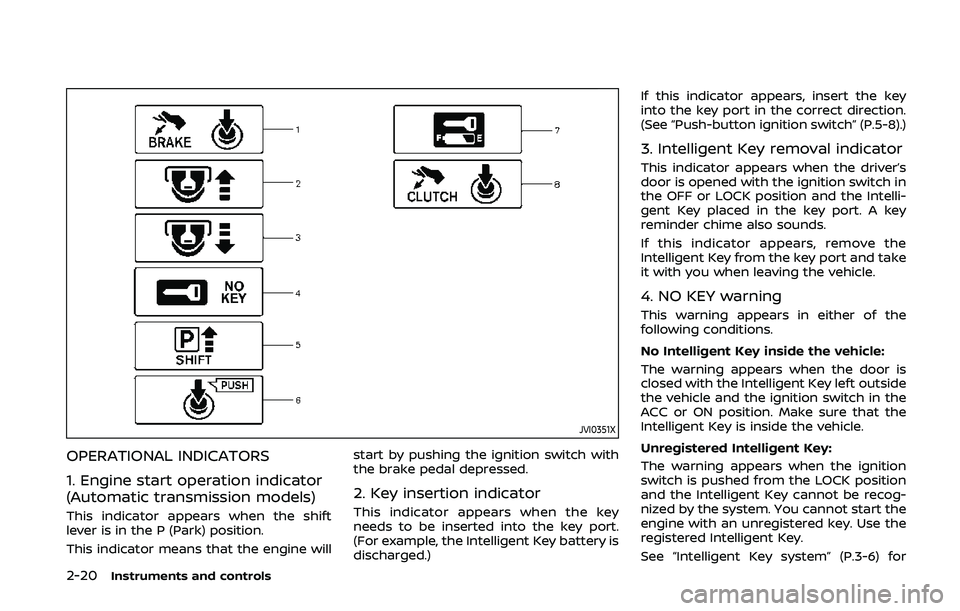
OPERATIONAL INDICATORS
1. Engine start operation indicator
(Automatic transmission models)
This indicator appears when the shift
lever is in the P (Park) position.
This indicator means that the engine willstart by pushing the ignition switch with
the brake pedal depressed.
2. Key insertion indicator
This indicator appears when the key
needs to be inserted into the key port.
(For example, the Intelligent Key battery is
discharged.)If this indicator appears, insert the key
into the key port in the correct direction.
(See “Push-button ignition switch” (P.5-8).)
3. Intelligent Key removal indicator
This indicator appears when the driver’s
door is opened with the ignition switch in
the OFF or LOCK position and the Intelli-
gent Key placed in the key port. A key
reminder chime also sounds.
If this indicator appears, remove the
Intelligent Key from the key port and take
it with you when leaving the vehicle.
4. NO KEY warning
This warning appears in either of the
following conditions.
No Intelligent Key inside the vehicle:
The warning appears when the door is
closed with the Intelligent Key left outside
the vehicle and the ignition switch in the
ACC or ON position. Make sure that the
Intelligent Key is inside the vehicle.
Unregistered Intelligent Key:
The warning appears when the ignition
switch is pushed from the LOCK position
and the Intelligent Key cannot be recog-
nized by the system. You cannot start the
engine with an unregistered key. Use the
registered Intelligent Key.
See “Intelligent Key system” (P.3-6) for
Page 91 of 455
COLD tire pressure shown on the recom-
mended COLD tire pressure shown on the
Tire and Loading Information label. (See
“Tire Pressure Monitoring System (TPMS)”
(P.5-3) and “Tire Pressure Monitoring Sys-
tem (TPMS)” (P.6-3).
7. “TIMER” indicator
This indicator appears when the set
“TIMER” indicator activates. You can set
the time for up to 6 hours. (See “Trip
computer” (P.2-25).)
8. Low outside temperature warn-
ing
This warning appears if the outside tem-
perature is below 37°F (3°C). The warning
can be set not to be displayed. (See “Trip
computer” (P.2-25).)
9. SynchroRev Match mode (S-
MODE) warning
This warning appears if a system mal-
function occurs. When the warning ap-
pears, the S-MODE function will not
operate, but the manual transmission will
operate normally and driving can be
continued. Have the system checked. It
is recommended you visit a NISSAN dealer
for this service.
10. Extended storage fuse warning
This warning may appear if the extended
storage fuse switch is not pushed in
(switched on). When this warning ap-
pears, push in (switch on) the extended
storage fuse switch to turn off the warn-
ing. For more information, see “Extended
storage fuse switch” (P.8-19).
Instruments and controls2-23
Page 94 of 455
2-26Instruments and controls
SIC3674
WAC0051X
ENTER switch
NEXT switch
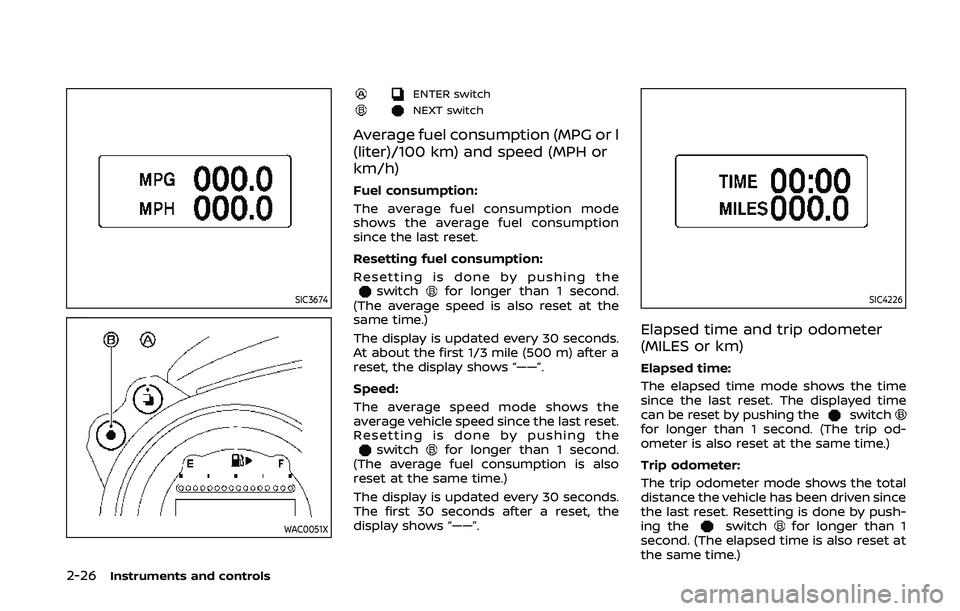
Average fuel consumption (MPG or l
(liter)/100 km) and speed (MPH or
km/h)
Fuel consumption:
The average fuel consumption mode
shows the average fuel consumption
since the last reset.
Resetting fuel consumption:
Resetting is done by pushing the
switchfor longer than 1 second.
(The average speed is also reset at the
same time.)
The display is updated every 30 seconds.
At about the first 1/3 mile (500 m) after a
reset, the display shows “——”.
Speed:
The average speed mode shows the
average vehicle speed since the last reset.
Resetting is done by pushing the
switchfor longer than 1 second.
(The average fuel consumption is also
reset at the same time.)
The display is updated every 30 seconds.
The first 30 seconds after a reset, the
display shows “——”.
SIC4226
Elapsed time and trip odometer
(MILES or km)
Elapsed time:
The elapsed time mode shows the time
since the last reset. The displayed time
can be reset by pushing the
switchfor longer than 1 second. (The trip od-
ometer is also reset at the same time.)
Trip odometer:
The trip odometer mode shows the total
distance the vehicle has been driven since
the last reset. Resetting is done by push-
ing the
switchfor longer than 1
second. (The elapsed time is also reset at
the same time.)
Page 95 of 455
SIC3676
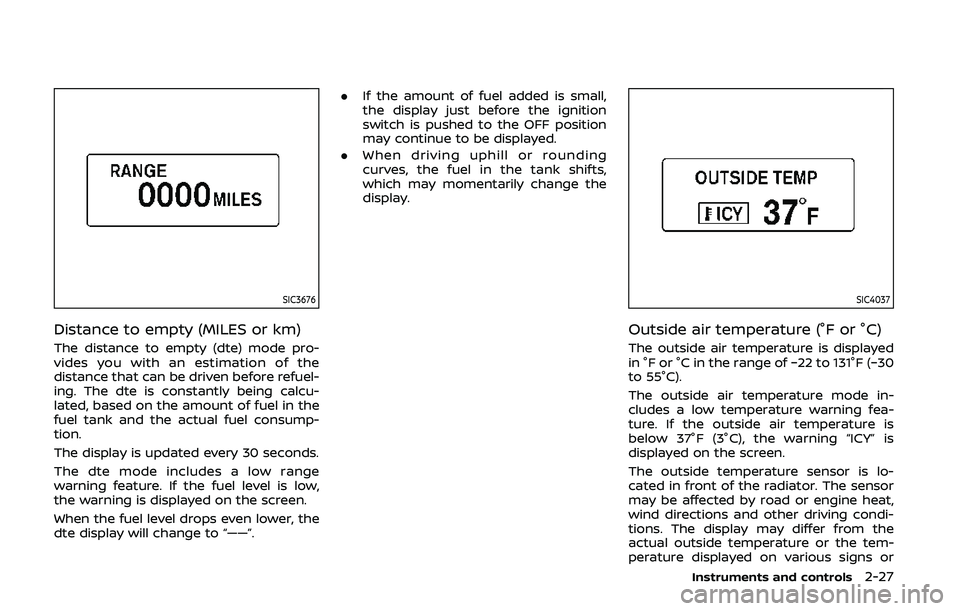
Distance to empty (MILES or km)
The distance to empty (dte) mode pro-
vides you with an estimation of the
distance that can be driven before refuel-
ing. The dte is constantly being calcu-
lated, based on the amount of fuel in the
fuel tank and the actual fuel consump-
tion.
The display is updated every 30 seconds.
The dte mode includes a low range
warning feature. If the fuel level is low,
the warning is displayed on the screen.
When the fuel level drops even lower, the
dte display will change to “——”..
If the amount of fuel added is small,
the display just before the ignition
switch is pushed to the OFF position
may continue to be displayed.
. When driving uphill or rounding
curves, the fuel in the tank shifts,
which may momentarily change the
display.
SIC4037
Outside air temperature (°F or °C)
The outside air temperature is displayed
in °F or °C in the range of −22 to 131°F (−30
to 55°C).
The outside air temperature mode in-
cludes a low temperature warning fea-
ture. If the outside air temperature is
below 37°F (3°C), the warning “ICY” is
displayed on the screen.
The outside temperature sensor is lo-
cated in front of the radiator. The sensor
may be affected by road or engine heat,
wind directions and other driving condi-
tions. The display may differ from the
actual outside temperature or the tem-
perature displayed on various signs or
Instruments and controls2-27