display NISSAN 370Z 2020 Owner´s Manual
[x] Cancel search | Manufacturer: NISSAN, Model Year: 2020, Model line: 370Z, Model: NISSAN 370Z 2020Pages: 455, PDF Size: 2.22 MB
Page 95 of 455
SIC3676
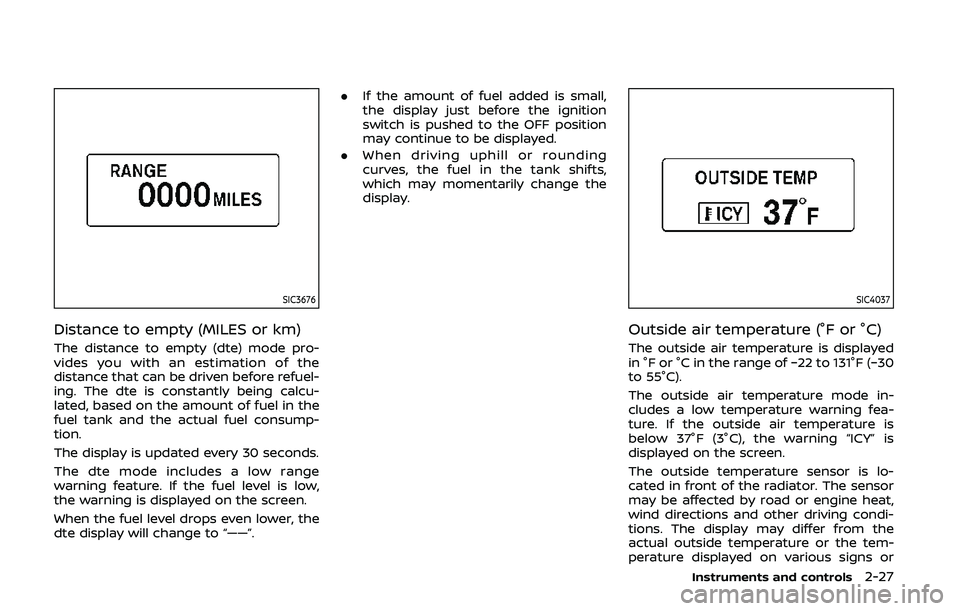
Distance to empty (MILES or km)
The distance to empty (dte) mode pro-
vides you with an estimation of the
distance that can be driven before refuel-
ing. The dte is constantly being calcu-
lated, based on the amount of fuel in the
fuel tank and the actual fuel consump-
tion.
The display is updated every 30 seconds.
The dte mode includes a low range
warning feature. If the fuel level is low,
the warning is displayed on the screen.
When the fuel level drops even lower, the
dte display will change to “——”..
If the amount of fuel added is small,
the display just before the ignition
switch is pushed to the OFF position
may continue to be displayed.
. When driving uphill or rounding
curves, the fuel in the tank shifts,
which may momentarily change the
display.
SIC4037
Outside air temperature (°F or °C)
The outside air temperature is displayed
in °F or °C in the range of −22 to 131°F (−30
to 55°C).
The outside air temperature mode in-
cludes a low temperature warning fea-
ture. If the outside air temperature is
below 37°F (3°C), the warning “ICY” is
displayed on the screen.
The outside temperature sensor is lo-
cated in front of the radiator. The sensor
may be affected by road or engine heat,
wind directions and other driving condi-
tions. The display may differ from the
actual outside temperature or the tem-
perature displayed on various signs or
Instruments and controls2-27
Page 96 of 455
2-28Instruments and controls
billboards.
JVI1447X
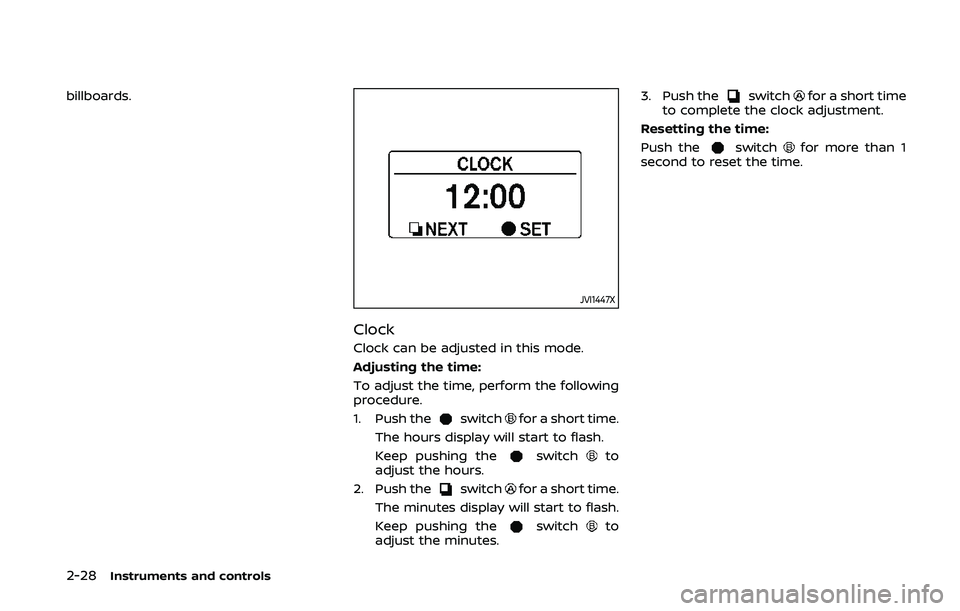
Clock
Clock can be adjusted in this mode.
Adjusting the time:
To adjust the time, perform the following
procedure.
1. Push the
switchfor a short time.
The hours display will start to flash.
Keep pushing the
switchto
adjust the hours.
2. Push the
switchfor a short time.
The minutes display will start to flash.
Keep pushing the
switchto
adjust the minutes. 3. Push the
switchfor a short time
to complete the clock adjustment.
Resetting the time:
Push the
switchfor more than 1
second to reset the time.
Page 97 of 455
JVI1452X
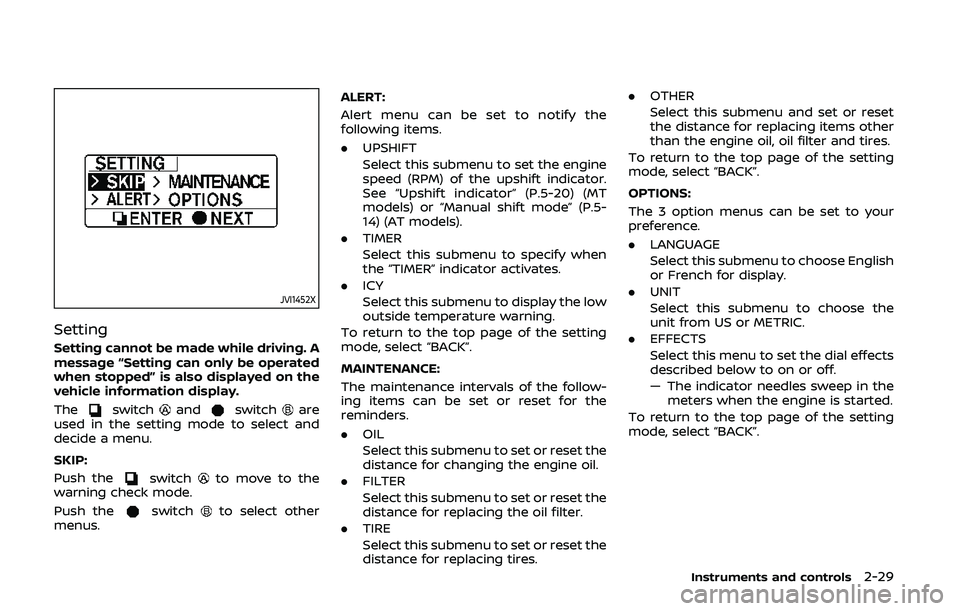
Setting
Setting cannot be made while driving. A
message “Setting can only be operated
when stopped” is also displayed on the
vehicle information display.
The
switchandswitchare
used in the setting mode to select and
decide a menu.
SKIP:
Push the
switchto move to the
warning check mode.
Push the
switchto select other
menus. ALERT:
Alert menu can be set to notify the
following items.
.
UPSHIFT
Select this submenu to set the engine
speed (RPM) of the upshift indicator.
See “Upshift indicator” (P.5-20) (MT
models) or “Manual shift mode” (P.5-
14) (AT models).
. TIMER
Select this submenu to specify when
the “TIMER” indicator activates.
. ICY
Select this submenu to display the low
outside temperature warning.
To return to the top page of the setting
mode, select “BACK”.
MAINTENANCE:
The maintenance intervals of the follow-
ing items can be set or reset for the
reminders.
. OIL
Select this submenu to set or reset the
distance for changing the engine oil.
. FILTER
Select this submenu to set or reset the
distance for replacing the oil filter.
. TIRE
Select this submenu to set or reset the
distance for replacing tires. .
OTHER
Select this submenu and set or reset
the distance for replacing items other
than the engine oil, oil filter and tires.
To return to the top page of the setting
mode, select “BACK”.
OPTIONS:
The 3 option menus can be set to your
preference.
. LANGUAGE
Select this submenu to choose English
or French for display.
. UNIT
Select this submenu to choose the
unit from US or METRIC.
. EFFECTS
Select this menu to set the dial effects
described below to on or off.
— The indicator needles sweep in the
meters when the engine is started.
To return to the top page of the setting
mode, select “BACK”.
Instruments and controls2-29
Page 98 of 455
2-30Instruments and controls
SIC3993
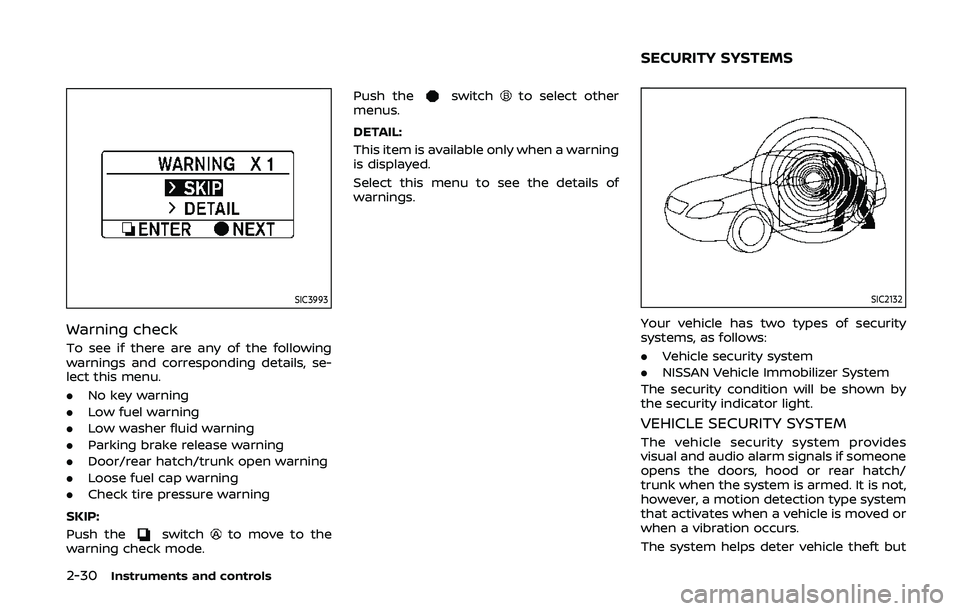
Warning check
To see if there are any of the following
warnings and corresponding details, se-
lect this menu.
.No key warning
. Low fuel warning
. Low washer fluid warning
. Parking brake release warning
. Door/rear hatch/trunk open warning
. Loose fuel cap warning
. Check tire pressure warning
SKIP:
Push the
switchto move to the
warning check mode. Push the
switchto select other
menus.
DETAIL:
This item is available only when a warning
is displayed.
Select this menu to see the details of
warnings.
SIC2132
Your vehicle has two types of security
systems, as follows:
. Vehicle security system
. NISSAN Vehicle Immobilizer System
The security condition will be shown by
the security indicator light.
VEHICLE SECURITY SYSTEM
The vehicle security system provides
visual and audio alarm signals if someone
opens the doors, hood or rear hatch/
trunk when the system is armed. It is not,
however, a motion detection type system
that activates when a vehicle is moved or
when a vibration occurs.
The system helps deter vehicle theft but
SECURITY SYSTEMS
Page 137 of 455
.All doors are closed, and
. The shift lever is in the P (Park)
position (Automatic Transmission
models).
WARNING SIGNALS
To help prevent the vehicle from moving
unexpectedly by erroneous operation of
the Intelligent Key listed on the following
chart or to help prevent the vehicle from
being stolen, chime or beep sounds inside
and outside the vehicle and a warning
displays in the vehicle information display.
When a chime or beep sounds or the
warning displays, be sure to check the
vehicle and Intelligent Key.
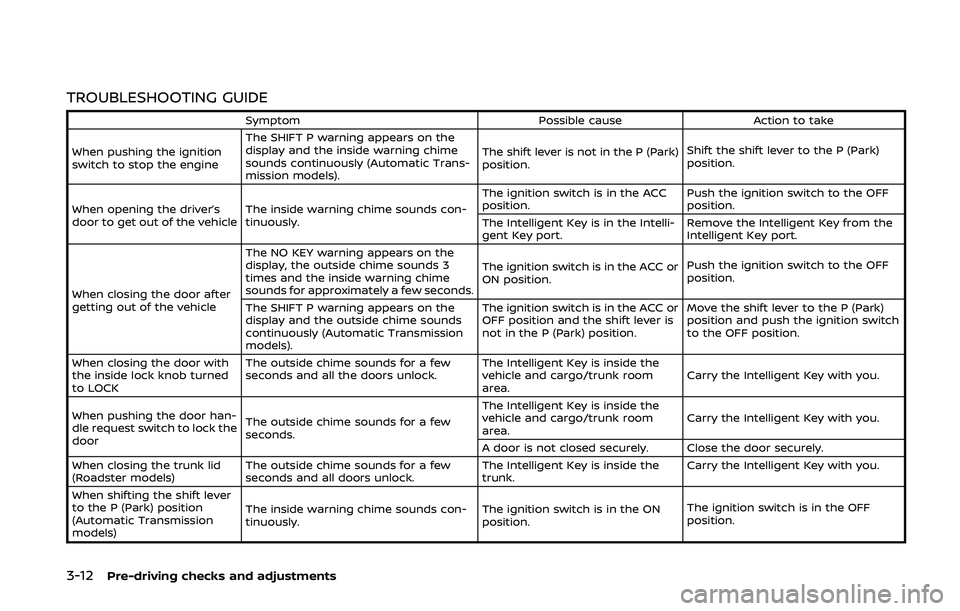
See “Troubleshooting guide” (P.3-12) and
“Vehicle information display” (P.2-19).
Pre-driving checks and adjustments3-11
Page 138 of 455
3-12Pre-driving checks and adjustments
TROUBLESHOOTING GUIDE
SymptomPossible causeAction to take
When pushing the ignition
switch to stop the engine The SHIFT P warning appears on the
display and the inside warning chime
sounds continuously (Automatic Trans-
mission models).
The shift lever is not in the P (Park)
position.
Shift the shift lever to the P (Park)
position.
When opening the driver’s
door to get out of the vehicle The inside warning chime sounds con-
tinuously. The ignition switch is in the ACC
position.
Push the ignition switch to the OFF
position.
The Intelligent Key is in the Intelli-
gent Key port. Remove the Intelligent Key from the
Intelligent Key port.
When closing the door after
getting out of the vehicle The NO KEY warning appears on the
display, the outside chime sounds 3
times and the inside warning chime
sounds for approximately a few seconds.
The ignition switch is in the ACC or
ON position.
Push the ignition switch to the OFF
position.
The SHIFT P warning appears on the
display and the outside chime sounds
continuously (Automatic Transmission
models). The ignition switch is in the ACC or
OFF position and the shift lever is
not in the P (Park) position.
Move the shift lever to the P (Park)
position and push the ignition switch
to the OFF position.
When closing the door with
the inside lock knob turned
to LOCK The outside chime sounds for a few
seconds and all the doors unlock.
The Intelligent Key is inside the
vehicle and cargo/trunk room
area.Carry the Intelligent Key with you.
When pushing the door han-
dle request switch to lock the
door The outside chime sounds for a few
seconds. The Intelligent Key is inside the
vehicle and cargo/trunk room
area.
Carry the Intelligent Key with you.
A door is not closed securely. Close the door securely.
When closing the trunk lid
(Roadster models) The outside chime sounds for a few
seconds and all doors unlock. The Intelligent Key is inside the
trunk.Carry the Intelligent Key with you.
When shifting the shift lever
to the P (Park) position
(Automatic Transmission
models) The inside warning chime sounds con-
tinuously.
The ignition switch is in the ON
position.The ignition switch is in the OFF
position.
Page 161 of 455
lock switch.
FUEL-FILLER CAP
WARNING
.Gasoline is extremely flammable
and highly explosive under cer-
tain conditions. You could be
burned or seriously injured if it is
misused or mishandled. Always
stop engine and do not smoke or
allow open flames or sparks near
the vehicle when refueling.
. Do not attempt to top off the fuel
tank after the fuel pump nozzle
shuts off automatically. Contin-
ued refueling may cause fuel
overflow, resulting in fuel spray
and possibly a fire.
. Use only an original equipment
type fuel-filler cap as a replace-
ment. It has a built-in safety valve
needed for proper operation of
the fuel system and emission
control system. An incorrect cap
can result in a serious malfunc-
tion and possible injury. It could
also cause the malfunction indi-
cator light to come on. .
Never pour fuel into the throttle
body to attempt to start your
vehicle.
. Do not fill a portable fuel contain-
er in the vehicle or trailer. Static
electricity can cause an explosion
of flammable liquid, vapor or gas
in any vehicle or trailer. To reduce
the risk of serious injury or death
when filling portable fuel contain-
ers:
— Always place the container on
the ground when filling.
— Do not use electronic devices when filling.
— Keep the pump nozzle in con- tact with the container while
you are filling it.
— Use only approved portable fuel containers for flammable
liquid.
CAUTION
. If fuel is spilled on the vehicle
body, flush it away with water to
avoid paint damage. .
Insert the cap straight into the
fuel-filler tube, then tighten until
the fuel-filler cap clicks. Failure to
tighten the fuel-filler cap properly
may cause the
malfunction
indicator light (MIL) to illuminate.
If the
light illuminates be-
cause the fuel-filler cap is loose
or missing, tighten or install the
cap and continue to drive the
vehicle. The
light should turn
off after a few driving trips. If the
light does not turn off after a
few driving trips, have the vehicle
inspected. It is recommended you
visit a NISSAN dealer for this
service.
. The LOOSE FUEL CAP warning will
appear if the fuel-filler cap is not
properly tightened. It may take a
few driving trips for the message
to be displayed. Failure to tighten
the fuel-filler cap properly after
the LOOSE FUEL CAP warning
appears may cause the
Mal-
function Indicator Light (MIL) to
illuminate.
Pre-driving checks and adjustments3-35
Page 162 of 455
3-36Pre-driving checks and adjustments
SPA2837
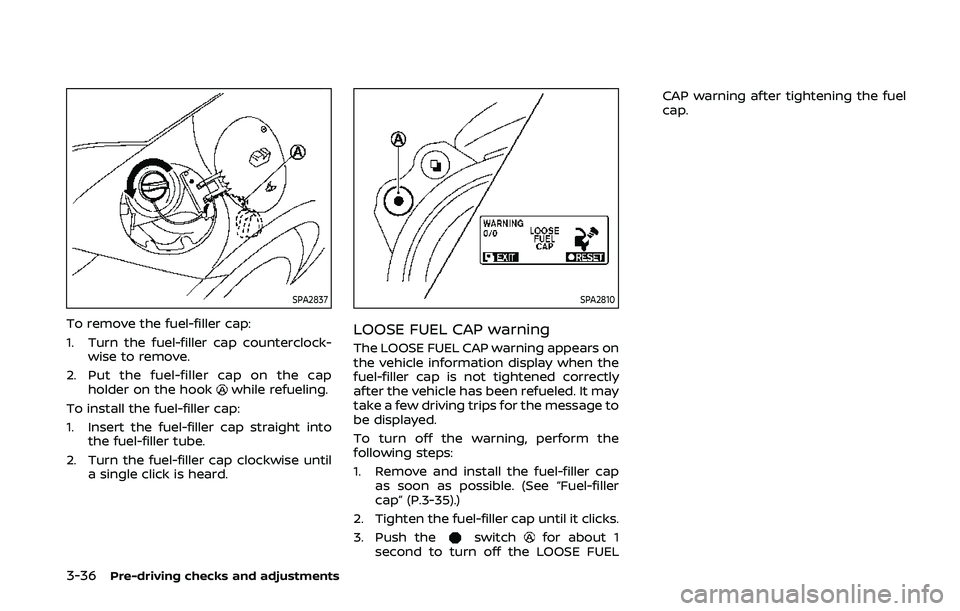
To remove the fuel-filler cap:
1. Turn the fuel-filler cap counterclock-wise to remove.
2. Put the fuel-filler cap on the cap holder on the hook
while refueling.
To install the fuel-filler cap:
1. Insert the fuel-filler cap straight into the fuel-filler tube.
2. Turn the fuel-filler cap clockwise until a single click is heard.
SPA2810
LOOSE FUEL CAP warning
The LOOSE FUEL CAP warning appears on
the vehicle information display when the
fuel-filler cap is not tightened correctly
after the vehicle has been refueled. It may
take a few driving trips for the message to
be displayed.
To turn off the warning, perform the
following steps:
1. Remove and install the fuel-filler capas soon as possible. (See “Fuel-filler
cap” (P.3-35).)
2. Tighten the fuel-filler cap until it clicks.
3. Push the
switchfor about 1
second to turn off the LOOSE FUEL CAP warning after tightening the fuel
cap.
Page 165 of 455
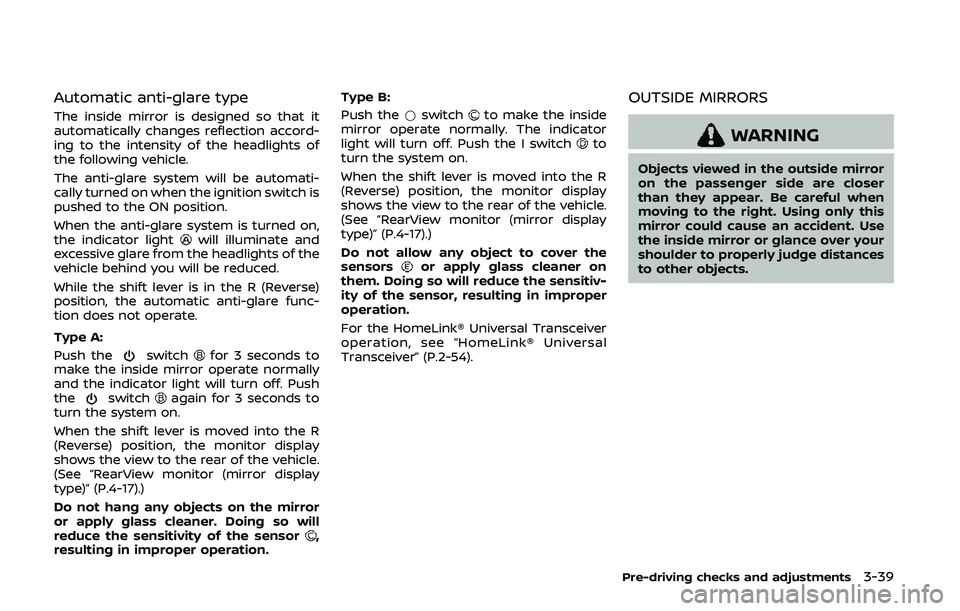
Automatic anti-glare type
The inside mirror is designed so that it
automatically changes reflection accord-
ing to the intensity of the headlights of
the following vehicle.
The anti-glare system will be automati-
cally turned on when the ignition switch is
pushed to the ON position.
When the anti-glare system is turned on,
the indicator light
will illuminate and
excessive glare from the headlights of the
vehicle behind you will be reduced.
While the shift lever is in the R (Reverse)
position, the automatic anti-glare func-
tion does not operate.
Type A:
Push the
switchfor 3 seconds to
make the inside mirror operate normally
and the indicator light will turn off. Push
the
switchagain for 3 seconds to
turn the system on.
When the shift lever is moved into the R
(Reverse) position, the monitor display
shows the view to the rear of the vehicle.
(See “RearView monitor (mirror display
type)” (P.4-17).)
Do not hang any objects on the mirror
or apply glass cleaner. Doing so will
reduce the sensitivity of the sensor
,
resulting in improper operation. Type B:
Push the
*switch
to make the inside
mirror operate normally. The indicator
light will turn off. Push the I switch
to
turn the system on.
When the shift lever is moved into the R
(Reverse) position, the monitor display
shows the view to the rear of the vehicle.
(See “RearView monitor (mirror display
type)” (P.4-17).)
Do not allow any object to cover the
sensors
or apply glass cleaner on
them. Doing so will reduce the sensitiv-
ity of the sensor, resulting in improper
operation.
For the HomeLink® Universal Transceiver
operation, see “HomeLink® Universal
Transceiver” (P.2-54).
OUTSIDE MIRRORS
WARNING
Objects viewed in the outside mirror
on the passenger side are closer
than they appear. Be careful when
moving to the right. Using only this
mirror could cause an accident. Use
the inside mirror or glance over your
shoulder to properly judge distances
to other objects.
Pre-driving checks and adjustments3-39
Page 169 of 455

4 Center display, heater, air conditioner,audio, phone and voice recognition sys-
tems
Safety note ........................................................................\
................ 4-3
Center multi-function control panel
(models with navigation system) .................................... 4-4
How to use multi-function controller .................... 4-4
How to use touch screen ................................................ 4-5
Menu options ........................................................................\
.... 4-7
How to select menus on the screen ...................... 4-7
Vehicle information and settings (models with
navigation system) ...................................................................... 4-8 How to use STATUS button .......................................... 4-8
How to use brightness control and display
ON/OFF button ........................................................................\
4-8
How to use INFO button .................................................. 4-8
How to use SETTING button ...................................... 4-11
RearView monitor (mirror display type) .................. 4-17 RearView Monitor system operation .................. 4-18
How to read displayed lines ....................................... 4-18
Difference between predictive and
actual distances ................................................................... 4-19
Display settings (Type A) (if so equipped) ....... 4-21
Display settings (Type B) (if so equipped) ....... 4-21
RearView Monitor system limitations ................. 4-22
System maintenance ....................................................... 4-23 RearView Monitor (center display type) (if
so equipped) ........................................................................\
......... 4-24
RearView Monitor system operation ................ 4-24
How to read displayed lines .................................... 4-25
How to park with predictive course lines ...... 4-25
Difference between predictive and
actual distances ................................................................ 4-26
Adjusting the screen ...................................................... 4-28
Predictive course line settings ............................... 4-28
RearView Monitor system limitations .............. 4-29
System maintenance .................................................... 4-30
Ventilators ........................................................................\
.............. 4-30 Center ventilators ............................................................ 4-30
Side ventilators .................................................................. 4-31
Heater and air conditioner ................................................ 4-31 Automatic air conditioner (Type A) (if
so equipped) ........................................................................\
. 4-32
Automatic air conditioner (Type B) (if
so equipped) ........................................................................\
. 4-34
Operating tips ..................................................................... 4-36
In-cabin microfilter .......................................................... 4-36
Servicing air conditioner ............................................. 4-36