warning NISSAN 370Z 2020 Owner´s Manual
[x] Cancel search | Manufacturer: NISSAN, Model Year: 2020, Model line: 370Z, Model: NISSAN 370Z 2020Pages: 455, PDF Size: 2.22 MB
Page 106 of 455
2-38Instruments and controls
if the headlights turn off auto-
matically.
Daytime running light system
The daytime running lights automatically
illuminate when the engine is started with
the parking brake released. The daytime
running lights operate with the headlight
switch in the OFF position or in the
position. Turn the headlight switch to theposition for full illumination when
driving at night. However, the daytime
running lights will turn off.
If the parking brake is applied before the
engine is started, the daytime running
lights do not illuminate. The daytime
running lights illuminate once the parking
brake is released. The daytime running
lights will remain on until the ignition
switch is pushed to the OFF position.
WARNING
When the daytime running light sys-
tem is active, tail lights on your
vehicle are not on. It is necessary at
dusk to turn on your headlights.
Failure to do so could cause an
accident injuring yourself and
others.
SIC3981
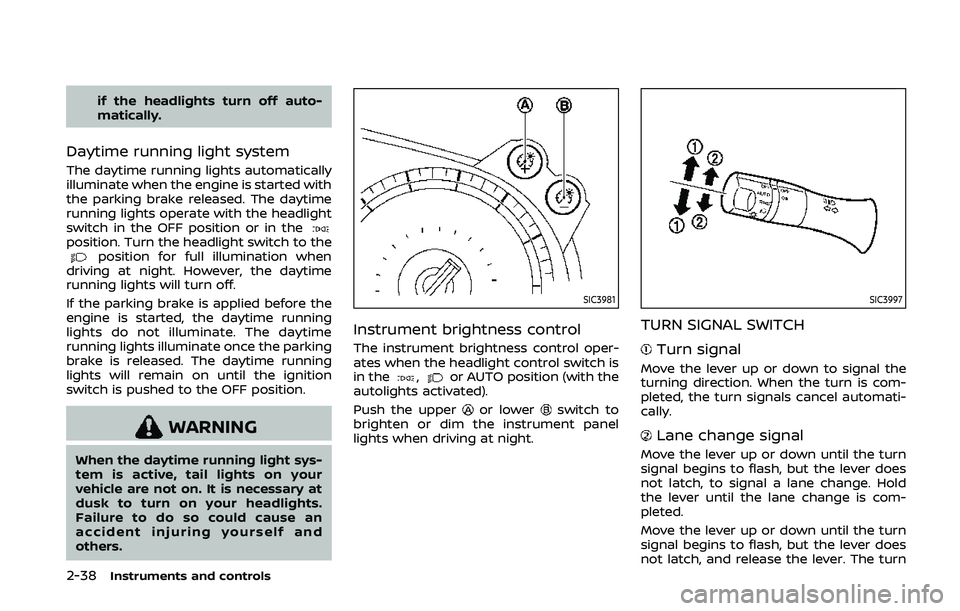
Instrument brightness control
The instrument brightness control oper-
ates when the headlight control switch is
in the
,or AUTO position (with the
autolights activated).
Push the upper
or lowerswitch to
brighten or dim the instrument panel
lights when driving at night.
SIC3997
TURN SIGNAL SWITCH
Turn signal
Move the lever up or down to signal the
turning direction. When the turn is com-
pleted, the turn signals cancel automati-
cally.
Lane change signal
Move the lever up or down until the turn
signal begins to flash, but the lever does
not latch, to signal a lane change. Hold
the lever until the lane change is com-
pleted.
Move the lever up or down until the turn
signal begins to flash, but the lever does
not latch, and release the lever. The turn
Page 107 of 455
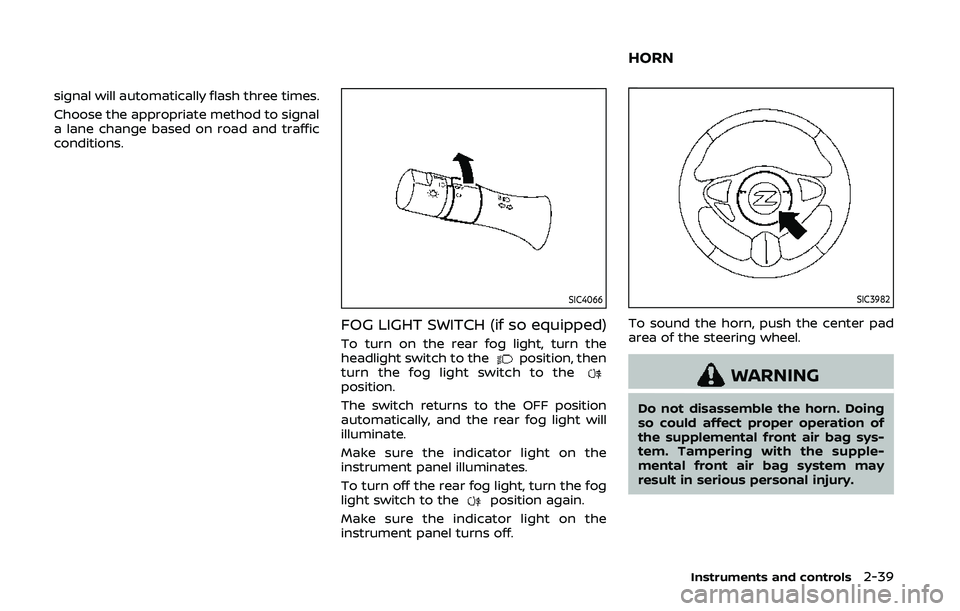
signal will automatically flash three times.
Choose the appropriate method to signal
a lane change based on road and traffic
conditions.
SIC4066
FOG LIGHT SWITCH (if so equipped)
To turn on the rear fog light, turn the
headlight switch to theposition, then
turn the fog light switch to the
position.
The switch returns to the OFF position
automatically, and the rear fog light will
illuminate.
Make sure the indicator light on the
instrument panel illuminates.
To turn off the rear fog light, turn the fog
light switch to the
position again.
Make sure the indicator light on the
instrument panel turns off.
SIC3982
To sound the horn, push the center pad
area of the steering wheel.
WARNING
Do not disassemble the horn. Doing
so could affect proper operation of
the supplemental front air bag sys-
tem. Tampering with the supple-
mental front air bag system may
result in serious personal injury.
Instruments and controls2-39
HORN
Page 108 of 455
2-40Instruments and controls
WARNING
Do not use or allow occupants to use
the seat heater if you or the occu-
pants cannot monitor elevated seat
temperatures or have an inability to
feel pain in those body parts in
contact with the seat. Use of the seat
heater by such people could result in
serious injury.
CAUTION
.The battery could run down if the
seat heater is operated while the
engine is not running.
. Do not use the seat heater for
extended periods or when no one
is using the seat.
. Do not put anything on the seat
which insulates heat, such as a
blanket, cushion, seat cover, etc.
Otherwise, the seat may become
overheated.
. Do not place anything hard or
heavy on the seat or pierce it with
a pin or similar object. This may
result in damage to the heater. .
Any liquid spilled on the heated
seat should be removed immedi-
ately with a dry cloth.
. When cleaning the seat, never use
gasoline, thinner, or any similar
materials.
. If any malfunctions are found or
the heated seat does not operate,
turn the switch off and have the
system checked. It is recom-
mended you visit a NISSAN dealer
for this service.
SIC2770
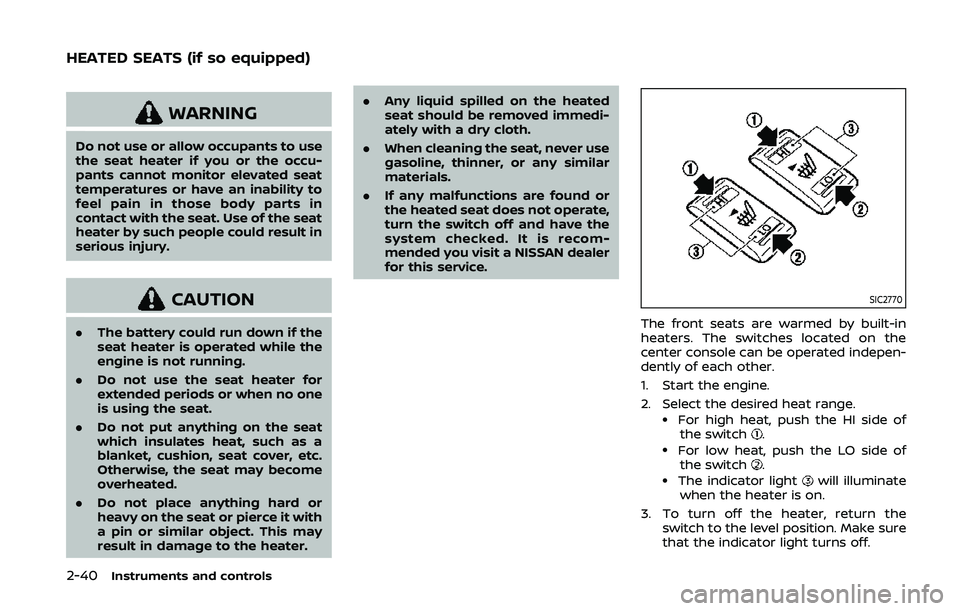
The front seats are warmed by built-in
heaters. The switches located on the
center console can be operated indepen-
dently of each other.
1. Start the engine.
2. Select the desired heat range.
.For high heat, push the HI side of
the switch..For low heat, push the LO side ofthe switch..The indicator lightwill illuminate
when the heater is on.
3. To turn off the heater, return the switch to the level position. Make sure
that the indicator light turns off.
HEATED SEATS (if so equipped)
Page 109 of 455
The heater is controlled by a thermo-
stat, automatically turning the heater
on and off. The indicator light will
remain on as long as the switch is on.
When the vehicle’s interior is warmed,
or before you leave the vehicle, be
sure to turn off the switch.
SIC2771
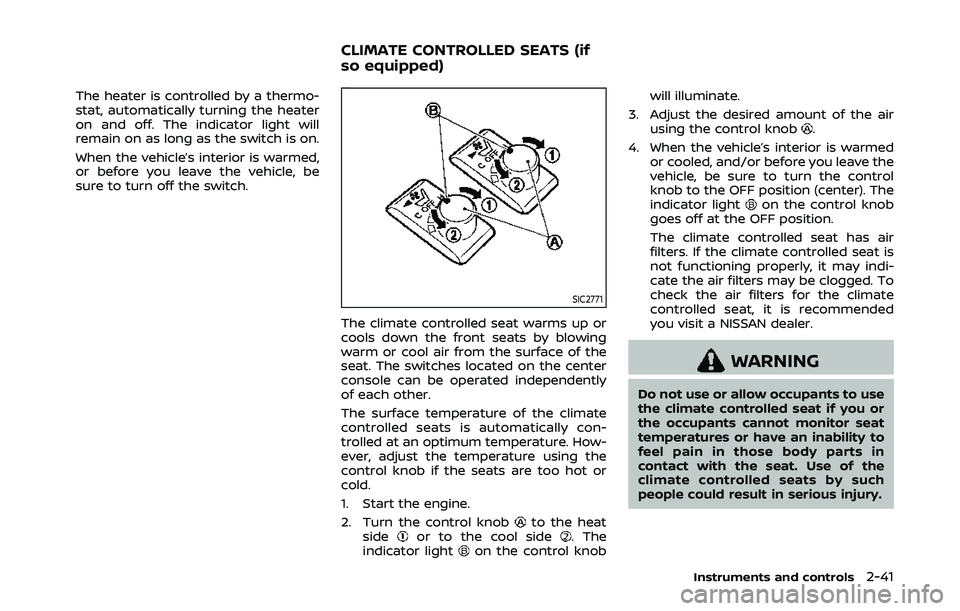
The climate controlled seat warms up or
cools down the front seats by blowing
warm or cool air from the surface of the
seat. The switches located on the center
console can be operated independently
of each other.
The surface temperature of the climate
controlled seats is automatically con-
trolled at an optimum temperature. How-
ever, adjust the temperature using the
control knob if the seats are too hot or
cold.
1. Start the engine.
2. Turn the control knob
to the heat
sideor to the cool side. The
indicator lighton the control knob will illuminate.
3. Adjust the desired amount of the air using the control knob
.
4. When the vehicle’s interior is warmed or cooled, and/or before you leave the
vehicle, be sure to turn the control
knob to the OFF position (center). The
indicator light
on the control knob
goes off at the OFF position.
The climate controlled seat has air
filters. If the climate controlled seat is
not functioning properly, it may indi-
cate the air filters may be clogged. To
check the air filters for the climate
controlled seat, it is recommended
you visit a NISSAN dealer.
WARNING
Do not use or allow occupants to use
the climate controlled seat if you or
the occupants cannot monitor seat
temperatures or have an inability to
feel pain in those body parts in
contact with the seat. Use of the
climate controlled seats by such
people could result in serious injury.
Instruments and controls2-41
CLIMATE CONTROLLED SEATS (if
so equipped)
Page 112 of 455
2-44Instruments and controls
.When not in use, be sure to close
the cap. Do not allow water or any
liquid to contact the outlet.
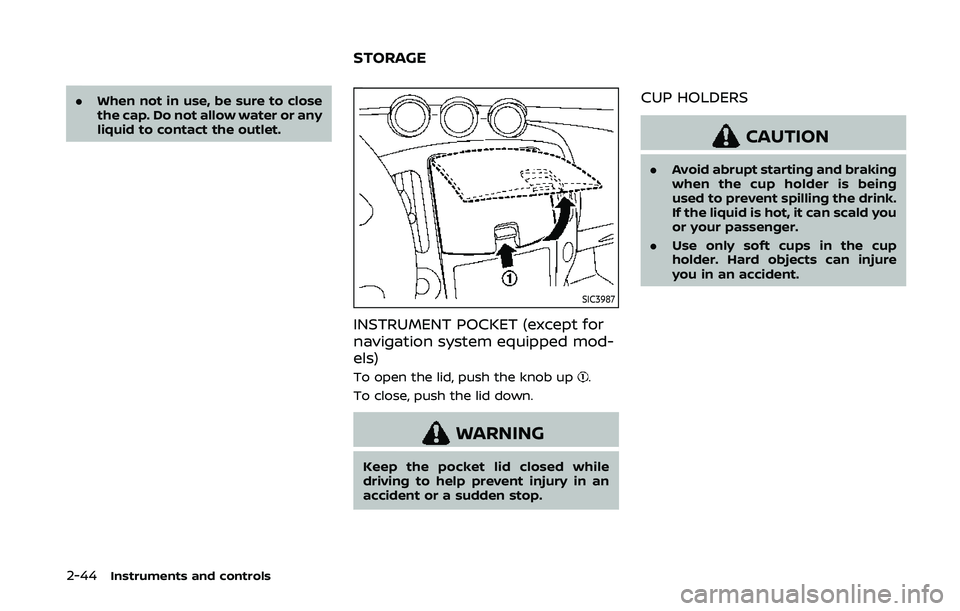
SIC3987
INSTRUMENT POCKET (except for
navigation system equipped mod-
els)
To open the lid, push the knob up.
To close, push the lid down.
WARNING
Keep the pocket lid closed while
driving to help prevent injury in an
accident or a sudden stop.
CUP HOLDERS
CAUTION
. Avoid abrupt starting and braking
when the cup holder is being
used to prevent spilling the drink.
If the liquid is hot, it can scald you
or your passenger.
. Use only soft cups in the cup
holder. Hard objects can injure
you in an accident.
STORAGE
Page 113 of 455
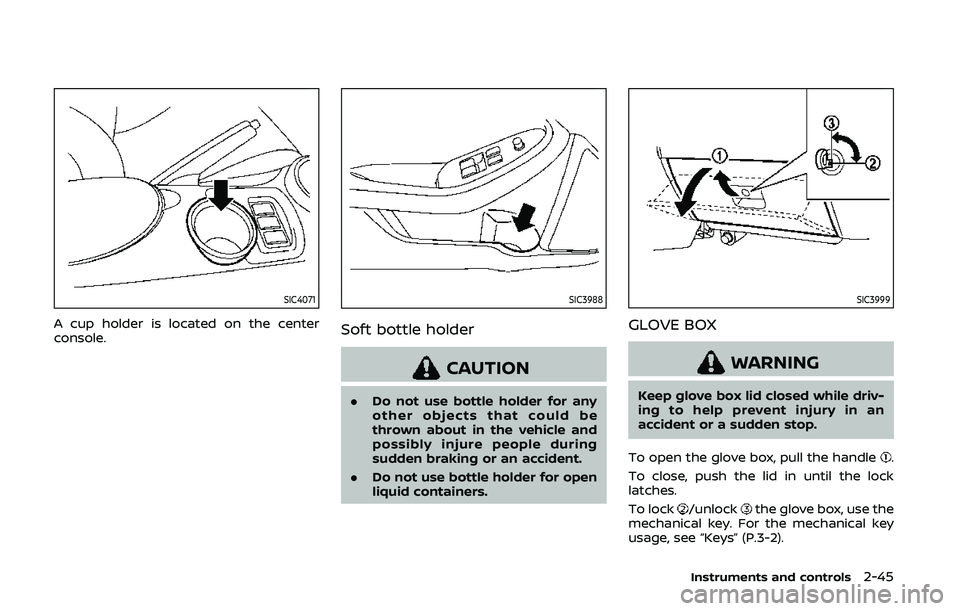
SIC4071
A cup holder is located on the center
console.
SIC3988
Soft bottle holder
CAUTION
.Do not use bottle holder for any
other objects that could be
thrown about in the vehicle and
possibly injure people during
sudden braking or an accident.
. Do not use bottle holder for open
liquid containers.
SIC3999
GLOVE BOX
WARNING
Keep glove box lid closed while driv-
ing to help prevent injury in an
accident or a sudden stop.
To open the glove box, pull the handle
.
To close, push the lid in until the lock
latches.
To lock
/unlockthe glove box, use the
mechanical key. For the mechanical key
usage, see “Keys” (P.3-2).
Instruments and controls2-45
Page 114 of 455
2-46Instruments and controls
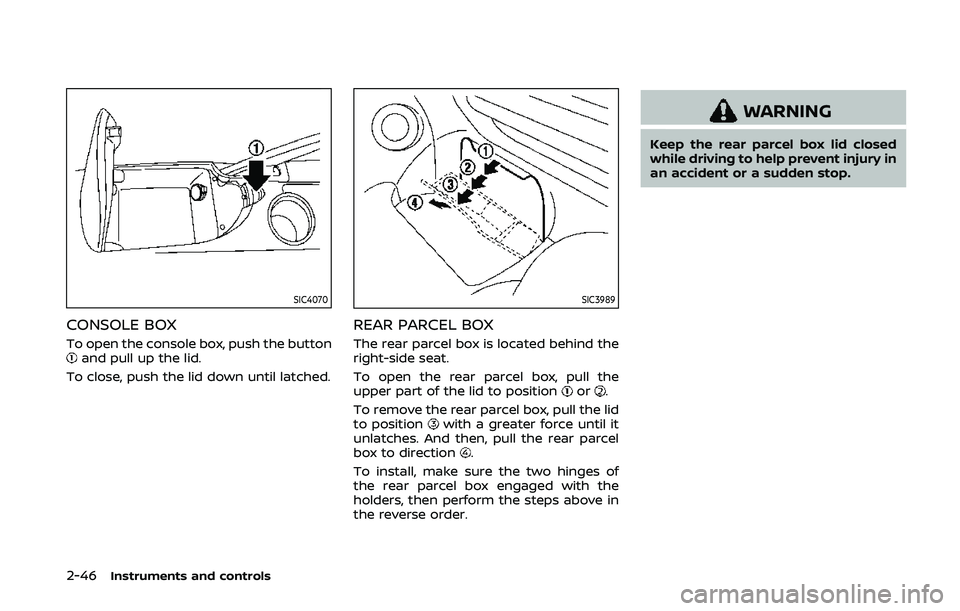
SIC4070
CONSOLE BOX
To open the console box, push the buttonand pull up the lid.
To close, push the lid down until latched.
SIC3989
REAR PARCEL BOX
The rear parcel box is located behind the
right-side seat.
To open the rear parcel box, pull the
upper part of the lid to position
or.
To remove the rear parcel box, pull the lid
to position
with a greater force until it
unlatches. And then, pull the rear parcel
box to direction
.
To install, make sure the two hinges of
the rear parcel box engaged with the
holders, then perform the steps above in
the reverse order.
WARNING
Keep the rear parcel box lid closed
while driving to help prevent injury in
an accident or a sudden stop.
Page 115 of 455
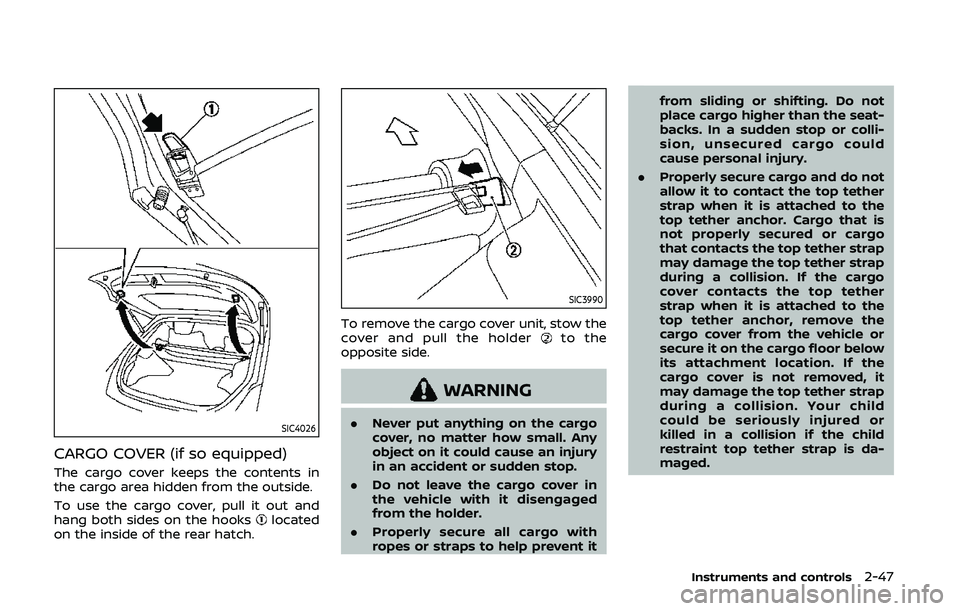
SIC4026
CARGO COVER (if so equipped)
The cargo cover keeps the contents in
the cargo area hidden from the outside.
To use the cargo cover, pull it out and
hang both sides on the hooks
located
on the inside of the rear hatch.
SIC3990
To remove the cargo cover unit, stow the
cover and pull the holderto the
opposite side.
WARNING
. Never put anything on the cargo
cover, no matter how small. Any
object on it could cause an injury
in an accident or sudden stop.
. Do not leave the cargo cover in
the vehicle with it disengaged
from the holder.
. Properly secure all cargo with
ropes or straps to help prevent it from sliding or shifting. Do not
place cargo higher than the seat-
backs. In a sudden stop or colli-
sion, unsecured cargo could
cause personal injury.
. Properly secure cargo and do not
allow it to contact the top tether
strap when it is attached to the
top tether anchor. Cargo that is
not properly secured or cargo
that contacts the top tether strap
may damage the top tether strap
during a collision. If the cargo
cover contacts the top tether
strap when it is attached to the
top tether anchor, remove the
cargo cover from the vehicle or
secure it on the cargo floor below
its attachment location. If the
cargo cover is not removed, it
may damage the top tether strap
during a collision. Your child
could be seriously injured or
killed in a collision if the child
restraint top tether strap is da-
maged.
Instruments and controls2-47
Page 116 of 455
2-48Instruments and controls
POWER WINDOWS
WARNING
.Make sure that all passengers
have their hands, etc. inside the
vehicle while it is in motion and
before closing the windows. Use
the window lock switch to pre-
vent unexpected use of the
power windows.
. To help avoid risk of injury or
death through unintended opera-
tion of the vehicle and or its
systems, including entrapment
in windows or inadvertent door
lock activation, do not leave chil-
dren, people who require the
assistance of others or pets un-
attended in your vehicle. Addi-
tionally, the temperature inside a
closed vehicle on a warm day can
quickly become high enough to
cause a significant risk of injury
or death to people and pets.
The power windows operate when the
ignition switch is in the ON position or for
about 45 seconds after the ignition
switch is pushed to the OFF position. If
the driver’s or front passenger’s door is opened during this period of about 45
seconds, power to the windows is can-
celed.
The power window switches will be
deactivated during soft top operation
(Roadster models).
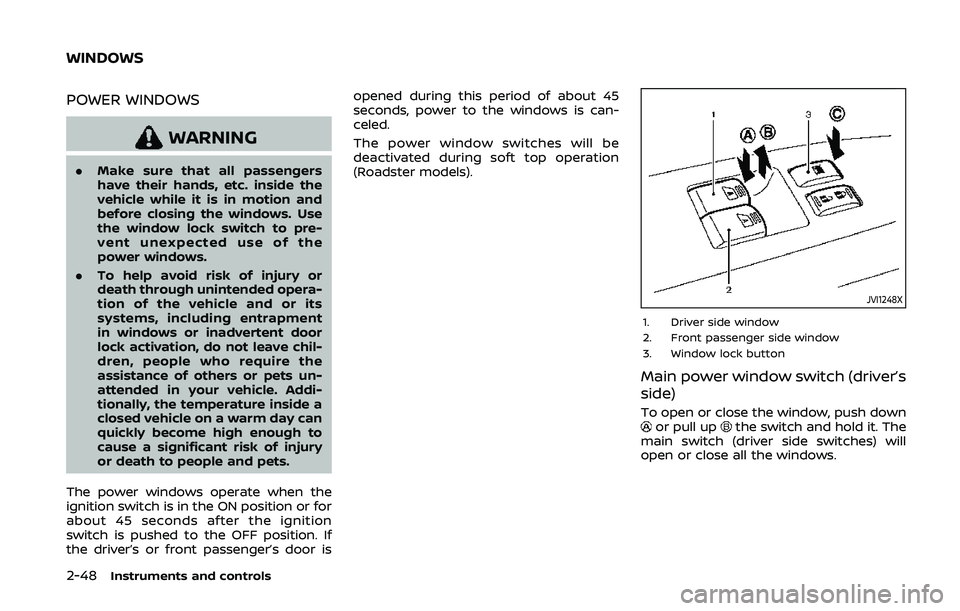
JVI1248X
1. Driver side window
2. Front passenger side window
3. Window lock button
Main power window switch (driver’s
side)
To open or close the window, push downor pull upthe switch and hold it. The
main switch (driver side switches) will
open or close all the windows.
WINDOWS
Page 118 of 455
2-50Instruments and controls
Auto reverse function
WARNING
There are some small distances im-
mediately before the closed position
which cannot be detected. Make sure
that all passengers have their hands,
etc., inside the vehicle before closing
the window.
If the control unit detects something
caught in the window as it is closing, the
window will be immediately lowered.
The auto reverse function can be acti-
vated when the window is closed by
automatic operation when the ignition
switch is in the ON position or for 45
seconds after the ignition switch is
pushed to the OFF position.
Depending on the environment or driv-
ing conditions, the auto reverse func-
tion may be activated if an impact or
load similar to something being caught
in the window occurs.
Automatic window lowering
(Roadster models)
When the soft top operating switch is
pressed, the power windows will auto-
matically be lowered completely. The
windows do not rise automatically after
the soft top open/close operation is
completed. Use the power window
switches to raise them.
Automatic adjusting function
CAUTION
When the battery cable is removed
from the battery terminal, do not
close either of the front doors. The
automatic window adjusting func-
tion will not work and the side roof
panel may be damaged.
The power window has an automatic
adjusting function. When the door is
being opened, the window is automati-
cally lowered slightly to avoid contact
between the window and the side roof
panel. When the door is closed, the
window is automatically raised slightly.
While the automatic adjusting function
does not work, the window will be con-
trolled as follows: .
When the door is opened, the window
lowers for approximately 2 seconds.
. While the door is open, the window
cannot be raised.
If the windows do not close auto-
matically
If the power window automatic function
(closing only) does not operate properly,
perform the following procedure to initi-
alize the power window system.
1. Push the ignition switch to start the
engine.
2. Close the door and soft top (Roadster models).
3. After starting the engine, open the window completely by operating the
power window switch.
4. Pull the power window switch and hold it to close the window, and then
hold the switch more than 3 seconds
after the window is closed completely.
5. Release the power window switch. Operate the window by the automatic
function to confirm the initialization is
complete.
6. Perform steps 2 through 5 above for other windows.
If the power window automatic function
does not operate properly after perform-