USB NISSAN 370Z COUPE 2010 Owner's Manual
[x] Cancel search | Manufacturer: NISSAN, Model Year: 2010, Model line: 370Z COUPE, Model: NISSAN 370Z COUPE 2010Pages: 409, PDF Size: 3.56 MB
Page 219 of 409
Black plate (219,1)
Model "Z34-D" EDITED: 2009/ 9/ 10
.Transfer Missing Titles to USB
Transfer the information of an album re-
corded without titles to a USB memory. Visit
www.nissanusa.com/gracenote/ for details.
. Update Gracenote from HDD
Search the title using the database in the
hard disk.
SAA2517
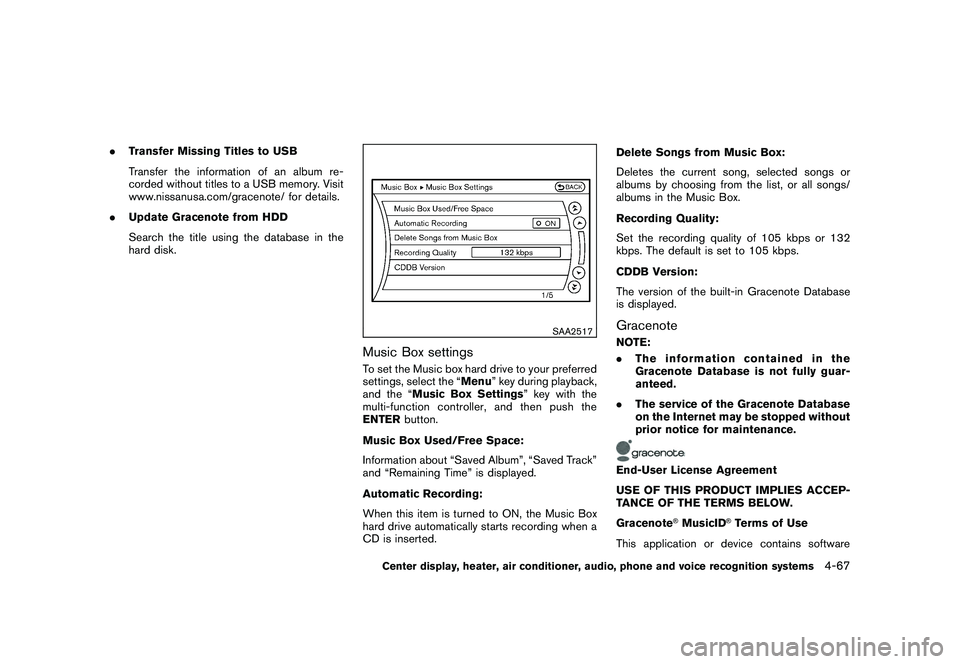
Music Box settingsTo set the Music box hard drive to your preferred
settings, select the “Menu ” key during playback,
and the “Music Box Settings ” key with the
multi-function controller, and then push the
ENTER button.
Music Box Used/Free Space:
Information about “Saved Album”, “Saved Track”
and “Remaining Time” is displayed.
Automatic Recording:
When this item is turned to ON, the Music Box
hard drive automatically starts recording when a
CD is inserted. Delete Songs from Music Box:
Deletes the current song, selected songs or
albums by choosing from the list, or all songs/
albums in the Music Box.
Recording Quality:
Set the recording quality of 105 kbps or 132
kbps. The default is set to 105 kbps.
CDDB Version:
The version of the built-in Gracenote Database
is displayed.
GracenoteNOTE:
.
The information contained in the
Gracenote Database is not fully guar-
anteed.
. The service of the Gracenote Database
on the Internet may be stopped without
prior notice for maintenance.End-User License Agreement
USE OF THIS PRODUCT IMPLIES ACCEP-
TANCE OF THE TERMS BELOW.
Gracenote
®MusicID
®Terms of Use
This application or device contains software
Center display, heater, air conditioner, audio, phone and voice recognition systems
4-67
Page 222 of 409
Black plate (222,1)
Model "Z34-D" EDITED: 2009/ 9/ 10
SAA2496
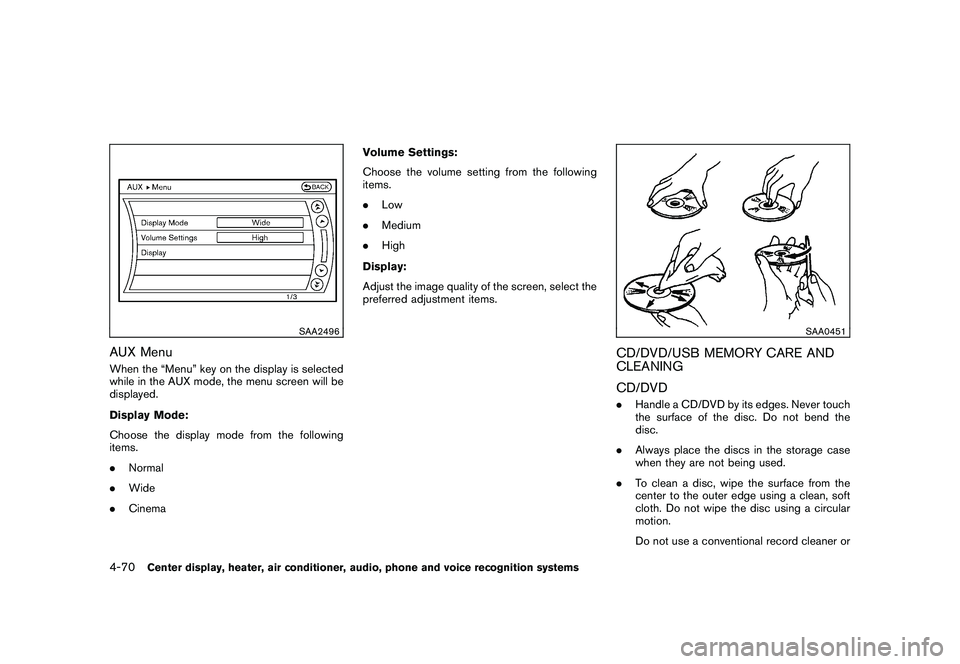
AUX MenuWhen the “Menu” key on the display is selected
while in the AUX mode, the menu screen will be
displayed.
Display Mode:
Choose the display mode from the following
items.
.Normal
. Wide
. Cinema Volume Settings:
Choose the volume setting from the following
items.
.
Low
. Medium
. High
Display:
Adjust the image quality of the screen, select the
preferred adjustment items.
SAA0451
CD/DVD/USB MEMORY CARE AND
CLEANING
CD/DVD. Handle a CD/DVD by its edges. Never touch
the surface of the disc. Do not bend the
disc.
. Always place the discs in the storage case
when they are not being used.
. To clean a disc, wipe the surface from the
center to the outer edge using a clean, soft
cloth. Do not wipe the disc using a circular
motion.
Do not use a conventional record cleaner or
4-70
Center display, heater, air conditioner, audio, phone and voice recognition systems
Page 223 of 409
Black plate (223,1)
Model "Z34-D" EDITED: 2009/ 9/ 10
alcohol intended for industrial use.
. A new disc may be rough on the inner and
outer edges. Remove the rough edges by
rubbing the inner and outer edges with the
side of a pen or pencil as illustrated.
USB memory.Never touch the terminal portion of the USB
memory.
. Do not place heavy objects on the USB
memory.
. Do not store the USB memory in highly
humid locations.
. Do not expose the USB memory to direct
sunlight.
. Do not spill any liquids on the USB memory.
Refer to the USB memory Owner’s Manual for
the details.
SAA2555
With navigation system
SAA2556
Without navigation system
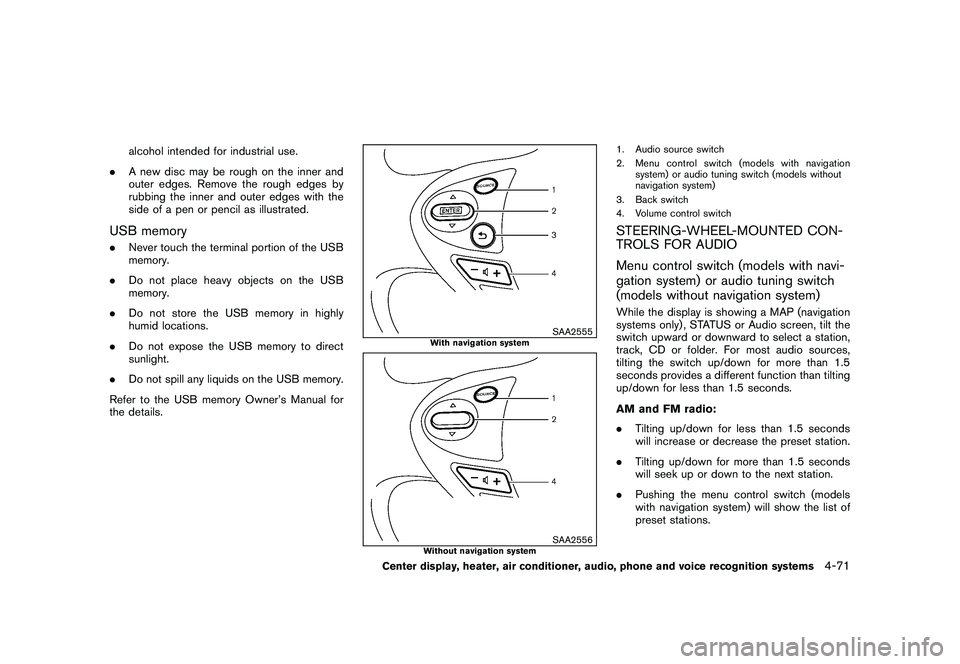
1. Audio source switch
2. Menu control switch (models with navigation system) or audio tuning switch (models without
navigation system)
3. Back switch
4. Volume control switchSTEERING-WHEEL-MOUNTED CON-
TROLS FOR AUDIO
Menu control switch (models with navi-
gation system) or audio tuning switch
(models without navigation system)While the display is showing a MAP (navigation
systems only) , STATUS or Audio screen, tilt the
switch upward or downward to select a station,
track, CD or folder. For most audio sources,
tilting the switch up/down for more than 1.5
seconds provides a different function than tilting
up/down for less than 1.5 seconds.
AM and FM radio:
. Tilting up/down for less than 1.5 seconds
will increase or decrease the preset station.
. Tilting up/down for more than 1.5 seconds
will seek up or down to the next station.
. Pushing the menu control switch (models
with navigation system) will show the list of
preset stations.
Center display, heater, air conditioner, audio, phone and voice recognition systems
4-71
Page 224 of 409
Black plate (224,1)
Model "Z34-D" EDITED: 2009/ 9/ 10
XM Satellite Radio (if so equipped):
.Tilting up/down for less than 1.5 seconds
will increase or decrease the preset channel.
. Tilting up/down for more than 1.5 seconds
will go to the next or previous category.
. Pushing the menu control switch (models
with navigation system) will show the XM
Menu.
iPod
®(models with navigation system) :
. Tilting up/down for less than 1.5 seconds
will increase or decrease the track number.
. Tilting up/down for more than 1.5 seconds
will skip to the next or previous index.
. Pushing the menu control switch will show
the iPod Menu.
CD:
. Tilting up/down for less than 1.5 seconds
will increase or decrease the track number.
. Tilting up/down for more than 1.5 seconds
will increase/decrease the folder number (if
playing compressed audio files) .
. Pushing the menu control switch (models
with navigation system) will show the CD
Menu. DVD (models with navigation system):
.
Tilting up/down for less than 1.5 seconds
will increase or decrease the track number.
. Tilting up/down for more than 1.5 seconds
will increase or decrease the title number.
. Pushing the menu control switch will select
an item from the DVD display.
. When the transparent operation menu ap-
pears, the switch will control the menu.
USB (models with navigation system):
. Tilting up/down for less than 1.5 seconds
will increase or decrease the track number.
. Tilting up/down for more than 1.5 seconds
will increase/decrease the folder number
. Pushing the menu control switch will show
the USB Menu.
Music Box (models with navigation sys-
tem):
. Tilting up/down for less than 1.5 seconds
will increase or decrease the track number.
. Tilting up/down for more than 1.5 seconds
will increase/decrease the album (folder)
number (if playing compressed audio files) .
. Pushing the menu control switch will show
the Music Box Menu. Bluetooth
®Audio (models with navigation
system):
. Tilting up/down for less than 1.5 seconds
will increase or decrease the track number.
AUX:
. Pushing the menu control switch (models
with navigation system) will show the AUX
Menu.
BACK switch (models with navi-
gation system)
Push this switch to go back to the previous
screen or cancel the selection if it is not
completed.Volume control switchesPush the upper (+) or lower ( ) side switch to
increase or decrease the volume.Audio source switchPush the audio source switch to change the
mode as follows.
. Models with navigation system
AM ?FM ?SAT ?CD/DVD ?Music Box
? USB/iPod
®? Bluetooth
®Audio ?AUX
4-72
Center display, heater, air conditioner, audio, phone and voice recognition systems
Page 266 of 409
Black plate (266,1)
Model "Z34-D" EDITED: 2009/ 9/ 10
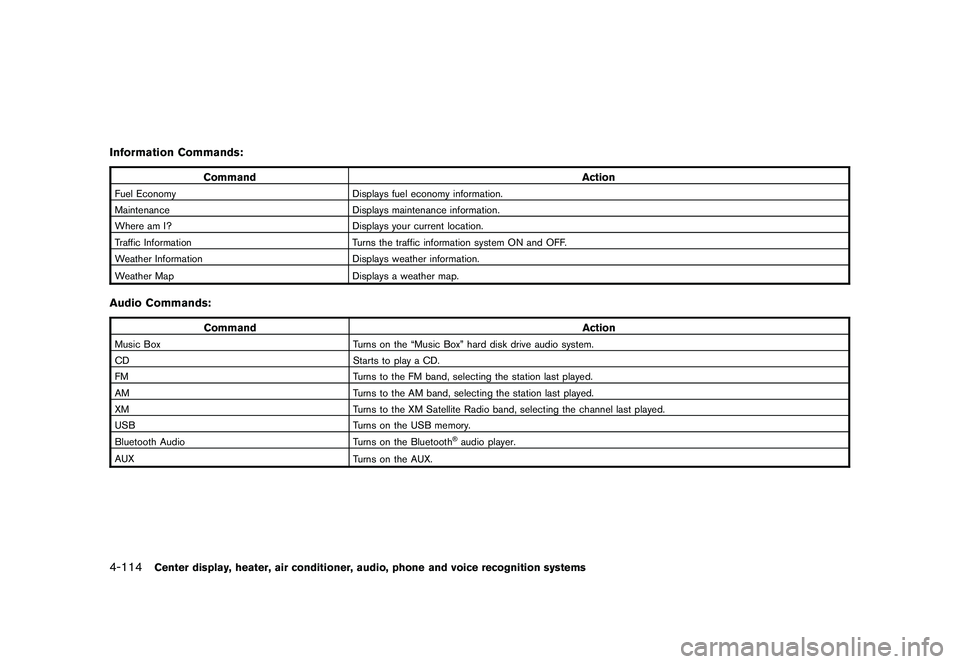
Information Commands:
CommandAction
Fuel EconomyDisplays fuel economy information.
Maintenance Displays maintenance information.
Where am I? Displays your current location.
Traffic Information Turns the traffic information system ON and OFF.
Weather Information Displays weather information.
Weather Map Displays a weather map.Audio Commands:
Command Action
Music BoxTurns on the “Music Box” hard disk drive audio system.
CD Starts to play a CD.
FM Turns to the FM band, selecting the station last played.
AM Turns to the AM band, selecting the station last played.
XM Turns to the XM Satellite Radio band, selecting the channel last played.
USB Turns on the USB memory.
Bluetooth Audio Turns on the Bluetooth
®audio player.
AUX Turns on the AUX.
4-114
Center display, heater, air conditioner, audio, phone and voice recognition systems
Page 406 of 409
Black plate (6,1)
10-6
Steering lock release malfunction
indicator........................................ 2-16
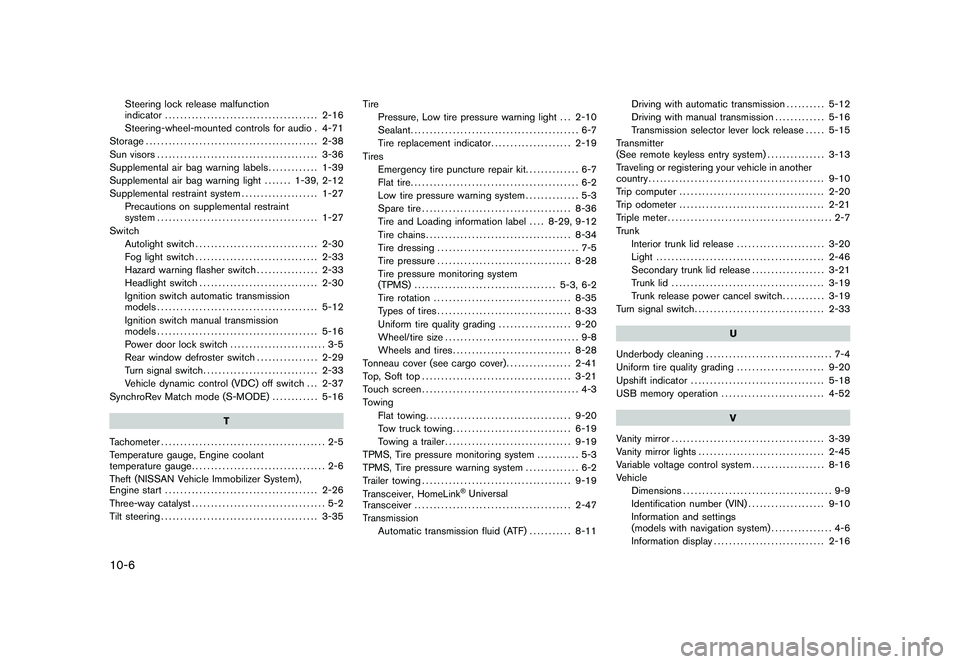
Steering-wheel-mounted controls for audio . 4-71
Storage ............................................. 2-38
Sun visors .......................................... 3-36
Supplemental air bag warning labels ............. 1-39
Supplemental air bag warning light ....... 1-39, 2-12
Supplemental restraint system .................... 1-27
Precautions on supplemental restraint
system .......................................... 1-27
Switch Autolight switch ................................ 2-30
Fog light switch ................................ 2-33
Hazard warning flasher switch ................ 2-33
Headlight switch ............................... 2-30
Ignition switch automatic transmission
models .......................................... 5-12
Ignition switch manual transmission
models .......................................... 5-16
Power door lock switch ......................... 3-5
Rear window defroster switch ................ 2-29
Turn signal switch .............................. 2-33
Vehicle dynamic control (VDC) off switch . . . 2-37
SynchroRev Match mode (S-MODE) ............ 5-16
T
Tachometer ........................................... 2-5
Temperature gauge, Engine coolant
temperature gauge ................................... 2-6
Theft (NISSAN Vehicle Immobilizer System) ,
Engine start ........................................ 2-26
Three-way catalyst ................................... 5-2
Tilt steering ......................................... 3-35 Tire
Pressure, Low tire pressure warning light . . . 2-10
Sealant ............................................ 6-7
Tire replacement indicator ..................... 2-19
Tires Emergency tire puncture repair kit .............. 6-7
Flat tire ............................................ 6-2
Low tire pressure warning system .............. 5-3
Spare tire ....................................... 8-36
Tire and Loading information label .... 8-29, 9-12
Tire chains ...................................... 8-34
Tire dressing ..................................... 7-5
Tire pressure ................................... 8-28
Tire pressure monitoring system
(TPMS) ..................................... 5-3, 6-2
Tire rotation .................................... 8-35
Types of tires ................................... 8-33
Uniform tire quality grading ................... 9-20
Wheel/tire size ................................... 9-8
Wheels and tires ............................... 8-28
Tonneau cover (see cargo cover) ................. 2-41
Top, Soft top ....................................... 3-21
Touch screen ......................................... 4-3
Towing Flat towing ...................................... 9-20
Tow truck towing ............................... 6-19
Towing a trailer ................................. 9-19
TPMS, Tire pressure monitoring system ........... 5-3
TPMS, Tire pressure warning system .............. 6-2
Trailer towing ....................................... 9-19
Transceiver, HomeLink
®Universal
Transceiver ......................................... 2-47
Transmission Automatic transmission fluid (ATF) ........... 8-11Driving with automatic transmission
.......... 5-12
Driving with manual transmission ............. 5-16
Transmission selector lever lock release ..... 5-15
Transmitter
(See remote keyless entry system) ............... 3-13
Traveling or registering your vehicle in another
country .............................................. 9-10
Trip computer ...................................... 2-20
Trip odometer ...................................... 2-21
Triple meter ........................................... 2-7
Trunk Interior trunk lid release ....................... 3-20
Light ............................................ 2-46
Secondary trunk lid release ................... 3-21
Trunk lid ........................................ 3-19
Trunk release power cancel switch ........... 3-19
Turn signal switch .................................. 2-33
U
Underbody cleaning ................................. 7-4
Uniform tire quality grading ....................... 9-20
Upshift indicator ................................... 5-18
USB memory operation ........................... 4-52
V
Vanity mirror ........................................ 3-39
Vanity mirror lights ................................. 2-45
Variable voltage control system ................... 8-16
Vehicle Dimensions ....................................... 9-9
Identification number (VIN) .................... 9-10
Information and settings
(models with navigation system) ................ 4-6
Information display ............................. 2-16
Model "Z34-D" EDITED: 2009/ 9/ 10