warning NISSAN 370Z COUPE 2010 Service Manual
[x] Cancel search | Manufacturer: NISSAN, Model Year: 2010, Model line: 370Z COUPE, Model: NISSAN 370Z COUPE 2010Pages: 409, PDF Size: 3.56 MB
Page 74 of 409
Black plate (72,1)
Model "Z34-D" EDITED: 2009/ 9/ 10
The seat belt warning light for the front
passenger will illuminate if the seat belt is not
fastened when the front passenger’s seat is
occupied. For 5 seconds after the ignition
switch is in the ON position, the system does
not activate the warning light for the front
passenger.
See “SEAT BELTS” in the “1. Safety — Seats,
seat belts and supplemental restraint system”
section for precautions on seat belt usage.
Supplemental air bag warning light
After pushing the ignition switch to the ON
position, the supplemental air bag warning light
will illuminate. The air bag warning light will turn
off after about 7 seconds if the front air bag, side
air bag and curtain air bag systems and/or
pretensioner system are operational.
If any of the following conditions occur, the front
air bag, side air bag and curtain air bag systems
and/or pretensioner system need servicing, and
your vehicle must be taken to your nearest
NISSAN dealer.
.The supplemental air bag warning light
remains on after approximately 7 seconds.
. The supplemental air bag warning light
flashes intermittently.
. The supplemental air bag warning light does not come on at all.
Unless checked and repaired, the Supplemental
Restraint Systems and/or the pretensioner seat
belt may not function properly.
For additional information, see “SUPPLEMEN-
TAL RESTRAINT SYSTEM” in the “1. Safety —
Seats, seat belts and supplemental restraint
system” section.
WARNING
If the supplemental air bag warning
light is on, it could mean that the front
air bag, side air bag and curtain air bag
systems and/or pretensioner system
will not operate in an accident. To help
avoid injury to yourself or others, have
your vehicle checked by a dealer as
soon as possible.INDICATOR LIGHTS
Transmission position indicator
(if so equipped)
When the ignition switch is pushed to the ON
position, the indicator shows the transmission
position. For AT models:
In the manual shift mode, when the transmission
does not shift to the selected gear due to the
transmission protection mode, the AT position
indicator light will blink and a buzzer will sound.
(See “DRIVING THE VEHICLE” in the “5.
Starting and driving” section.)
Cruise indicator light
Cruise main switch indicator:
This light illuminates when the cruise control
main switch is pushed. The light turns off when
the main switch is pushed again. When the
cruise main switch indicator light illuminates, the
cruise control system is operational. (See
“CRUISE CONTROL” in the “5. Starting and
driving” section.)
Cruise malfunction:
If the cruise indicator light blinks while the
engine is running, it may indicate the cruise
control system is not functioning properly. Have
the system checked by a NISSAN dealer. (See
“CRUISE CONTROL” in the “5. Starting and
driving” section.)
2-12
Instruments and controls
Page 77 of 409
Black plate (75,1)
Model "Z34-D" EDITED: 2009/ 9/ 10
For more details about the electric soft top
operation, see “SOFT TOP (Roadster models)”
in the “3. Pre-driving checks and adjustments”
section.
SynchroRev Match mode
(S-MODE) indicator
(if so equipped)
This indicator will illuminate when the
SynchroRev Match mode (S-MODE) is acti-
vated. (“SynchroRev Match mode (S-MODE) (if
so equipped for Manual Transmission models)”
in the “5. Starting and driving” section)
Turn signal/hazard indicator lights
The light flashes when the turn signal switch
lever or hazard switch is turned on.
Vehicle Dynamic Control (VDC) off
indicator light
The light comes on when the vehicle dynamic
control off switch is pushed to OFF. This
indicates that the vehicle dynamic control
system and traction control system are not
operating. When the vehicle dynamic control
off indicator light and slip indicator light come on
with the vehicle dynamic control system turned
on, this light alerts the driver to the fact that thevehicle dynamic control system’s fail-safe mode
is operating, for example the vehicle dynamic
control system may not be functioning properly.
Have the system checked by a NISSAN dealer.
If an abnormality occurs in the system, the
vehicle dynamic control system function will be
canceled but the vehicle is still driveable. For
additional information, see “VEHICLE DYNAMIC
CONTROL (VDC) SYSTEM” in the “5. Starting
and driving” section of this manual.
AUDIBLE REMINDERS
Key reminder chimeA chime will sound if the driver side door is
opened while the ignition switch is pushed to
the ACC position or pushed to the OFF or
LOCK position with the Intelligent Key left in the
Intelligent Key port. Make sure the ignition
switch is pushed to the OFF position, and take
the Intelligent Key with you when leaving the
vehicle.Light reminder chimeA chime will sound when the driver side door is
opened with the light switch in the
or
position and the ignition switch in the ACC, OFF
or LOCK position.
Turn the light switch off when you leave the
vehicle.
Parking brake reminder chimeA chime will sound if the vehicle speed is above
4 MPH (7 km/h) with the parking brake applied.
Stop the vehicle and release the parking brake.Brake pad wear warningThe disc brake pads have audible wear warn-
ings. When a brake pad requires replacement, it
will make a high pitched scraping sound when
the vehicle is in motion. This scraping sound will
first occur only when the brake pedal is
depressed. After more wear of the brake pad
the sound will always be heard even if the brake
pedal is not depresse
d. Have the brakes
checked as soon as possible if the warning
sound is heard.
Instruments and controls
2-15
Page 78 of 409
Black plate (76,1)
Model "Z34-D" EDITED: 2009/ 9/ 10
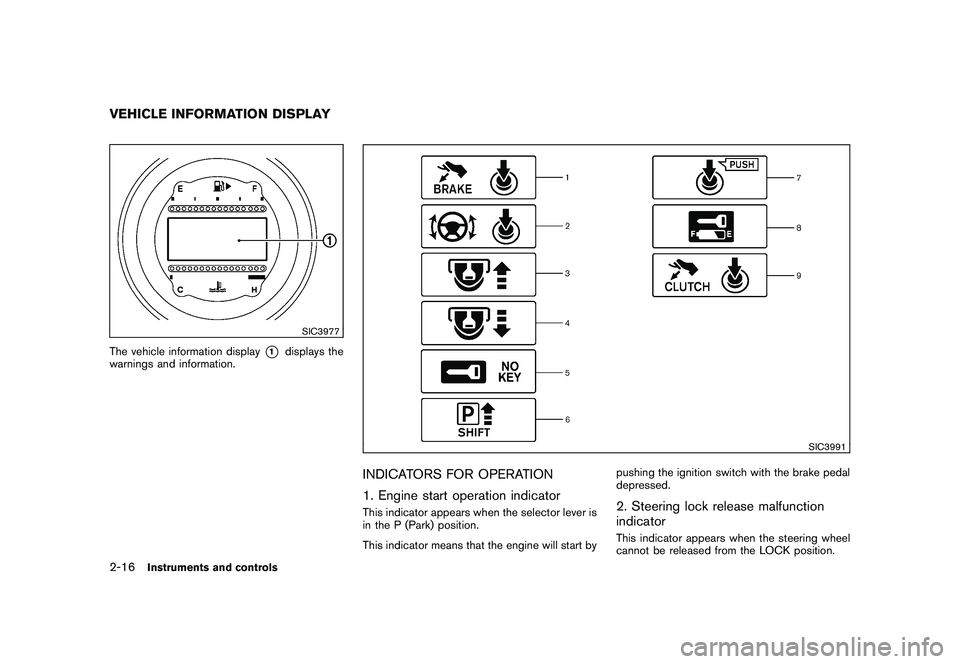
SIC3977
The vehicle information display
*1
displays the
warnings and information.
SIC3991
INDICATORS FOR OPERATION
1. Engine start operation indicatorThis indicator appears when the selector lever is
in the P (Park) position.
This indicator means that the engine will start by pushing the ignition switch with the brake pedal
depressed.
2. Steering lock release malfunction
indicatorThis indicator appears when the steering wheel
cannot be released from the LOCK position.
VEHICLE INFORMATION DISPLAY2-16
Instruments and controls
Page 79 of 409
Black plate (77,1)
Model "Z34-D" EDITED: 2009/ 9/ 10
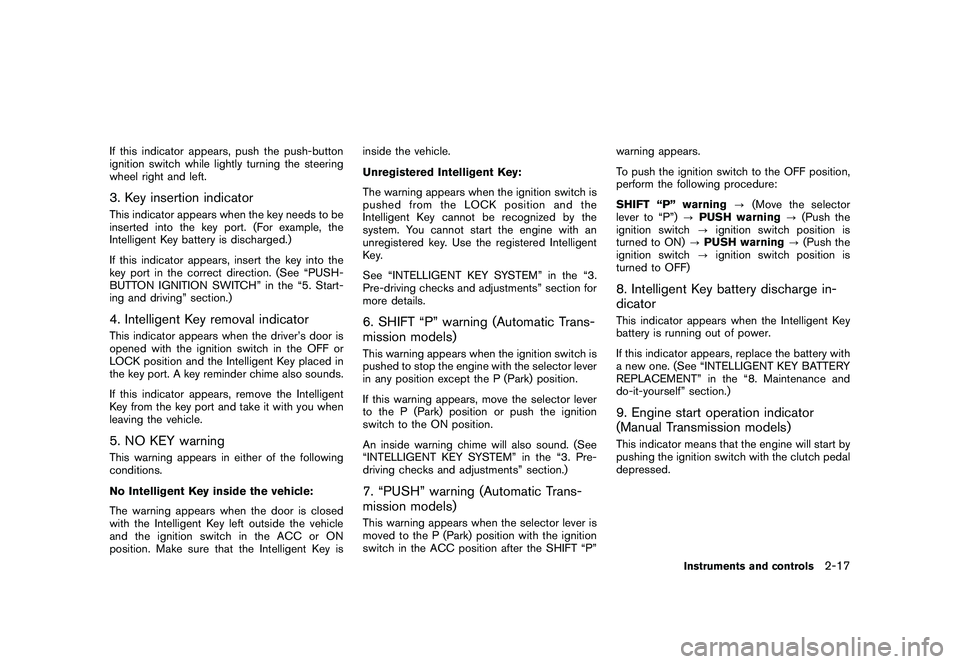
If this indicator appears, push the push-button
ignition switch while lightly turning the steering
wheel right and left.3. Key insertion indicatorThis indicator appears when the key needs to be
inserted into the key port. (For example, the
Intelligent Key battery is discharged.)
If this indicator appears, insert the key into the
key port in the correct direction. (See “PUSH-
BUTTON IGNITION SWITCH” in the “5. Start-
ing and driving” section.)4. Intelligent Key removal indicatorThis indicator appears when the driver’s door is
opened with the ignition switch in the OFF or
LOCK position and the Intelligent Key placed in
the key port. A key reminder chime also sounds.
If this indicator appears, remove the Intelligent
Key from the key port and take it with you when
leaving the vehicle.5. NO KEY warningThis warning appears in either of the following
conditions.
No Intelligent Key inside the vehicle:
The warning appears when the door is closed
with the Intelligent Key left outside the vehicle
and the ignition switch in the ACC or ON
position. Make sure that the Intelligent Key isinside the vehicle.
Unregistered Intelligent Key:
The warning appears when the ignition switch is
pushed from the LOCK position and the
Intelligent Key cannot be recognized by the
system. You cannot start the engine with an
unregistered key. Use the registered Intelligent
Key.
See “INTELLIGENT KEY SYSTEM” in the “3.
Pre-driving checks and adjustments” section for
more details.
6. SHIFT “P” warning (Automatic Trans-
mission models)This warning appears when the ignition switch is
pushed to stop the engine with the selector lever
in any position except the P (Park) position.
If this warning appears, move the selector lever
to the P (Park) position or push the ignition
switch to the ON position.
An inside warning chime will also sound. (See
“INTELLIGENT KEY SYSTEM” in the “3. Pre-
driving checks and adjustments” section.)7. “PUSH” warning (Automatic Trans-
mission models)This warning appears when the selector lever is
moved to the P (Park) position with the ignition
switch in the ACC position after the SHIFT “P”
warning appears.
To push the ignition switch to the OFF position,
perform the following procedure:
SHIFT “P” warning
?(Move the selector
lever to “P”) ?PUSH warning ?(Push the
ignition switch ?ignition switch position is
turned to ON) ?PUSH warning ?(Push the
ignition switch ?ignition switch position is
turned to OFF)
8. Intelligent Key battery discharge in-
dicatorThis indicator appears when the Intelligent Key
battery is running out of power.
If this indicator appears, replace the battery with
a new one. (See “INTELLIGENT KEY BATTERY
REPLACEMENT” in the “8. Maintenance and
do-it-yourself” section.)9. Engine start operation indicator
(Manual Transmission models)This indicator means that the engine will start by
pushing the ignition switch with the clutch pedal
depressed.
Instruments and controls
2-17
Page 80 of 409
Black plate (78,1)
Model "Z34-D" EDITED: 2009/ 9/ 10
SIC4027
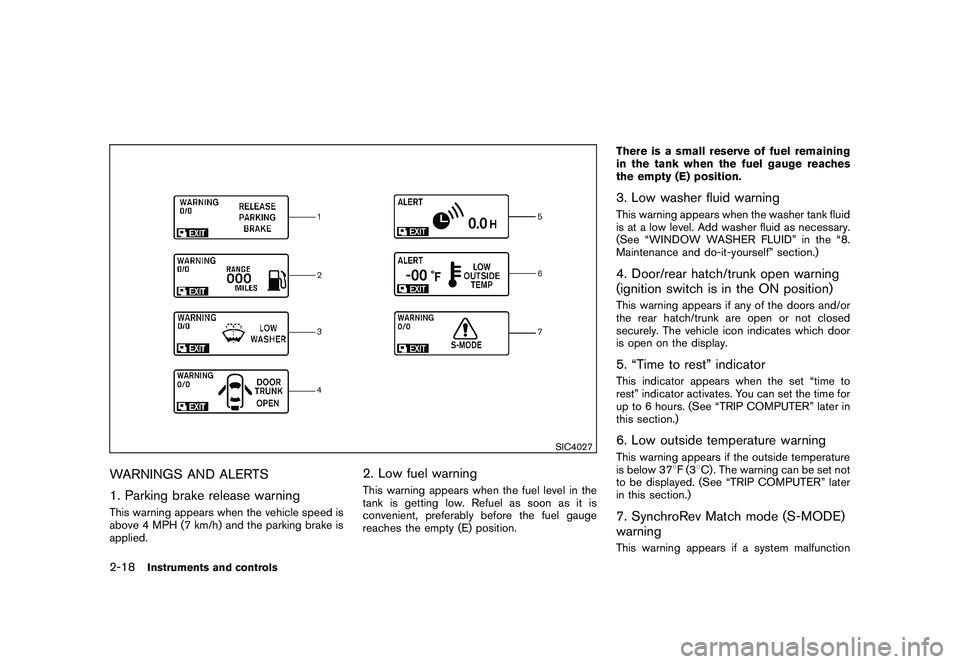
WARNINGS AND ALERTS
1. Parking brake release warningThis warning appears when the vehicle speed is
above 4 MPH (7 km/h) and the parking brake is
applied.
2. Low fuel warningThis warning appears when the fuel level in the
tank is getting low. Refuel as soon as it is
convenient, preferably before the fuel gauge
reaches the empty (E) position.There is a small reserve of fuel remaining
in the tank when the fuel gauge reaches
the empty (E) position.
3. Low washer fluid warningThis warning appears when the washer tank fluid
is at a low level. Add washer fluid as necessary.
(See “WINDOW WASHER FLUID” in the “8.
Maintenance and do-it-yourself” section.)4. Door/rear hatch/trunk open warning
(ignition switch is in the ON position)This warning appears if any of the doors and/or
the rear hatch/trunk are open or not closed
securely. The vehicle icon indicates which door
is open on the display.5. “Time to rest” indicatorThis indicator appears when the set “time to
rest” indicator activates. You can set the time for
up to 6 hours. (See “TRIP COMPUTER” later in
this section.)6. Low outside temperature warningThis warning appears if the outside temperature
is below 37
8F(3 8C) . The warning can be set not
to be displayed. (See “TRIP COMPUTER” later
in this section.)7. SynchroRev Match mode (S-MODE)
warningThis warning appears if a system malfunction
2-18
Instruments and controls
Page 81 of 409
Black plate (79,1)
Model "Z34-D" EDITED: 2009/ 9/ 10
occurs. When the warning appears, the S-
MODE function will not operate, but the manual
transmission will operate normally and driving
can be continued. Have the system checked by
a NISSAN dealer.
SIC4237
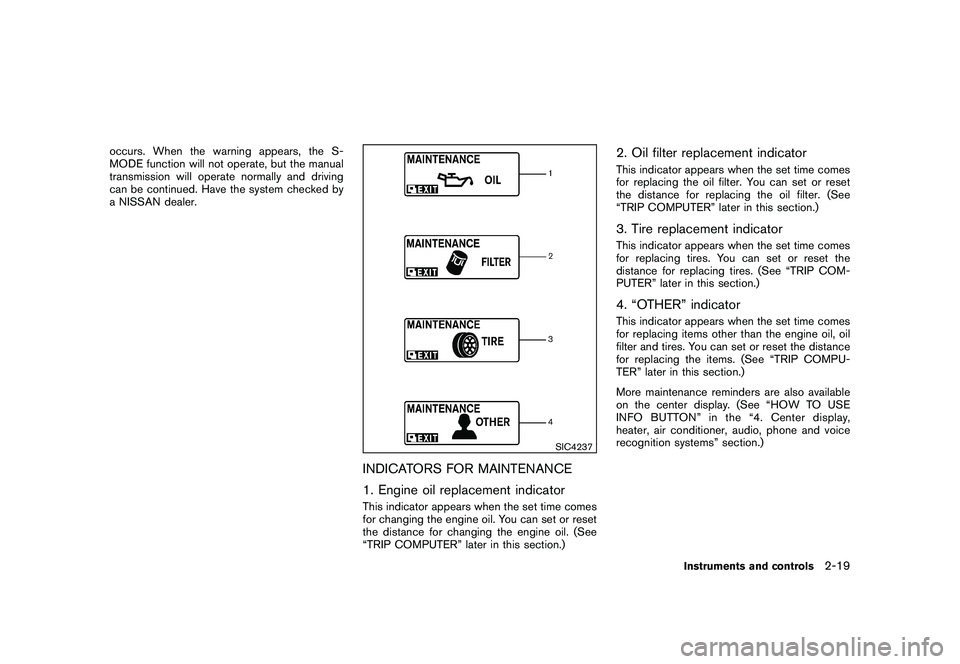
INDICATORS FOR MAINTENANCE
1. Engine oil replacement indicatorThis indicator appears when the set time comes
for changing the engine oil. You can set or reset
the distance for changing the engine oil. (See
“TRIP COMPUTER” later in this section.)
2. Oil filter replacement indicatorThis indicator appears when the set time comes
for replacing the oil filter. You can set or reset
the distance for replacing the oil filter. (See
“TRIP COMPUTER” later in this section.)3. Tire replacement indicatorThis indicator appears when the set time comes
for replacing tires. You can set or reset the
distance for replacing tires. (See “TRIP COM-
PUTER” later in this section.)4. “OTHER” indicatorThis indicator appears when the set time comes
for replacing items other than the engine oil, oil
filter and tires. You can set or reset the distance
for replacing the items. (See “TRIP COMPU-
TER” later in this section.)
More maintenance reminders are also available
on the center display. (See “HOW TO USE
INFO BUTTON” in the “4. Center display,
heater, air conditioner, audio, phone and voice
recognition systems” section.)
Instruments and controls
2-19
Page 82 of 409
Black plate (80,1)
Model "Z34-D" EDITED: 2009/ 9/ 10
SIC3978
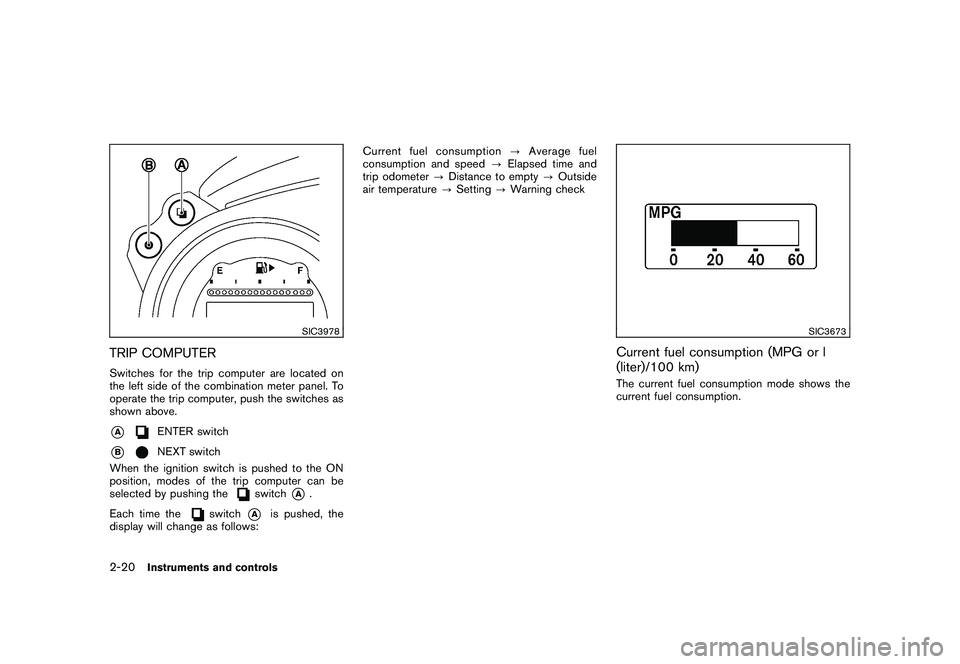
TRIP COMPUTERSwitches for the trip computer are located on
the left side of the combination meter panel. To
operate the trip computer, push the switches as
shown above.*A
ENTER switch
*B
NEXT switch
When the ignition switch is pushed to the ON
position, modes of the trip computer can be
selected by pushing the
switch
*A
.
Each time the
switch
*A
is pushed, the
display will change as follows: Current fuel consumption
?Average fuel
consumption and speed ?Elapsed time and
trip odometer ?Distance to empty ?Outside
air temperature ?Setting ?Warning check
SIC3673
Current fuel consumption (MPG or l
(liter)/100 km)The current fuel consumption mode shows the
current fuel consumption.
2-20
Instruments and controls
Page 84 of 409
Black plate (82,1)
Model "Z34-D" EDITED: 2009/ 9/ 10
SIC3676
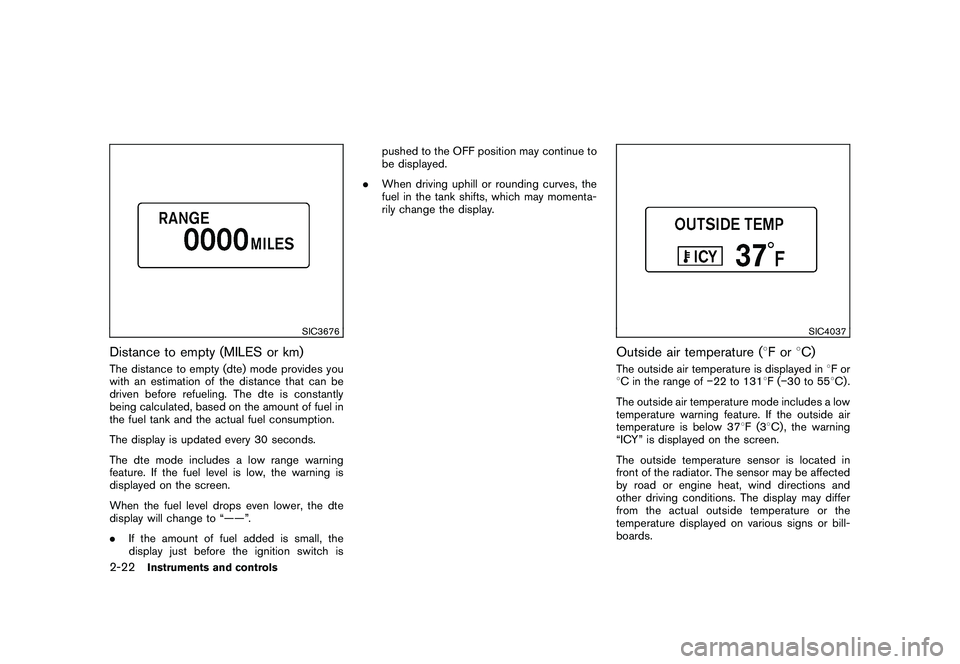
Distance to empty (MILES or km)The distance to empty (dte) mode provides you
with an estimation of the distance that can be
driven before refueling. The dte is constantly
being calculated, based on the amount of fuel in
the fuel tank and the actual fuel consumption.
The display is updated every 30 seconds.
The dte mode includes a low range warning
feature. If the fuel level is low, the warning is
displayed on the screen.
When the fuel level drops even lower, the dte
display will change to “——”.
.If the amount of fuel added is small, the
display just before the ignition switch is pushed to the OFF position may continue to
be displayed.
. When driving uphill or rounding curves, the
fuel in the tank shifts, which may momenta-
rily change the display.
SIC4037
Outside air temperature ( 8For 8C)The outside air temperature is displayed in 8For
8 C in the range of 22 to 1318F( 30 to 55 8C) .
The outside air temperature mode includes a low
temperature warning feature. If the outside air
temperature is below 37 8F(3 8C) , the warning
“ICY” is displayed on the screen.
The outside temperature sensor is located in
front of the radiator. The sensor may be affected
by road or engine heat, wind directions and
other driving conditions. The display may differ
from the actual outside temperature or the
temperature displayed on various signs or bill-
boards.
2-22
Instruments and controls
Page 85 of 409
Black plate (83,1)
Model "Z34-D" EDITED: 2009/ 9/ 10
SIC3992
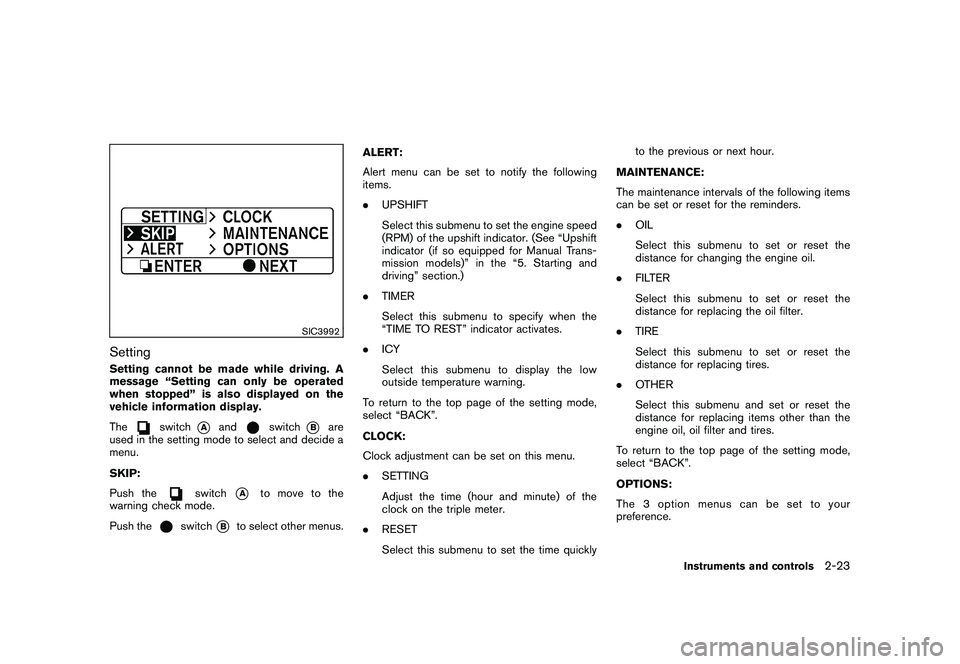
SettingSetting cannot be made while driving. A
message “Setting can only be operated
when stopped” is also displayed on the
vehicle information display.
The
switch
*A
and
switch
*B
are
used in the setting mode to select and decide a
menu.
SKIP:
Push the
switch
*A
to move to the
warning check mode.
Push the
switch
*B
to select other menus. ALERT:
Alert menu can be set to notify the following
items.
.
UPSHIFT
Select this submenu to set the engine speed
(RPM) of the upshift indicator. (See “Upshift
indicator (if so equipped for Manual Trans-
mission models)” in the “5. Starting and
driving” section.)
. TIMER
Select this submenu to specify when the
“TIME TO REST” indicator activates.
. ICY
Select this submenu to display the low
outside temperature warning.
To return to the top page of the setting mode,
select “BACK”.
CLOCK:
Clock adjustment can be set on this menu.
. SETTING
Adjust the time (hour and minute) of the
clock on the triple meter.
. RESET
Select this submenu to set the time quickly to the previous or next hour.
MAINTENANCE:
The maintenance intervals of the following items
can be set or reset for the reminders.
. OIL
Select this submenu to set or reset the
distance for changing the engine oil.
. FILTER
Select this submenu to set or reset the
distance for replacing the oil filter.
. TIRE
Select this submenu to set or reset the
distance for replacing tires.
. OTHER
Select this submenu and set or reset the
distance for replacing items other than the
engine oil, oil filter and tires.
To return to the top page of the setting mode,
select “BACK”.
OPTIONS:
The 3 option menus can be set to your
preference.
Instruments and controls
2-23
Page 86 of 409
Black plate (84,1)
Model "Z34-D" EDITED: 2009/ 9/ 10
.LANGUAGE
Select this submenu to choose English or
French for display.
. UNIT
Select this submenu to choose the unit from
US or METRIC.
. EFFECTS
Select this menu to set the dial effects
described below to on or off.
— The indicator needles sweep in the meters when the engine is started.
To return to the top page of the setting mode,
select “BACK”.
SIC3993
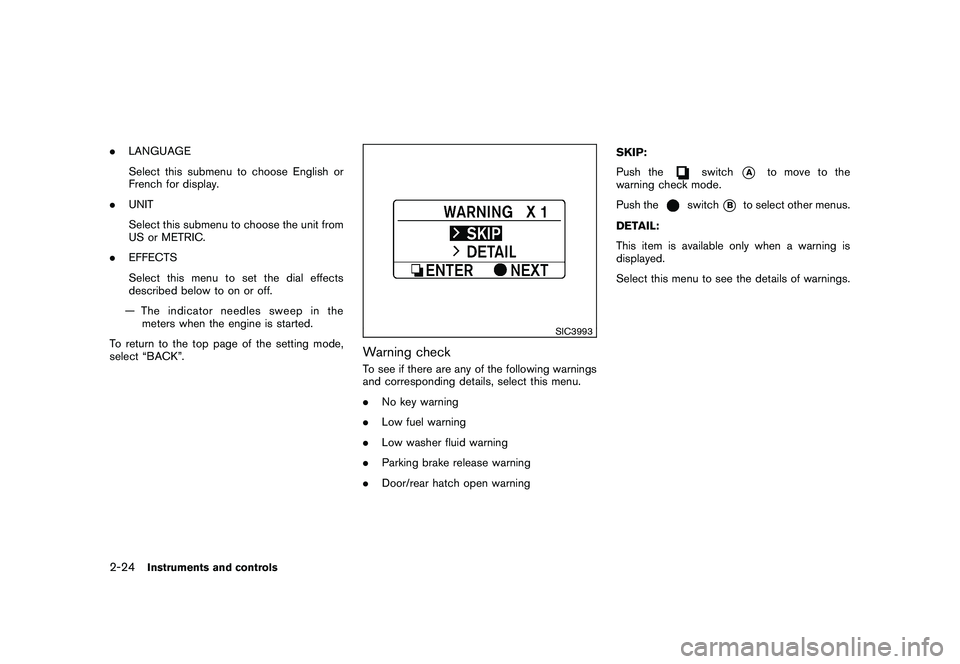
Warning checkTo see if there are any of the following warnings
and corresponding details, select this menu.
. No key warning
. Low fuel warning
. Low washer fluid warning
. Parking brake release warning
. Door/rear hatch open warning SKIP:
Push the
switch
*A
to move to the
warning check mode.
Push the
switch
*B
to select other menus.
DETAIL:
This item is available only when a warning is
displayed.
Select this menu to see the details of warnings.
2-24
Instruments and controls