battery NISSAN 370Z COUPE 2012 Owner's Manual
[x] Cancel search | Manufacturer: NISSAN, Model Year: 2012, Model line: 370Z COUPE, Model: NISSAN 370Z COUPE 2012Pages: 427, PDF Size: 3.25 MB
Page 127 of 427
doors will be locked automatically after another
1 minute.
Opening rear hatch/trunk lid
To open only the rear hatch/trunk lid, perform the
following procedure.
1. Carry the Intelligent Key.
2. Push the rear hatch/trunk lid opener switch
*C.
3. The rear hatch/trunk lid will open.
Lockout protection:
To prevent the Intelligent Key from being
accidentally locked in the trunk, lockout protec-
tion is equipped with the Intelligent Key system.
When the trunk lid is closed with the Intelligent
Key inside the trunk, the outside buzzer will
sound and all doors and the rear hatch/trunk lid
will unlock.
BATTERY SAVER SYSTEM
When all the following conditions are met for 60
minutes, the battery saver system will cut off the
power supply to prevent battery discharge.
. The ignition switch is in the ACC position,
and
. All doors are closed, and
. The selector lever is in the P (Park) position
(Automatic Transmission models) .
WARNING SIGNALS
To help prevent the vehicle from moving
unexpectedly by erroneous operation of the
Intelligent Key listed on the following chart or
to help prevent the vehicle from being stolen,
chime or beep sounds inside and outside the
vehicle and a warning displays in the vehicle
information display.
When a chime or beep sounds or the warning
displays, be sure to check the vehicle and
Intelligent Key.
See “Troubleshooting guide” (P.3-12) and
“Vehicle information display” (P.2-17) .
Pre-driving checks and adjustments3-11
Page 129 of 427
WARNING
The Intelligent Key transmits radio
waves when the buttons are pushed.
The FAA advises that the radio waves
may affect aircraft navigation and com-
munication systems. Do not operate the
Intelligent Key while on an airplane.
Make sure the buttons are not operated
unintentionally when the unit is stored
during a flight.
It is possible to lock/unlock all doors, fuel-filler
door, activate the panic alarm and open the
windows by pushing the buttons on the Intelli-
gent Key from outside the vehicle.
Before locking the doors, make sure the
Intelligent Key is not left in the vehicle.
The LOCK/UNLOCK button on the Intelligent
Key can operate at a distance of approximately
33 ft (10 m) from the vehicle. (The effective
distance depends upon the conditions around
the vehicle.)
As many as 4 Intelligent Keys can be used with
one vehicle. For information concerning the
purchase and use of additional Intelligent Keys,
contact a NISSAN dealer. The lock and unlock buttons on the Intelligent
Key will not operate when:
.
the distance between the Intelligent Key and
the vehicle is over 33 ft (10 m) .
. the Intelligent Key battery is discharged.
After locking with the remote keyless entry
function, pull the door handle to make sure the
doors are securely locked.
The LOCK/UNLOCK operating range varies
depending on the environment. To securely
operate the lock and unlock buttons, approach
the vehicle to about 3 ft (1 m) from the door.
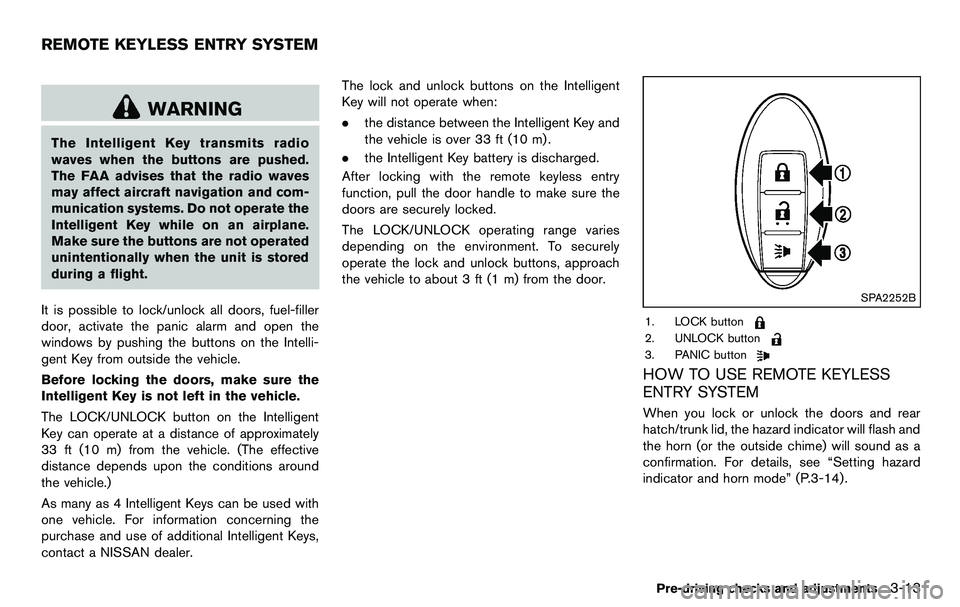
SPA2252B
1. LOCK button
2. UNLOCK button
3. PANIC button
HOW TO USE REMOTE KEYLESS
ENTRY SYSTEM
When you lock or unlock the doors and rear
hatch/trunk lid, the hazard indicator will flash and
the horn (or the outside chime) will sound as a
confirmation. For details, see “Setting hazard
indicator and horn mode” (P.3-14) .
Pre-driving checks and adjustments3-13
REMOTE KEYLESS ENTRY SYSTEM
Page 134 of 427
3-18Pre-driving checks and adjustments
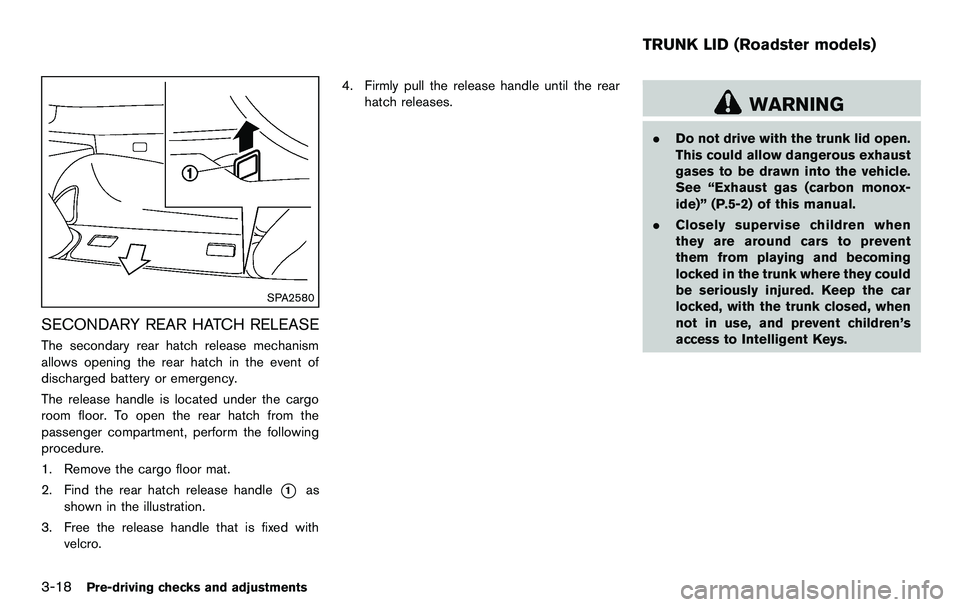
SPA2580
SECONDARY REAR HATCH RELEASE
The secondary rear hatch release mechanism
allows opening the rear hatch in the event of
discharged battery or emergency.
The release handle is located under the cargo
room floor. To open the rear hatch from the
passenger compartment, perform the following
procedure.
1. Remove the cargo floor mat.
2. Find the rear hatch release handle
*1as
shown in the illustration.
3. Free the release handle that is fixed with velcro. 4. Firmly pull the release handle until the rear
hatch releases.
WARNING
.Do not drive with the trunk lid open.
This could allow dangerous exhaust
gases to be drawn into the vehicle.
See “Exhaust gas (carbon monox-
ide)” (P.5-2) of this manual.
. Closely supervise children when
they are around cars to prevent
them from playing and becoming
locked in the trunk where they could
be seriously injured. Keep the car
locked, with the trunk closed, when
not in use, and prevent children’s
access to Intelligent Keys.
TRUNK LID (Roadster models)
Page 136 of 427
3-20Pre-driving checks and adjustments
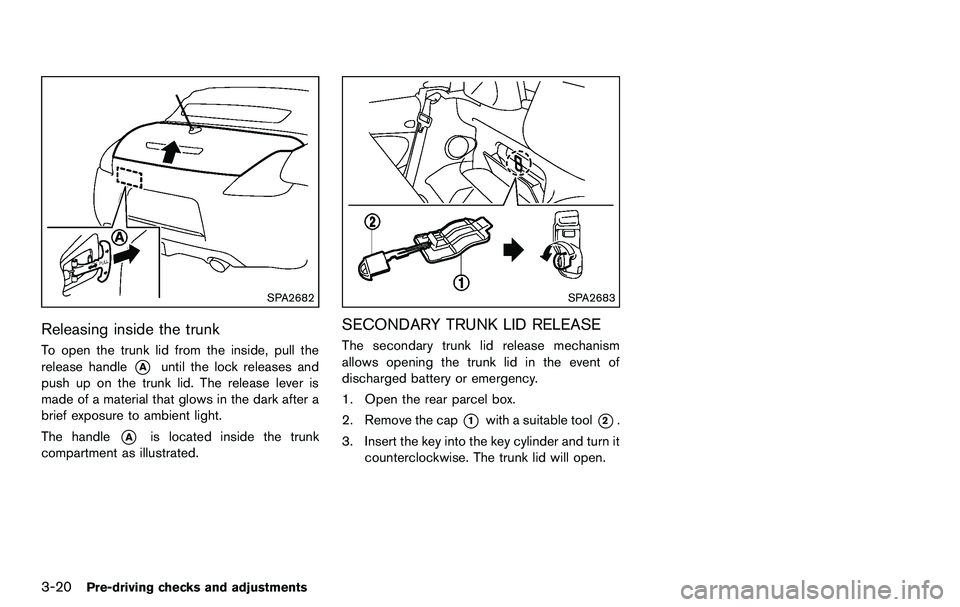
SPA2682
Releasing inside the trunk
To open the trunk lid from the inside, pull the
release handle
*Auntil the lock releases and
push up on the trunk lid. The release lever is
made of a material that glows in the dark after a
brief exposure to ambient light.
The handle
*Ais located inside the trunk
compartment as illustrated.
SPA2683
SECONDARY TRUNK LID RELEASE
The secondary trunk lid release mechanism
allows opening the trunk lid in the event of
discharged battery or emergency.
1. Open the rear parcel box.
2. Remove the cap
*1with a suitable tool*2.
3. Insert the key into the key cylinder and turn it counterclockwise. The trunk lid will open.
Page 137 of 427
SPA2685
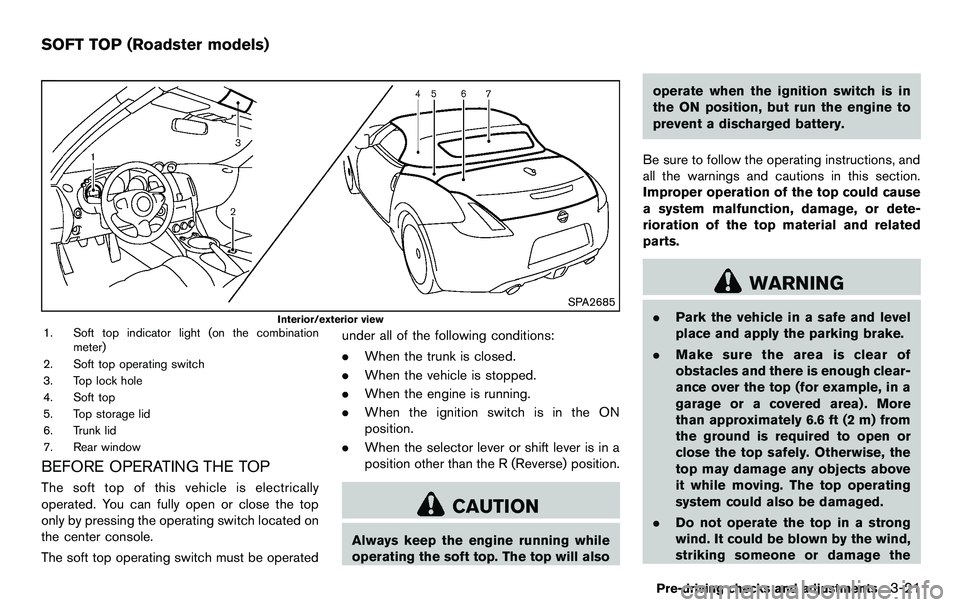
Interior/exterior view1. Soft top indicator light (on the combinationmeter)
2. Soft top operating switch
3. Top lock hole
4. Soft top
5. Top storage lid
6. Trunk lid
7. Rear window
BEFORE OPERATING THE TOP
The soft top of this vehicle is electrically
operated. You can fully open or close the top
only by pressing the operating switch located on
the center console.
The soft top operating switch must be operated under all of the following conditions:
.
When the trunk is closed.
. When the vehicle is stopped.
. When the engine is running.
. When the ignition switch is in the ON
position.
. When the selector lever or shift lever is in a
position other than the R (Reverse) position.
CAUTION
Always keep the engine running while
operating the soft top. The top will also operate when the ignition switch is in
the ON position, but run the engine to
prevent a discharged battery.
Be sure to follow the operating instructions, and
all the warnings and cautions in this section.
Improper operation of the top could cause
a system malfunction, damage, or dete-
rioration of the top material and related
parts.
WARNING
. Park the vehicle in a safe and level
place and apply the parking brake.
. Make sure the area is clear of
obstacles and there is enough clear-
ance over the top (for example, in a
garage or a covered area) . More
than approximately 6.6 ft (2 m) from
the ground is required to open or
close the top safely. Otherwise, the
top may damage any objects above
it while moving. The top operating
system could also be damaged.
. Do not operate the top in a strong
wind. It could be blown by the wind,
striking someone or damage the
Pre-driving checks and adjustments3-21
SOFT TOP (Roadster models)
Page 139 of 427
.Do not place anything in the top
storage area. The top will not fit
there properly, and this could da-
mage the top and/or the vehicle
body.
. Do not sit or place excessive weight
on the top and the storage lid,
especially when the top is being
operated. The top may be damaged.
. Do not drive the vehicle with the top
partially opened. Always make sure
the top is either fully opened or
closed before driving.
. Secure items so that they cannot be
blown from the vehicle while driving
with the top open.
. Do not operate the top manually
except for emergency cases. Manual
operation may damage the top.
. Be sure to fully open or fully close
the top. Do not release the switch
half way through the roof opening
or closing process. If the top is only
partially opened, significant da-
mage to the top could occur.
Make sure the trunk lid is securely closed before
operating the top.
SPA2706
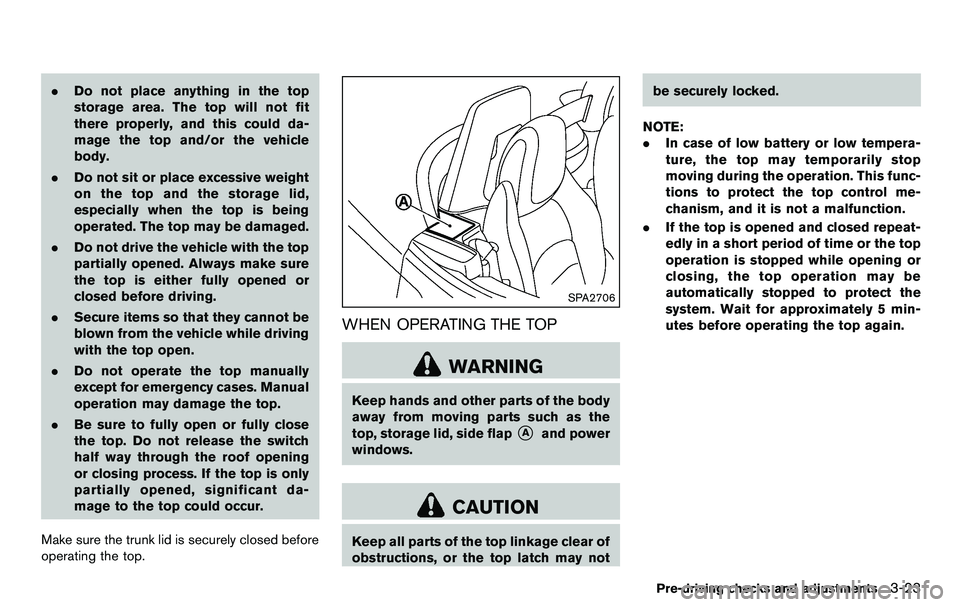
WHEN OPERATING THE TOP
WARNING
Keep hands and other parts of the body
away from moving parts such as the
top, storage lid, side flap
*Aand power
windows.
CAUTION
Keep all parts of the top linkage clear of
obstructions, or the top latch may not be securely locked.
NOTE:
. In case of low battery or low tempera-
ture, the top may temporarily stop
moving during the operation. This func-
tions to protect the top control me-
chanism, and it is not a malfunction.
. If the top is opened and closed repeat-
edly in a short period of time or the top
operation is stopped while opening or
closing, the top operation may be
automatically stopped to protect the
system. Wait for approximately 5 min-
utes before operating the top again.
Pre-driving checks and adjustments3-23
Page 140 of 427
3-24Pre-driving checks and adjustments
SPA1691
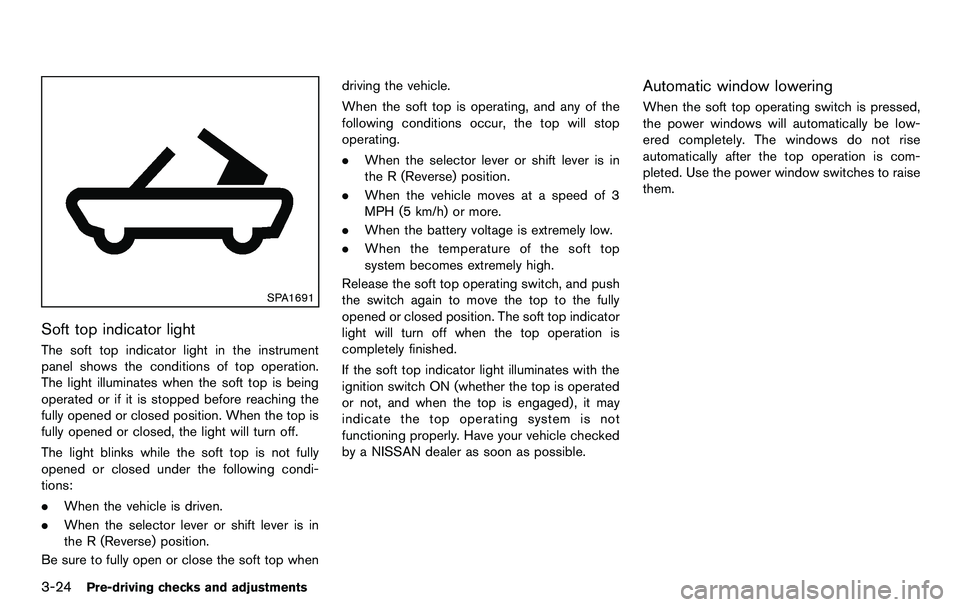
Soft top indicator light
The soft top indicator light in the instrument
panel shows the conditions of top operation.
The light illuminates when the soft top is being
operated or if it is stopped before reaching the
fully opened or closed position. When the top is
fully opened or closed, the light will turn off.
The light blinks while the soft top is not fully
opened or closed under the following condi-
tions:
.When the vehicle is driven.
. When the selector lever or shift lever is in
the R (Reverse) position.
Be sure to fully open or close the soft top when driving the vehicle.
When the soft top is operating, and any of the
following conditions occur, the top will stop
operating.
.
When the selector lever or shift lever is in
the R (Reverse) position.
. When the vehicle moves at a speed of 3
MPH (5 km/h) or more.
. When the battery voltage is extremely low.
. When the temperature of the soft top
system becomes extremely high.
Release the soft top operating switch, and push
the switch again to move the top to the fully
opened or closed position. The soft top indicator
light will turn off when the top operation is
completely finished.
If the soft top indicator light illuminates with the
ignition switch ON (whether the top is operated
or not, and when the top is engaged) , it may
indicate the top operating system is not
functioning properly. Have your vehicle checked
by a NISSAN dealer as soon as possible.
Automatic window lowering
When the soft top operating switch is pressed,
the power windows will automatically be low-
ered completely. The windows do not rise
automatically after the top operation is com-
pleted. Use the power window switches to raise
them.
Page 143 of 427
TROUBLESHOOTING GUIDE
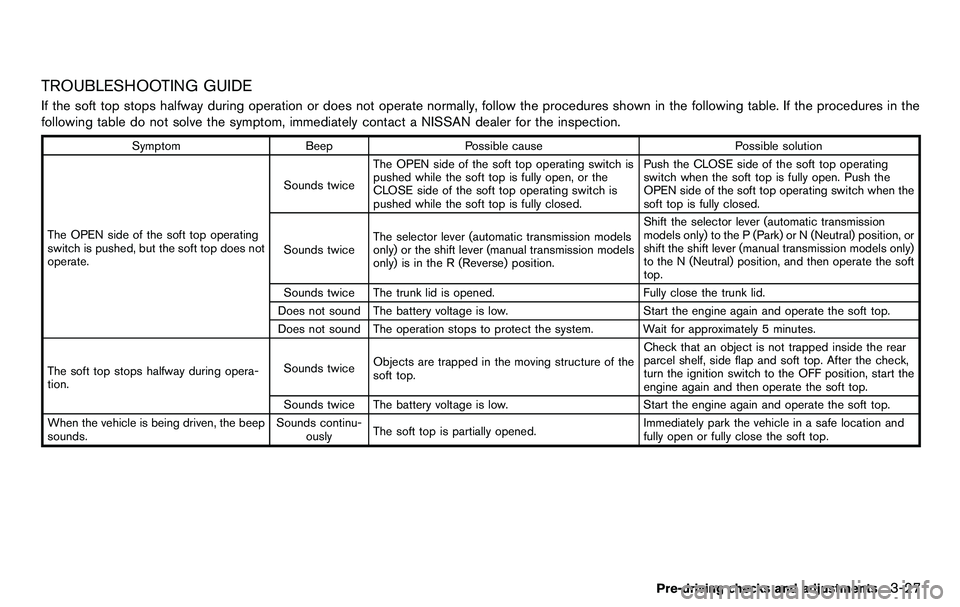
If the soft top stops halfway during operation or does not operate normally, follow the procedures shown in the following table. If the procedures in the
following table do not solve the symptom, immediately contact a NISSAN dealer for the inspection.
SymptomBeepPossible cause Possible solution
The OPEN side of the soft top operating
switch is pushed, but the soft top does not
operate. Sounds twice
The OPEN side of the soft top operating switch is
pushed while the soft top is fully open, or the
CLOSE side of the soft top operating switch is
pushed while the soft top is fully closed. Push the CLOSE side of the soft top operating
switch when the soft top is fully open. Push the
OPEN side of the soft top operating switch when the
soft top is fully closed.
Sounds twice The selector lever (automatic transmission models
only) or the shift lever (manual transmission models
only) is in the R (Reverse) position. Shift the selector lever (automatic transmission
models only) to the P (Park) or N (Neutral) position, or
shift the shift lever (manual transmission models only)
to the N (Neutral) position, and then operate the soft
top.
Sounds twice The trunk lid is opened. Fully close the trunk lid.
Does not sound The battery voltage is low. Start the engine again and operate the soft top.
Does not sound The operation stops to protect the system. Wait for approximately 5 minutes.
The soft top stops halfway during opera-
tion. Sounds twice
Objects are trapped in the moving structure of the
soft top. Check that an object is not trapped inside the rear
parcel shelf, side flap and soft top. After the check,
turn the ignition switch to the OFF position, start the
engine again and then operate the soft top.
Sounds twice The battery voltage is low. Start the engine again and operate the soft top.
When the vehicle is being driven, the beep
sounds. Sounds continu-
ously The soft top is partially opened. Immediately park the vehicle in a safe location and
fully open or fully close the soft top.
Pre-driving checks and adjustments3-27
Page 144 of 427
3-28Pre-driving checks and adjustments
IF THE TOP DOES NOT OPEN OR
CLOSE ELECTRICALLY
If you cannot operate the soft top with the
operating switch, first check whether all the
following operating conditions are met.
.vehicle is stopped
. ignition switch is ON (Run the engine when
operating the top.)
. the trunk is closed
. the selector lever or shift lever is in a position
other than the R (Reverse) position
If the top still does not move under the above
conditions or has any system malfunction, see a
NISSAN dealer as soon as possible. When you
must close the top by yourself, in the event of
emergency or when an immediate dealer service
is not available, close the top manually accord-
ing to the procedures shown in this section.
When closing the soft top manually:
. Move the vehicle to a safe place, away from
traffic.
. Two people should perform this procedure,
as some of the top parts are extremely
heavy.
The top cannot be opened manually.
WARNING
. Do not drive with the top partially
opened.
. If the top cannot be operated prop-
erly, see a NISSAN dealer as soon
as possible to have your vehicle
checked.
CAUTION
The storage lid is extremely heavy. The
storage lid should be manually opened
or closed by two people.SPA2715
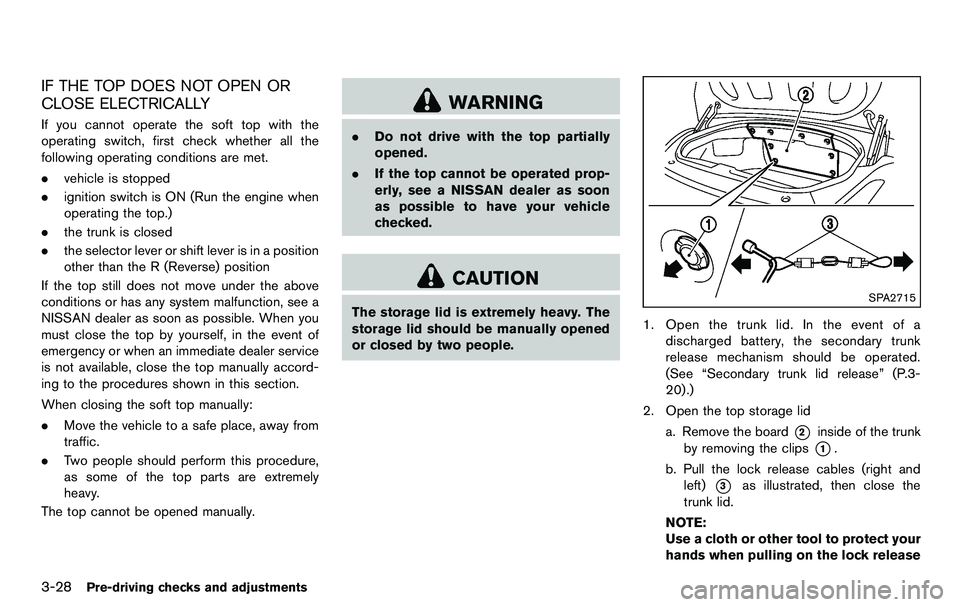
1. Open the trunk lid. In the event of a
discharged battery, the secondary trunk
release mechanism should be operated.
(See “Secondary trunk lid release” (P.3-
20).)
2. Open the top storage lid a. Remove the board
*2inside of the trunk
by removing the clips
*1.
b. Pull the lock release cables (right and left)
*3as illustrated, then close the
trunk lid.
NOTE:
Use a cloth or other tool to protect your
hands when pulling on the lock release
Page 188 of 427
4-32Center display, heater, air conditioner, audio, phone and voice recognition systems
Static and flutter: During signal interference from
buildings, large hills or due to antenna position,
usually in conjunction with increased distance
from the station transmitter, static or flutter can
be heard. This can be reduced by lowering the
treble setting to reduce the treble response.
Multipath reception: Because of the reflective
characteristics of FM signals, direct and re-
flected signals reach the receiver at the same
time. The signals may cancel each other,
resulting in momentary flutter or loss of sound.
AM radio reception:
AM signals, because of their low frequency, can
bend around objects and skip along the ground.
In addition, the signals can be bounced off the
ionosphere and bent back to earth. Because of
these characteristics. AM signals are also
subject to interference as they travel from
transmitter to receiver.
Fading: Occurs while the vehicle is passing
through freeway underpasses or in areas with
many tall buildings. It can also occur for several
seconds during ionospheric turbulence even in
areas where no obstacles exist.
Static: Caused by thunderstorms, electrical
power lines, electric signs and even traffic lights.Satellite radio reception (if so equipped):
When the satellite radio is used for the first time
or the battery has been replaced, the satellite
radio may not work properly. This is not a
malfunction. Wait more than 10 minutes with the
satellite radio ON and the vehicle outside of any
metal or large building for the satellite radio to
receive all of the necessary data.
The satellite radio mode requires an active XM
®
Satellite Radio subscription. The satellite radio is
not available in Alaska, Hawaii and Guam.
The satellite radio performance may be affected
if cargo carried on the roof blocks the satellite
radio signal.
If possible, do not put cargo near the satellite
antenna.
A build up of ice on the satellite radio antenna
can affect satellite radio performance. Remove
the ice to restore satellite radio reception.
SAA0480
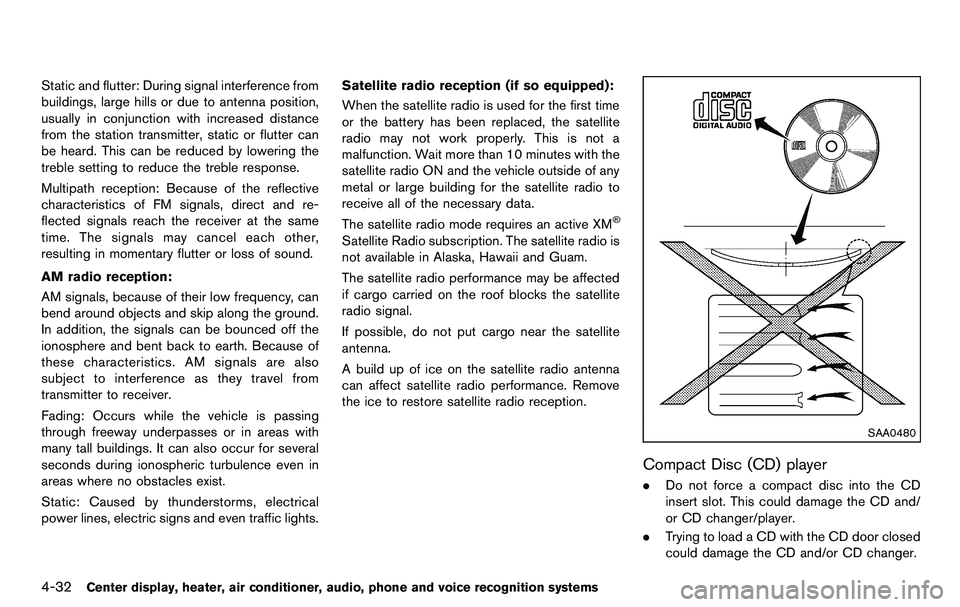
Compact Disc (CD) player
. Do not force a compact disc into the CD
insert slot. This could damage the CD and/
or CD changer/player.
. Trying to load a CD with the CD door closed
could damage the CD and/or CD changer.