engine oil NISSAN 370Z COUPE 2012 Owners Manual
[x] Cancel search | Manufacturer: NISSAN, Model Year: 2012, Model line: 370Z COUPE, Model: NISSAN 370Z COUPE 2012Pages: 427, PDF Size: 3.25 MB
Page 20 of 427
0-12Illustrated table of contents
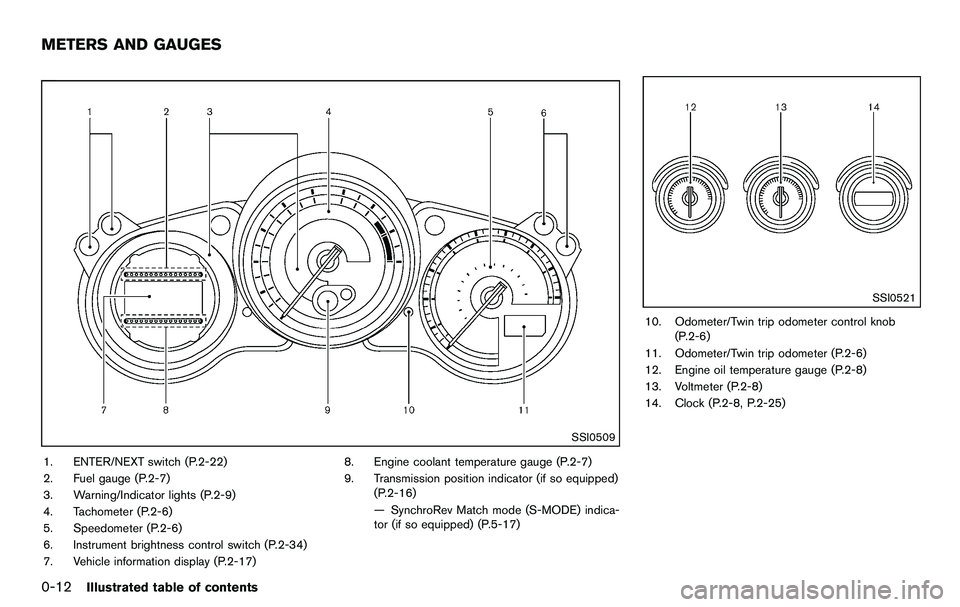
SSI0509
1. ENTER/NEXT switch (P.2-22)
2. Fuel gauge (P.2-7)
3. Warning/Indicator lights (P.2-9)
4. Tachometer (P.2-6)
5. Speedometer (P.2-6)
6. Instrument brightness control switch (P.2-34)
7. Vehicle information display (P.2-17)8. Engine coolant temperature gauge (P.2-7)
9. Transmission position indicator (if so equipped)
(P.2-16)
— SynchroRev Match mode (S-MODE) indica-
tor (if so equipped) (P.5-17)
SSI0521
10. Odometer/Twin trip odometer control knob(P.2-6)
11. Odometer/Twin trip odometer (P.2-6)
12. Engine oil temperature gauge (P.2-8)
13. Voltmeter (P.2-8)
14. Clock (P.2-8, P.2-25)
METERS AND GAUGES
Page 21 of 427
JVM0086X
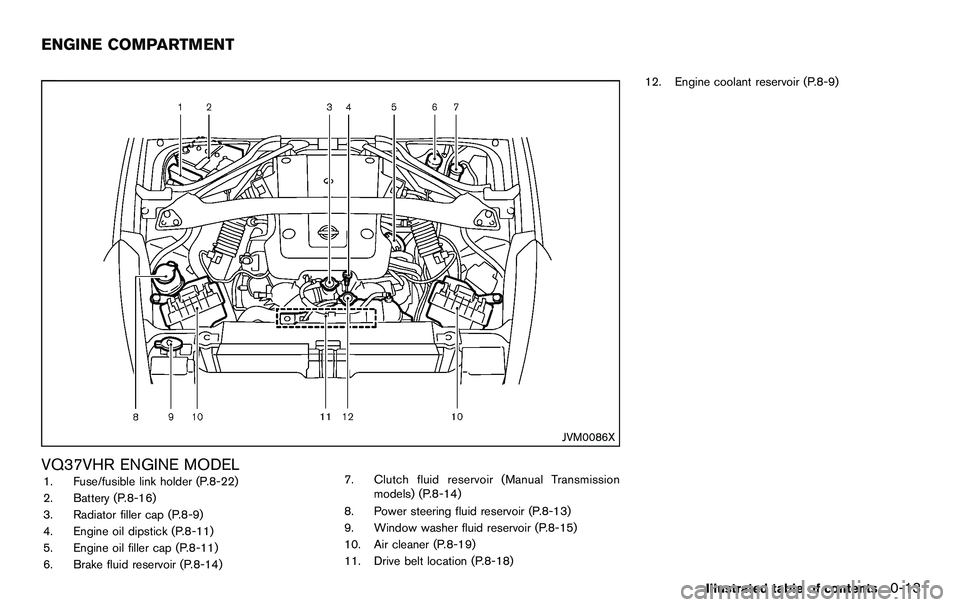
VQ37VHR ENGINE MODEL1. Fuse/fusible link holder (P.8-22)
2. Battery (P.8-16)
3. Radiator filler cap (P.8-9)
4. Engine oil dipstick (P.8-11)
5. Engine oil filler cap (P.8-11)
6. Brake fluid reservoir (P.8-14)7. Clutch fluid reservoir (Manual Transmission
models) (P.8-14)
8. Power steering fluid reservoir (P.8-13)
9. Window washer fluid reservoir (P.8-15)
10. Air cleaner (P.8-19)
11. Drive belt location (P.8-18) 12. Engine coolant reservoir (P.8-9)
Illustrated table of contents0-13
ENGINE COMPARTMENT
Page 22 of 427
0-14Illustrated table of contents
Warninglight Name
Page
Anti-lock Braking System
(ABS) warning light 2-10
Automatic Transmission (AT)
check warning light2-10
Brake warning light
2-10
Charge warning light2-11
Engine oil pressure warning
light 2-11
Intelligent Key system warning
light2-11
Low tire pressure warning light 2-12
Master warning light
2-13
Seat belt warning light 2-13
Supplemental air bag warning
light 2-13
Vehicle Dynamic Control (VDC)
warning light2-14Indicator
light Name Page
Cruise indicator light
2-14
Front passenger air bag status
light 2-14
High beam indicator light 2-14
Low beam indicator lights 2-14
Malfunction Indicator Light
(MIL)2-14
Rear fog light indicator light* 2-15
Security indicator light
2-15
Soft top indicator light (Road-
ster models) 2-15
SynchroRev Match mode (S-
MODE) indicator*2-16
Transmission position indicator
light*2-16
Turn signal/hazard indicator
lights
2-16
Vehicle Dynamic Control (VDC)
off indicator light2-16
*: if so equipped
WARNING AND INDICATOR LIGHTS
Page 69 of 427
SSI0509
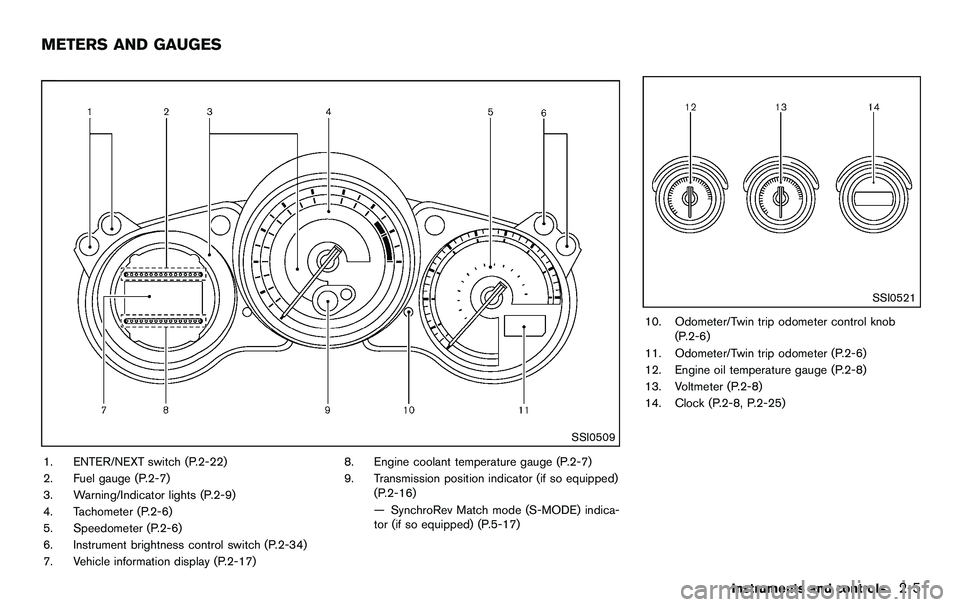
1. ENTER/NEXT switch (P.2-22)
2. Fuel gauge (P.2-7)
3. Warning/Indicator lights (P.2-9)
4. Tachometer (P.2-6)
5. Speedometer (P.2-6)
6. Instrument brightness control switch (P.2-34)
7. Vehicle information display (P.2-17)8. Engine coolant temperature gauge (P.2-7)
9. Transmission position indicator (if so equipped)
(P.2-16)
— SynchroRev Match mode (S-MODE) indica-
tor (if so equipped) (P.5-17)
SSI0521
10. Odometer/Twin trip odometer control knob(P.2-6)
11. Odometer/Twin trip odometer (P.2-6)
12. Engine oil temperature gauge (P.2-8)
13. Voltmeter (P.2-8)
14. Clock (P.2-8, P.2-25)
Instruments and controls2-5
METERS AND GAUGES
Page 72 of 427
2-8Instruments and controls
located on the passenger’s side of the vehicle.
CAUTION
.If the vehicle runs out of fuel, the
malfunction indicator light (MIL)
may come on. Refuel as soon as
possible. After a few driving trips,
the
light should turn off. If the
light remains on after a few driving
trips, have the vehicle inspected by
a NISSAN dealer.
. For additional information, see
“Malfunction Indicator Light (MIL)”
(P.2-14) .
SIC4003
Triple meter
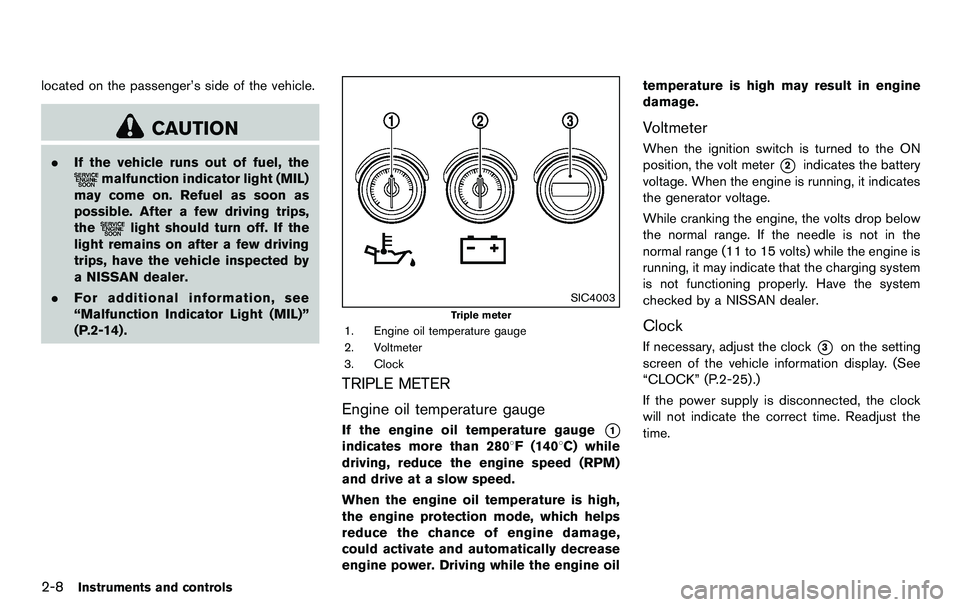
1. Engine oil temperature gauge
2. Voltmeter
3. Clock
TRIPLE METER
Engine oil temperature gauge
If the engine oil temperature gauge*1
indicates more than 2808F (1408C) while
driving, reduce the engine speed (RPM)
and drive at a slow speed.
When the engine oil temperature is high,
the engine protection mode, which helps
reduce the chance of engine damage,
could activate and automatically decrease
engine power. Driving while the engine oil temperature is high may result in engine
damage.
Voltmeter
When the ignition switch is turned to the ON
position, the volt meter
*2indicates the battery
voltage. When the engine is running, it indicates
the generator voltage.
While cranking the engine, the volts drop below
the normal range. If the needle is not in the
normal range (11 to 15 volts) while the engine is
running, it may indicate that the charging system
is not functioning properly. Have the system
checked by a NISSAN dealer.
Clock
If necessary, adjust the clock*3on the setting
screen of the vehicle information display. (See
“CLOCK” (P.2-25) .)
If the power supply is disconnected, the clock
will not indicate the correct time. Readjust the
time.
Page 73 of 427
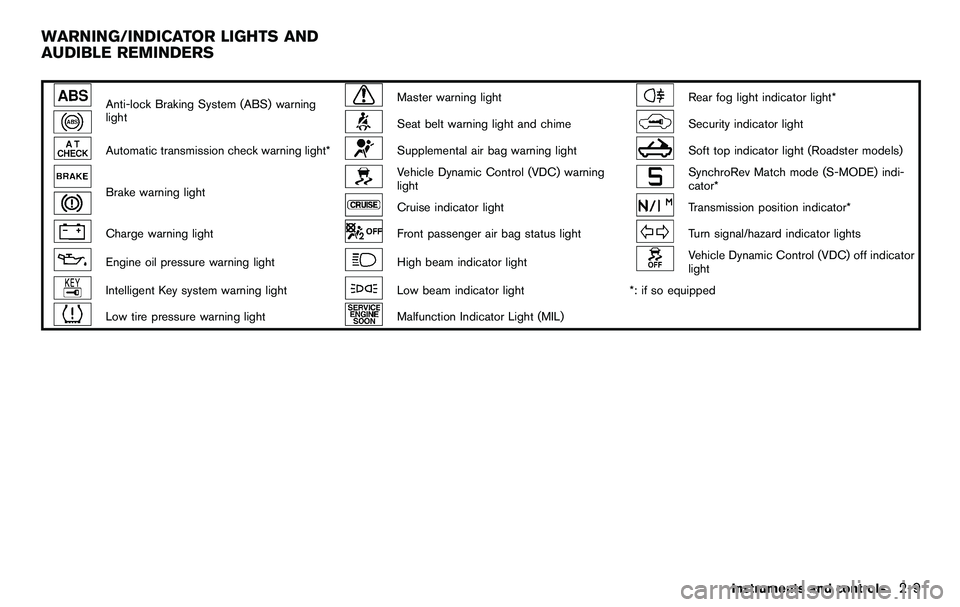
Anti-lock Braking System (ABS) warning
lightMaster warning lightRear fog light indicator light*
Seat belt warning light and chimeSecurity indicator light
Automatic transmission check warning light*Supplemental air bag warning lightSoft top indicator light (Roadster models)
Brake warning light
Vehicle Dynamic Control (VDC) warning
lightSynchroRev Match mode (S-MODE) indi-
cator*
Cruise indicator lightTransmission position indicator*
Charge warning lightFront passenger air bag status lightTurn signal/hazard indicator lights
Engine oil pressure warning lightHigh beam indicator lightVehicle Dynamic Control (VDC) off indicator
light
Intelligent Key system warning lightLow beam indicator light*: if so equipped
Low tire pressure warning lightMalfunction Indicator Light (MIL)
Instruments and controls2-9
WARNING/INDICATOR LIGHTS AND
AUDIBLE REMINDERS
Page 75 of 427
paired, by a NISSAN dealer promptly. (See
“Anti-lock Braking System (ABS) warning light”
(P.2-10) .)
WARNING
.Your brake system may not be
working properly if the warning light
is on. Driving could be dangerous. If
you judge it to be safe, drive care-
fully to the nearest service station
for repairs. Otherwise, have your
vehicle towed because driving it
could be dangerous.
. Pressing the brake pedal with the
engine stopped and/or low brake
fluid level may increase your stop-
ping distance and braking will re-
quire greater pedal effort as well as
pedal travel.
. If the brake fluid level is below the
minimum or MIN mark on the brake
fluid reservoir, do not drive until the
brake system has been checked at a
NISSAN dealer.
Charge warning light
If the light comes on while the engine is running,
it may indicate the charging system is not
functioning properly. Turn the engine off and
check the alternator belt. If the belt is loose,
broken, missing or if the light remains on, see a
NISSAN dealer immediately.
CAUTION
Do not continue driving if the alternator
belt is loose, broken or missing.
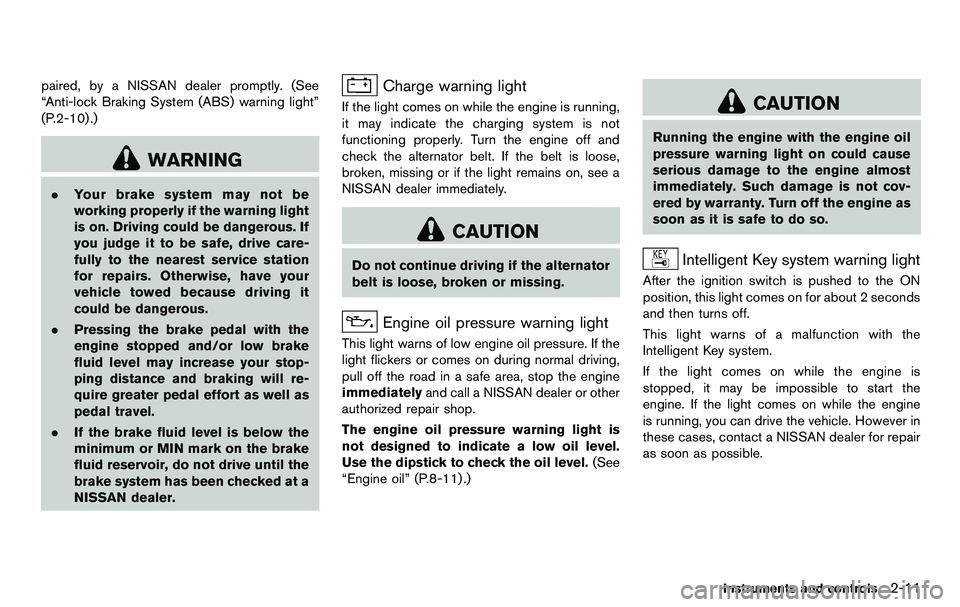
Engine oil pressure warning light
This light warns of low engine oil pressure. If the
light flickers or comes on during normal driving,
pull off the road in a safe area, stop the engine
immediately and call a NISSAN dealer or other
authorized repair shop.
The engine oil pressure warning light is
not designed to indicate a low oil level.
Use the dipstick to check the oil level. (See
“Engine oil” (P.8-11) .)
CAUTION
Running the engine with the engine oil
pressure warning light on could cause
serious damage to the engine almost
immediately. Such damage is not cov-
ered by warranty. Turn off the engine as
soon as it is safe to do so.
Intelligent Key system warning light
After the ignition switch is pushed to the ON
position, this light comes on for about 2 seconds
and then turns off.
This light warns of a malfunction with the
Intelligent Key system.
If the light comes on while the engine is
stopped, it may be impossible to start the
engine. If the light comes on while the engine
is running, you can drive the vehicle. However in
these cases, contact a NISSAN dealer for repair
as soon as possible.
Instruments and controls2-11
Page 85 of 427
7. Low outside temperature warning
This warning appears if the outside temperature
is below 378F(38C) . The warning can be set not
to be displayed. (See “Trip computer” (P.2-22) .)
8. SynchroRev Match mode (S-MODE)
warning
This warning appears if a system malfunction
occurs. When the warning appears, the S-
MODE function will not operate, but the manual
transmission will operate normally and driving
can be continued. Have the system checked by
a NISSAN dealer.
SIC4237
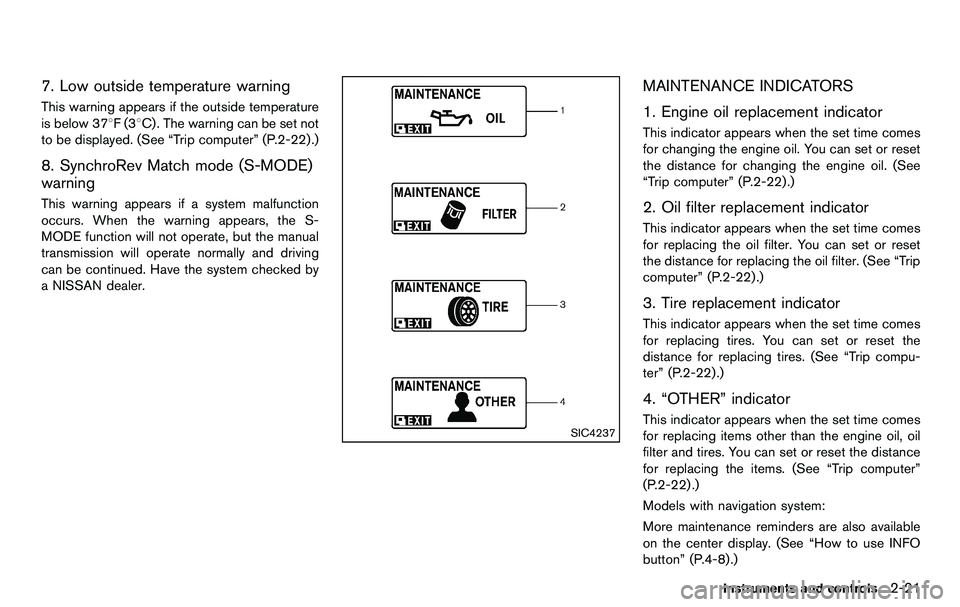
MAINTENANCE INDICATORS
1. Engine oil replacement indicator
This indicator appears when the set time comes
for changing the engine oil. You can set or reset
the distance for changing the engine oil. (See
“Trip computer” (P.2-22) .)
2. Oil filter replacement indicator
This indicator appears when the set time comes
for replacing the oil filter. You can set or reset
the distance for replacing the oil filter. (See “Trip
computer” (P.2-22).)
3. Tire replacement indicator
This indicator appears when the set time comes
for replacing tires. You can set or reset the
distance for replacing tires. (See “Trip compu-
ter” (P.2-22) .)
4. “OTHER” indicator
This indicator appears when the set time comes
for replacing items other than the engine oil, oil
filter and tires. You can set or reset the distance
for replacing the items. (See “Trip computer”
(P.2-22) .)
Models with navigation system:
More maintenance reminders are also available
on the center display. (See “How to use INFO
button” (P.4-8).)
Instruments and controls2-21
Page 89 of 427
SIC3992
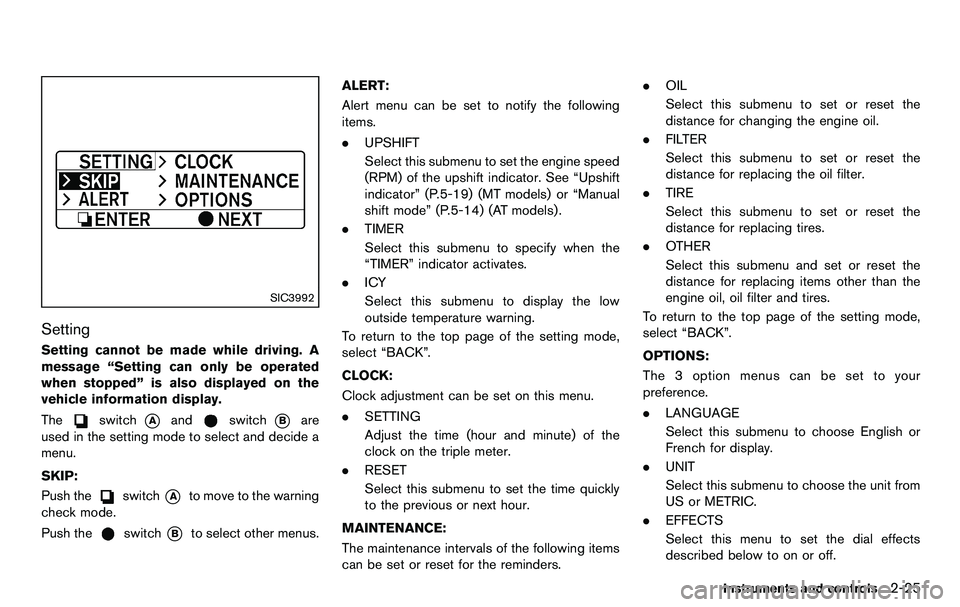
Setting
Setting cannot be made while driving. A
message “Setting can only be operated
when stopped” is also displayed on the
vehicle information display.
The
switch*Aandswitch*Bare
used in the setting mode to select and decide a
menu.
SKIP:
Push the
switch*Ato move to the warning
check mode.
Push the
switch*Bto select other menus. ALERT:
Alert menu can be set to notify the following
items.
. UPSHIFT
Select this submenu to set the engine speed
(RPM) of the upshift indicator. See “Upshift
indicator” (P.5-19) (MT models) or “Manual
shift mode” (P.5-14) (AT models) .
. TIMER
Select this submenu to specify when the
“TIMER” indicator activates.
. ICY
Select this submenu to display the low
outside temperature warning.
To return to the top page of the setting mode,
select “BACK”.
CLOCK:
Clock adjustment can be set on this menu.
. SETTING
Adjust the time (hour and minute) of the
clock on the triple meter.
. RESET
Select this submenu to set the time quickly
to the previous or next hour.
MAINTENANCE:
The maintenance intervals of the following items
can be set or reset for the reminders. .
OIL
Select this submenu to set or reset the
distance for changing the engine oil.
. FILTER
Select this submenu to set or reset the
distance for replacing the oil filter.
. TIRE
Select this submenu to set or reset the
distance for replacing tires.
. OTHER
Select this submenu and set or reset the
distance for replacing items other than the
engine oil, oil filter and tires.
To return to the top page of the setting mode,
select “BACK”.
OPTIONS:
The 3 option menus can be set to your
preference.
. LANGUAGE
Select this submenu to choose English or
French for display.
. UNIT
Select this submenu to choose the unit from
US or METRIC.
. EFFECTS
Select this menu to set the dial effects
described below to on or off.
Instruments and controls2-25
Page 165 of 427
SAA2479
SAA2480
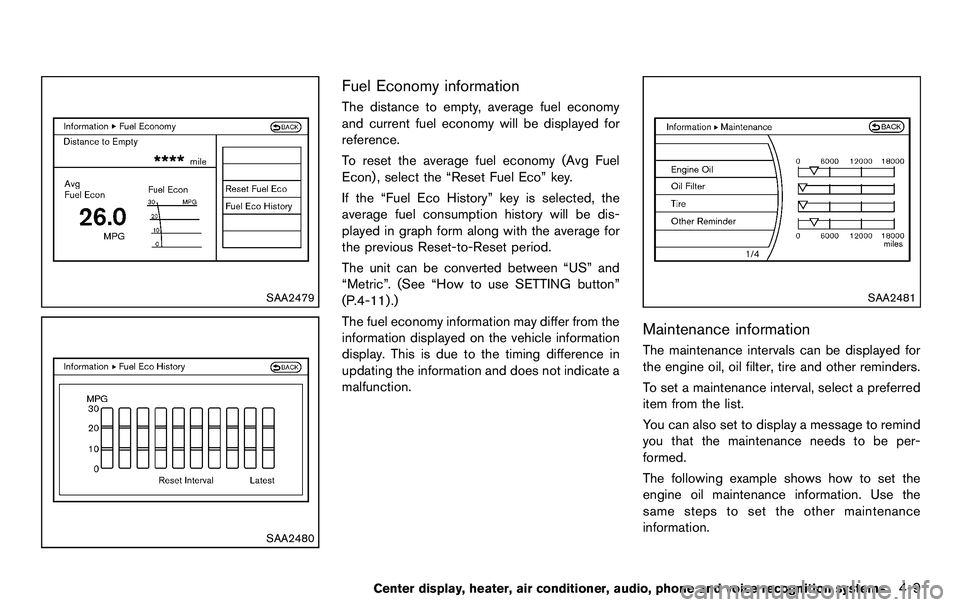
Fuel Economy information
The distance to empty, average fuel economy
and current fuel economy will be displayed for
reference.
To reset the average fuel economy (Avg Fuel
Econ) , select the “Reset Fuel Eco” key.
If the “Fuel Eco History” key is selected, the
average fuel consumption history will be dis-
played in graph form along with the average for
the previous Reset-to-Reset period.
The unit can be converted between “US” and
“Metric”. (See “How to use SETTING button”
(P.4-11) .)
The fuel economy information may differ from the
information displayed on the vehicle information
display. This is due to the timing difference in
updating the information and does not indicate a
malfunction.
SAA2481
Maintenance information
The maintenance intervals can be displayed for
the engine oil, oil filter, tire and other reminders.
To set a maintenance interval, select a preferred
item from the list.
You can also set to display a message to remind
you that the maintenance needs to be per-
formed.
The following example shows how to set the
engine oil maintenance information. Use the
same steps to set the other maintenance
information.
Center display, heater, air conditioner, audio, phone and voice recognition systems4-9