navigation system NISSAN 370Z COUPE 2019 User Guide
[x] Cancel search | Manufacturer: NISSAN, Model Year: 2019, Model line: 370Z COUPE, Model: NISSAN 370Z COUPE 2019Pages: 460, PDF Size: 3.06 MB
Page 139 of 460
3-14Pre-driving checks and adjustments
WARNING
The Intelligent Key transmits radio
waves when the buttons are pushed.
The FAA advises that the radio waves
may affect aircraft navigation and
communication systems. Do not op-
erate the Intelligent Key while on an
airplane. Make sure the buttons are
not operated unintentionally when
the unit is stored during a flight.
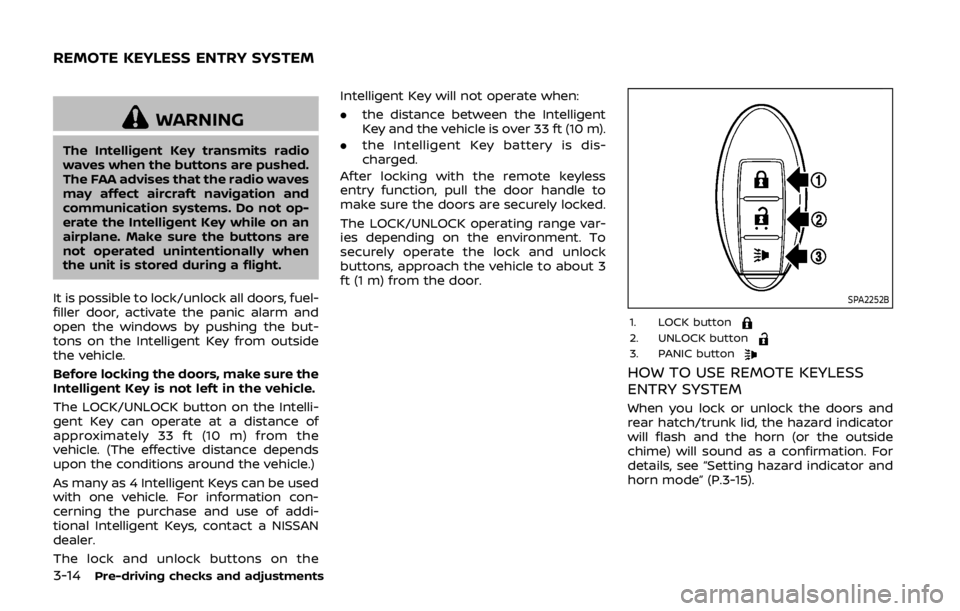
It is possible to lock/unlock all doors, fuel-
filler door, activate the panic alarm and
open the windows by pushing the but-
tons on the Intelligent Key from outside
the vehicle.
Before locking the doors, make sure the
Intelligent Key is not left in the vehicle.
The LOCK/UNLOCK button on the Intelli-
gent Key can operate at a distance of
approximately 33 ft (10 m) from the
vehicle. (The effective distance depends
upon the conditions around the vehicle.)
As many as 4 Intelligent Keys can be used
with one vehicle. For information con-
cerning the purchase and use of addi-
tional Intelligent Keys, contact a NISSAN
dealer.
The lock and unlock buttons on the Intelligent Key will not operate when:
.
the distance between the Intelligent
Key and the vehicle is over 33 ft (10 m).
. the Intelligent Key battery is dis-
charged.
After locking with the remote keyless
entry function, pull the door handle to
make sure the doors are securely locked.
The LOCK/UNLOCK operating range var-
ies depending on the environment. To
securely operate the lock and unlock
buttons, approach the vehicle to about 3
ft (1 m) from the door.
SPA2252B
1. LOCK button2. UNLOCK button3. PANIC button
HOW TO USE REMOTE KEYLESS
ENTRY SYSTEM
When you lock or unlock the doors and
rear hatch/trunk lid, the hazard indicator
will flash and the horn (or the outside
chime) will sound as a confirmation. For
details, see “Setting hazard indicator and
horn mode” (P.3-15).
REMOTE KEYLESS ENTRY SYSTEM
Page 168 of 460

4 Center display, heater, air conditioner,audio, phone and voice recognition sys-
tems
Safety note ........................................................................\
................ 4-3
Center multi-function control panel
(models with navigation system) .................................... 4-4
How to use multi-function controller .................... 4-4
How to use touch screen ................................................ 4-5
Menu options ........................................................................\
.... 4-7
How to select menus on the screen ...................... 4-7
Vehicle information and settings (models with
navigation system) ...................................................................... 4-8 How to use STATUS button .......................................... 4-8
How to use brightness control and display
ON/OFF button ........................................................................\
4-8
How to use INFO button .................................................. 4-8
How to use SETTING button ...................................... 4-11
RearView monitor (mirror display type) .................. 4-17 RearView Monitor system operation .................. 4-18
How to read displayed lines ....................................... 4-18
Difference between predictive and
actual distances ................................................................... 4-19
Display settings (Type A) (if so equipped) ....... 4-21
Display settings (Type B) (if so equipped) ....... 4-21
RearView Monitor system limitations ................. 4-22
System maintenance ....................................................... 4-23 RearView Monitor (center display type) (if
so equipped) ........................................................................\
......... 4-24
RearView Monitor system operation ................ 4-24
How to read displayed lines .................................... 4-25
How to park with predictive course lines ...... 4-25
Difference between predictive and
actual distances ................................................................ 4-26
Adjusting the screen ...................................................... 4-28
Predictive course line settings ............................... 4-28
RearView Monitor system limitations .............. 4-28
System maintenance .................................................... 4-29
Ventilators ........................................................................\
.............. 4-30 Center ventilators ............................................................ 4-30
Side ventilators .................................................................. 4-30
Heater and air conditioner ................................................ 4-31 Automatic air conditioner (Type A) (if
so equipped) ........................................................................\
. 4-32
Automatic air conditioner (Type B) (if
so equipped) ........................................................................\
. 4-34
Operating tips ..................................................................... 4-36
In-cabin microfilter .......................................................... 4-36
Servicing air conditioner ............................................. 4-36
Audio system ........................................................................\
....... 4-36
Page 169 of 460
 player ........................................................................\
........ 4-50")
Audio operation precautions .................................... 4-36
FM-AM radio with Compact Disc
(CD) player ........................................................................\
........ 4-50
FM-AM-SAT radio with Compact Disc
(CD) player ........................................................................\
........ 4-59
DVD (Digital Versatile Disc) player operation
(models with navigation system) ........................... 4-62
USB (Universal Serial Bus) connection port
(models with navigation system) ........................... 4-66
Bluetooth® streaming audio (models with
navigation system) ............................................................ 4-70
iPod® player operation (models with
navigation system) ............................................................ 4-75
Auxiliary input jacks (models with
navigation system) ............................................................ 4-77
CD/DVD/USB memory care and cleaning ...... 4-78
Steering-wheel-mounted controls
for audio ........................................................................\
............. 4-80
Antenna ........................................................................\
.............. 4-81
Car phone or CB radio .......................................................... 4-82
Bluetooth® hands-free phone system
(models with navigation system) ................................. 4-83 Regulatory information .................................................. 4-84
Voice commands ................................................................ 4-85
Control buttons .................................................................... 4-85
Connecting procedure ................................................... 4-85 Phone selection ................................................................. 4-86
Quick Dial ........................................................................\
........ 4-86
Making a call ........................................................................\
4-89
Receiving a call ................................................................... 4-90
During a call ........................................................................\
.. 4-90
Phone setting ...................................................................... 4-91
Troubleshooting guide ................................................ 4-93
Bluetooth® hands-free phone system (models
without navigation system) ............................................. 4-94 Regulatory information ............................................... 4-95
Using the system .............................................................. 4-96
Control buttons ................................................................. 4-98
Getting started ................................................................... 4-98
List of voice commands .......................................... 4-100
Speaker Adaptation (SA) mode ......................... 4-104
Troubleshooting guide ............................................ 4-106
NISSAN Voice Recognition System
(models with navigation system) ............................. 4-107
NISSAN voice recognition
Standard Mode ............................................................... 4-107
Using the system .......................................................... 4-110
NISSAN voice recognition Alternate
Command Mode ........................................................... 4-118
Using the system .......................................................... 4-127
Troubleshooting guide ............................................ 4-132
Page 171 of 460

4-4Center display, heater, air conditioner, audio, phone and voice recognition systems
SAA2273
1. “STATUS” status display button (P.4-8)
2, 3, 7, 8, 9.For navigation system control buttons
(Refer to the separate Navigation System
Owner’s Manual.)
4. Multi-function controller (P.4-4)
5. “PHONE” Bluetooth® Hands-Free Phone System button (P.4-83)
6. “
OFF” brightness control and display
ON/OFF button (P.4-8)
10. “INFO” vehicle and navigation information button (P.4-8)
11. “SETTING” button (P.4-11)
SAA2274
HOW TO USE MULTI-FUNCTION
CONTROLLER
Choose an item on the display using the
main directional buttons(or additional
directional buttonswith navigation
system) or center dial, and push the
ENTER buttonfor operation.
Push the BACK button
to return the
display to the previous screen or delete
characters. Pushing BACK may or may
not save the settings depending on the
menu.
For the VOICE button
functions, refer to
the separate Navigation System Owner’s
Manual.
CENTER MULTI-FUNCTION CONTROL
PANEL (models with navigation system)
Page 172 of 460
HOW TO USE TOUCH SCREEN
CAUTION
.The glass screen on the liquid
crystal display may break if it is
hit with a hard or sharp object. If
the glass screen breaks, do not
touch it. Doing so could result in
an injury.
. To clean the display, use a soft,
dry cloth. If additional cleaning is
necessary, use a small amount of
neutral detergent with a soft
cloth. Never use a rough cloth,
alcohol, benzine, thinner or any
kind of solvent or paper towel
with a chemical cleaning agent.
They will scratch or deteriorate
the panel.
. Do not splash any liquid such as
water or car fragrance on the
display. Contact with liquid will
cause the system to malfunction.
To ensure safe driving, some functions
cannot be operated while driving.
The on-screen functions that are not
available while driving will be “grayed
out” or muted. Park the vehicle in a safe location and
then operate the navigation system.
WARNING
.
ALWAYS give your full attention to
driving.
. Avoid using vehicle features that
could distract you. If distracted,
you could lose control of your
vehicle and cause an accident.
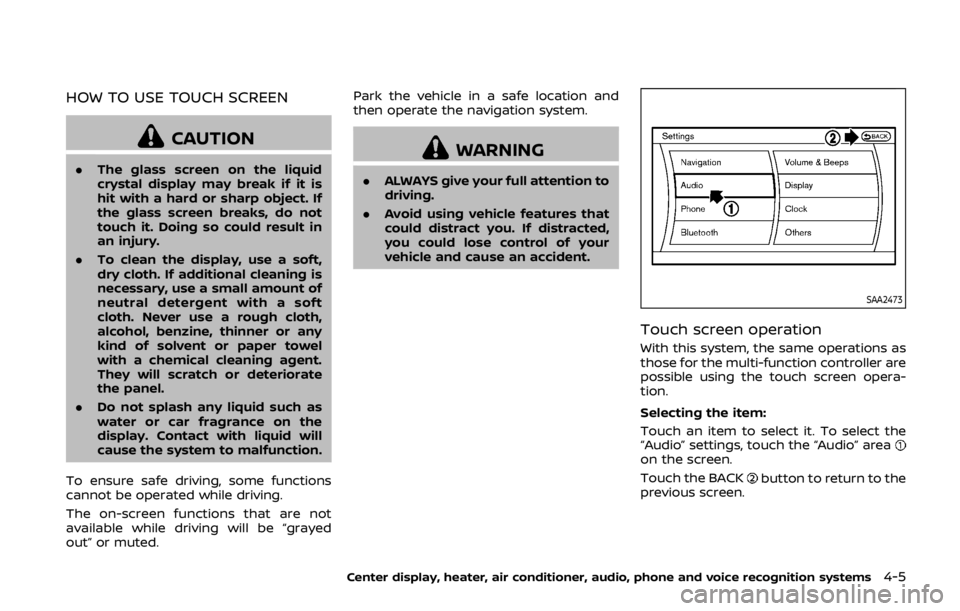
SAA2473
Touch screen operation
With this system, the same operations as
those for the multi-function controller are
possible using the touch screen opera-
tion.
Selecting the item:
Touch an item to select it. To select the
“Audio” settings, touch the “Audio” area
on the screen.
Touch the BACK
button to return to the
previous screen.
Center display, heater, air conditioner, audio, phone and voice recognition systems4-5
Page 174 of 460

SAA2143
MENU OPTIONS
The start menu can be displayed using
the menu control switch on the steering-
wheel-mounted controls.
1. While the MAP or STATUS screen isdisplayed, push and hold the menu
control switch until the “Menu Op-
tions” screen appears.
2. Highlight the preferred item by tilting the menu control switch up or down,
and then push the menu control
switch to select it.
SAA2476
Available items
Destination/Route:
These items are for the navigation sys-
tem. See the separate Navigation System
Owner’s Manual for details.
Info:
Displays the information screen. It is the
same screen that appears when you push
the INFO button.
Settings:
Displays the settings screen. It is the same
screen that appears when you push the
SETTING button.
SAA2477
HOW TO SELECT MENUS ON THE
SCREEN
Vehicle functions are viewed on the dis-
play screen in menus. To select each key
item, highlight the preferred item using
the multi-function controller and push
the ENTER button.
Whenever a menu selection is made or
menu item is highlighted, different areas
on the screen provide you with important
information. See the following for details.
1. Header:
Shows the path used to get to the
current screen. (i.e. push SETTING
button > choose “Comfort” menu
item.)
Center display, heater, air conditioner, audio, phone and voice recognition systems4-7
Page 175 of 460

4-8Center display, heater, air conditioner, audio, phone and voice recognition systems
2. Menu Selections:Shows the options to choose within
that menu screen.
3. UP/DOWN Movement indicator:
Shows that the multi-function con-
troller may be used to move UP/
DOWN on the screen and select more
options.
4. Menu Items Counter: Shows the total number of items
listed across all pages for the current
menu (i.e. 3/7).
5. Footer/Information Line: Provides more information (if avail-
able) about the menu selection cur-
rently highlighted. (i.e. Adjust head
lamp on time after shut-off.)HOW TO USE STATUS BUTTON
You can check information related to the
audio, climate control system, fuel con-
sumption and navigation system by
pressing the STATUS button repeatedly.
HOW TO USE BRIGHTNESS CON-
TROL AND DISPLAY ON/OFF BUT-
TON
Push the “OFF” button to switch the
display brightness to the daytime mode
or the nighttime mode, and to adjust the
display brightness using the multi-func-
tion controller while the indicator is dis-
played at the bottom of the screen.
The display brightness can also be ad-
justed using the brightness UP button (+)
or brightness DOWN button (−).
Push and hold the “
OFF” button for
more than 2 seconds to turn the display
off. Push the button again to turn the
display on.
HOW TO USE INFO BUTTON
The display screen shows vehicle and
navigation information for your conveni-
ence.
The information shown on the screen
should be a guide to determine the
condition of the vehicle. See the following
for details.
SAA2478
1. Push the INFO button on the control
panel.
2. Select an item from the INFO menu.
3. After viewing or adjusting the infor- mation on the following screens, push
the BACK button to return to the INFO
menu.
See the separate Navigation System
Owner’s Manual for the following items:
. Where am I?
. Traffic Info
. Weather Info
. Map Update
. Navigation Version
*When the ignition switch is in the ON
VEHICLE INFORMATION AND SETTINGS
(models with navigation system)
Page 176 of 460

position, the “Navigation Version” key is
displayed after selecting the “Others” key.
SAA2479
SAA2480
Fuel Economy information
The approximate distance to empty,
average fuel economy and current fuel
economy will be displayed for reference.
To reset the average fuel economy (Avg
Fuel Econ), select the “Reset Fuel Eco” key.
If the “Fuel Eco History” key is selected, the
average fuel consumption history will be
displayed in graph form along with the
average for the previous Reset-to-Reset
period.
The unit can be converted between “US”
and “Metric”. (See “How to use SETTING
button” (P.4-11).)
The fuel economy information may differ
from the information displayed on the
vehicle information display. This is due to
the timing difference in updating the
information and does not indicate a
malfunction.
Center display, heater, air conditioner, audio, phone and voice recognition systems4-9
Page 178 of 460

SAA2483
Others information
The Others information display will ap-
pear when pushing the INFO button and
selecting the “Others” key.
GPS Position:
For the details of this item, see the
separate Navigation System Owner’s
Manual.
Voice Recognition:
For the details of this item, see “NISSAN
Voice Recognition System (models with
navigation system)” (P.4-107).
SAA2484
HOW TO USE SETTING BUTTON
The display as illustrated will appear
when the SETTING button is pushed.
For navigation settings, refer to the
separate Navigation System Owner’s
Manual.
SAA2485Example
Audio settings
The display as illustrated will appear
when pushing the SETTING button and
selecting the “Audio” key.
Bass/Treble/Balance/Fade:
To adjust the speaker tone quality and
sound balance, select the “Bass”, “Treble”,
“Balance” or “Fade” key and adjust it with
the multi-function controller.
These items can also be adjusted by
pushing and turning the AUDIO knob.
Speed Sensitive Vol.:
The audio system’s volume is increased
with the vehicle speed. Select the “Speed
Center display, heater, air conditioner, audio, phone and voice recognition systems4-11
Page 179 of 460

4-12Center display, heater, air conditioner, audio, phone and voice recognition systems
Sensitive Vol.” and adjust the effect level
with the multi-function controller. The
Speed Sensitive Volume function is
turned off when the level is set to “OFF”.
Increasing the value will cause the vo-
lume to increase faster with vehicle
speed.
DivX® Registration Code:
The registration code for a device that is
used to download DivX® files will be
displayed on the screen. If a disc is loaded
or a USB memory is connected to the
audio system, this function will not be
activated.
Display Album Cover Art:
When this item is turned to ON, the album
cover image is displayed when playing
iPod® or MP3 music files through a CD,
DVD or USB memory. When the image is
not properly embedded in the file or
device, the image will not be displayed.
Phone settings
For details of the “Phone” settings, see
“Bluetooth® hands-free phone system
(models with navigation system)” (P.4-83).
Bluetooth® settings
For details of the “Bluetooth” settings, see
“Bluetooth® hands-free phone system
(models with navigation system)” (P.4-83)
or “Bluetooth® streaming audio (models
with navigation system)” (P.4-70).
SAA2554Example
Volume and Beeps settings
The display as illustrated will appear
when pushing the SETTING button, se-
lecting the “Volume & Beeps” key.
Audio Volume:
To increase or decrease the audio vo-
lume, select the “Audio Volume” and
adjust it with the multi-function control-
ler. You can also adjust the audio volume
by turning the VOLUME control knob.
Guidance Volume:
To adjust the guidance voice volume,
select the “Guidance Volume” and adjust
it with the multi-function controller.