clock NISSAN 370Z ROADSTER 2016 Z34 User Guide
[x] Cancel search | Manufacturer: NISSAN, Model Year: 2016, Model line: 370Z ROADSTER, Model: NISSAN 370Z ROADSTER 2016 Z34Pages: 428, PDF Size: 3.01 MB
Page 204 of 428
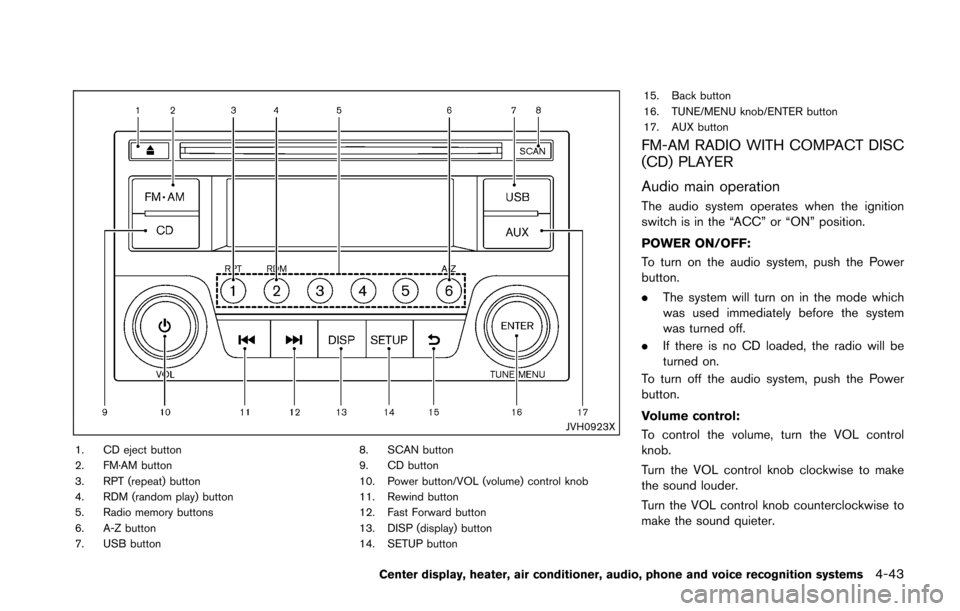
JVH0923X
1. CD eject button
2. FM·AM button
3. RPT (repeat) button
4. RDM (random play) button
5. Radio memory buttons
6. A-Z button
7. USB button8. SCAN button
9. CD button
10. Power button/VOL (volume) control knob
11. Rewind button
12. Fast Forward button
13. DISP (display) button
14. SETUP button15. Back button
16. TUNE/MENU knob/ENTER button
17. AUX button
FM-AM RADIO WITH COMPACT DISC
(CD) PLAYER
Audio main operation
The audio system operates when the ignition
switch is in the “ACC” or “ON” position.
POWER ON/OFF:
To turn on the audio system, push the Power
button.
.
The system will turn on in the mode which
was used immediately before the system
was turned off.
. If there is no CD loaded, the radio will be
turned on.
To turn off the audio system, push the Power
button.
Volume control:
To control the volume, turn the VOL control
knob.
Turn the VOL control knob clockwise to make
the sound louder.
Turn the VOL control knob counterclockwise to
make the sound quieter.
Center display, heater, air conditioner, audio, phone and voice recognition systems4-43
Page 205 of 428
4-44Center display, heater, air conditioner, audio, phone and voice recognition systems
SETUP button:
To configure Audio, Clock, Language or Scroll
direction settings, perform the following proce-
dure:
1. Push the SETUP button.
2. Push the ENTER button.
3. Turn the TUNE/MENU knob clockwise orcounterclockwise, the display will appear in
the following order:
Audio œClock œLanguage œScroll
Direction
After the desired levels have been set, push
either the back button repeatedly, the SETUP
button, or wait for 8 seconds without pushing
any buttons to exit the menu screen.
Audio adjustments:
Push the SETUP button to enter the setup menu
screen then select Audio by using TUNE/MENU
knob.
Each time the ENTER button is pushed, the
mode will change as follows:
Bass ?Treble ?Fade ?Balance ?AUX VOL
? SPD VOL ?Audio (setup menu screen)
Turn the TUNE/MENU knob clockwise or
counterclockwise to adjust the following items
and push the ENTER button to confirm. Bass control:
Use this control to enhance or attenuate bass
response sound.
Treble control:
Use this control to enhance or attenuate the
treble.
Fade control:
Use this control to adjust the balance of the
volume between the front and rear (if so
equipped) speakers.
Balance control:
Use this control to adjust the balance of the
volume between the left and right speakers.
AUX VOL (Auxiliary volume) control:
Use this control to adjust the volume output from
the auxiliary source.
SPD VOL (Speed volume) control:
This mode controls the volume output from the
speakers automatically in relation to vehicle
speed.
Adjusting the setting to 0 (zero) turns off the
speed volume feature.
Clock setting:
Push the SETUP button to enter the setup menu
screen then select Clock.
Turn the TUNE/MENU knob, the mode will change as follows:
Set Time
œON/OFF œClock Format œSet
time
Set Time:
Select Set Time then adjust the clock as follows:
1. The hour display will start flashing. Turn the TUNE/MENU knob to adjust the hour and
push the ENTER button.
2. The minute display will start flashing. Turn the TUNE/MENU knob to adjust the minute
and push the ENTER button to finish the
clock adjustment.
ON/OFF:
Set the clock display between on or off when the
audio unit is turned off. If set in the ON position,
the clock will be displayed when the audio unit is
turned off either by pushing the power button or
when the ignition switch is placed in the “OFF”
position.
Clock Format:
Switch the clock display between 24-hour mode
and 12-hour clock mode.
Language setting:
Push the SETUP button to enter the setup menu
screen then select Language.
Select the appropriate language and push the
ENTER button. Upon completion, the screen will
Page 235 of 428
4-74Center display, heater, air conditioner, audio, phone and voice recognition systems
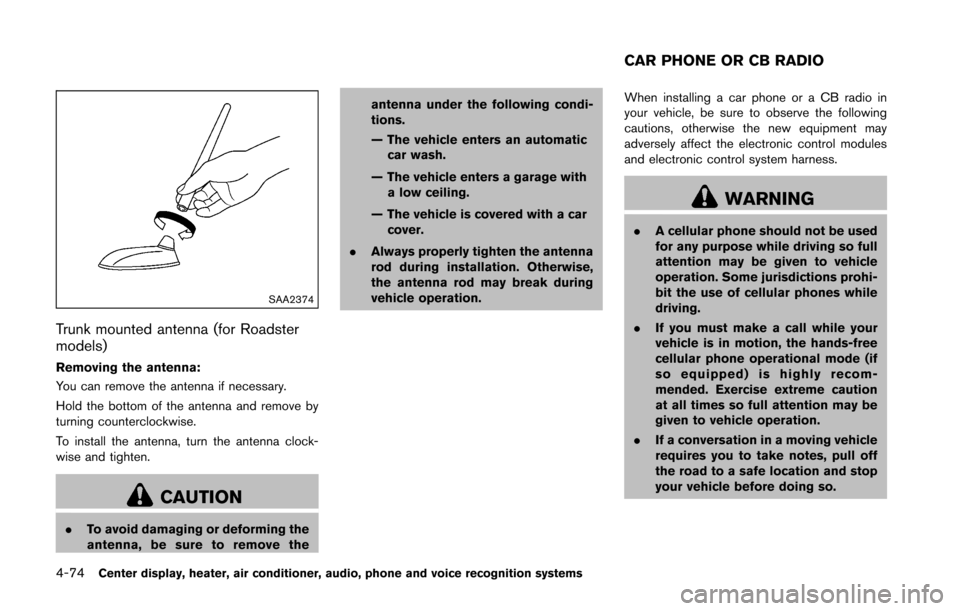
SAA2374
Trunk mounted antenna (for Roadster
models)
Removing the antenna:
You can remove the antenna if necessary.
Hold the bottom of the antenna and remove by
turning counterclockwise.
To install the antenna, turn the antenna clock-
wise and tighten.
CAUTION
.To avoid damaging or deforming the
antenna, be sure to remove the antenna under the following condi-
tions.
— The vehicle enters an automatic
car wash.
— The vehicle enters a garage with a low ceiling.
— The vehicle is covered with a car cover.
. Always properly tighten the antenna
rod during installation. Otherwise,
the antenna rod may break during
vehicle operation. When installing a car phone or a CB radio in
your vehicle, be sure to observe the following
cautions, otherwise the new equipment may
adversely affect the electronic control modules
and electronic control system harness.
WARNING
.
A cellular phone should not be used
for any purpose while driving so full
attention may be given to vehicle
operation. Some jurisdictions prohi-
bit the use of cellular phones while
driving.
. If you must make a call while your
vehicle is in motion, the hands-free
cellular phone operational mode (if
so equipped) is highly recom-
mended. Exercise extreme caution
at all times so full attention may be
given to vehicle operation.
. If a conversation in a moving vehicle
requires you to take notes, pull off
the road to a safe location and stop
your vehicle before doing so.
CAR PHONE OR CB RADIO
Page 324 of 428
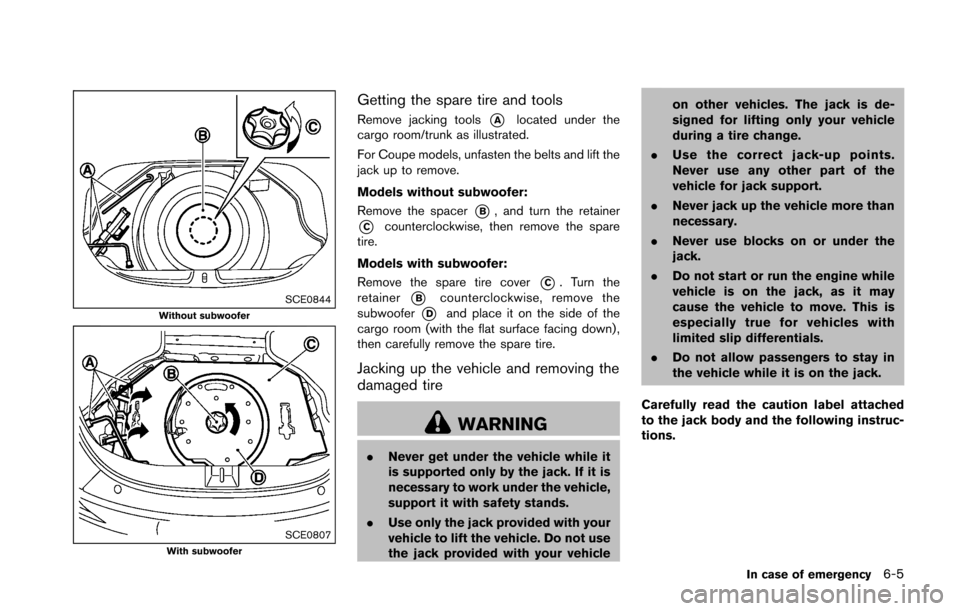
SCE0844Without subwoofer
SCE0807With subwoofer
Getting the spare tire and tools
Remove jacking tools*Alocated under the
cargo room/trunk as illustrated.
For Coupe models, unfasten the belts and lift the
jack up to remove.
Models without subwoofer:
Remove the spacer
*B, and turn the retainer
*Ccounterclockwise, then remove the spare
tire.
Models with subwoofer:
Remove the spare tire cover
*C. Turn the
retainer
*Bcounterclockwise, remove the
subwoofer
*Dand place it on the side of the
cargo room (with the flat surface facing down) ,
then carefully remove the spare tire.
Jacking up the vehicle and removing the
damaged tire
WARNING
. Never get under the vehicle while it
is supported only by the jack. If it is
necessary to work under the vehicle,
support it with safety stands.
. Use only the jack provided with your
vehicle to lift the vehicle. Do not use
the jack provided with your vehicle on other vehicles. The jack is de-
signed for lifting only your vehicle
during a tire change.
. Use the correct jack-up points.
Never use any other part of the
vehicle for jack support.
. Never jack up the vehicle more than
necessary.
. Never use blocks on or under the
jack.
. Do not start or run the engine while
vehicle is on the jack, as it may
cause the vehicle to move. This is
especially true for vehicles with
limited slip differentials.
. Do not allow passengers to stay in
the vehicle while it is on the jack.
Carefully read the caution label attached
to the jack body and the following instruc-
tions.
In case of emergency6-5
Page 325 of 428
6-6In case of emergency
SCE0790Jack-up point
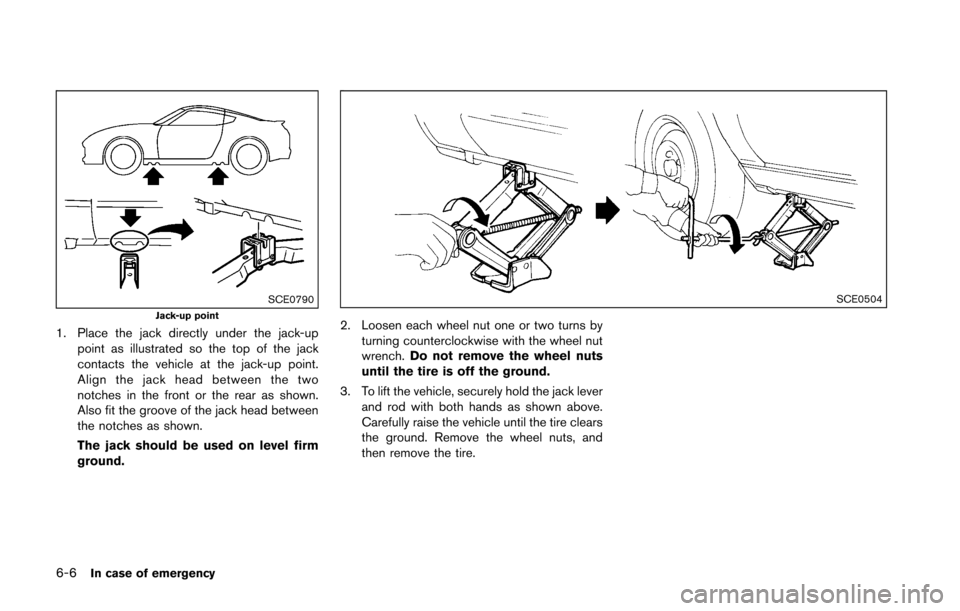
1. Place the jack directly under the jack-uppoint as illustrated so the top of the jack
contacts the vehicle at the jack-up point.
Align the jack head between the two
notches in the front or the rear as shown.
Also fit the groove of the jack head between
the notches as shown.
The jack should be used on level firm
ground.
SCE0504
2. Loosen each wheel nut one or two turns by
turning counterclockwise with the wheel nut
wrench. Do not remove the wheel nuts
until the tire is off the ground.
3. To lift the vehicle, securely hold the jack lever and rod with both hands as shown above.
Carefully raise the vehicle until the tire clears
the ground. Remove the wheel nuts, and
then remove the tire.
Page 330 of 428
JVE0014X
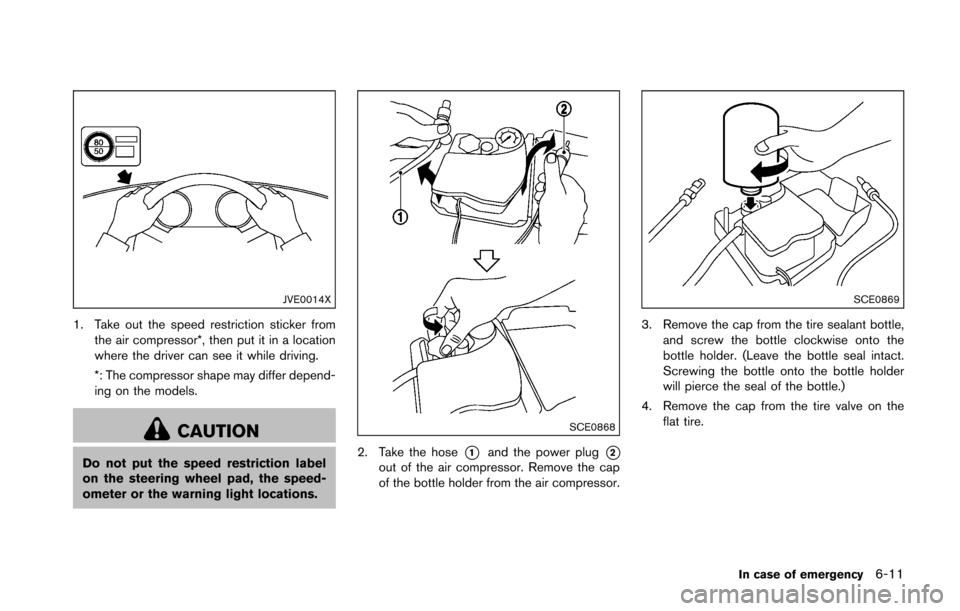
1. Take out the speed restriction sticker fromthe air compressor*, then put it in a location
where the driver can see it while driving.
*: The compressor shape may differ depend-
ing on the models.
CAUTION
Do not put the speed restriction label
on the steering wheel pad, the speed-
ometer or the warning light locations.
SCE0868
2. Take the hose*1and the power plug*2out of the air compressor. Remove the cap
of the bottle holder from the air compressor.
SCE0869
3. Remove the cap from the tire sealant bottle,and screw the bottle clockwise onto the
bottle holder. (Leave the bottle seal intact.
Screwing the bottle onto the bottle holder
will pierce the seal of the bottle.)
4. Remove the cap from the tire valve on the flat tire.
In case of emergency6-11
Page 360 of 428
SDI2335
Engine oil and filter
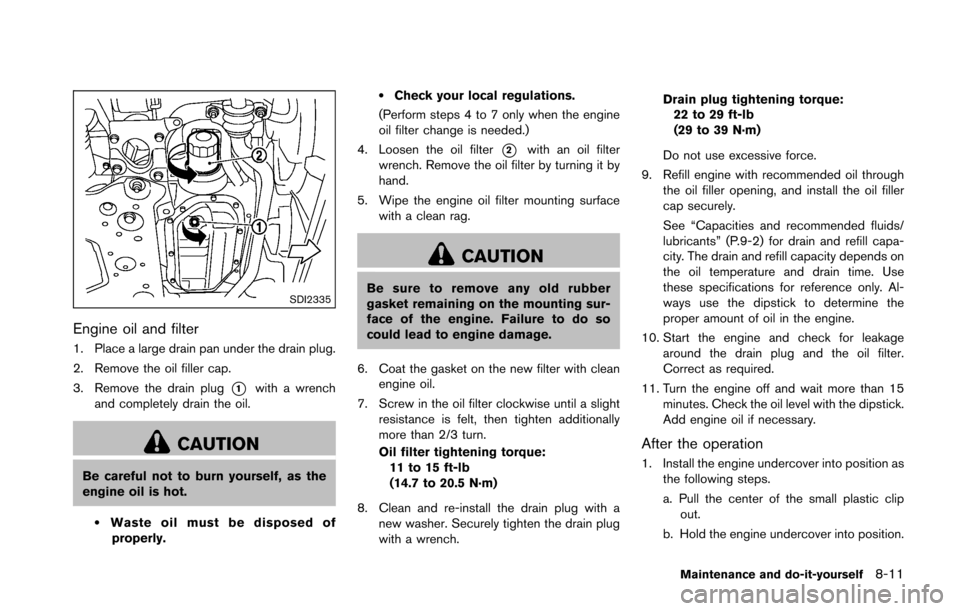
1. Place a large drain pan under the drain plug.
2. Remove the oil filler cap.
3. Remove the drain plug
*1with a wrench
and completely drain the oil.
CAUTION
Be careful not to burn yourself, as the
engine oil is hot.
.Waste oil must be disposed of properly.
.Check your local regulations.
(Perform steps 4 to 7 only when the engine
oil filter change is needed.)
4. Loosen the oil filter
*2with an oil filter
wrench. Remove the oil filter by turning it by
hand.
5. Wipe the engine oil filter mounting surface with a clean rag.
CAUTION
Be sure to remove any old rubber
gasket remaining on the mounting sur-
face of the engine. Failure to do so
could lead to engine damage.
6. Coat the gasket on the new filter with clean engine oil.
7. Screw in the oil filter clockwise until a slight resistance is felt, then tighten additionally
more than 2/3 turn.
Oil filter tightening torque:11 to 15 ft-lb
(14.7 to 20.5 N·m)
8. Clean and re-install the drain plug with a new washer. Securely tighten the drain plug
with a wrench. Drain plug tightening torque:
22 to 29 ft-lb
(29 to 39 N·m)
Do not use excessive force.
9. Refill engine with recommended oil through the oil filler opening, and install the oil filler
cap securely.
See “Capacities and recommended fluids/
lubricants” (P.9-2) for drain and refill capa-
city. The drain and refill capacity depends on
the oil temperature and drain time. Use
these specifications for reference only. Al-
ways use the dipstick to determine the
proper amount of oil in the engine.
10. Start the engine and check for leakage around the drain plug and the oil filter.
Correct as required.
11. Turn the engine off and wait more than 15 minutes. Check the oil level with the dipstick.
Add engine oil if necessary.
After the operation
1. Install the engine undercover into position asthe following steps.
a. Pull the center of the small plastic clipout.
b. Hold the engine undercover into position.
Maintenance and do-it-yourself8-11
Page 420 of 428
10 Index
A
ABS (Anti-lock Braking System) ............................ 5-27
Active noise control ................................................... 5-34
Active sound control .................................................. 5-34
Advanced air bag system ......................................... 1-35
Air bag systemAdvanced air bag system .................................. 1-35
Front passenger air bag and status light ...... 1-37
Front-seat mounted side-impact
supplemental air bag system ............................ 1-40
Roof-mounted curtain side-impact
supplemental air bag system ............................ 1-40
Air bag warning labels .............................................. 1-42
Air bag warning light ..................................... 1-42, 2-14
Air cleaner housing filter ........................................... 8-19
Air conditioner Air conditioner operation ................................... 4-24
Air conditioner service ....................................... 4-29
Air conditioner specification label ................... 9-13
Air conditioning system refrigerant and
lubricant recommendations ...................... 4-29, 9-7
In-cabin microfilter ............................................... 4-29
Air deflectors ............................................................... 9-17
Alarm, How to stop alarm (see vehicle
security system) .......................................................... 2-29
Alcohol, drugs and driving ......................................... 5-7
Antenna ......................................................................... 4-73
Anti-lock Braking System (ABS) ............................ 5-27
Anti-lock braking system (ABS) warning light .... 2-11
Appearance care Exterior appearance care ..................................... 7-2
Interior appearance care ....................................... 7-5
Audible reminders ...................................................... 2-17
Audio operation precautions ................................... 4-30
Audio system ............................................................... 4-30 FM-AM radio with Compact Disc
(CD) player ............................................................ 4-43
FM-AM-SAT radio with Compact Disc
(CD) player ............................................................ 4-52
Steering wheel audio controls ......................... 4-72
Autolight system ......................................................... 2-34
Automatic Air conditioner (Type A) ..................................... 4-25
Air conditioner (Type B) .................................... 4-27
Automatic adjusting function
(front windows) .................................................... 2-47
Automatic Transmission Fluid (ATF) ............... 8-12
Door locks ................................................................ 3-5
Driving with automatic transmission ............... 5-12
Auxiliary input jacks .................................................... 4-70
Avoiding collision and rollover .................................. 5-5
B
Battery ........................................................................... 8-15 Battery saver system .......................................... 2-35
Intelligent Key ....................................................... 8-24
Variable voltage control system ....................... 8-17
Before starting the engine ....................................... 5-10
Belts (See drive belts) .............................................. 8-18
Bluetooth
Šhands-free phone system
(models with navigation system) ............................ 4-75
Bluetooth
Šhands-free phone system
(models without navigation system) ...................... 4-86
Bluetooth
Šstreaming audio ..................................... 4-62
Booster seats .............................................................. 1-26
Brake Anti-lock Braking System (ABS) ..................... 5-27
Brake and clutch fluid ........................................ 8-13
Brake fluid ............................................................. 8-13
Brake system ........................................................ 5-26 Parking brake operation ..................................... 5-20
Warning light ........................................................ 2-11
Break-in schedule ....................................................... 5-23
Brightness control ........................................................ 4-7 Display ON/OFF button ........................................ 4-7
Instrument panel .................................................. 2-36
Bulb check/instrument panel ................................... 2-11
Bulb replacement ....................................................... 8-26
C
Cabin air filter .............................................................. 4-29
Capacities and recommended fluids/lubricants ... 9-2
Car phone or CB radio ............................................. 4-74
Cargo cover ................................................................. 2-44
Catalytic converter, Three way catalyst .................. 5-3
CD/DVD/USB memory care and cleaning .......... 4-71
Center multi-function control panel (models with
navigation system) ....................................................... 4-3
Child restraints ............................................................ 1-19 Booster seats ....................................................... 1-26
Precautions on child restraints ........................ 1-19
Top tether strap ................................................... 1-20
Child safety .................................................................. 1-16
Chimes Audible reminders ............................................... 2-17
Seat belt warning light and chime .................. 2-14
Circuit breaker, Fusible link ..................................... 8-22
Cleaning exterior and interior ........................... 7-2, 7-5
Clock .................................................................... 2-9, 2-26
Clutch fluid ................................................................... 8-13
Cockpit ............................................................................ 2-3
Cold weather driving ................................................. 5-32
Compact Disc (CD) player (See
audio system) .............................................................. 4-54
Compact spare tire .................................................... 8-39