seats NISSAN 370Z ROADSTER 2016 Z34 Workshop Manual
[x] Cancel search | Manufacturer: NISSAN, Model Year: 2016, Model line: 370Z ROADSTER, Model: NISSAN 370Z ROADSTER 2016 Z34Pages: 428, PDF Size: 3.01 MB
Page 104 of 428
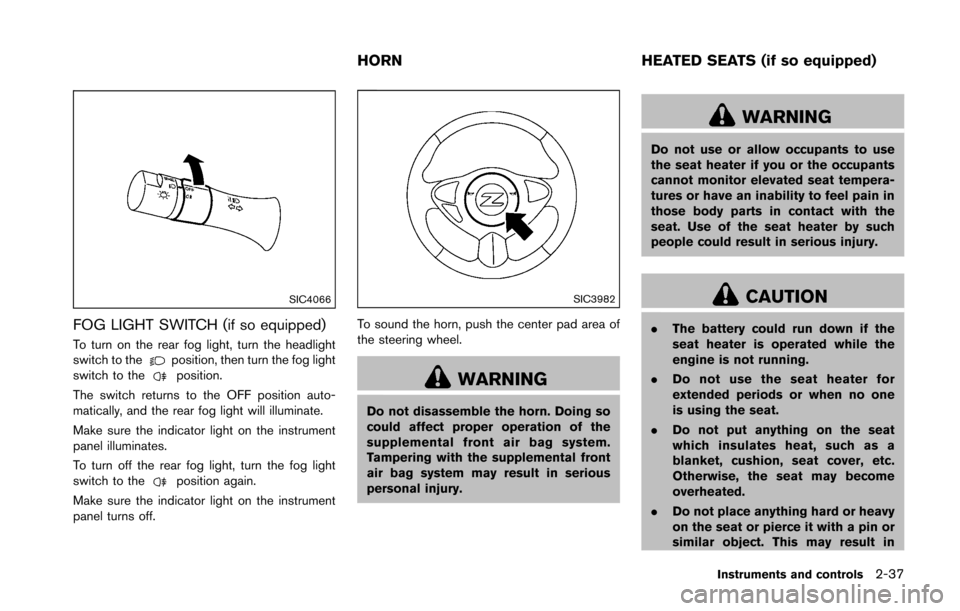
SIC4066
FOG LIGHT SWITCH (if so equipped)
To turn on the rear fog light, turn the headlight
switch to theposition, then turn the fog light
switch to theposition.
The switch returns to the OFF position auto-
matically, and the rear fog light will illuminate.
Make sure the indicator light on the instrument
panel illuminates.
To turn off the rear fog light, turn the fog light
switch to the
position again.
Make sure the indicator light on the instrument
panel turns off.
SIC3982
To sound the horn, push the center pad area of
the steering wheel.
WARNING
Do not disassemble the horn. Doing so
could affect proper operation of the
supplemental front air bag system.
Tampering with the supplemental front
air bag system may result in serious
personal injury.
WARNING
Do not use or allow occupants to use
the seat heater if you or the occupants
cannot monitor elevated seat tempera-
tures or have an inability to feel pain in
those body parts in contact with the
seat. Use of the seat heater by such
people could result in serious injury.
CAUTION
. The battery could run down if the
seat heater is operated while the
engine is not running.
. Do not use the seat heater for
extended periods or when no one
is using the seat.
. Do not put anything on the seat
which insulates heat, such as a
blanket, cushion, seat cover, etc.
Otherwise, the seat may become
overheated.
. Do not place anything hard or heavy
on the seat or pierce it with a pin or
similar object. This may result in
Instruments and controls2-37
HORN HEATED SEATS (if so equipped)
Page 105 of 428
2-38Instruments and controls
damage to the heater.
. Any liquid spilled on the heated seat
should be removed immediately
with a dry cloth.
. When cleaning the seat, never use
gasoline, thinner, or any similar
materials.
. If any malfunctions are found or the
heated seat does not operate, turn
the switch off and have the system
checked by a NISSAN dealer.
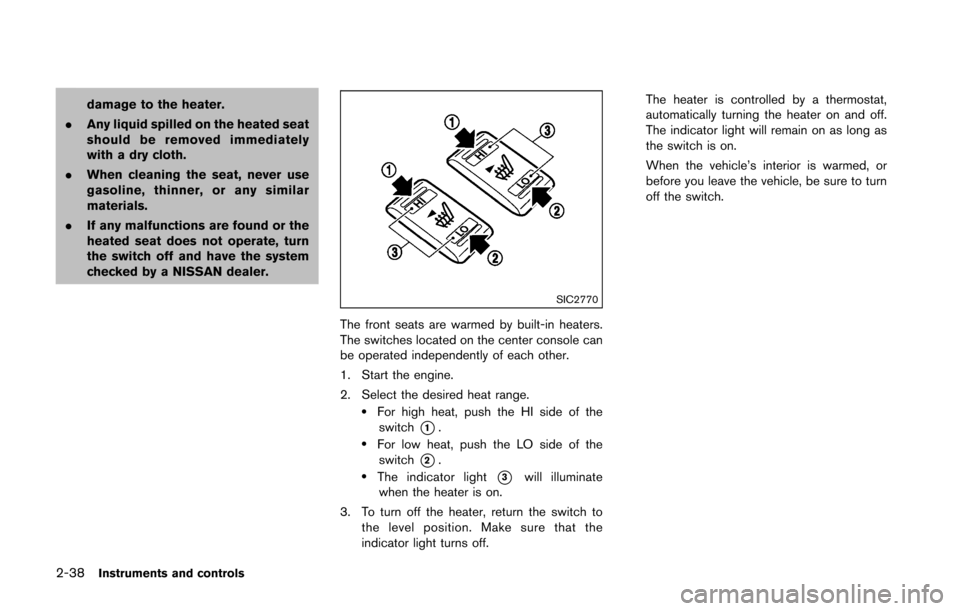
SIC2770
The front seats are warmed by built-in heaters.
The switches located on the center console can
be operated independently of each other.
1. Start the engine.
2. Select the desired heat range.
.For high heat, push the HI side of the
switch
*1..For low heat, push the LO side of theswitch
*2..The indicator light*3will illuminate
when the heater is on.
3. To turn off the heater, return the switch to the level position. Make sure that the
indicator light turns off. The heater is controlled by a thermostat,
automatically turning the heater on and off.
The indicator light will remain on as long as
the switch is on.
When the vehicle’s interior is warmed, or
before you leave the vehicle, be sure to turn
off the switch.
Page 106 of 428
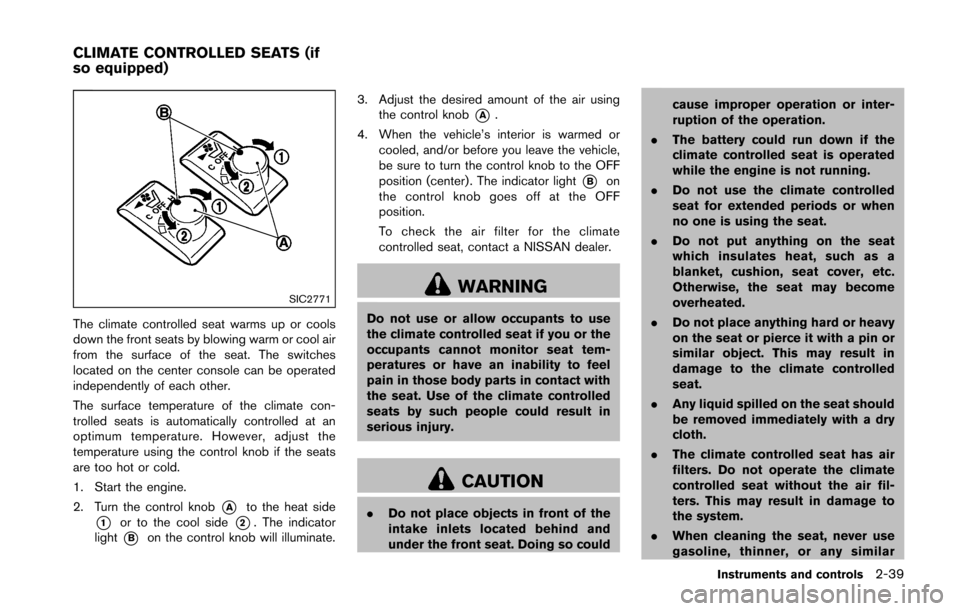
SIC2771
The climate controlled seat warms up or cools
down the front seats by blowing warm or cool air
from the surface of the seat. The switches
located on the center console can be operated
independently of each other.
The surface temperature of the climate con-
trolled seats is automatically controlled at an
optimum temperature. However, adjust the
temperature using the control knob if the seats
are too hot or cold.
1. Start the engine.
2. Turn the control knob
*Ato the heat side
*1or to the cool side*2. The indicator
light
*Bon the control knob will illuminate. 3. Adjust the desired amount of the air using
the control knob
*A.
4. When the vehicle’s interior is warmed or cooled, and/or before you leave the vehicle,
be sure to turn the control knob to the OFF
position (center) . The indicator light
*Bon
the control knob goes off at the OFF
position.
To check the air filter for the climate
controlled seat, contact a NISSAN dealer.
WARNING
Do not use or allow occupants to use
the climate controlled seat if you or the
occupants cannot monitor seat tem-
peratures or have an inability to feel
pain in those body parts in contact with
the seat. Use of the climate controlled
seats by such people could result in
serious injury.
CAUTION
. Do not place objects in front of the
intake inlets located behind and
under the front seat. Doing so could cause improper operation or inter-
ruption of the operation.
. The battery could run down if the
climate controlled seat is operated
while the engine is not running.
. Do not use the climate controlled
seat for extended periods or when
no one is using the seat.
. Do not put anything on the seat
which insulates heat, such as a
blanket, cushion, seat cover, etc.
Otherwise, the seat may become
overheated.
. Do not place anything hard or heavy
on the seat or pierce it with a pin or
similar object. This may result in
damage to the climate controlled
seat.
. Any liquid spilled on the seat should
be removed immediately with a dry
cloth.
. The climate controlled seat has air
filters. Do not operate the climate
controlled seat without the air fil-
ters. This may result in damage to
the system.
. When cleaning the seat, never use
gasoline, thinner, or any similar
Instruments and controls2-39
CLIMATE CONTROLLED SEATS (if
so equipped)
Page 195 of 428
4-34Center display, heater, air conditioner, audio, phone and voice recognition systems
.DTS and DTS 2.0 “” are registered
trademarks of DTS, Inc.
Parental level (parental control):
DVDs with the parental control setting can be
played with this system. Please use your own
judgement to set the parental control with the
system.
Disc selection:
The following disc formats can be played with
the DVD drive.
. DVD-VIDEO
. VIDEO-CD
. CD-DA (Conventional Compact Disc)
. DTS-CD
USB (Universal Serial Bus) connection
port
WARNING
Do not connect, disconnect or operate
the USB device while driving. Doing so
can be a distraction. If distracted you
could lose control of your vehicle and
cause an accident or serious injury.
CAUTION
.Do not force the USB device into the
USB port. Inserting the USB device
tilted or up-side-down into the port
may damage the port. Make sure
that the USB device is connected
correctly into the USB port.
. Do not grab the USB port cover (if
so equipped) when pulling the USB
device out of the port. This could
damage the port and the cover.
. Do not leave the USB cable in a
place where it can be pulled unin-
tentionally. Pulling the cable may
damage the port.
The vehicle is not equipped with a USB device.
USB devices should be purchased separately
as necessary.
This system cannot be used to format USB
devices. To format a USB device, use a personal
computer.
In some states/area, the USB device for the
front seats plays only sound without images for
regulatory reasons, even when the vehicle is
parked.
This system supports various USB memory devices, USB hard drives and iPod
Šplayers.
Some USB devices may not be supported by
this system.
. Partitioned USB devices may not be played
correctly.
. Some characters used in other languages
(Chinese, Japanese, etc.) may not appear
properly in the display. Using English lan-
guage characters with a USB device is
recommended.
General notes for USB use:
Refer to your device manufacturer’s owner
information regarding the proper use and care
of the device.
Notes for iPod
Šuse:
iPodŠis a trademark of Apple Inc., registered in
the U.S. and other countries.
. Improperly plugging in the iPod
Šmay cause
a checkmark to be displayed on and off
(flickering) . Always make sure that the iPod
Š
is connected properly.
. An iPod nanoŠ(1st Generation) may remain
in fast forward or rewind mode if it is
connected during a seek operation. In this
case, please manually reset the iPod
Š.
. An iPod nanoŠ(2nd Generation) will con-
tinue to fast-forward or rewind if it is
disconnected during a seek operation.
Page 346 of 428
CHROME PARTS
Clean chrome parts regularly with a non-
abrasive chrome polish to maintain the finish.
TIRE DRESSING
NISSAN does not recommend the use of tire
dressings. Tire manufacturers apply a coating to
the tires to help reduce discoloration of the
rubber. If a tire dressing is applied to the tires, it
may react with the coating and form a com-
pound. This compound may come off the tire
while driving and stain the vehicle paint.
If you choose to use a tire dressing, take the
following precautions:
.Use a water-based tire dressing. The coat-
ing on the tire dissolves more easily with an
oil-based tire dressing.
. Apply a light coat of tire dressing to help
prevent it from entering the tire tread/
grooves (where it would be difficult to
remove) .
. Wipe off excess tire dressing using a dry
towel. Make sure the tire dressing is
completely removed from the tire tread/
grooves.
. Allow the tire dressing to dry as recom-
mended by tire dressing manufacturer. Occasionally remove loose dust from the interior
trim, plastic parts and seats using a vacuum
cleaner or soft bristled brush. Wipe the vinyl and
leather surfaces with a clean, soft cloth dam-
pened in mild soap solution, then wipe clean
with a dry soft cloth.
Regular care and cleaning is required in order to
maintain the appearance of the leather.
Before using any fabric protector, read the
manufacturer’s recommendations. Some fabric
protectors contain chemicals that may stain or
bleach the seat material.
Use a cloth dampened only with water, to clean
the meter and gauge lens.
WARNING
Do not use water or acidic cleaners (hot
steam cleaners) on the seat. This can
damage the seat or occupant classifica-
tion sensor. This can also affect the
operation of the air bag system and
result in serious personal injury.
CAUTION
.
Never use benzine, thinner, or any
similar material.
. For cleaning, use a soft cloth, dam-
pened with water. Never use a rough
cloth, alcohol, benzine, thinner or
any kind of solvent or paper towel
with a chemical cleaning agent.
They will scratch or cause discolora-
tion to the lens.
. Do not spray any liquid such as
water on the meter lens. Spraying
liquid may cause the system to
malfunction.
. Small dirt particles can be abrasive
and damaging to the leather sur-
faces and should be removed
promptly. Do not use saddle soap,
car waxes, polishes, oils, cleaning
fluids, solvents, detergents or am-
monia-based cleaners as they may
damage the leather’s natural finish.
. Only use fabric protectors approved
by NISSAN.
. Do not use glass or plastic cleaner
on meter or gauge lens covers. It
Appearance and care7-5
CLEANING INTERIOR
Page 353 of 428
8-4Maintenance and do-it-yourself
Lights*:Clean the headlights on a regular basis.
Make sure that the headlights, stop lights, tail
lights, turn signal lights, and other lights are all
operating properly and installed securely. Also
check headlight aim.
Road wheel nuts (lug nuts)*: When checking
the tires, make sure no wheel nuts are missing,
and check for any loose wheel nuts. Tighten if
necessary.
Tire rotation*: Tires cannot be rotated, as the
front tires are a different size from the rear tires
and the direction of wheel rotation is fixed in
each tire.
Tires*: Check the pressure with a gauge often
and always prior to long distance trips. If
necessary, adjust the pressure in all tires,
including the spare, to the pressure specified.
Check carefully for damage, cuts or excessive
wear.
Tire Pressure Monitoring System (TPMS)
transmitter components: Replace the TPMS
transmitter grommet seal, valve core and cap
when the tires are replaced due to wear or age.
Tire, wheel alignment and balance: If the
vehicle should pull to either side while driving on
a straight and level road, or if you detect uneven
or abnormal tire wear, there may be a need for
wheel alignment. If the steering wheel or seat vibrates at normal
highway speeds, wheel balancing may be
needed.
For additional information regarding tires, refer
to “Important Tire Safety Information” (US) or
“Tire Safety Information” (Canada) in the
NISSAN Warranty Information Booklet.
Windshield:
Clean the windshield on a regular
basis. Check the windshield at least every six
months for cracks or other damage. Have a
damaged windshield repaired by a qualified
repair facility.
Windshield wiper blades*: Check for cracks
or wear if they do not wipe properly.
Inside the vehicle
The maintenance items listed here should be
checked on a regular basis, such as when
performing scheduled maintenance, cleaning
the vehicle, etc.
Accelerator pedal: Check the pedal for
smooth operation and make sure the pedal
does not catch or require uneven effort. Keep
the floor mat away from the pedal.
Automatic transmission P (Park) mechan-
ism: On a fairly steep hill, check that your
vehicle is held securely with the shift lever in the
P (Park) position without applying any brakes. Brake pedal:
Check the pedal for smooth
operation. If the brake pedal suddenly goes
down further than normal, the pedal feels
spongy or the vehicle seems to take longer to
stop, see a NISSAN dealer immediately. Keep
the floor mat away from the pedal.
Brakes: Check that the brakes do not pull the
vehicle to one side when applied.
Parking brake: Check the parking brake
operation regularly. The vehicle should be
securely held on a fairly steep hill with only the
parking brake applied. If the parking brake needs
adjusted, see a NISSAN dealer.
Seat belts: Check that all parts of the seat belt
system (for example, buckles, anchors, adjuster
and retractors) operate properly and smoothly,
and are installed securely. Check the belt
webbing for cuts, fraying, wear or damage.
Seats: Check seat position controls such as
seat adjusters, seatback recliner, etc. to ensure
they operate smoothly and that all latches lock
securely in every position. Check that the head
restraints move up and down smoothly and that
the locks (if so equipped) hold securely in all
latched positions.
Steering wheel: Check for changes in the
steering conditions, such as excessive free play,
hard steering or strange noises.
Page 409 of 428
9-18Technical and consumer information
WARNING
.It is extremely dangerous to ride
in a cargo area inside the vehi-
cle. In a collision, people riding
in these areas are more likely to
be seriously injured or killed.
.Do not allow people to ride in
any area of vehicle that is not
equipped with seats and seat
belts.
.Be sure everyone in your vehicle
is in a seat and using a seat belt
properly.
TERMS
It is important to familiarize yourself with the
following terms before loading your vehicle:
.Curb Weight (actual weight of your
vehicle) - vehicle weight including:
standard equipment, fluids, emergency
tools, and spare tire assembly. This
weight does not include passengers
and cargo. .
GVW (Gross Vehicle Weight) - curb
weight plus the combined weight of
optional equipment, passengers and
cargo.
. GVWR (Gross Vehicle Weight Rating)
- maximum total combined weight of the
unloaded vehicle, passengers, luggage,
hitch, trailer tongue load and any other
optional equipment. This information is
located on the F.M.V.S.S./C.M.V.S.S.
label.
. GAWR (Gross Axle Weight Rating) -
maximum weight (load) limit specified
for the front or rear axle. This informa-
tion is located on the F.M.V.S.S./C.M.V.
S.S. label.
. GCWR (Gross Combined Weight Rat-
ing) - The maximum total weight rating
of the vehicle, passengers, cargo, and
trailer.
. Vehicle Capacity Weight, Load limit,
Total load capacity - maximum total
weight limit specified of the load
(passengers and cargo) for the vehicle.
This is the maximum combined weight
of occupants and cargo that can be loaded into the vehicle. If the vehicle is
used to tow a trailer, the trailer tongue
weight must be included as part of the
cargo load. This information is located
on the Tire and Loading Information
label.
. Cargo capacity - permissible weight of
cargo, the weight of total occupants
weight subtracted from the load limit.
VEHICLE LOADING INFORMATION
Page 420 of 428
10 Index
A
ABS (Anti-lock Braking System) ............................ 5-27
Active noise control ................................................... 5-34
Active sound control .................................................. 5-34
Advanced air bag system ......................................... 1-35
Air bag systemAdvanced air bag system .................................. 1-35
Front passenger air bag and status light ...... 1-37
Front-seat mounted side-impact
supplemental air bag system ............................ 1-40
Roof-mounted curtain side-impact
supplemental air bag system ............................ 1-40
Air bag warning labels .............................................. 1-42
Air bag warning light ..................................... 1-42, 2-14
Air cleaner housing filter ........................................... 8-19
Air conditioner Air conditioner operation ................................... 4-24
Air conditioner service ....................................... 4-29
Air conditioner specification label ................... 9-13
Air conditioning system refrigerant and
lubricant recommendations ...................... 4-29, 9-7
In-cabin microfilter ............................................... 4-29
Air deflectors ............................................................... 9-17
Alarm, How to stop alarm (see vehicle
security system) .......................................................... 2-29
Alcohol, drugs and driving ......................................... 5-7
Antenna ......................................................................... 4-73
Anti-lock Braking System (ABS) ............................ 5-27
Anti-lock braking system (ABS) warning light .... 2-11
Appearance care Exterior appearance care ..................................... 7-2
Interior appearance care ....................................... 7-5
Audible reminders ...................................................... 2-17
Audio operation precautions ................................... 4-30
Audio system ............................................................... 4-30 FM-AM radio with Compact Disc
(CD) player ............................................................ 4-43
FM-AM-SAT radio with Compact Disc
(CD) player ............................................................ 4-52
Steering wheel audio controls ......................... 4-72
Autolight system ......................................................... 2-34
Automatic Air conditioner (Type A) ..................................... 4-25
Air conditioner (Type B) .................................... 4-27
Automatic adjusting function
(front windows) .................................................... 2-47
Automatic Transmission Fluid (ATF) ............... 8-12
Door locks ................................................................ 3-5
Driving with automatic transmission ............... 5-12
Auxiliary input jacks .................................................... 4-70
Avoiding collision and rollover .................................. 5-5
B
Battery ........................................................................... 8-15 Battery saver system .......................................... 2-35
Intelligent Key ....................................................... 8-24
Variable voltage control system ....................... 8-17
Before starting the engine ....................................... 5-10
Belts (See drive belts) .............................................. 8-18
Bluetooth
Šhands-free phone system
(models with navigation system) ............................ 4-75
Bluetooth
Šhands-free phone system
(models without navigation system) ...................... 4-86
Bluetooth
Šstreaming audio ..................................... 4-62
Booster seats .............................................................. 1-26
Brake Anti-lock Braking System (ABS) ..................... 5-27
Brake and clutch fluid ........................................ 8-13
Brake fluid ............................................................. 8-13
Brake system ........................................................ 5-26 Parking brake operation ..................................... 5-20
Warning light ........................................................ 2-11
Break-in schedule ....................................................... 5-23
Brightness control ........................................................ 4-7 Display ON/OFF button ........................................ 4-7
Instrument panel .................................................. 2-36
Bulb check/instrument panel ................................... 2-11
Bulb replacement ....................................................... 8-26
C
Cabin air filter .............................................................. 4-29
Capacities and recommended fluids/lubricants ... 9-2
Car phone or CB radio ............................................. 4-74
Cargo cover ................................................................. 2-44
Catalytic converter, Three way catalyst .................. 5-3
CD/DVD/USB memory care and cleaning .......... 4-71
Center multi-function control panel (models with
navigation system) ....................................................... 4-3
Child restraints ............................................................ 1-19 Booster seats ....................................................... 1-26
Precautions on child restraints ........................ 1-19
Top tether strap ................................................... 1-20
Child safety .................................................................. 1-16
Chimes Audible reminders ............................................... 2-17
Seat belt warning light and chime .................. 2-14
Circuit breaker, Fusible link ..................................... 8-22
Cleaning exterior and interior ........................... 7-2, 7-5
Clock .................................................................... 2-9, 2-26
Clutch fluid ................................................................... 8-13
Cockpit ............................................................................ 2-3
Cold weather driving ................................................. 5-32
Compact Disc (CD) player (See
audio system) .............................................................. 4-54
Compact spare tire .................................................... 8-39
Page 422 of 428
Fusible links ................................................................. 8-22
G
Garage door opener, HomeLinkŠ
Universal Transceiver ................................................. 2-50
Gas cap ........................................................................ 3-34
Gauge .............................................................................. 2-5Engine coolant temperature gauge ................... 2-7
Fuel gauge ............................................................... 2-8
Odometer ................................................................. 2-6
Speedometer ........................................................... 2-6
Tachometer ............................................................... 2-7
Trip computer ....................................................... 2-23
General maintenance .................................................. 8-3
Glove box ..................................................................... 2-43
H
Hands-free phone system, BluetoothŠ
(models with navigation system) ............................ 4-75
Hands-free phone system, BluetoothŠ
(models without navigation system) ...................... 4-86
Hatch, Rear hatch ...................................................... 3-17
Hazard warning flasher switch .................................. 6-2
Head restraints/headrests .......................................... 1-6
Headlights Bulb replacement ................................................ 8-27
Headlight switch .................................................. 2-33
Xenon headlights ................................................. 2-33
Heated seats ............................................................... 2-37
Heater Engine block heater ............................................ 5-33
Heater and air conditioner operation ............. 4-24
HomeLink
ŠUniversal Transceiver .......................... 2-50
Hood release ............................................................... 3-16
Horn ............................................................................... 2-37
I
Ignition switch (Push-button) .......................................................... 5-7
Manual transmission models ............................ 5-16
Immobilizer system ..................................................... 2-29
In-cabin microfilter ...................................................... 4-29
Indicator lights ............................................................. 2-15
INFO button ................................................................... 4-7
Inside mirror ................................................................. 3-37
Inspection/maintenance (I/M) test .......................... 9-24
Instrument brightness control .................................. 2-36
Instrument panel ........................................................... 2-4
Instrument pocket ....................................................... 2-41
Intelligent Key ................................................................ 3-2
Intelligent Key battery discharge indicator ........... 2-20
Intelligent Key removal indicator ............................. 2-19
Intelligent Key system .................................................. 3-6 Battery replacement ............................................ 8-24
Intelligent Key system warning light ............... 2-12
Key operating range .............................................. 3-8
Key operation ........................................................... 3-9
Warning signals ................................................... 3-11
Interior light control switch ...................................... 2-48
Interior light replacement .......................................... 8-28
Interior lights ................................................................ 2-48
Interior trunk lid release ............................................ 3-20
iPod
Šplayer operation .............................................. 4-67
J
Jump starting ............................................................... 6-14
K
Keyless entry (See remote keyless
entry system) ............................................................... 3-13
Keys ................................................................................. 3-2 For Intelligent Key system .................................... 3-6
L
LabelsAir bag warning labels ....................................... 1-42
Air conditioner specification label ................... 9-13
Emission control information label .................. 9-12
Engine serial number .......................................... 9-12
F.M.V.S.S./C.M.V.S.S. certification label ........ 9-12
Tire and Loading information label ....... 8-31, 9-13
Vehicle identification number (VIN) ................ 9-11
License plate, Installing front license plate .......... 9-14
Light Air bag warning light .......................................... 1-42
Bulb replacement ................................................ 8-26
Cargo area courtesy light .................................. 2-49
Cargo light ............................................................ 2-50
Fog light switch ................................................... 2-37
Headlight switch .................................................. 2-33
Headlights bulb replacement ........................... 8-27
Indicator lights ...................................................... 2-15
Interior light control switch ............................... 2-48
Interior lights ......................................................... 2-48
Map lights .............................................................. 2-48
Replacement ......................................................... 8-26
Trunk light .............................................................. 2-50
Vanity mirror lights ............................................... 2-49
Warning lights, indicator lights and
audible reminders ................................................ 2-11
Xenon headlights ................................................. 2-33
Lights, Exterior and interior light replacement .... 8-28
10-3
Page 424 of 428
Rear hatch opener switch ........................................ 3-17
Rear parcel box ........................................................... 2-43
Rear window defroster switch ................................ 2-32
RearView Monitor (models with
navigation system) ..................................................... 4-17
Recorders, Event data ............................................... 9-24
Registering your vehicle in another country ........ 9-11
Remote keyless entry system .................................. 3-13
Repairing flat tire (with emergency tire puncture
repair kit) ........................................................................ 6-8
Reporting safety defects .......................................... 9-23
Roadside assistance program ................................... 6-2
Rollover ........................................................................... 5-5
Roof, Soft top .............................................................. 3-21
S
Safety, Child seat belts ............................................. 1-16
Satellite radio operation ............................................ 4-52
Seat adjustmentFront manual seat adjustment ............................. 1-4
Front power seat adjustment .............................. 1-3
Front seats ............................................................... 1-3
Seat belt(s) Child safety ........................................................... 1-16
Infants ..................................................................... 1-16
Injured persons .................................................... 1-12
Larger children ..................................................... 1-17
Precautions on seat belt usage ....................... 1-10
Pregnant women .................................................. 1-12
Seat belt cleaning .................................................. 7-7
Seat belt extenders ............................................. 1-15
Seat belt maintenance ....................................... 1-15
Seat belt warning light and chime .................. 2-14
Seat belts .............................................................. 1-10
Seat belts with pretensioners .......................... 1-41
Three-point type .................................................. 1-12 Seat(s)
Climate controlled seats .................................... 2-39
Heated seats ........................................................ 2-37
Seats .......................................................................... 1-2
Secondary rear hatch release ................................. 3-18
Secondary trunk lid release ..................................... 3-20
Security system (NISSAN Vehicle Immobilizer
System) , Engine start ................................................ 2-29
Security system, Vehicle security system ............. 2-28
Servicing air conditioner ........................................... 4-29
SETTING button ......................................................... 4-10
Shift lever, Shift lock release ................................... 5-16
Shift lock release, Transmission ............................. 5-16
Shift “P” warning (Automatic
Transmission models) ................................................ 2-20
Shifting Automatic transmission ...................................... 5-12
Manual transmission ........................................... 5-16
Soft top Care and cleaning .................................................. 7-3
If the top does not open or close ................... 3-28
Opening using the Intelligent Key ................... 3-26
Soft top indicator light ............................ 2-16, 3-24
Soft top operation ............................................... 3-21
Spare tire ........................................................................ 9-9
Spark plugs .................................................................. 8-18
Speedometer ................................................................. 2-6
Starting Before starting the engine ................................ 5-10
Jump starting ........................................................ 6-14
Precautions when starting and driving ............. 5-2
Push starting ......................................................... 6-16
Starting the engine ............................................. 5-11
STATUS button ............................................................. 4-7
Status light, Front passenger air bag .................... 1-37
Steering Power steering ..................................................... 5-26 Power steering fluid ............................................ 8-12
Steering-wheel-mounted controls
for audio ................................................................. 4-72
Storage ......................................................................... 2-41
Sun visors ..................................................................... 3-36
Supplemental air bag warning labels .................... 1-42
Supplemental air bag warning light ........... 1-42, 2-14
Supplemental restraint system ................................ 1-29 Precautions on supplemental
restraint system .................................................... 1-29
Switch Autolight switch ................................................... 2-34
Fog light switch ................................................... 2-37
Hazard warning flasher switch ............................ 6-2
Headlight switch .................................................. 2-33
Ignition switch ...................................................... 5-12
Ignition switch manual
transmission models ........................................... 5-16
Power door lock switch ........................................ 3-5
Rear window defroster switch ......................... 2-32
Turn signal switch ................................................ 2-36
Vehicle dynamic control (VDC) off switch .... 2-40
SynchroRev Match mode (S-MODE) ................... 5-17
T
Tachometer ..................................................................... 2-7
Temperature gauge, Engine coolant
temperature gauge ....................................................... 2-7
Theft (NISSAN Vehicle Immobilizer System) ,
Engine start .................................................................. 2-29
Three-way catalyst ....................................................... 5-3
Tilt steering .................................................................. 3-36
Tire Pressure, Low tire pressure warning light .... 2-13
Sealant ...................................................................... 6-8
Tire replacement indicator ................................. 2-22
10-5