ECU NISSAN ALTIMA 2000 L30 / 2.G User Guide
[x] Cancel search | Manufacturer: NISSAN, Model Year: 2000, Model line: ALTIMA, Model: NISSAN ALTIMA 2000 L30 / 2.GPages: 242, PDF Size: 1.94 MB
Page 47 of 242

2 Instruments and controls
Meters and gauges ................................................2-2
Speedometer and odometer ..................................2-3
Tachometer ............................................................2-4
Engine coolant temperature gauge........................2-4
Fuel gauge .............................................................2-5
Warning/indicator lights and chimes ......................2-6
Checking bulbs .......................................................2-6
Warning lights.........................................................2-6
Indicator lights ........................................................2-8
Chimes ...................................................................2-9
Security systems ..................................................2-10
Nissan vehicle immobilizer system (NVIS) ..........2-10
Enhanced immobilizer security system
(if so equipped) ....................................................2-12
Windshield wiper and washer switch ...................2-14
Switch operation ...................................................2-14
Rear window defogger switch ..............................2-15
Headlight and turn signal switch ..........................2-16
Headlight switch ...................................................2-16
Turn signal switch ................................................2-17
Cornering light ......................................................2-18
Fog light switch (if so equipped) ..........................2-18Hazard warning flasher switch .............................2-18
Horn ......................................................................2-19
Power socket ......................................................2-19
Cigarette lighter (accessory) and ash tray ...........2-20
Storage .................................................................2-21
Map pocket ...........................................................2-21
Glasses case ........................................................2-21
Cup holders ..........................................................2-22
Glove box .............................................................2-23
Console box .........................................................2-23
Cargo net (if so equipped) ...................................2-25
Trunk side net ......................................................2-26
Windows ...............................................................2-26
Power windows ....................................................2-26
Sunroof (if so equipped).......................................2-27
Interior light...........................................................2-29
Map lights (if so equipped)...................................2-29
Trunk light.............................................................2-30
Integrated HomeLinkTuniversal transceiver
(if so equipped) ....................................................2-30
Programming HomeLinkT.....................................2-31
ZX
Page 54 of 242
Charge warning light
If this light comes on while the engine is
running, it may indicate a problem with the
charging system. Turn the engine off and
check the generator belt. If the belt is loose,
broken, or missing, or if the light remains on,
see an authorized NISSAN dealer immediately.
CAUTION
Do not continue driving if the belt is
loose, broken or missing.
Door open warning light
This light comes on when any of the doors
are not closed securely while the ignition
key is ON.
Seat belt warning light and
chime
The light and chime remind you to fasten
seat belts. The light illuminates whenever
the ignition key is turned to ON, and re-
mains illuminated until the driver's seat belt
is fastened. At the same time, the chime
sounds for about seven seconds unless the
driver seat belt is securely fastened.
Refer to ``Seat belts'' in the ``Seats, re-straints and supplemental air bag systems''
section for precautions on seat belt usage.
Supplemental air bag
warning light
When the ignition key is in the ON or START
position, the supplemental air bag warning
light illuminates for about 7 seconds and
then turns off. This means the system is
operational.
If any of the following conditions occur, the
supplemental air bag system needs servicing
and your vehicle must be taken to an autho-
rized NISSAN dealer:
cThe supplemental air bag warning light
remains on after approximately 7 sec-
onds.
cThe supplemental air bag warning light
flashes intermittently.
cThe supplemental air bag warning light
does not come on at all.
Unless checked and repaired, the supple-
mental restraint system (air bag system)
may not function properly. For additional
details, see ``Supplemental restraint system''
in the ``Seats, restraints and supplemental
air bag systems'' section.
WARNING
If the supplemental air bag warning
light is on, it could mean that the
supplemental air bag or supplemental
side air bag system (if so equipped) will
not operate in an accident.
Low washer fluid warning
light (Canada only)
This light comes on when the washer fluid is
at a low level. Add washer fluid as neces-
sary. See the ``Do-it-yourself'' section.
orBrake warning light
This light functions for both the parking
brake and the foot brake systems.
When the ignition key is in the ON position,
the light comes on when the parking brake is
applied, and also warns of a low brake fluid
level. If the light comes on while the engine
is running with the parking brake not applied,
stop the vehicle and perform the following:
1.Check the brake fluid level. Add brake
fluid as necessary. See ``Brake and clutch
fluid'' in the ``Do-it-yourself'' section of this
owner's manual.
Instruments and controls2-7
ZX
Page 57 of 242

Light reminder chime
With the ignition switch in the OFF position,
a chime sounds when the driver's door is
opened with the headlight switch on.
Turn the headlight switch OFF when leaving
the vehicle.
Your vehicle has two types of security sys-
tems:
cNissan Vehicle Immobilizer System-
NVIS
cEnhanced immobilizer security system (if
so equipped)
NISSAN VEHICLE IMMOBILIZER
SYSTEM (NVIS)
The Nissan Vehicle Immobilizer System
(NVIS) will not allow the engine to start
without the use of a registered NVIS key.
If the engine fails to start using a registered
NVIS key (for example, when interference is
caused by another NVIS key, an automated
toll road device or automated payment device
on the key ring), restart the engine using the
following procedures:
1. Leave the ignition switch in the ON posi-
tion for approximately 5 seconds.
2. Turn the ignition switch to the OFF or
LOCK position, and wait approximately 5
seconds.
3. Repeat step 1 and 2.
4. Restart the engine while holding the de-
vice (which may have caused the inter-
ference) separate from the registered
NVIS key.
If the no start condition re-occurs, Nissan
recommends placing the registered NVIS
key on a separate key ring to avoid interfer-
ence from other devices.IC0005
SECURITY SYSTEMS
2-10Instruments and controls
ZX
Page 58 of 242

Statement related to section 15 of FCC
rules for Nissan Vehicle Immobilizer
System (CONT ASSY - IMMOBILIZER,
ANT ASSY - IMMOBILIZER)
This device complies with part 15 of the
FCC Rules and RSS-210 of Industry
Canada. Operation is subject to the fol-
lowing two conditions;
(1) This device may not cause harmful
interference, and (2) this device must
accept any interference received, includ-
ing interference that may cause undes-
ired operation of the device.
CHANGES OR MODIFICATIONS NOT EX-
PRESSLY APPROVED BY THE MANU-
FACTURER FOR COMPLIANCE COULD
VOID THE USER'S AUTHORITY TO OP-
ERATE THE EQUIPMENT.
Security indicator light (Nissan Ve-
hicle Immobilizer System)
The security indicator light blinks every 3
seconds whenever the ignition switch is in
the LOCK, OFF or ACC position. This func-
tion indicates the Nissan Vehicle Immobi-
lizer System (NVIS) is operational.
If the NVIS is malfunctioning, the light will
remain on while the ignition key is in the ON
position.
If the light still remains on and/or the
engine will not start, see your Nissan
dealer for NVIS service as soon as pos-sible. Please bring all NVIS keys that you
have when visiting your NISSAN dealer
for service.
LIC0004
Instruments and controls2-11
ZX
Page 59 of 242

ENHANCED IMMOBILIZER SE-
CURITY SYSTEM (if so equipped)
The enhanced immobilizer security system
provides visual and audio alarm signals if
parts of the vehicle are disturbed.
Security indicator light (Enhanced
immobilizer security system)
The security indicator light shows the status
of the enhanced immobilizer security sys-
tem.
The light operates whenever the ignition
switch is in the LOCK, OFF, or ACC posi-
tion.
The enhanced immobilizer security system
has four phases. For each phase the opera-
tion of the security indicator light is different.
LIC0004
LIC0053
2-12Instruments and controls
ZX
Page 60 of 242

How to arm the enhanced immobi-
lizer security system
1. Close all windows.(The system can be
armed even if the windows are open).
2. Remove the key from the ignition switch.
3. Close the hood, trunk lid and all doors.
Lock all doors. The doors can be locked
with the key or with the multi-remote
controller.
Multi-remote controller operation:
cPush the
button on the multi-
remote controller. All doors lock. The
hazard lights flash twice and the horn
beeps once to indicate all doors are
locked.
cWhen the
button is pushed with all
doors locked, the hazard lights flash
twice and the horn beeps once as a
reminder that the doors are already
locked.
The horn may or may not beep once.
Refer to ``Silencing the horn beep fea-
ture'' later in this section for details.
4.
Confirm that the SECURITY indicator light
comes on. The SECURITY light stays on
for about 30 seconds. The enhanced im-mobilizer security system is now pre-
armed. After about 30 seconds the en-
hanced immobilizer security system
automatically shifts into the armed phase.
The SECURITY light begins to flash once
every three seconds. If, during the 30-
second pre-arm time period, the door is
unlocked by the key or the multi-remote
controller, or the ignition key is turned to
ACC or ON, the system will not arm.
cIf the key is turned slowly when lock-
ing the door, the system may not arm.
Furthermore, if the key is turned ex-
cessively to the unlock position, the
system may be disarmed when the key
is removed. If the indicator light fails to
glow for 30 seconds, unlock the door
once and lock it again.
cEven when the driver and/or passen-
gers are in the vehicle, the system will
arm with all doors, hood and trunk lid
closed and locked with the ignition
key in the OFF position.
Enhanced immobilizer security sys-
tem activation
The enhanced immobilizer security system
will give the following alarm:cThe headlights blink and the horn sounds
intermittently.
cThe alarm automatically turns off after 2
to 3 minutes. However, the alarm reacti-
vates if the vehicle is tampered with
again. The alarm can be shut off by
unlocking a door or trunk lid with the key,
or by pressing the
button on the
multi-remote controller.
The alarm is activated by:
copening the door or trunk lid without
using the key or multi-remote controller
(even if the door is unlocked by releasing
the door inside lock switch) or opening
the trunk lid by operating the opener
lever.
copening the hood.
How to stop an activated alarm
The alarm stops only by unlocking a door or
the trunk lid with the key, or by pressing
the
button on the multi-remote control-
ler.
The alarm does not stop if the ignition
switch is turned to ACC or ON.
Instruments and controls
2-13
ZX
Page 72 of 242
CARGO NET (if so equipped)
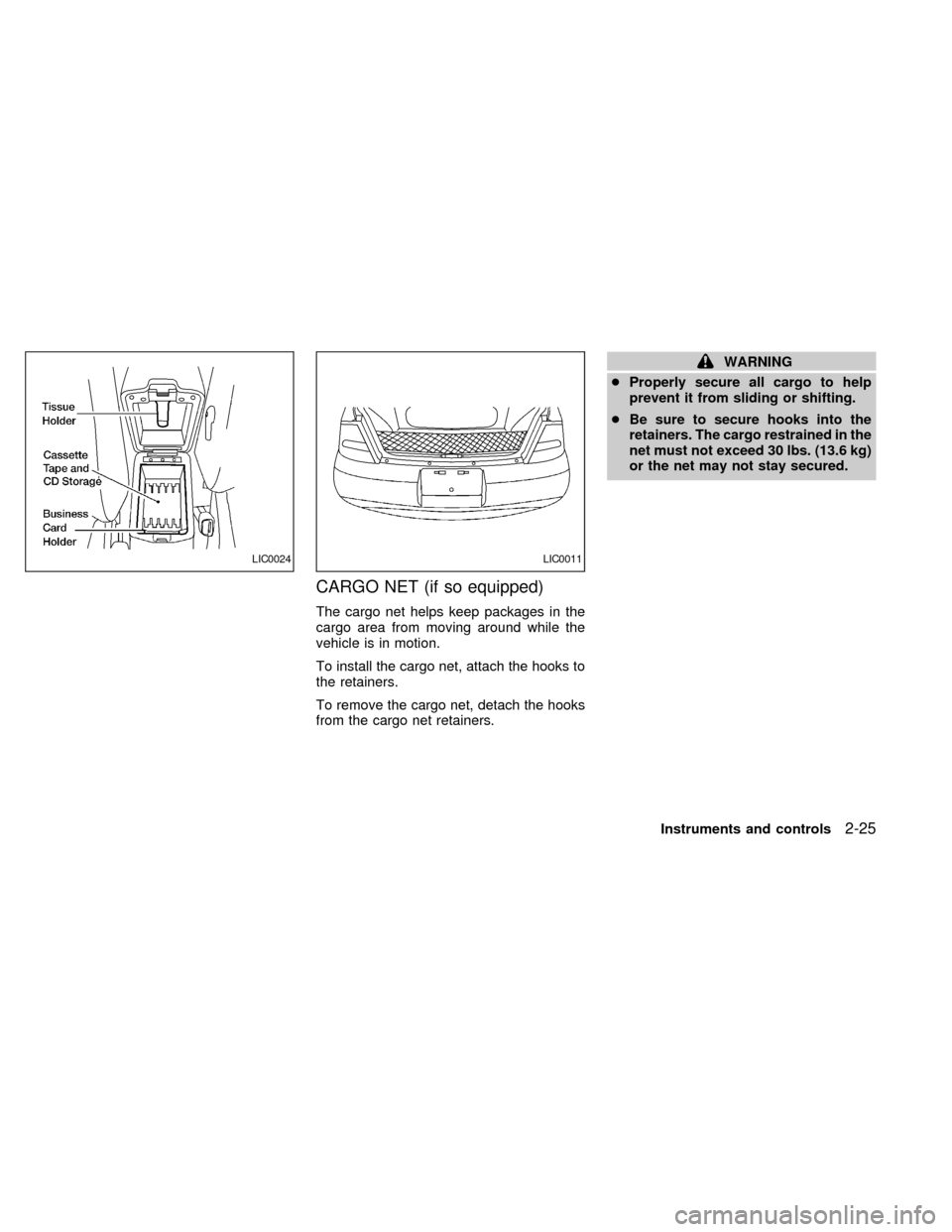
The cargo net helps keep packages in the
cargo area from moving around while the
vehicle is in motion.
To install the cargo net, attach the hooks to
the retainers.
To remove the cargo net, detach the hooks
from the cargo net retainers.
WARNING
cProperly secure all cargo to help
prevent it from sliding or shifting.
cBe sure to secure hooks into the
retainers. The cargo restrained in the
net must not exceed 30 lbs. (13.6 kg)
or the net may not stay secured.
LIC0024LIC0011
Instruments and controls2-25
ZX
Page 77 of 242
The light illuminates when the trunk lid is
opened. When the trunk lid is closed, the
light goes off.
INTEGRATED HomeLinkTUNI-
VERSAL TRANSCEIVER (if so
equipped)
The Integrated HomeLinkTUniversal Trans-
ceiver provides a convenient way to consoli-
date the functions of up to three individual
hand-held transmitters into one built-in de-
vice.
Integrated HomeLinkTUniversal Trans-
ceiver:
cWill operate most Radio Frequency (RF)
devices such as garage doors, gates,
home and office lighting, entry door locks
and security systems.
cIs powered by your vehicle's battery. No
separate batteries are required. If the
vehicle's battery is discharged or is dis-
connected, HomeLinkTwill retain all pro-
gramming.Once the Integrated HomeLinkTUniver-
sal Transceiver is programmed, retain
the original transmitter for future pro-
gramming procedures (i.e., new vehicle
purchases). Upon sale of the vehicle, the
programmed Integrated HomeLinkTUni-
versal Transceiver buttons should be
erased for security purposes. For addi-
tional information refer to ``Program-
ming the Integrated HomeLinkTUniver-
sal Transceiver'' later in this section.
WARNING
cDo not use the Integrated
HomeLinkTUniversal Transceiver
with any garage door opener that
lacks safety stop and reverse fea-
tures as required by federal safety
standards. (These standards be-
came effective for opener models
manufactured after April 1, 1982). A
garage door opener which cannot
detect an object in the path of a
closing garage door and then auto-
matically stop and reverse, does not
meet current federal safety stan-
dards. Using a garage door opener
without these features increases the
risk of serious injury or death.
cDuring programming, your garage
door or gate may open or close.
Make sure that people and objects
are clear of the garage door or gate
that you are programming.
cYour vehicle's engine should be
turned off while programming the
Integrated HomeLinkTUniversal
Transceiver.
TRUNK LIGHT
2-30Instruments and controls
ZX
Page 89 of 242

BATTERY REPLACEMENT
Replace the battery in the multi-remote con-
troller as follows:
1. Open the lid using a coin.
2. Replace the battery with a new one.Recommended battery: Sanyo CR2025
or equivalent.
3. Close the lid securely.
4. Press the
button, then thebut-
ton two or three times to check themulti-remote controller operation.
Each time the
button is pressed, the
hazard lights flash once.
If the battery is removed for any reason
other than replacement, perform step 4.
cAn improperly disposed battery can
hurt the environment. Always confirm
local regulations for battery disposal.
cThe multi-remote controller is water-
resistant; however, if it does get wet,
immediately wipe completely dry.
cThe operational range of the multi-
remote controller extends to approxi-
mately 33 ft (10 m) from the vehicle.
This range may vary with conditions.
FCC Notice:
Changes or modifications not expressly
approved by the manufacturer for com-
pliance could void the user's authority to
operate the equipment.
This device complies with part 15 of the
FCC Rules and RSS-210 of Industry
Canada.
Operation is subject to the following two
conditions: (1) This device may not
APD1026
3-8Pre-driving checks and adjustments
ZX
Page 91 of 242
OPENER OPERATION
WARNING
cDo not drive with the trunk lid open.
This could allow dangerous exhaust
gases to be drawn into the vehicle.
See ``Exhaust gas'' in the ``Starting
and driving'' section of this manual.
cClosely supervise children when
they are around cars to prevent them
from playing and becoming lockedin the trunk where they could be seri-
ously injured. Keep the car locked, with
the trunk closed, when not in use, and
prevent children's access to car keys.
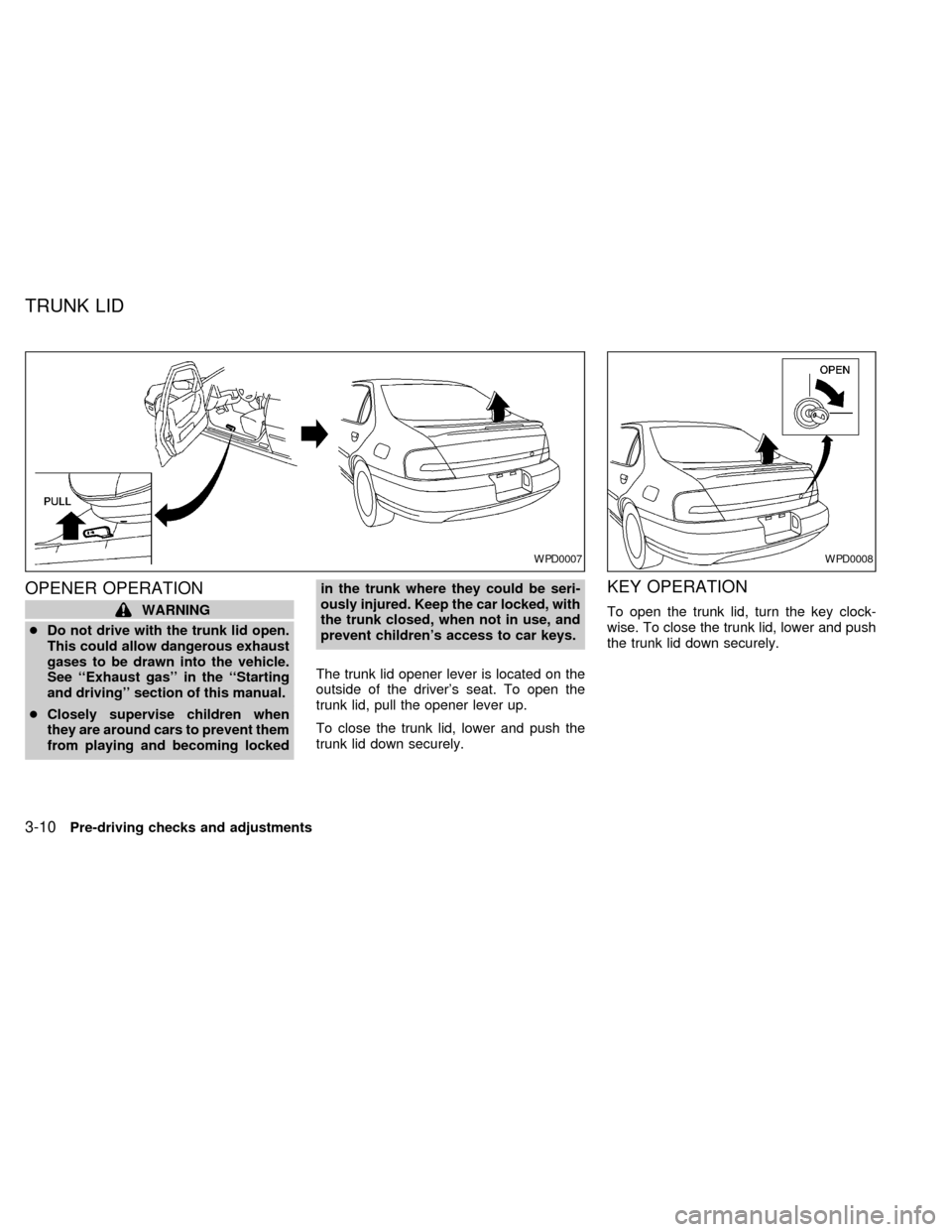
The trunk lid opener lever is located on the
outside of the driver's seat. To open the
trunk lid, pull the opener lever up.
To close the trunk lid, lower and push the
trunk lid down securely.
KEY OPERATION
To open the trunk lid, turn the key clock-
wise. To close the trunk lid, lower and push
the trunk lid down securely.
WPD0007WPD0008
TRUNK LID
3-10Pre-driving checks and adjustments
ZX