radio NISSAN ALTIMA 2002 L31 / 3.G User Guide
[x] Cancel search | Manufacturer: NISSAN, Model Year: 2002, Model line: ALTIMA, Model: NISSAN ALTIMA 2002 L31 / 3.GPages: 249, PDF Size: 2.02 MB
Page 127 of 249
Setting RDS Mode
Press and hold the MENU button (>2 sec-
onds) until the radio beeps to start the
editing mode. Press the MENU button until
the display showsªRDS TRAFFICº. This
display will last 2 seconds and then change
toªTRAFFIC-OFFº. Press TUNE/FF-REV
(
or) to toggle the RDS traffic mode
from ªOFFº to ªONº. Press the RDS button
again to set your RDS mode selection.
The display changes toªRDS DISPLAYº.
This display will last 2 seconds and then
change to ªSHOWº. Press TUNE/FF-REV
(
or) to switch between the follow-
ing RDS display modes:
cªFM & RDSº: the radio display will show
the station's broadcast frequency and the
station's name.
cªRDS ONLYº: the radio display will show
the station's name only.
cªRDS TEMPº: the radio display will show
the station's name for 5 seconds and
then display only the radio station's
broadcast frequency.PTY (Program Type)
PTY can be used to search for a certain
program type. Certain areas have a limited
number of stations that transmit RDS. Many
stations transmit call letters and frequencies
only. Searching or scanning by program
type may yield a limited number of selec-
tions.
1. Press the MIXzPTY button. The display
changes fromªRDS PTY SEARCHºto
ªSELECT BY TUNEº.
2. Press TUNE/FF-REV (
or)
up/down button to choose a specific pro-
gram type:
ROCK, CLASSIC ROCK, SOFT ROCK,
TOP 40, COUNTRY, JAZZ, CLASSICAL,
OLDIES, NEWS, SPORTS, TALK, ANY
3. Press the SEEK (
or) or SCAN
button to search for the next station with
the selected PTY. The SCAN icon
flashes when the SCAN button is
pressed. If SCAN is selected, push the
PTY or SCAN buttons to stop on a station.
If SEEK is selected, the radio automati-
cally stops on the next radio station
matching the selected program type.4. Press the PTY button again to cancel the
PTY mode.
Speed Sensitive Control Volume (SCV)
Your vehicle has Speed Sensitive Control
Volume (SCV) for audio. The audio volume
changes as the driving speed changes.
Press and hold the MENU button (>2 sec-
onds) until the radio beeps to start the
editing mode. Press the MENU button until
the display showsªSpeed comp volº. This
display will last 2 seconds and then change
toªSCV-offº. Press TUNE/FF-REV
(
or) to change between:
Off!Low!Mid!High
Compact disc (CD) operation
Turn the ignition key to the ACC or ON
position.
CAUTION
cDo not force a compact disc (CD)
into the CD insert slot. This could
damage the CD and/or CD changer.
cTrying to load a CD with the CD door
closed could damage the CD and/or
CD changer.
4-24Heater, air conditioner and audio systems
ZX
Page 128 of 249

CD6 button
When the CD6 button is pressed with a
compact disc loaded and the radio playing,
the radio turns off and the last used com-
pact disc starts to play.
CD Loading
Press the LOAD button to start CD loading
mode.
The following sequence will occur:
1. Thegreenindicator on the lowest avail-
able disc select button will start blinking.
(Same as preset memory button). The
display showsªPlease Waitº.
2. The display changes toªInsert Discºfor
a maximum of 15 seconds.
3. During the 15 second interval, insert the
disc. The display changes toªLoading
Discº.
4. The CD will play after the disc is set to a
play position.
5. The indicator changes fromblinking
greentosolid greenand the display
changes to show the Disc number icon,
Disc number, Track number and Elapsed
time.All disc loading
1. Press and hold the LOAD button until the
radio beeps (>1.5 seconds).
2. Thegreenindicator on the lowest avail-
able disc select button will start blinking.
(Same as preset memory button). The
display showsªPlease Waitº.
3. The display changes toªInsert Discºfor
a maximum of 15 seconds.
4. During the 15 second interval, insert the
disc. The display changes toªLoading
Discº.
5. The indicator changes fromblinking
greentosolid green.
6. The disc number icon is turned on.
7. Steps 2-5 are repeated until all discs are
loaded, then the last loaded disc will
begin to play. The display shows the Disc
number, Track number and Elapsed
Time.
Selected disc loading
1. Press a disc select button whose indica-
tor is off. The display showsªPlease
Waitº.2. Thegreenindicator starts blinking and
the display showsªInsert Discºfor 15
seconds.
3. Insert the CD. The display showsªLoad-
ing Discº.
4. The CD will play after the disc is set to a
play position.
5. The indicator color changes fromblink-
ing greentosolid greenand the display
shows the Disc icon, Disc number, Track
number and Elapsed Time.
If a disc is not inserted within 15 seconds or
if the load button is pressed during load
sequence, the entire disc load sequence will
be canceled.
Disc Play
Press the CD button. If a CD is loaded and
the radio is playing, the radio turns off and
the last loaded disc starts to play.
Selected disc play
1. Press the disc select button whose disc
icon is displayed.
2. The indicator blinksgreenduring the
change and the display showsªChang-
ing Discº.
Heater, air conditioner and audio systems
4-25
ZX
Page 132 of 249
TUNING
Memory change (radio):
Push the tuning switch ``
'' or ``''
for less than 1.5 seconds to change to the
next preset station in memory.
Seek tuning (radio):
Push the tuning switch ``
'' or ``''
for more than 1.5 seconds to seek the next
or previous radio station.
Next/Previous Track (CD):
Push the tuning switch ``
'' or ``''
for less than 1.5 seconds to return to the
beginning of the present track or skip to the
next track. Push several times to skip back
or skip through tracks.
This system searches for the blank intervals
between selections. If there is a blank inter-
val within one program or there is no interval
between programs, the system may not
stop in the desired or expected location.
Change Disc (CD) (if so equipped):
Push the tuning switch ``
'' or ``''
for more than 1.5 seconds to change the
playing disc up or down.
ANTENNA
Window antenna
The antenna pattern is printed inside the
rear window.
CAUTION
cDo not place metalized film near the
rear window glass or attach any
metal parts to it. This may cause
poor reception or noise.
cWhen cleaning the inside of the rear
window, be careful not to scratch or
damage the rear window antenna.
Lightly wipe along the antenna with
a dampened soft cloth.When installing a CB, ham radio or car
phone in your NISSAN, be sure to observe
the following cautions, otherwise the new
equipment may adversely affect the MFI
(Multiport Fuel Injection) system and other
electronic parts.WARNING
cA cellular telephone should not be
used while driving so full attention
may be given to vehicle operation.
Some jurisdictions prohibit the use
of cellular telephones while driving.
cIf you must make a call while your
vehicle is in motion, the hands free
cellular phone operational mode (if
so equipped) is highly recom-
mended. Exercise extreme caution
at all times so full attention may be
given to vehicle operation.
cIf a conversation in a moving vehicle
requires you to take notes, pull off
the road to a safe location and stop
your vehicle before doing so.
CAR PHONE OR CB RADIO
Heater, air conditioner and audio systems4-29
ZX
Page 133 of 249
CAUTION
cKeep the antenna as far as possible
away from the Engine Control Mod-
ule (ECM).
cKeep the antenna wire more than 8
in. (20 cm) away from the Multiport
Fuel Injection harness. Do not route
the antenna wire next to any har-
ness.
cAdjust the antenna standing-wave
ratio as recommended by the manu-
facturer.
cConnect the ground wire from the
CB radio chassis to the body.
cFor details, consult an authorized
NISSAN dealer.
4-30Heater, air conditioner and audio systems
ZX
Page 138 of 249
To lock the steering wheel, turn the key
to the LOCK position. Remove the key.
To unlock the steering wheel, insert the
key and turn it gently while rotating the
steering wheel slightly right and left.
WARNING
Never remove or turn the key to the
LOCK position while driving. The steer-
ing wheel will lock. This may cause the
driver to lose control of the vehicle and
could result in serious vehicle damage
or personal injury.
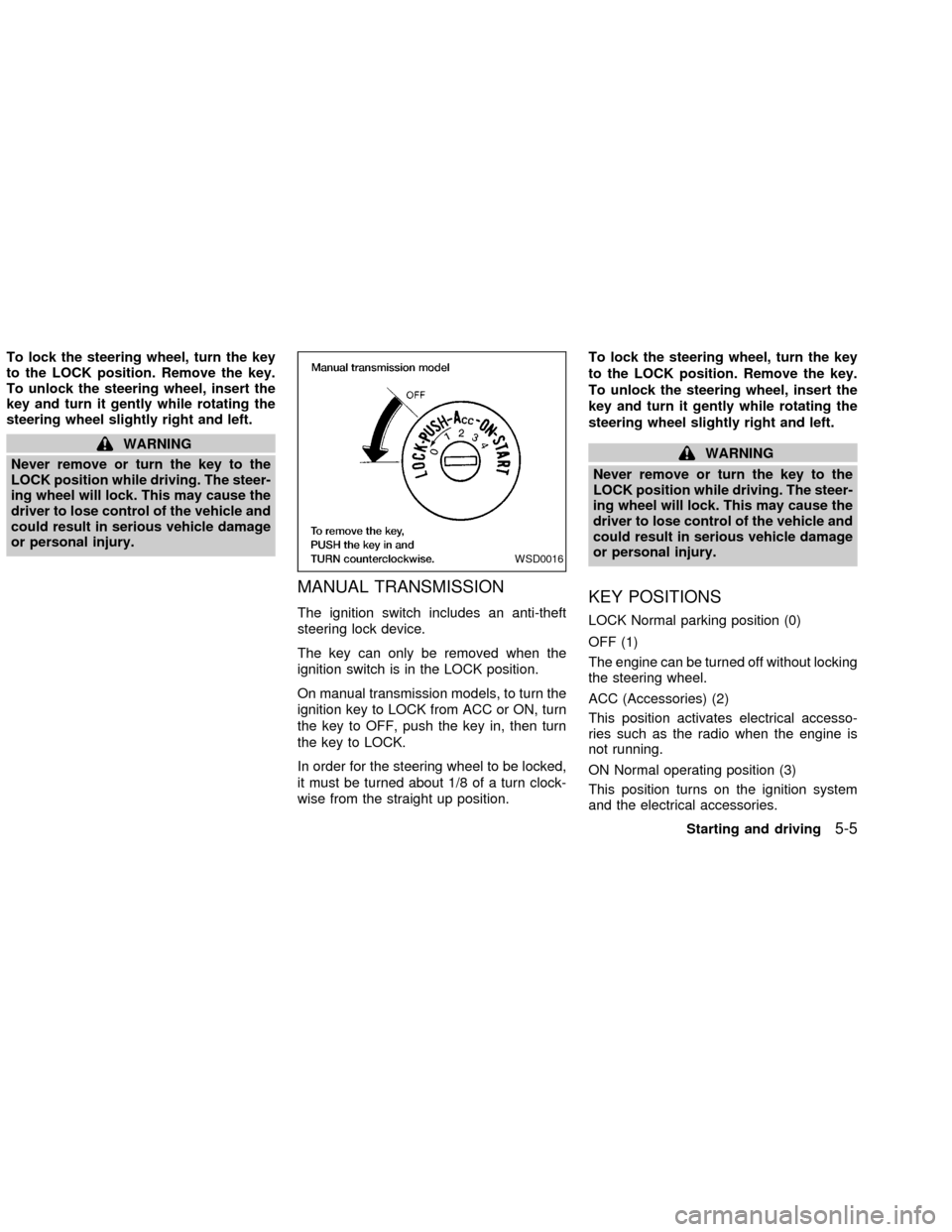
MANUAL TRANSMISSION
The ignition switch includes an anti-theft
steering lock device.
The key can only be removed when the
ignition switch is in the LOCK position.
On manual transmission models, to turn the
ignition key to LOCK from ACC or ON, turn
the key to OFF, push the key in, then turn
the key to LOCK.
In order for the steering wheel to be locked,
it must be turned about 1/8 of a turn clock-
wise from the straight up position.To lock the steering wheel, turn the key
to the LOCK position. Remove the key.
To unlock the steering wheel, insert the
key and turn it gently while rotating the
steering wheel slightly right and left.
WARNING
Never remove or turn the key to the
LOCK position while driving. The steer-
ing wheel will lock. This may cause the
driver to lose control of the vehicle and
could result in serious vehicle damage
or personal injury.
KEY POSITIONS
LOCK Normal parking position (0)
OFF (1)
The engine can be turned off without locking
the steering wheel.
ACC (Accessories) (2)
This position activates electrical accesso-
ries such as the radio when the engine is
not running.
ON Normal operating position (3)
This position turns on the ignition system
and the electrical accessories.
WSD0016
Starting and driving5-5
ZX
Page 173 of 249
after the vehicle is parked in the hot sun.
Glass cleaner and a soft cloth will easily
remove this film.
CAUTION
When cleaning the inside of the win-
dows, do not use sharp-edged tools,
abrasive cleaners or chlorine based
disinfectant cleaners. They could dam-
age the electrical conductors, radio an-
tenna, or rear window defogger ele-
ments.
ALUMINUM ALLOY WHEELS
Wash regularly, especially during winter
months in areas where road salt is used. If
not removed, salt could discolor the wheels.
CHROME PARTS
Clean all chrome parts regularly with a
non-abrasive chrome polish to maintain the
finish.Occasionally remove loose dust from the
interior trim, plastic parts and seats using a
vacuum cleaner or soft brush. Wipe the
vinyl and leather surfaces with a clean, soft
cloth dampened in mild soap solution, then
wipe clean with a dry, soft cloth. Before
using any fabric protector, read the manu-
facturer's recommendations. Some fabric
protectors contain chemicals that may stain
or bleach the seat material.
Use a cloth dampened only with water, to
clean the meter and gauge lens.
CAUTION
cNever use benzine, thinner, or any
similar material.
cThe leather seats should be regu-
larly coated with a leather wax like
saddle soap. Never use car wax.
cNever use fabric protectors unless
recommended by the manufacturer.
cDo not use glass or plastic cleaner
on meter or gauge lens covers. It
may damage the lens cover.
FLOOR MATS
The use of genuine NISSAN floor mats can
extend the life of your vehicle carpet and
make it easier to clean the interior.No mat-
ter what mats are used, be sure they are
fitted for your vehicle and are properly
positioned in the footwell to prevent inter-
ference with pedal operation.Mats should
be maintained with regular cleaning and re-
placed if they become excessively worn.
CLEANING INTERIOR
7-4Appearance and care
ZX
Page 242 of 249
10 Index
A
Air bag (See supplemental restraint
system) ........................................................ 1-8
Air bag warning light ................. 1-14, 1-19, 2-9
Air cleaner housing filter ............................ 8-21
Air conditioner
Air conditioner operation ........................ 4-5
Air conditioner service .......................... 4-11
Air conditioner specification label ......... 9-12
Air conditioner system refrigerant and
lubrication recommendations.................. 9-7
Heater and air conditioner controls ........ 4-3
Servicing air conditioner ....................... 4-11
Air flow charts .............................................. 4-6
Alarm system (See vehicle security
system) ...................................................... 2-13
Anchor point locations ............................... 1-37
Antenna...................................................... 4-29
Anti-lock brake system (ABS).................... 5-19
Anti-lock brake warning light ..................... 2-10
Armrests....................................................... 1-7
Audio system
FM-AM radio with compact disc (CD)
changer ....................................... 4-16, 4-21
Autolamp switch......................................... 2-20
Automatic
Automatic power window switch .......... 2-32Automatic transmission fluid (ATF) ...... 8-14
Driving with automatic transmission ....... 5-4
B
Battery........................................................ 8-17
Battery
Charge warning light .............................. 2-9
Battery replacement (See remote keyless
entry system) ............................................... 3-8
Before starting the engine ........................... 5-6
Belts (See drive belts) ........................ 8-19, 9-8
Brake
Anti-lock brake system (ABS) .............. 5-19
Brake booster ....................................... 8-26
Brake fluid............................................. 8-16
Brake pedal .......................................... 8-25
Brake system .............................. 2-12, 5-18
Brake warning light ............................... 2-10
Brake wear indicators ................. 2-12, 8-26
Parking brake check ............................. 8-25
Parking brake operation ....................... 5-13
Self-adjusting brakes ............................ 8-26
Break-in schedule ...................................... 5-15
Bulb check/instrument panel ....................... 2-8
Bulb replacement ....................................... 8-32C
Capacities and recommended fuel/
lubricants...................................................... 9-2
Car phone or CB radio .............................. 4-29
Cargo (See vehicle loading information) ... 9-13
Check engine indicator light
(See malfunction indicator light) ................ 2-11
Child restraint with top tether strap ........... 1-37
Child restraints ........................ 1-23, 1-28, 1-35
Child safety rear door lock .......................... 3-4
Cleaning exterior and interior ...................... 7-2
Clutch
Clutch fluid ............................................ 8-16
Clutch pedal.......................................... 8-26
Cold weather driving .................................. 5-21
Controls
Heater and air conditioner controls ........ 4-3
Coolant
Capacities and recommended fuel/
lubricants ................................................ 9-2
Changing engine coolant...................... 8-10
Checking engine coolant level ............... 8-9
Engine coolant temperature gauge ........ 2-6
Corrosion protection .................................... 7-5
Cruise control............................................. 5-14
Cup holders ............................................... 2-27
ZX
Page 245 of 249

O
Octane rating (See fuel octane rating) ........ 9-3
Odometer ..................................................... 2-3
Oil
Capacities and recommended fuel/
lubricants ................................................ 9-2
Changing engine oil.............................. 8-11
Changing engine oil filter...................... 8-13
Checking engine oil level ..................... 8-10
Engine oil .............................................. 8-10
Engine oil and oil filter
recommendation ..................................... 9-5
Engine oil viscosity ................................. 9-5
Outside mirror control ................................ 3-16
Overheat
If your vehicle overheats ........................ 6-8
Owner's manual/service manual order
information ................................................. 9-21
P
Parking
Parking brake check ............................. 8-25
Parking brake operation ....................... 5-13
Parking/parking on hills ........................ 5-17
Power
Power door locks .................................... 3-3
Power outlet.......................................... 2-25
Power steering fluid .............................. 8-15
Power steering system ......................... 5-18Power windows..................................... 2-31
Precautions
Maintenance precautions ................ 8-2, 8-5
Precautions on seat belt usage............ 1-21
Precautions when starting and driving ... 5-2
Push starting ................................................ 6-8
R
Radio
Car phone or CB radio ......................... 4-29
FM-AM radio with compact disc (CD)
changer ....................................... 4-16, 4-21
Readiness for inspection maintenance
(I/M) test..................................................... 9-20
Rear seat ..................................................... 1-6
Rear window defogger switch ................... 2-17
Refrigerant recommendation ....................... 9-7
Registering your vehicle in another
country ....................................................... 9-10
Remote keyless entry system ..................... 3-5
Reporting safety defects (USA) ................. 9-19
S
Safety
Child safety rear door lock ..................... 3-4
Reporting safety defects (USA) ............ 9-19
Seat adjustment
Front manual seat adjustment................ 1-3
Front power seat adjustment.................. 1-4Seat belt
Precautions on seat belt usage............ 1-21
Seat belt extenders .............................. 1-28
Seat belt maintenance.......................... 1-28
Seat belts.............................................. 1-21
Shoulder belt height adjustment ........... 1-27
Three-point type with retractor ............. 1-24
Seat belt warning light ................................. 2-9
Seatback pockets ...................................... 2-26
Seatback side pockets............................... 2-26
Seats
Front seats.............................................. 1-2
Heated seats ........................................ 2-24
Rear seat ................................................ 1-6
Self-adjusting brakes ................................. 8-26
Servicing air conditioner ............................ 4-11
Shifting
Manual transmission............................. 5-12
Shoulder belt height adjustment ................ 1-27
Spark plug replacement............................. 8-20
Speedometer ............................................... 2-3
Spotlights (See map light) ......................... 2-34
SRS warning label ..................................... 1-19
Starting
Before starting the engine ...................... 5-6
Jump starting................................. 6-6, 8-18
Precautions when starting and driving ... 5-2
Push starting........................................... 6-8
Starting the engine ................................. 5-7
Steering
Power steering fluid .............................. 8-15
Power steering system ......................... 5-18
10-4
ZX