fog light NISSAN ALTIMA 2005 L31 / 3.G Owners Manual
[x] Cancel search | Manufacturer: NISSAN, Model Year: 2005, Model line: ALTIMA, Model: NISSAN ALTIMA 2005 L31 / 3.GPages: 304, PDF Size: 4.91 MB
Page 9 of 304
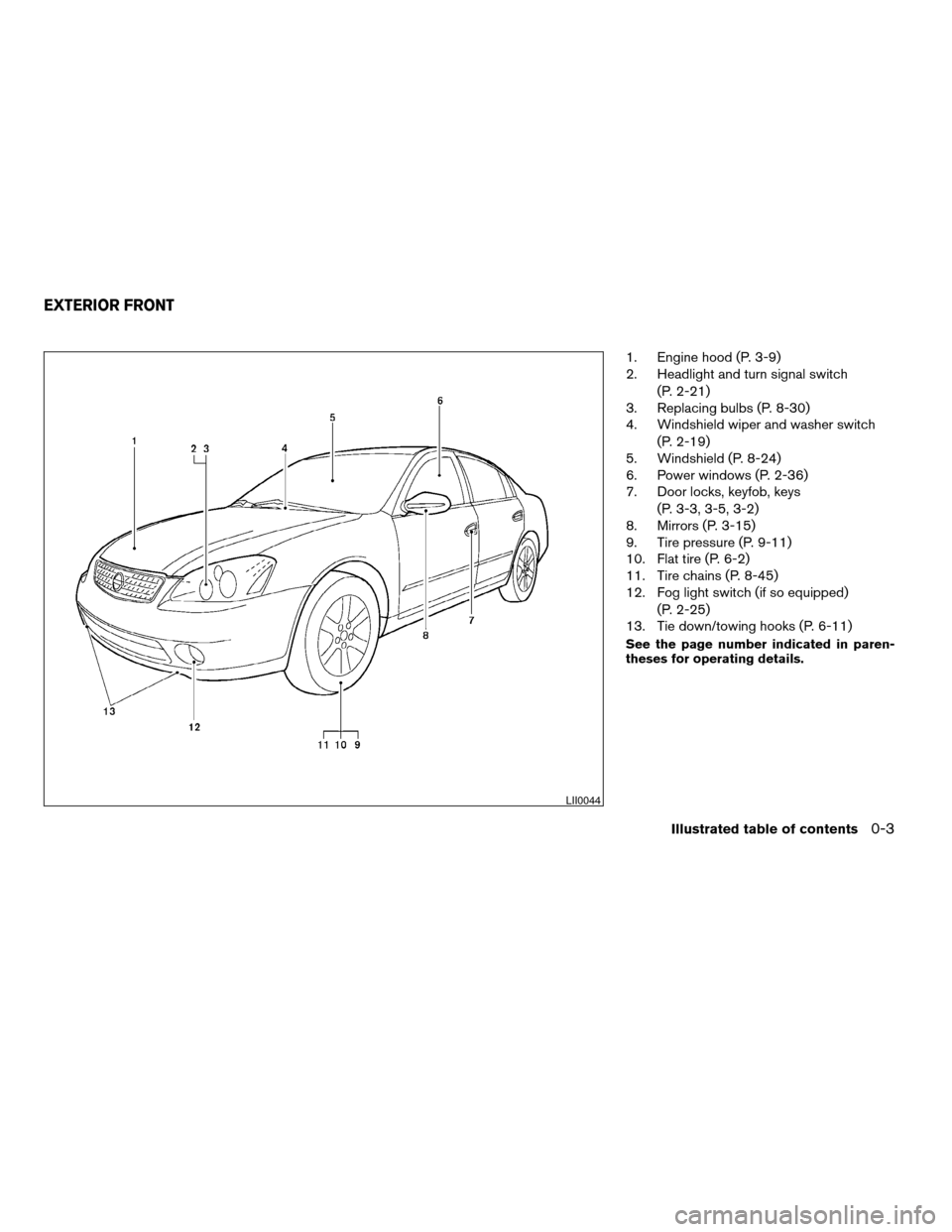
1. Engine hood (P. 3-9)
2. Headlight and turn signal switch(P. 2-21)
3. Replacing bulbs (P. 8-30)
4. Windshield wiper and washer switch
(P. 2-19)
5. Windshield (P. 8-24)
6. Power windows (P. 2-36)
7. Door locks, keyfob, keys
(P. 3-3, 3-5, 3-2)
8. Mirrors (P. 3-15)
9. Tire pressure (P. 9-11)
10. Flat tire (P. 6-2)
11. Tire chains (P. 8-45)
12. Fog light switch (if so equipped)
(P. 2-25)
13. Tie down/towing hooks (P. 6-11)
See the page number indicated in paren-
theses for operating details.
LII0044
EXTERIOR FRONT
Illustrated table of contents0-3
ZREVIEW COPYÐ2005 Altima (l30)
Owners ManualÐUSA_English (nna)
06/29/04Ðtbrooks
X
Page 12 of 304
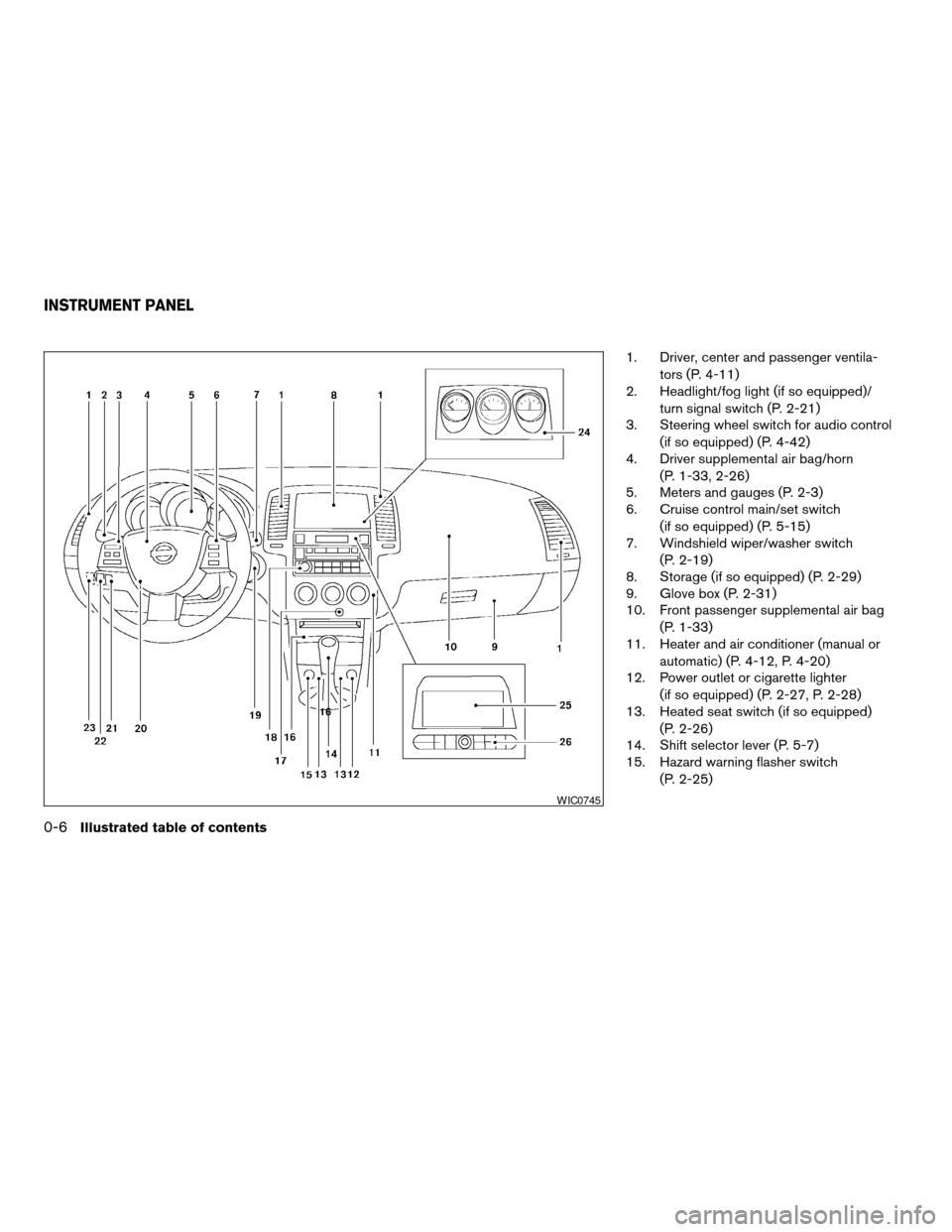
1. Driver, center and passenger ventila-tors (P. 4-11)
2. Headlight/fog light (if so equipped)/
turn signal switch (P. 2-21)
3. Steering wheel switch for audio control
(if so equipped) (P. 4-42)
4. Driver supplemental air bag/horn
(P. 1-33, 2-26)
5. Meters and gauges (P. 2-3)
6. Cruise control main/set switch
(if so equipped) (P. 5-15)
7. Windshield wiper/washer switch
(P. 2-19)
8. Storage (if so equipped) (P. 2-29)
9. Glove box (P. 2-31)
10. Front passenger supplemental air bag
(P. 1-33)
11. Heater and air conditioner (manual or
automatic) (P. 4-12, P. 4-20)
12. Power outlet or cigarette lighter
(if so equipped) (P. 2-27, P. 2-28)
13. Heated seat switch (if so equipped)
(P. 2-26)
14. Shift selector lever (P. 5-7)
15. Hazard warning flasher switch
(P. 2-25)
WIC0745
INSTRUMENT PANEL
0-6Illustrated table of contents
ZREVIEW COPYÐ2005 Altima (l30)
Owners ManualÐUSA_English (nna)
07/09/04Ðbetty
X
Page 68 of 304
2 Instruments and controls
Instrument panel...................................2-2
Meters and gauges ................................2-3
Speedometer and odometer .....................2-4
Trip computer (if so equipped) ...................2-5
Tachometer ....................................2-7
Engine coolant temperature gauge ...............2-8
Fuel gauge ....................................2-8
Engine oil pressure gauge .......................2-9
Voltmeter ..................................... 2-10
Fuel consumption gauge .......................2-10
Warning/indicator lights and audible reminders ......2-11
Checking bulbs ............................... 2-11
Warning lights ................................ 2-11
Indicator lights ................................ 2-14
Audible reminders ............................. 2-15
Security systems ................................. 2-16
Vehicle security system (if so equipped) ..........2-16
Nissan vehicle immobilizer system (NVIS) ........2-17
Windshield wiper and washer switch ...............2-19
Switch operation .............................. 2-19
Rear window and outside mirror (if so equipped)
defroster switch .................................. 2-20
Headlight and turn signal switch ....................2-21Xenon headlights (if so equipped)
...............2-21
Headlight control switch ........................ 2-21
Daytime running light system (Canada only) ......2-23
Instrument brightness control ...................2-24
Turn signal switch ............................. 2-24
Fog light switch (if so equipped) ................2-25
Hazard warning flasher switch .....................2-25
Horn ............................................ 2-26
Heated seat (if so equipped) .......................2-26
Traction control system (TCS) off switch
(if so equipped) .................................. 2-27
Power outlet ..................................... 2-27
Cigarette lighter and ashtray (if so equipped) ........2-28
Storage ......................................... 2-29
Map pockets .................................. 2-29
Seatback pockets (if so equipped) ..............2-29
Sunglasses holder ............................. 2-30
Cup holders .................................. 2-30
Glove box .................................... 2-31
Console box .................................. 2-31
Instrument panel storage (if so equipped) ........2-33
Covered storage box (if so equipped) ............2-34
Grocery hooks (if so equipped) .................2-34
ZREVIEW COPYÐ2005 Altima(l30)
Owners ManualÐUSA_English (nna)
06/29/04Ðtbrooks
X
Page 70 of 304
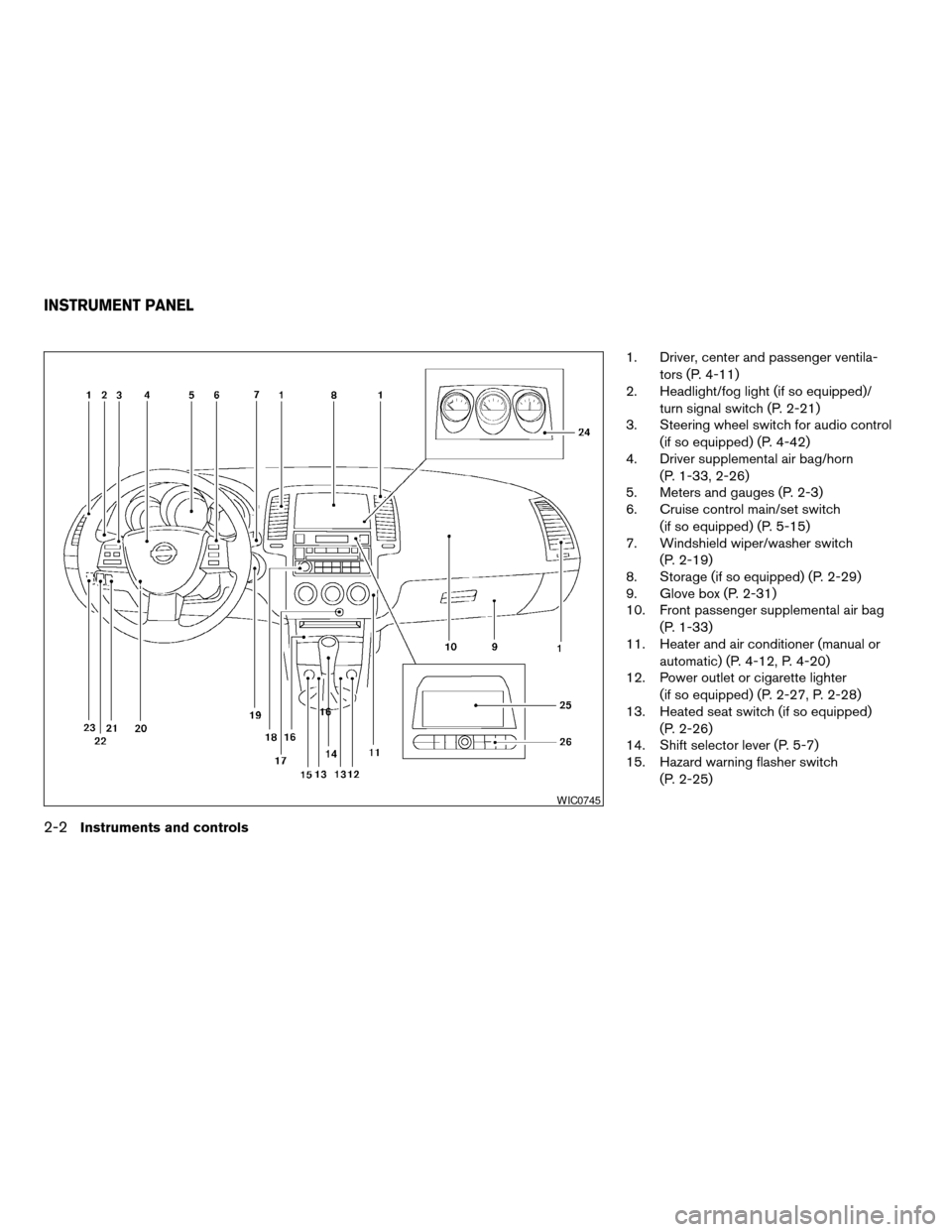
1. Driver, center and passenger ventila-tors (P. 4-11)
2. Headlight/fog light (if so equipped)/
turn signal switch (P. 2-21)
3. Steering wheel switch for audio control
(if so equipped) (P. 4-42)
4. Driver supplemental air bag/horn
(P. 1-33, 2-26)
5. Meters and gauges (P. 2-3)
6. Cruise control main/set switch
(if so equipped) (P. 5-15)
7. Windshield wiper/washer switch
(P. 2-19)
8. Storage (if so equipped) (P. 2-29)
9. Glove box (P. 2-31)
10. Front passenger supplemental air bag
(P. 1-33)
11. Heater and air conditioner (manual or
automatic) (P. 4-12, P. 4-20)
12. Power outlet or cigarette lighter
(if so equipped) (P. 2-27, P. 2-28)
13. Heated seat switch (if so equipped)
(P. 2-26)
14. Shift selector lever (P. 5-7)
15. Hazard warning flasher switch
(P. 2-25)
WIC0745
INSTRUMENT PANEL
2-2Instruments and controls
ZREVIEW COPYÐ2005 Altima (l30)
Owners ManualÐUSA_English (nna)
07/09/04Ðbetty
X
Page 93 of 304
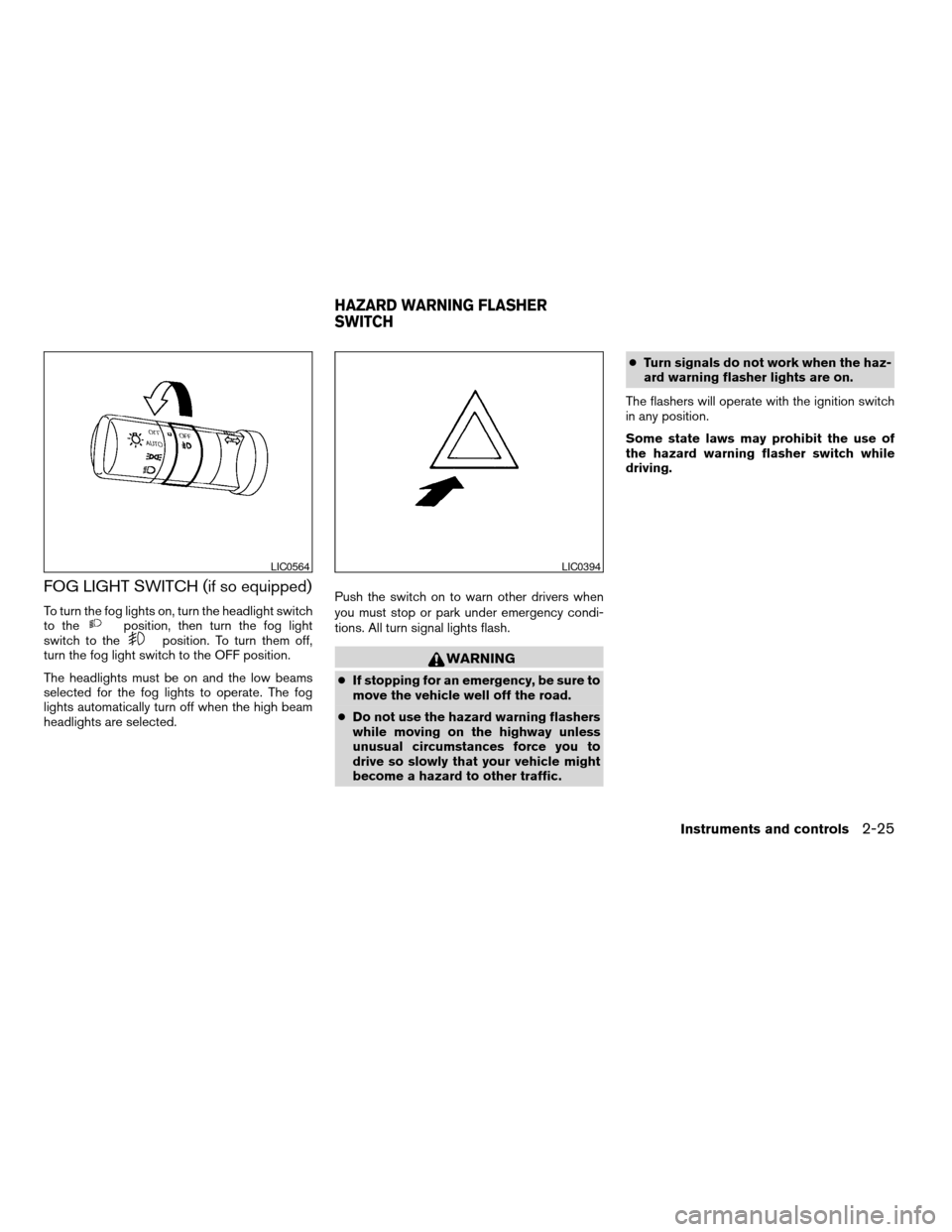
FOG LIGHT SWITCH (if so equipped)
To turn the fog lights on, turn the headlight switch
to theposition, then turn the fog light
switch to theposition. To turn them off,
turn the fog light switch to the OFF position.
The headlights must be on and the low beams
selected for the fog lights to operate. The fog
lights automatically turn off when the high beam
headlights are selected. Push the switch on to warn other drivers when
you must stop or park under emergency condi-
tions. All turn signal lights flash.
WARNING
c
If stopping for an emergency, be sure to
move the vehicle well off the road.
c Do not use the hazard warning flashers
while moving on the highway unless
unusual circumstances force you to
drive so slowly that your vehicle might
become a hazard to other traffic. c
Turn signals do not work when the haz-
ard warning flasher lights are on.
The flashers will operate with the ignition switch
in any position.
Some state laws may prohibit the use of
the hazard warning flasher switch while
driving.
LIC0564LIC0394
HAZARD WARNING FLASHER
SWITCH
Instruments and controls2-25
ZREVIEW COPYÐ2005 Altima (l30)
Owners ManualÐUSA_English (nna)
06/28/04Ðtbrooks
X
Page 128 of 304
AUTO indicator light will be on. When the switch
on the inside mirror is in the OFF position, the
inside mirror will operate normally.
Do not hang any object on the sensor or
apply glass cleaner. Doing so will reduce
the sensitivity of the sensor, resulting in
improper operation.
OUTSIDE MIRRORS
WARNING
cObjects viewed in the outside mirror on
the passenger side are closer than they
appear. Be careful when moving to the
right. Using only this mirror could cause
an accident. Use the inside mirror or
glance over your shoulder to properly
judge distances to other objects.
c Do not adjust the mirrors while driving.
You could lose control of your vehicle
and cause an accident.
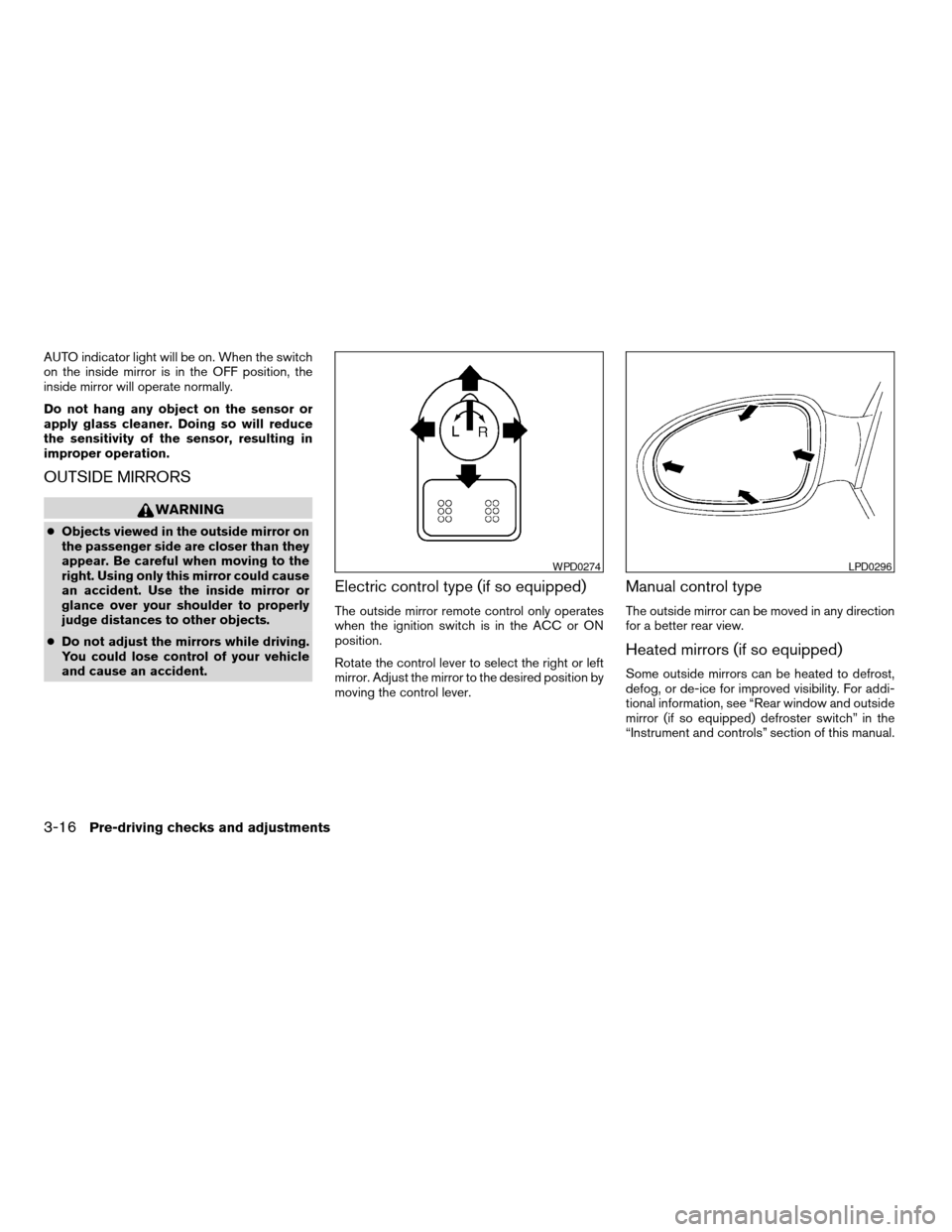
Electric control type (if so equipped)
The outside mirror remote control only operates
when the ignition switch is in the ACC or ON
position.
Rotate the control lever to select the right or left
mirror. Adjust the mirror to the desired position by
moving the control lever.
Manual control type
The outside mirror can be moved in any direction
for a better rear view.
Heated mirrors (if so equipped)
Some outside mirrors can be heated to defrost,
defog, or de-ice for improved visibility. For addi-
tional information, see “Rear window and outside
mirror (if so equipped) defroster switch” in the
“Instrument and controls” section of this manual.
WPD0274LPD0296
3-16Pre-driving checks and adjustments
ZREVIEW COPYÐ2005 Altima (l30)
Owners ManualÐUSA_English (nna)
06/28/04Ðtbrooks
X
Page 142 of 304
OFF position (Indicator light off):
Outside air is drawn into the passenger compart-
ment and distributed through the selected outlet.
Use the off position for normal heater or air con-
ditioner operation.
Air conditioner button (if so
equipped)
The button is provided only on vehicles equipped
with an air conditioner.
Start the engine, turn the fan control dial to the
desired position and push the
button to
turn on the air conditioner. The indicator light
comes on when the air conditioner is operating.
To turn off the air conditioner, push the
button again.
The air conditioner cooling function oper-
ates only when the engine is running.
Rear window defroster switch
For more information about the rear window de-
froster switch, see “Rear window and outside
mirror (if so equipped) defroster switch” in the
“Instruments and controls” section of this manual.
HEATER OPERATION
Heating
This mode is used to direct heated air to the foot
outlets. Some air also flows from the defrost
outlets.
1. Push the
button to the off position for
normal heating.
2. Turn the air flow control dial to the
position.
3. Turn the fan control dial to the desired posi- tion.
4. Turn the temperature control dial to the de- sired position between the middle and the
hot position.
Ventilation
This mode directs outside air to the side and
center ventilators.
1. Push the
button to the off position.
2. Turn the air flow control dial to the
position.
3. Turn the fan control dial to the desired posi- tion.
4. Turn the temperature control dial to the de- sired position.
Defrosting or defogging
This mode directs the air to the defrost outlets to
defrost/defog the windows.
1. Turn the air flow control dial to the
position.
2. Turn the fan control dial to the desired posi- tion.
3. Turn the temperature control dial to the de- sired position between the middle and the
hot position.
c To quickly remove ice or fog from the win-
dows, turn the fan control dial to HI and the
temperature control lever to the full HOT
position.
c When the
position is selected, the air
conditioner automatically turns on (however,
the indicator light will not illuminate) if the
outside temperature is more than 36°F
(2°C) . The air conditioning system will con-
tinue to operate until the vehicle is restarted,
even if the air flow control dial is turned to a
position other than the
position. This
dehumidifies the air which helps defog the
windshield. The
mode automatically
turns off, allowing outside air to be drawn
into the passenger compartment to further
improve the defogging performance.
4-14Display screen, heater, air conditioner and audio systems
ZREVIEW COPYÐ2005 Altima (l30)
Owners ManualÐUSA_English (nna)
06/28/04Ðtbrooks
X
Page 143 of 304
Bi-level heating
This mode directs air from the side, center and
the foot outlets.1. Push the
button to the off position.
2. Turn the air flow control dial to the
position.
3. Turn the fan control dial to the desired posi- tion.
4. Turn the temperature control dial to the de- sired position.
Heating and defogging
This mode heats the interior and defogs the wind-
shield.
1. Turn the air flow control dial to the
position.
2. Turn the fan control dial to the desired posi- tion.
3. Turn the temperature control dial to the de- sired position between the middle and the
hot position.
c When the
position is selected, the air
conditioner automatically turns on (however,
the indicator light will not illuminate) if the
outside temperature is more than 36°F
(2°C) . The air conditioning system will con- tinue to operate until the vehicle is restarted,
even if the air flow control dial is turned to a
position other than the
position. This
dehumidifies the air which helps defog the
windshield. The
mode automatically
turns off, allowing outside air to be drawn
into the passenger compartment to further
improve the defogging performance.
Operating tips
Clear snow and ice from the wiper blades
and air inlet in front of the windshield. This
improves heater operation.
AIR CONDITIONER OPERATION (if
so equipped)
Start the engine, turn the fan control dial to the
desired position, and push in thebutton to
activate the air conditioner. When the air condi-
tioner is on, cooling and dehumidifying functions
are added to the heater operation.
The air conditioner cooling function oper-
ates only when the engine is running.
Cooling
This mode is used to cool and dehumidify the air.
1. Push the
button to the off position. 2. Turn the air flow control dial to the MAX A/C
or
position.
3. Turn the fan control dial to the desired posi- tion.
4. Push the
button. The indicator light
comes on.
5. Turn the temperature control dial to the de- sired position.
c For quick cooling when the outside tem-
perature is high, push the
button to
the on position (indicator light on) . Be sure
to return the
button to the off position
for normal cooling. MAX A/C may be used
for quick cooling.
Dehumidified heating
This mode is used to heat and dehumidify the air.
1. Push the
button to the off position.
2. Turn the air flow control dial to the
position.
3. Turn the fan control dial to the desired posi- tion.
4. Push the
button. The indicator light
comes on.
Display screen, heater, air conditioner and audio systems4-15
ZREVIEW COPYÐ2005 Altima (l30)
Owners ManualÐUSA_English (nna)
06/28/04Ðtbrooks
X
Page 144 of 304
5. Turn the temperature control dial to the de-sired position.
Dehumidified defogging
This mode is used to defog the windows and
dehumidify the air.
1. Turn the air flow control dial to the
position.
2. Turn the fan control dial to the desired posi- tion.
3. Push the
button. The indicator light
comes on.
When the
,or positions in between
are selected, the air conditioner automatically
turns on (however, the indicator light will not
illuminate) if the outside temperature is more than
36°F (2°C) . The air conditioning system will con-
tinue to operate until the vehicle is restarted, even
if the air flow control dial is turned to a position
other than the
position. This dehumidifies
the air which helps defog the windshield.
The
mode automatically turns off, allowing
outside air to be drawn into the passenger com-
partment to further improve the defogging perfor-
mance. 4. Turn the temperature control dial to the de-
sired position.
Operating tips
cKeep the windows and sunroof closed while
the air conditioner is in operation.
c After parking in the sun, drive for 2 or 3
minutes with the windows open to vent hot
air from the passenger compartment. Then,
close the windows. This allows the air con-
ditioner to cool the interior more quickly.
c The air conditioning system should be
operated for approximately 10 minutes
at least once a month. This helps pre-
vent damage to the system due to lack
of lubrication.
c If the engine coolant temperature
gauge indicates engine coolant tem-
perature over the normal range, turn
the air conditioner off. See “If your
vehicle overheats” in the “In case of
emergency” section of this manual.
AIRFLOW CHARTS
The following charts show the button and dial
positions for MAXIMUM AND QUICK heating,
cooling or defrosting. The air recirculation
button should always be in the OFF posi-
tion for heating and defrosting.
4-16Display screen, heater, air conditioner and audio systems
ZREVIEW COPYÐ2005 Altima (l30)
Owners ManualÐUSA_English (nna)
06/28/04Ðtbrooks
X
Page 149 of 304
Heating (A/C OFF)
The air conditioner does not activate. When you
need to heat only, use this mode.
s1Turn the fan control dial to the AUTO posi-
tion.
s2Push the A/C button to turn off the air con-
ditioner. The light will not be illuminated in
the dial.
s3Turn the temperature dial to the left or right to
set the desired temperature.
c The temperature of the passenger compart-
ment will be maintained automatically. Air
flow distribution and fan speed are also con-
trolled automatically.
c Do not set the temperature lower than the
outside air temperature. Otherwise the sys-
tem may not work properly.
c Not recommended if windows fog up.
Dehumidified defogging
1. Turn the air flow control dial to the DEF
positionto turn it on. The indicator
light on the button will come on.
2. Turn the temperature dial to the left or right to set the desired temperature. c
To quickly remove ice from the outside of the
windows, turn the manual fan control dial to
HI.
c As soon as possible after the windshield is
clean, turn the air flow control dial to the
AUTO position to return to the auto mode.
c When the control dial is turned to the
DEF
position, the air conditioner will
automatically be turned on at outside tem-
peratures above 36°F (2°C) . The air condi-
tioning system will continue to operate until
the vehicle is restarted, even if the air flow
control dial is turned to a position other than
the
position. This dehumidifies the air
which helps defog the windshield. The air
recirculate mode automatically turns off, al-
lowing outside air to be drawn into the pas-
senger compartment to further improve the
defogging performance.
MANUAL OPERATION
Fan speed control
Turn the fan control dialleft or right to
manually control the fan speed.
Turn the control dial to the AUTO position to
return to automatic control of the fan speed.
Air recirculation
Push the air recirculation buttonto recir-
culate interior air inside the vehicle. The indicator
light on the switch will come on.
The air recirculation button will not be activated
when the air conditioner is in DEF mode.
Air flow control
Turning the air flow control dial away from AUTO
selects the air outlet to:
— Air flows from center and side
ventilators.
— Air flows from center and sideventilators and foot outlets.
— Air flows mainly from foot outlets.
— Air flows from defroster and footoutlets.
— Air flows mainly from defrosteroutlets.
To turn system off
Turn the fan control dial to the OFF position.
Display screen, heater, air conditioner and audio systems4-21
ZREVIEW COPYÐ2005 Altima (l30)
Owners ManualÐUSA_English (nna)
06/28/04Ðtbrooks
X