audio NISSAN ALTIMA 2008 L32A / 4.G Owners Manual
[x] Cancel search | Manufacturer: NISSAN, Model Year: 2008, Model line: ALTIMA, Model: NISSAN ALTIMA 2008 L32A / 4.GPages: 352, PDF Size: 4.42 MB
Page 5 of 352

Table of
ContentsIllustrated table of contents
Safety—Seats, seat belts and supplemental restraint system
Instruments and controls
Pre-driving checks and adjustments
Monitor, climate, audio, phone and voice recognition systems
Starting and driving
In case of emergency
Appearance and care
Maintenance and do-it-yourself
Technical and consumer information
Index
0
1
2
3
4
5
6
7
8
9
10
Page 12 of 352

1. Vents (P. 4-10)
2. Headlight/fog light (if so equipped)/turn
signal switch (P. 2-27)3. Steering wheel switch for audio control
(if so equipped)/BluetoothThands-free
phone system (if so equipped)
(P. 4-43, P. 4-46, P. 4-60)
4. Meters and gauges (P. 2-3)5. Driver supplemental air bag/horn
(P. 1-39, P. 2-33)
6. Cruise control main/set switch
(P. 5-17)
7. Windshield wiper/washer switch
(P. 2-26)
8. Push-button ignition switch (P. 5-6)
9. Hazard warning flasher switch (P. 2-32)
10. Front passenger air bag status light
(P. 1-48)
11. Front passenger supplemental air bag
(P. 1-39)
12. Glove box (P. 2-39)
13. Navigation system* (if so equipped)
(P. 4-2)
14. Heater and air conditioner (manual or
automatic) (P. 4-10, P. 4-18)
15. Shift selector lever (P. 5-10)
16. Audio system controls (P. 4-20)
17. Tilt/telescopic steering wheel controls
(P. 3-20)
18. Vehicle information display controls
(P. 2-16)
19. Hood release (P. 3-16)
WIC1258
INSTRUMENT PANEL
0-6Illustrated table of contents
ZREVIEW COPYÐ2008 Altima(alt)
Owners ManualÐUSA_English(nna)
03/12/07Ðdebbie
X
Page 74 of 352

1. Vents (P. 4-10)
2. Headlight/fog light (if so equipped)/turn
signal switch (P. 2-27)3. Steering wheel switch for audio control
(if so equipped)/BluetoothThands-free
phone system (if so equipped)
(P. 4-43, P. 4-46, P. 4-60)
4. Meters and gauges (P. 2-3)5. Driver supplemental air bag/horn
(P. 1-39, P. 2-33)
6. Cruise control main/set switch
(P. 5-17)
7. Windshield wiper/washer switch
(P. 2-26)
8. Push-button ignition switch (P. 5-6)
9. Hazard warning flasher switch (P. 2-32)
10. Front passenger air bag status light
(P. 1-48)
11. Front passenger supplemental air bag
(P. 1-39)
12. Glove box (P. 2-39)
13. Navigation system* (if so equipped)
(P. 4-2)
14. Heater and air conditioner (manual or
automatic) (P. 4-10, P. 4-18)
15. Shift selector lever (P. 5-10)
16. Audio system controls (P. 4-20)
17. Tilt/telescopic steering wheel controls
(P. 3-20)
18. Vehicle information display controls
(P. 2-16)
19. Hood release (P. 3-16)
WIC1258
INSTRUMENT PANEL
2-2Instruments and controls
ZREVIEW COPYÐ2008 Altima(alt)
Owners ManualÐUSA_English(nna)
03/12/07Ðdebbie
X
Page 99 of 352
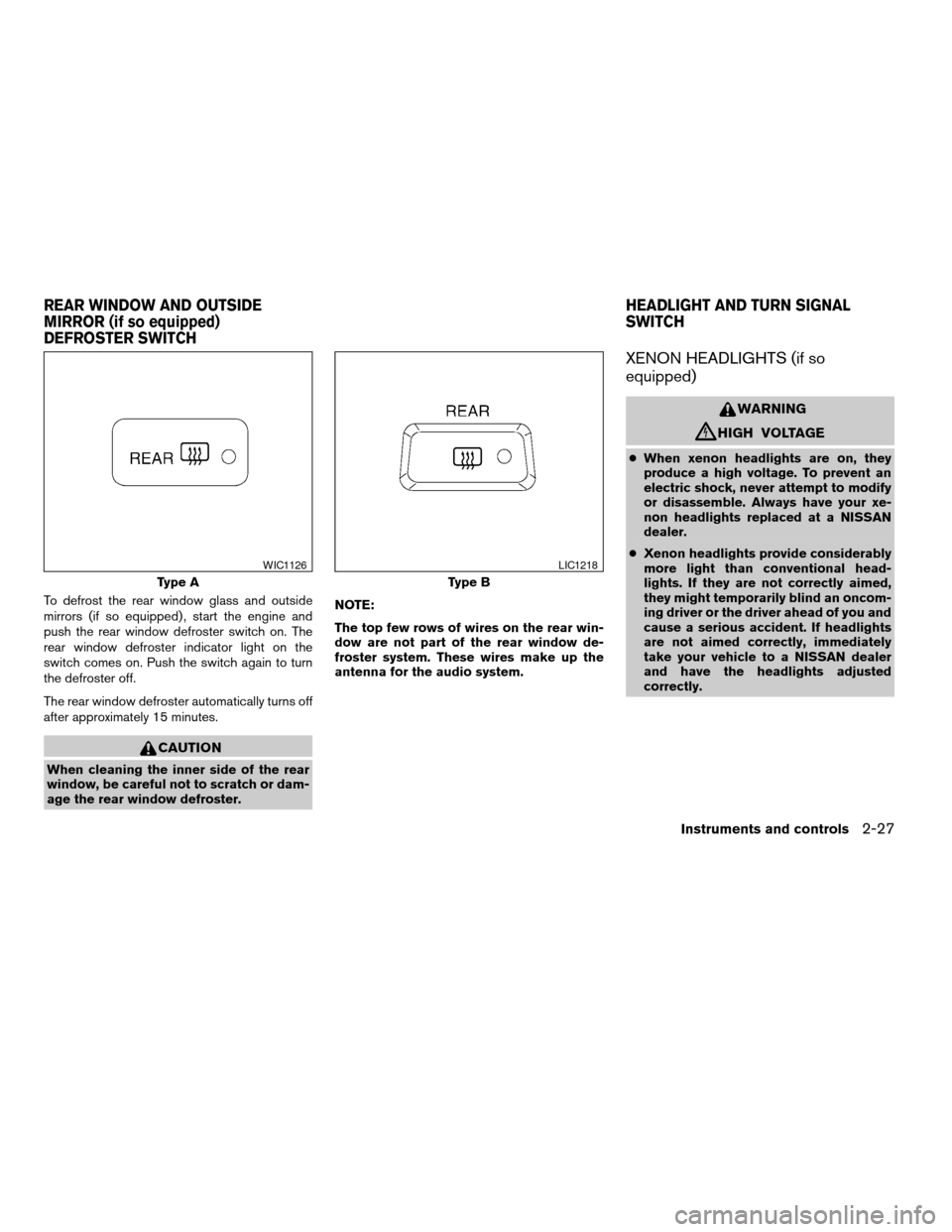
To defrost the rear window glass and outside
mirrors (if so equipped) , start the engine and
push the rear window defroster switch on. The
rear window defroster indicator light on the
switch comes on. Push the switch again to turn
the defroster off.
The rear window defroster automatically turns off
after approximately 15 minutes.
CAUTION
When cleaning the inner side of the rear
window, be careful not to scratch or dam-
age the rear window defroster.NOTE:
The top few rows of wires on the rear win-
dow are not part of the rear window de-
froster system. These wires make up the
antenna for the audio system.
XENON HEADLIGHTS (if so
equipped)
WARNING
cHIGH VOLTAGE
cWhen xenon headlights are on, they
produce a high voltage. To prevent an
electric shock, never attempt to modify
or disassemble. Always have your xe-
non headlights replaced at a NISSAN
dealer.
cXenon headlights provide considerably
more light than conventional head-
lights. If they are not correctly aimed,
they might temporarily blind an oncom-
ing driver or the driver ahead of you and
cause a serious accident. If headlights
are not aimed correctly, immediately
take your vehicle to a NISSAN dealer
and have the headlights adjusted
correctly.
Type A
WIC1126
Type B
LIC1218
REAR WINDOW AND OUTSIDE
MIRROR (if so equipped)
DEFROSTER SWITCHHEADLIGHT AND TURN SIGNAL
SWITCH
Instruments and controls2-27
ZREVIEW COPYÐ2008 Altima(alt)
Owners ManualÐUSA_English(nna)
03/12/07Ðdebbie
X
Page 124 of 352
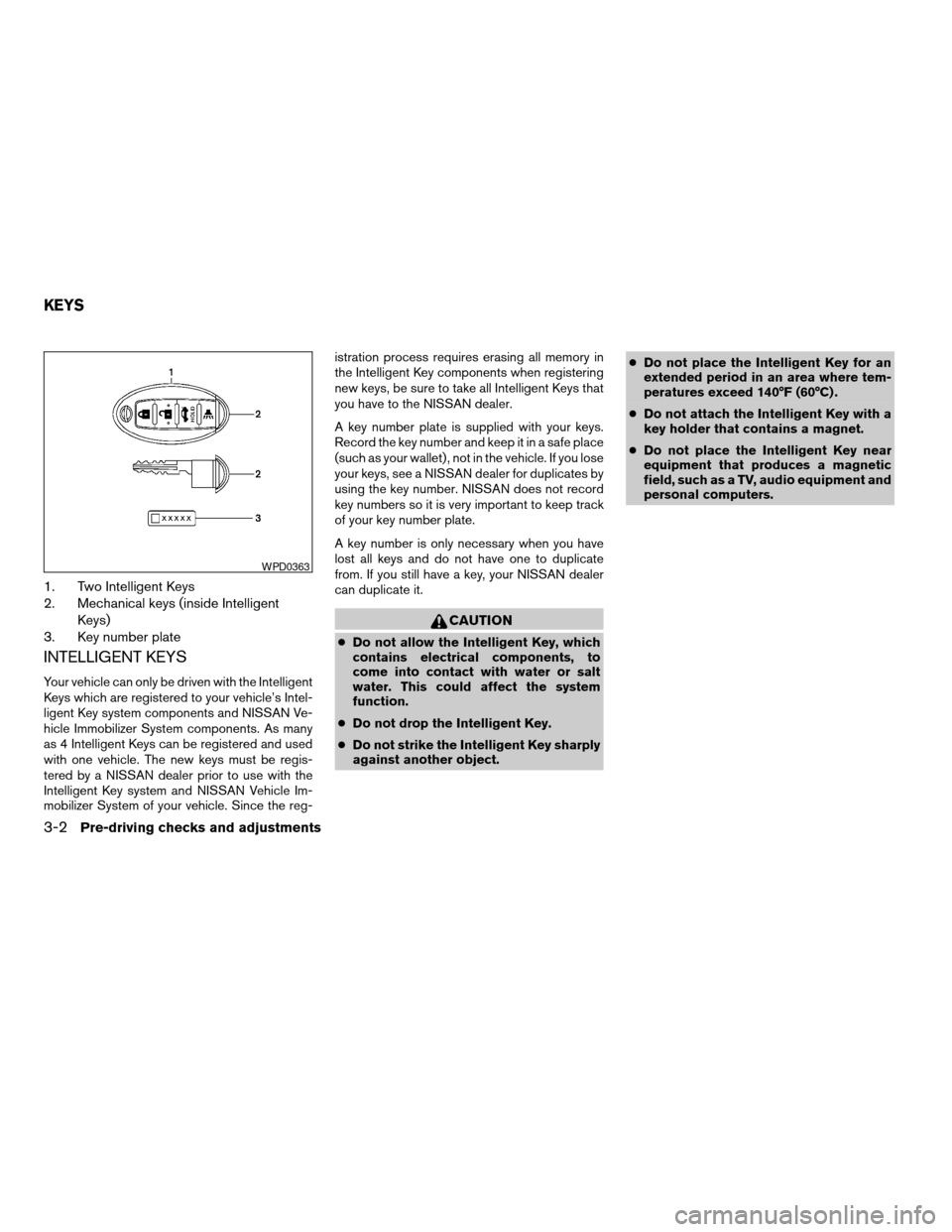
1. Two Intelligent Keys
2. Mechanical keys (inside Intelligent
Keys)
3. Key number plate
INTELLIGENT KEYS
Your vehicle can only be driven with the Intelligent
Keys which are registered to your vehicle’s Intel-
ligent Key system components and NISSAN Ve-
hicle Immobilizer System components. As many
as 4 Intelligent Keys can be registered and used
with one vehicle. The new keys must be regis-
tered by a NISSAN dealer prior to use with the
Intelligent Key system and NISSAN Vehicle Im-
mobilizer System of your vehicle. Since the reg-istration process requires erasing all memory in
the Intelligent Key components when registering
new keys, be sure to take all Intelligent Keys that
you have to the NISSAN dealer.
A key number plate is supplied with your keys.
Record the key number and keep it in a safe place
(such as your wallet) , not in the vehicle. If you lose
your keys, see a NISSAN dealer for duplicates by
using the key number. NISSAN does not record
key numbers so it is very important to keep track
of your key number plate.
A key number is only necessary when you have
lost all keys and do not have one to duplicate
from. If you still have a key, your NISSAN dealer
can duplicate it.
CAUTION
cDo not allow the Intelligent Key, which
contains electrical components, to
come into contact with water or salt
water. This could affect the system
function.
cDo not drop the Intelligent Key.
cDo not strike the Intelligent Key sharply
against another object.cDo not place the Intelligent Key for an
extended period in an area where tem-
peratures exceed 140°F (60°C) .
cDo not attach the Intelligent Key with a
key holder that contains a magnet.
cDo not place the Intelligent Key near
equipment that produces a magnetic
field, such as a TV, audio equipment and
personal computers.
WPD0363
KEYS
3-2Pre-driving checks and adjustments
ZREVIEW COPYÐ2008 Altima(alt)
Owners ManualÐUSA_English(nna)
03/13/07Ðdebbie
X
Page 128 of 352
cWhen operating near a location where
strong radio waves are transmitted, such as
a TV tower, power station and broadcasting
station.
cWhen in possession of wireless equipment,
such as a cellular telephone, transceiver,
and CB radio.
cWhen the Intelligent Key is in contact with or
covered by metallic materials.
cWhen any type of radio wave remote control
is used nearby.
cWhen the Intelligent Key is placed near an
electric appliance such as a personal com-
puter.
cWhen the vehicle is parked near a parking
meter.
In such cases, correct the operating conditions
before using the Intelligent Key function or use
the mechanical key.
Although the life of the battery varies depending
on the operating conditions, the battery’s life is
approximately 2 years. If the battery is dis-
charged, replace it with a new one.When the Intelligent Key battery is almost dis-
charged, insert the Intelligent Key into the Intelli-
gent Key port to start the engine. Replace the
discharged battery with a new one as soon as
possible. For more details, see “Push-button ig-
nition switch” in the “Starting and driving” sec-
tion.
Since the Intelligent Key is continuously receiving
radio waves, if the key is left near equipment
which transmits strong radio waves, such as sig-
nals from a TV and personal computer, the bat-
tery life may become shorter.
For information regarding replacement of a bat-
tery, see “Battery” in the “Maintenance and do-it-
yourself” section.
Because the steering wheel is locked electrically,
unlocking the steering wheel with the ignition
switch in the LOCK position is impossible when
the vehicle battery is completely discharged. Un-
locking the steering wheel is impossible even if
the Intelligent Key is inserted into the Intelligent
Key port. Pay special attention that the vehicle
battery is not completely discharged.
As many as 4 Intelligent Keys can be registered
and used with one vehicle. For information about
the purchase and use of additional Intelligent
Keys, contact a NISSAN dealer.CAUTION
cDo not allow the Intelligent Key, which
contains electrical components, to
come into contact with water or salt
water. This could affect the system
function.
cDo not drop the Intelligent Key.
cDo not strike the Intelligent Key sharply
against another object.
cDo not change or modify the Intelligent
Key.
cWetting may damage the Intelligent
Key. If the Intelligent Key gets wet, im-
mediately wipe until it is completely dry.
cDo not place the Intelligent Key for an
extended period in an area where tem-
peratures exceed 140°F (60°C) .
cDo not attach the Intelligent Key with a
key holder that contains a magnet.
cDo not place the Intelligent Key near
equipment that produces a magnetic
field, such as a TV, audio equipment and
personal computers.
3-6Pre-driving checks and adjustments
ZREVIEW COPYÐ2008 Altima(alt)
Owners ManualÐUSA_English(nna)
03/13/07Ðdebbie
X
Page 146 of 352

4 Monitor, climate, audio, phone and voice
recognition systems
Control panel buttons (if so equipped)...............4-2
Setting up the start-up screen...................4-3
How to use the SETUP button...................4-3
button...................................4-7
Rearview monitor (if so equipped)...................4-8
How to read the displayed lines..................4-8
Adjusting the screen............................4-9
Operating tips..................................4-9
Ventilators.......................................4-10
Heater and air conditioner (manual).................4-10
Controls......................................4-11
Heater operation..............................4-12
Air conditioner operation (if so equipped)........4-13
Air flow charts.................................4-14
Heater and air conditioner (automatic)
(if so equipped)..................................4-18
Automatic operation...........................4-18
Manual operation..............................4-19
Operating tips.................................4-19
Servicing air conditioner...........................4-20
Audio system....................................4-20
Radio........................................4-20
FM radio reception............................4-21AM radio reception............................4-21
Satellite radio reception (if so equipped).........4-21
Audio operation precautions....................4-22
FM/AM radio with compact disc (CD) player......4-27
FM/AM/SAT radio with compact disc (CD)
changer (if so equipped).......................4-31
FM/AM/SAT radio with compact disc (CD)
changer (if so equipped).......................4-38
CD care and cleaning..........................4-43
Steering wheel switch for audio control
(if so equipped)...............................4-43
Antenna......................................4-45
Car phone or CB radio............................4-45
BluetoothTHands-Free Phone System without
Navigation System (if so equipped).................4-46
Using the system..............................4-47
Control buttons...............................4-49
Getting started................................4-49
List of voice commands........................4-51
Speaker adaptation (SA) mode..................4-57
Troubleshooting guide.........................4-59
BluetoothTHands-Free Phone System with
Navigation System (if so equipped).................4-60
ZREVIEW COPYÐ2008 Altima(alt)
Owners ManualÐUSA_English(nna)
03/13/07Ðdebbie
X
Page 148 of 352
WARNING
cDo not disassemble or modify this sys-
tem. If you do, it may result in accidents,
fire, or electrical shock.
cDo not use this system if you notice any
abnormality, such as a frozen screen or
lack of sound. Continued use of the
system may result in accident, fire or
electric shock.
cIn case you notice any foreign object in
the system hardware, spill liquid on it,
or notice smoke or smell coming from
it, stop using the system immediately
and contact your nearest NISSAN
dealer. Ignoring such conditions may
lead to accidents, fire or electrical
shock.
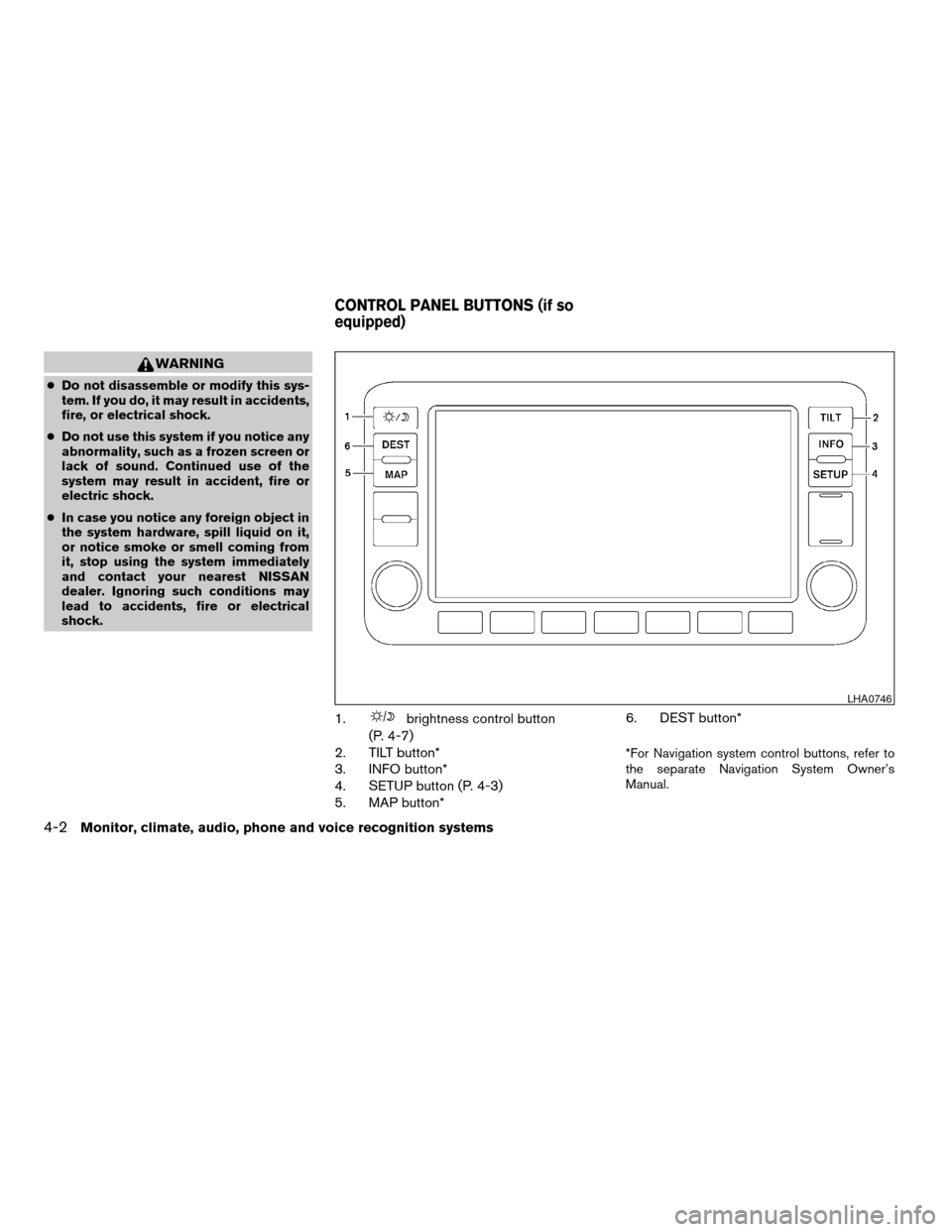
1.brightness control button
(P. 4-7)
2. TILT button*
3. INFO button*
4. SETUP button (P. 4-3)
5. MAP button*6. DEST button*
*For Navigation system control buttons, refer to
the separate Navigation System Owner’s
Manual.
LHA0746
CONTROL PANEL BUTTONS (if so
equipped)
4-2Monitor, climate, audio, phone and voice recognition systems
ZREVIEW COPYÐ2008 Altima(alt)
Owners ManualÐUSA_English(nna)
03/13/07Ðarosenma
X
Page 149 of 352

When you use this system, make sure the engine
is running.
If you use the system with the engine not
running (ignition ON or ACC) for a long
time, it will use up all the battery power,
and the engine will not start.
Reference symbols:
SETUP button — This is a button on the control
panel.
“Display” key — This is a select key on the touch-
screen. By touching this key you can proceed to
the next function.
SETTING UP THE START-UP
SCREEN
With the ignition to ACC or ON, the SYSTEM
START-UP warning is displayed on the screen.
Read the warning and touch the “I agree” key
(English) or the “Enter” (Français) key.
If you do not touch the “I agree” key, the Naviga-
tion system will not proceed to the next step
display.
If you do not press a button or touch a screen key
for more than 1 minute on the START-UP screen,
the screen will change to the audio screen auto-
matically.To proceed to the next step, refer to the separate
Navigation System Owner’s Manual.
HOW TO USE THE SETUP BUTTON
When the SETUP button is pressed, the settings
screen will appear on the display. You can select
and/or adjust several functions, features and
modes that are available for your vehicle. Touch
one of the setting item keys to select each item to
be set.
LHA0747
Monitor, climate, audio, phone and voice recognition systems4-3
ZREVIEW COPYÐ2008 Altima(alt)
Owners ManualÐUSA_English(nna)
03/13/07Ðdebbie
X
Page 150 of 352

Display settings
Touch the “Display” key. The display screen will
appear.
Display/brightness/contrast:
Touch the “–” key or the “+” key to adjust the
brightness and contrast of the screen.
The new settings are automatically saved when
you exit the setting screen by touching the “Back”
key or pressing any other mode button.Display off:
Touch the Display “ON” key. The indicator of the
display turns off; touch the “Back” key to accept
the change. The message above will be dis-
played briefly. When the audio, or any mode
button on the control panel is operated, the dis-
play turns on for that operation. If one of the
control panel buttons is pressed, the display will
automatically turn off after 5 seconds.To turn the screen on,
cPress the SETUP button and then touch the
display “ON” key, or
cPress the
button. The message “Re-
suming display” will appear and the Display
“ON” key will be automatically turned on, the
amber indicator will illuminate.
LHA0748LHA0749
4-4Monitor, climate, audio, phone and voice recognition systems
ZREVIEW COPYÐ2008 Altima(alt)
Owners ManualÐUSA_English(nna)
03/13/07Ðdebbie
X