power steering NISSAN ALTIMA 2008 L32A / 4.G Owners Manual
[x] Cancel search | Manufacturer: NISSAN, Model Year: 2008, Model line: ALTIMA, Model: NISSAN ALTIMA 2008 L32A / 4.GPages: 352, PDF Size: 4.42 MB
Page 14 of 352

QR25DE engine
1. Power steering fluid reservoir (P. 8-13)
2. Engine oil filler cap (P. 8-9)
3. Brake fluid reservoir/Clutch fluid reser-
voir (M/T model) (P. 8-13, 8-14)
4. Air cleaner (P. 8-18)
5. Fuse block (P. 8-21)
6. Battery (P. 8-15)
7. Fuse/fusible link box (P. 8-21)
8. Engine oil dipstick (P. 8-9)
9. Radiator cap (P. 8-8)
10. Drive belt location (P.8-16)
11. Engine coolant reservoir (P. 8-8)
12. Windshield washer fluid reservoir
(P. 8-14)
See the page number indicated in paren-
theses for operating details.
LDI0553
ENGINE COMPARTMENT CHECK
LOCATIONS
0-8Illustrated table of contents
ZREVIEW COPYÐ2008 Altima(alt)
Owners ManualÐUSA_English(nna)
03/12/07Ðdebbie
X
Page 15 of 352

VQ35DE engine
1. Power steering fluid reservoir (P. 8-13)
2. Engine oil filler cap (P. 8-9)
3. Brake fluid reservoir/Clutch fluid reser-
voir (M/T model) (P. 8-13, 8-14)
4. Air cleaner (P. 8-18)
5. Fuse block (P. 8-21)
6. Battery (P. 8-15)
7. Fuse/fusible link box (P. 8-21)
8. Engine oil dipstick (P. 8-9)
9. Radiator cap (P. 8-8)
10. Drive belt location (P.8-16)
11. Engine coolant reservoir (P. 8-8)
12. Windshield washer fluid reservoir
(P. 8-14)
See the page number indicated in paren-
theses for operating details.
LDI0552
Illustrated table of contents0-9
ZREVIEW COPYÐ2008 Altima(alt)
Owners ManualÐUSA_English(nna)
03/12/07Ðdebbie
X
Page 95 of 352

when the main switch is pushed again. When the
cruise main switch indicator illuminates, the
cruise control system is operational.
Cruise set switch indicator light
The light comes on while the vehicle speed is
controlled by the cruise control system. If the light
blinks while the engine is running, it may indicate
the cruise control system is not functioning prop-
erly. Have the system checked by a NISSAN
dealer.
Engine start operation indicator (CVT mod-
els)
This indicator illuminates when the ignition switch
is in the LOCK, OFF, ACC or ON position with
the selector lever in the P (Park) position.
This indicator means that the engine will start by
pushing the push-button ignition switch with the
brake pedal depressed.
Engine start operation indicator (MT mod-
els)
This indicator illuminates when the ignition switch
is in the LOCK, OFF, ACC or ON position with
the manual transmission gear selector lever in
neutral and the parking brake on.
This indicator means that the engine will start by
pushing the push-button ignition switch with the
clutch and the brake pedal depressed.Intelligent Key insertion indicator
This indicator illuminates when the Intelligent Key
needs to be inserted into the Intelligent Key port.
(For example, the Intelligent Key battery is dis-
charged.)
If this indicator illuminates, insert the Intelligent
Key into the Intelligent Keys port in the correct
direction. See “Push-button ignition switch” in
the “Starting and driving” section.
Intelligent Key removal indicator
This indicator illuminates when the driver’s door
is opened with ignition switch in the OFF position
and the Intelligent Key placed in the Intelligent
Key port. A key reminder chime also sounds.
If this indicator illuminates, remove the Intelligent
Key from the Intelligent Key port and take it with
you when leaving the vehicle.
Intelligent Key battery discharge indicator
This indicator illuminates when the Intelligent Key
battery is running out of power.
If this indicator illuminates, replace the battery
with a new one. See “Intelligent Key battery” in
the “Maintenance and do-it-yourself” section.Steering lock release malfunction indica-
tor
This indicator illuminates when the steering
wheel cannot be released from the LOCK posi-
tion.
If this indicator illuminates, push the push-button
ignition switch while lightly turning the steering
wheel right and left.
Instruments and controls2-23
ZREVIEW COPYÐ2008 Altima(alt)
Owners ManualÐUSA_English(nna)
03/12/07Ðdebbie
X
Page 123 of 352

3 Pre-driving checks and adjustments
Keys .............................................3-2
Intelligent Keys.................................3-2
Doors............................................3-3
Locking with key................................3-4
Locking with inside lock knob....................3-4
Locking with power door lock switch.............3-5
Intelligent Key system..............................3-5
Operating range................................3-7
Door locks/unlocks precaution...................3-8
Intelligent Key operation.........................3-8
How to use the remote keyless entry
function......................................3-12
Warning signals...............................3-14
Troubleshooting guide.........................3-14
Hood...........................................3-16
Trunk lid.........................................3-16Opener operation..............................3-16
Interior trunk lid release........................3-17
Fuel-filler door...................................3-18
Opener operation..............................3-18
Fuel-filler cap.................................3-18
Tilting telescopic steering column..................3-20
Tilt operation..................................3-20
Telescopic operation...........................3-20
Sun visors.......................................3-20
Vanity mirrors.................................3-21
Mirrors..........................................3-21
Rearview mirror (if so equipped).................3-21
Automatic anti-glare rearview mirror
(if so equipped)...............................3-22
Outside mirrors...............................3-22
ZREVIEW COPYÐ2008 Altima(alt)
Owners ManualÐUSA_English(nna)
03/13/07Ðdebbie
X
Page 128 of 352
cWhen operating near a location where
strong radio waves are transmitted, such as
a TV tower, power station and broadcasting
station.
cWhen in possession of wireless equipment,
such as a cellular telephone, transceiver,
and CB radio.
cWhen the Intelligent Key is in contact with or
covered by metallic materials.
cWhen any type of radio wave remote control
is used nearby.
cWhen the Intelligent Key is placed near an
electric appliance such as a personal com-
puter.
cWhen the vehicle is parked near a parking
meter.
In such cases, correct the operating conditions
before using the Intelligent Key function or use
the mechanical key.
Although the life of the battery varies depending
on the operating conditions, the battery’s life is
approximately 2 years. If the battery is dis-
charged, replace it with a new one.When the Intelligent Key battery is almost dis-
charged, insert the Intelligent Key into the Intelli-
gent Key port to start the engine. Replace the
discharged battery with a new one as soon as
possible. For more details, see “Push-button ig-
nition switch” in the “Starting and driving” sec-
tion.
Since the Intelligent Key is continuously receiving
radio waves, if the key is left near equipment
which transmits strong radio waves, such as sig-
nals from a TV and personal computer, the bat-
tery life may become shorter.
For information regarding replacement of a bat-
tery, see “Battery” in the “Maintenance and do-it-
yourself” section.
Because the steering wheel is locked electrically,
unlocking the steering wheel with the ignition
switch in the LOCK position is impossible when
the vehicle battery is completely discharged. Un-
locking the steering wheel is impossible even if
the Intelligent Key is inserted into the Intelligent
Key port. Pay special attention that the vehicle
battery is not completely discharged.
As many as 4 Intelligent Keys can be registered
and used with one vehicle. For information about
the purchase and use of additional Intelligent
Keys, contact a NISSAN dealer.CAUTION
cDo not allow the Intelligent Key, which
contains electrical components, to
come into contact with water or salt
water. This could affect the system
function.
cDo not drop the Intelligent Key.
cDo not strike the Intelligent Key sharply
against another object.
cDo not change or modify the Intelligent
Key.
cWetting may damage the Intelligent
Key. If the Intelligent Key gets wet, im-
mediately wipe until it is completely dry.
cDo not place the Intelligent Key for an
extended period in an area where tem-
peratures exceed 140°F (60°C) .
cDo not attach the Intelligent Key with a
key holder that contains a magnet.
cDo not place the Intelligent Key near
equipment that produces a magnetic
field, such as a TV, audio equipment and
personal computers.
3-6Pre-driving checks and adjustments
ZREVIEW COPYÐ2008 Altima(alt)
Owners ManualÐUSA_English(nna)
03/13/07Ðdebbie
X
Page 189 of 352

CD CARE AND CLEANING
cHandle a CD by its edges. Do not bend the
disc. Never touch the surface of the disc.
cAlways place the discs in the storage case
when they are not being used.
cTo clean a disc, wipe the surface from the
center to the outer edge using a clean, soft
cloth. Do not wipe the disc using a circular
motion.
cDo not use a conventional record cleaner or
alcohol intended for industrial use.cA new disc may be rough on the inner and
outer edges. Remove the rough edges by
rubbing the inner and outer edges with the
side of a pen or pencil as illustrated.
STEERING WHEEL SWITCH FOR
AUDIO CONTROL (if so equipped)
1. Source select and Power on switch
2. Tuning switch
3. Volume control switch
LHA0049
Type A
LHA0752
Monitor, climate, audio, phone and voice recognition systems4-43
ZREVIEW COPYÐ2008 Altima(alt)
Owners ManualÐUSA_English(nna)
03/13/07Ðdebbie
X
Page 221 of 352

5 Starting and driving
Precautions when starting and driving................5-2
Exhaust gas (carbon monoxide)..................5-2
Three-way catalyst..............................5-2
Tire Pressure Monitoring System (TPMS)..........5-3
Avoiding collision and rollover....................5-5
Drinking alcohol/drugs and driving................5-5
Push-Button Ignition Switch........................5-6
Push-button ignition switch positions.............5-7
Intelligent key battery discharge..................5-7
Before starting the engine..........................5-8
Starting the engine................................5-9
Driving the vehicle................................5-10
Continuously Variable Transmission (CVT)
(if so equipped)...............................5-10
Manual transmission (if so equipped)............5-14
Parking brake....................................5-16
Cruise control....................................5-17
Precautions on cruise control...................5-17
Cruise control operations.......................5-17Break-in schedule................................5-18
Increasing fuel economy...........................5-19
Parking/parking on hills............................5-20
Power steering...................................5-21
Brake system....................................5-21
Brake precautions.............................5-21
Anti-lock Braking System (ABS).................5-22
Traction control system (TCS) (if so equipped).......5-23
Vehicle dynamic control (VDC) system
(if so equipped)..................................5-24
Cold weather driving..............................5-25
Freeing a frozen door lock......................5-25
Anti-freeze....................................5-25
Battery.......................................5-25
Draining of coolant water.......................5-26
Tire equipment................................5-26
Special winter equipment.......................5-26
Driving on snow or ice.........................5-26
Engine block heater (if so equipped).............5-27
ZREVIEW COPYÐ2008 Altima(alt)
Owners ManualÐUSA_English(nna)
03/13/07Ðdebbie
X
Page 233 of 352
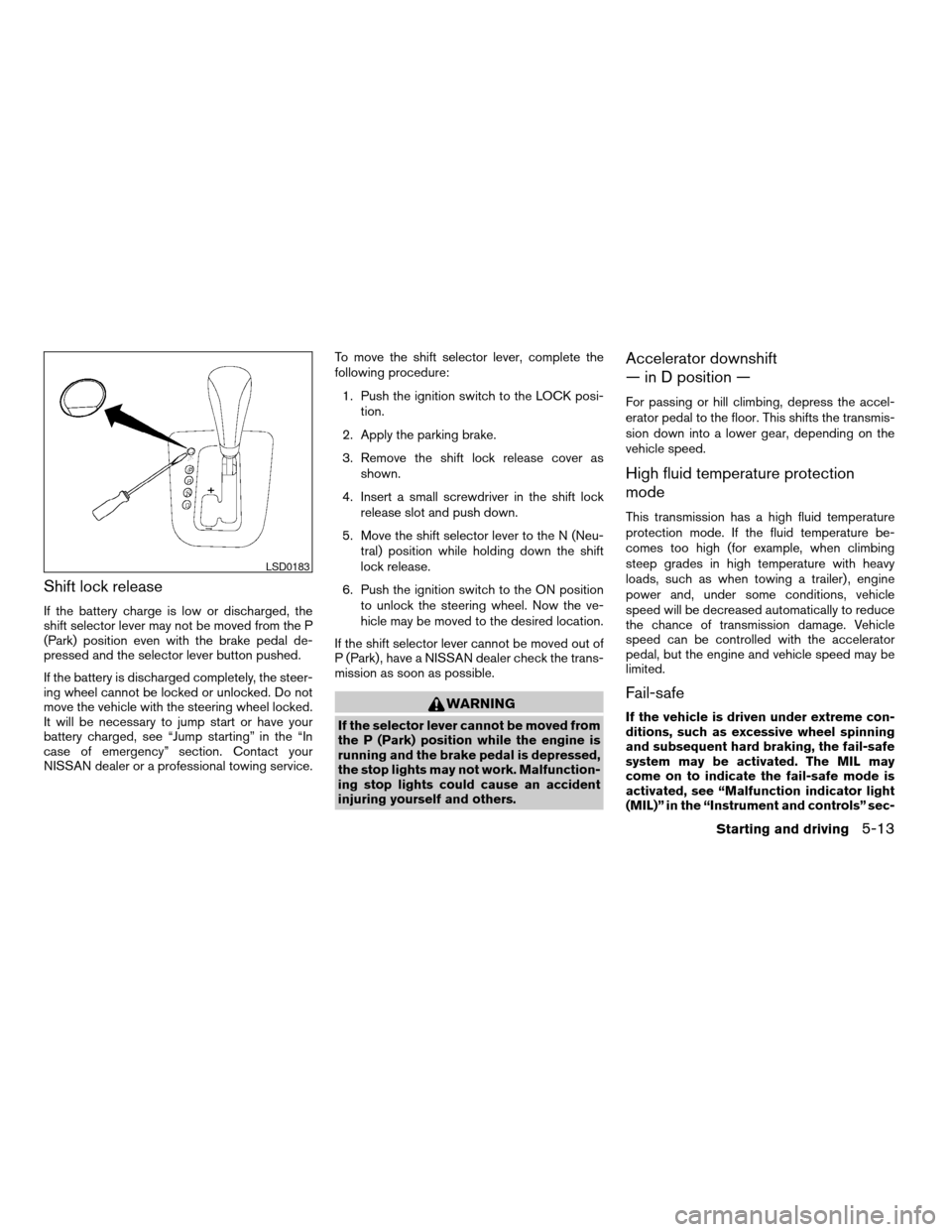
Shift lock release
If the battery charge is low or discharged, the
shift selector lever may not be moved from the P
(Park) position even with the brake pedal de-
pressed and the selector lever button pushed.
If the battery is discharged completely, the steer-
ing wheel cannot be locked or unlocked. Do not
move the vehicle with the steering wheel locked.
It will be necessary to jump start or have your
battery charged, see “Jump starting” in the “In
case of emergency” section. Contact your
NISSAN dealer or a professional towing service.To move the shift selector lever, complete the
following procedure:
1. Push the ignition switch to the LOCK posi-
tion.
2. Apply the parking brake.
3. Remove the shift lock release cover as
shown.
4. Insert a small screwdriver in the shift lock
release slot and push down.
5. Move the shift selector lever to the N (Neu-
tral) position while holding down the shift
lock release.
6. Push the ignition switch to the ON position
to unlock the steering wheel. Now the ve-
hicle may be moved to the desired location.
If the shift selector lever cannot be moved out of
P (Park) , have a NISSAN dealer check the trans-
mission as soon as possible.
WARNING
If the selector lever cannot be moved from
the P (Park) position while the engine is
running and the brake pedal is depressed,
the stop lights may not work. Malfunction-
ing stop lights could cause an accident
injuring yourself and others.
Accelerator downshift
— in D position —
For passing or hill climbing, depress the accel-
erator pedal to the floor. This shifts the transmis-
sion down into a lower gear, depending on the
vehicle speed.
High fluid temperature protection
mode
This transmission has a high fluid temperature
protection mode. If the fluid temperature be-
comes too high (for example, when climbing
steep grades in high temperature with heavy
loads, such as when towing a trailer) , engine
power and, under some conditions, vehicle
speed will be decreased automatically to reduce
the chance of transmission damage. Vehicle
speed can be controlled with the accelerator
pedal, but the engine and vehicle speed may be
limited.
Fail-safe
If the vehicle is driven under extreme con-
ditions, such as excessive wheel spinning
and subsequent hard braking, the fail-safe
system may be activated. The MIL may
come on to indicate the fail-safe mode is
activated, see “Malfunction indicator light
(MIL)” in the “Instrument and controls” sec-
LSD0183
Starting and driving5-13
ZREVIEW COPYÐ2008 Altima(alt)
Owners ManualÐUSA_English(nna)
03/13/07Ðdebbie
X
Page 241 of 352
The power assisted steering uses a hydraulic
pump, driven by the engine, to assist steering.
If the engine stops or the drive belt breaks, you
will still have control of the vehicle. However,
much greater steering effort is needed, especially
in sharp turns and at low speeds.
WARNING
If the engine is not running or is turned off
while driving, the power assist for the
steering will not work. Steering will be
harder to operate.The brake system has two separate hydraulic
circuits. If one circuit malfunctions, you will still
have braking at two wheels.
BRAKE PRECAUTIONS
Vacuum assisted brakes
The brake booster aids braking by using engine
vacuum. If the engine stops, you can stop the
vehicle by depressing the brake pedal. However,
greater foot pressure on the brake pedal will be
required to stop the vehicle and stopping dis-
tance will be longer.
Using the brakes
Avoid resting your foot on the brake pedal while
driving. This will overheat the brakes, wear out the
brakes and pads faster, and reduce gas mileage.
To help reduce brake wear and to prevent the
brakes from overheating, reduce speed and
downshift to a lower gear before going down a
slope or long grade. Overheated brakes may
reduce braking performance and could result in
loss of vehicle control.
WARNING
cWhile driving on a slippery surface, be
careful when braking, accelerating or
downshifting. Abrupt braking or accel-
erating could cause the wheels to skid
and result in an accident.
cIf the engine is not running or is turned
off while driving, the power assist for
the brakes will not work. Braking will be
harder.
Parking brake break-in
Break-in the parking brake shoes whenever the
stopping effect of the parking brake is weakened
or whenever the parking brake shoes and/or
drum/rotors are replaced, in order to assure the
best brake performance.
This procedure is described in the vehicle service
manual and can be performed by a NISSAN
dealer.
Wet brakes
When the vehicle is washed or driven through
water, the brakes may get wet. As a result, your
braking distance will be longer and the vehicle
may pull to one side during braking.
POWER STEERING BRAKE SYSTEM
Starting and driving5-21
ZREVIEW COPYÐ2008 Altima(alt)
Owners ManualÐUSA_English(nna)
03/13/07Ðdebbie
X
Page 244 of 352
cWhen driving on extremely inclined sur-
faces such as higher banked corners,
the traction control system may not op-
erate properly and the
indicator
light may come on. Do not drive on
these types of roads.
cIf wheels or tires other than the recom-
mended ones are used, the traction
control system may not operate prop-
erly and the
indicator light may
come on.
cThe traction control system is not a sub-
stitute for winter tires or tire chains on a
snow covered road.When accelerating or driving on slippery sur-
faces, the tires may spin or slide. With the Vehicle
Dynamic Control (VDC) system, sensors detect
these movements and control the braking and
engine output to help improve vehicle stability.
cWhen the vehicle dynamic control (VDC)
system is operating, theSLIPindicator in
the instrument panel blinks.
cIf theSLIPindicator blinks, the road condi-
tions are slippery. Be sure to adjust your
speed and driving to these conditions. See
“Slip indicator light”, and “Vehicle dynamic
control (VDC) off indicator light” in the “In-
struments and controls” section.
cIndicator light
If a malfunction occurs in the system, the
SLIPand
indicator lights come on in
the instrument panel.
As long as these indicator lights are on, the
traction control function is canceled.
If the vehicle is operated with the vehicle dynamic
control system OFF using the VDC OFF switch,
VDC functions will be turned off. The VDC sys-
tem will still try to transfer power from a slipping
drive wheel to one with more traction when the
VDC system switch is OFF. TheSLIPindicator
will flash if wheel spin is detected. The ABS will
still operate with the VDC system off.When the VDC system is operating, you may feel
a pulsation in the brake pedal and hear a noise or
vibration from under the hood. This is normal and
indicates that the VDC system is working prop-
erly.
The computer has a built in diagnostic feature
that tests the system each time you start the
engine and move the vehicle forward or in reverse
at a slow speed. When the self-test occurs, you
may hear a clunk noise and/or feel a pulsation in
the brake pedal. This is normal and is not an
indication of a malfunction.
WARNING
cThe vehicle dynamic control system is
designed to help improve driving stabil-
ity but does not prevent accidents due
to abrupt steering operation at high
speeds or by careless or dangerous
driving techniques. Reduce vehicle
speed and be especially careful when
driving and cornering on slippery sur-
faces and always drive carefully.
VEHICLE DYNAMIC CONTROL (VDC)
SYSTEM (if so equipped)
5-24Starting and driving
ZREVIEW COPYÐ2008 Altima(alt)
Owners ManualÐUSA_English(nna)
03/13/07Ðdebbie
X