trunk NISSAN ALTIMA 2008 L32A / 4.G Owners Manual
[x] Cancel search | Manufacturer: NISSAN, Model Year: 2008, Model line: ALTIMA, Model: NISSAN ALTIMA 2008 L32A / 4.GPages: 352, PDF Size: 4.42 MB
Page 10 of 352
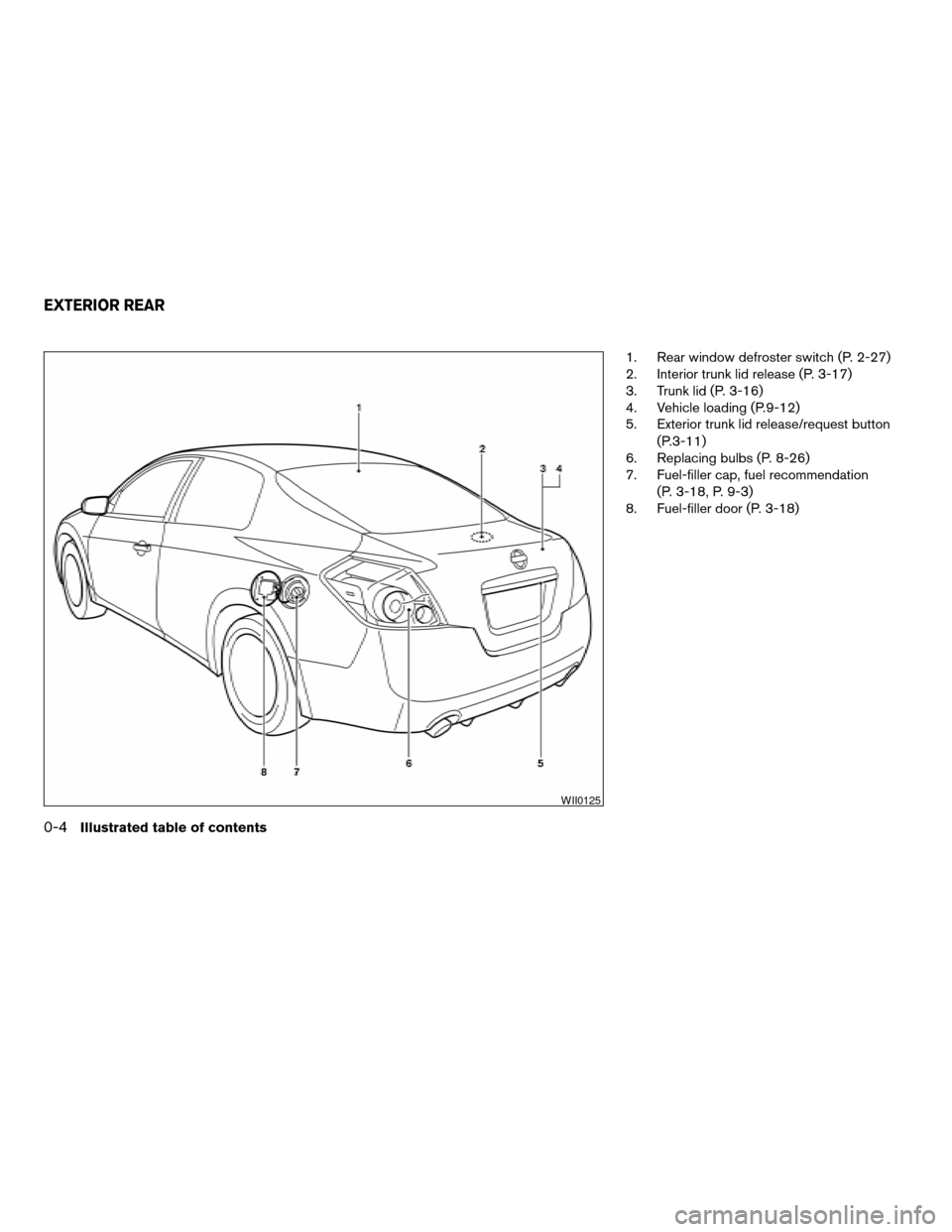
1. Rear window defroster switch (P. 2-27)
2. Interior trunk lid release (P. 3-17)
3. Trunk lid (P. 3-16)
4. Vehicle loading (P.9-12)
5. Exterior trunk lid release/request button
(P.3-11)
6. Replacing bulbs (P. 8-26)
7. Fuel-filler cap, fuel recommendation
(P. 3-18, P. 9-3)
8. Fuel-filler door (P. 3-18)
WII0125
EXTERIOR REAR
0-4Illustrated table of contents
ZREVIEW COPYÐ2008 Altima(alt)
Owners ManualÐUSA_English(nna)
03/12/07Ðdebbie
X
Page 11 of 352
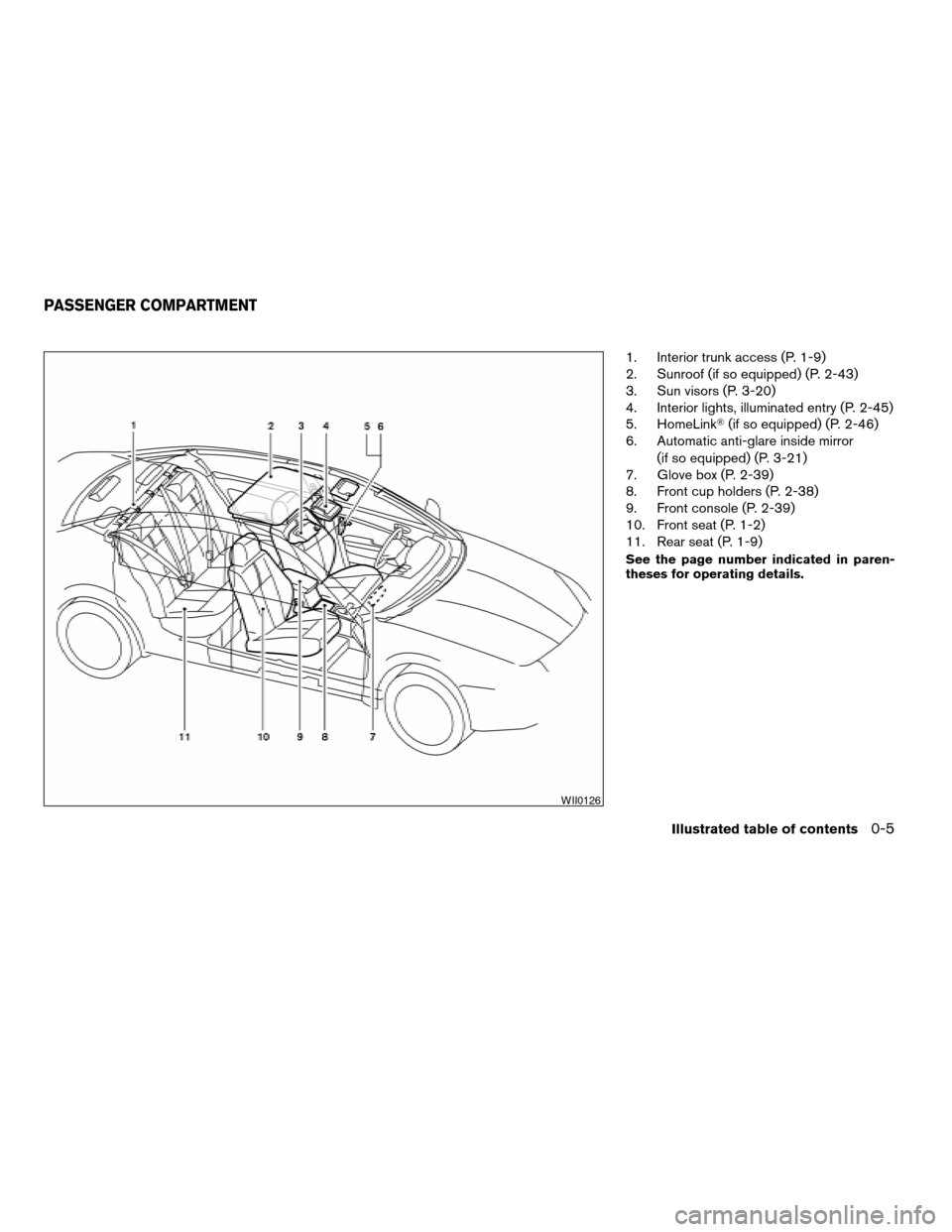
1. Interior trunk access (P. 1-9)
2. Sunroof (if so equipped) (P. 2-43)
3. Sun visors (P. 3-20)
4. Interior lights, illuminated entry (P. 2-45)
5. HomeLinkT(if so equipped) (P. 2-46)
6. Automatic anti-glare inside mirror
(if so equipped) (P. 3-21)
7. Glove box (P. 2-39)
8. Front cup holders (P. 2-38)
9. Front console (P. 2-39)
10. Front seat (P. 1-2)
11. Rear seat (P. 1-9)
See the page number indicated in paren-
theses for operating details.
WII0126
PASSENGER COMPARTMENT
Illustrated table of contents0-5
ZREVIEW COPYÐ2008 Altima(alt)
Owners ManualÐUSA_English(nna)
03/12/07Ðdebbie
X
Page 13 of 352

20. Traction Control System (TCS) OFF
switch (if so equipped)/Vehicle Dy-
namic Control (VDC) OFF switch
(if so equipped) (P. 5-23, P. 5-24)
Trunk opener (P. 3-16)
Intelligent Key port (P. 5-6)
*: Refer to the separate Navigation System Own-
er’s Manual.
See the page number indicated in paren-
theses for operating details.
Illustrated table of contents0-7
ZREVIEW COPYÐ2008 Altima(alt)
Owners ManualÐUSA_English(nna)
03/12/07Ðdebbie
X
Page 25 of 352
FOLDING REAR SEAT
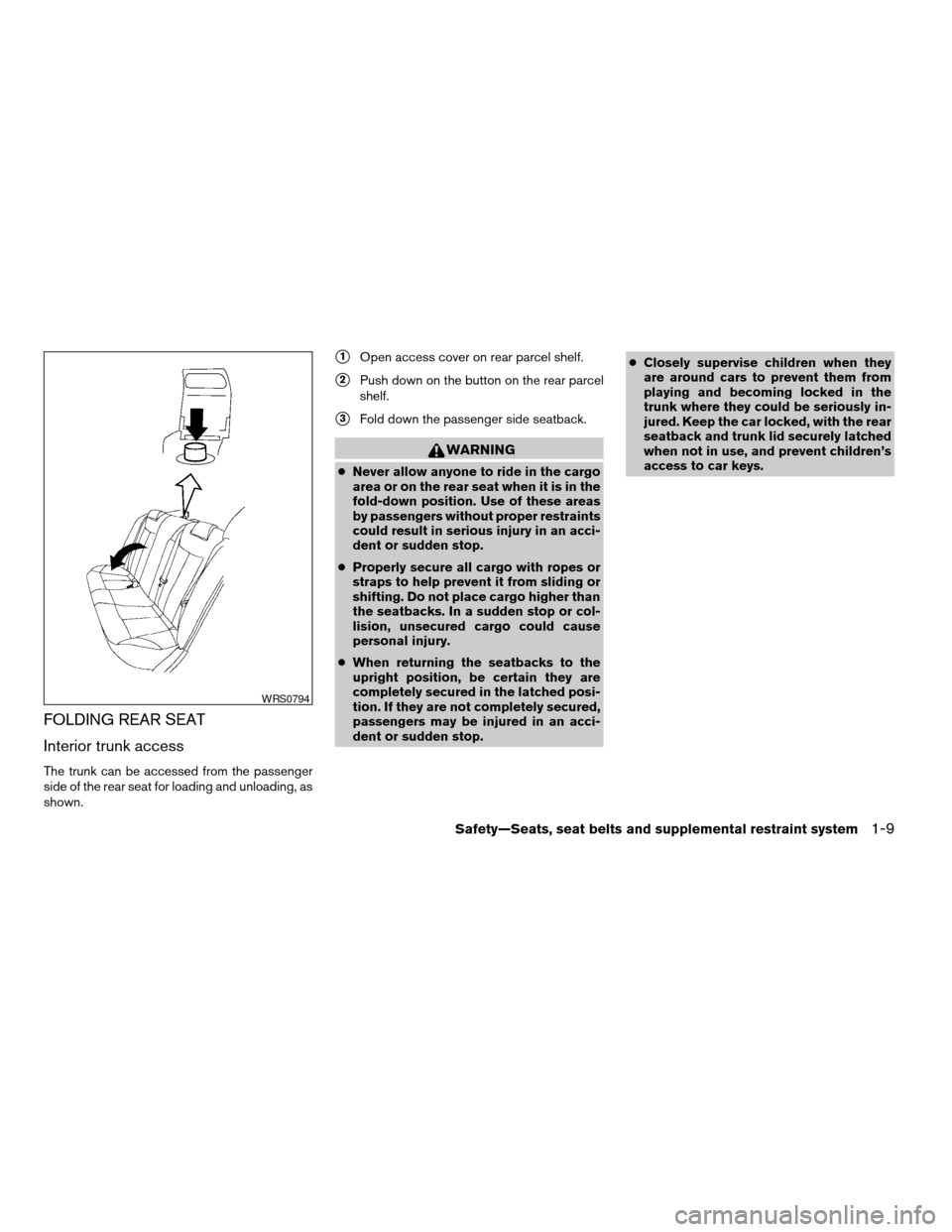
Interior trunk access
The trunk can be accessed from the passenger
side of the rear seat for loading and unloading, as
shown.
s1Open access cover on rear parcel shelf.
s2Push down on the button on the rear parcel
shelf.
s3Fold down the passenger side seatback.
WARNING
cNever allow anyone to ride in the cargo
area or on the rear seat when it is in the
fold-down position. Use of these areas
by passengers without proper restraints
could result in serious injury in an acci-
dent or sudden stop.
cProperly secure all cargo with ropes or
straps to help prevent it from sliding or
shifting. Do not place cargo higher than
the seatbacks. In a sudden stop or col-
lision, unsecured cargo could cause
personal injury.
cWhen returning the seatbacks to the
upright position, be certain they are
completely secured in the latched posi-
tion. If they are not completely secured,
passengers may be injured in an acci-
dent or sudden stop.cClosely supervise children when they
are around cars to prevent them from
playing and becoming locked in the
trunk where they could be seriously in-
jured. Keep the car locked, with the rear
seatback and trunk lid securely latched
when not in use, and prevent children’s
access to car keys.
WRS0794
Safety—Seats, seat belts and supplemental restraint system1-9
ZREVIEW COPYÐ2008 Altima(alt)
Owners ManualÐUSA_English(nna)
03/12/07Ðdebbie
X
Page 73 of 352

Grocery hooks (if so equipped).................2-40
Cargo net (if so equipped)......................2-41
Windows........................................2-41
Power windows...............................2-41
Sunroof (if so equipped)...........................2-43
Automatic sunroof.............................2-43
Interior light......................................2-45
Map lights.......................................2-46
Trunk light.......................................2-46
HomeLinkTuniversal transceiver (if so equipped).....2-46Programming HomeLinkT.......................2-47
Programming HomeLinkTfor Canadian
customers....................................2-48
Operating the HomeLinkTuniversal
transceiver....................................2-48
Programming trouble-diagnosis.................2-49
Clearing the programmed information............2-49
Rolling code programming......................2-49
Reprogramming a single HomeLinkTbutton......2-50
If your vehicle is stolen.........................2-50
ZREVIEW COPYÐ2008 Altima(alt)
Owners ManualÐUSA_English(nna)
03/12/07Ðdebbie
X
Page 75 of 352

20. Traction Control System (TCS) OFF
switch (if so equipped)/Vehicle Dy-
namic Control (VDC) OFF switch
(if so equipped) (P. 5-23, P. 5-24)
Trunk opener (P. 3-16)
Intelligent Key port (P. 5-6)
*: Refer to the separate Navigation System Own-
er’s Manual.
See the page number indicated in paren-
theses for operating details.
1. Tachometer
2. Speedometer
3. Fuel gauge
4. Engine coolant temperature gauge
5. Odometer/twin trip odometer
6. Twin trip odometer change button7. Vehicle information display
8. Instrument brightness control
WIC1259
METERS AND GAUGES
Instruments and controls2-3
ZREVIEW COPYÐ2008 Altima(alt)
Owners ManualÐUSA_English(nna)
03/12/07Ðdebbie
X
Page 93 of 352

Vehicle information display warnings
and indicators
1. Door and trunk open warning
2. Push warning
3. Low fuel warning4. Low windshield washer fluid warning
5. No key warning
6. Parking brake indicator
7. Shift P warning8. Cruise main switch indicator
9. Cruise set switch indicator
10. Engine start operation indicator (CVT mod-
els)
WIC1275
Instruments and controls2-21
ZREVIEW COPYÐ2008 Altima(alt)
Owners ManualÐUSA_English(nna)
03/12/07Ðdebbie
X
Page 94 of 352

11. Engine start operation indicator (MT mod-
els)
12. Intelligent Key insertion indicator
13. Intelligent Key removal indicator
14. Intelligent Key battery discharge indicator
15. Steering lock release malfunction indicator
Door and trunk open warning
This warning illuminates when a door or the trunk
has been opened when the engine is running.
Push warning (CVT models)
After the Shift P warning illuminates, the Push
warning will illuminate if the ignition switch in the
ACC position when the shift selector lever is
moved to the P (Park) position.
See “Shift P warning” in this section for additional
information.
To turn off the Push warning, push the ignition
switch to the ON position and then to the LOCK
position.
Low fuel warning
This warning illuminates when the fuel level in the
fuel tank is getting low. Refuel as soon as it is
convenient, preferably before the fuel gauge
reaches E (Empty) .There will be a small re-serve of fuel in the tank when the fuel
gauge needle reaches E (Empty) .
Low windshield washer fluid warning
This warning illuminates when the windshield
washer fluid is at a low level. Add windshield
washer fluid as necessary. See “Window washer
fluid” in the “Maintenance and do-it-yourself”
section of this manual.
No key warning
This warning illuminates following two condi-
tions:
1. When the ignition switch is pushed and the
Intelligent Key cannot be recognized by the
system. If this warning illuminates, you can-
not start the engine.
Check for the following causes and perform
the assigned remedies:
– The battery of the Intelligent Key carried
with you is discharged completely. Re-
place the battery with a new one.
– The Intelligent Key carried with you is not
registered to the system. Use the regis-
tered Intelligent Key.
– You do not have an Intelligent Key with
you. Carry an Intelligent Key with you.2. When the door is closed with the Intelligent
Key left outside the vehicle and the ignition
switch is in the ACC or ON position. A
chime will also sound.
Parking brake warning
This warning illuminates when the parking brake
is set and the vehicle is driven.
SHIFT P warning (CVT models)
This warning illuminates when the ignition switch
is pushed to stop the engine with the selector
lever in any position except in the P (Park) posi-
tion.
If this warning illuminates, the ignition switch is in
the OFF position. Move the selector lever to the P
(Park) position or push the ignition switch to the
ON position.
An inside warning chime will also sound.
If the shift selector lever is moved to the P (Park)
position, the Push warning will appear. Refer to
“Push warning” in this section.
For additional information about Intelligent Key,
see “Intelligent Key system” in the “Pre-driving
checks and adjustments” section.
Cruise main switch indicator
This indicator illuminates when the cruise control
main switch is pushed. The indicator turns off
2-22Instruments and controls
ZREVIEW COPYÐ2008 Altima(alt)
Owners ManualÐUSA_English(nna)
03/12/07Ðdebbie
X
Page 96 of 352

Your vehicle may have two types of security sys-
tems:
cVehicle security system
cNISSAN Vehicle Immobilizer System
VEHICLE SECURITY SYSTEM
The vehicle security system provides visual and
audible alarm signals if someone opens the doors
or trunk lid when the system is armed. It is not,
however, a motion detection type system that
activates when a vehicle is moved or when a
vibration occurs.The system helps deter vehicle theft but cannot
prevent it, nor can it prevent the theft of interior or
exterior vehicle components in all situations. Al-
ways secure your vehicle even if parking for a
brief period. Never leave your Intelligent Key in
the vehicle, and always lock the vehicle when
unattended. Be aware of your surroundings, and
park in secure, well-lit areas whenever possible.
Many devices offering additional protection, such
as component locks, identification markers, and
tracking systems, are available at auto supply
stores and specialty shops. Your NISSAN dealer
may also offer such equipment. Check with your
insurance company to see if you may be eligible
for discounts for various theft protection features.
How to arm the vehicle security
system
1. Close all windows.(The system can be
armed even if the windows are open.)
2. Remove the Intelligent Key from the vehicle.
3. Close all doors, hood and trunk. Lock all
doors. The doors can be locked with the
Intelligent Key, door handle request switch,
power door lock switch or mechanical key.4. Confirm that the security indicator light
comes on. The security light stays on for
about 30 seconds. The vehicle security sys-
tem is now pre-armed. After about 30 sec-
onds the vehicle security system automati-
cally shifts into the armed phase. The
security light begins to flash once every 3
seconds. If, during the 30-second pre-arm
time period, the driver’s door is unlocked by
the key or the keyfob, or the ignition switch is
pushed to ACC or ON, the system will not
arm.
cEven when the driver and/or passen-
gers are in the vehicle, the system will
activate with all the doors, hood and
trunk lid locked with the ignition
switch in the LOCK position. When
pushing the ignition switch to the ACC
or ON position, the system will be re-
leased.
Vehicle security system activation
The vehicle security system will give the following
alarm:
cThe headlights blink and the horn sounds
intermittently.
LIC0301
SECURITY SYSTEMS
2-24Instruments and controls
ZREVIEW COPYÐ2008 Altima(alt)
Owners ManualÐUSA_English(nna)
03/12/07Ðdebbie
X
Page 97 of 352

cThe alarm automatically turns off after ap-
proximately 50 seconds. However, the alarm
reactivates if the vehicle is tampered with
again. The alarm can be shut off by unlocking
the driver’s door or trunk lid with the key, or
by pressing the
button on the Intelli-
gent Key.
The alarm is activated by:
copening the door or trunk lid without using
the key or Intelligent Key (even if the door is
unlocked by releasing the door inside lock
switch) .
How to stop an activated alarm
The alarm stops only by unlocking the driver’s
door or the trunk lid with the key, or by pressing
the
button on the Intelligent Key.
NISSAN VEHICLE IMMOBILIZER
SYSTEM
The NISSAN Vehicle Immobilizer System will not
allow the engine to start without the use of a
registered key.
Statement related to Section 15 of FCC
Rules for NISSAN Vehicle Immobilizer Sys-
temThis device complies with part 15 of the
FCC Rules and RSS-210 of Industry
Canada. Operation is subject to the follow-
ing two conditions;
(1) This device may not cause harmful in-
terference, and (2) this device must accept
any interference received, including inter-
ference that may cause undesired opera-
tion of the device.
CHANGES OR MODIFICATIONS NOT EX-
PRESSLY APPROVED BY THE PARTY RE-
SPONSIBLE FOR COMPLIANCE COULD
VOID THE USER’S AUTHORITY TO OPER-
ATE THE EQUIPMENT.
Security indicator light
The security indicator light blinks whenever the
ignition switch is in the OFF, LOCK or ACC
position. This function indicates the NISSAN Ve-
hicle Immobilizer System is operational.
If the NISSAN Vehicle Immobilizer System is mal-
functioning, the light will remain on while the
ignition switch is in the ON position.
If the light still remains on and/or the en-
gine will not start, see a NISSAN dealer for
NISSAN Vehicle Immobilizer System ser-
vice as soon as possible. Please bring all
registered keys that you have when visiting
your NISSAN dealer for service.
LIC0474
Instruments and controls2-25
ZREVIEW COPYÐ2008 Altima(alt)
Owners ManualÐUSA_English(nna)
03/12/07Ðdebbie
X