display NISSAN ALTIMA 2012 Owner's Guide
[x] Cancel search | Manufacturer: NISSAN, Model Year: 2012, Model line: ALTIMA, Model: NISSAN ALTIMA 2012Pages: 453, PDF Size: 4.23 MB
Page 203 of 453
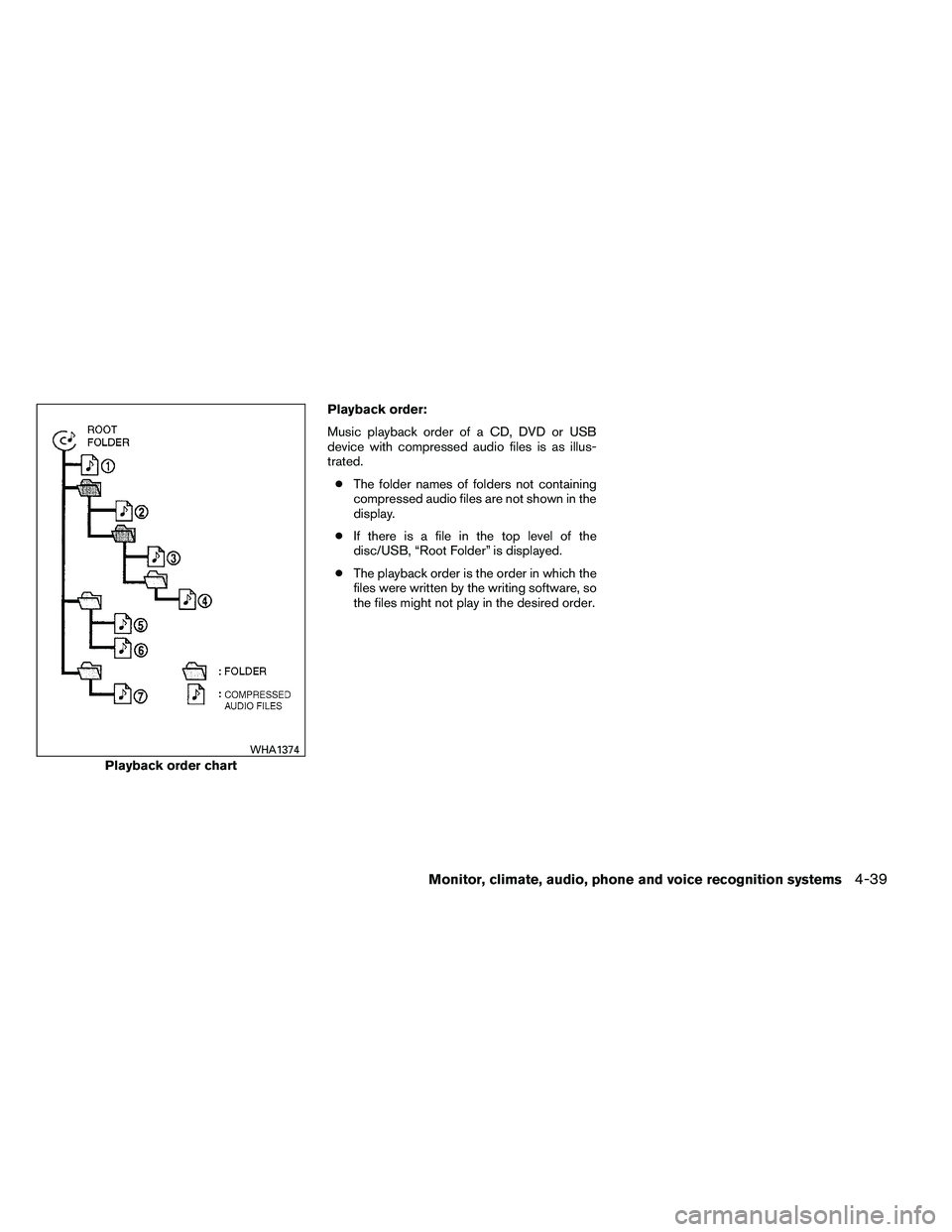
Playback order:
Music playback order of a CD, DVD or USB
device with compressed audio files is as illus-
trated.● The folder names of folders not containing
compressed audio files are not shown in the
display.
● If there is a file in the top level of the
disc/USB, “Root Folder” is displayed.
● The playback order is the order in which the
files were written by the writing software, so
the files might not play in the desired order.
Page 209 of 453
AUDIO button (Bass, Treble, Fade and
Balance)
Press the AUDIO button to change the mode as
follows:
Bass→Treble →Fade →Balance →Beep
ON/OFF →Audio →Bass
To adjust Bass, Treble, Fade and Balance press
the AUDIO button until the desired mode ap-
pears in the display. Press the
TUNE/FF·REW
Page 211 of 453
Each time the button is pressed, the CD ad-
vances 1 additional track. The track number ap-
pears in the display window. (When the last track
on the compact disc is skipped, the first track is
played.)
When
Page 212 of 453
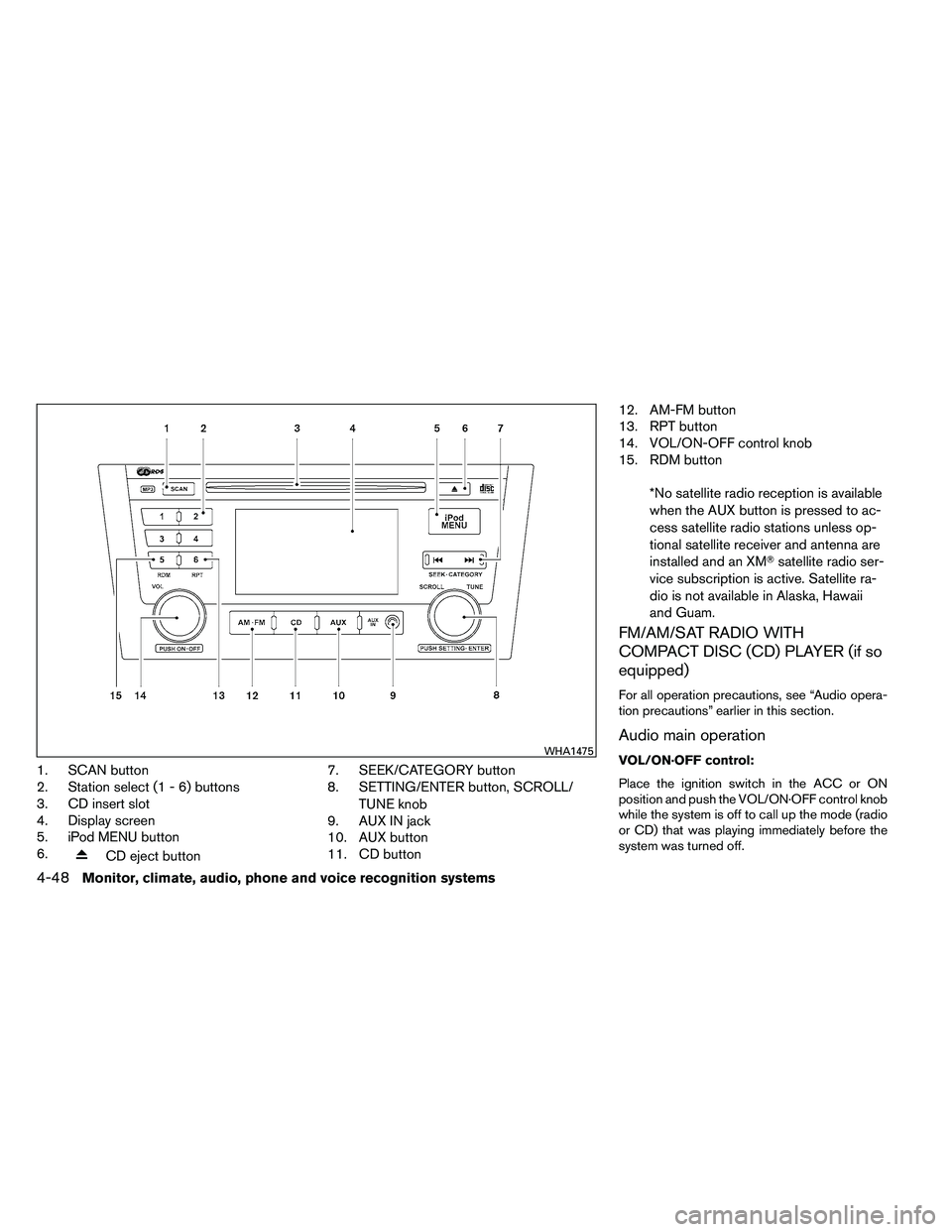
1. SCAN button
2. Station select (1 - 6) buttons
3. CD insert slot
4. Display screen
5. iPod MENU button
6.
Page 213 of 453
To turn the system off, press the VOL/ON·OFF
control knob.
Turn the VOL/ON·OFF control knob to adjust the
volume.
This vehicle may be equipped with Speed Sen-
sitive Volume (SSV) for audio. When this feature
is active, the audio volume changes as the driving
speed changes.
Setting control knob (Audio, Display and
Clock):
Press the SETTING button to adjust the audio,
display and clock settings as follows:
Bass→Treble →Fade →Balance →Speed
Sensitive Volume (SSV) →Brightness →Con-
trast →On-screen Clock →Clock Adjust →
Bass
Once the desired setting is displayed on the
screen, turn the SCROLL/TUNE knob left or right
to adjust the chosen setting. Press the SETTING
button to move to the next setting or wait approxi-
mately five seconds to exit the setting adjustment
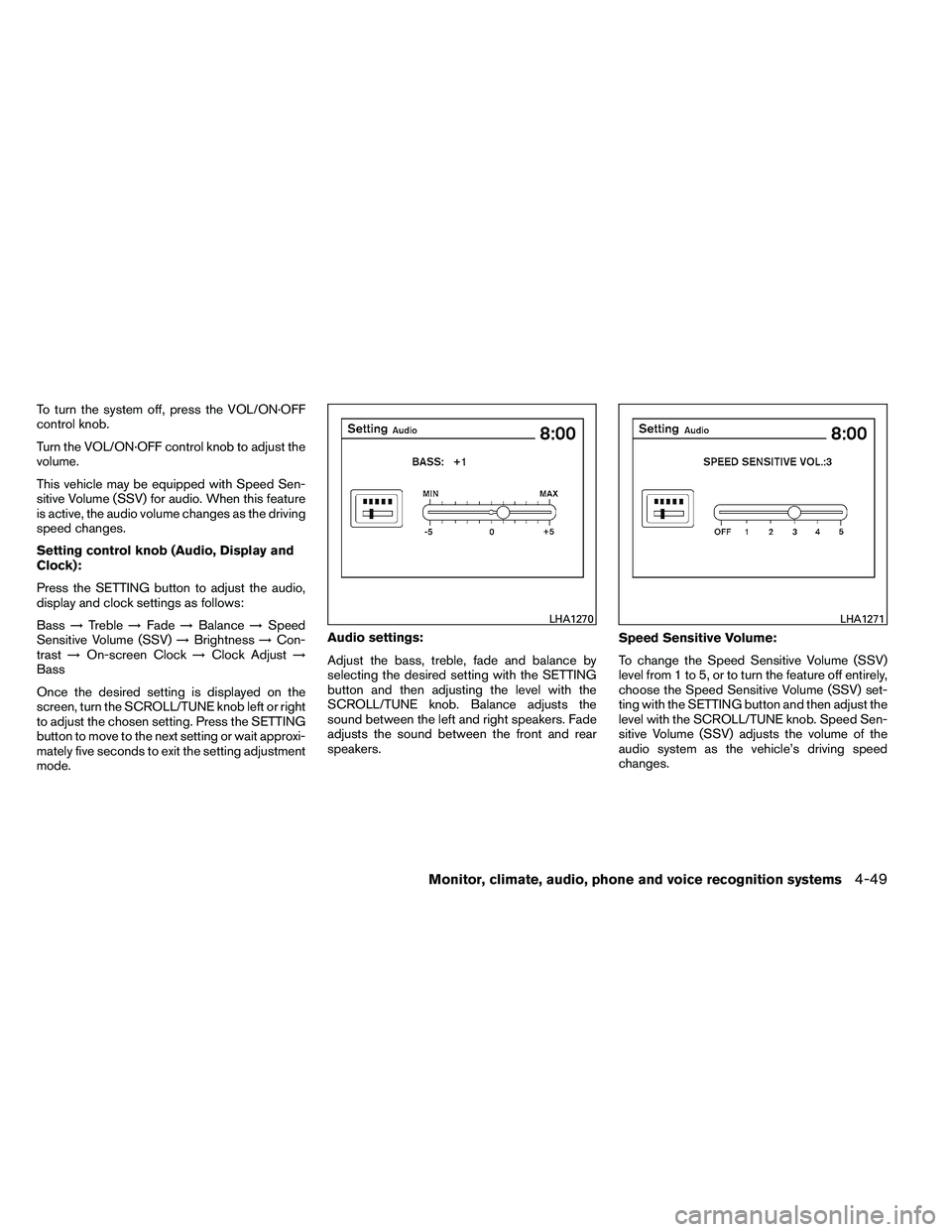
mode. Audio settings:
Adjust the bass, treble, fade and balance by
selecting the desired setting with the SETTING
button and then adjusting the level with the
SCROLL/TUNE knob. Balance adjusts the
sound between the left and right speakers. Fade
adjusts the sound between the front and rear
speakers.
Speed Sensitive Volume:
To change the Speed Sensitive Volume (SSV)
level from 1 to 5, or to turn the feature off entirely,
choose the Speed Sensitive Volume (SSV) set-
ting with the SETTING button and then adjust the
level with the SCROLL/TUNE knob. Speed Sen-
sitive Volume (SSV) adjusts the volume of the
audio system as the vehicle’s driving speed
changes.
Page 214 of 453
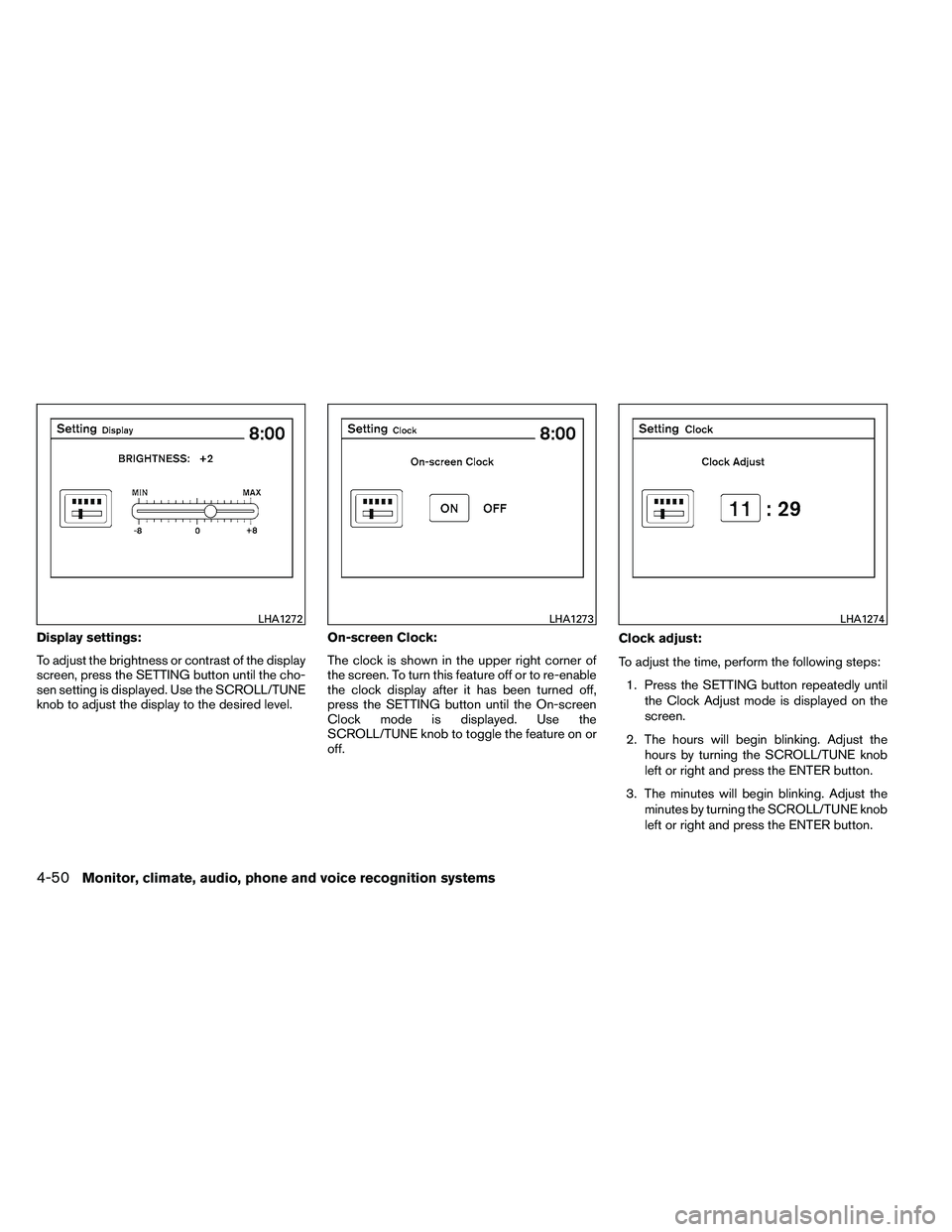
Display settings:
To adjust the brightness or contrast of the display
screen, press the SETTING button until the cho-
sen setting is displayed. Use the SCROLL/TUNE
knob to adjust the display to the desired level.On-screen Clock:
The clock is shown in the upper right corner of
the screen. To turn this feature off or to re-enable
the clock display after it has been turned off,
press the SETTING button until the On-screen
Clock mode is displayed. Use the
SCROLL/TUNE knob to toggle the feature on or
off.Clock adjust:
To adjust the time, perform the following steps:
1. Press the SETTING button repeatedly until the Clock Adjust mode is displayed on the
screen.
2. The hours will begin blinking. Adjust the hours by turning the SCROLL/TUNE knob
left or right and press the ENTER button.
3. The minutes will begin blinking. Adjust the minutes by turning the SCROLL/TUNE knob
left or right and press the ENTER button.
Page 216 of 453
If the battery cable is disconnected or if the fuse
opens, the radio memory will be canceled. In that
case, reset the desired stations.
Compact disc (CD) player operation
If the radio is already operating, it automatically
turns off and the compact disc begins to play.
CD button:
When the CD button is pressed with the system
off and the compact disc loaded, the system will
turn on and the compact disc will start to play.
When the CD button is pressed with a compact
disc loaded and the radio playing, the radio will
automatically be turned off and the compact disc
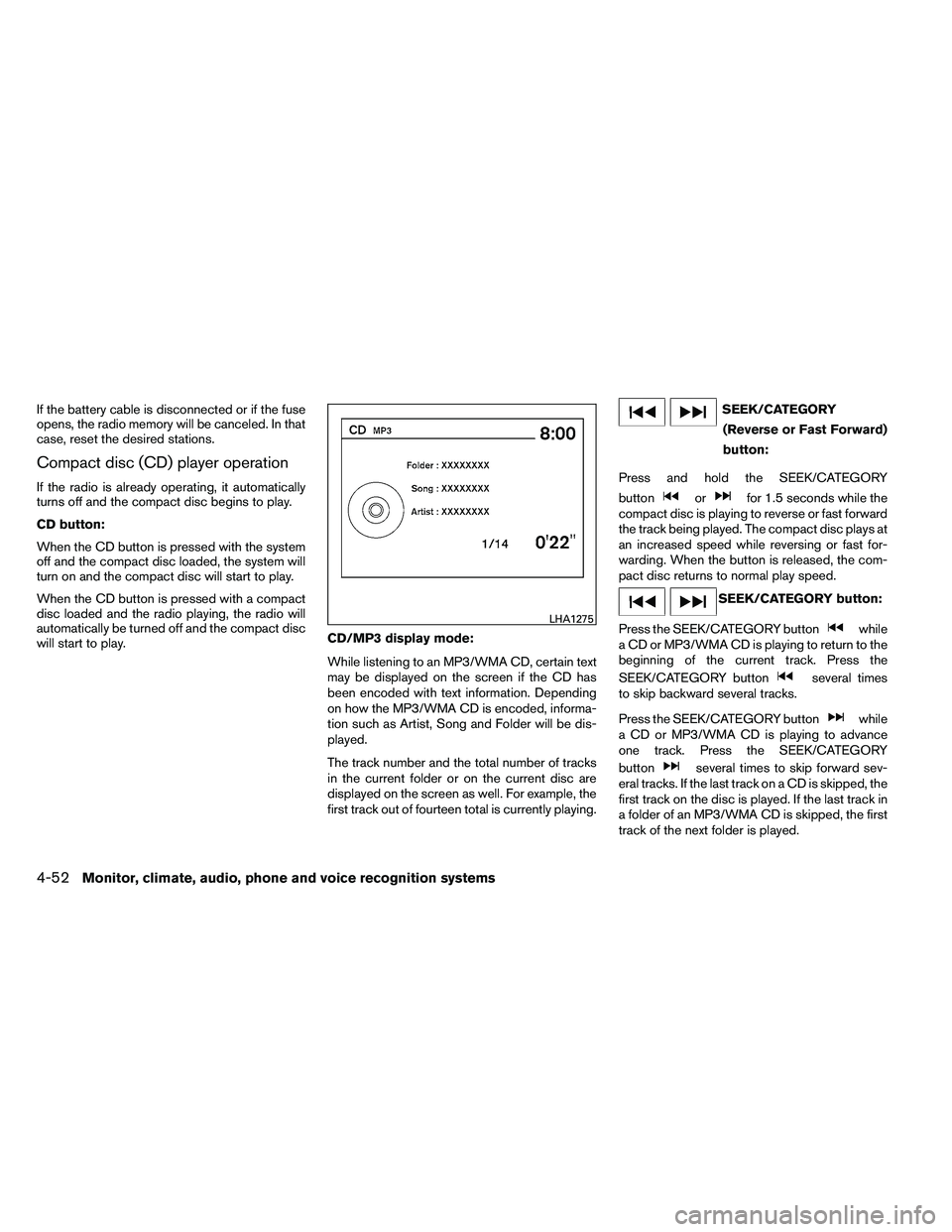
will start to play.CD/MP3 display mode:
While listening to an MP3/WMA CD, certain text
may be displayed on the screen if the CD has
been encoded with text information. Depending
on how the MP3/WMA CD is encoded, informa-
tion such as Artist, Song and Folder will be dis-
played.
The track number and the total number of tracks
in the current folder or on the current disc are
displayed on the screen as well. For example, the
first track out of fourteen total is currently playing.
Page 217 of 453
SCROLL/TUNE knob (MP3/WMA CD
only):
If an MP3/WMA CD with multiple folders is play-
ing, turn the SCROLL/TUNE knob to change
folders. Turn the knob to the left to skip back a
folder. Turn the knob to the right to skip ahead a
folder.
RPT button:
When the RPT button is pressed while a com-
pact disc is playing, the play pattern can be
changed as follows:
CD:
1 TRK RPT←→OFF
CD with MP3 or WMA:
1 FOLDER RPT →1 TRK RPT →OFF
1 TRK RPT: the current track will be repeated.
1 FOLDER RPT: the current folder will be re-
peated.
OFF: No repeat play pattern is applied. The indi-
cator on the display will turn off.
The current play pattern of the CD is displayed on
the screen unless no pattern is applied. RDM button:
When the RDM button is pressed while a com-
pact disc is playing, the play pattern can be
changed as follows:
CD:
1 DISC RDM
←→OFF
CD with MP3 or WMA:
1 DISC RDM →1 FOLDER RDM →OFF
1 DISC RDM: all tracks on the disc will be played
randomly.
1 FOLDER RDM: all tracks in the current folder
will be played randomly.
OFF: No random play pattern is applied. The
indicator on the display will turn off.
The current play pattern of the CD is displayed on
the screen unless no pattern is applied.
AUX button:
The AUX IN jack is located on the CD player. The
AUX IN audio input jack accepts any standard
analog audio input such as from a portable cas-
sette tape/CD player, MP3 player or a laptop
computer. Press the AUX button to play a compatible device
plugged into the AUX IN jack. The AUX button is
also used to switch the audio system to a source
plugged into the USB input jack in the center
console. When a device is plugged into the AUX
IN jack while another device is plugged into the
USB input jack, the AUX button is used to toggle
between the two functions.
For more information about the USB input jack,
see “USB interface” in this section.
Page 227 of 453
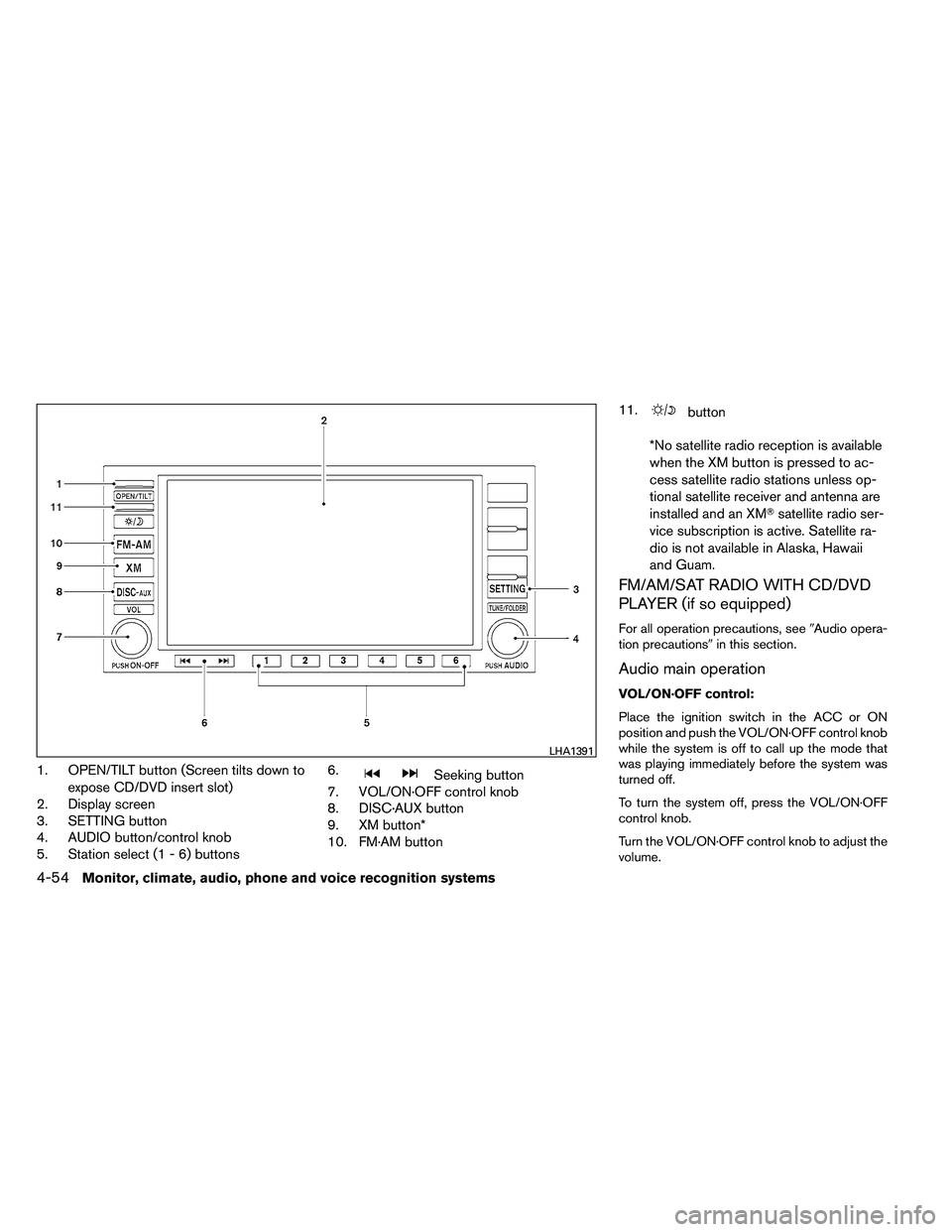
1. OPEN/TILT button (Screen tilts down toexpose CD/DVD insert slot)
2. Display screen
3. SETTING button
4. AUDIO button/control knob
5. Station select (1 - 6) buttons 6.
Page 228 of 453
This vehicle has Speed Sensitive Volume (SSV)
for audio. The audio volume changes as the driv-
ing speed changes.
AUDIO control knob (Bass, Treble, Bal-
ance and Fade):
Press the AUDIO control knob to change the
mode as follows:
Bass→Treble →Balance →Fade
To adjust Bass, Treble, Balance and Fade, press
the AUDIO control knob until the desired mode
appears in the display. Turn the tuning knob to
adjust Bass and Treble to the desired level. You
can also use the tuning knob to adjust Fade and
Balance modes. Fade adjusts the sound level
between the front and rear speakers and Balance
adjusts the sound between the right and left
speakers.
Once you have adjusted the sound quality to the
desired level, press the AUDIO control knob re-
peatedly until the radio or CD display reappears.
If the control knob is not pressed for approxi-
mately 10 seconds, the radio or CD display will
automatically reappear. Speed Sensitive Volume (SSV):
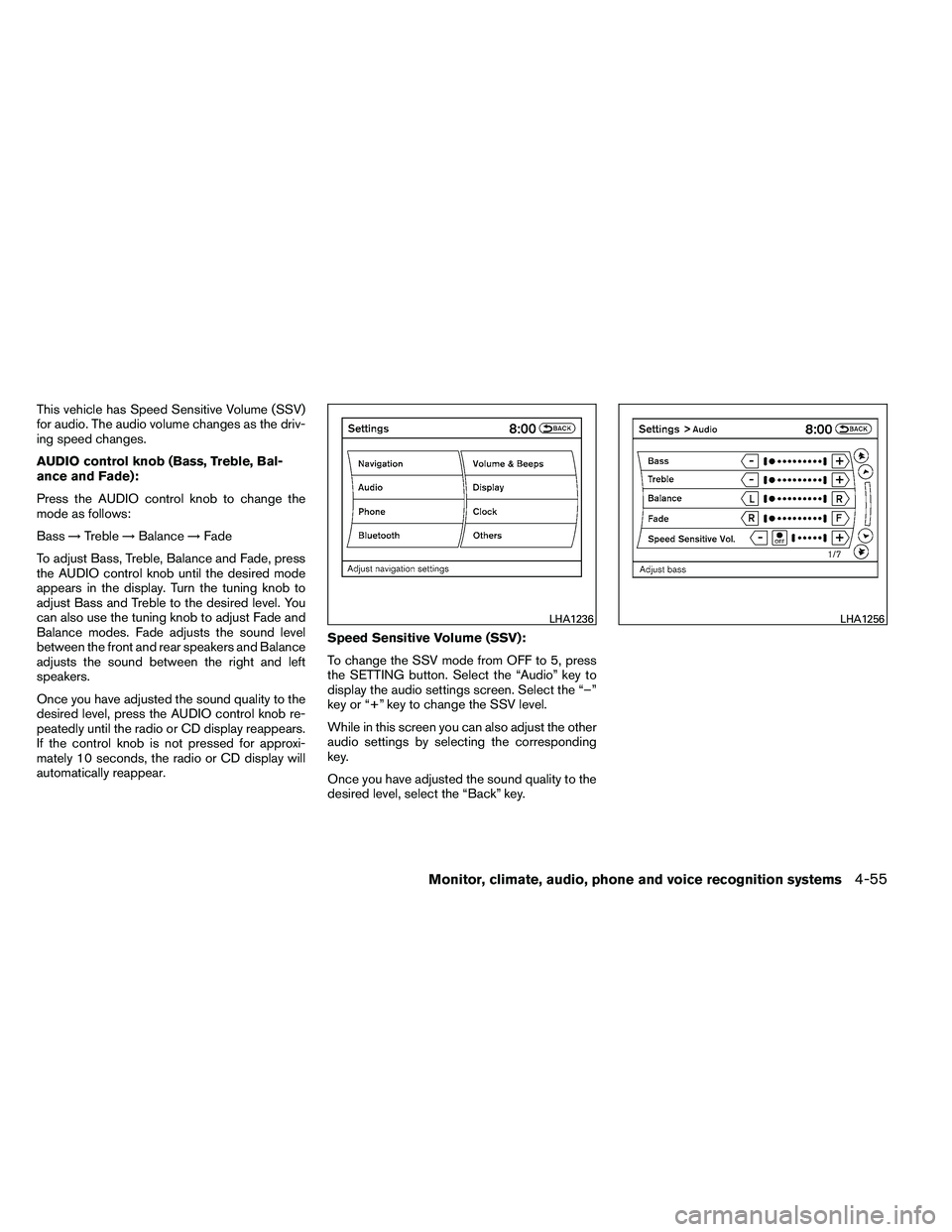
To change the SSV mode from OFF to 5, press
the SETTING button. Select the “Audio” key to
display the audio settings screen. Select the “–”
key or “+” key to change the SSV level.
While in this screen you can also adjust the other
audio settings by selecting the corresponding
key.
Once you have adjusted the sound quality to the
desired level, select the “Back” key.