AUX NISSAN ALTIMA 2018 Owner´s Manual
[x] Cancel search | Manufacturer: NISSAN, Model Year: 2018, Model line: ALTIMA, Model: NISSAN ALTIMA 2018Pages: 467, PDF Size: 5.42 MB
Page 25 of 467
15. Shif t lever (P. 5-14)
16. USB connection port(if so equipped) (P. 4-24)
Aux jack (P. 4-24)
17. Push-button ignition switch
(P. 5-9)
18. Cruise control main/set switches
(if so equipped) (P. 5-41)
Intelligent Cruise Control (ICC)
switches (if so equipped) (P. 5-43)
Bluetooth® Hands-free Phone
System (P. 4-2, 4-54)
19. Tilt/telescopic steering wheel
controls (P. 3-28)
20. Vehicle information display
controls (P. 2-18)
Steering wheel switch for audio
control (P. 4-48)
21. Hood release (P. 3-23)
22. Trunk opener (P. 3-24) Vehicle Dynamic Control (VDC) OFF
switch (P. 2-42)
Heated steering wheel switch
(if so equipped) (P. 2-42)
*: For additional information, refer to the
separate NissanConnect® Owner’s Manual. Refer to the page number indicated in
parentheses for operating details.
Illustrated table of contents0-7
Page 95 of 467
15. Shif t lever (P. 5-14)
16. USB connection port(if so equipped) (P. 4-24)
Aux jack (P. 4-24)
17. Push-button ignition switch
(P. 5-9)
18. Cruise control main/set switches
(if so equipped) (P. 5-41)
Intelligent Cruise Control (ICC)
switches (if so equipped) (P. 5-43)
Bluetooth® Hands-free Phone
System (P. 4-2, 4-54)
19. Tilt/telescopic steering wheel
controls (P. 3-28)
20. Vehicle information display
controls (P. 2-18)
Steering wheel switch for audio
control (P. 4-48)
21. Hood release (P. 3-23)
22. Trunk opener (P. 3-24) Vehicle Dynamic Control (VDC) OFF
switch (P. 2-42)
Heated steering wheel switch
(if so equipped) (P. 2-42)
*: For additional information, refer to the
separate NissanConnect® Owner’s Manual.
Refer to the page number indicated in
parentheses for operating details.
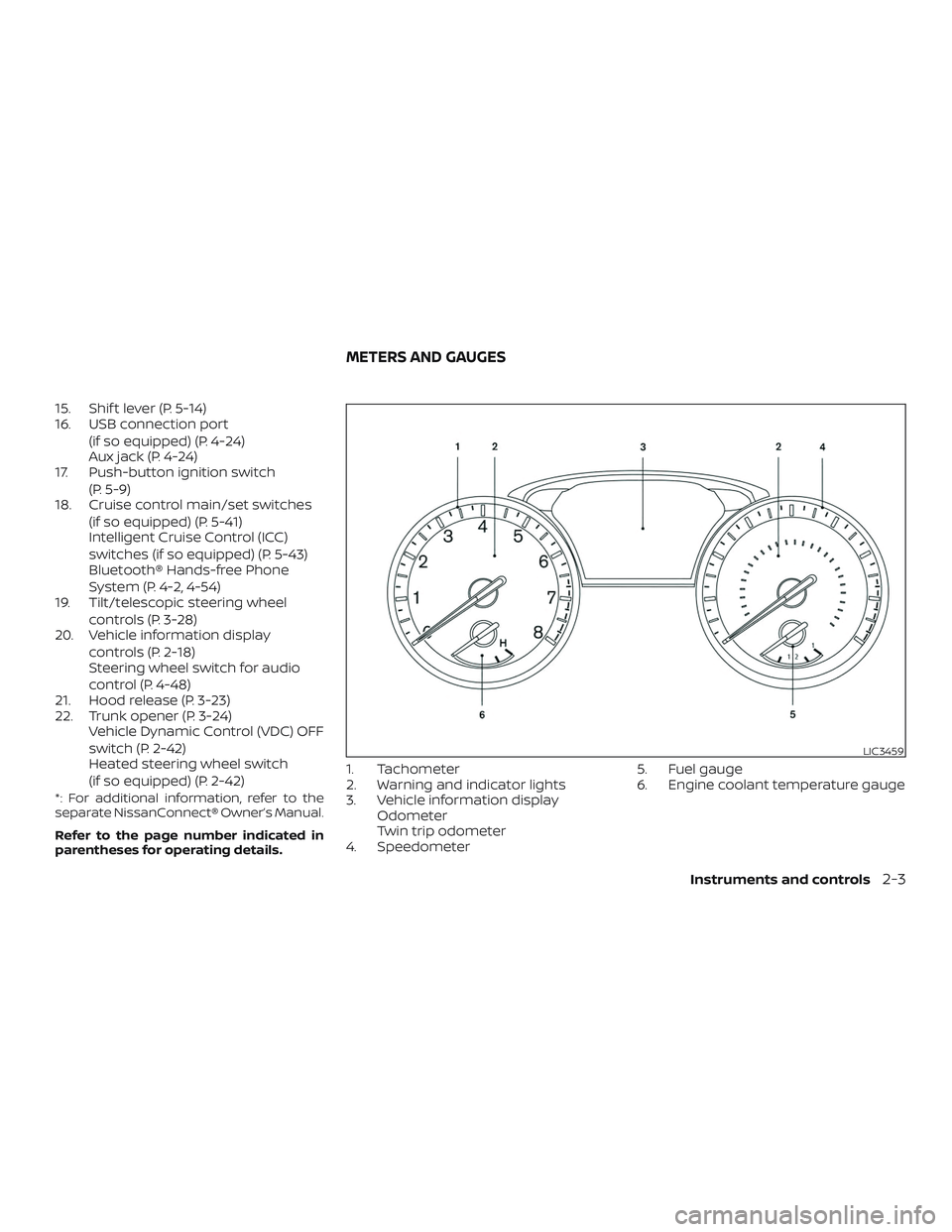
1. Tachometer
2. Warning and indicator lights
3. Vehicle information displayOdometer
Twin trip odometer
4. Speedometer 5. Fuel gauge
6. Engine coolant temperature gauge
LIC3459
METERS AND GAUGES
Instruments and controls2-3
Page 219 of 467
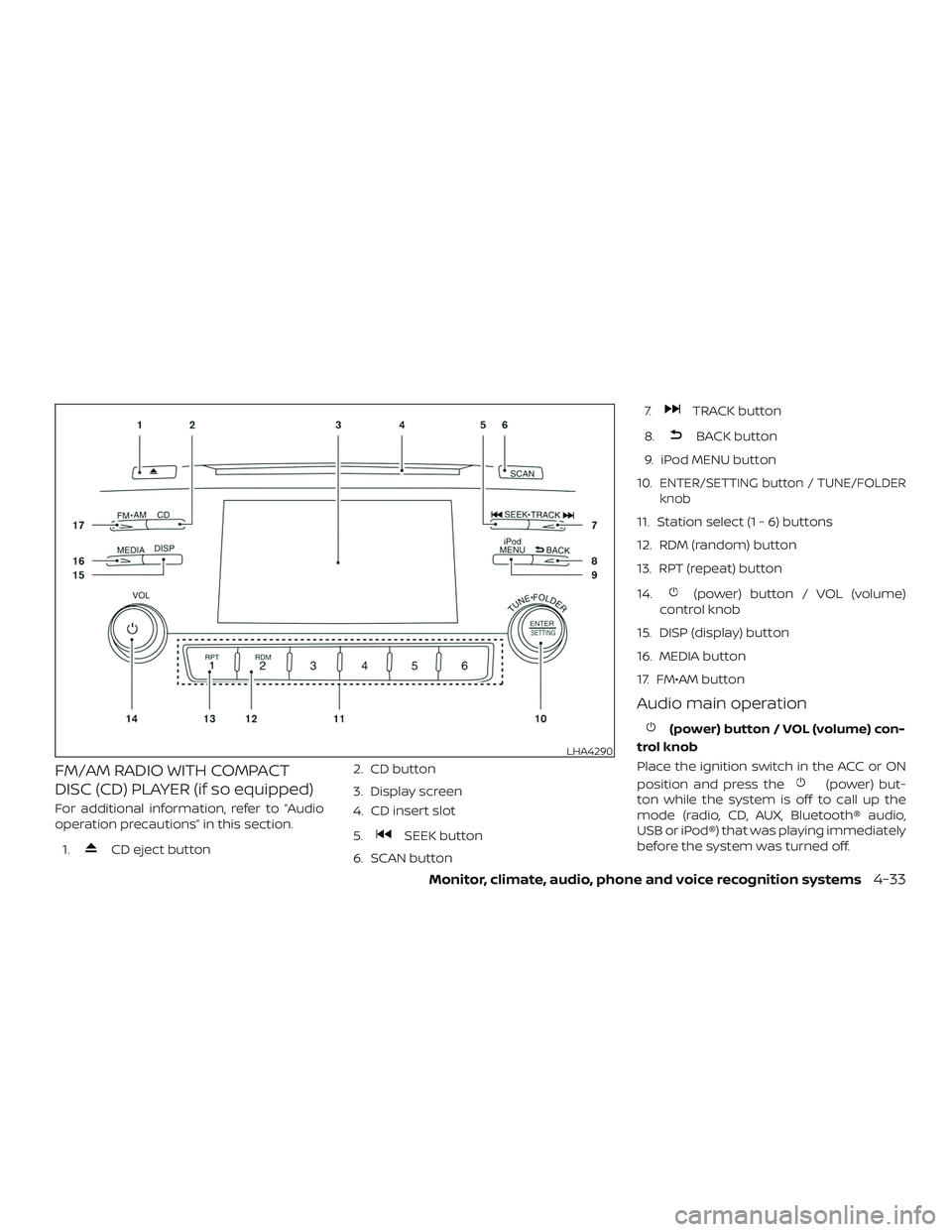
FM/AM RADIO WITH COMPACT
DISC (CD) PLAYER (if so equipped)
For additional information, refer to “Audio
operation precautions” in this section.1.
CD eject button 2. CD button
3. Display screen
4. CD insert slot
5.SEEK button
6. SCAN button 7.
TRACK button
8.
BACK button
9. iPod MENU button
10.
ENTER/SETTING button / TUNE/FOLDER
knob
11. Station select (1 - 6) buttons
12. RDM (random) button
13. RPT (repeat) button
14.
(power) button / VOL (volume)
control knob
15. DISP (display) button
16. MEDIA button
17. FM•AM button
Audio main operation
(power) button / VOL (volume) con-
trol knob
Place the ignition switch in the ACC or ON
position and press the
(power) but-
ton while the system is off to call up the
mode (radio, CD, AUX, Bluetooth® audio,
USB or iPod®) that was playing immediately
before the system was turned off.
LHA4290
Monitor, climate, audio, phone and voice recognition systems4-33
Page 220 of 467
To turn the system off, press the(power) button.
Turn the VOL (volume) control knob to ad-
just the volume.This vehicle is equipped with Speed Sensi-
tive Volume. When this feature is active, the
audio volume changes as the driving
speed changes.
ENTER/SETTING button
Press the ENTER/SETTING button to show
the Settings screen on the display. Turn the
TUNE/FOLDER knob to navigate the op-
tions and then press the ENTER/SETTING
button to make a selection.
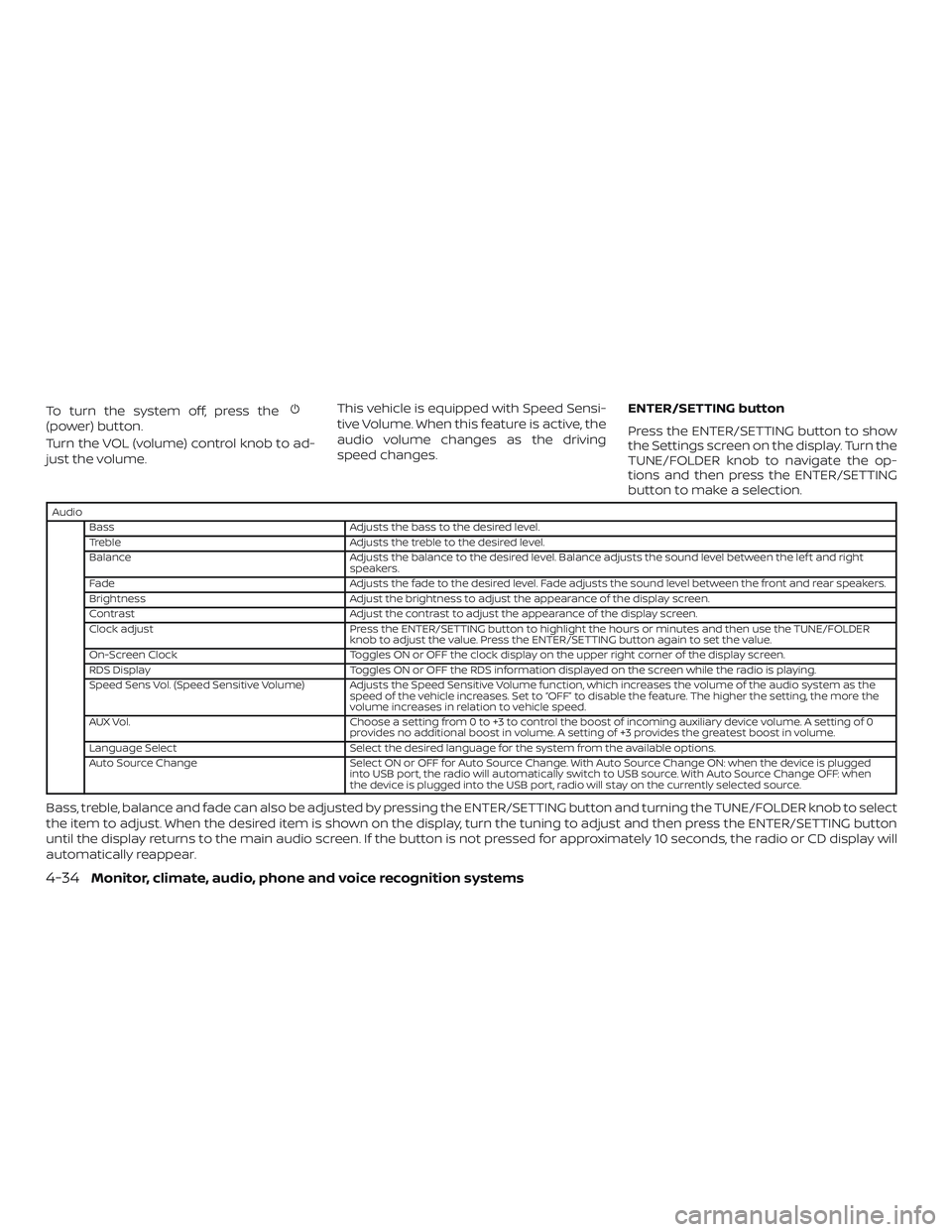
Audio
Bass Adjusts the bass to the desired level.
Treble Adjusts the treble to the desired level.
Balance Adjusts the balance to the desired level. Balance adjusts the sound level between the lef t and right
speakers.
Fade Adjusts the fade to the desired level. Fade adjusts the sound level between the front and rear speakers.
Brightness Adjust the brightness to adjust the appearance of the display screen.
Contrast Adjust the contrast to adjust the appearance of the display screen.
Clock adjust Press the ENTER/SETTING button to highlight the hours or minutes and then use the TUNE/FOLDER
knob to adjust the value. Press the ENTER/SETTING button again to set the value.
On-Screen Clock Toggles ON or OFF the clock display on the upper right corner of the display screen.
RDS Display Toggles ON or OFF the RDS information displayed on the screen while the radio is playing.
Speed Sens Vol. (Speed Sensitive Volume) Adjusts the Speed Sensitive Volume function, which increases the volume of the audio system as the speed of the vehicle increases. Set to “OFF” to disable the feature. The higher the setting, the more the
volume increases in relation to vehicle speed.
AUX Vol. Choose a setting from 0 to +3 to control the boost of incoming auxiliary device volume. A setting of 0
provides no additional boost in volume. A setting of +3 provides the greatest boost in volume.
Language Select Select the desired language for the system from the available options.
Auto Source Change Select ON or OFF for Auto Source Change. With Auto Source Change ON: when the device is plugged
into USB port, the radio will automatically switch to USB source. With Auto Source Change OFF: when
the device is plugged into the USB port, radio will stay on the currently selected source.
Bass, treble, balance and fade can also be adjusted by pressing the ENTER/SETTING button and turning the TUNE/FOLDER knob to select
the item to adjust. When the desired item is shown on the display, turn the tuning to adjust and then press the ENTER/SETTING button
until the display returns to the main audio screen. If the button is not pressed for approximately 10 seconds, the radio or CD display will
automatically reappear.
4-34Monitor, climate, audio, phone and voice recognition systems
Page 224 of 467
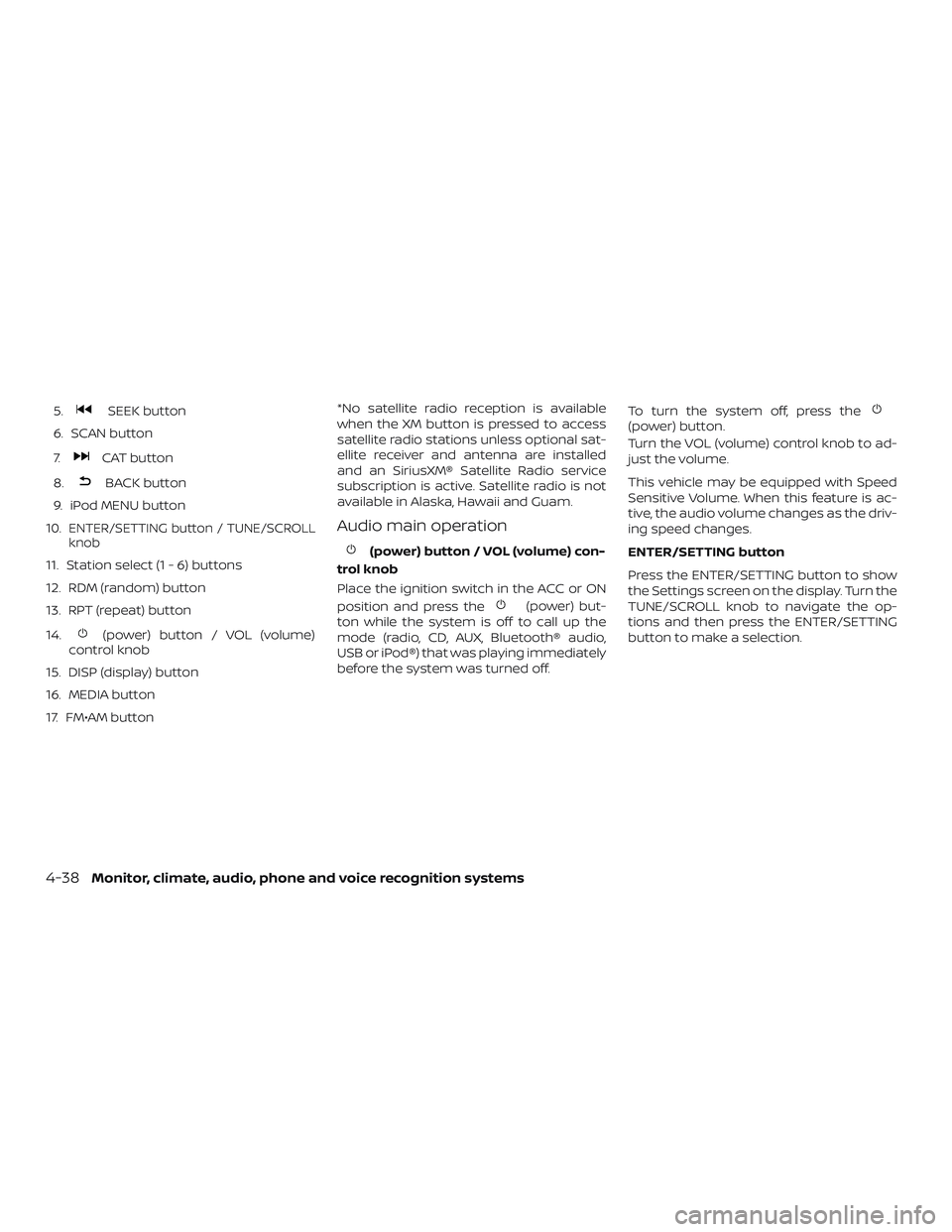
5.SEEK button
6. SCAN button
7.
CAT button
8.
BACK button
9. iPod MENU button
10.
ENTER/SETTING button / TUNE/SCROLL
knob
11. Station select (1 - 6) buttons
12. RDM (random) button
13. RPT (repeat) button
14.
(power) button / VOL (volume)
control knob
15. DISP (display) button
16. MEDIA button
17. FM•AM button *No satellite radio reception is available
when the XM button is pressed to access
satellite radio stations unless optional sat-
ellite receiver and antenna are installed
and an SiriusXM® Satellite Radio service
subscription is active. Satellite radio is not
available in Alaska, Hawaii and Guam.
Audio main operation
(power) button / VOL (volume) con-
trol knob
Place the ignition switch in the ACC or ON
position and press the
(power) but-
ton while the system is off to call up the
mode (radio, CD, AUX, Bluetooth® audio,
USB or iPod®) that was playing immediately
before the system was turned off. To turn the system off, press the
(power) button.
Turn the VOL (volume) control knob to ad-
just the volume.
This vehicle may be equipped with Speed
Sensitive Volume. When this feature is ac-
tive, the audio volume changes as the driv-
ing speed changes.
ENTER/SETTING button
Press the ENTER/SETTING button to show
the Settings screen on the display. Turn the
TUNE/SCROLL knob to navigate the op-
tions and then press the ENTER/SETTING
button to make a selection.
4-38Monitor, climate, audio, phone and voice recognition systems
Page 225 of 467
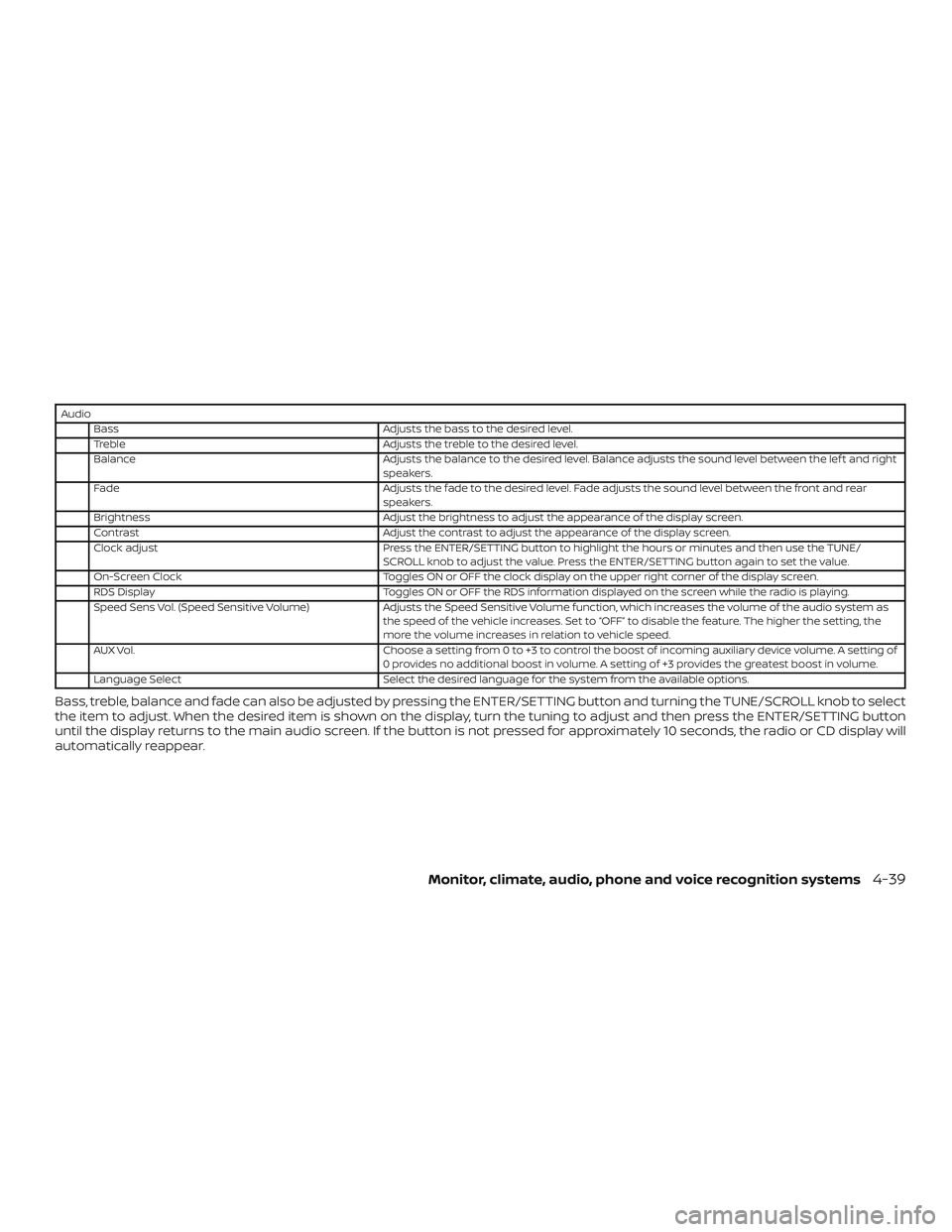
AudioBass Adjusts the bass to the desired level.
Treble Adjusts the treble to the desired level.
Balance Adjusts the balance to the desired level. Balance adjusts the sound level between the lef t and right speakers.
Fade Adjusts the fade to the desired level. Fade adjusts the sound level between the front and rear
speakers.
Brightness Adjust the brightness to adjust the appearance of the display screen.
Contrast Adjust the contrast to adjust the appearance of the display screen.
Clock adjust Press the ENTER/SETTING button to highlight the hours or minutes and then use the TUNE/
SCROLL knob to adjust the value. Press the ENTER/SETTING button again to set the value.
On-Screen Clock Toggles ON or OFF the clock display on the upper right corner of the display screen.
RDS Display Toggles ON or OFF the RDS information displayed on the screen while the radio is playing.
Speed Sens Vol. (Speed Sensitive Volume) Adjusts the Speed Sensitive Volume function, which increases the volume of the audio system as
the speed of the vehicle increases. Set to “OFF” to disable the feature. The higher the setting, the
more the volume increases in relation to vehicle speed.
AUX Vol. Choose a setting from 0 to +3 to control the boost of incoming auxiliary device volume. A setting of
0 provides no additional boost in volume. A setting of +3 provides the greatest boost in volume.
Language Select Select the desired language for the system from the available options.
Bass, treble, balance and fade can also be adjusted by pressing the ENTER/SETTING button and turning the TUNE/SCROLL knob to select
the item to adjust. When the desired item is shown on the display, turn the tuning to adjust and then press the ENTER/SETTING button
until the display returns to the main audio screen. If the button is not pressed for approximately 10 seconds, the radio or CD display will
automatically reappear.
Monitor, climate, audio, phone and voice recognition systems4-39
Page 229 of 467
CAUTION
∙ Do not force the USB device into theUSB connection port. Inserting the
USB device tilted or up-side-down
into the port may damage the port.
Make sure that the USB device is con-
nected correctly into the USB connec-
tion port.
∙ Do not grab the USB port cover (if so equipped) when pulling the USB de-
vice out of the port. This could dam-
age the port and the cover.
∙ Do not leave the USB cable in a place where it can be pulled unintentionally.
Pulling the cable may damage the
port.
For additional information, refer to your de-
vice manufacturer’s owner information re-
garding the proper use and care of the
device.
The USB port is located in the center con-
sole. Insert the USB device into the connec-
tion port.
When a compatible storage device is
plugged into the connection port, compat-
ible audio files on the storage device can be
played through the vehicle’s audio system.
Audio file operation
MEDIA button
Place the ignition switch in the ON or ACC
position and press the MEDIA button to
switch to the USB input mode. If a CD is
playing or another audio source is plugged
in through the AUX IN jack, the MEDIA but-
ton toggles between the three sources.
Play information
Information about the audio files being
played can be displayed on the display
screen of the vehicle’s audio system. De-
pending on how the audio files are en-
coded, information such as Folder, Song
and Artist will be displayed.
The track number and number of total
tracks in the folder are displayed on the
screen as well.
SEEK/CAT and TRACK (Reverse or Fast For-
ward) buttons
Press and hold the
orSEEK/CAT
and TRACK buttons for 1.5 seconds while an
audio file on the USB device is playing to
reverse or fast forward the track being
played. The track plays at an increased
speed while reversing or fast forwarding. When the button is released, the audio file
returns to normal play speed.
SEEK/CAT and TRACK
buttons
Press the SEEK/CAT and TRACK
buttons
while an audio file on the
USB device is playing to return to the begin-
ning of the current track. Press the
SEEK/CAT and TRACK buttons
sev-
eral times to skip backward several tracks.
Press the SEEK/CAT and TRACK
buttons
while an audio file on the
USB device is playing to advance one track.
Press the SEEK/CAT and TRACK
buttons
several times to skip forward
several tracks. If the last track in a folder on
the USB device is skipped, the first track of
the next folder is played.
RDM (random) button
When the RDM button is pressed while an
audio file on the USB device is playing, the
play pattern can be changed as follows:
All Random →1 Folder Random →OFF
All Random: all tracks on the USB device will
be played randomly.
1 Folder Random: all tracks in the current
folder will be played randomly.
Monitor, climate, audio, phone and voice recognition systems4-43
Page 235 of 467
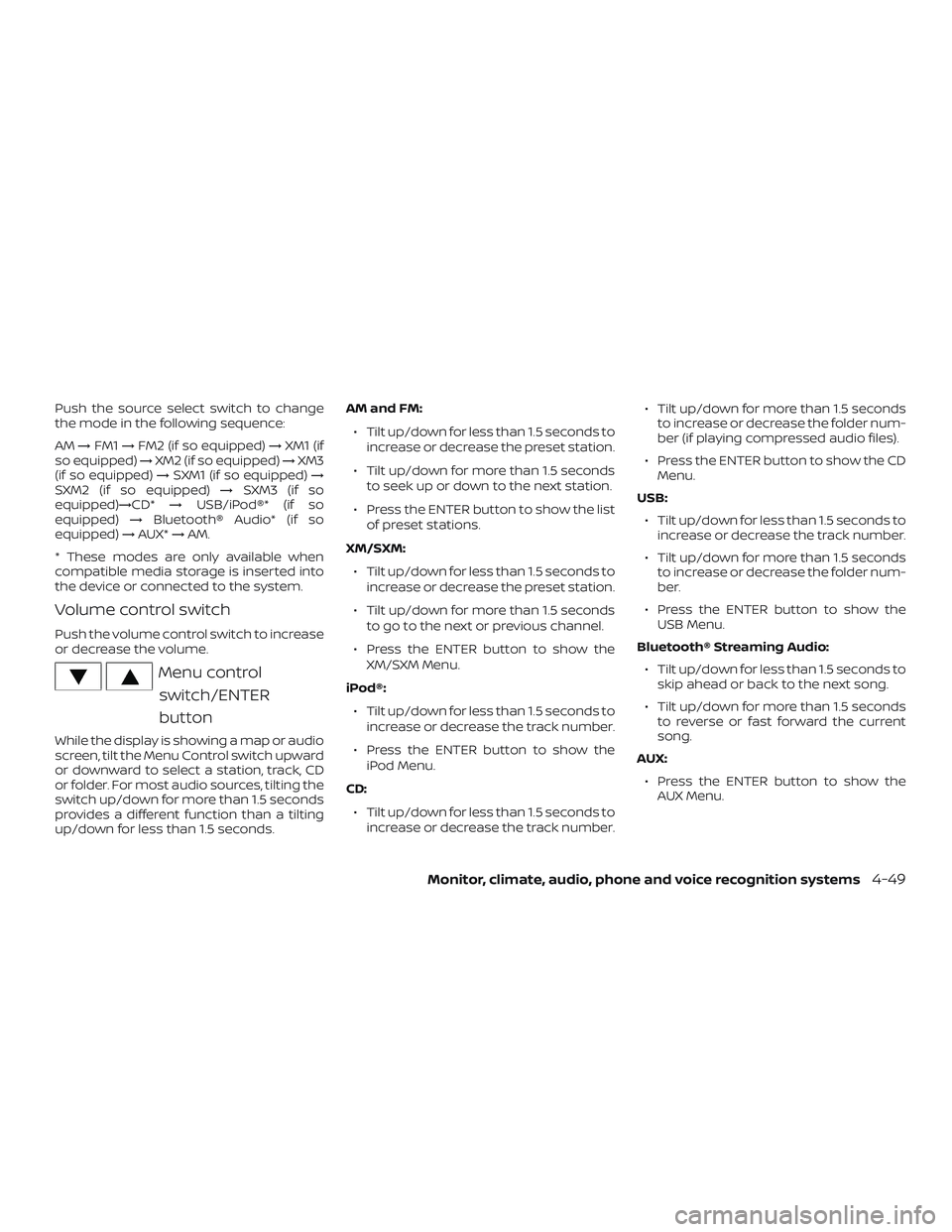
Push the source select switch to change
the mode in the following sequence:
AM→FM1 →FM2 (if so equipped) →XM1 (if
so equipped) →XM2 (if so equipped) →XM3
(if so equipped) →SXM1 (if so equipped) →
SXM2 (if so equipped) →SXM3 (if so
equipped)→CD* →USB/iPod®* (if so
equipped) →Bluetooth® Audio* (if so
equipped) →AUX* →AM.
* These modes are only available when
compatible media storage is inserted into
the device or connected to the system.
Volume control switch
Push the volume control switch to increase
or decrease the volume.
Menu control switch/ENTER
button
While the display is showing a map or audio
screen, tilt the Menu Control switch upward
or downward to select a station, track, CD
or folder. For most audio sources, tilting the
switch up/down for more than 1.5 seconds
provides a different function than a tilting
up/down for less than 1.5 seconds. AM and FM:
∙ Tilt up/down for less than 1.5 seconds to increase or decrease the preset station.
∙ Tilt up/down for more than 1.5 seconds to seek up or down to the next station.
∙ Press the ENTER button to show the list of preset stations.
XM/SXM: ∙ Tilt up/down for less than 1.5 seconds to increase or decrease the preset station.
∙ Tilt up/down for more than 1.5 seconds to go to the next or previous channel.
∙ Press the ENTER button to show the XM/SXM Menu.
iPod®: ∙ Tilt up/down for less than 1.5 seconds to increase or decrease the track number.
∙ Press the ENTER button to show the iPod Menu.
CD: ∙ Tilt up/down for less than 1.5 seconds to increase or decrease the track number. ∙ Tilt up/down for more than 1.5 seconds
to increase or decrease the folder num-
ber (if playing compressed audio files).
∙ Press the ENTER button to show the CD Menu.
USB: ∙ Tilt up/down for less than 1.5 seconds to increase or decrease the track number.
∙ Tilt up/down for more than 1.5 seconds to increase or decrease the folder num-
ber.
∙ Press the ENTER button to show the USB Menu.
Bluetooth® Streaming Audio: ∙ Tilt up/down for less than 1.5 seconds to skip ahead or back to the next song.
∙ Tilt up/down for more than 1.5 seconds to reverse or fast forward the current
song.
AUX: ∙ Press the ENTER button to show the AUX Menu.
Monitor, climate, audio, phone and voice recognition systems4-49
Page 238 of 467
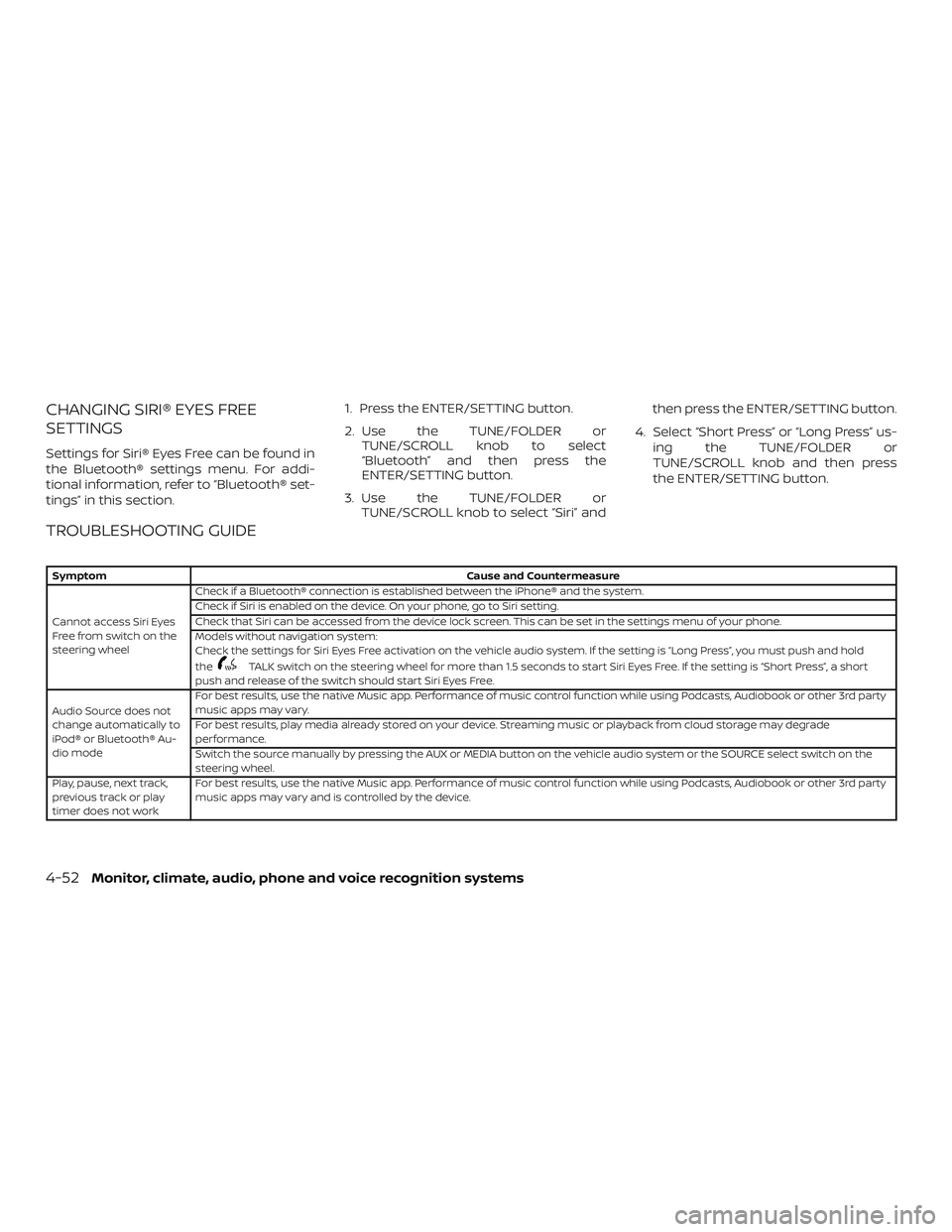
CHANGING SIRI® EYES FREE
SETTINGS
Settings for Siri® Eyes Free can be found in
the Bluetooth® settings menu. For addi-
tional information, refer to “Bluetooth® set-
tings” in this section.1. Press the ENTER/SETTING button.
2. Use the TUNE/FOLDER or
TUNE/SCROLL knob to select
“Bluetooth” and then press the
ENTER/SETTING button.
3. Use the TUNE/FOLDER or TUNE/SCROLL knob to select “Siri” and then press the ENTER/SETTING button.
4. Select “Short Press” or “Long Press” us- ing the TUNE/FOLDER or
TUNE/SCROLL knob and then press
the ENTER/SETTING button.
TROUBLESHOOTING GUIDE
Symptom Cause and Countermeasure
Cannot access Siri Eyes
Freefromswitchonthe
steering wheel Check if a Bluetooth® connection is established between the iPhone® and the system.
Check if Siri is enabled on the device. On your phone, go to Siri setting.
Check that Siri can be accessed from the device lock screen. This can be set in the settings menu of your phone.
Models without navigation system:
Check the settings for Siri Eyes Free activation on the vehicle audio system. If the setting is “Long Press”, you must push and hold
the
TALK switch on the steering wheel for more than 1.5 seconds to start Siri Eyes Free. If the setting is “Short Press”, a short
push and release of the switch should start Siri Eyes Free.
Audio Source does not
change automatically to
iPod® or Bluetooth® Au-
dio mode For best results, use the native Music app. Performance of music control function while using Podcasts, Audiobook or other 3rd party
music apps may vary.
For best results, play media already stored on your device. Streaming music or playback from cloud storage may degrade
performance.
Switch the source manually by pressing the AUX or MEDIA button on the vehicle audio system or the SOURCE select switch on the
steering wheel.
Play, pause, next track,
previous track or play
timer does not work For best results, use the native Music app. Performance of music control function while using Podcasts, Audiobook or other 3rd party
music apps may vary and is controlled by the device.
4-52Monitor, climate, audio, phone and voice recognition systems
Page 286 of 467
For Canada
Applicable law: Canada 310
This device complies with Industry Canada
licence-exempt RSS standard(s). Operation
is subject to the following two conditions:1. This device may not cause interference, and
2. This device must accept any interfer- ence, including interference that may
cause undesired operation of the de-
vice.
Frequency bands: 24.05 – 24.25GHz
Output power: less than 20 milliwatts
Droit applicable: Canada 310
Le présent appareil est conforme aux CNR
d’Industrie Canada applicables aux appar-
eils radio exempts de licence. L’exploitation
est autorisée aux deux conditions suiv-
antes: 1. L’appareil ne doit pas produire de brouillage, et
2. L’utilisateur de l’appareil doit accepter tout brouillage radioélectrique subi,
même si le brouillage est susceptible
d’en compromettre le fonctionnement. Bandes de fréquences: 24.05 - 24.25GHz
Puissance émise: Moins de 20 milliwattsWARNING
Failure to follow the warnings and in-
structions for proper use of the RCTA
could result in serious injury or death.
∙ The RCTA system is not a replacement
for proper driving procedures and is
not designed to prevent contact with
vehicles or objects. When backing out
of a parking space, always use the
side and rear mirrors and turn and
look in the direction your vehicle will
move. Never rely solely on the RCTA
system.
The RCTA system will assist you when
backing out from a parking space. When
the vehicle is in reverse, the system is de-
signed to detect other vehicles approach-
ing from the right or lef t of the vehicle. If the
system detects cross traffic, it will alert you.
REAR CROSS TRAFFIC ALERT (RCTA)
(if so equipped)
5-32Starting and driving