lights NISSAN ALTIMA 2020 Owner´s Manual
[x] Cancel search | Manufacturer: NISSAN, Model Year: 2020, Model line: ALTIMA, Model: NISSAN ALTIMA 2020Pages: 559, PDF Size: 6.3 MB
Page 96 of 559
Front-door pockets.......................... 2-58
Seatback pockets ........................... 2-58
Glovebox.................................... 2-59
Console box ................................. 2-59
Overhead sunglasses storage ...............2-59
Cup holders ................................. 2-60
Windows ....................................... 2-61
Power windows ............................. 2-61
Moonroof (if so equipped) ......................2-64
Power moonroof ............................ 2-64
Interior lights ................................... 2-66
Map lights ................................... 2-66
Personal lights .............................. 2-67Trunk light
...................................... 2-67
HomeLink® Universal Transceiver
(if so equipped) ................................. 2-67
Programming HomeLink® ...................2-68
Programming HomeLink® for Canadian
customers and gate openers ................2-69
Operating the HomeLink® Universal
Transceiver .................................. 2-70
Programming trouble-diagnosis ............2-70
Clearing the programmed information ......2-71
Reprogramming a single HomeLink®
button....................................... 2-71
If your vehicle is stolen ....................... 2-71
Page 97 of 559
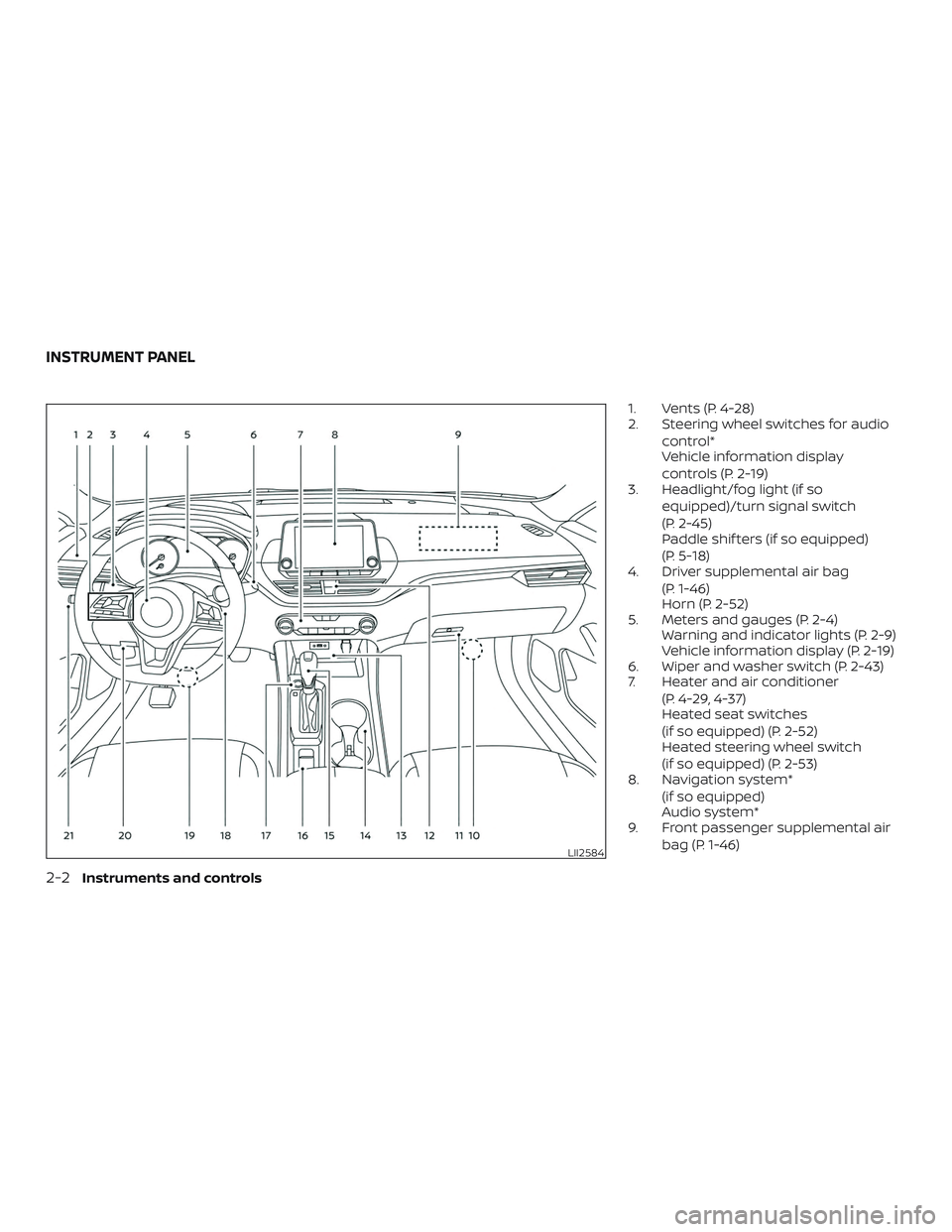
1. Vents (P. 4-28)
2. Steering wheel switches for audiocontrol*
Vehicle information display
controls (P. 2-19)
3. Headlight/fog light (if so
equipped)/turn signal switch
(P. 2-45)
Paddle shif ters (if so equipped)
(P. 5-18)
4. Driver supplemental air bag
(P. 1-46)
Horn (P. 2-52)
5. Meters and gauges (P. 2-4) Warning and indicator lights (P. 2-9)
Vehicle information display (P. 2-19)
6. Wiper and washer switch (P. 2-43)
7. Heater and air conditioner
(P. 4-29, 4-37)
Heated seat switches
(if so equipped) (P. 2-52)
Heated steering wheel switch
(if so equipped) (P. 2-53)
8. Navigation system*
(if so equipped)
Audio system*
9. Front passenger supplemental air
bag (P. 1-46)
LII2584
INSTRUMENT PANEL
2-2Instruments and controls
Page 99 of 559
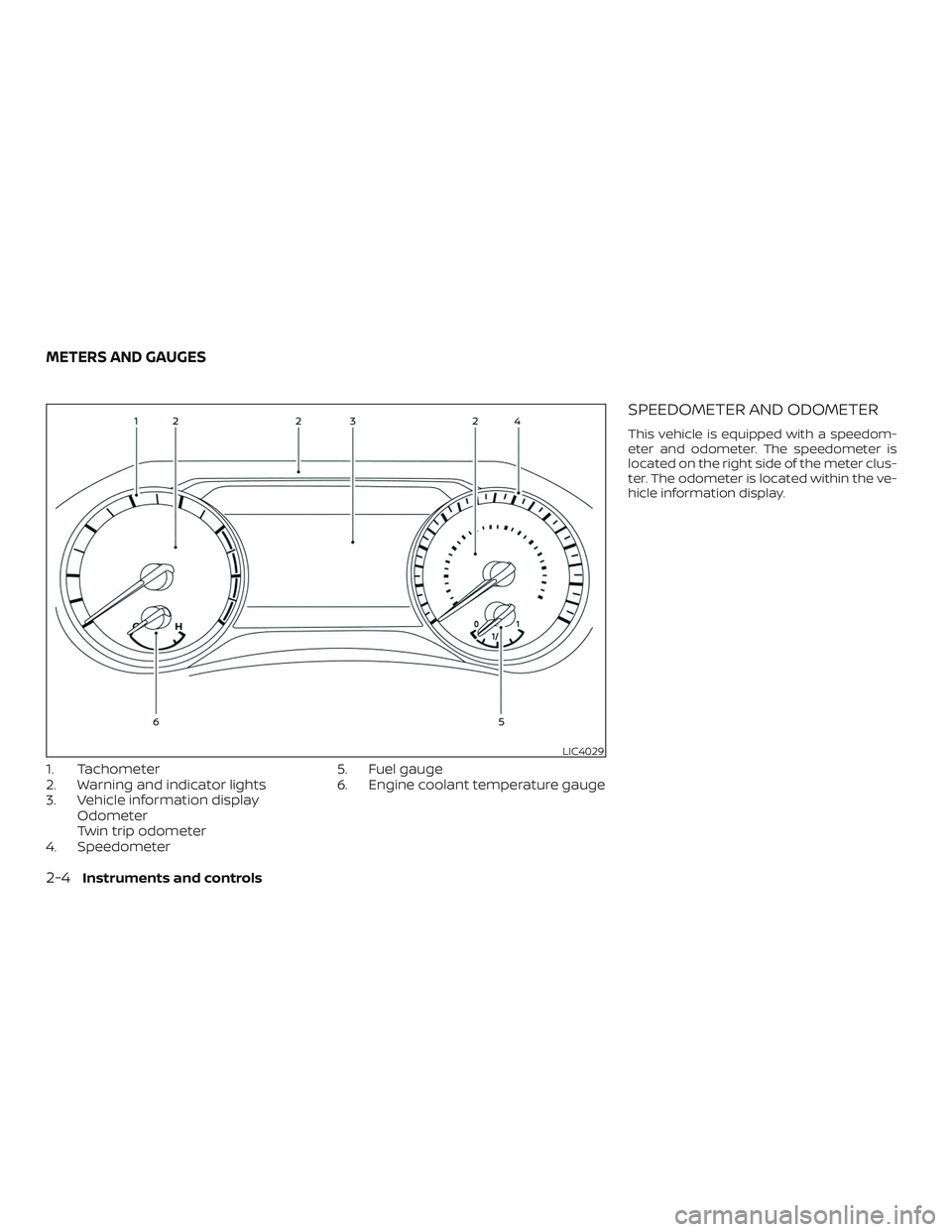
1. Tachometer
2. Warning and indicator lights
3. Vehicle information displayOdometer
Twin trip odometer
4. Speedometer 5. Fuel gauge
6. Engine coolant temperature gauge
SPEEDOMETER AND ODOMETER
This vehicle is equipped with a speedom-
eter and odometer. The speedometer is
located on the right side of the meter clus-
ter. The odometer is located within the ve-
hicle information display.
LIC4029
METERS AND GAUGES
2-4Instruments and controls
Page 104 of 559
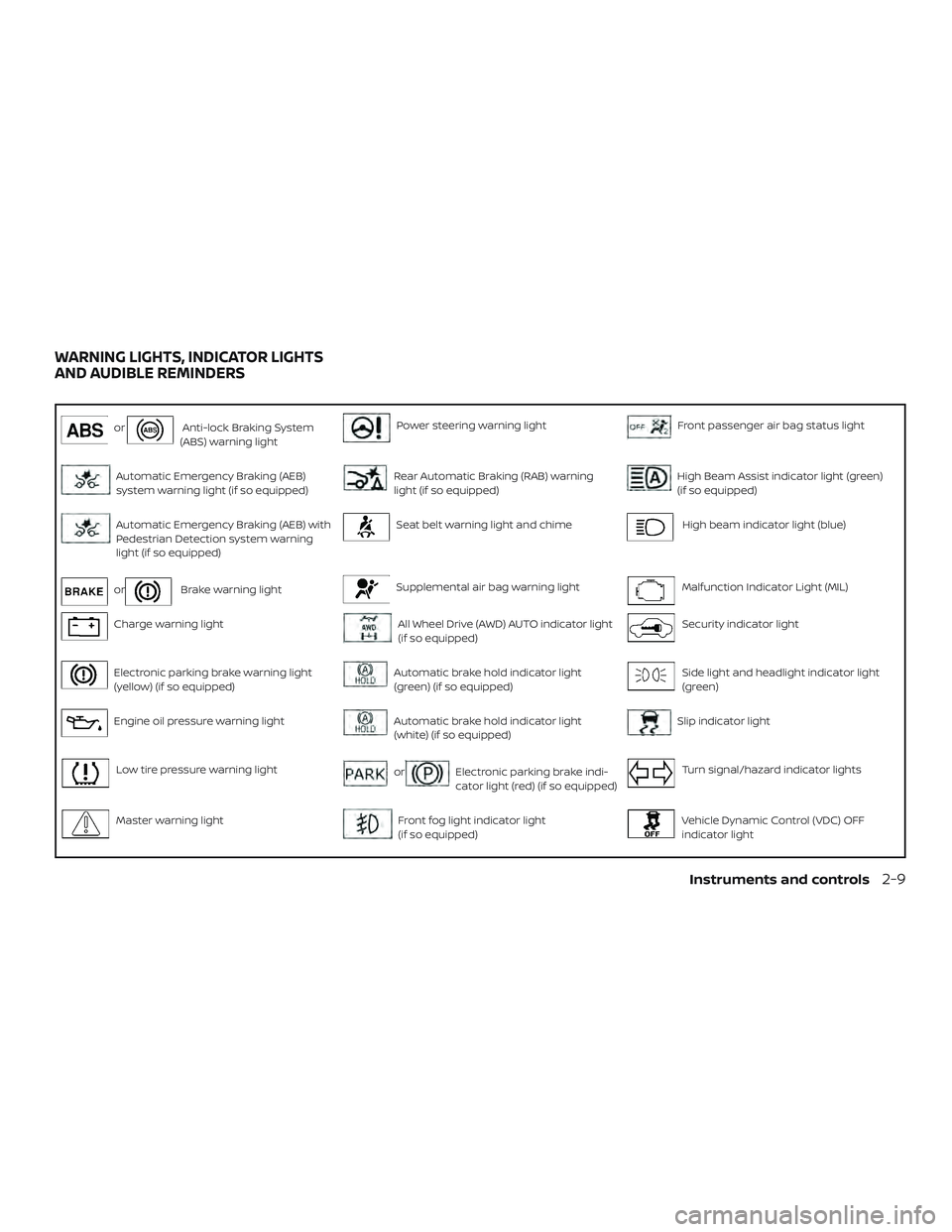
orAnti-lock Braking System
(ABS) warning lightPower steering warning lightFront passenger air bag status light
Automatic Emergency Braking (AEB)
system warning light (if so equipped)Rear Automatic Braking (RAB) warning
light (if so equipped)High Beam Assist indicator light (green)
(if so equipped)
Automatic Emergency Braking (AEB) with
Pedestrian Detection system warning
light (if so equipped)Seat belt warning light and chimeHigh beam indicator light (blue)
orBrake warning lightSupplemental air bag warning lightMalfunction Indicator Light (MIL)
Charge warning lightAll Wheel Drive (AWD) AUTO indicator light
(if so equipped)Security indicator light
Electronic parking brake warning light
(yellow) (if so equipped)Automatic brake hold indicator light
(green) (if so equipped)Side light and headlight indicator light
(green)
Engine oil pressure warning lightAutomatic brake hold indicator light
(white) (if so equipped)Slip indicator light
Low tire pressure warning lightorElectronic parking brake indi-
cator light (red) (if so equipped)Turn signal/hazard indicator lights
Master warning lightFront fog light indicator light
(if so equipped)Vehicle Dynamic Control (VDC) OFF
indicator light
WARNING LIGHTS, INDICATOR LIGHTS
AND AUDIBLE REMINDERS
Instruments and controls2-9
Page 105 of 559
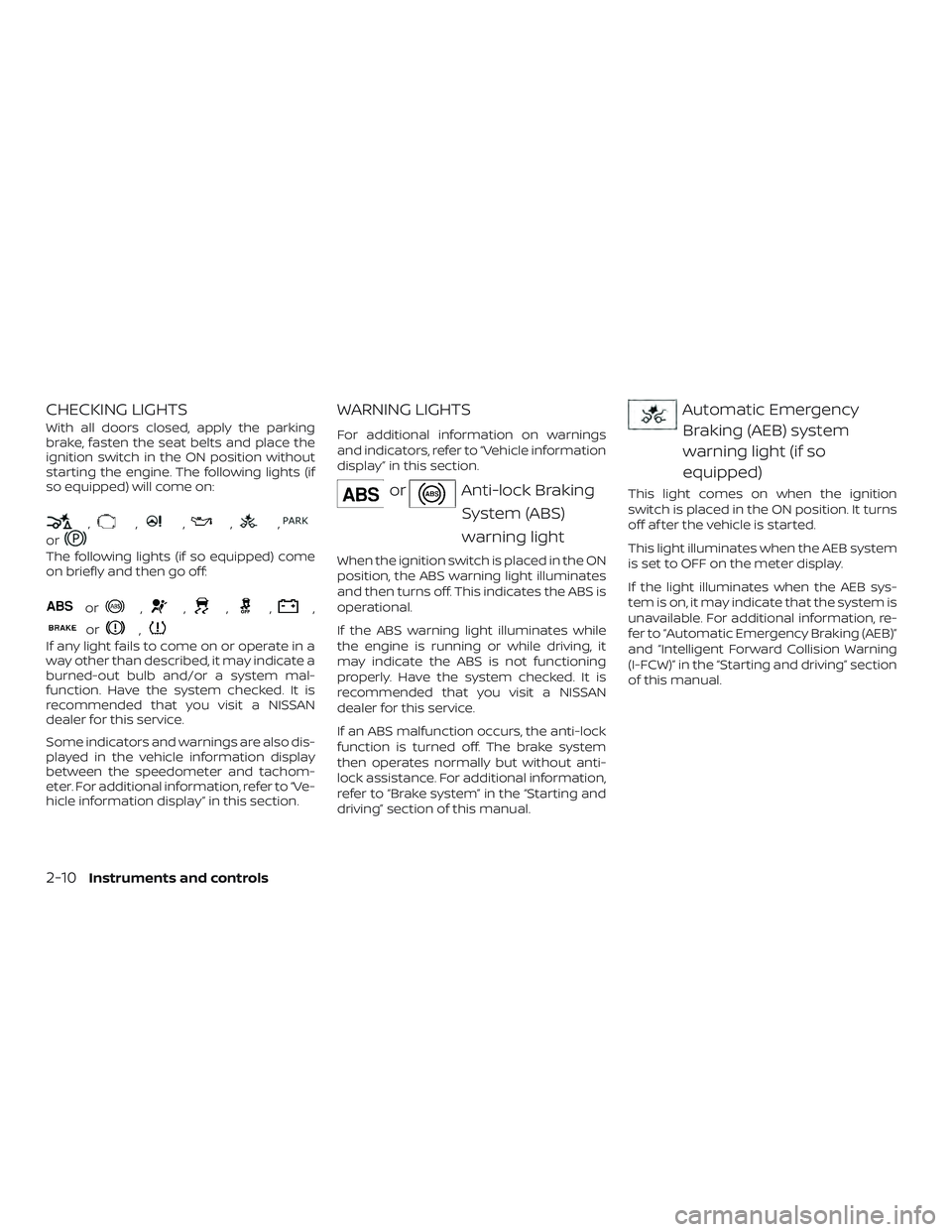
CHECKING LIGHTS
With all doors closed, apply the parking
brake, fasten the seat belts and place the
ignition switch in the ON position without
starting the engine. The following lights (if
so equipped) will come on:
,,,,,
or
The following lights (if so equipped) come
on briefly and then go off:
or,,,,,
or,
If any light fails to come on or operate in a
way other than described, it may indicate a
burned-out bulb and/or a system mal-
function. Have the system checked. It is
recommended that you visit a NISSAN
dealer for this service.
Some indicators and warnings are also dis-
played in the vehicle information display
between the speedometer and tachom-
eter. For additional information, refer to “Ve-
hicle information display” in this section.
WARNING LIGHTS
For additional information on warnings
and indicators, refer to “Vehicle information
display” in this section.
orAnti-lock BrakingSystem (ABS)
warning light
When the ignition switch is placed in the ON
position, the ABS warning light illuminates
and then turns off. This indicates the ABS is
operational.
If the ABS warning light illuminates while
the engine is running or while driving, it
may indicate the ABS is not functioning
properly. Have the system checked. It is
recommended that you visit a NISSAN
dealer for this service.
If an ABS malfunction occurs, the anti-lock
function is turned off. The brake system
then operates normally but without anti-
lock assistance. For additional information,
refer to “Brake system” in the “Starting and
driving” section of this manual.
Automatic EmergencyBraking (AEB) system
warning light (if so
equipped)
This light comes on when the ignition
switch is placed in the ON position. It turns
off af ter the vehicle is started.
This light illuminates when the AEB system
is set to OFF on the meter display.
If the light illuminates when the AEB sys-
tem is on, it may indicate that the system is
unavailable. For additional information, re-
fer to “Automatic Emergency Braking (AEB)”
and “Intelligent Forward Collision Warning
(I-FCW)” in the “Starting and driving” section
of this manual.
2-10Instruments and controls
Page 110 of 559
For additional information, refer to “Power
steering” in the “Starting and driving” sec-
tion of this manual.
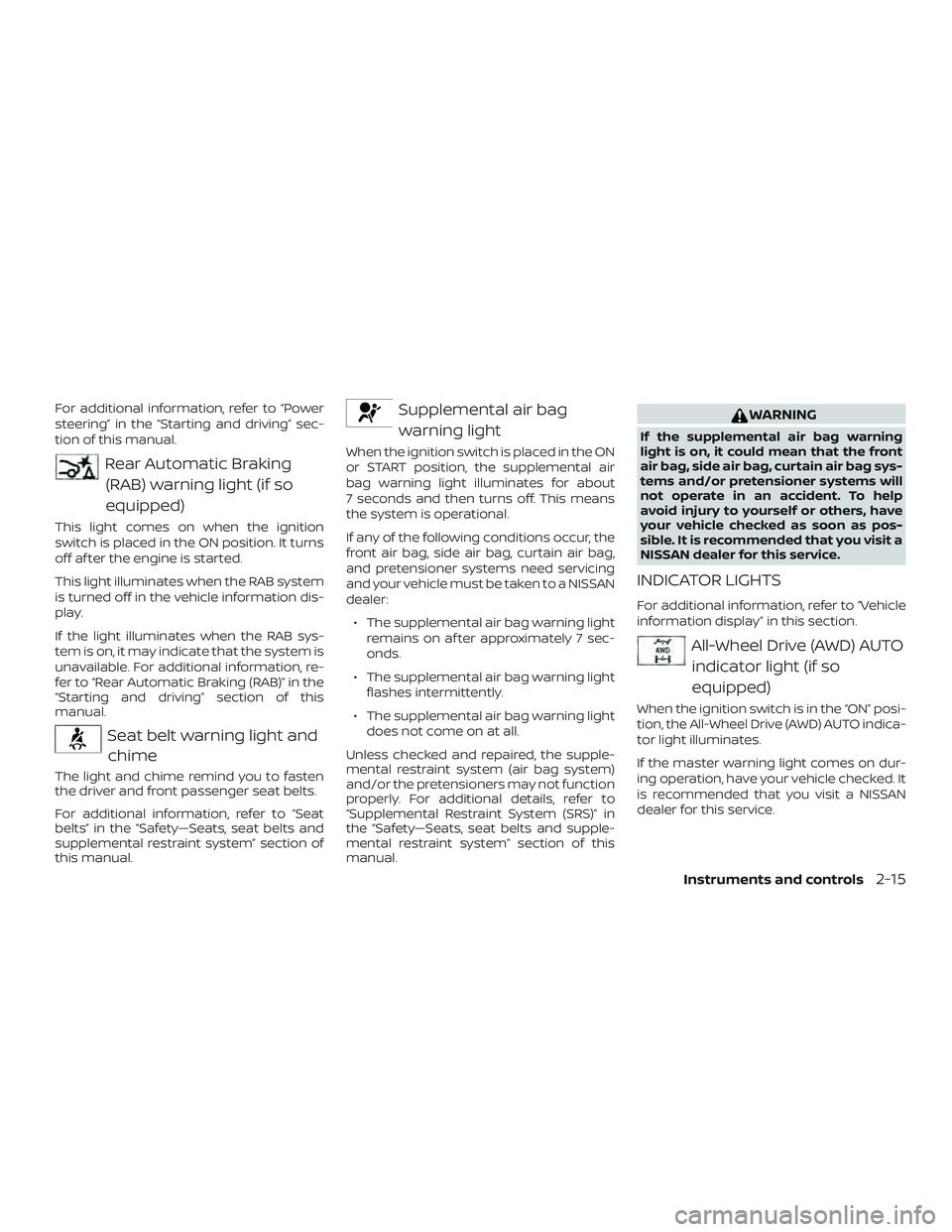
Rear Automatic Braking(RAB) warning light (if so
equipped)
This light comes on when the ignition
switch is placed in the ON position. It turns
off af ter the engine is started.
This light illuminates when the RAB system
is turned off in the vehicle information dis-
play.
If the light illuminates when the RAB sys-
tem is on, it may indicate that the system is
unavailable. For additional information, re-
fer to “Rear Automatic Braking (RAB)” in the
“Starting and driving” section of this
manual.
Seat belt warning light andchime
The light and chime remind you to fasten
the driver and front passenger seat belts.
For additional information, refer to “Seat
belts” in the “Safety—Seats, seat belts and
supplemental restraint system” section of
this manual.
Supplemental air bag
warning light
When the ignition switch is placed in the ON
or START position, the supplemental air
bag warning light illuminates for about
7 seconds and then turns off. This means
the system is operational.
If any of the following conditions occur, the
front air bag, side air bag, curtain air bag,
and pretensioner systems need servicing
and your vehicle must be taken to a NISSAN
dealer:
∙ The supplemental air bag warning light remains on af ter approximately 7 sec-
onds.
∙ The supplemental air bag warning light flashes intermittently.
∙ The supplemental air bag warning light does not come on at all.
Unless checked and repaired, the supple-
mental restraint system (air bag system)
and/or the pretensioners may not function
properly. For additional details, refer to
“Supplemental Restraint System (SRS)” in
the “Safety—Seats, seat belts and supple-
mental restraint system” section of this
manual.
WARNING
If the supplemental air bag warning
light is on, it could mean that the front
air bag, side air bag, curtain air bag sys-
tems and/or pretensioner systems will
not operate in an accident. To help
avoid injury to yourself or others, have
your vehicle checked as soon as pos-
sible. It is recommended that you visit a
NISSAN dealer for this service.
INDICATOR LIGHTS
For additional information, refer to “Vehicle
information display” in this section.
All-Wheel Drive (AWD) AUTO indicator light (if so
equipped)
When the ignition switch is in the “ON” posi-
tion, the All-Wheel Drive (AWD) AUTO indica-
tor light illuminates.
If the master warning light comes on dur-
ing operation, have your vehicle checked. It
is recommended that you visit a NISSAN
dealer for this service.
Instruments and controls2-15
Page 111 of 559
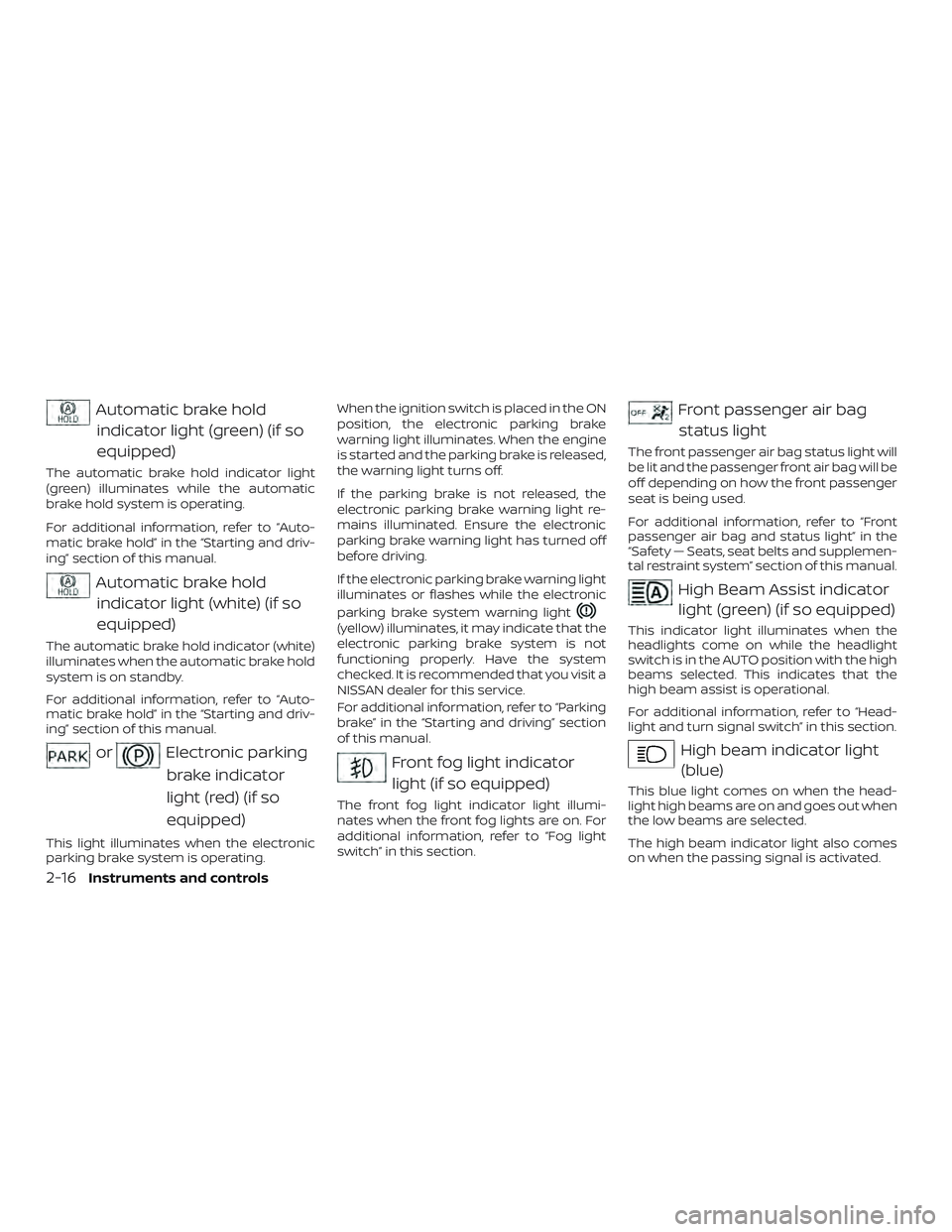
Automatic brake holdindicator light (green) (if so
equipped)
The automatic brake hold indicator light
(green) illuminates while the automatic
brake hold system is operating.
For additional information, refer to “Auto-
matic brake hold” in the “Starting and driv-
ing” section of this manual.
Automatic brake holdindicator light (white) (if so
equipped)
The automatic brake hold indicator (white)
illuminates when the automatic brake hold
system is on standby.
For additional information, refer to “Auto-
matic brake hold” in the “Starting and driv-
ing” section of this manual.
orElectronic parking
brake indicator
light (red) (if so
equipped)
This light illuminates when the electronic
parking brake system is operating. When the ignition switch is placed in the ON
position, the electronic parking brake
warning light illuminates. When the engine
is started and the parking brake is released,
the warning light turns off.
If the parking brake is not released, the
electronic parking brake warning light re-
mains illuminated. Ensure the electronic
parking brake warning light has turned off
before driving.
If the electronic parking brake warning light
illuminates or flashes while the electronic
parking brake system warning light
(yellow) illuminates, it may indicate that the
electronic parking brake system is not
functioning properly. Have the system
checked. It is recommended that you visit a
NISSAN dealer for this service.
For additional information, refer to “Parking
brake” in the “Starting and driving” section
of this manual.
Front fog light indicator
light (if so equipped)
The front fog light indicator light illumi-
nates when the front fog lights are on. For
additional information, refer to “Fog light
switch” in this section.
Front passenger air bagstatus light
The front passenger air bag status light will
be lit and the passenger front air bag will be
off depending on how the front passenger
seat is being used.
For additional information, refer to “Front
passenger air bag and status light” in the
“Safety — Seats, seat belts and supplemen-
tal restraint system” section of this manual.
High Beam Assist indicatorlight (green) (if so equipped)
This indicator light illuminates when the
headlights come on while the headlight
switch is in the AUTO position with the high
beams selected. This indicates that the
high beam assist is operational.
For additional information, refer to “Head-
light and turn signal switch” in this section.
High beam indicator light(blue)
This blue light comes on when the head-
light high beams are on and goes out when
the low beams are selected.
The high beam indicator light also comes
on when the passing signal is activated.
2-16Instruments and controls
Page 113 of 559
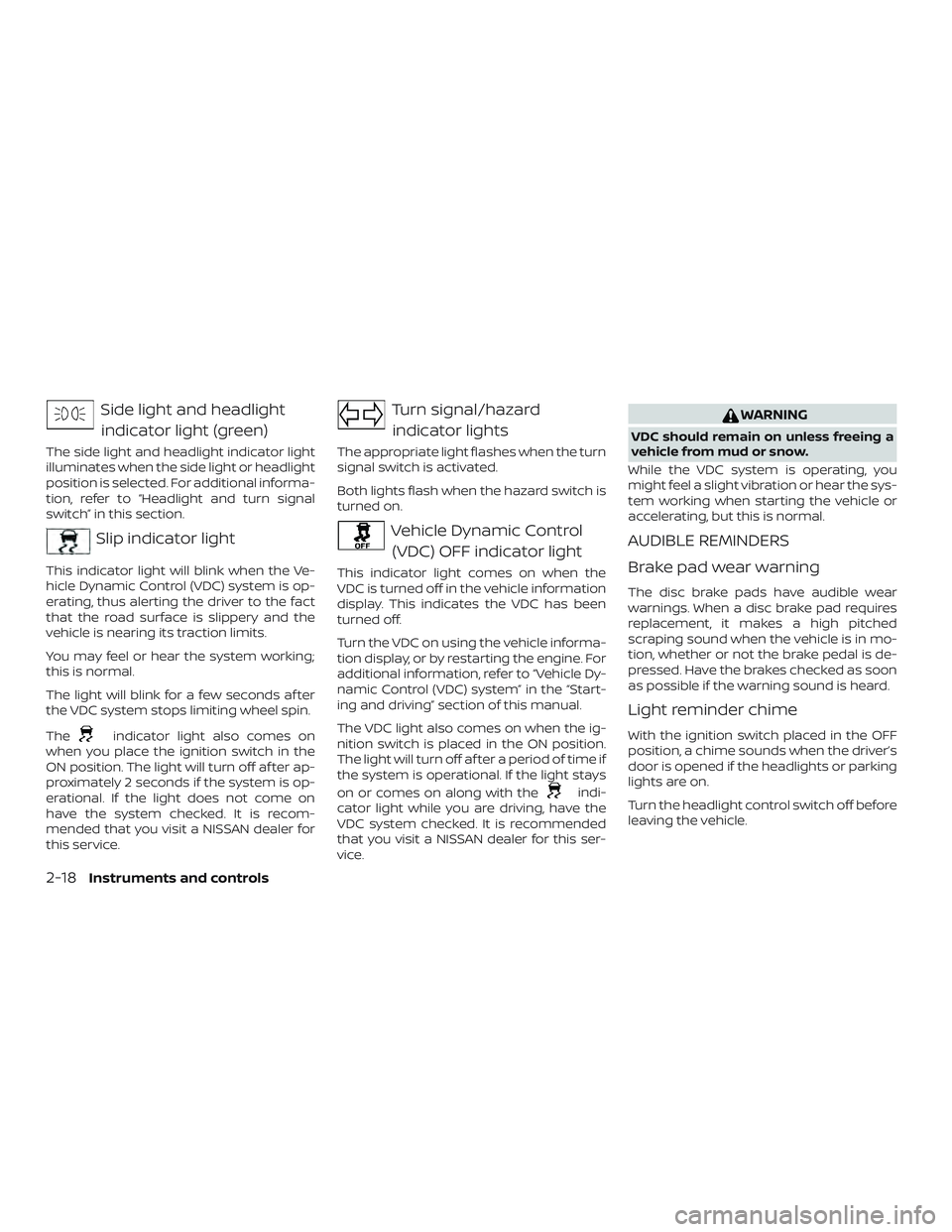
Side light and headlightindicator light (green)
The side light and headlight indicator light
illuminates when the side light or headlight
position is selected. For additional informa-
tion, refer to “Headlight and turn signal
switch” in this section.
Slip indicator light
This indicator light will blink when the Ve-
hicle Dynamic Control (VDC) system is op-
erating, thus alerting the driver to the fact
that the road surface is slippery and the
vehicle is nearing its traction limits.
You may feel or hear the system working;
this is normal.
The light will blink for a few seconds af ter
the VDC system stops limiting wheel spin.
The
indicator light also comes on
when you place the ignition switch in the
ON position. The light will turn off af ter ap-
proximately 2 seconds if the system is op-
erational. If the light does not come on
have the system checked. It is recom-
mended that you visit a NISSAN dealer for
this service.
Turn signal/hazard
indicator lights
The appropriate light flashes when the turn
signal switch is activated.
Both lights flash when the hazard switch is
turned on.
Vehicle Dynamic Control (VDC) OFF indicator light
This indicator light comes on when the
VDC is turned off in the vehicle information
display. This indicates the VDC has been
turned off.
Turn the VDC on using the vehicle informa-
tion display, or by restarting the engine. For
additional information, refer to “Vehicle Dy-
namic Control (VDC) system” in the “Start-
ing and driving” section of this manual.
The VDC light also comes on when the ig-
nition switch is placed in the ON position.
The light will turn off af ter a period of time if
the system is operational. If the light stays
on or comes on along with the
indi-
cator light while you are driving, have the
VDC system checked. It is recommended
that you visit a NISSAN dealer for this ser-
vice.
WARNING
VDC should remain on unless freeing a
vehicle from mud or snow.
While the VDC system is operating, you
might feel a slight vibration or hear the sys-
tem working when starting the vehicle or
accelerating, but this is normal.
AUDIBLE REMINDERS
Brake pad wear warning
The disc brake pads have audible wear
warnings. When a disc brake pad requires
replacement, it makes a high pitched
scraping sound when the vehicle is in mo-
tion, whether or not the brake pedal is de-
pressed. Have the brakes checked as soon
as possible if the warning sound is heard.
Light reminder chime
With the ignition switch placed in the OFF
position, a chime sounds when the driver’s
door is opened if the headlights or parking
lights are on.
Turn the headlight control switch off before
leaving the vehicle.
2-18Instruments and controls
Page 120 of 559
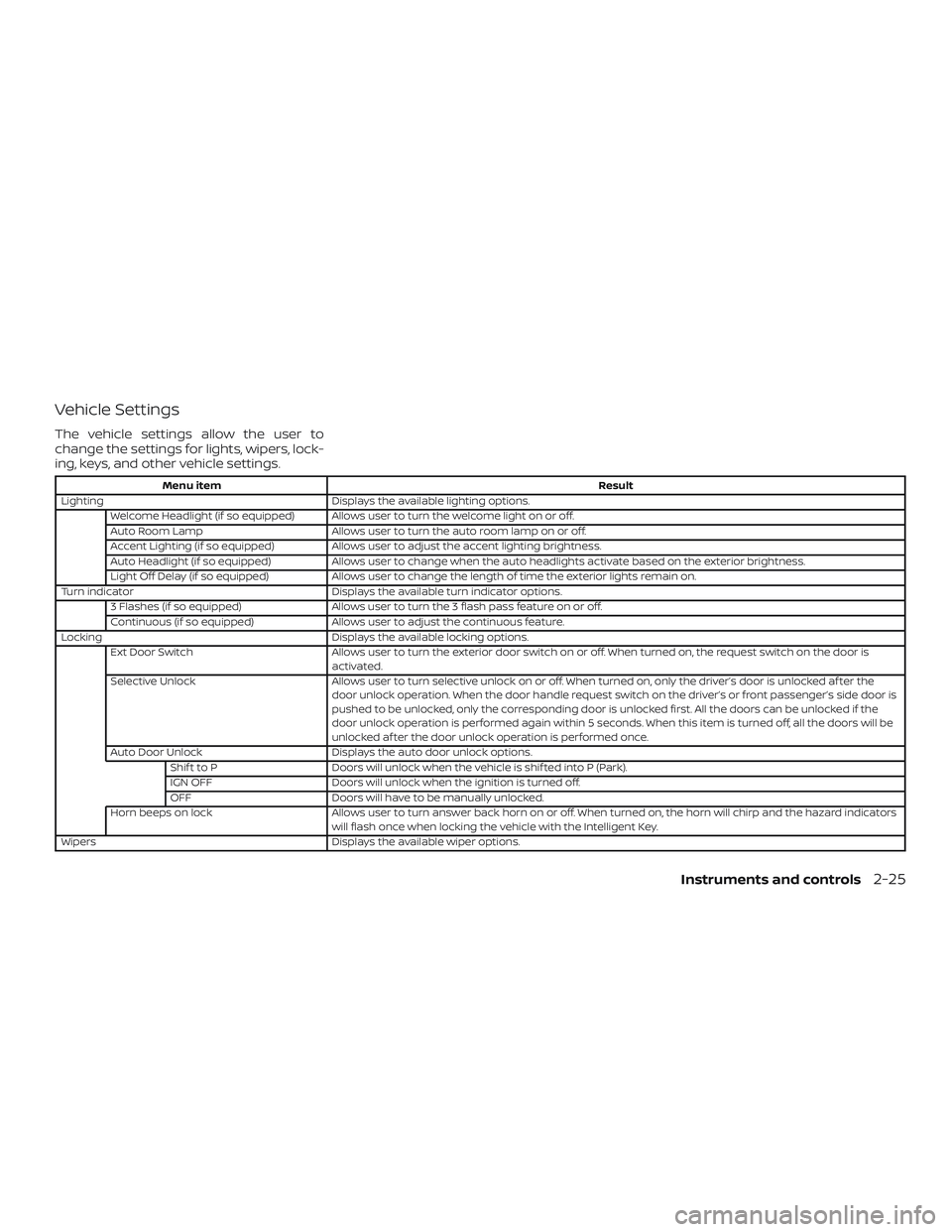
Vehicle Settings
The vehicle settings allow the user to
change the settings for lights, wipers, lock-
ing, keys, and other vehicle settings.
Menu itemResult
Lighting Displays the available lighting options.
Welcome Headlight (if so equipped) Allows user to turn the welcome light on or off.
Auto Room Lamp Allows user to turn the auto room lamp on or off.
Accent Lighting (if so equipped) Allows user to adjust the accent lighting brightness.
Auto Headlight (if so equipped) Allows user to change when the auto headlights activate based on the exterior brightness.
Light Off Delay (if so equipped) Allows user to change the length of time the exterior lights remain on.
Turn indicator Displays the available turn indicator options.
3 Flashes (if so equipped) Allows user to turn the 3 flash pass feature on or off.
Continuous (if so equipped) Allows user to adjust the continuous feature.
Locking Displays the available locking options.
Ext Door Switch Allows user to turn the exterior door switch on or off. When turned on, the request switch on the door is
activated.
Selective Unlock Allows user to turn selective unlock on or off. When turned on, only the driver’s door is unlocked af ter the
door unlock operation. When the door handle request switch on the driver’s or front passenger’s side door is
pushed to be unlocked, only the corresponding door is unlocked first. All the doors can be unlocked if the
door unlock operation is performed again within 5 seconds. When this item is turned off, all the doors will be
unlocked af ter the door unlock operation is performed once.
Auto Door Unlock Displays the auto door unlock options.
Shif t to P Doors will unlock when the vehicle is shif ted into P (Park).
IGN OFF Doors will unlock when the ignition is turned off.
OFF Doors will have to be manually unlocked.
Horn beeps on lock Allows user to turn answer back horn on or off. When turned on, the horn will chirp and the hazard indicators
will flash once when locking the vehicle with the Intelligent Key.
Wipers Displays the available wiper options.
Instruments and controls2-25
Page 123 of 559
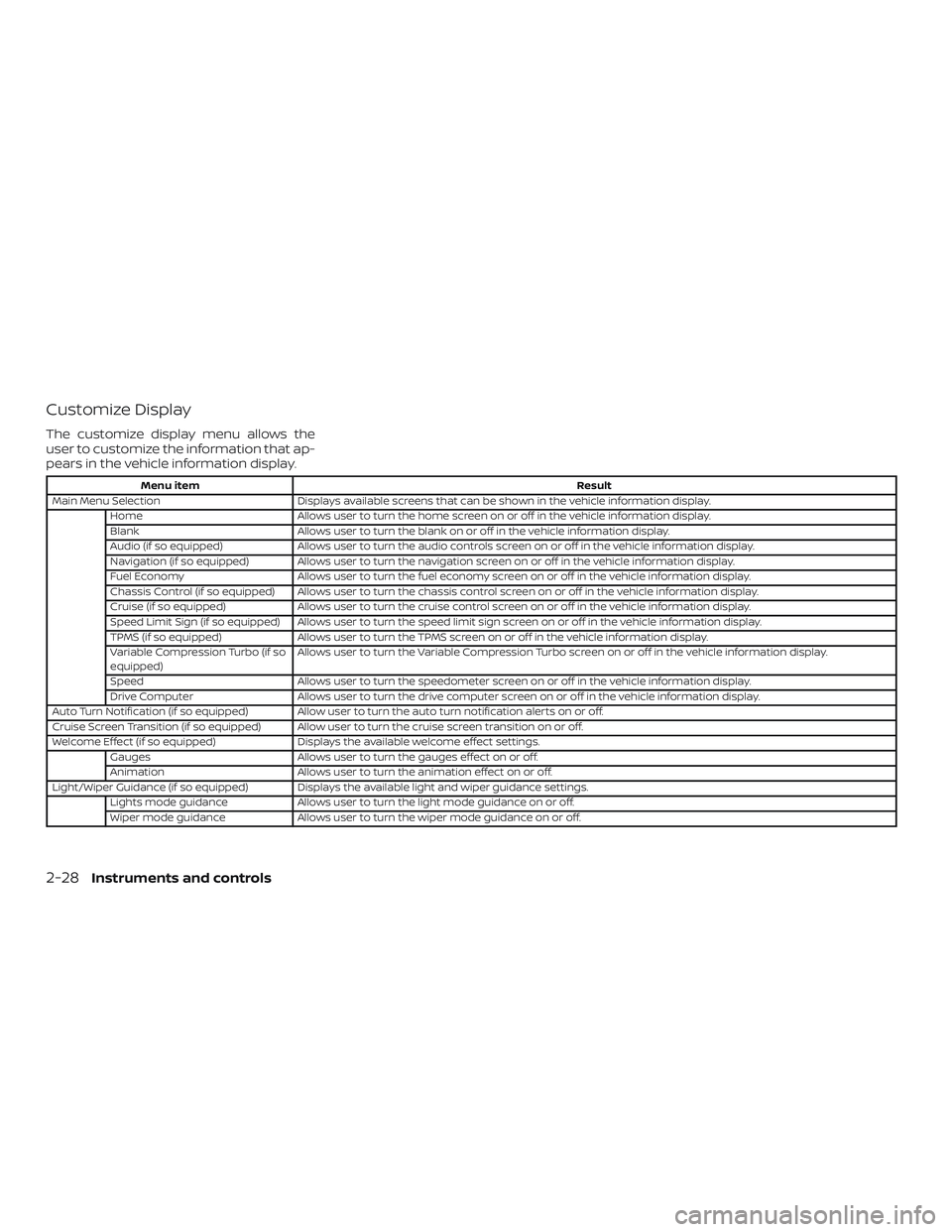
Customize Display
The customize display menu allows the
user to customize the information that ap-
pears in the vehicle information display.
Menu itemResult
Main Menu Selection Displays available screens that can be shown in the vehicle information display.
Home Allows user to turn the home screen on or off in the vehicle information display.
Blank Allows user to turn the blank on or off in the vehicle information display.
Audio (if so equipped) Allows user to turn the audio controls screen on or off in the vehicle information display.
Navigation (if so equipped) Allows user to turn the navigation screen on or off in the vehicle information display.
Fuel Economy Allows user to turn the fuel economy screen on or off in the vehicle information display.
Chassis Control (if so equipped) Allows user to turn the chassis control screen on or off in the vehicle information display.
Cruise (if so equipped) Allows user to turn the cruise control screen on or off in the vehicle information display.
Speed Limit Sign (if so equipped) Allows user to turn the speed limit sign screen on or off in the vehicle information display.
TPMS (if so equipped) Allows user to turn the TPMS screen on or off in the vehicle information display.
Variable Compression Turbo (if so
equipped) Allows user to turn the Variable Compression Turbo screen on or off in the vehicle information display.
Speed Allows user to turn the speedometer screen on or off in the vehicle information display.
Drive Computer Allows user to turn the drive computer screen on or off in the vehicle information display.
Auto Turn Notification (if so equipped) Allow user to turn the auto turn notification alerts on or off.
Cruise Screen Transition (if so equipped) Allow user to turn the cruise screen transition on or off.
Welcome Effect (if so equipped) Displays the available welcome effect settings.
Gauges Allows user to turn the gauges effect on or off.
Animation Allows user to turn the animation effect on or off.
Light/Wiper Guidance (if so equipped) Displays the available light and wiper guidance settings. Lights mode guidance Allows user to turn the light mode guidance on or off.
Wiper mode guidance Allows user to turn the wiper mode guidance on or off.
2-28Instruments and controls