Aeb NISSAN ALTIMA 2020 Owner´s Manual
[x] Cancel search | Manufacturer: NISSAN, Model Year: 2020, Model line: ALTIMA, Model: NISSAN ALTIMA 2020Pages: 559, PDF Size: 6.3 MB
Page 23 of 559
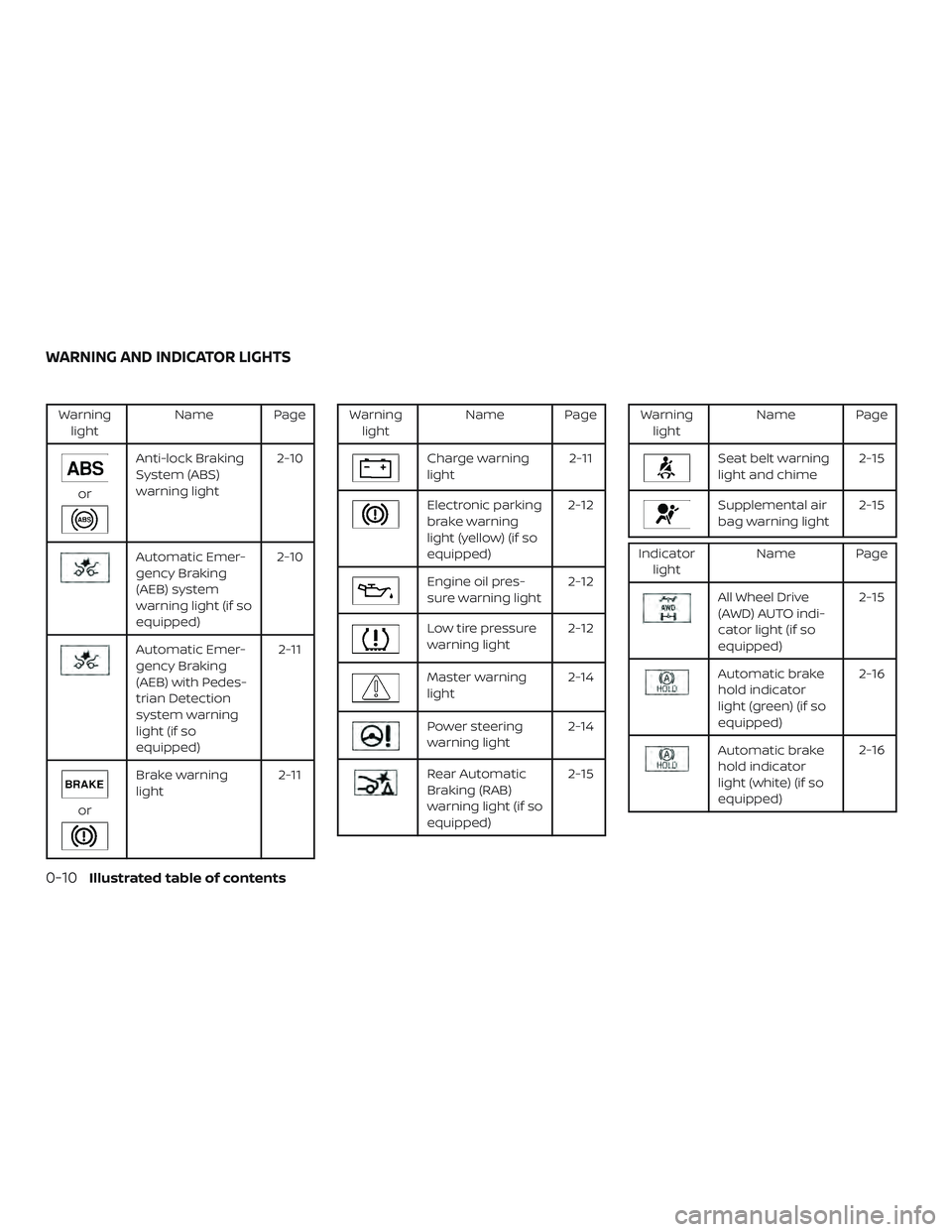
Warninglight Name Page
or
Anti-lock Braking
System (ABS)
warning light 2-10
Automatic Emer-
gency Braking
(AEB) system
warning light (if so
equipped)2-10
Automatic Emer-
gency Braking
(AEB) with Pedes-
trian Detection
system warning
light (if so
equipped) 2-11
or
Brake warning
light
2-11
Warning
light Name Page
Charge warning
light 2-11
Electronic parking
brake warning
light (yellow) (if so
equipped)2-12
Engine oil pres-
sure warning light
2-12
Low tire pressure
warning light2-12
Master warning
light2-14
Power steering
warning light2-14
Rear Automatic
Braking (RAB)
warning light (if so
equipped) 2-15
Warning
light Name Page
Seat belt warning
light and chime 2-15
Supplemental air
bag warning light2-15
Indicator
light Name Page
All Wheel Drive
(AWD) AUTO indi-
cator light (if so
equipped) 2-15
Automatic brake
hold indicator
light (green) (if so
equipped)2-16
Automatic brake
hold indicator
light (white) (if so
equipped)2-16
WARNING AND INDICATOR LIGHTS
0-10Illustrated table of contents
Page 104 of 559
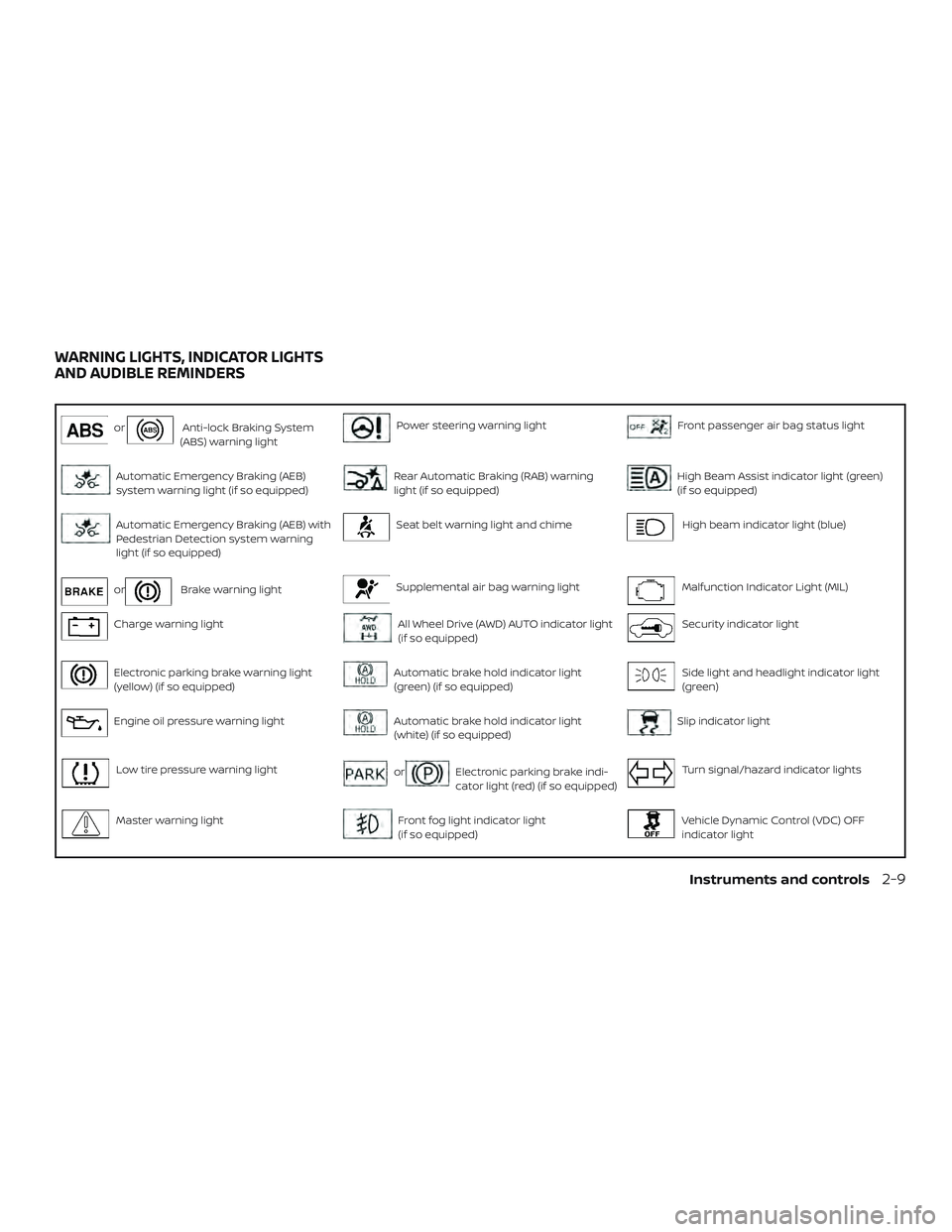
orAnti-lock Braking System
(ABS) warning lightPower steering warning lightFront passenger air bag status light
Automatic Emergency Braking (AEB)
system warning light (if so equipped)Rear Automatic Braking (RAB) warning
light (if so equipped)High Beam Assist indicator light (green)
(if so equipped)
Automatic Emergency Braking (AEB) with
Pedestrian Detection system warning
light (if so equipped)Seat belt warning light and chimeHigh beam indicator light (blue)
orBrake warning lightSupplemental air bag warning lightMalfunction Indicator Light (MIL)
Charge warning lightAll Wheel Drive (AWD) AUTO indicator light
(if so equipped)Security indicator light
Electronic parking brake warning light
(yellow) (if so equipped)Automatic brake hold indicator light
(green) (if so equipped)Side light and headlight indicator light
(green)
Engine oil pressure warning lightAutomatic brake hold indicator light
(white) (if so equipped)Slip indicator light
Low tire pressure warning lightorElectronic parking brake indi-
cator light (red) (if so equipped)Turn signal/hazard indicator lights
Master warning lightFront fog light indicator light
(if so equipped)Vehicle Dynamic Control (VDC) OFF
indicator light
WARNING LIGHTS, INDICATOR LIGHTS
AND AUDIBLE REMINDERS
Instruments and controls2-9
Page 105 of 559
CHECKING LIGHTS
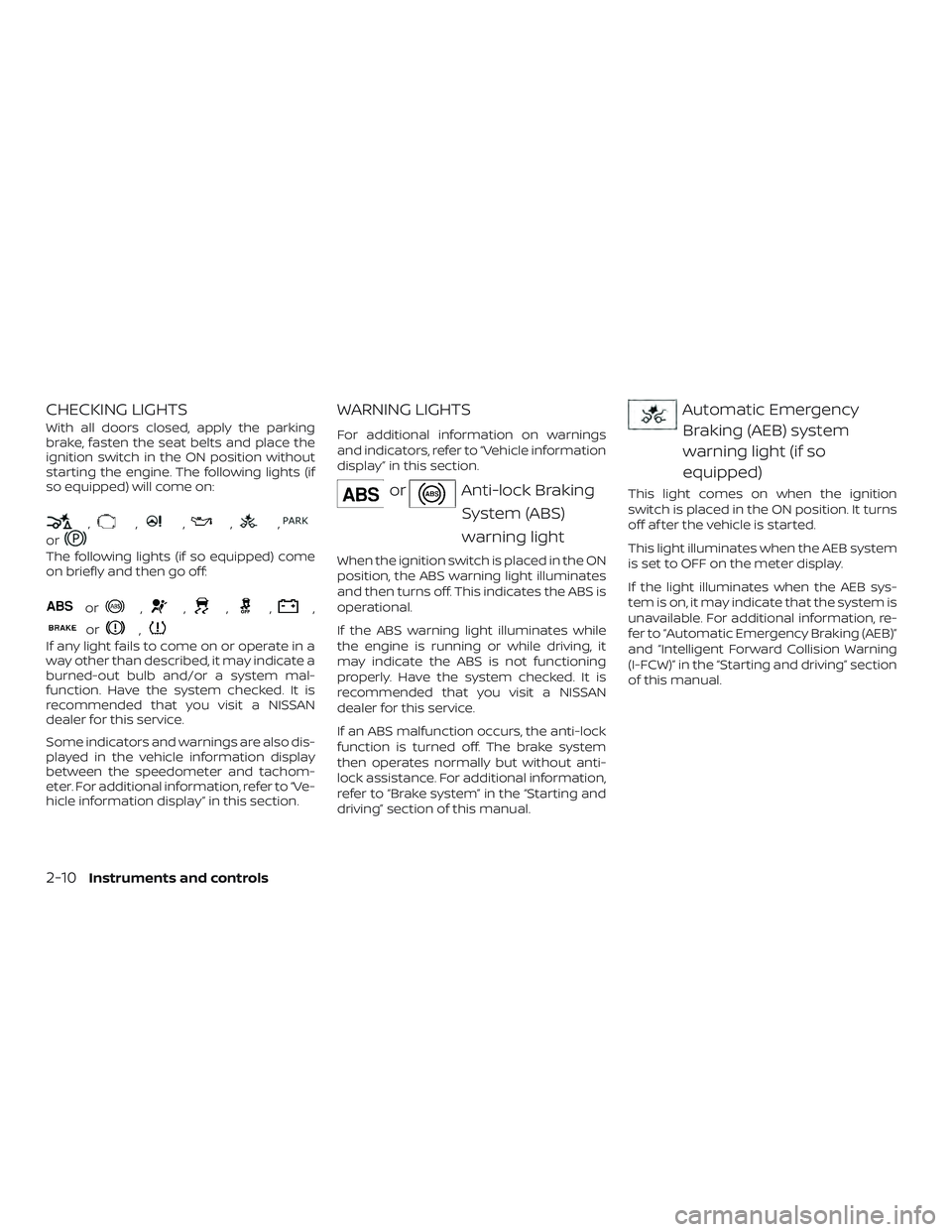
With all doors closed, apply the parking
brake, fasten the seat belts and place the
ignition switch in the ON position without
starting the engine. The following lights (if
so equipped) will come on:
,,,,,
or
The following lights (if so equipped) come
on briefly and then go off:
or,,,,,
or,
If any light fails to come on or operate in a
way other than described, it may indicate a
burned-out bulb and/or a system mal-
function. Have the system checked. It is
recommended that you visit a NISSAN
dealer for this service.
Some indicators and warnings are also dis-
played in the vehicle information display
between the speedometer and tachom-
eter. For additional information, refer to “Ve-
hicle information display” in this section.
WARNING LIGHTS
For additional information on warnings
and indicators, refer to “Vehicle information
display” in this section.
orAnti-lock BrakingSystem (ABS)
warning light
When the ignition switch is placed in the ON
position, the ABS warning light illuminates
and then turns off. This indicates the ABS is
operational.
If the ABS warning light illuminates while
the engine is running or while driving, it
may indicate the ABS is not functioning
properly. Have the system checked. It is
recommended that you visit a NISSAN
dealer for this service.
If an ABS malfunction occurs, the anti-lock
function is turned off. The brake system
then operates normally but without anti-
lock assistance. For additional information,
refer to “Brake system” in the “Starting and
driving” section of this manual.
Automatic EmergencyBraking (AEB) system
warning light (if so
equipped)
This light comes on when the ignition
switch is placed in the ON position. It turns
off af ter the vehicle is started.
This light illuminates when the AEB system
is set to OFF on the meter display.
If the light illuminates when the AEB sys-
tem is on, it may indicate that the system is
unavailable. For additional information, re-
fer to “Automatic Emergency Braking (AEB)”
and “Intelligent Forward Collision Warning
(I-FCW)” in the “Starting and driving” section
of this manual.
2-10Instruments and controls
Page 106 of 559
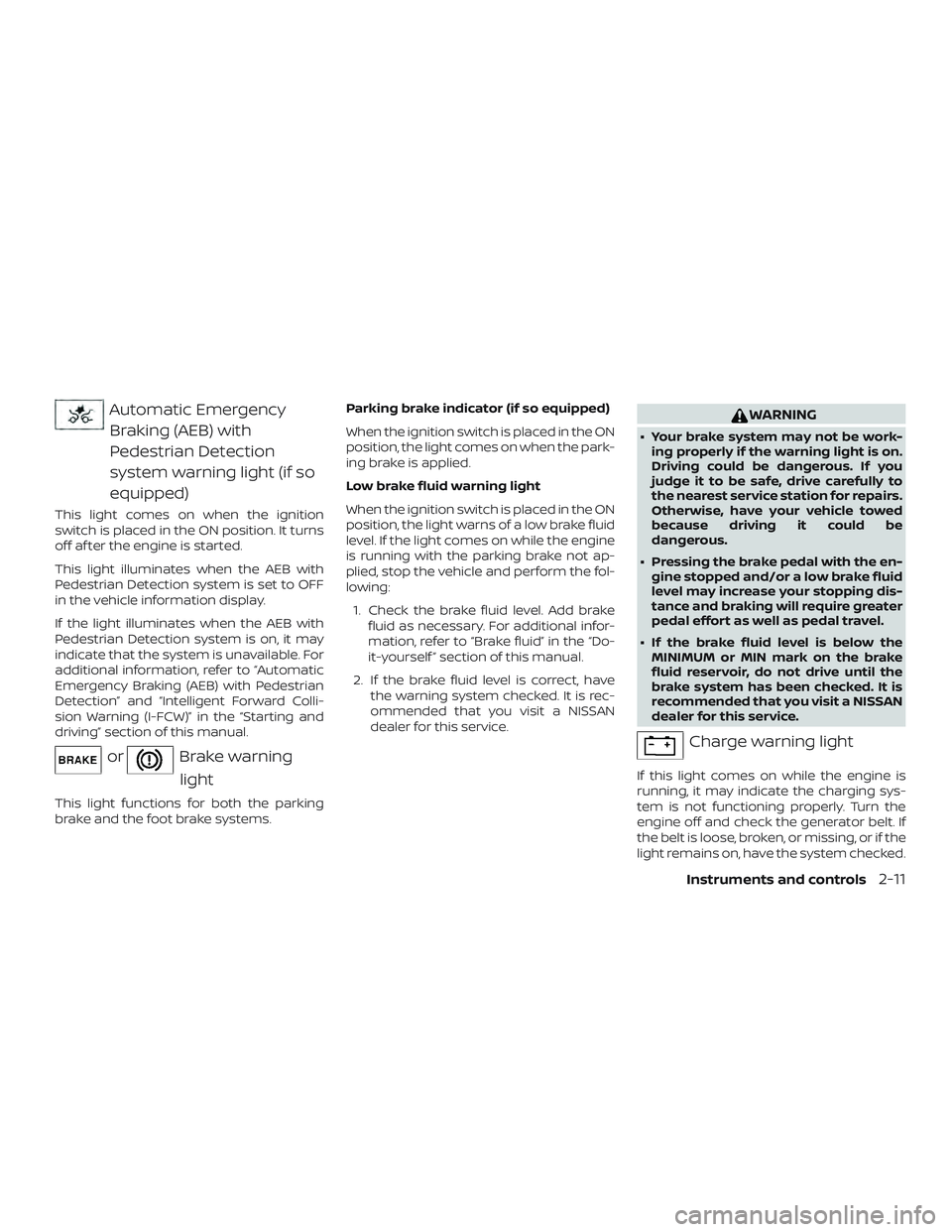
Automatic EmergencyBraking (AEB) with
Pedestrian Detection
system warning light (if so
equipped)
This light comes on when the ignition
switch is placed in the ON position. It turns
off af ter the engine is started.
This light illuminates when the AEB with
Pedestrian Detection system is set to OFF
in the vehicle information display.
If the light illuminates when the AEB with
Pedestrian Detection system is on, it may
indicate that the system is unavailable. For
additional information, refer to “Automatic
Emergency Braking (AEB) with Pedestrian
Detection” and “Intelligent Forward Colli-
sion Warning (I-FCW)” in the “Starting and
driving” section of this manual.
orBrake warning
light
This light functions for both the parking
brake and the foot brake systems. Parking brake indicator (if so equipped)
When the ignition switch is placed in the ON
position, the light comes on when the park-
ing brake is applied.
Low brake fluid warning light
When the ignition switch is placed in the ON
position, the light warns of a low brake fluid
level. If the light comes on while the engine
is running with the parking brake not ap-
plied, stop the vehicle and perform the fol-
lowing:
1. Check the brake fluid level. Add brake fluid as necessary. For additional infor-
mation, refer to “Brake fluid” in the “Do-
it-yourself ” section of this manual.
2. If the brake fluid level is correct, have the warning system checked. It is rec-
ommended that you visit a NISSAN
dealer for this service.
WARNING
∙ Your brake system may not be work-ing properly if the warning light is on.
Driving could be dangerous. If you
judge it to be safe, drive carefully to
the nearest service station for repairs.
Otherwise, have your vehicle towed
because driving it could be
dangerous.
∙ Pressing the brake pedal with the en- gine stopped and/or a low brake fluid
level may increase your stopping dis-
tance and braking will require greater
pedal effort as well as pedal travel.
∙ If the brake fluid level is below the MINIMUM or MIN mark on the brake
fluid reservoir, do not drive until the
brake system has been checked. It is
recommended that you visit a NISSAN
dealer for this service.
Charge warning light
If this light comes on while the engine is
running, it may indicate the charging sys-
tem is not functioning properly. Turn the
engine off and check the generator belt. If
the belt is loose, broken, or missing, or if the
light remains on, have the system checked.
Instruments and controls2-11
Page 118 of 559
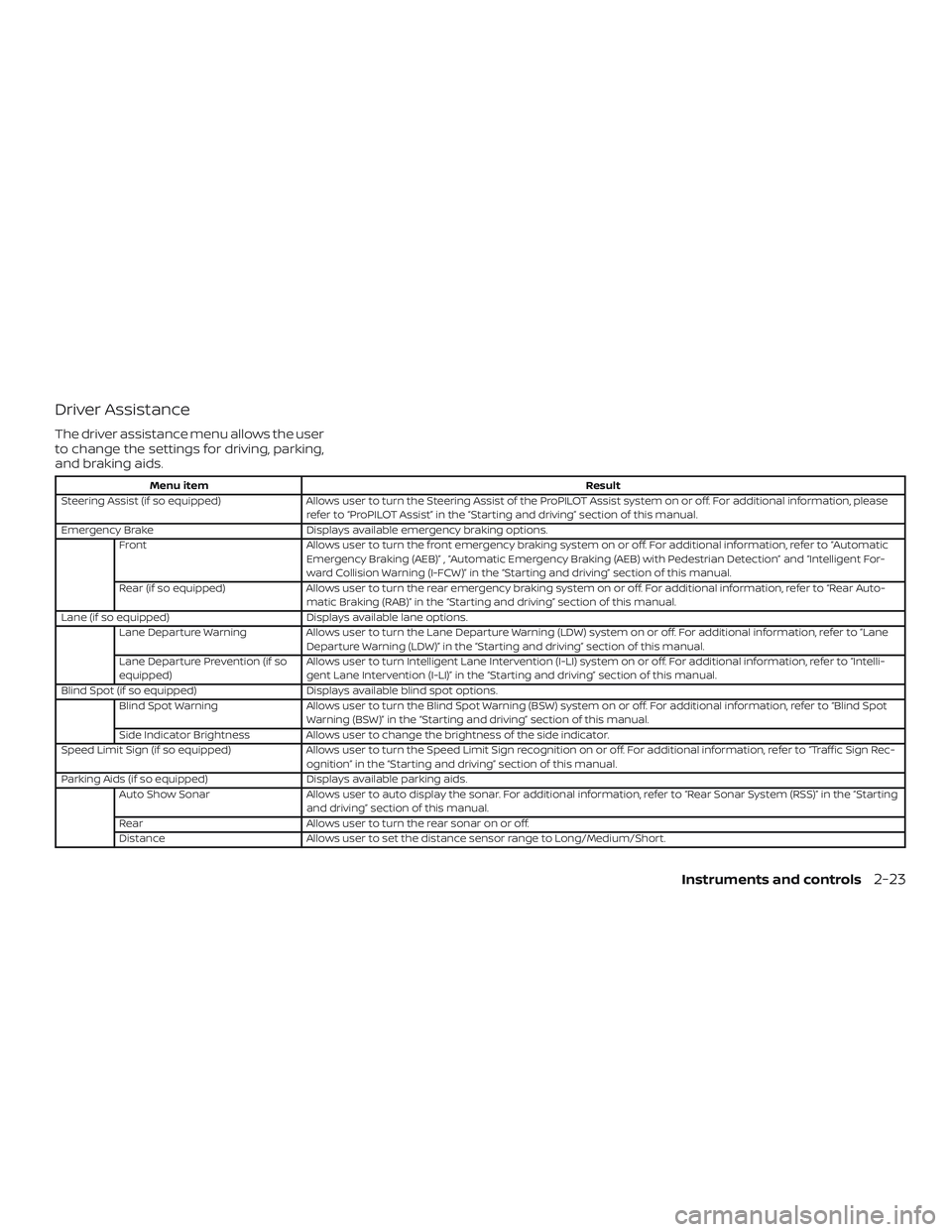
Driver Assistance
The driver assistance menu allows the user
to change the settings for driving, parking,
and braking aids.
Menu itemResult
Steering Assist (if so equipped) Allows user to turn the Steering Assist of the ProPILOT Assist system on or off. For additional information, please
refer to “ProPILOT Assist” in the “Starting and driving” section of this manual.
Emergency Brake Displays available emergency braking options.
Front Allows user to turn the front emergency braking system on or off. For additional information, refer to “Automatic
Emergency Braking (AEB)” , “Automatic Emergency Braking (AEB) with Pedestrian Detection” and “Intelligent For-
ward Collision Warning (I-FCW)” in the “Starting and driving” section of this manual.
Rear (if so equipped) Allows user to turn the rear emergency braking system on or off. For additional information, refer to “Rear Auto-
matic Braking (RAB)” in the “Starting and driving” section of this manual.
Lane (if so equipped) Displays available lane options.
Lane Departure Warning Allows user to turn the Lane Departure Warning (LDW) system on or off. For additional information, refer to “Lane
Departure Warning (LDW)” in the “Starting and driving” section of this manual.
Lane Departure Prevention (if so
equipped) Allows user to turn Intelligent Lane Intervention (I-LI) system on or off. For additional information, refer to “Intelli-
gent Lane Intervention (I-LI)” in the “Starting and driving” section of this manual.
Blind Spot (if so equipped) Displays available blind spot options.
Blind Spot Warning Allows user to turn the Blind Spot Warning (BSW) system on or off. For additional information, refer to “Blind Spot
Warning (BSW)” in the “Starting and driving” section of this manual.
Side Indicator Brightness Allows user to change the brightness of the side indicator.
Speed Limit Sign (if so equipped) Allows user to turn the Speed Limit Sign recognition on or off. For additional information, refer to “Traffic Sign Rec -
ognition” in the “Starting and driving” section of this manual.
Parking Aids (if so equipped) Displays available parking aids.
Auto Show Sonar Allows user to auto display the sonar. For additional information, refer to “Rear Sonar System (RSS)” in the “Starting
and driving” section of this manual.
Rear Allows user to turn the rear sonar on or off.
Distance Allows user to set the distance sensor range to Long/Medium/Short.
Instruments and controls2-23
Page 125 of 559
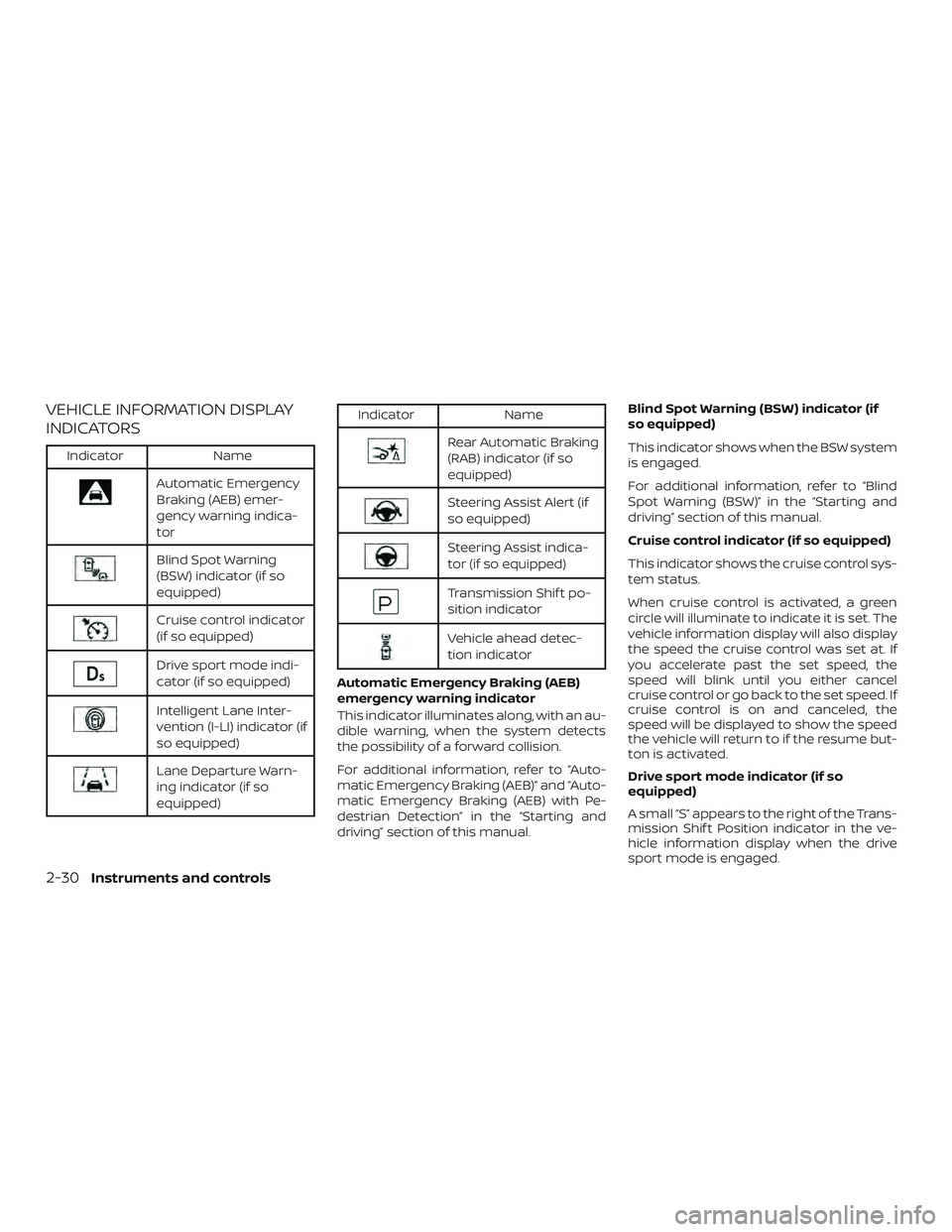
VEHICLE INFORMATION DISPLAY
INDICATORS
IndicatorName
Automatic Emergency
Braking (AEB) emer-
gency warning indica-
tor
Blind Spot Warning
(BSW) indicator (if so
equipped)
Cruise control indicator
(if so equipped)
Drive sport mode indi-
cator (if so equipped)
Intelligent Lane Inter-
vention (I-LI) indicator (if
so equipped)
Lane Departure Warn-
ing indicator (if so
equipped)
IndicatorName
Rear Automatic Braking
(RAB) indicator (if so
equipped)
Steering Assist Alert (if
so equipped)
Steering Assist indica-
tor (if so equipped)
Transmission Shif t po-
sition indicator
Vehicle ahead detec-
tion indicator
Automatic Emergency Braking (AEB)
emergency warning indicator
This indicator illuminates along, with an au-
dible warning, when the system detects
the possibility of a forward collision.
For additional information, refer to “Auto-
matic Emergency Braking (AEB)” and “Auto-
matic Emergency Braking (AEB) with Pe-
destrian Detection” in the “Starting and
driving” section of this manual. Blind Spot Warning (BSW) indicator (if
so equipped)
This indicator shows when the BSW system
is engaged.
For additional information, refer to “Blind
Spot Warning (BSW)” in the “Starting and
driving” section of this manual.
Cruise control indicator (if so equipped)
This indicator shows the cruise control sys-
tem status.
When cruise control is activated, a green
circle will illuminate to indicate it is set. The
vehicle information display will also display
the speed the cruise control was set at. If
you accelerate past the set speed, the
speed will blink until you either cancel
cruise control or go back to the set speed. If
cruise control is on and canceled, the
speed will be displayed to show the speed
the vehicle will return to if the resume but-
ton is activated.
Drive sport mode indicator (if so
equipped)
A small “S” appears to the right of the Trans-
mission Shif t Position indicator in the ve-
hicle information display when the drive
sport mode is engaged.
2-30Instruments and controls
Page 126 of 559
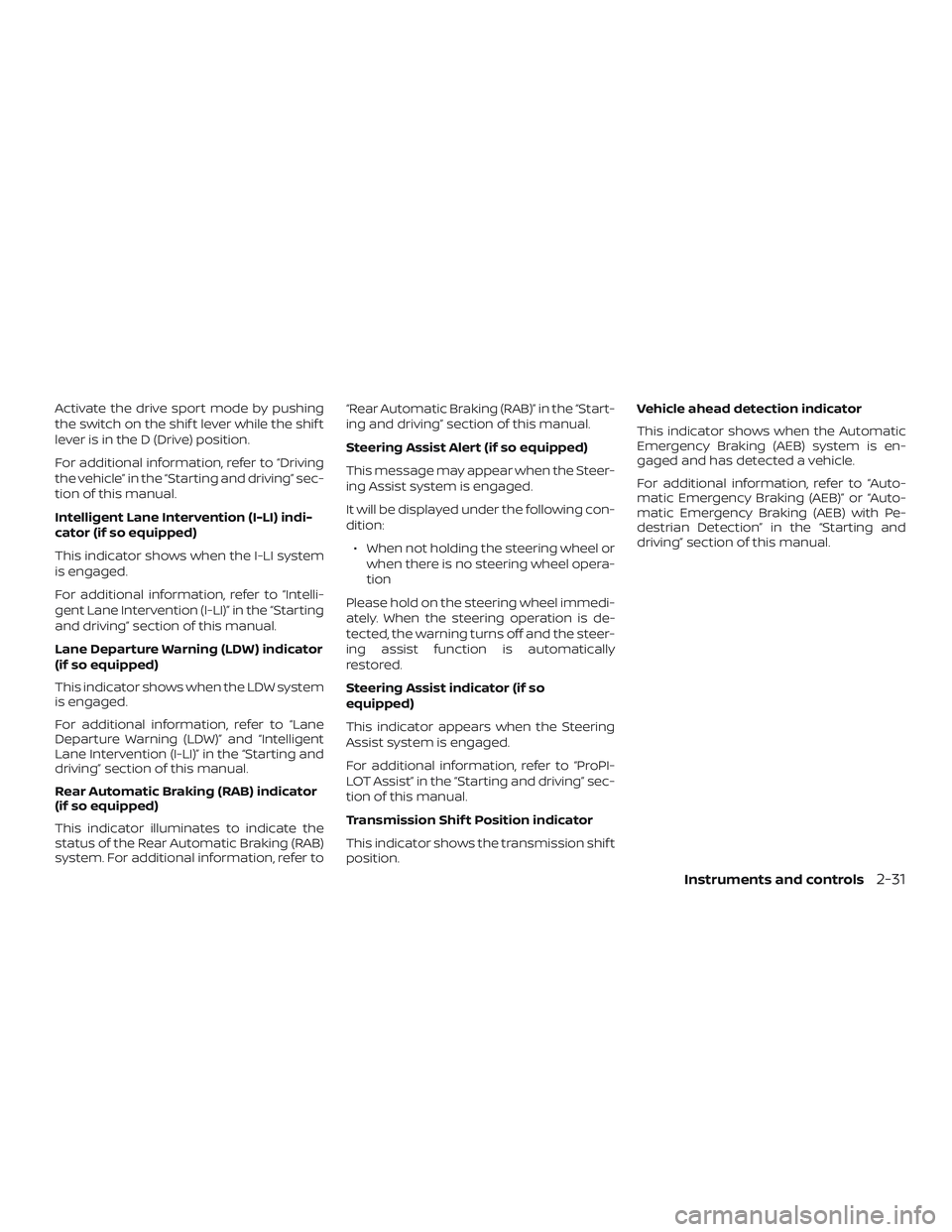
Activate the drive sport mode by pushing
the switch on the shif t lever while the shif t
lever is in the D (Drive) position.
For additional information, refer to “Driving
the vehicle” in the “Starting and driving” sec-
tion of this manual.
Intelligent Lane Intervention (I-LI) indi-
cator (if so equipped)
This indicator shows when the I-LI system
is engaged.
For additional information, refer to “Intelli-
gent Lane Intervention (I-LI)” in the “Starting
and driving” section of this manual.
Lane Departure Warning (LDW) indicator
(if so equipped)
This indicator shows when the LDW system
is engaged.
For additional information, refer to “Lane
Departure Warning (LDW)” and “Intelligent
Lane Intervention (I-LI)” in the “Starting and
driving” section of this manual.
Rear Automatic Braking (RAB) indicator
(if so equipped)
This indicator illuminates to indicate the
status of the Rear Automatic Braking (RAB)
system. For additional information, refer to“Rear Automatic Braking (RAB)” in the “Start-
ing and driving” section of this manual.
Steering Assist Alert (if so equipped)
This message may appear when the Steer-
ing Assist system is engaged.
It will be displayed under the following con-
dition:
∙ When not holding the steering wheel or when there is no steering wheel opera-
tion
Please hold on the steering wheel immedi-
ately. When the steering operation is de-
tected, the warning turns off and the steer-
ing assist function is automatically
restored.
Steering Assist indicator (if so
equipped)
This indicator appears when the Steering
Assist system is engaged.
For additional information, refer to “ProPI-
LOT Assist” in the “Starting and driving” sec-
tion of this manual.
Transmission Shif t Position indicator
This indicator shows the transmission shif t
position. Vehicle ahead detection indicator
This indicator shows when the Automatic
Emergency Braking (AEB) system is en-
gaged and has detected a vehicle.
For additional information, refer to “Auto-
matic Emergency Braking (AEB)” or “Auto-
matic Emergency Braking (AEB) with Pe-
destrian Detection” in the “Starting and
driving” section of this manual.
Instruments and controls2-31
Page 131 of 559
button ignition switch positions” in the
“Starting and driving” section of this
manual.
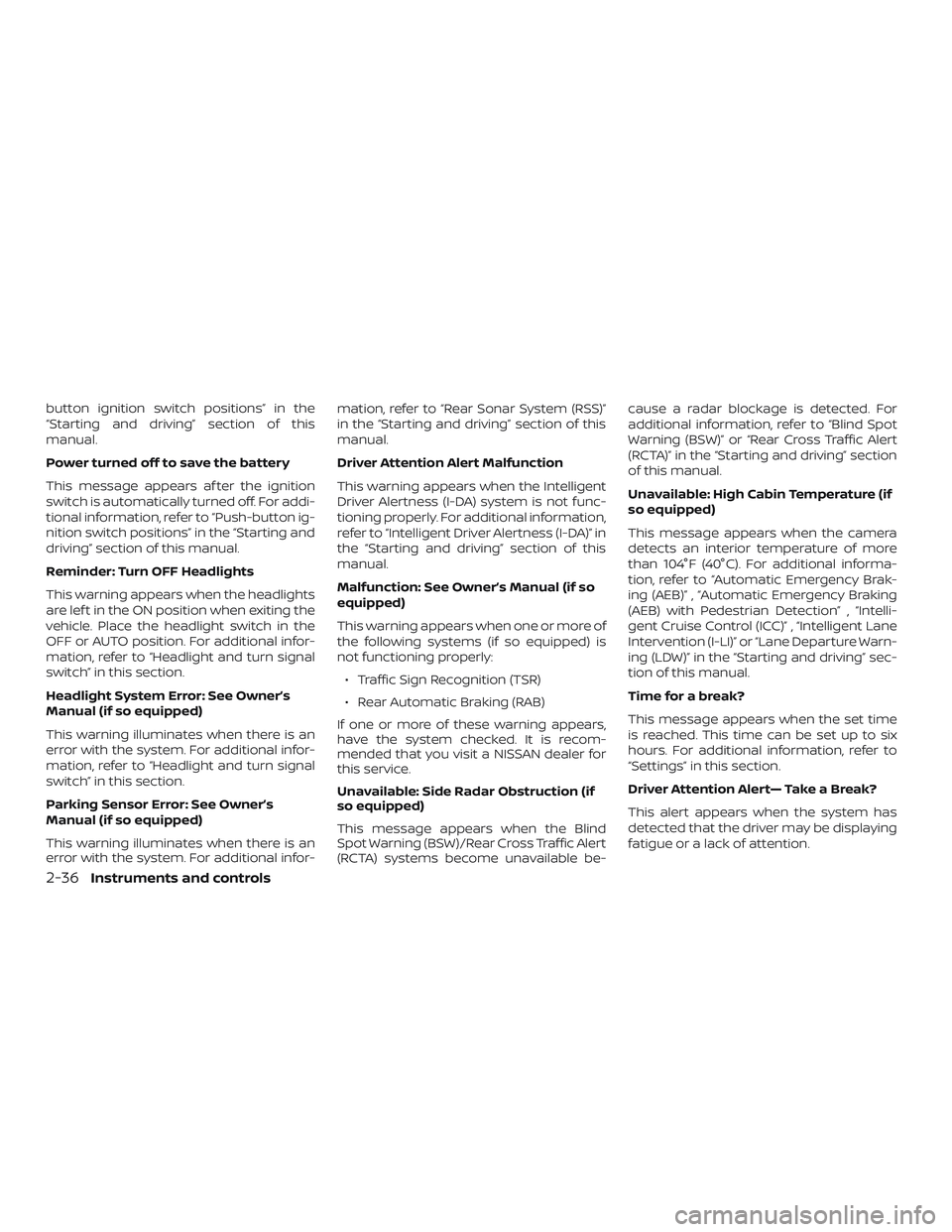
Power turned off to save the battery
This message appears af ter the ignition
switch is automatically turned off. For addi-
tional information, refer to “Push-button ig-
nition switch positions” in the “Starting and
driving” section of this manual.
Reminder: Turn OFF Headlights
This warning appears when the headlights
are lef t in the ON position when exiting the
vehicle. Place the headlight switch in the
OFF or AUTO position. For additional infor-
mation, refer to “Headlight and turn signal
switch” in this section.
Headlight System Error: See Owner’s
Manual (if so equipped)
This warning illuminates when there is an
error with the system. For additional infor-
mation, refer to “Headlight and turn signal
switch” in this section.
Parking Sensor Error: See Owner’s
Manual (if so equipped)
This warning illuminates when there is an
error with the system. For additional infor-mation, refer to “Rear Sonar System (RSS)”
in the “Starting and driving” section of this
manual.
Driver Attention Alert Malfunction
This warning appears when the Intelligent
Driver Alertness (I-DA) system is not func-
tioning properly. For additional information,
refer to “Intelligent Driver Alertness (I-DA)” in
the “Starting and driving” section of this
manual.
Malfunction: See Owner’s Manual (if so
equipped)
This warning appears when one or more of
the following systems (if so equipped) is
not functioning properly:
∙ Traffic Sign Recognition (TSR)
∙ Rear Automatic Braking (RAB)
If one or more of these warning appears,
have the system checked. It is recom-
mended that you visit a NISSAN dealer for
this service.
Unavailable: Side Radar Obstruction (if
so equipped)
This message appears when the Blind
Spot Warning (BSW)/Rear Cross Traffic Alert
(RCTA) systems become unavailable be- cause a radar blockage is detected. For
additional information, refer to “Blind Spot
Warning (BSW)” or “Rear Cross Traffic Alert
(RCTA)” in the “Starting and driving” section
of this manual.
Unavailable: High Cabin Temperature (if
so equipped)
This message appears when the camera
detects an interior temperature of more
than 104°F (40°C). For additional informa-
tion, refer to “Automatic Emergency Brak-
ing (AEB)” , “Automatic Emergency Braking
(AEB) with Pedestrian Detection” , “Intelli-
gent Cruise Control (ICC)” , “Intelligent Lane
Intervention (I-LI)” or “Lane Departure Warn-
ing (LDW)” in the “Starting and driving” sec-
tion of this manual.
Time for a break?
This message appears when the set time
is reached. This time can be set up to six
hours. For additional information, refer to
“Settings” in this section.
Driver Attention Alert— Take a Break?
This alert appears when the system has
detected that the driver may be displaying
fatigue or a lack of attention.
2-36Instruments and controls
Page 132 of 559
Malfunction (if so equipped)
This warning appears when one or more of
the following systems (if so equipped) is
not functioning properly:∙ Automatic Emergency Braking (AEB)
∙ Automatic Emergency Braking (AEB) with Pedestrian Detection
∙ Intelligent Forward Collision Warning (I- FCW)
If one or more of these warning appears,
have the system checked. It is recom-
mended that you visit a NISSAN dealer for
this service.
For additional information, refer to “Auto-
matic Emergency Braking (AEB)”, “Auto-
matic Emergency Braking (AEB) with Pe-
destrian Detection” or “Intelligent Forward
Collision Warning (I-FCW) in the “Starting
and driving” section of this manual.
Shipping Mode On Push Storage Fuse
This warning may appear if the extended
storage switch is not pushed in. When this
warning appears, push in the extended
storage switch to turn off the warning. For
additional information, refer to “Extended
storage switch” in this section. Not Available Parking Brake On (if so
equipped)
This message may appear when the Intel-
ligent Cruise Control (ICC) (for vehicles with
ProPILOT Assist) is engaged.
Under the following condition, the ICC (for
vehicles with ProPILOT Assist) system is au-
tomatically canceled:
∙ The electronic parking brake is applied.
The above system cannot be used when
the electronic parking is activated.
For additional information, refer to "Intelli-
gent Cruise Control (ICC) (for vehicles with
ProPILOT Assist)” and “Parking brake” in the
“Starting and driving” section of this
manual.
Rear Door Alert is activated
When the system is enabled, this message
appears when the Rear Door Alert system
is active and can remind the driver to check
the back seat. ∙ Using the steering wheel switch, a driver can select “Dismiss Message” to clear
the display for a period of time. If no
selection is made, this message auto-
matically turns off af ter a period of time. ∙ Using the steering wheel switch, a driver
can select “Disable Alert” to disable the
horn alert for the remainder of the cur-
rent trip.
WARNING
Selecting “Dismiss Message” during a
stop within a trip temporarily dismisses
the message for that stop without turn-
ing the system off. Alerts can be pro-
vided for other stops during the trip. Se-
lecting “Disable Alert” turns off the Rear
Door Alert system for the remainder of
a trip and no audible alert will be
provided.
NOTE:
This system is disabled until a driver en-
ables it using the vehicle information
display. For additional information, refer
to “How to use the vehicle information
display ” in this section.
For additional information, refer to “Rear
Door Alert” in this section.
Check Rear Seat For All Articles
When the system is enabled, this message
appears when the vehicle comes to a com-
plete stop, the vehicle is transitioned from
Instruments and controls2-37
Page 134 of 559
The above system cannot be used when
the driver’s seat belt is not fastened.
Not Available: Front Radar Blocked (if so
equipped)
This message appears when the Intelligent
Cruise Control (ICC) systems, the Auto-
matic Emergency Braking (AEB) system,
the Automatic Emergency Braking (AEB)
with Pedestrian Detection system, or the
Intelligent Forward Collision Warning (I-
FCW) system becomes unavailable be-
cause the front radar is obstructed. For ad-
ditional information, refer to “Intelligent
Cruise Control (ICC) (for vehicles without
ProPILOT Assist)” , “Intelligent Cruise Control
(ICC) (for vehicles with ProPILOT Assist)” ,
“Automatic Emergency Braking (AEB)” , “Au-
tomatic Emergency Braking (AEB) with Pe-
destrian Detection” or “Intelligent Forward
Collision Warning (I-FCW)” in the “Starting
and driving” section of this manual.
Currently not available (if so equipped)
This message may appear when the Intel-
ligent Cruise Control (ICC) (with ProPILOT
Assist) system , the ICC system or the Intel-
ligent Lane Intervention (I-LI) system is en-
gaged.Under the following conditions, the ICC
(with ProPILOT Assist) , the ICC system or
the Intelligent Lane Intervention (I-LI) sys-
tem is automatically canceled:
∙ When the VDC operates
∙ When a wheel slips
∙ When the VDC system is turned off
The above system cannot be used in some
situations (VDC operates, wheel slip and
VDC system is off.)
Not Available Poor Road Conditions (if
so equipped)
This message may appear when the Intel-
ligent Cruise Control (ICC) (with ProPILOT
Assist) system , the ICC system or the Intel-
ligent Lane Intervention (I-LI) system is en-
gaged.
Under the following conditions, the ICC
(with ProPILOT Assist) , the ICC system or
the Intelligent Lane Intervention (I-LI) sys-
tem is automatically canceled: ∙ When the VDC operates
∙ When a wheel slips
The above system cannot be used in some
situations (VDC operates and wheel slip.) AWD Error: See Owner’s Manual (if so
equipped)
This warning appears when the all-wheel
drive system is not functioning properly
while the engine is running.
AWD High Temp. Stop vehicle (if so
equipped)
This warning may appear while trying to
free a stuck vehicle due to increased oil
temperature. The driving mode may
change to 2-Wheel Drive (2WD). If this warn-
ing is displayed, stop the vehicle with the
engine idling, as soon as it is safe to do so.
Then if the warning turns off, you can con-
tinue driving.
AWD Tire Size Incorrect: See Owner’s
Manual (if so equipped)
This warning may appear if there is a large
difference between the diameters of the
front and rear wheels. Pull off the road in a
safe area, with the engine idling. Check that
all the tire sizes are the same, that the tire
pressure is correct and that the tires are
not excessively worn.
Instruments and controls2-39