TPMS NISSAN ALTIMA 2020 Owner´s Manual
[x] Cancel search | Manufacturer: NISSAN, Model Year: 2020, Model line: ALTIMA, Model: NISSAN ALTIMA 2020Pages: 559, PDF Size: 6.3 MB
Page 107 of 559
It is recommended that you visit a NISSAN
dealer for this service.
CAUTION
∙ Do not ground electrical accessoriesdirectly to the battery terminal. Doing
so will bypass the variable voltage
control system and the vehicle bat-
tery may not charge completely. For
additional information, refer to “Vari-
able voltage control system” in the
“Do-it-yourself ” section of this
manual.
∙ Do not continue driving if the genera- tor belt is loose, broken or missing.
Electronic parking brake
warning light (yellow) (if so
equipped)
The electronic parking brake system warn-
ing light functions for the electronic park-
ing brake system. If the warning light illumi-
nates, it may indicate the electronic
parking brake system is not functioning
properly. Have the system checked. It is
recommended that you visit a NISSAN
dealer for this service. For additional information, refer to “Parking
brake” in the “Starting and driving” section
of this manual.
Engine oil pressure
warning light
This light warns of low engine oil pressure. If
the light flickers or comes on during nor-
mal driving, pull off the road in a safe area,
stop the engine immediatelyand call a
NISSAN dealer or other authorized repair
shop.
The engine oil pressure warning light is
not designed to indicate a low oil level.
Use the dipstick to check the oil level. For
additional information, refer to “Engine oil”
in the “Do-it-yourself ” section of this
manual.
CAUTION
Running the engine with the engine oil
pressure warning light on could cause
serious damage to the engine almost
immediately. Such damage is not cov-
ered by the NISSAN New Vehicle Limited
Warranty. Turn off the engine as soon as
it is safe to do so.
Low tire pressure warning
light
Your vehicle is equipped with a Tire Pres-
sure Monitoring System (TPMS) that moni-
tors the tire pressure of all tires except the
spare.
The low tire pressure warning light warns
of low tire pressure or indicates that the
TPMS is not functioning properly.
Af ter the ignition switch is placed in the ON
position, this light illuminates for about
1 second and turns off.
Low tire pressure warning
If the vehicle is being driven with low tire
pressure, the warning light will illumi-
nate. A “Tire Pressure Low - Add Air”
warning also appears in the vehicle in-
formation display.
When the low tire pressure warning light
illuminates, you should stop and adjust
the tire pressure of all four tires to the
recommended COLD tire pressure shown
on the Tire and Loading Information la-
bel located in the driver’s door opening.
The low tire pressure warning light does
not automatically turn off when the tire
pressure is adjusted. Af ter the tire is in-
flated to the recommended pressure,
2-12Instruments and controls
Page 108 of 559
the vehicle must be driven at speeds
above 16 mph (25 km/h) to activate the
TPMS and turn off the low tire pressure
warning light. Use a tire pressure gauge
to check the tire pressure.
The “Tire Pressure Low - Add Air” warning
appears each time the ignition switch is
placed in the ON position as long as the low
tire pressure warning light remains illumi-
nated.
For additional information, refer to “Vehicle
information display” in this section, “Tire
Pressure Monitoring System (TPMS)” in the
“Starting and driving” and “In case of emer-
gency” sections of this manual.
TPMS malfunction
If the TPMS is not functioning properly, the
low tire pressure warning light will flash for
approximately 1 minute when the ignition
switch is placed in the ON position. The
light will remain on af ter 1 minute. Have the
system checked. It is recommended that
you visit a NISSAN dealer for this service.
The "Tire Pressure Low — Add Air" warning
does not appear if the low tire pressure
warning light illuminates to indicate a
TPMS malfunction.For additional information, refer to “Tire
Pressure Monitoring System (TPMS)” in the
“Starting and driving” section and “Tire
pressure” in the “Do-it-yourself ” section of
this manual.
WARNING
∙ Radio waves could adversely affect
electric medical equipment. Those
who use a pacemaker should contact
the electric medical equipment
manufacturer for the possible influ-
ences before use.
∙ If the light does not illuminate with the ignition switch placed in the ON
position, have the vehicle checked as
soon as possible. It is recommended
that you visit a NISSAN dealer for this
service. ∙ If the light illuminates while driving,
avoid sudden steering maneuvers or
abrupt braking, reduce vehicle speed,
pull off the road to a safe location and
stop the vehicle as soon as possible.
Driving with under-inflated tires may
permanently damage the tires and in-
crease the likelihood of tire failure. Se-
rious vehicle damage could occur and
may lead to an accident and could re-
sult in serious personal injury or
death. Check the tire pressure for all
four tires. Adjust the tire pressure to
the recommended COLD tire pressure
show on the Tire and Loading Infor-
mation label located in the driver’s
door opening to turn the low tire pres-
sure warning light off. If the light still
illuminates while driving af ter adjust-
ing the tire pressure, a tire may be flat
or the TPMS may be malfunctioning. If
you have a flat tire, replace it with a
spare tire as soon as possible. If no tire
is flat and all tires are properly in-
flated, have the vehicle checked. It is
recommended that you visit a NISSAN
dealer for this service.
Instruments and controls2-13
Page 109 of 559
∙ When replacing a wheel without theTPMS such as the spare tire, the TPMS
will not function and the low tire pres-
sure warning light will flash for ap-
proximately 1 minute. The light will re-
main on af ter 1 minute. Have your
tires replaced and/or TPMS system
reset as soon as possible. It is recom-
mended that you visit a NISSAN dealer
for these services.
∙ Replacing tires with those not origi- nally specified by NISSAN could affect
the proper operation of the TPMS.
CAUTION
∙ The TPMS is not a substitute for theregular tire pressure check. Be sure to
check the tire pressure regularly.
∙ If the vehicle is being driven at speeds of less than 16 mph (25 km/h), the
TPMS may not operate correctly.
∙ Be sure to install the specified size of tires to the four wheels correctly.
Master warning light
When the ignition is in the ON position, the
master warning light illuminates if any of
the following are displayed on the vehicle
information display.
∙ No key warning
∙ Low windshield-washer fluid warning
∙ Parking brake release warning
∙ Door/trunk open warning
∙ Loose fuel cap
∙ Low tire pressure warning
Power steering warninglight
WARNING
∙ If the engine is not running or is turned off while driving, the power as-
sist for the steering will not work.
Steering will be harder to operate. ∙ When the power steering warning
light illuminates with the engine run-
ning, there will be no power assist for
the steering. You will still have control
of the vehicle, but the steering will be
harder to operate. Have the power
steering system checked. It is recom-
mended that you visit a NISSAN dealer
for this service.
When the ignition switch is placed in the ON
position, the power steering warning light
illuminates. Af ter starting the engine, the
power steering warning light turns off. This
indicates the power steering is operational.
If the power steering warning light illumi-
nates while the engine is running, it may
indicate the power steering is not function-
ing properly and may need servicing. Have
the power steering checked. It is recom-
mended that you visit a NISSAN dealer for
this service.
When the power steering warning light illu-
minates with the engine running, there will
be no power assist for the steering, but you
will still have control of the vehicle. At this
time, greater steering effort is required to
operate the steering wheel, especially in
sharp turns and at low speeds.
2-14Instruments and controls
Page 117 of 559
To reset oil control system:1. Push ignition button to “ON” position.
2. Push the
andbuttons lo-
cated on the steering wheel until “Set-
tings” displays in the vehicle informa-
tion display. Use the
buttons to select “Maintenance”. Then,
press the OK button.
3. Select the “Oil Control System” and press the OK button.
4. Press the OK button according to the reset instructions displayed at the bot-
tom of the “Oil Control System” mainte-
nance screen. For additional information, refer to “Oil con-
trol system” in the “Maintenance and
schedules” section of this manual.
SETTINGS
The setting mode allows you to change the
information displayed in the vehicle infor-
mation display. It also allows you to change
vehicle functions:
∙ VDC Setting
∙ Driver Assistance
∙ TPMS Setting
∙ Clock ∙ Vehicle Settings
∙ Maintenance
∙ Customize Display
∙ Unit/Language
∙ Key-Linked Settings (if so equipped)
∙ Factory Reset
VDC Setting
The VDC Setting menu allows the user to
enable or disable the Vehicle Dynamic
Control (VDC) system.
Menu item
Result
System Allows the user turn the VDC system on or off. For additional information, refer to “Vehicle Dynamic Control
(VDC) system” in the Starting and driving” section of this manual.
2-22Instruments and controls
Page 119 of 559
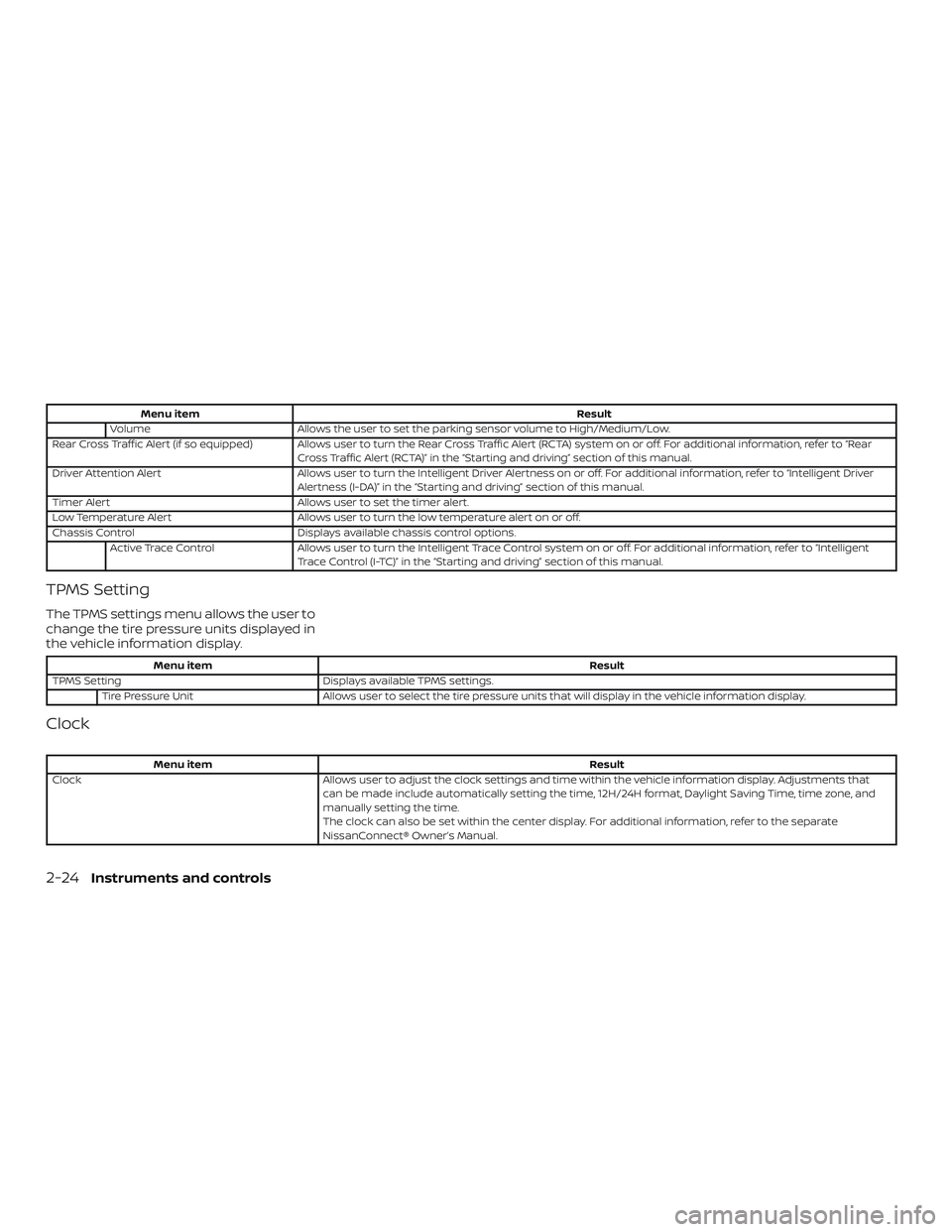
Menu itemResult
Volume Allows the user to set the parking sensor volume to High/Medium/Low.
Rear Cross Traffic Alert (if so equipped) Allows user to turn the Rear Cross Traffic Alert (RCTA) system on or off. For additional information, refer to “Rear
Cross Traffic Alert (RCTA)” in the “Starting and driving” section of this manual.
Driver Attention Alert Allows user to turn the Intelligent Driver Alertness on or off. For additional information, refer to “Intelligent Driver
Alertness (I-DA)” in the “Starting and driving” section of this manual.
Timer Alert Allows user to set the timer alert.
Low Temperature Alert Allows user to turn the low temperature alert on or off.
Chassis Control Displays available chassis control options.
Active Trace Control Allows user to turn the Intelligent Trace Control system on or off. For additional information, refer to “Intelligent
Trace Control (I-TC)” in the “Starting and driving” section of this manual.
TPMS Setting
The TPMS settings menu allows the user to
change the tire pressure units displayed in
the vehicle information display.
Menu item Result
TPMS Setting Displays available TPMS settings.
Tire Pressure Unit Allows user to select the tire pressure units that will display in the vehicle information display.
Clock
Menu item Result
Clock Allows user to adjust the clock settings and time within the vehicle information display. Adjustments that
can be made include automatically setting the time, 12H/24H format, Daylight Saving Time, time zone, and
manually setting the time.
The clock can also be set within the center display. For additional information, refer to the separate
NissanConnect® Owner’s Manual.
2-24Instruments and controls
Page 123 of 559
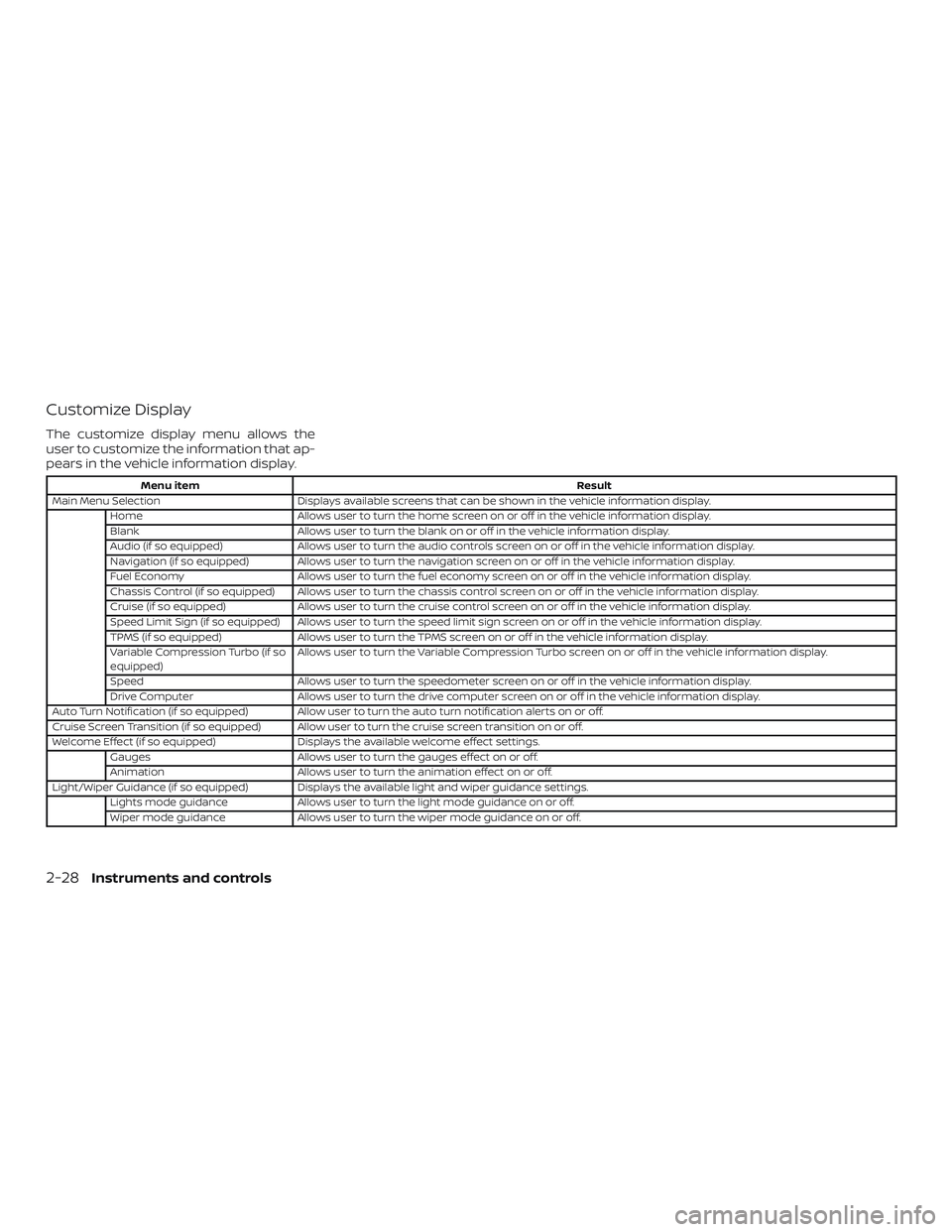
Customize Display
The customize display menu allows the
user to customize the information that ap-
pears in the vehicle information display.
Menu itemResult
Main Menu Selection Displays available screens that can be shown in the vehicle information display.
Home Allows user to turn the home screen on or off in the vehicle information display.
Blank Allows user to turn the blank on or off in the vehicle information display.
Audio (if so equipped) Allows user to turn the audio controls screen on or off in the vehicle information display.
Navigation (if so equipped) Allows user to turn the navigation screen on or off in the vehicle information display.
Fuel Economy Allows user to turn the fuel economy screen on or off in the vehicle information display.
Chassis Control (if so equipped) Allows user to turn the chassis control screen on or off in the vehicle information display.
Cruise (if so equipped) Allows user to turn the cruise control screen on or off in the vehicle information display.
Speed Limit Sign (if so equipped) Allows user to turn the speed limit sign screen on or off in the vehicle information display.
TPMS (if so equipped) Allows user to turn the TPMS screen on or off in the vehicle information display.
Variable Compression Turbo (if so
equipped) Allows user to turn the Variable Compression Turbo screen on or off in the vehicle information display.
Speed Allows user to turn the speedometer screen on or off in the vehicle information display.
Drive Computer Allows user to turn the drive computer screen on or off in the vehicle information display.
Auto Turn Notification (if so equipped) Allow user to turn the auto turn notification alerts on or off.
Cruise Screen Transition (if so equipped) Allow user to turn the cruise screen transition on or off.
Welcome Effect (if so equipped) Displays the available welcome effect settings.
Gauges Allows user to turn the gauges effect on or off.
Animation Allows user to turn the animation effect on or off.
Light/Wiper Guidance (if so equipped) Displays the available light and wiper guidance settings. Lights mode guidance Allows user to turn the light mode guidance on or off.
Wiper mode guidance Allows user to turn the wiper mode guidance on or off.
2-28Instruments and controls
Page 130 of 559
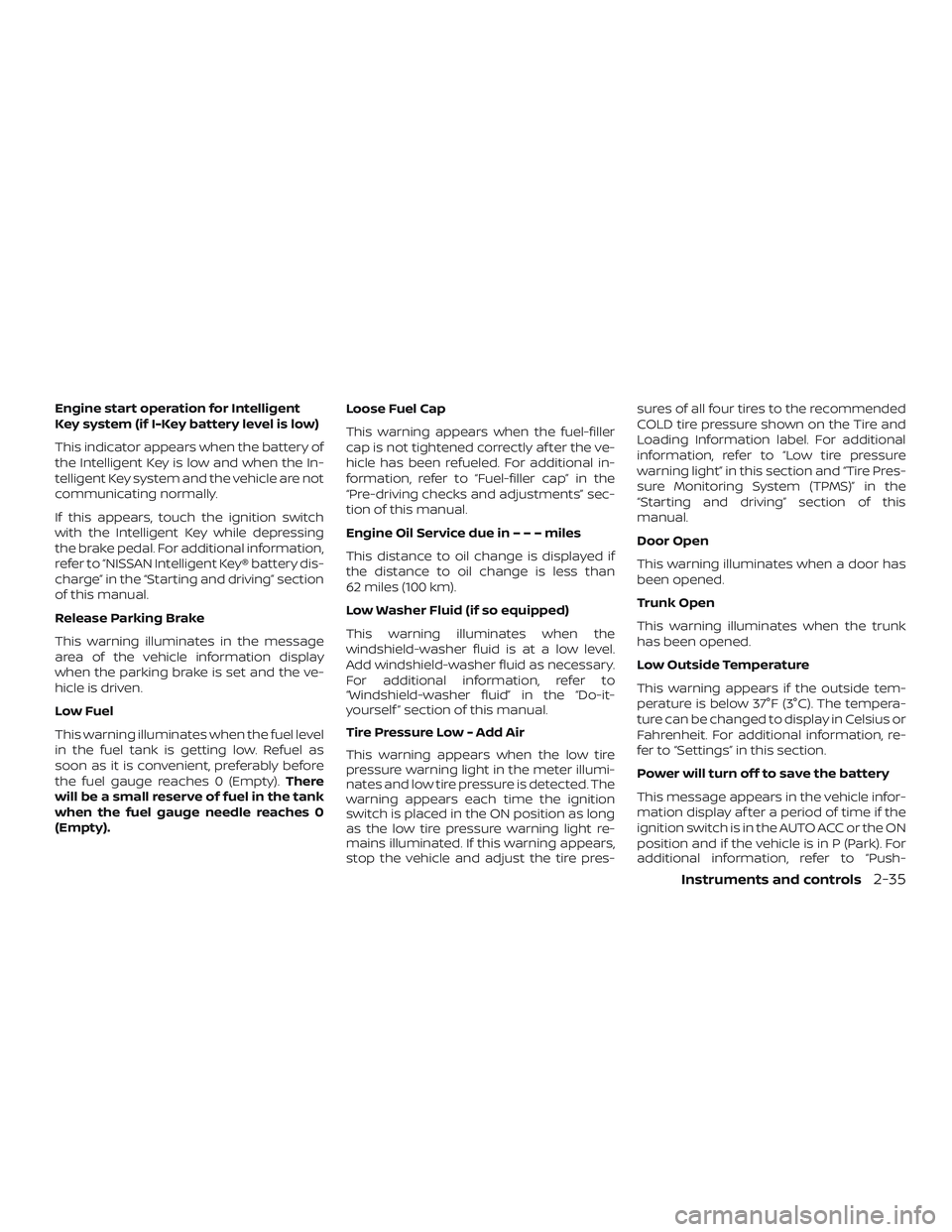
Engine start operation for Intelligent
Key system (if I-Key battery level is low)
This indicator appears when the battery of
the Intelligent Key is low and when the In-
telligent Key system and the vehicle are not
communicating normally.
If this appears, touch the ignition switch
with the Intelligent Key while depressing
the brake pedal. For additional information,
refer to “NISSAN Intelligent Key® battery dis-
charge” in the “Starting and driving” section
of this manual.
Release Parking Brake
This warning illuminates in the message
area of the vehicle information display
when the parking brake is set and the ve-
hicle is driven.
Low Fuel
This warning illuminates when the fuel level
in the fuel tank is getting low. Refuel as
soon as it is convenient, preferably before
the fuel gauge reaches 0 (Empty).There
will be a small reserve of fuel in the tank
when the fuel gauge needle reaches 0
(Empty). Loose Fuel Cap
This warning appears when the fuel-filler
cap is not tightened correctly af ter the ve-
hicle has been refueled. For additional in-
formation, refer to “Fuel-filler cap” in the
“Pre-driving checks and adjustments” sec-
tion of this manual.
Engine Oil Service due in–––miles
This distance to oil change is displayed if
the distance to oil change is less than
62 miles (100 km).
Low Washer Fluid (if so equipped)
This warning illuminates when the
windshield-washer fluid is at a low level.
Add windshield-washer fluid as necessary.
For additional information, refer to
“Windshield-washer fluid” in the “Do-it-
yourself ” section of this manual.
Tire Pressure Low - Add Air
This warning appears when the low tire
pressure warning light in the meter illumi-
nates and low tire pressure is detected. The
warning appears each time the ignition
switch is placed in the ON position as long
as the low tire pressure warning light re-
mains illuminated. If this warning appears,
stop the vehicle and adjust the tire pres-sures of all four tires to the recommended
COLD tire pressure shown on the Tire and
Loading Information label. For additional
information, refer to “Low tire pressure
warning light” in this section and “Tire Pres-
sure Monitoring System (TPMS)” in the
“Starting and driving” section of this
manual.
Door Open
This warning illuminates when a door has
been opened.
Trunk Open
This warning illuminates when the trunk
has been opened.
Low Outside Temperature
This warning appears if the outside tem-
perature is below 37°F (3°C). The tempera-
ture can be changed to display in Celsius or
Fahrenheit. For additional information, re-
fer to “Settings” in this section.
Power will turn off to save the battery
This message appears in the vehicle infor-
mation display af ter a period of time if the
ignition switch is in the AUTO ACC or the ON
position and if the vehicle is in P (Park). For
additional information, refer to “Push-
Instruments and controls2-35
Page 247 of 559
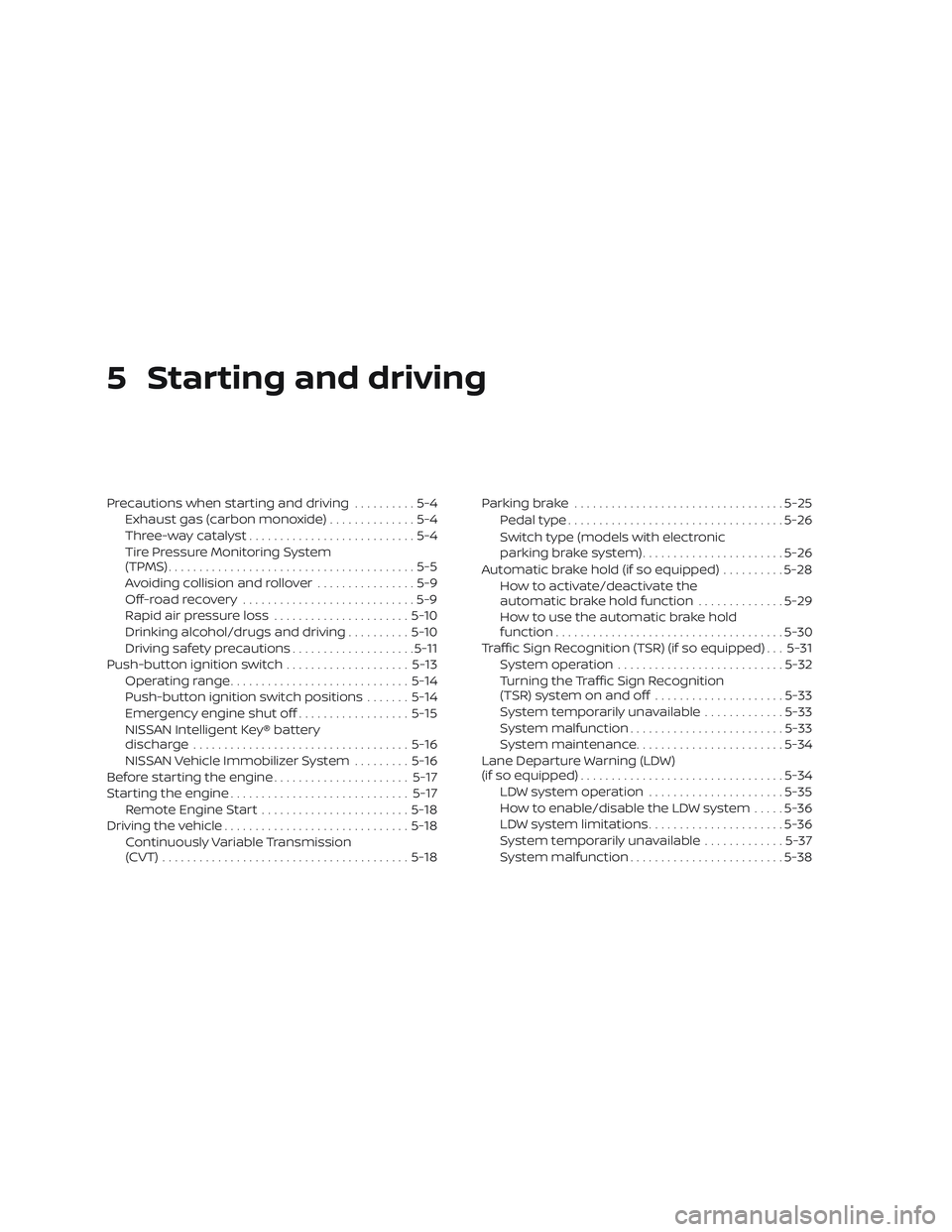
5 Starting and driving
Precautions when starting and driving..........5-4
Exhaust gas (carbon monoxide) ..............5-4
Three-way catalyst ...........................5-4
Tire Pressure Monitoring System
(TPMS)........................................5-5
Avoiding collision and rollover ................5-9
Off-roadrecovery ............................5-9
Rapid air pressure loss ......................5-10
Drinking alcohol/drugs and driving ..........5-10
Driving safety precautions ....................5-11
Push-button ignition switch ....................5-13
Operating range ............................. 5-14
Push-button ignition switch positions .......5-14
Emergency engine shut off ..................5-15
NISSAN Intelligent Key® battery
discharge ................................... 5-16
NISSAN Vehicle Immobilizer System .........5-16
Before starting the engine ......................5-17
Starting the engine ............................. 5-17
Remote Engine Start ........................ 5-18
Driving the vehicle .............................. 5-18
Continuously Variable Transmission
(CVT) ........................................ 5-18Parking brake
.................................. 5-25
Pedal type ................................... 5-26
Switch type (models with electronic
parking brake system) .......................5-26
Automatic brake hold (if so equipped) ..........5-28
How to activate/deactivate the
automatic brake hold function ..............5-29
How to use the automatic brake hold
function ..................................... 5-30
Traffic Sign Recognition (TSR) (if so equipped) . . . 5-31 System operation ........................... 5-32
Turning the Traffic Sign Recognition
(TSR) system on and off .....................5-33
System temporarily unavailable .............5-33
System malfunction ......................... 5-33
System maintenance ........................ 5-34
Lane Departure Warning (LDW)
(if so equipped) ................................. 5-34
LDW system operation ......................5-35
How to enable/disable the LDW system .....5-36
LD
W system limitations ...................... 5-36
System temporarily unavailable .............5-37
System malfunction ......................... 5-38
Page 252 of 559
∙ Do not stop or park the vehicle overflammable materials such as dry
grass, waste paper or rags. They may
ignite and cause a fire.
CAUTION
∙ Do not use leaded gasoline. Depositsfrom leaded gasoline will seriously re-
duce the three-way catalyst’s ability
to help reduce exhaust pollutants.
∙ Keep your engine tuned up. Malfunc- tions in the ignition, fuel injection, or
electrical systems can cause overrich
fuel flow into the three-way catalyst,
causing it to overheat. Do not keep
driving if the engine misfires, or if no-
ticeable loss of performance or other
unusual operating conditions are de-
tected. Have the vehicle inspected
promptly. It is recommended that you
visit a NISSAN dealer for this service.
∙ Avoid driving with an extremely low fuel level. Running out of fuel could
cause the engine to misfire, damag-
ing the three-way catalyst.
∙ Do not race the engine while warming it up. ∙ Do not push or tow your vehicle to
start the engine.
TIRE PRESSURE MONITORING
SYSTEM (TPMS)
Each tire, including the spare (if provided),
should be checked monthly when cold and
inflated to the inflation pressure recom-
mended by the vehicle manufacturer on
the vehicle placard or tire inflation pressure
label. (If your vehicle has tires of a different
size than the size indicated on the vehicle
placard or tire inflation pressure label, you
should determine the proper tire inflation
pressure for those tires.)
As an added safety feature, your vehicle
has been equipped with a Tire Pressure
Monitoring System (TPMS) that illuminates
a low tire pressure telltale when one or
more of your tires is significantly under-
inflated. Accordingly, when the low tire
pressure telltale illuminates, you should
stop and check your tires as soon as pos-
sible, and inflate them to the proper pres-
sure. Driving on a significantly under-
inflated tire causes the tire to overheat and
can lead to tire failure. Under-inflation also
reduces fuel efficiency and tire tread life,
and may affect the vehicle’s handling and
stopping ability. Please note that the TPMS is not a substi-
tute for proper tire maintenance, and it is
the driver’s responsibility to maintain cor-
rect tire pressure, even if under-inflation
has not reached the level to trigger illumi-
nation of the TPMS low tire pressure telltale.
Your vehicle has also been equipped with a
TPMS malfunction indicator to indicate
when the system is not operating properly.
The TPMS malfunction indicator is com-
bined with the low tire pressure telltale.
When the system detects a malfunction,
the telltale will flash for approximately one
minute and then remain continuously illu-
minated. This sequence will continue upon
subsequent vehicle start-ups as long as
the malfunction exists. When the malfunc-
tion indicator is illuminated, the system
may not be able to detect or signal low tire
pressure as intended. TPMS malfunctions
may occur for a variety of reasons, includ-
ing the installation of replacement or alter-
nate tires or wheels on the vehicle that
prevent the TPMS from functioning prop-
erly. Always check the TPMS malfunction
telltale af ter replacing one or more tires or
wheels on your vehicle to ensure that the
replacement or alternate tires and wheels
allow the TPMS to continue to function
properly.
Starting and driving5-5
Page 253 of 559
Additional information:∙ When replacing a wheel without the TPMS such as the spare tire, the TPMS
does not monitor the tire pressure of
the spare tire.
∙ The TPMS will activate only when the vehicle is driven at speeds above
16 mph (25 km/h). Also, this system may
not detect a sudden drop in tire pres-
sure (for example, a flat tire while driv-
ing).
∙ The low tire pressure warning light does not automatically turn off when the tire
pressure is adjusted on all four tires. Af-
ter all four tires are inflated to the rec-
ommended pressure, the vehicle must
be driven at speeds above 16 mph
(25 km/h) to activate the TPMS and turn
off the low tire pressure warning light.
Use a tire pressure gauge to check the
tire pressure.
∙ The “Tire Pressure Low - Add Air” warn- ing appears in the vehicle information
display when the low tire pressure
warning light is illuminated and low tire
pressure is detected. The “Tire Pressure
Low - Add Air” warning turns off when
the low tire pressure warning light turns
off. ∙ The “Tire Pressure Low - Add Air” warn-
ing appears each time the ignition
switch is placed in the ON position as
long as the low tire pressure warning
light remains illuminated.
∙ The “Tire Pressure Low - Add Air” warn- ing does not appear if the low tire pres-
sure warning light illuminates to indi-
cate a TPMS malfunction.
∙ Tire pressure rises and falls depending on the heat caused by the vehicle’s op-
eration and the outside temperature.
Do not reduce the tire pressure af ter
driving because the tire pressure rises
af ter driving. Low outside temperature
can lower the temperature of the air
inside the tire which can cause a lower
tire inflation pressure. This may cause
the low tire pressure warning light to
illuminate. If the warning light illumi-
nates, check the tire pressure for all four
tires.
∙ The Tire and Loading Information label is located in the driver’s door opening. ∙ You can also check the tire pressure of
all tires (except the spare) on the vehicle
information display screen. The order of
the tire pressure figures displayed on
the screen corresponds with the actual
order of the tire position.
For additional information, refer to “Low tire
pressure warning light” in the “Instruments
and controls” section, “Tire Pressure Moni-
toring System (TPMS)” in the “In case of
emergency” section and “Tire pressure” in
the “Do-it-yourself ” section of this manual.
WARNING
∙ Radio waves could adversely affect electric medical equipment. Those
who use a pacemaker should contact
the electric medical equipment
manufacturer for the possible influ-
ences before use.
5-6Starting and driving