power steering NISSAN ALTIMA 2020 Owner´s Manual
[x] Cancel search | Manufacturer: NISSAN, Model Year: 2020, Model line: ALTIMA, Model: NISSAN ALTIMA 2020Pages: 559, PDF Size: 6.3 MB
Page 20 of 559
9. Front passenger supplemental airbag (P. 1-46)
10. Passenger supplemental knee
airbag (P. 1-46)
11.. Glove box (P. 2-58)
12. Front passenger air bag status
light (P. 1-46)
Hazard warning flasher switch
(P. 6-2)
13. Power outlet (P. 2-56) USB connection port
(if so equipped) (P. 4-2, 4-42)
Aux jack*
14. Cup holders (P. 2-58)
15 Shif t lever (P. 5-18)
16. Electronic parking brake switch
(if so equipped) (P. 5-25)
Automatic brake hold switch
(if so equipped) (P. 5-25)
17. Push-button ignition switch
(P. 5-13) 18. Cruise control switches
(if so equipped) (P. 5-63)
Intelligent Cruise Control (ICC)
switches (if so equipped) (P. 5-66)
Bluetooth® Hands-free Phone
System*
ProPILOT Assist Switch
(if so equipped) (P. 5-90)
19. Driver supplemental knee airbag
(P. 1-46)
20. Hood release (P. 3-22) Fuel-filler door release (P. 3-25)
Tilt/telescopic steering wheel
controls (P. 3-28)
21. Trip computer reset switch (P. 2-4) Instrument brightness control
(P. 2-45)
Steering assist switch
(for vehicles with ProPILOT Assist)
(if so equipped) (P. 2-54)
Trunk opener (P. 3-23)
*: For additional information, refer to the
separate NissanConnect® Owner’s Manual.
Refer to the page number indicated in
parentheses for operating details.
Illustrated table of contents0-7
Page 23 of 559
Warninglight Name Page
or
Anti-lock Braking
System (ABS)
warning light 2-10
Automatic Emer-
gency Braking
(AEB) system
warning light (if so
equipped)2-10
Automatic Emer-
gency Braking
(AEB) with Pedes-
trian Detection
system warning
light (if so
equipped) 2-11
or
Brake warning
light
2-11
Warning
light Name Page
Charge warning
light 2-11
Electronic parking
brake warning
light (yellow) (if so
equipped)2-12
Engine oil pres-
sure warning light
2-12
Low tire pressure
warning light2-12
Master warning
light2-14
Power steering
warning light2-14
Rear Automatic
Braking (RAB)
warning light (if so
equipped) 2-15
Warning
light Name Page
Seat belt warning
light and chime 2-15
Supplemental air
bag warning light2-15
Indicator
light Name Page
All Wheel Drive
(AWD) AUTO indi-
cator light (if so
equipped) 2-15
Automatic brake
hold indicator
light (green) (if so
equipped)2-16
Automatic brake
hold indicator
light (white) (if so
equipped)2-16
WARNING AND INDICATOR LIGHTS
0-10Illustrated table of contents
Page 95 of 559
2 Instruments and controls
Instrument panel................................2-2
Meters and gauges ..............................2-4
Speedometer and odometer .................2-4
Tachometer ..................................2-6
Engine coolant temperature gauge ..........2-6
Fuel gauge ................................... 2-7
Distance To Empty (DTE) ...................... 2-7
Variable Compression Turbo
(if so equipped) ...............................2-8
Warning lights, indicator lights and audible
reminders .......................................2-9
Checking lights .............................. 2-10
Warning lights ............................... 2-10
Indicator lights .............................. 2-15
Audible reminders ........................... 2-18
Vehicle information display .....................2-19
How to use the vehicle information
display ...................................... 2-20
Startup display .............................. 2-20
Resetting the drive computer ................2-21
Oil control system (if so equipped) ...........2-21
Settings ..................................... 2-22
Vehicle information display indicators .......2-30
Vehicle information display warnings ........2-33 Security systems
............................... 2-40
Vehicle security system .....................2-40
NISSAN Vehicle Immobilizer System .........2-42
Wiper and washer switch .......................2-43
Switch operation ............................ 2-43
Rear window and outside mirror
(if so equipped) defroster switch ................2-44
Headlight and turn signal switch ...............2-45
Headlight control switch .....................2-45
LED Daytime Running Lights (DRL)
system (if so equipped) ......................2-50
Instrument brightness control ...............2-50
Turn signal switch ........................... 2-50
Fog light switch (if so equipped) .............2-51
Horn ........................................... 2-52
Heated seat switches (if so equipped) ..........2-52
Heated steering wheel switch (if so equipped) . . 2-53
S
teering Assist switch (for vehicles with
ProPILOT Assist) (if so equipped) ................2-54
E-call (SOS) button (if so equipped) .............2-54
Rear Door Alert ................................. 2-55
Power outlet .................................... 2-56
Extended storage switch .......................2-57
Storage ........................................ 2-58
Page 98 of 559
10. Passenger supplemental kneeairbag (P. 1-46)
11.. Glove box (P. 2-58)
12. Front passenger air bag status
light (P. 1-46)
Hazard warning flasher switch
(P. 6-2)
13. Power outlet (P. 2-56) USB connection port
(if so equipped) (P. 4-2, 4-42)
Aux jack*
14. Cup holders (P. 2-58)
15 Shif t lever (P. 5-18)
16. Electronic parking brake switch
(if so equipped) (P. 5-25)
Automatic brake hold switch
(if so equipped) (P. 5-25)
17. Push-button ignition switch
(P. 5-13)
18. Cruise control switches
(if so equipped) (P. 5-63)
Intelligent Cruise Control (ICC)
switches (if so equipped) (P. 5-66)
Bluetooth® Hands-free Phone
System*
ProPILOT Assist Switch (if so
equipped) (P. 5-90) 19. Driver supplemental knee airbag
(P. 1-46)
20. Hood release (P. 3-22) Fuel-filler door release (P. 3-25)
Tilt/telescopic steering wheel
controls (P. 3-28)
21. Trip computer reset switch (P. 2-4) Instrument brightness control
(P. 2-45)
Steering assist switch (for vehicles
with ProPILOT Assist) (if so
equipped) (P. 2-54)
Trunk opener (P. 3-23)
*: For additional information, refer to the
separate NissanConnect® Owner’s Manual.
Refer to the page number indicated in
parentheses for operating details.
Instruments and controls2-3
Page 104 of 559
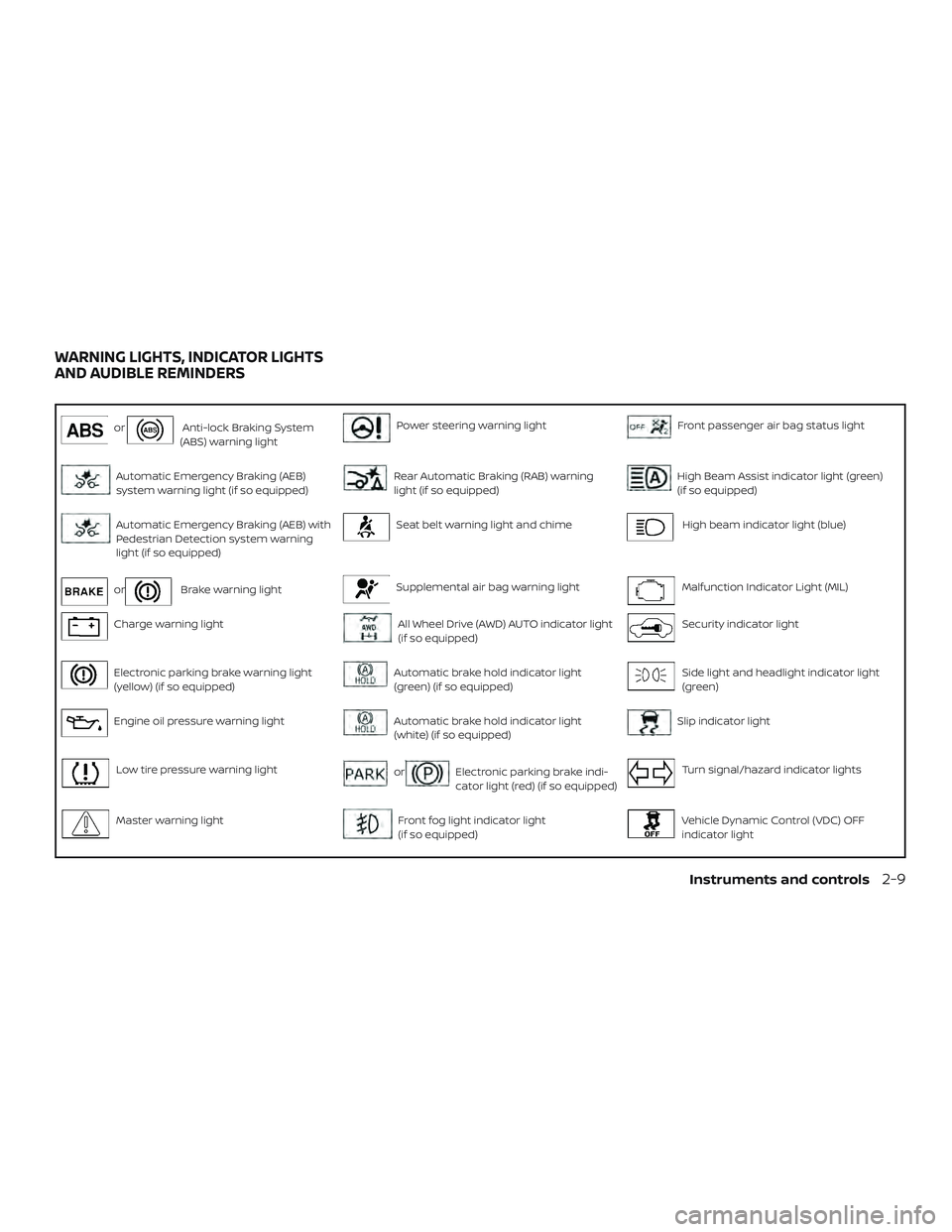
orAnti-lock Braking System
(ABS) warning lightPower steering warning lightFront passenger air bag status light
Automatic Emergency Braking (AEB)
system warning light (if so equipped)Rear Automatic Braking (RAB) warning
light (if so equipped)High Beam Assist indicator light (green)
(if so equipped)
Automatic Emergency Braking (AEB) with
Pedestrian Detection system warning
light (if so equipped)Seat belt warning light and chimeHigh beam indicator light (blue)
orBrake warning lightSupplemental air bag warning lightMalfunction Indicator Light (MIL)
Charge warning lightAll Wheel Drive (AWD) AUTO indicator light
(if so equipped)Security indicator light
Electronic parking brake warning light
(yellow) (if so equipped)Automatic brake hold indicator light
(green) (if so equipped)Side light and headlight indicator light
(green)
Engine oil pressure warning lightAutomatic brake hold indicator light
(white) (if so equipped)Slip indicator light
Low tire pressure warning lightorElectronic parking brake indi-
cator light (red) (if so equipped)Turn signal/hazard indicator lights
Master warning lightFront fog light indicator light
(if so equipped)Vehicle Dynamic Control (VDC) OFF
indicator light
WARNING LIGHTS, INDICATOR LIGHTS
AND AUDIBLE REMINDERS
Instruments and controls2-9
Page 109 of 559
∙ When replacing a wheel without theTPMS such as the spare tire, the TPMS
will not function and the low tire pres-
sure warning light will flash for ap-
proximately 1 minute. The light will re-
main on af ter 1 minute. Have your
tires replaced and/or TPMS system
reset as soon as possible. It is recom-
mended that you visit a NISSAN dealer
for these services.
∙ Replacing tires with those not origi- nally specified by NISSAN could affect
the proper operation of the TPMS.
CAUTION
∙ The TPMS is not a substitute for theregular tire pressure check. Be sure to
check the tire pressure regularly.
∙ If the vehicle is being driven at speeds of less than 16 mph (25 km/h), the
TPMS may not operate correctly.
∙ Be sure to install the specified size of tires to the four wheels correctly.
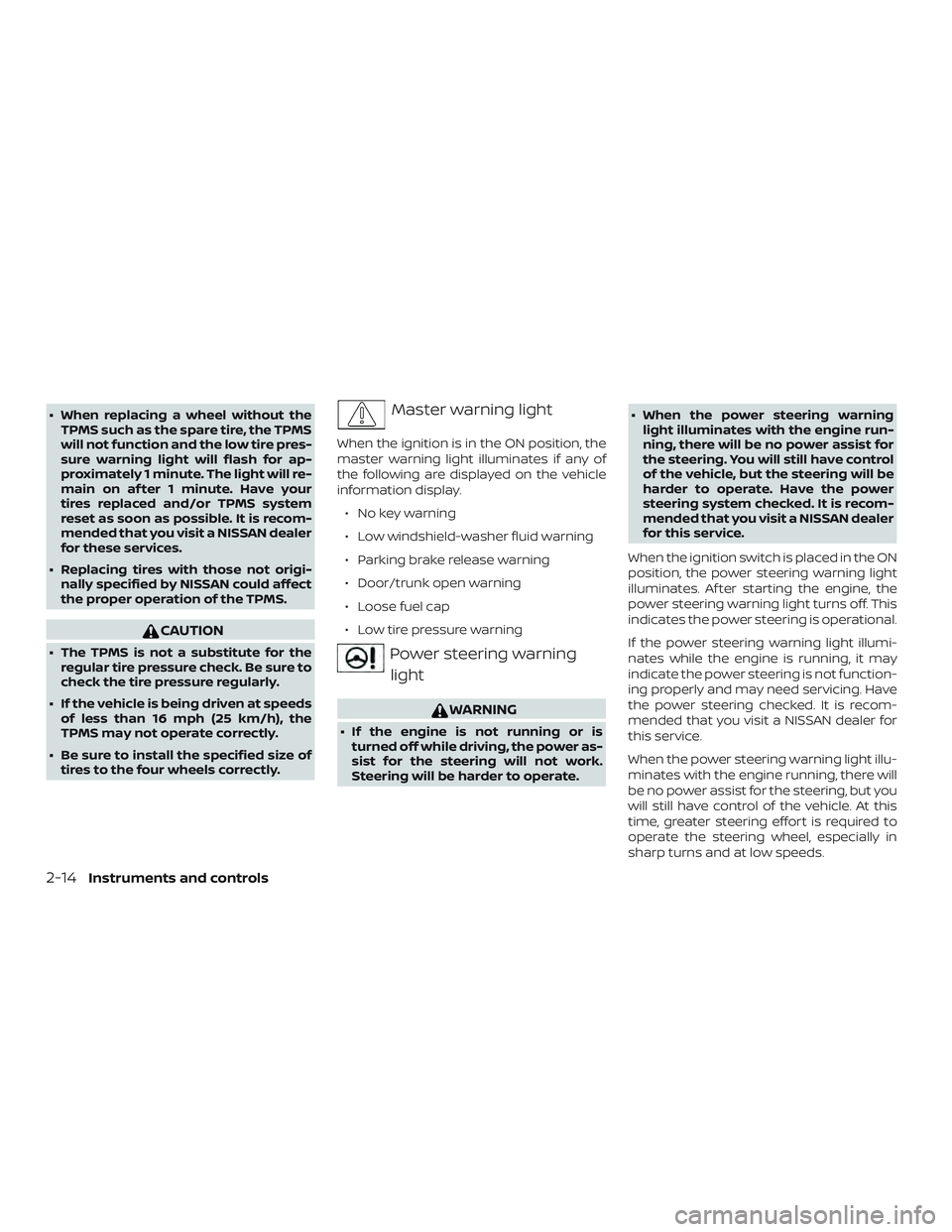
Master warning light
When the ignition is in the ON position, the
master warning light illuminates if any of
the following are displayed on the vehicle
information display.
∙ No key warning
∙ Low windshield-washer fluid warning
∙ Parking brake release warning
∙ Door/trunk open warning
∙ Loose fuel cap
∙ Low tire pressure warning
Power steering warninglight
WARNING
∙ If the engine is not running or is turned off while driving, the power as-
sist for the steering will not work.
Steering will be harder to operate. ∙ When the power steering warning
light illuminates with the engine run-
ning, there will be no power assist for
the steering. You will still have control
of the vehicle, but the steering will be
harder to operate. Have the power
steering system checked. It is recom-
mended that you visit a NISSAN dealer
for this service.
When the ignition switch is placed in the ON
position, the power steering warning light
illuminates. Af ter starting the engine, the
power steering warning light turns off. This
indicates the power steering is operational.
If the power steering warning light illumi-
nates while the engine is running, it may
indicate the power steering is not function-
ing properly and may need servicing. Have
the power steering checked. It is recom-
mended that you visit a NISSAN dealer for
this service.
When the power steering warning light illu-
minates with the engine running, there will
be no power assist for the steering, but you
will still have control of the vehicle. At this
time, greater steering effort is required to
operate the steering wheel, especially in
sharp turns and at low speeds.
2-14Instruments and controls
Page 110 of 559
For additional information, refer to “Power
steering” in the “Starting and driving” sec-
tion of this manual.
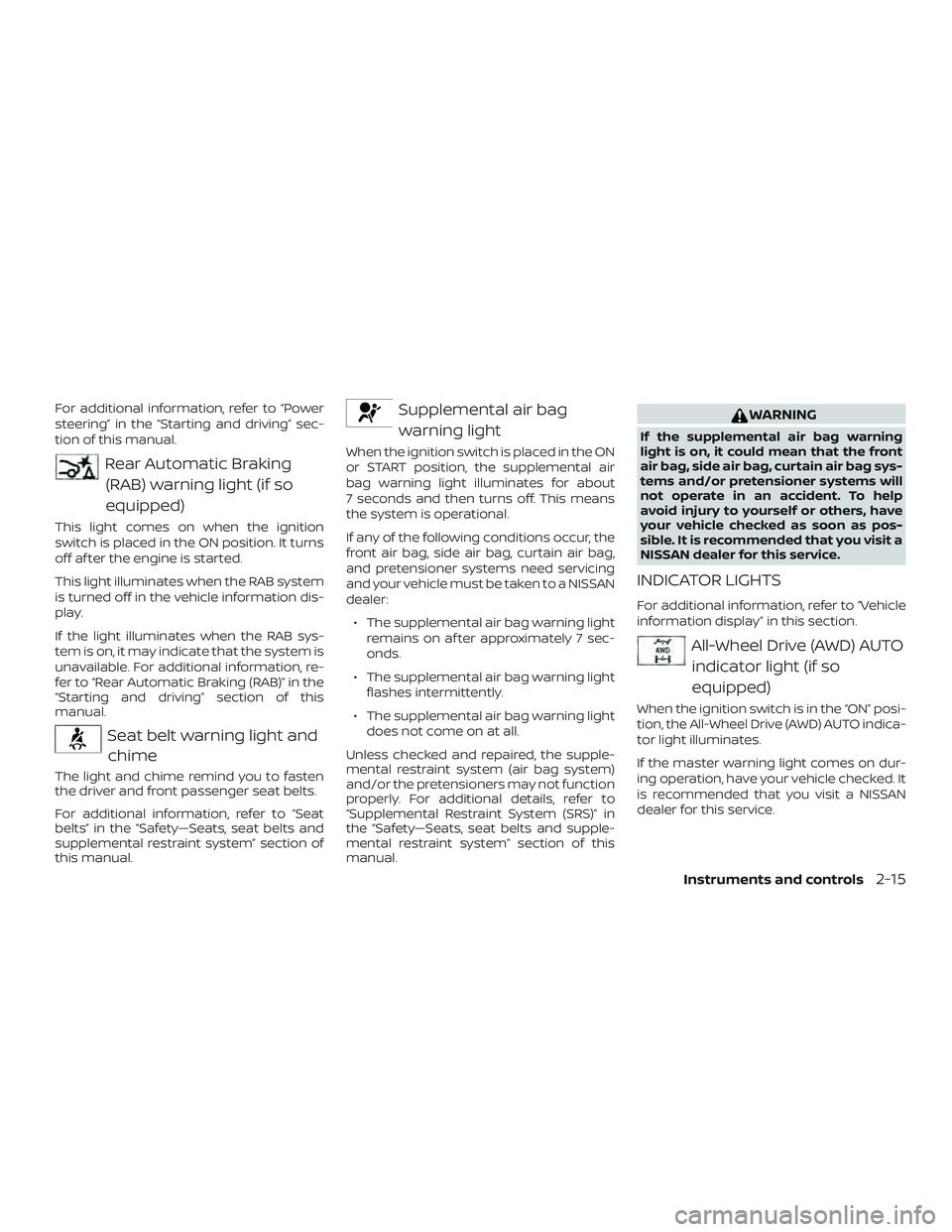
Rear Automatic Braking(RAB) warning light (if so
equipped)
This light comes on when the ignition
switch is placed in the ON position. It turns
off af ter the engine is started.
This light illuminates when the RAB system
is turned off in the vehicle information dis-
play.
If the light illuminates when the RAB sys-
tem is on, it may indicate that the system is
unavailable. For additional information, re-
fer to “Rear Automatic Braking (RAB)” in the
“Starting and driving” section of this
manual.
Seat belt warning light andchime
The light and chime remind you to fasten
the driver and front passenger seat belts.
For additional information, refer to “Seat
belts” in the “Safety—Seats, seat belts and
supplemental restraint system” section of
this manual.
Supplemental air bag
warning light
When the ignition switch is placed in the ON
or START position, the supplemental air
bag warning light illuminates for about
7 seconds and then turns off. This means
the system is operational.
If any of the following conditions occur, the
front air bag, side air bag, curtain air bag,
and pretensioner systems need servicing
and your vehicle must be taken to a NISSAN
dealer:
∙ The supplemental air bag warning light remains on af ter approximately 7 sec-
onds.
∙ The supplemental air bag warning light flashes intermittently.
∙ The supplemental air bag warning light does not come on at all.
Unless checked and repaired, the supple-
mental restraint system (air bag system)
and/or the pretensioners may not function
properly. For additional details, refer to
“Supplemental Restraint System (SRS)” in
the “Safety—Seats, seat belts and supple-
mental restraint system” section of this
manual.
WARNING
If the supplemental air bag warning
light is on, it could mean that the front
air bag, side air bag, curtain air bag sys-
tems and/or pretensioner systems will
not operate in an accident. To help
avoid injury to yourself or others, have
your vehicle checked as soon as pos-
sible. It is recommended that you visit a
NISSAN dealer for this service.
INDICATOR LIGHTS
For additional information, refer to “Vehicle
information display” in this section.
All-Wheel Drive (AWD) AUTO indicator light (if so
equipped)
When the ignition switch is in the “ON” posi-
tion, the All-Wheel Drive (AWD) AUTO indica-
tor light illuminates.
If the master warning light comes on dur-
ing operation, have your vehicle checked. It
is recommended that you visit a NISSAN
dealer for this service.
Instruments and controls2-15
Page 167 of 559
3 Pre-driving checks and adjustments
Keys.............................................3-2NISSAN Intelligent Key® .......................3-2
NISSAN Vehicle Immobilizer System
keys..........................................3-4
Doors ...........................................3-4
Locking with key ..............................3-5
Locking with inside lock knob .................3-6
Locking with power door lock switch .........3-6
Automatic door locks (if so equipped) ........3-6
Child safety rear door lock .................... 3-7
NISSAN Intelligent Key® .......................... 3-7
Operating range ..............................3-9
Door locks/unlocks precaution ...............3-9
NISSAN Intelligent Key® operation ............3-10
How to use the remote keyless entry
function ..................................... 3-14
Warning signals ............................. 3-16
Troubleshooting guide ......................3-17
Remote Engine Start ........................... 3-19
Remote Engine Start operating range .......3-19
Remote starting the vehicle .................3-20
Extending engine run time ..................3-20Canceling a Remote Engine Start
............3-20
Conditions the Remote Engine Start will
notwork .................................... 3-21
Hood ........................................... 3-22
Trunk lid ........................................ 3-23
Opener operation ........................... 3-23
Interior trunk lid release .....................3-24
Interior trunk access ........................ 3-24
Fuel-filler door .................................. 3-25
Opener operation ........................... 3-25
Fuel-filler cap ................................ 3-25
Steering wheel ................................. 3-28
Tilt operation ................................ 3-28
Telescopic operation ........................ 3-28
Sun visors ...................................... 3-29
Vanity mirrors ............................... 3-29
Mirrors ......................................... 3-30
Manual anti-glare rearview mirror
(if so equipped) .............................. 3-30
Automatic anti-glare rearview mirror
(if so equipped) .............................. 3-30
Outside
mirrors............................. 3-31
Page 242 of 559
Remote Engine Start with
Intelligent Climate Control (if so
equipped)
Vehicles equipped with automatic climate
controls and Remote Engine Start function
may go into automatic heating or cooling
mode when Remote Engine Start is acti-
vated depending on outside and cabin
temperatures. During this period, the cli-
mate control display and buttons will be
inoperable until the ignition switch is
turned on. In Remote Engine Start defrost-
ing mode, the rear window defroster and
heated steering wheel (if so equipped) may
be activated automatically.
MANUAL OPERATION
Fan speed control buttons
Press thefan speed control buttons
to manually control the fan speed.
Press the AUTO button to return to auto-
matic control of the fan speed.
Temperature control dial
The temperature control dial allows you to
adjust the temperature of the outlet air. To
lower the temperature, turn the dial to the
lef t. To increase the temperature, turn the dial to the right. Temperature can be ad-
justed on the driver’s and passenger’s side.
Air recirculation
Press theair recirculation button to
recirculate interior air inside the vehicle.
The
indicator light on the button will
come on.
The air recirculation cannot be activated
when the air conditioner is in the
front defrosting mode.
When the outside temperature exceeds
70°F (21°C), the air conditioning system may
default to air recirculation mode automati-
cally to reduce overall power consumption.
To exit air recirculation mode, deselect the
air recirculation button (indicator light will
turn off ) to enter fresh air mode.
Automatic intake air control
In the AUTO mode, the intake air will be
controlled automatically. To manually con-
trol the intake air, press the
air recir-
culation button. To return to the automatic
control mode, press and hold the
air
recirculation button for about 2 seconds.
The indicator light will flash twice, and then
the intake air will be controlled automati-
cally.
A/C (air conditioner) button
Start the engine, press thefan speed
control buttons to the desired position and
press the
button to turn on the air
conditioner. To turn off the air conditioner,
press the
button again.
The air conditioner cooling function op-
erates only when the engine is running.
Air flow control
Pressing thebutton manually con-
trols air flow and selects the air outlet:
— Air flows from center and side
vents.
— Air flows from center and sidevents and foot outlets.
— Air flows mainly from footoutlets.
— Air flows from defroster andfoot outlets.
Synchronize climate settings
Press the SYNC button to synchronize cli-
mate settings. The sync indicator will turn
on.
Pressing SYNC will synchronize driver’s and
front passenger’s climate settings.
Monitor, climate, audio, phone and voice recognition systems4-39
Page 250 of 559
All-Wheel Drive (AWD) (if so equipped)..........5-164
Parking/parking on hills .......................5-167
Power steering ................................ 5-168
Brake system .................................. 5-169
Brake precautions .......................... 5-169
Anti-lock Braking System (ABS) .............5-169
Brake Assist ................................ 5-170
Vehicle Dynamic Control (VDC) system .........5-171
Brake force distribution .....................5-173
Chassis Control ............................... 5-174
Intelligent Trace Control (I-TC) ...............5-174
Active Ride Control (ARC) ...................5-174
Hill start assist system ......................... 5-174
Rear Sonar System (RSS) (if so equipped) ......5-175
System operation .......................... 5-176
How to enable/disable the sonar
system ..................................... 5-178Sonar limitations
........................... 5-179
System temporarily unavailable ............5-179
System maintenance ....................... 5-180
Cold weather driving .......................... 5-180
Freeing a frozen door lock ..................5-180
Antifreeze .................................. 5-180
Battery..................................... 5-180
Draining of coolant water ...................5-181
Tire equipment ............................. 5-181
Special winter equipment ..................5-181
Driving on snow or ice ......................5-181
Engine block heater (if so equipped) ........5-182
Active noise cancellation/Active sound
enhancement (if so equipped) .................5-183
Active noise cancellation ...................5-183
Active sound enhancement ................5-183