power steering NISSAN ALTIMA 2023 Owners Manual
[x] Cancel search | Manufacturer: NISSAN, Model Year: 2023, Model line: ALTIMA, Model: NISSAN ALTIMA 2023Pages: 644, PDF Size: 4.12 MB
Page 14 of 644
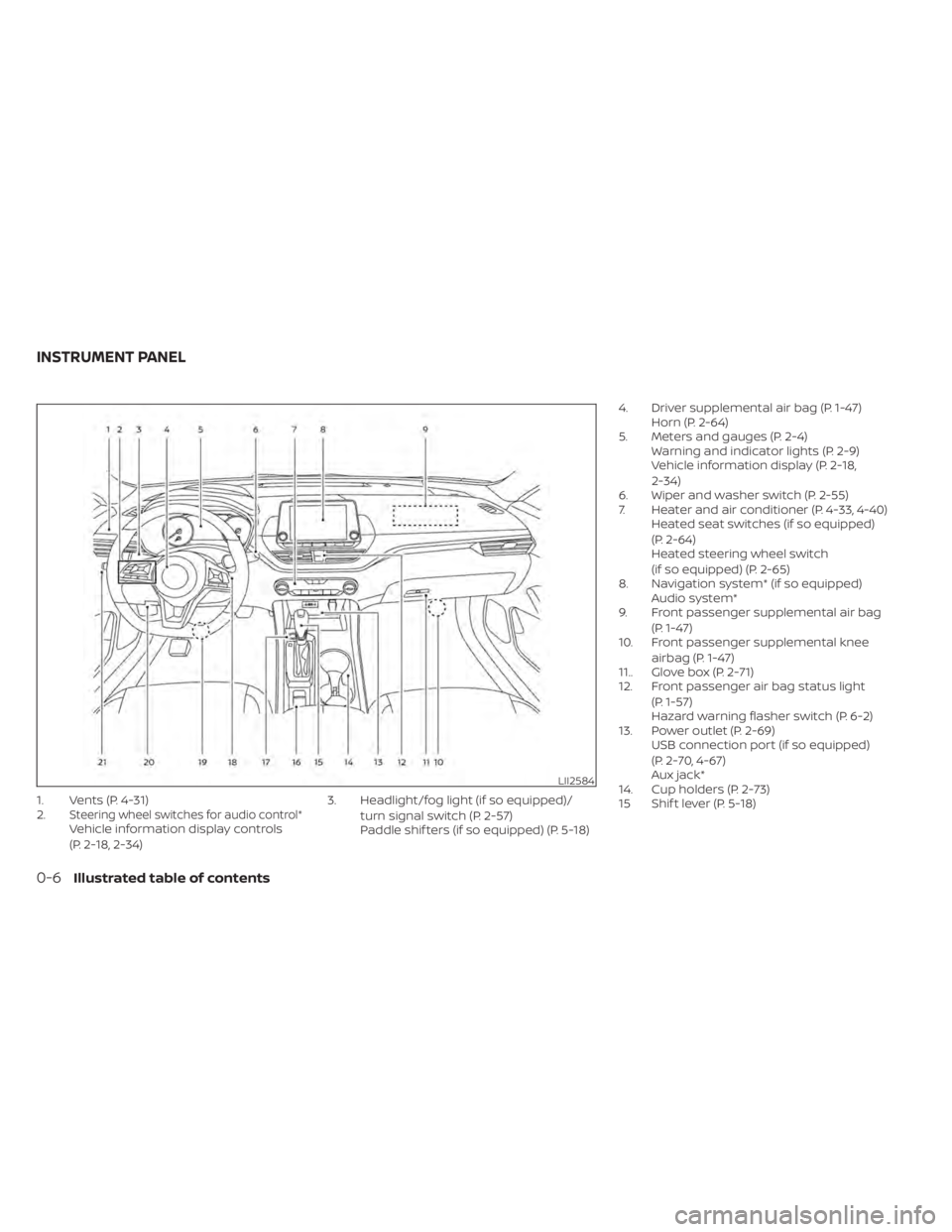
1. Vents (P. 4-31)
2.Steering wheel switches for audio control*Vehicle information display controls
(P. 2-18, 2-34)3. Headlight/fog light (if so equipped)/
turn signal switch (P. 2-57)
Paddle shif ters (if so equipped) (P. 5-18) 4. Driver supplemental air bag (P. 1-47)
Horn (P. 2-64)
5. Meters and gauges (P. 2-4) Warning and indicator lights (P. 2-9)
Vehicle information display (P. 2-18,
2-34)
6. Wiper and washer switch (P. 2-55)
7. Heater and air conditioner (P. 4-33, 4-40) Heated seat switches (if so equipped)
(P. 2-64)
Heated steering wheel switch
(if so equipped) (P. 2-65)
8. Navigation system* (if so equipped) Audio system*
9. Front passenger supplemental air bag
(P. 1-47)
10. Front passenger supplemental knee
airbag (P. 1-47)
11.. Glove box (P. 2-71)
12. Front passenger air bag status light
(P. 1-57)
Hazard warning flasher switch (P. 6-2)
13. Power outlet (P. 2-69) USB connection port (if so equipped)
(P. 2-70, 4-67)
Aux jack*
14. Cup holders (P. 2-73)
15 Shif t lever (P. 5-18)
LII2584
INSTRUMENT PANEL
0-6Illustrated table of contents
Page 19 of 644
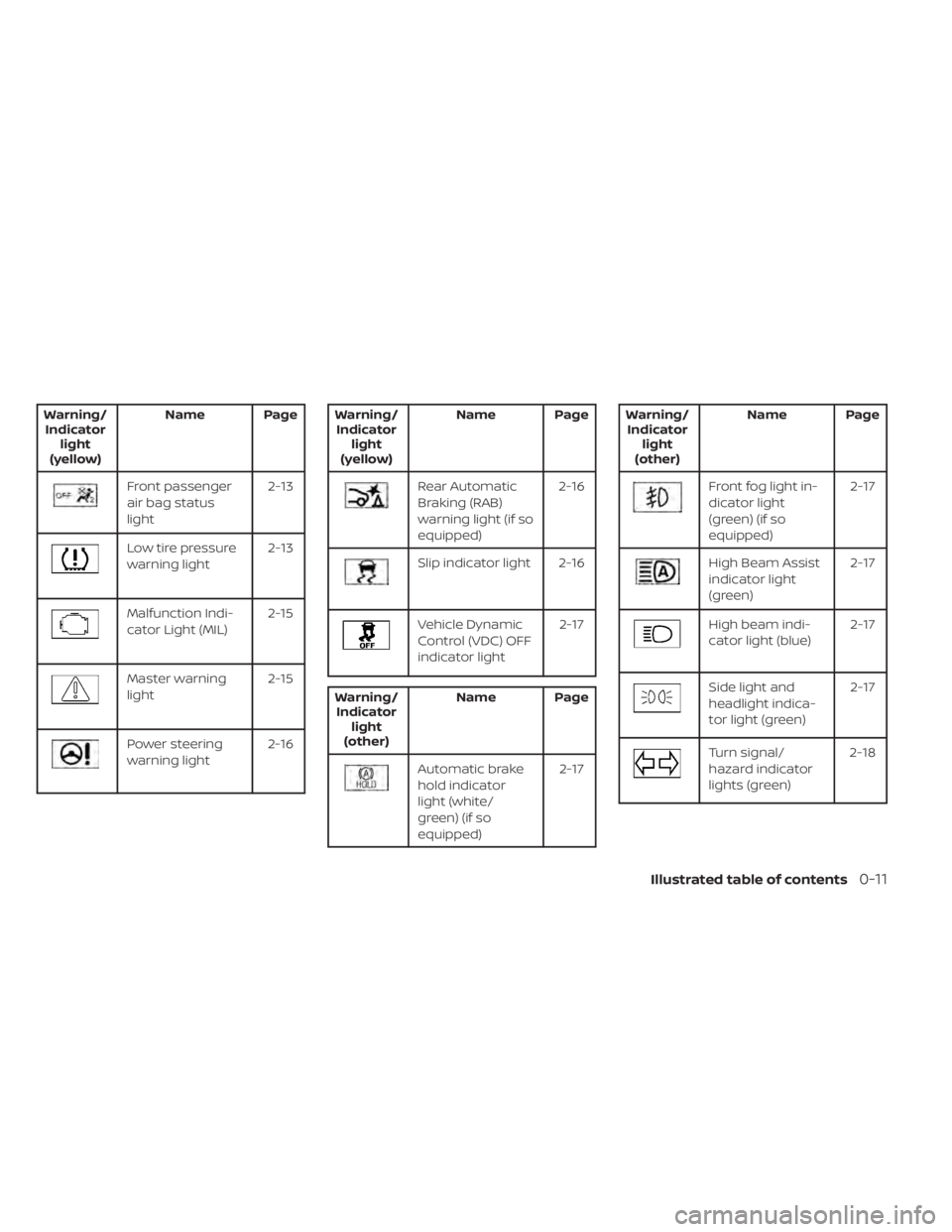
Warning/Indicator light
(yellow) Name Page
Front passenger
air bag status
light
2-13
Low tire pressure
warning light
2-13
Malfunction Indi-
cator Light (MIL)2-15
Master warning
light2-15
Power steering
warning light2-16
Warning/
Indicator light
(yellow) Name Page
Rear Automatic
Braking (RAB)
warning light (if so
equipped) 2-16
Slip indicator light 2-16
Vehicle Dynamic
Control (VDC) OFF
indicator light
2-17
Warning/
Indicator light
(other) Name Page
Automatic brake
hold indicator
light (white/
green) (if so
equipped) 2-17
Warning/
Indicator light
(other) Name Page
Front fog light in-
dicator light
(green) (if so
equipped) 2-17
High Beam Assist
indicator light
(green)
2-17
High beam indi-
cator light (blue)
2-17
Side light and
headlight indica-
tor light (green)2-17
Turn signal/
hazard indicator
lights (green)2-18
Illustrated table of contents0-11
Page 91 of 644
Heated seat switches (if so equipped)..........2-64
Heated steering wheel switch (if so equipped) . . 2-65
Steering Assist switch (for vehicles with
ProPILOT Assist) (if so equipped) ................2-66
Emergency call (SOS) button (if so equipped) . . . 2-67
Rear Door Alert ................................. 2-67
Power outlet ................................... 2-69
USB/iPod® charging port (if so equipped) .......2-70
Extended storage switch .......................2-70
Storage ........................................ 2-71
Front-door pockets ......................... 2-71
Seatback pockets (if so equipped) ...........2-71
Glovebox ................................... 2-72
Console box ................................. 2-72
Overhead sunglasses storage ...............2-73
Cup holders ................................. 2-73
Windows ....................................... 2-75
Power windows ............................. 2-75Moonroof (if so equipped)
......................2-77
Power moonroof ............................ 2-77
Interior lights ................................... 2-79
Map lights ................................... 2-80
Personal lights .............................. 2-80
Trunk light ................................... 2-80
HomeLink® Universal Transceiver
(if so equipped) ................................. 2-81
Programming HomeLink® ...................2-81
Programming HomeLink® for Canadian
customers and gate openers ...............2-83
Operating the HomeLink® Universal
Transceiver .................................. 2-84
Programming trouble-diagnosis ............2-84
Clearing the programmed information ......2-84
Reprogramming a single HomeLink®
button ...................................... 2-84
If your vehicle is stolen ......................2-85
Page 92 of 644
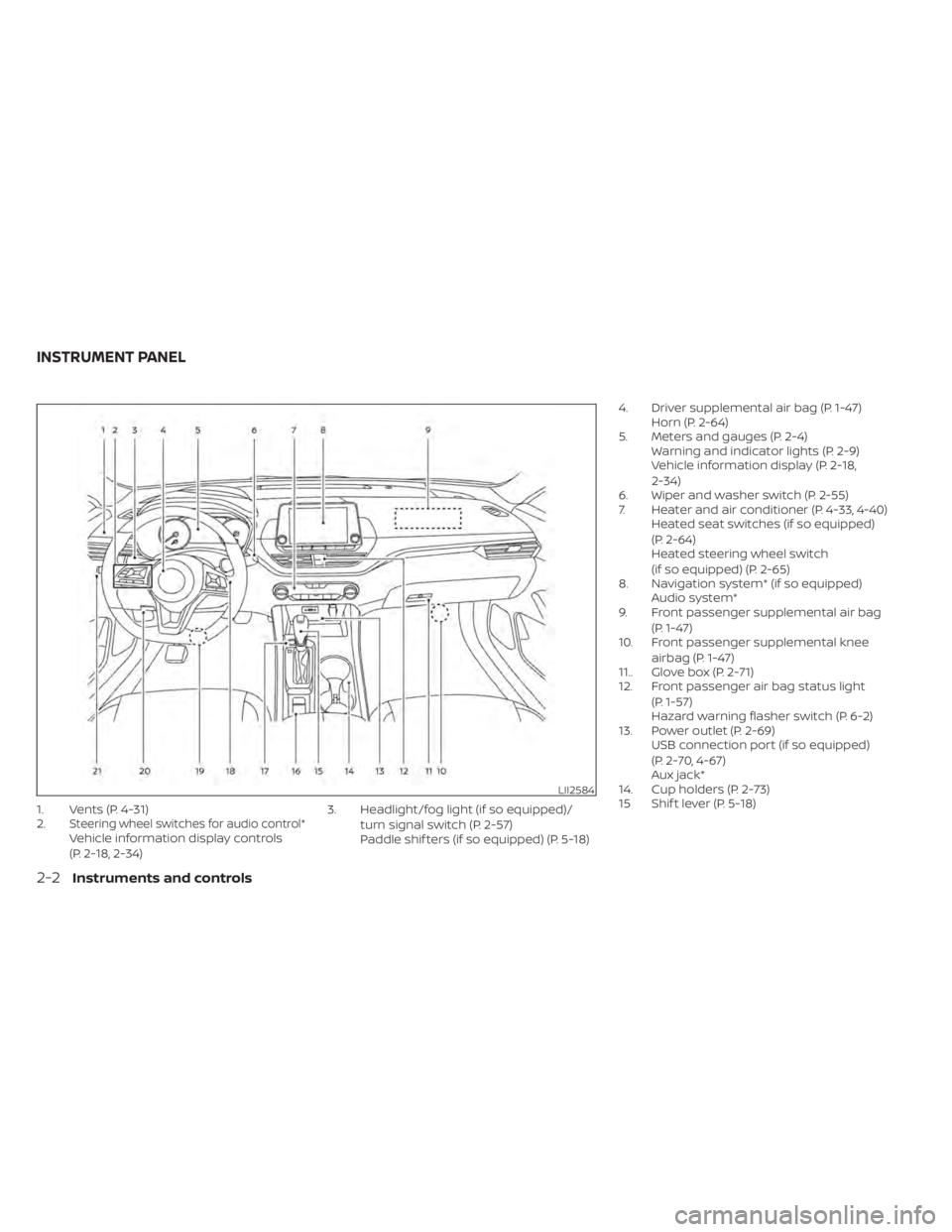
1. Vents (P. 4-31)
2.Steering wheel switches for audio control*Vehicle information display controls
(P. 2-18, 2-34)3. Headlight/fog light (if so equipped)/
turn signal switch (P. 2-57)
Paddle shif ters (if so equipped) (P. 5-18) 4. Driver supplemental air bag (P. 1-47)
Horn (P. 2-64)
5. Meters and gauges (P. 2-4) Warning and indicator lights (P. 2-9)
Vehicle information display (P. 2-18,
2-34)
6. Wiper and washer switch (P. 2-55)
7. Heater and air conditioner (P. 4-33, 4-40) Heated seat switches (if so equipped)
(P. 2-64)
Heated steering wheel switch
(if so equipped) (P. 2-65)
8. Navigation system* (if so equipped) Audio system*
9. Front passenger supplemental air bag
(P. 1-47)
10. Front passenger supplemental knee
airbag (P. 1-47)
11.. Glove box (P. 2-71)
12. Front passenger air bag status light
(P. 1-57)
Hazard warning flasher switch (P. 6-2)
13. Power outlet (P. 2-69) USB connection port (if so equipped)
(P. 2-70, 4-67)
Aux jack*
14. Cup holders (P. 2-73)
15 Shif t lever (P. 5-18)
LII2584
INSTRUMENT PANEL
2-2Instruments and controls
Page 99 of 644
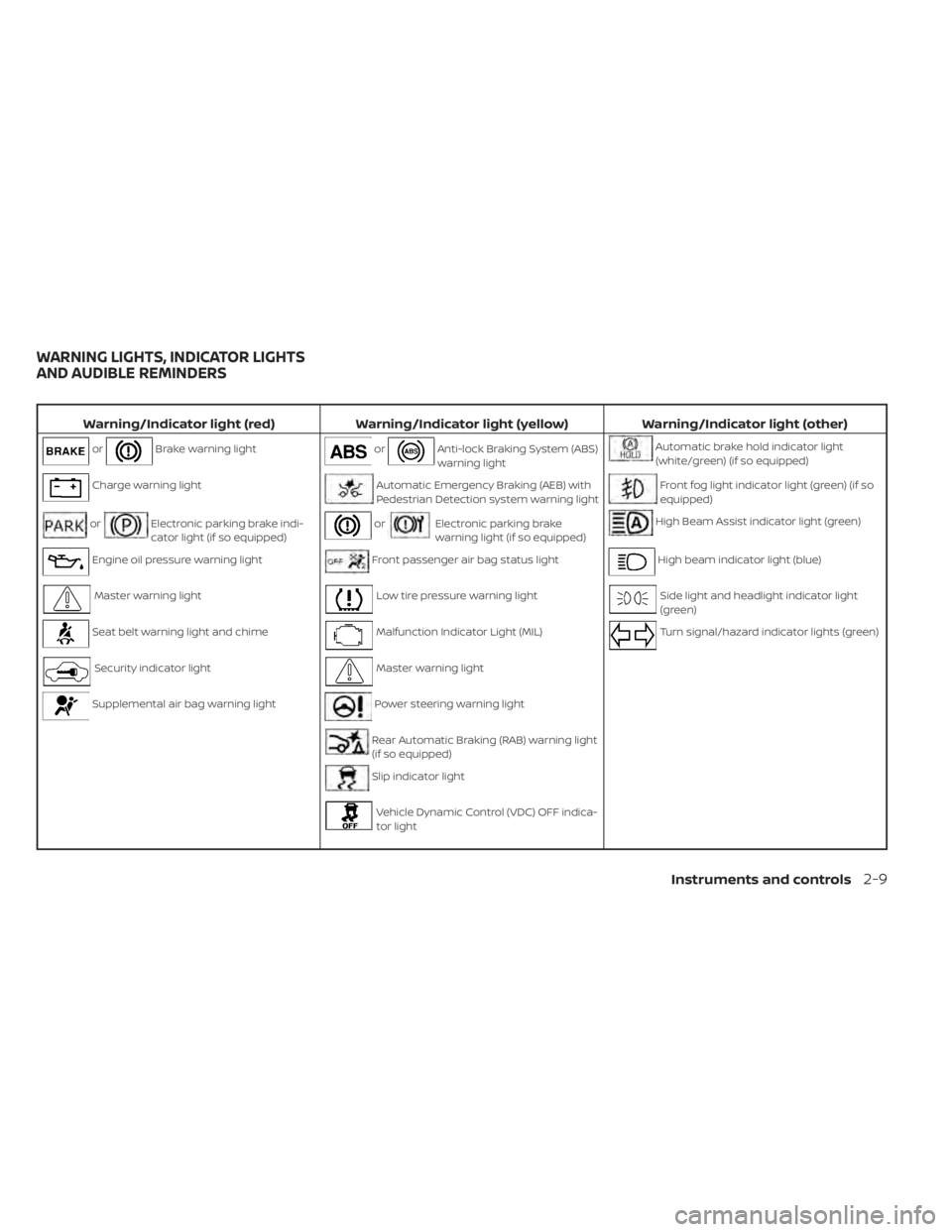
Warning/Indicator light (red)Warning/Indicator light (yellow) Warning/Indicator light (other)
orBrake warning lightorAnti-lock Braking System (ABS)
warning lightAutomatic brake hold indicator light
(white/green) (if so equipped)
Charge warning lightAutomatic Emergency Braking (AEB) with
Pedestrian Detection system warning lightFront fog light indicator light (green) (if so
equipped)
orElectronic parking brake indi-
cator light (if so equipped)orElectronic parking brake
warning light (if so equipped)High Beam Assist indicator light (green)
Engine oil pressure warning lightFront passenger air bag status lightHigh beam indicator light (blue)
Master warning lightLow tire pressure warning lightSide light and headlight indicator light
(green)
Seat belt warning light and chimeMalfunction Indicator Light (MIL)Turn signal/hazard indicator lights (green)
Security indicator lightMaster warning light
Supplemental air bag warning lightPower steering warning light
Rear Automatic Braking (RAB) warning light
(if so equipped)
Slip indicator light
Vehicle Dynamic Control (VDC) OFF indica-
tor light
WARNING LIGHTS, INDICATOR LIGHTS
AND AUDIBLE REMINDERS
Instruments and controls2-9
Page 106 of 644
• Loose fuel cap
• Low tire pressure warning
• AWD warning
If the master warning light illuminates and
the message(s) are not visible on the ve-
hicle information display, use the buttons
located on the steering wheel to navigate
the vehicle information display until the
“Warnings” screen is displayed.
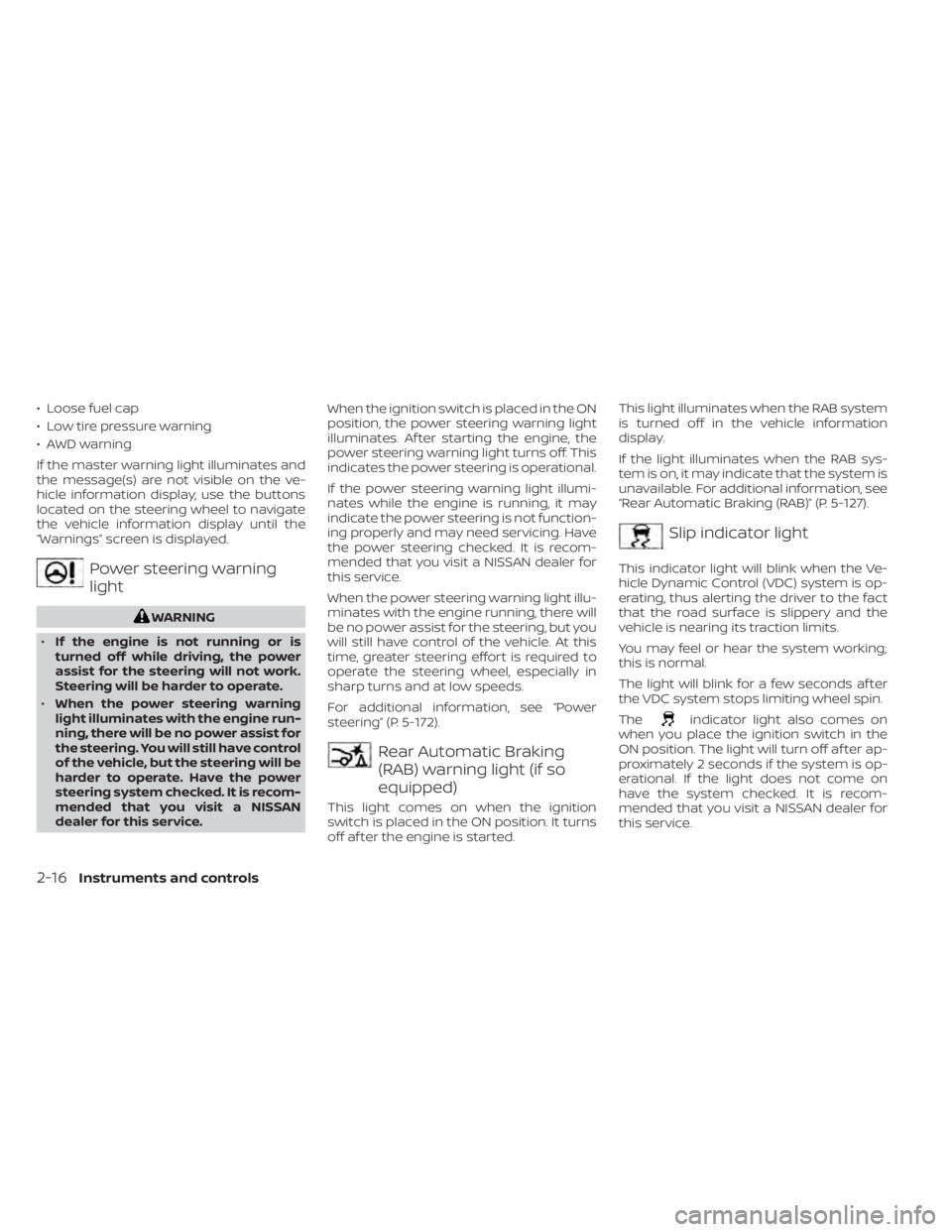
Power steering warning
light
WARNING
• If the engine is not running or is
turned off while driving, the power
assist for the steering will not work.
Steering will be harder to operate.
• When the power steering warning
light illuminates with the engine run-
ning, there will be no power assist for
the steering. You will still have control
of the vehicle, but the steering will be
harder to operate. Have the power
steering system checked. It is recom-
mended that you visit a NISSAN
dealer for this service. When the ignition switch is placed in the ON
position, the power steering warning light
illuminates. Af ter starting the engine, the
power steering warning light turns off. This
indicates the power steering is operational.
If the power steering warning light illumi-
nates while the engine is running, it may
indicate the power steering is not function-
ing properly and may need servicing. Have
the power steering checked. It is recom-
mended that you visit a NISSAN dealer for
this service.
When the power steering warning light illu-
minates with the engine running, there will
be no power assist for the steering, but you
will still have control of the vehicle. At this
time, greater steering effort is required to
operate the steering wheel, especially in
sharp turns and at low speeds.
For additional information, see “Power
steering” (P. 5-172).
Rear Automatic Braking
(RAB) warning light (if so
equipped)
This light comes on when the ignition
switch is placed in the ON position. It turns
off af ter the engine is started. This light illuminates when the RAB system
is turned off in the vehicle information
display.
If the light illuminates when the RAB sys-
tem is on, it may indicate that the system is
unavailable. For additional information, see
“Rear Automatic Braking (RAB)” (P. 5-127).
Slip indicator light
This indicator light will blink when the Ve-
hicle Dynamic Control (VDC) system is op-
erating, thus alerting the driver to the fact
that the road surface is slippery and the
vehicle is nearing its traction limits.
You may feel or hear the system working;
this is normal.
The light will blink for a few seconds af ter
the VDC system stops limiting wheel spin.
The
indicator light also comes on
when you place the ignition switch in the
ON position. The light will turn off af ter ap-
proximately 2 seconds if the system is op-
erational. If the light does not come on
have the system checked. It is recom-
mended that you visit a NISSAN dealer for
this service.
2-16Instruments and controls
Page 135 of 644
VEHICLE INFORMATION DISPLAY
WARNINGS AND INDICATORS
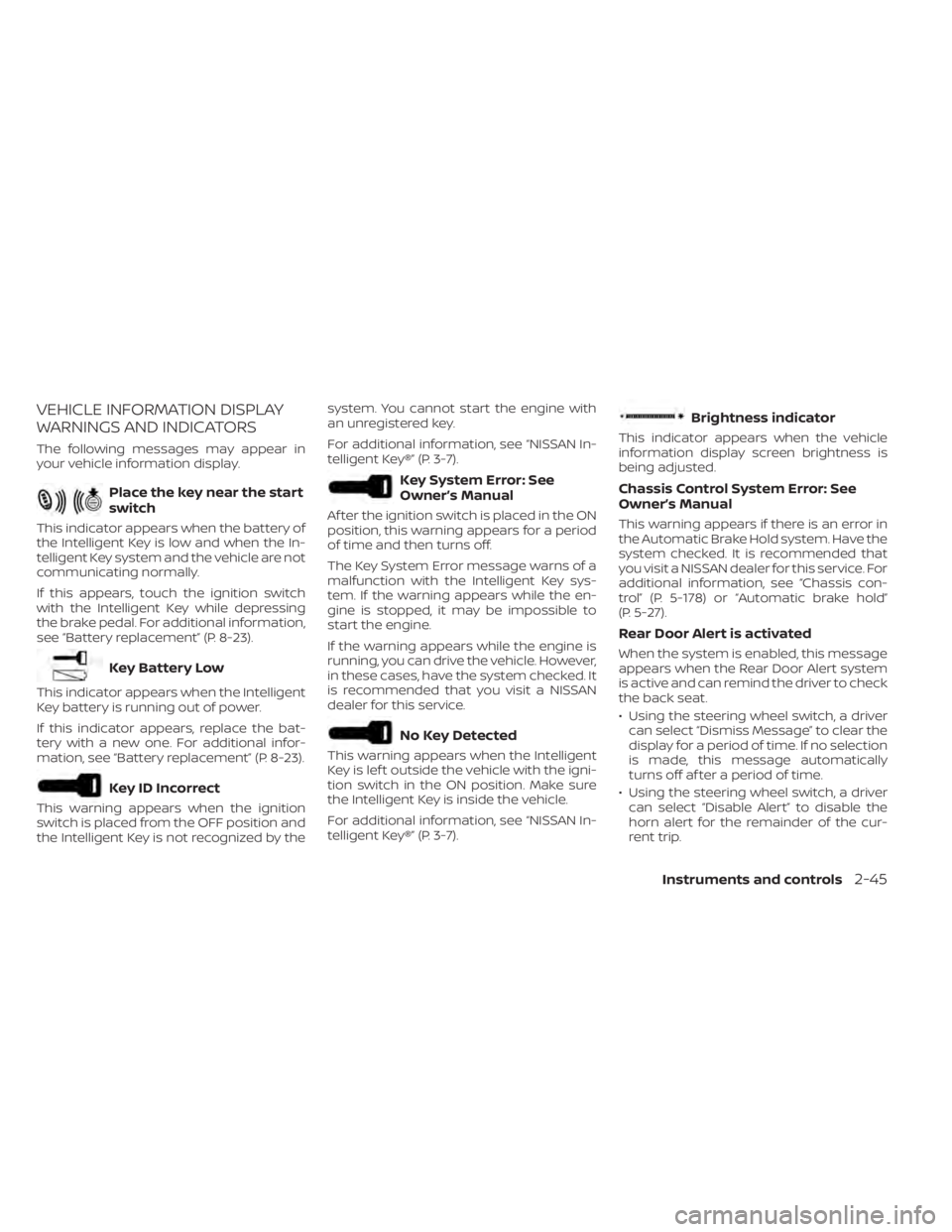
The following messages may appear in
your vehicle information display.
Place the key near the start
switch
This indicator appears when the battery of
the Intelligent Key is low and when the In-
telligent Key system and the vehicle are not
communicating normally.
If this appears, touch the ignition switch
with the Intelligent Key while depressing
the brake pedal. For additional information,
see “Battery replacement” (P. 8-23).
Key Battery Low
This indicator appears when the Intelligent
Key battery is running out of power.
If this indicator appears, replace the bat-
tery with a new one. For additional infor-
mation, see “Battery replacement” (P. 8-23).
Key ID Incorrect
This warning appears when the ignition
switch is placed from the OFF position and
the Intelligent Key is not recognized by thesystem. You cannot start the engine with
an unregistered key.
For additional information, see “NISSAN In-
telligent Key®” (P. 3-7).
Key System Error: See
Owner’s Manual
Af ter the ignition switch is placed in the ON
position, this warning appears for a period
of time and then turns off.
The Key System Error message warns of a
malfunction with the Intelligent Key sys-
tem. If the warning appears while the en-
gine is stopped, it may be impossible to
start the engine.
If the warning appears while the engine is
running, you can drive the vehicle. However,
in these cases, have the system checked. It
is recommended that you visit a NISSAN
dealer for this service.
No Key Detected
This warning appears when the Intelligent
Key is lef t outside the vehicle with the igni-
tion switch in the ON position. Make sure
the Intelligent Key is inside the vehicle.
For additional information, see “NISSAN In-
telligent Key®” (P. 3-7).
Brightness indicator
This indicator appears when the vehicle
information display screen brightness is
being adjusted.
Chassis Control System Error: See
Owner’s Manual
This warning appears if there is an error in
the Automatic Brake Hold system. Have the
system checked. It is recommended that
you visit a NISSAN dealer for this service. For
additional information, see “Chassis con-
trol” (P. 5-178) or “Automatic brake hold”
(P. 5-27).
Rear Door Alert is activated
When the system is enabled, this message
appears when the Rear Door Alert system
is active and can remind the driver to check
the back seat.
• Using the steering wheel switch, a driver
can select “Dismiss Message” to clear the
display for a period of time. If no selection
is made, this message automatically
turns off af ter a period of time.
• Using the steering wheel switch, a driver can select “Disable Alert” to disable the
horn alert for the remainder of the cur-
rent trip.
Instruments and controls2-45
Page 177 of 644
3 Pre-driving checks and adjustments
Keys.............................................3-2NISSAN Intelligent Key® (if so equipped) .......3-2
NISSAN Vehicle Immobilizer System
keys..........................................3-4
Doors ...........................................3-4
Locking with key .............................3-5
Locking with inside lock knob ................3-6
Locking with power door lock switch .........3-6
Automatic door locks ........................3-6
Child safety rear door lock .................... 3-7
NISSAN Intelligent Key® (if so equipped) .......... 3-7
Operating range .............................3-9
Door locks/unlocks precaution ...............3-9
NISSAN Intelligent Key® operation ...........3-10
How to use the remote keyless entry
function ..................................... 3-14
Warning signals ............................. 3-16
Troubleshooting guide ......................3-16
Remote Engine Start ........................... 3-19
Remote Engine Start operating range .......3-19
Remote starting the vehicle .................3-20
Extending engine run time ..................3-20
Canceling a Remote Engine Start ...........3-20
Conditions the Remote Engine Start will
notwork .................................... 3-21Hood
........................................... 3-22
Trunk lid ........................................ 3-22
Opener operation ........................... 3-22
Interior trunk lid release .....................3-24
Interior trunk access ........................ 3-24
Fuel-filler door .................................. 3-25
Opener operation ........................... 3-25
Fuel-filler cap ................................ 3-25
Steering wheel ................................. 3-27
Tilt operation ................................ 3-27
Telescopic operation ........................ 3-27
Sun visors ...................................... 3-28
Vanity mirrors ............................... 3-29
Mirrors ......................................... 3-29
Manual anti-glare rearview mirror
(if so equipped) .............................. 3-29
Automatic anti-glare rearview mirror
(if so equipped) .............................. 3-29
Outside mirrors .............................
3-30
Memor
y seat (if so equipped) ...................3-31
Memory storage function ...................3-31
Memory storage function (switch) ...........3-32
Entry/exit function .......................... 3-33
System operation ........................... 3-33
Page 252 of 644
mode when Remote Engine Start is acti-
vated depending on outside and cabin
temperatures. During this period, the cli-
mate control display and buttons will be
inoperable until the ignition switch is
turned on. In Remote Engine Start defrost-
ing mode, the rear window defroster,
heated seats (if so equipped) and heated
steering wheel (if so equipped) may be ac-
tivated automatically.
MANUAL OPERATION
Fan speed control buttons
Press thefan speed control buttons
to manually control the fan speed.
Press the AUTO button to return to auto-
matic control of the fan speed.
Temperature control dial
The temperature control dial allows you to
adjust the temperature of the outlet air. To
lower the temperature, turn the dial to the
lef t. To increase the temperature, turn the
dial to the right. Temperature can be ad-
justed on the driver’s and passenger’s side.
Air recirculation
Press theair recirculation button to
recirculate interior air inside the vehicle.
The
indicator light on the button will
come on.
The air recirculation cannot be activated
when the air conditioner is in the
front
defrosting mode.
When the outside temperature exceeds
70°F (21°C), the air conditioning system may
default to air recirculation mode automati-
cally to reduce overall power consumption.
To exit air recirculation mode, deselect the
air recirculation button (indicator light will
turn off ) to enter fresh air mode.
Automatic intake air control
In the AUTO mode, the intake air will be
controlled automatically. To manually con-
trol the intake air, press the
air recir-
culation button. To return to the automatic
control mode, press and hold the
air
recirculation button for about 2 seconds.
The indicator light will flash twice, and then
the intake air will be controlled
automatically.
A/C (air conditioner) button
Start the engine, press thefan speed
control buttons to the desired position and
press the
button to turn on the air
conditioner. To turn off the air conditioner,
press the
button again.
The air conditioner cooling function op-
erates only when the engine is running.
Air flow control
Pressing thebutton manually con-
trols air flow and selects the air outlet:
— Air flows from center and side
vents.
— Air flows from center and sidevents and foot outlets.
— Air flows mainly from the footoutlets.
— Air flows from defroster and footoutlets.
4-42Monitor, climate, audio, phone and voice recognition systems
Page 298 of 644
RAB system limitations.....................5-132
System malfunction ........................ 5-134
System maintenance ......................5-134
Automatic Emergency Braking (AEB) with
Pedestrian Detection .......................... 5-135
AEB with Pedestrian Detection system
operation .................................. 5-136
Turning the AEB with Pedestrian
Detection system ON/OFF .................5-138
AEB with Pedestrian Detection system
limitations ................................. 5-140
System temporarily unavailable ............5-143
System malfunction ........................ 5-145
System maintenance ......................5-146
Intelligent Forward Collision Warning (I-FCW) . . 5-147 I-FCW system operation ....................5-150
Turning the I-FCW system on/off ...........5-151
I-FCW system limitations ...................5-153
System temporarily unavailable ............5-158
System malfunction ........................ 5-160
System maintenance ......................5-161
Intelligent Driver Alertness (I-DA) ...............5-162
Intelligent Driver Alertness system
operation .................................. 5-162How to enable/disable the Intelligent
Driver Alertness (I-DA) system
..............5-164
Intelligent Driver Alertness (I-DA)
system limitations ......................... 5-165
Break-in schedule ............................. 5-167
Fuel efficient driving tips .......................5-167
Increasing fuel economy ......................5-168
All-Wheel Drive (AWD) (if so equipped) ..........5-168
Parking/parking on hills ........................5-171
Power steering ................................ 5-172
Brake system ................................. 5-173
Brake precautions .......................... 5-173
Anti-lock Braking System (ABS) .............5-173
Brake Assist ................................ 5-175
Vehicle Dynamic Control (VDC) system ........5-175
Brake force distribution ....................5-177
Chassis Control (if so equipped) ...............
5-178
Intelligent
Trace Control (I-TC) ..............5-178
Active Ride Control (ARC) ...................5-178
Hill start assist system ........................5-178
Rear Sonar System (RSS) (if so equipped) ......5-179
System operation .......................... 5-180