lights NISSAN ALTIMA HYBRID 2007 L32A / 4.G Owner's Guide
[x] Cancel search | Manufacturer: NISSAN, Model Year: 2007, Model line: ALTIMA HYBRID, Model: NISSAN ALTIMA HYBRID 2007 L32A / 4.GPages: 344, PDF Size: 4.85 MB
Page 169 of 344

RADIO
With the push-button ignition switch in the ACC
or ON position, press the PWR (power)/VOL
(volume) knob to turn the radio on. If you listen to
the radio with the Hybrid System not running, the
switch should be in the ACC position.
Radio reception is affected by station signal
strength, distance from radio transmitter, build-
ings, bridges, mountains and other external influ-
ences. Intermittent changes in reception quality
normally are caused by these external influences.
Using a cellular phone in or near the ve-
hicle may influence radio reception quality.
Radio reception
Your NISSAN radio system is equipped with
state-of-the-art electronic circuits to enhance ra-
dio reception. These circuits are designed to
extend reception range, and to enhance the qual-
ity of that reception.
However there are some general characteristics
of both FM and AM radio signals that can affect
radio reception quality in a moving vehicle, even
when the finest equipment is used. These char-
acteristics are completely normal in a given re-
ception area, and do not indicate any malfunction
in your NISSAN radio system.Reception conditions will constantly change be-
cause of vehicle movement. Buildings, terrain,
signal distance and interference from other ve-
hicles can work against ideal reception. De-
scribed below are some of the factors that can
affect your radio reception.
FM RADIO RECEPTION
Range: FM range is normally limited to 25 – 30
miles (40 – 48 km) , with monaural (single chan-
nel) FM having slightly more range than stereo
FM. External influences may sometimes interfere
with FM station reception even if the FM station is
within 25 miles (40 km) . The strength of the FM
signal is directly related to the distance between
the transmitter and receiver. FM signals follow a
line-of-sight path, exhibiting many of the same
characteristics as light. For example, they will
reflect off objects.
Fade and drift: As your vehicle moves away from
a station transmitter, the signals will tend to fade
and/or drift.
Static and flutter: During signal interference from
buildings, large hills or due to antenna position
(usually in conjunction with increased distance
from the station transmitter) static or flutter can
be heard. This can be reduced by adjusting the
treble control to reduce treble response.Multipath reception: Because of the reflective
characteristics of FM signals, direct and reflected
signals reach the receiver at the same time. The
signals may cancel each other, resulting in mo-
mentary flutter or loss of sound.
AM RADIO RECEPTION
AM signals, because of their low frequency, can
bend around objects and skip along the ground.
In addition, the signals can be bounced off the
ionosphere and bent back to earth. Because of
these characteristics, AM signals are also sub-
ject to interference as they travel from transmitter
to receiver.
Fading: Occurs while the vehicle is passing
through freeway underpasses or in areas with
many tall buildings. It can also occur for several
seconds during ionospheric turbulence even in
areas where no obstacles exist.
Static: Caused by thunderstorms, electrical
power lines, electric signs and even traffic lights.
SATELLITE RADIO RECEPTION (if so
equipped)
When the satellite radio is first installed or the
battery has been replaced, the satellite radio may
not work properly. This is not a malfunction. Wait
more than 10 minutes with satellite radio ON and
AUDIO SYSTEM
Monitor, climate, audio, phone and voice recognition systems4-13
ZREVIEW COPYÐ2007 Altima Hybrid Electric
(ahv)
Owners ManualÐUSA_English(nna)
11/27/06Ðdebbie
X
Page 225 of 344
The ignition switch is equipped with an anti-theft
steering lock device.
The ignition lock is designed so that the ignition
switch position cannot be switched to OFF until
the selector lever is moved to the P (Park) posi-
tion.
When the ignition switch cannot be pushed to-
ward the OFF position, proceed as follows:
1. Move the selector lever into the P (Park)
position.
2. Push the ignition switch. The ignition switch
position will change to the ON position.
3. Push the ignition switch again to the OFF
position.
The selector lever can be moved from the P
(Park) position if the ignition switch is in
the ON position and the brake pedal is
depressed.
In order for the steering wheel to be locked, it
must be turned about 1/8 of a right or left turn
from the straight up position.
To lock the steering wheel, push the igni-
tion switch to the LOCK position. To unlock
the steering wheel, push the ignition switch
while slightly turning the steering wheel
right and left.If the battery of the vehicle is discharged,
the push-button ignition switch cannot be
turned from the LOCK position.
Some indicators and warnings for operation are
displayed on the vehicle information display. See
“Vehicle information display” in the “Instruments
and controls” section.
PUSH-BUTTON IGNITION SWITCH
POSITIONS
LOCK (Normal parking position):
The ignition switch can only be locked in this
position.
The ignition switch will be unlocked when it is
pushed to the ACC position while carrying the
Intelligent Key or with the Intelligent Key inserted
in the port.
The ignition switch will lock when any door is
opened or closed with the ignition switched off.
OFF:
The ignition switch is in the off position when the
Hybrid System is turned off using the ignition
switch. No lights will illuminate on the ignition
switch.ACC (Accessories):
This position activates electrical accessories
such as the radio, when the Hybrid System is off.
ON (Normal operating position):
This position turns on the ignition system and
electrical accessories.
CAUTION
Do not leave the vehicle with the ignition
switch in ACC or ON positions when the
Hybrid System is off for an extended pe-
riod. This can discharge the battery.
INTELLIGENT KEY BATTERY
DISCHARGE
Starting and driving5-7
ZREVIEW COPYÐ2007 Altima Hybrid Electric
(ahv)
Owners ManualÐUSA_English(nna)
11/27/06Ðdebbie
X
Page 227 of 344

If the engine fails to start using a registered key
(for example, when interference is caused by
another registered key, an automated toll road
device or automatic payment device on the key
ring) , restart the engine using the following pro-
cedures:
1. Leave the ignition switch in the ON position
for approximately 5 seconds.
2. Turn the ignition switch to the OFF or LOCK
position, and wait approximately 10 sec-
onds.
3. Repeat steps 1 and 2.
4. Restart the engine while holding the device
(which may have caused the interference)
separate from the registered key.
If the no start condition re-occurs, NISSAN rec-
ommends placing the registered key on a sepa-
rate key ring to avoid interference from other
devices.cMake sure the area around the vehicle is
clear.
cCheck fluid levels such as engine oil, cool-
ant, brake fluid, and window washer fluid as
frequently as possible, or at least whenever
you refuel.
cCheck that all windows and lights are clean.
cVisually inspect tires for their appearance
and condition. Also check tires for proper
inflation.
cLock all doors.
cPosition seat and adjust head restraints.
cAdjust inside and outside mirrors.
cFasten seat belts and ask all passengers to
do likewise.
cCheck the operation of warning lights when
the ignition switch is pushed to the ON
position. See “Warning/indicator lights and
audible reminders” in the “Instruments and
controls” section of this manual.1. Apply the parking brake.
2. Move the shift selector lever to P (Park) .
The Hybrid System is designed not to
operate if the shift selector lever is not
in the P (Park) position.
3. Push the ignition switch to the ON position.
Depress the brake pedal and push the igni-
tion switch to start the Hybrid System. The
READY light will illuminate on the meter.
NOTE:
When starting the Hybrid System at very
low outside temperatures, the READY light
will flash and it may take longer for the
READY light to illuminate.
cThe engine may not start even with the
READY light illuminated. Once the
READY light is illuminated you may begin
driving the vehicle.
cYou may hear a sound in the engine com-
partment when the brake pedal is de-
pressed with the Hybrid System off. This
does not indicate a problem.
BEFORE STARTING THE HYBRID
SYSTEMSTARTING THE HYBRID SYSTEM
Starting and driving5-9
ZREVIEW COPYÐ2007 Altima Hybrid Electric
(ahv)
Owners ManualÐUSA_English(nna)
11/27/06Ðdebbie
X
Page 231 of 344
To move the shift selector lever, complete the
following procedure:
1. Push the ignition switch to the LOCK posi-
tion.
2. Apply the parking brake.
3. Remove the shift lock release cover as
shown.
4. Insert a small screwdriver in the shift lock
release slot and push down.
5. Move the shift selector lever to the N (Neu-
tral) position while holding down the shift
lock release.
6. Push the ignition switch to the ON position
to unlock the steering wheel. Now the ve-
hicle may be moved to the desired location.
If the shift selector lever cannot be moved out of
P (Park) , have a NISSAN dealer check the trans-
mission as soon as possible.
WARNING
If the selector lever cannot be moved from
the P (Park) position while the engine is
running and the brake pedal is depressed,
the stop lights may not work. Malfunction-
ing stop lights could cause an accident
injuring yourself and others.
WARNING
cBe sure the parking brake is fully re-
leased before driving. Failure to do so
can cause brake failure and lead to an
accident.
cDo not release the parking brake from
outside the vehicle.
cDo not use the gear shift in place of the
parking brake. When parking, be sure
the parking brake is fully engaged.
cDo not leave children unattended in a
vehicle. They could release the parking
brake and cause an accident.
To engage:Firmly depress the parking brake.
To release:
1. Firmly apply the foot brake.
2. Move the shift selector lever to the P (Park)
position.
3. Firmly depress the parking brake pedal and it
will release.
4. Before driving, be sure the brake warning
light goes out.
LSD0158
PARKING BRAKE
Starting and driving5-13
ZREVIEW COPYÐ2007 Altima Hybrid Electric
(ahv)
Owners ManualÐUSA_English(nna)
11/27/06Ðdebbie
X
Page 244 of 344
TIRE PRESSURE MONITORING
SYSTEM (TPMS)
This vehicle is equipped with the Tire Pressure
Monitoring System (TPMS) . It monitors tire pres-
sure of all tires except the spare. When the low
tire pressure warning light is lit, one or more of
your tires is significantly under-inflated. If the
vehicle is being driven with low tire pressure, the
TPMS will activate and warn you of it by the low
tire pressure warning light. This system will acti-
vate only when the vehicle is driven at speeds
above 16 MPH (25 km/h) . For more details, refer
to “Warning/indicator lights and audible remind-
ers” in the “Instruments and controls” section,
and “Tire Pressure Monitoring System (TPMS)”
in the “Starting and driving” section.
WARNING
cIf the low tire pressure warning light
illuminates while driving, avoid sudden
steering maneuvers or abrupt braking,
reduce vehicle speed, pull off the road
to a safe location and stop the vehicle
as soon as possible. Serious vehicle
damage could occur and may lead to an
accident and could result in serious
personal injury. Check the tire pressure
for all four tires. Adjust the tire pressure
to the recommended COLD tire pres-
sure shown on the Tire and Loading
Information label to turn the low tire
pressure warning light OFF. If you have
a flat tire, replace it with a spare tire as
soon as possible.
cWhen a spare tire is mounted or a wheel
is replaced, the TPMS will not function
and the low tire pressure warning light
will flash for approximately 1 minute.
The light will remain on after 1 minute.
Contact your NISSAN dealer as soon as
possible for tire replacement and/or
system resetting.
cReplacing tires with those not originally
specified by NISSAN could affect the
proper operation of the TPMS.cDo not inject any tire liquid or aerosol
tire sealant into the tires, as this may
cause a malfunction of the tire pressure
sensors.
CHANGING A FLAT TIRE
If you have a flat tire, follow the instructions be-
low.
Stopping the vehicle
1. Safely move the vehicle off the road and
away from traffic.
2. Turn on the hazard warning flashers.
3. Park on a level surface and apply the parking
brake. Move the shift selector lever to P
(Park) .
4. Turn Hybrid System OFF.
5. Raise the hood to warn other traffic and to
signal professional road assistance person-
nel that you need assistance.
6. Have all passengers get out of the vehicle
and stand in a safe place, away from traffic
and clear of the vehicle.
FLAT TIRE
6-2In case of emergency
ZREVIEW COPYÐ2007 Altima Hybrid Electric
(ahv)
Owners ManualÐUSA_English(nna)
11/27/06Ðdebbie
X
Page 249 of 344
Before attempting to jump start the vehicle, make
sure the fuel tank is not empty and the correct
starting procedure is followed. See “Starting the
Hybrid System” in the “Starting and driving” sec-
tion. Do not drive the vehicle on battery power
only if the fuel tank is empty. The high voltage
battery will become discharged and the Hybrid
System will turn off.
CONFIRM BATTERY IS
DISCHARGED
Confirm the battery is discharged by pushing the
ignition switch to the ON position. Confirm the
instrument cluster or head lights come on at the
normal brightness levels or that other accesso-
ries such as the audio system come on. Push the
ignition switch to turn the Hybrid System on.
cIf the lights do not dim or the accessories do
not turn off, see “Emergency start” in this
section.
cIf the lights become dim or the accessories
turn off, check the following:
1. Check that the 12-volt battery terminals are
tight and clean. See “12-volt Battery” in the
“Maintenance and do-it-yourself” section.
The battery is located on the right hand side
of the trunk behind an access panel. If the
12-volt battery terminals are loose, contact
your NISSAN dealer.2. If the 12-volt battery terminals are tight and
clean, try to jump start the vehicle. See
“Jump starting” in this section.
EMERGENCY START
When the Hybrid System cannot be started, the
following procedure can be used if the Hybrid
System and “POWER” switch function normally:
1. Put the transmission in P (Park) position.
2. Push the ignition switch to the ACC posi-
tion.
3. Depress the brake pedal.
4. Push and hold the ignition switch for about
15 seconds. Even if the Hybrid System
starts using this procedure, the system may
be malfunctioning. Do not continue to use
this emergency procedure to start the sys-
tem. Have the vehicle checked by your
NISSAN dealer.
If the Hybrid System still does not start, contact
you NISSAN dealer.To start the Hybrid System with a booster battery,
the instructions and precautions below must be
followed.
WARNING
cThe engine may start at any time with-
out warning when the ignition is on and
the Hybrid System is in the READY
mode. When Jump starting keep your
hands, clothing, hair and tools away
from fans, belts and any other parts that
can move to avoid personal injury.
cIf done incorrectly, jump starting can
lead to a battery explosion, resulting in
severe injury or death. It could also
damage your vehicle.
cExplosive hydrogen gas is always
present in the vicinity of the battery.
Keep all sparks and flames away from
the battery.
cDo not allow battery fluid to come into
contact with eyes, skin, clothing or
painted surfaces. Battery fluid is a cor-
rosive sulfuric acid solution which can
cause severe burns. If the fluid should
come into contact with anything, imme-
diately flush the contacted area with
water.
VEHICLE DOES NOT START JUMP STARTING
In case of emergency6-7
ZREVIEW COPYÐ2007 Altima Hybrid Electric
(ahv)
Owners ManualÐUSA_English(nna)
11/27/06Ðdebbie
X
Page 251 of 344
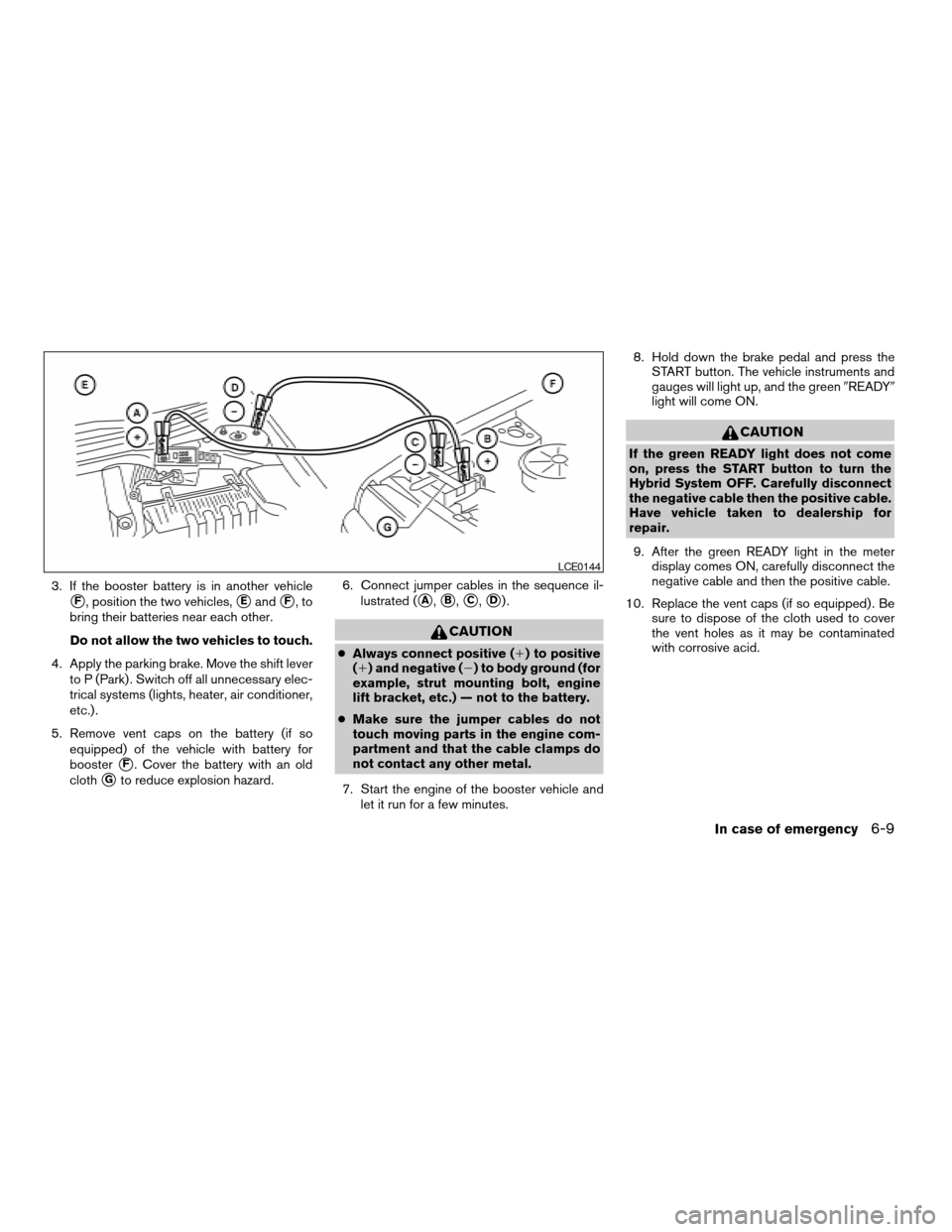
3. If the booster battery is in another vehicle
sF, position the two vehicles,sEandsF,to
bring their batteries near each other.
Do not allow the two vehicles to touch.
4. Apply the parking brake. Move the shift lever
to P (Park) . Switch off all unnecessary elec-
trical systems (lights, heater, air conditioner,
etc.) .
5. Remove vent caps on the battery (if so
equipped) of the vehicle with battery for
booster
sF. Cover the battery with an old
cloth
sGto reduce explosion hazard.6. Connect jumper cables in the sequence il-
lustrated (
sA,sB,sC,sD).
CAUTION
cAlways connect positive (1) to positive
(1) and negative (2) to body ground (for
example, strut mounting bolt, engine
lift bracket, etc.) — not to the battery.
cMake sure the jumper cables do not
touch moving parts in the engine com-
partment and that the cable clamps do
not contact any other metal.
7. Start the engine of the booster vehicle and
let it run for a few minutes.8. Hold down the brake pedal and press the
START button. The vehicle instruments and
gauges will light up, and the green9READY9
light will come ON.
CAUTION
If the green READY light does not come
on, press the START button to turn the
Hybrid System OFF. Carefully disconnect
the negative cable then the positive cable.
Have vehicle taken to dealership for
repair.
9. After the green READY light in the meter
display comes ON, carefully disconnect the
negative cable and then the positive cable.
10. Replace the vent caps (if so equipped) . Be
sure to dispose of the cloth used to cover
the vent holes as it may be contaminated
with corrosive acid.
LCE0144
In case of emergency6-9
ZREVIEW COPYÐ2007 Altima Hybrid Electric
(ahv)
Owners ManualÐUSA_English(nna)
11/27/06Ðdebbie
X
Page 265 of 344

8 Maintenance and do-it-yourself
Maintenance requirements..........................8-2
General maintenance..............................8-2
Explanation of general maintenance items.........8-2
Maintenance precautions...........................8-5
Engine compartment check locations................8-7
Engine cooling system.............................8-8
Checking engine coolant level...................8-8
Changing engine coolant........................8-9
Inverter cooling system.............................8-9
Checking inverter coolant level..................8-10
Changing inverter coolant......................8-10
Engine oil........................................8-10
Checking engine oil level.......................8-10
Changing engine oil...........................8-11
Changing engine oil filter.......................8-12
Electronically controlled Continuously Variable
Transmission (eCVT) fluid.........................8-13
Brake fluid.......................................8-13
Brake fluid....................................8-14
Window washer fluid.............................8-14
Window washer fluid reservoir..................8-14
12-volt battery...................................8-15
Jump starting.................................8-15
Drive belt........................................8-15
Spark plugs......................................8-16Replacing spark plugs.........................8-16
Air cleaner.......................................8-17
In-cabin microfilter.............................8-17
Windshield wiper blades..........................8-17
Cleaning.....................................8-17
Replacing....................................8-18
Brakes..........................................8-19
Self-adjusting brakes..........................8-19
Brake pad wear indicators......................8-19
Fuses...........................................8-19
Engine compartment...........................8-20
Passenger compartment.......................8-21
Battery replacement..............................8-22
Intelligent key battery..........................8-23
Lights...........................................8-24
Headlights....................................8-24
Front park/turn/sidemarker light.................8-24
Exterior and interior lights.......................8-25
Wheels and tires.................................8-29
Tire pressure..................................8-29
Tire labeling...................................8-32
Types of tires..................................8-35
Tire chains....................................8-36
Changing wheels and tires.....................8-37
ZREVIEW COPYÐ2007 Altima Hybrid Electric
(ahv)
Owners ManualÐUSA_English(nna)
11/27/06Ðdebbie
X
Page 267 of 344

When driving in areas using road salt or other
corrosive materials, check lubrication frequently.
Lights*Clean the headlights on a regular basis.
Make sure that the headlights, stop lights, tail
lights, turn signal lights, and other lights are all
operating properly and installed securely. Also
check headlight aim.
Road wheel nuts*When checking the tires,
make sure no wheel nuts are missing, and check
for any loose wheel nuts. Tighten if necessary.
Tire rotation*Tires should be rotated every
7,500 miles (12,000 km) .
Tires*Check the pressure with a gauge often
and always prior to long distance trips. If neces-
sary, adjust the pressure in all tires, including the
spare, to the pressure specified. Check carefully
for damage, cuts or excessive wear.
Tire Pressure Monitoring System (TPMS)
transmitter componentsReplace the grom-
met seal, valve core and cap of the transmitter in
vehicles equipped with TPMS at every tire re-
placement or when reaching the wear limit of the
tires.
Wheel alignment and balanceIf the vehicle
should pull to either side while driving on a
straight and level road, or if you detect uneven or
abnormal tire wear, there may be a need for wheelalignment. If the steering wheel or seat vibrates at
normal highway speeds, wheel balancing may be
needed.
cFor additional information regarding tires,
refer to “Important Tire Safety Information”
(US) or “Tire Safety Information” (Canada) in
the Warranty Information Booklet .
WindshieldClean the windshield on a regular
basis. Check the windshield at least every six
months for cracks or other damage. Have a dam-
aged windshield repaired by a qualified repair
facility.
Windshield wiper blades*Check for cracks or
wear if they do not wipe properly.
Inside the vehicle
The maintenance items listed here should be
checked on a regular basis, such as when per-
forming periodic maintenance, cleaning the ve-
hicle, etc.
Additional information on the following
items with an “*” is found later in this sec-
tion.
Accelerator pedalCheck the pedal for smooth
operation and make sure the pedal does not bind
or require uneven effort. Keep the floor mat away
from the pedal.Brake pedalCheck the pedal for smooth opera-
tion. If the brake pedal suddenly goes down fur-
ther than normal, the pedal feels spongy or the
vehicle seems to take longer to stop, see a
NISSAN dealer immediately. Keep the floor mat
away from the pedal.
BrakesCheck that the brakes do not pull the
vehicle to one side when applied.
Electronically controlled Continuously
Variable Transmission (eCVT) P (Park) po-
sition mechanism:On a fairly steep hill check
that the vehicle is held securely with the selector
lever in the P (Park) position without applying any
brakes.
Parking brakeCheck the parking brake opera-
tion regularly. The vehicle should be securely held
on a fairly steep hill with only the parking brake
applied. If the parking brake needs adjustment,
see a NISSAN dealer.
SeatsCheck seat position controls such as seat
adjusters, seatback recliner, etc. to ensure they
operate smoothly and all latches lock securely in
every position. Check that the head restraints
move up and down smoothly and the locks (if so
equipped) hold securely in all latched positions.
Seat beltsCheck that all parts of the seat belt
system (for example, buckles, anchors, adjusters
and retractors) operate properly and smoothly,
Maintenance and do-it-yourself8-3
ZREVIEW COPYÐ2007 Altima Hybrid Electric
(ahv)
Owners ManualÐUSA_English(nna)
11/27/06Ðdebbie
X
Page 268 of 344

and are installed securely. Check the belt web-
bing for cuts, fraying, wear or damage.
Steering wheelCheck for changes in the steer-
ing system, such as excessive freeplay, hard
steering or strange noises.
Warning lights and chimesMake sure all
warning lights and chimes are operating properly.
Windshield wiper and washer*Check that
the wipers and washer operate properly and that
the wipers do not streak.
Windshield defrosterCheck that the air
comes out of the defroster outlets properly and in
sufficient quantity when operating the heater or
air conditioner.
Under the hood and vehicle
The maintenance items listed here should be
checked periodically (for example, each time you
check the engine oil or refuel) .
Brake fluid level*Make sure that the brake fluid
level is between the MIN and MAX lines on the
reservoir.
Electronically controlled Continuously
Variable Transmission (eCVT) fluid*Check
under the vehicle for leaks after the vehicle has
been parked for a while.Engine coolant level*Check the coolant level
when the engine is cold.
Engine drive belts*Make sure the drive belts
are not frayed, worn, cracked or oily.
Engine oil level*Check the level after parking
the vehicle on a level surface with the engine off.
Wait more than 10 minutes for the oil to drain
back into the oil pan.
Exhaust systemMake sure there are no loose
supports, cracks or holes. If the sound of the
exhaust seems unusual or there is a smell of
exhaust fumes, immediately have the exhaust
system inspected by a NISSAN dealer. See the
carbon monoxide warning in the “Starting and
driving” section of this manual.
Fluid leaksCheck under the vehicle for fuel, oil,
water or other fluid leaks after the vehicle has
been parked for a while. Water dripping from the
air conditioner after use is normal. If you should
notice any leaks or if gasoline fumes are evident,
check for the cause and have it corrected imme-
diately.
Inverter coolant level*Check the coolant level
when the inverter is cold.
Radiator and hosesCheck the front of the
radiator and clean off any dirt, insects, leaves,etc., that may have accumulated. Make sure the
hoses have no cracks, deformation, rot or loose
connections.
UnderbodyThe underbody is frequently ex-
posed to corrosive substances such as those
used on icy roads or to control dust. It is very
important to remove these substances from the
underbody, otherwise rust may form on the floor
pan, frame, fuel lines and exhaust system. At the
end of winter, the underbody should be thor-
oughly flushed with plain water, in those areas
where mud and dirt may have accumulated. See
the “Appearance and care” section of this
manual.
Windshield washer fluid*Check that there is
adequate fluid in the reservoir.
8-4Maintenance and do-it-yourself
ZREVIEW COPYÐ2007 Altima Hybrid Electric
(ahv)
Owners ManualÐUSA_English(nna)
11/27/06Ðdebbie
X