steering wheel NISSAN ALTIMA HYBRID 2011 L32A / 4.G Service Manual
[x] Cancel search | Manufacturer: NISSAN, Model Year: 2011, Model line: ALTIMA HYBRID, Model: NISSAN ALTIMA HYBRID 2011 L32A / 4.GPages: 422, PDF Size: 3.83 MB
Page 312 of 422
WARNING
●If the Hybrid System is not in the READY
mode or is turned off while driving, the
power assist for the steering will not
work. Steering will be harder to
operate.
● When the power steering warning light
illuminates with the Hybrid System in
the READY mode, there will be no
power assist for the steering. You will
still have control of the vehicle but the
steering will be harder to operate. Have
the power steering system checked by a
NISSAN dealer.
The power steering system is designed to pro-
vide power assist while driving to operate the
steering wheel with light force.
When the steering wheel is operated repeatedly
or continuously while parking or driving at a very
low speed, the power assist for the steering
wheel will be reduced. This is to prevent over-
heating of the power steering system and protect
it from getting damaged. While the power assist
is reduced, steering wheel operation will become
heavy. When the temperature of the power steer-
ing system goes down, the power assist level will
return to normal. Avoid repeating such steering wheel operations that could cause the power
steering system to overheat.
You may hear a sound when the steering wheel is
operated quickly. However, this is not a malfunc-
tion.
If the power steering warning light
PSilluminates
while the Hybrid System is in the READY mode, it
may indicate the power steering system is not
functioning properly and may need servicing.
Have the power steering system checked by a
NISSAN dealer.
When the power steering warning light illumi-
nates with the Hybrid System in the READY
mode, there will be no power assist for the steer-
ing but you will still have control of the vehicle. At
this time, greater steering effort is required to
operate the steering wheel, especially in sharp
turns and at low speeds.
For additional information see “Electric power
steering warning light” in the “Instruments and
controls” section.
WARNING
Your brake system may not be working
properly if the hydraulic brake warning
light and the electronically controlled
brake system warning light is on. Driving
could be dangerous. If you judge it to be
safe, drive carefully to the nearest service
station for repairs. Otherwise, have your
vehicle towed because driving it could be
dangerous.
BRAKE PRECAUTIONS
Regenerative brake
The Hybrid System changes vehicle motion into
electricity. The electricity is used to recharge the
high voltage battery. When applying the brakes,
you may hear a sound coming from the regenera-
tive braking system. This is a normal operating
characteristic of a hybrid vehicle.
The regenerative braking works in the following
conditions:
1. When the accelerator pedal is released, the Hybrid System makes electricity while the
vehicle slows down during coasting.
2. When the brake pedal is depressed with the shift selector in “D” or “B”.
POWER STEERING BRAKE SYSTEM
Starting and driving5-19
Page 314 of 422
ANTI-LOCK BRAKING SYSTEM
(ABS)
WARNING
●The Anti-lock Braking System (ABS) is a
sophisticated device, but it cannot pre-
vent accidents resulting from careless
or dangerous driving techniques. It can
help maintain vehicle control during
braking on slippery surfaces. Remem-
ber that stopping distances on slippery
surfaces will be longer than on normal
surfaces even with ABS. Stopping dis-
tances may also be longer on rough,
gravel or snow covered roads, or if you
are using tire chains. Always maintain a
safe distance from the vehicle in front
of you. Ultimately, the driver is respon-
sible for safety.
● Tire type and condition of tires may also
affect braking effectiveness.
– When replacing tires, install the specified size of tires on all four
wheels. – When installing a spare tire, make
sure that it is the proper size and type
as specified on the Tire and Loading
Information label. See “Tire and
Loading Information label” in the
“Technical and consumer informa-
tion” section of this manual.
– For detailed information, see “Wheels and tires” in the “Mainte-
nance and do-it-yourself” section of
this manual.
The Anti-lock Braking System (ABS) controls the
brakes so the wheels do not lock during hard
braking or when braking on slippery surfaces.
The system detects the rotation speed at each
wheel and varies the brake fluid pressure to pre-
vent each wheel from locking and sliding. By
preventing each wheel from locking, the system
helps the driver maintain steering control and
helps to minimize swerving and spinning on slip-
pery surfaces. When the ABS is operating the
SLIP indicator light in the instrument panel will
blink.
Using the system
Depress the brake pedal and hold it down. De-
press the brake pedal with firm steady pressure,
but do not pump the brakes. The ABS will oper-
ate to prevent the wheels from locking up. Steer
the vehicle to avoid obstacles.
WARNING
Do not pump the brake pedal. Doing so
may result in increased stopping
distances.
Self-test feature
The ABS includes electronic sensors, electric
pumps, hydraulic solenoids and a computer. The
computer has a built-in diagnostic feature that
tests the system each time you start the engine
and move the vehicle at a low speed in forward or
reverse. When the self-test occurs, you may hear
a “clunk” noise. This is normal and does not
indicate a malfunction. If the computer senses a
malfunction, it switches the ABS off and illumi-
nates the ABS warning light on the instrument
panel. The brake system then operates normally,
but without anti-lock assistance.
If the ABS warning light illuminates during the
self-test or while driving, have the vehicle
checked by a NISSAN dealer.
Starting and driving5-21
Page 315 of 422
Normal operation
The ABS operates at speeds above4-6MPH(7
- 10 km/h) . The speed varies according to road
conditions.
When the ABS senses that 1 or more wheels are
close to locking up, the actuator rapidly applies
and releases hydraulic pressure. This action is
similar to pumping the brakes very quickly. You
may hear a noise from under the hood or feel a
vibration from the actuator when it is operating.
This is normal and indicates that the ABS is
operating properly. However, if theSLIPindica-
tor light blinks, the road conditions are hazardous
and extra care is required while driving. When accelerating on slippery surfaces the tire
may spin or slip. With the vehicle Traction Control
System (TCS) , sensors detect these movements
and control the braking and engine output to help
improve vehicle road traction.
● When the TCS is operating, the slip indica-
tor in the instrument panel blinks.
● If the slip indicator blinks, the vehicle is may
be under slippery conditions. Be sure to
drive carefully.
● If a malfunction occurs in the system, the
VDC warning light illuminates in the instru-
ment panel.
As long as the VDC warning light is on, the
traction control function is canceled. The vehicle
will behave like a vehicle without the system.
WARNING
● The Traction Control System is de-
signed to help maintain traction with
the road surface but does not prevent
accidents due to abrupt steering opera-
tion at high speeds or by careless or
dangerous driving techniques. Reduce
vehicle speed and be especially careful
when driving and cornering on slippery
surfaces and always drive carefully. ●
If brake related parts such as brake
pads, rotors and calipers are not stan-
dard equipment or are extremely dete-
riorated, the Traction Control System
may not operate properly and the VDC
warning light may come on.
● Do not modify the vehicle’s suspension.
If suspension parts such as shock ab-
sorbers, struts, springs, bushings and
wheels are not standard equipment or
are extremely deteriorated, the Traction
Control System may not operate prop-
erly and the VDC warning light may
come on.
● If wheels or tires other than the recom-
mended ones are used, the Traction
Control System may not operate prop-
erly and the VDC warning light may
come on.
● The Traction Control System is not a
substitute for winter tires or tire chains
on a snow covered road.
TRACTION CONTROL SYSTEM (TCS)
5-22Starting and driving
Page 316 of 422
The Vehicle Dynamic Control (VDC) system uses
various sensors to monitor driver inputs and ve-
hicle motion. Under certain driving situations, the
system will control braking and engine output to
help keep the vehicle on its steered path.● When the Vehicle Dynamic Control (VDC)
system is operating, the SLIPindicator in
the instrument panel blinks.
● If the SLIP indicator blinks, the road condi-
tions may be slippery. Be sure to adjust your
speed and driving to these conditions. See
“Slip indicator light”, and “Vehicle Dynamic
Control warning light” in the “Instruments
and controls” section.
● Indicator light
If a malfunction occurs in the system, the
VDC warning light comes on in the instru-
ment panel.
As long as this warning light is on, the trac-
tion control and the Vehicle Dynamic Control
functions are canceled.
When the VDC system is operating, you may
hear a noise or vibration from under the hood.
This is normal and indicates that the VDC system
is working properly.
The computer has a built in diagnostic feature
that tests the system each time you start the
engine and move the vehicle forward or in reverse at a slow speed. When the self-test occurs, you
may hear a clunk noise. This is not an indication of
a malfunction and indicates that the VDC system
is working properly.
WARNING
●
The Vehicle Dynamic Control system is
designed to help improve driving stabil-
ity but does not prevent accidents due
to abrupt steering operation at high
speeds or by careless or dangerous
driving techniques. Reduce vehicle
speed and be especially careful when
driving and cornering on slippery sur-
faces and always drive carefully.
● Do not modify the vehicle’s suspension.
If suspension parts such as shock ab-
sorbers, struts, springs, bushings and
wheels are not standard equipment or
are extremely deteriorated, the Traction
Control System may not operate prop-
erly and the VDC warning light may
come on.
● If brake related parts such as brake
pads, rotors and calipers are not stan-
dard equipment or are extremely dete-
riorated, the Vehicle Dynamic Control
system may not operate properly and
the VDC warning light may come on. ●
When driving on extremely inclined sur-
faces such as higher banked corners,
the Vehicle Dynamic Control system
may not operate properly and the VDC
warning light may come on. Do not drive
on these types of roads.
● When driving on an unstable surface
such as a turntable, ferry, elevator or
ramp, the VDC warning light may illumi-
nate. This is not a malfunction. Restart
the engine after driving onto a stable
surface.
● If wheels or tires other than the recom-
mended ones are used, the Vehicle Dy-
namic Control system may not operate
properly and the VDC warning light may
come on.
● The Vehicle Dynamic Control system is
not a substitute for winter tires or tire
chains on a snow covered road.
VEHICLE DYNAMIC CONTROL (VDC)
SYSTEM
Starting and driving5-23
Page 321 of 422
To shut off the engine in an emergency situation
while driving perform the following procedure:
– Rapidly push the push-button ignition switch 3consecutive times, or
– Push and hold the push-button ignition switch for more than 2 seconds.TIRE PRESSURE MONITORING
SYSTEM (TPMS)
This vehicle is equipped with the Tire Pressure
Monitoring System (TPMS) . It monitors tire pres-
sure of all tires except the spare. When the low
tire pressure warning light is lit, one or more of
your tires is significantly under-inflated. If the
vehicle is being driven with low tire pressure, the
TPMS will activate and warn you of it by the low
tire pressure warning light. This system will acti-
vate only when the vehicle is driven at speeds
above 16 MPH (25 km/h) . For more details, refer
to “Warning/indicator lights and audible remind-
ers” in the “Instruments and controls” section,
and “Tire Pressure Monitoring System (TPMS)”
in the “Starting and driving” section.
WARNING
●If the low tire pressure warning light
illuminates while driving, avoid sudden
steering maneuvers or abrupt braking,
reduce vehicle speed, pull off the road
to a safe location and stop the vehicle
as soon as possible. Driving with under-
inflated tires may permanently damage
the tires and increase the likelihood of
tire failure. Serious vehicle damage
could occur and may lead to an acci-
dent and could result in serious per-
sonal injury. Check the tire pressure for
all four tires. Adjust the tire pressure to
the recommended COLD tire pressure
shown on the Tire and Loading Informa-
tion label to turn the low tire pressure
warning light OFF. If you have a flat tire,
replace it with a spare tire as soon as
possible.
● When a spare tire is mounted or a wheel
is replaced, the TPMS will not function
and the low tire pressure warning light
will flash for approximately 1 minute.
The light will remain on after 1 minute.
Contact your NISSAN dealer as soon as
possible for tire replacement and/or
system resetting.
EMERGENCY ENGINE SHUT OFF FLAT TIRE
6-2In case of emergency
Page 326 of 422
WARNING
●If the Hybrid System stops operating
while driving, the power assist for the
brakes and steering will not work. Brak-
ing and steering will be harder.
● If the Hybrid System stops operating
while driving, do not open any door until
the vehicle comes to a complete stop.
Opening a door will lock the steering
wheel. This may cause the driver to lose
control of the vehicle and could result in
serious vehicle damage or personal
injury.
The Hybrid System may stop operating while
driving if the high voltage battery becomes dis-
charged, the 12-volt battery becomes dis-
charged or the fuel tank is empty. If the Hybrid
System stops operating while driving, perform
the following: 1. Reduce your speed gradually. Pull to the side of the road to a safe area.
2. Turn on the hazard warning flashers.
3. Set the “POWER” switch at ACC or OFF, and try to start the Hybrid System.
4. If the Hybrid System will not start, see “Ve- hicle does not start” in this section. Before attempting to jump start the vehicle, make
sure the fuel tank is not empty and the correct
starting procedure is followed. See “Starting the
Hybrid System” in the “Starting and driving” sec-
tion. Do not drive the vehicle on battery power
only if the fuel tank is empty. The high voltage
battery will become discharged and the Hybrid
System will turn off.
CONFIRM BATTERY IS
DISCHARGED
Confirm the battery is discharged by pushing the
ignition switch to the ON position. Confirm the
instrument cluster or head lights come on at the
normal brightness levels or that other accesso-
ries such as the audio system come on. Push the
ignition switch to turn the Hybrid System on.
● If the lights do not dim or the accessories do
not turn off, see “Emergency start” in this
section.
● If the lights become dim or the accessories
turn off, check the following:
1. Check that the 12-volt battery terminals are tight and clean. See “12-volt Battery” in the
“Maintenance and do-it-yourself” section.
The battery is located on the right hand side
of the trunk behind an access panel. If the
12-volt battery terminals are loose, contact
your NISSAN dealer. 2. If the 12-volt battery terminals are tight and
clean, try to jump start the vehicle. See
“Jump starting” in this section.
EMERGENCY START
When the Hybrid System cannot be started, the
following procedure can be used if the Hybrid
System and “POWER” switch function normally:
1. Put the transmission in P (Park) position.
2. Push the ignition switch to the ACC posi- tion.
3. Depress the brake pedal.
4. Push and hold the ignition switch for about 15 seconds. Even if the Hybrid System
starts using this procedure, the system may
be malfunctioning. Do not continue to use
this emergency procedure to start the sys-
tem. Have the vehicle checked by your
NISSAN dealer.
If the Hybrid System still does not start, contact
you NISSAN dealer.
HYBRID SYSTEM STOPS OPERATING
WHILE DRIVING VEHICLE DOES NOT START
In case of emergency6-7
Page 332 of 422
WARNING
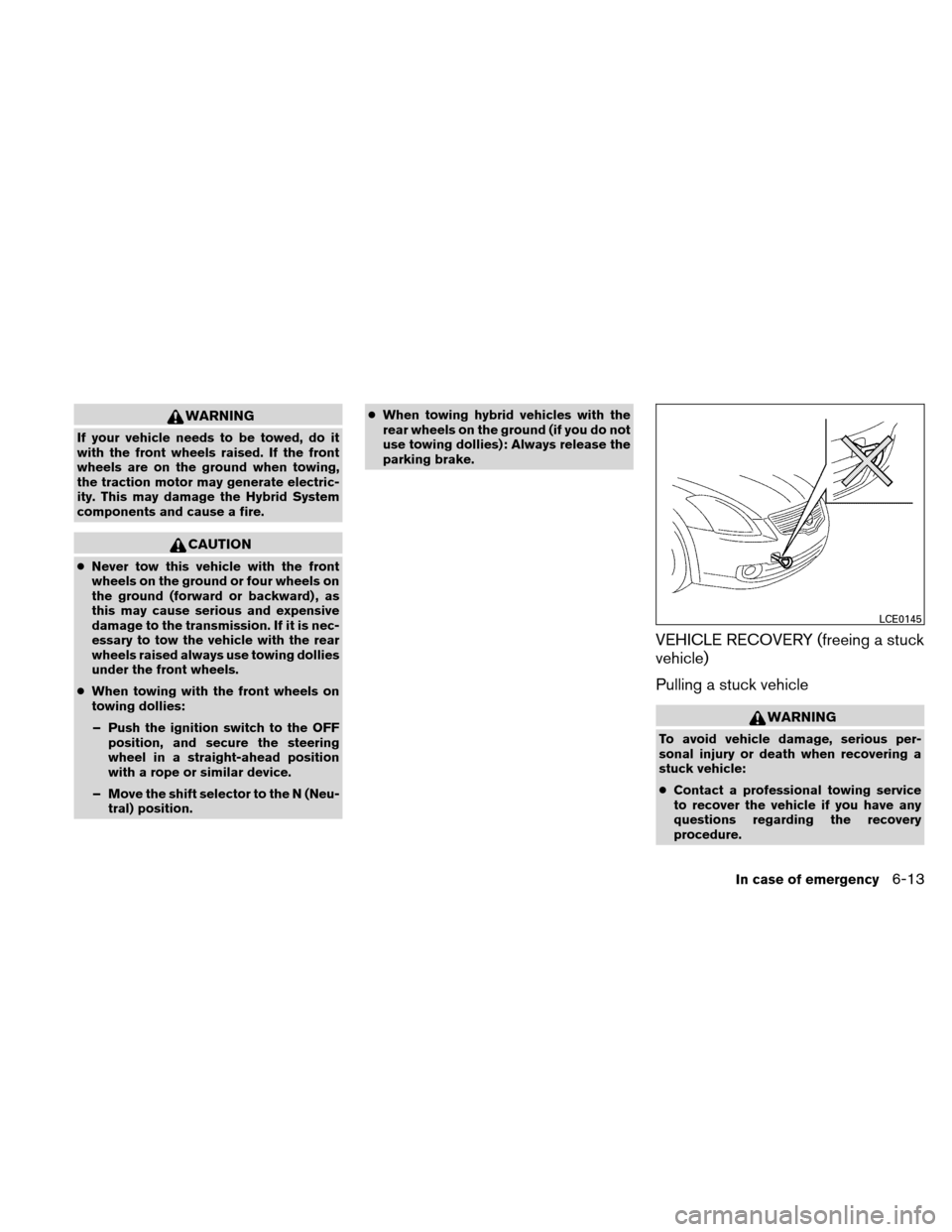
If your vehicle needs to be towed, do it
with the front wheels raised. If the front
wheels are on the ground when towing,
the traction motor may generate electric-
ity. This may damage the Hybrid System
components and cause a fire.
CAUTION
●Never tow this vehicle with the front
wheels on the ground or four wheels on
the ground (forward or backward) , as
this may cause serious and expensive
damage to the transmission. If it is nec-
essary to tow the vehicle with the rear
wheels raised always use towing dollies
under the front wheels.
● When towing with the front wheels on
towing dollies:
– Push the ignition switch to the OFF position, and secure the steering
wheel in a straight-ahead position
with a rope or similar device.
– Move the shift selector to the N (Neu- tral) position. ●
When towing hybrid vehicles with the
rear wheels on the ground (if you do not
use towing dollies): Always release the
parking brake.
VEHICLE RECOVERY (freeing a stuck
vehicle)
Pulling a stuck vehicle
WARNING
To avoid vehicle damage, serious per-
sonal injury or death when recovering a
stuck vehicle:
● Contact a professional towing service
to recover the vehicle if you have any
questions regarding the recovery
procedure.
LCE0145
In case of emergency6-13
Page 333 of 422
●Do not use the vehicle tie-downs to tow
or free a stuck vehicle.
● Only use devices specifically designed
for vehicle recovery and follow the
manufacturer’s instructions.
● Always pull the recovery device straight
out from the front of the vehicle. Never
pull at an angle.
● Route recovery devices so they do not
touch any part of the vehicle except the
attachment point.
If your vehicle is stuck in sand, snow, mud, etc.,
use a tow strap or other device designed specifi-
cally for vehicle recovery. Always follow the
manufacturer’s instructions for the recovery de-
vice.
Do not use the tie-down hooks for towing or
vehicle recovery.Rocking a stuck vehicle
WARNING
● Stand clear of a stuck vehicle.
● Do not spin your tires at high speed.
This could cause them to explode and
result in serious injury. Parts of your
vehicle could also overheat and be
damaged.
If your vehicle is stuck in sand, snow, mud, etc.,
use the following procedure: 1. Make sure the area in front and behind the vehicle is clear of obstructions.
2. Turn the steering wheel right and left to clear an area around the front tires.
3. Slowly rock the vehicle forward and back- ward.
● Shift back and forth between R (Reverse)
and D (Drive) .
● Apply the accelerator as little as possible
to maintain the rocking motion.
● Release the accelerator pedal before
shifting between R (Reverse) and D
(Drive) . ●
Do not spin the tires above 35 mph (55
km/h) .
4. If the vehicle cannot be freed after a few tries, contact a professional towing service
to remove the vehicle.
6-14In case of emergency
Page 344 of 422
When driving in areas using road salt or other
corrosive materials, check lubrication frequently.
Lights*Clean the headlights on a regular basis.
Make sure that the headlights, stop lights, tail
lights, turn signal lights, and other lights are all
operating properly and installed securely. Also
check headlight aim.
Road wheel nuts (lug nuts)* When checking
the tires, make sure no wheel nuts are missing,
and check for any loose wheel nuts. Tighten if
necessary.
Tire rotation* Tires should be rotated every
7,500 miles (12,000 km) .
Tires* Check the pressure with a gauge often
and always prior to long distance trips. If neces-
sary, adjust the pressure in all tires, including the
spare, to the pressure specified. Check carefully
for damage, cuts or excessive wear.
Tire Pressure Monitoring System (TPMS)
transmitter components Replace the TPMS
transmitter grommet seal, valve core and cap
when the tires are replaced due to wear or age.
Wheel alignment and balance
If the vehicle
should pull to either side while driving on a straight
and level road, or if you detect uneven or abnormal
tire wear, there may be a need for wheel alignment.
If the steering wheel or seat vibrates at normal
highway speeds, wheel balancing may be needed.
● For additional information regarding tires,
refer to “Important Tire Safety Information”
(US) or “Tire Safety Information” (Canada) in
the Warranty Information Booklet.
Windshield Clean the windshield on a regular
basis. Check the windshield at least every six
months for cracks or other damage. Have a dam-
aged windshield repaired by a qualified repair
facility.
Windshield wiper blades* Check for cracks or
wear if they do not wipe properly.
Inside the vehicle
The maintenance items listed here should be
checked on a regular basis, such as when per-
forming periodic maintenance, cleaning the ve-
hicle, etc.
Additional information on the following
items with an “*” is found later in this sec-
tion.
Accelerator pedal Check the pedal for smooth
operation and make sure the pedal does not bind
or require uneven effort. Keep the floor mat away
from the pedal.
Brake pedal Check the pedal for smooth opera-
tion. If the brake pedal suddenly goes down fur-
ther than normal, the pedal feels spongy or the vehicle seems to take longer to stop, see a
NISSAN dealer immediately. Keep the floor mat
away from the pedal.
Brakes
Check that the brakes do not pull the
vehicle to one side when applied.
Electronically controlled Continuously
Variable Transmission (eCVT) P (Park) po-
sition mechanism: On a fairly steep hill check
that the vehicle is held securely with the shift
selector in the P (Park) position without applying
any brakes.
Parking brake Check the parking brake opera-
tion regularly. The vehicle should be securely held
on a fairly steep hill with only the parking brake
applied. If the parking brake needs adjustment,
see a NISSAN dealer.
Seats Check seat position controls such as seat
adjusters, seatback recliner, etc. to ensure they
operate smoothly and all latches lock securely in
every position. Check that the head restraints
move up and down smoothly and the locks (if so
equipped) hold securely in all latched positions.
Seat belts Check that all parts of the seat belt
system (for example, buckles, anchors, adjusters
and retractors) operate properly and smoothly,
and are installed securely. Check the belt web-
bing for cuts, fraying, wear or damage.
Maintenance and do-it-yourself8-3
Page 345 of 422
Steering wheelCheck for changes in the steer-
ing system, such as excessive freeplay, hard
steering or strange noises.
Warning lights and chimes Make sure all
warning lights and chimes are operating properly.
Windshield wiper and washer* Check that
the wipers and washer operate properly and that
the wipers do not streak.
Windshield defroster Check that the air
comes out of the defroster outlets properly and in
sufficient quantity when operating the heater or
air conditioner.
Under the hood and vehicle
The maintenance items listed here should be
checked periodically (for example, each time you
check the engine oil or refuel) .
Brake fluid level* Make sure that the brake fluid
level is between the MIN and MAX lines on the
reservoir.
Electronically controlled Continuously
Variable Transmission (eCVT) fluid* Check
under the vehicle for leaks after the vehicle has
been parked for a while.
Engine coolant level* Check the coolant level
when the engine is cold. Engine drive belts*
Make sure the drive belts
are not frayed, worn, cracked or oily.
Engine oil level* Check the level after parking
the vehicle on a level surface with the engine off.
Wait more than 10 minutes for the oil to drain
back into the oil pan.
Exhaust system Make sure there are no loose
supports, cracks or holes. If the sound of the
exhaust seems unusual or there is a smell of
exhaust fumes, immediately have the exhaust
system inspected by a NISSAN dealer. See the
“Exhaust gas (carbon monoxide) in the “Starting
and driving” section of this manual.
Fluid leaks Check under the vehicle for fuel, oil,
water or other fluid leaks after the vehicle has
been parked for a while. Water dripping from the
air conditioner after use is normal. If you should
notice any leaks or if gasoline fumes are evident,
check for the cause and have it corrected imme-
diately.
Inverter coolant level*Check the coolant level
when the inverter is cold.
Radiator and hoses Check the front of the
radiator and clean off any dirt, insects, leaves,
etc., that may have accumulated. Make sure the
hoses have no cracks, deformation, rot or loose
connections. Underbody
The underbody is frequently ex-
posed to corrosive substances such as those
used on icy roads or to control dust. It is very
important to remove these substances from the
underbody, otherwise rust may form on the floor
pan, frame, fuel lines and exhaust system. At the
end of winter, the underbody should be thor-
oughly flushed with plain water, in those areas
where mud and dirt may have accumulated. See
the “Appearance and care” section of this
manual.
Windshield-washer fluid* Check that there is
adequate fluid in the reservoir.
8-4Maintenance and do-it-yourself