climate control NISSAN ALTIMA SEDAN 2013 Workshop Manual
[x] Cancel search | Manufacturer: NISSAN, Model Year: 2013, Model line: ALTIMA SEDAN, Model: NISSAN ALTIMA SEDAN 2013Pages: 413, PDF Size: 4.52 MB
Page 261 of 413
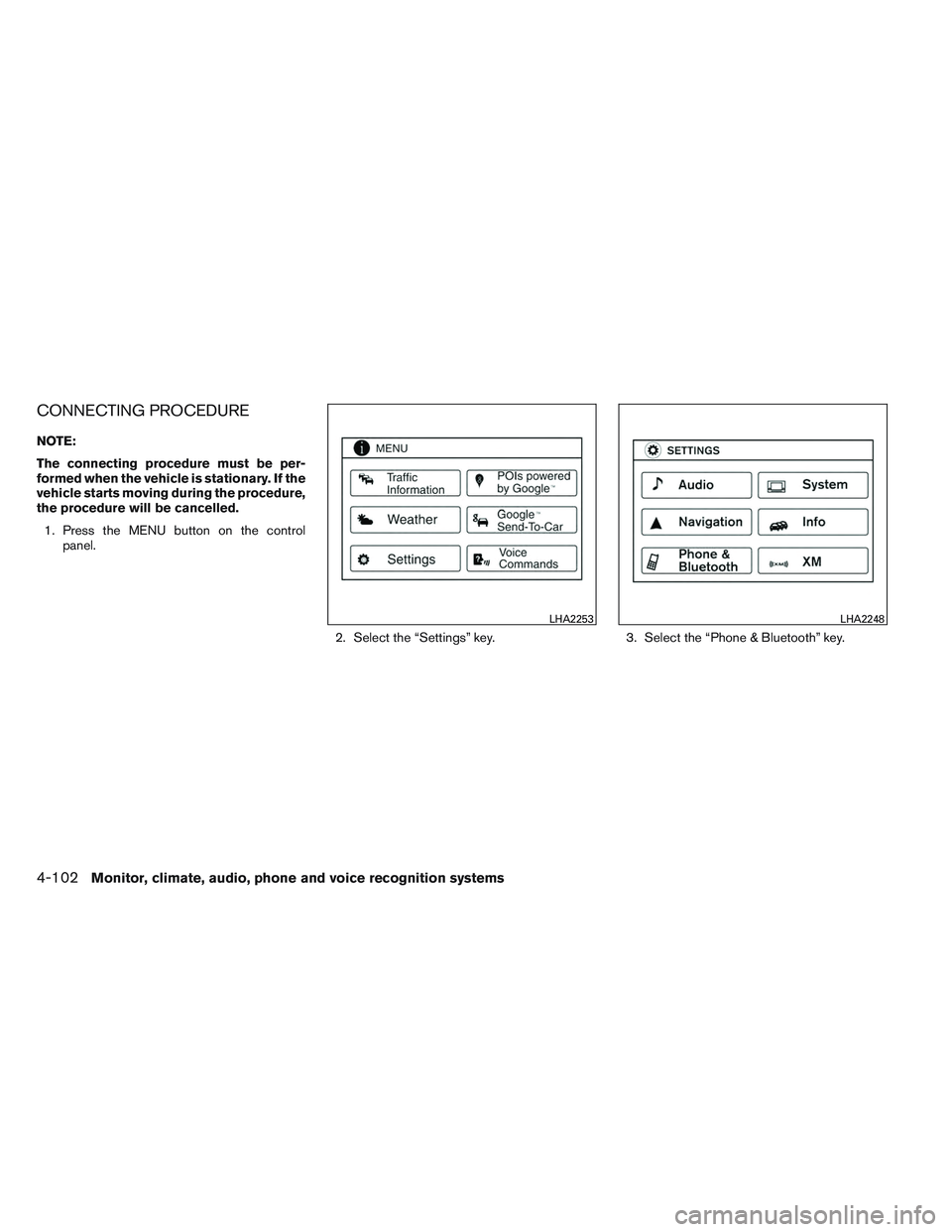
CONNECTING PROCEDURE
NOTE:
The connecting procedure must be per-
formed when the vehicle is stationary. If the
vehicle starts moving during the procedure,
the procedure will be cancelled.1. Press the MENU button on the control panel.
2. Select the “Settings” key. 3. Select the “Phone & Bluetooth” key.
LHA2253LHA2248
4-102Monitor, climate, audio, phone and voice recognition systems
Page 262 of 413
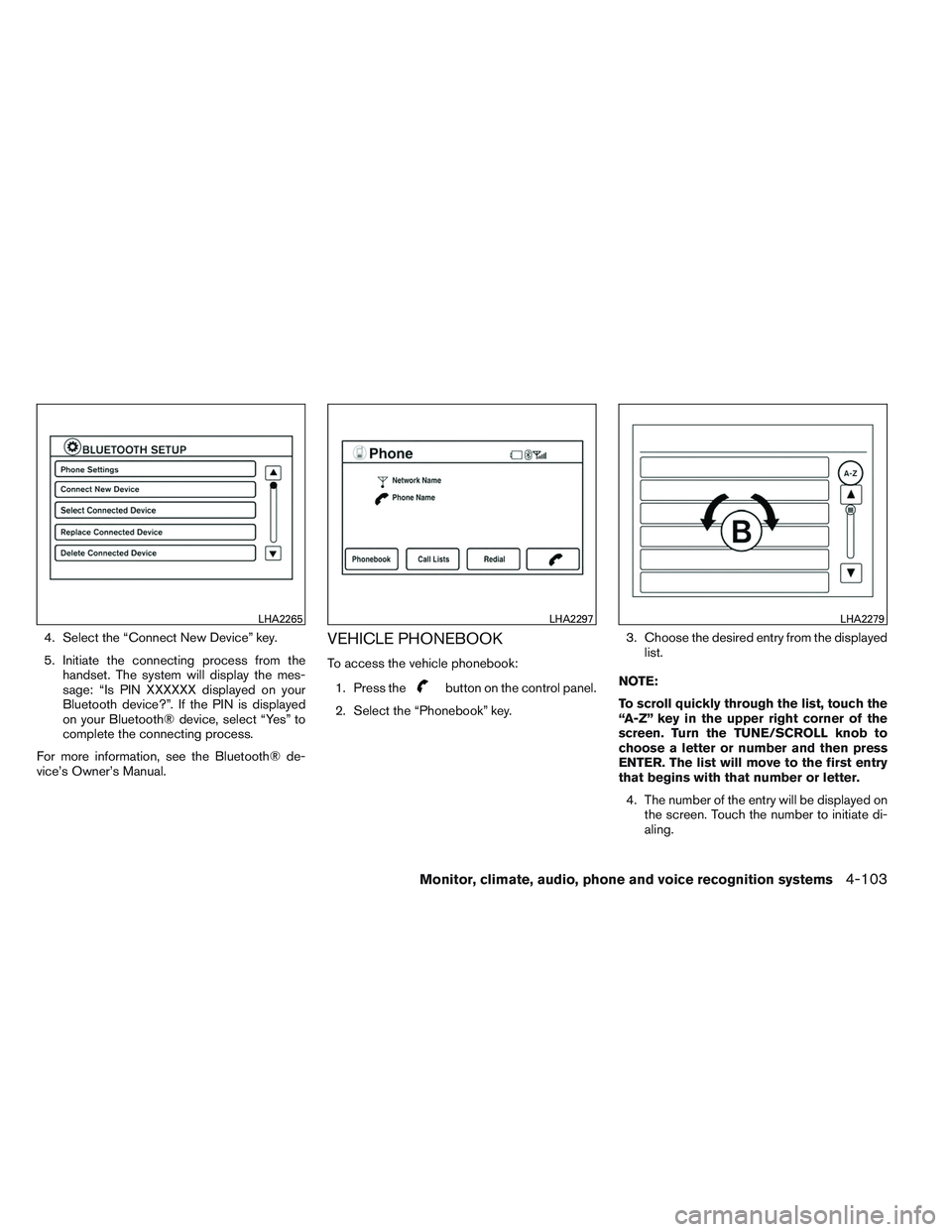
4. Select the “Connect New Device” key.
5. Initiate the connecting process from thehandset. The system will display the mes-
sage: “Is PIN XXXXXX displayed on your
Bluetooth device?”. If the PIN is displayed
on your Bluetooth® device, select “Yes” to
complete the connecting process.
For more information, see the Bluetooth® de-
vice’s Owner’s Manual.VEHICLE PHONEBOOK
To access the vehicle phonebook:
1. Press the
button on the control panel.
2. Select the “Phonebook” key. 3. Choose the desired entry from the displayed
list.
NOTE:
To scroll quickly through the list, touch the
“A-Z” key in the upper right corner of the
screen. Turn the TUNE/SCROLL knob to
choose a letter or number and then press
ENTER. The list will move to the first entry
that begins with that number or letter. 4. The number of the entry will be displayed on the screen. Touch the number to initiate di-
aling.
LHA2265LHA2297LHA2279
Monitor, climate, audio, phone and voice recognition systems4-103
Page 264 of 413
DURING A CALL
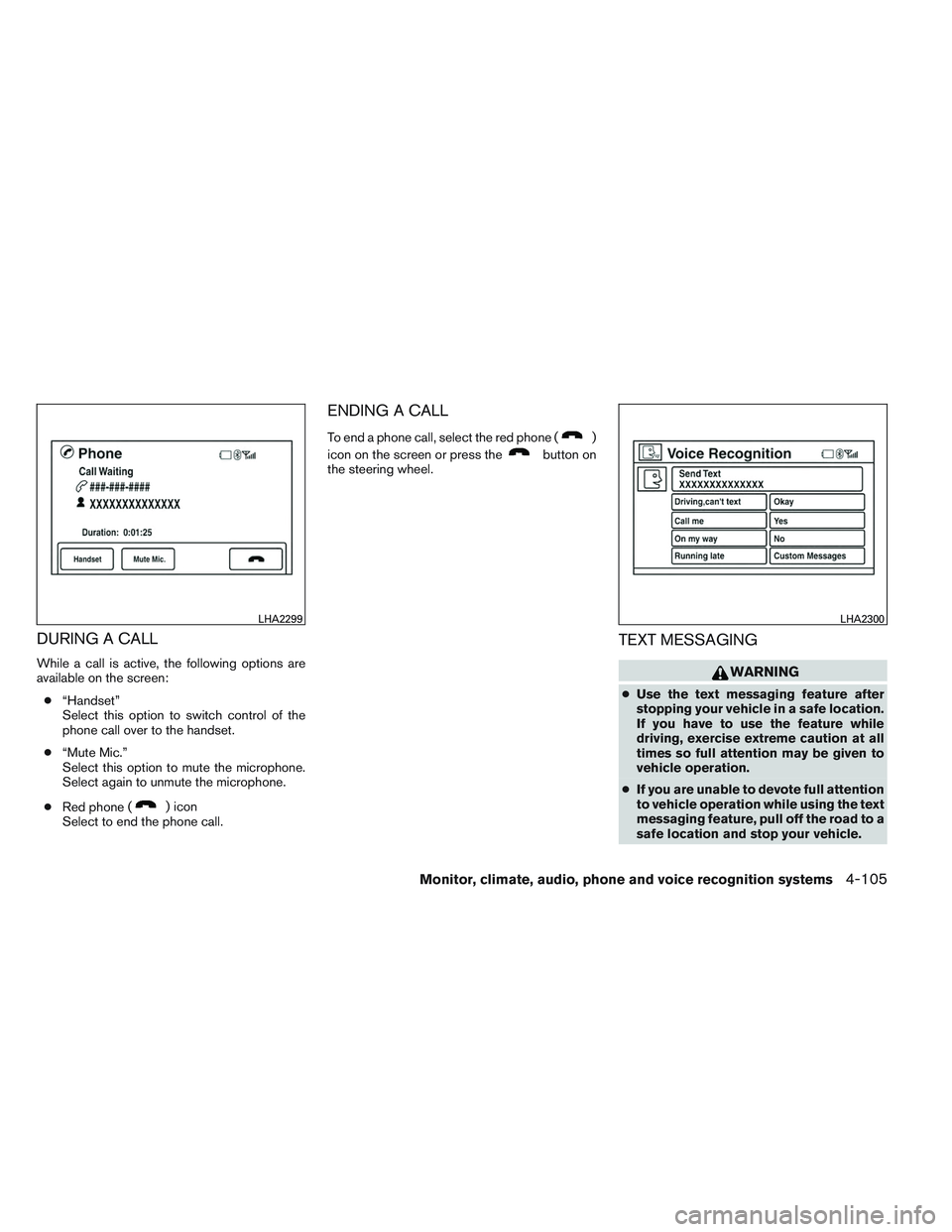
While a call is active, the following options are
available on the screen:● “Handset”
Select this option to switch control of the
phone call over to the handset.
● “Mute Mic.”
Select this option to mute the microphone.
Select again to unmute the microphone.
● Red phone (
) icon
Select to end the phone call.
ENDING A CALL
To end a phone call, select the red phone ()
icon on the screen or press the
button on
the steering wheel.
TEXT MESSAGING
WARNING
● Use the text messaging feature after
stopping your vehicle in a safe location.
If you have to use the feature while
driving, exercise extreme caution at all
times so full attention may be given to
vehicle operation.
● If you are unable to devote full attention
to vehicle operation while using the text
messaging feature, pull off the road to a
safe location and stop your vehicle.
LHA2299LHA2300
Monitor, climate, audio, phone and voice recognition systems4-105
Page 269 of 413
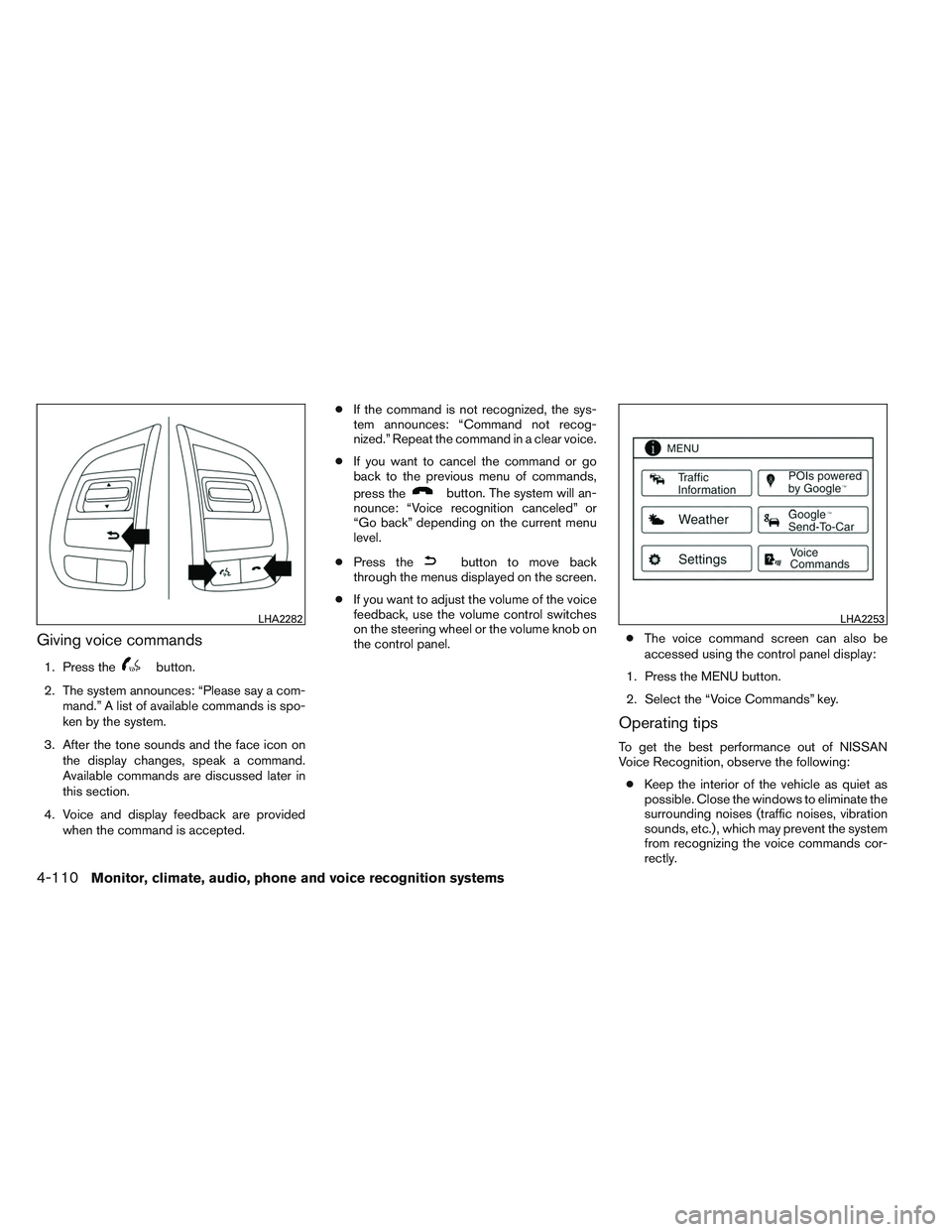
Giving voice commands
1. Press thebutton.
2. The system announces: “Please say a com- mand.” A list of available commands is spo-
ken by the system.
3. After the tone sounds and the face icon on the display changes, speak a command.
Available commands are discussed later in
this section.
4. Voice and display feedback are provided when the command is accepted. ●
If the command is not recognized, the sys-
tem announces: “Command not recog-
nized.” Repeat the command in a clear voice.
● If you want to cancel the command or go
back to the previous menu of commands,
press the
button. The system will an-
nounce: “Voice recognition canceled” or
“Go back” depending on the current menu
level.
● Press the
button to move back
through the menus displayed on the screen.
● If you want to adjust the volume of the voice
feedback, use the volume control switches
on the steering wheel or the volume knob on
the control panel. ●
The voice command screen can also be
accessed using the control panel display:
1. Press the MENU button.
2. Select the “Voice Commands” key.
Operating tips
To get the best performance out of NISSAN
Voice Recognition, observe the following: ● Keep the interior of the vehicle as quiet as
possible. Close the windows to eliminate the
surrounding noises (traffic noises, vibration
sounds, etc.) , which may prevent the system
from recognizing the voice commands cor-
rectly.
LHA2282LHA2253
4-110Monitor, climate, audio, phone and voice recognition systems
Page 271 of 413
BLUETOOTH® HANDS-FREE
PHONE SYSTEM VOICE
COMMANDS
To access the Bluetooth® Hands-Free Phone
System voice commands:1. Press the
button.
2.
Say “Call” and then a name in the vehicle
phonebook to call that entry. Otherwise, say
“Phone” to access various phone commands.
If the Bluetooth® has been set to “Off”, the
system announces: “Bluetooth® is off. Would
you like to turn Bluetooth® on?”
If no phone is connected to the system and the
vehicle is stationary, the system announces:
“There is no phone connected. Would you like to
connect a phone now?” Say “Yes” to connect a
phone. All further Bluetooth® Hands-Free Phone
System voice commands are only available if a
phone is connected.
If a phone is connected and Bluetooth® is set to
“On”, the following voice commands are available:
● Dial Number
Allows for up to 24 digits to be dialed. After
the number is entered, say “Dial” to initiate
dialing. Say “Correction” to correct the num-
ber entered. Say “Go Back” to return to the
main menu. ●
List Phonebook
Starting with the first alphabetical entry in
the vehicle phonebook, the system prompts
for an additional command. Say “Dial” to call
the number of the phonebook entry. Say
“Send Text” to send a text message to the
number of the phonebook entry. Say “Next
Entry” to skip to the next alphabetical entry in
the vehicle phonebook, where the same op-
tions will then be available.
● Recent Calls
The system prompts for an additional com-
mand. Say “Missed Calls”, “Incoming Calls”
or “Outgoing Calls” to display a list of such
calls on the screen.
Speak the number of the entry displayed on
the screen to dial that number or say “Next
Page” to view entries on the next page (if
available) .
● Redial
Redials the last called number.
● Read Text
Reads an incoming text message. For more
information about text messaging with the
Bluetooth® Hands-Free Phone System, see
“Bluetooth® Hands-Free Phone System
with Navigation System” in this section. ●
Send Text
Sends a text message. For more information
about text messaging with the Bluetooth®
Hands-Free Phone System, see
“Bluetooth® Hands-Free Phone System
with Navigation System” in this section.
● Select Phone
The system replies “Please use manual con-
trols to continue”. Use manual controls to
change the active phone from among the
listed phones connected to the vehicle.
For more information about the Bluetooth®
Hands-Free Phone System, see “Bluetooth®
Hands-Free Phone System with Navigation Sys-
tem” in this section.
NAVIGATION SYSTEM VOICE
COMMANDS
The following voice commands are available for
the Navigation System: ● Places
● Street Address
● Address Book
● Home
● Previous Destination
4-112Monitor, climate, audio, phone and voice recognition systems
Page 400 of 413
Do not tow a trailer with your vehicle.
FLAT TOWING
Towing your vehicle with all four wheels on the
ground is sometimes called flat towing. This
method is sometimes used when towing a vehicle
behind a recreational vehicle, such as a motor
home.
CAUTION
●Failure to follow these guidelines can
result in severe transmission damage.
● Whenever flat towing your vehicle, al-
ways tow forward, never backward.
● DO NOT tow any continuously variable
transmission vehicle with all four
wheels on the ground (flat towing) . Do-
ing so WILL DAMAGE internal transmis-
sion parts due to lack of transmission
lubrication.
● For emergency towing procedures refer
to “Towing recommended by NISSAN”
in the “In case of emergency” section of
this manual.
Continuously Variable Transmission
To tow a vehicle equipped with a continuously
variable transmission, an appropriate vehicle
dolly MUST be placed under the towed vehicle’s
drive wheels. Alwaysfollow the dolly manufac-
turer’s recommendations when using their prod-
uct. DOT (Department of Transportation) Quality
Grades: All passenger car tires must conform to
federal safety requirements in addition to these
grades.
Quality grades can be found where applicable on
the tire sidewall between tread shoulder and
maximum section width. For example:
Treadwear 200 Traction AA Temperature A
Treadwear
The treadwear grade is a comparative rating
based on the wear rate of the tire when tested
under controlled conditions on a specified gov-
ernment test course. For example, a tire graded
150 would wear one and one-half (1 1/2) times
as well on the government course as a tire graded
100. The relative performance of tires depends
upon the actual conditions of their use, however,
and may depart significantly from the norm due to
variations in driving habits, service practices and
differences in road characteristics and climate.
Traction AA, A, B and C
The traction grades, from highest to lowest, are
AA, A, B, and C. Those grades represent the
tire’s ability to stop on wet pavement as mea-
sured under controlled conditions on specified
government test surfaces of asphalt and con-
crete. A tire marked C may have poor traction
performance.
TOWING A TRAILER
UNIFORM TIRE QUALITY GRADING
Technical and consumer information9-17