engine NISSAN ALTIMA SEDAN 2015 Workshop Manual
[x] Cancel search | Manufacturer: NISSAN, Model Year: 2015, Model line: ALTIMA SEDAN, Model: NISSAN ALTIMA SEDAN 2015Pages: 441, PDF Size: 4.59 MB
Page 209 of 441
The air conditioner system in your NISSAN ve-
hicle is charged with a refrigerant designed with
the environment in mind.
This refrigerant does not harm the earth’s
ozone layer.
Special charging equipment and lubricant is re-
quired when servicing your NISSAN air condi-
tioner. Using improper refrigerants or lubricants
will cause severe damage to your air conditioner
system. For additional information, refer to “Air
conditioner system refrigerant and oil recommen-
dations” in the “Technical and consumer informa-
tion” section of this manual.
A NISSAN dealer is able to service your “environ-
mentally friendly” air conditioning system.
WARNING
The air conditioner system contains refrig-
erant under high pressure. To avoid per-
sonal injury, any air conditioner service
should be done only by an experienced
technician with proper equipment.
RADIO
With the ignition placed in the ACC or ON posi-
tion, press the
POWER button /VOL (vol-
ume) knob to turn the radio on. If you listen to the
radio with the engine not running, the ignition
should be placed in the ACC position.
Radio reception is affected by station signal
strength, distance from radio transmitter, build-
ings, bridges, mountains and other external influ-
ences. Intermittent changes in reception quality
normally are caused by these external influences.
Using a cellular phone in or near the vehicle
may influence radio reception quality.
Radio reception
Your NISSAN radio system is equipped with
state-of-the-art electronic circuits to enhance ra-
dio reception. These circuits are designed to
extend reception range, and to enhance the qual-
ity of that reception.
However, there are some general characteristics
of both FM and AM radio signals that can affect
radio reception quality in a moving vehicle, even
when the finest equipment is used. These char-
acteristics are completely normal in a given re-
ception area and do not indicate any malfunction
in your NISSAN radio system. Reception conditions will constantly change be-
cause of vehicle movement. Buildings, terrain,
signal distance and interference from other ve-
hicles can work against ideal reception. De-
scribed below are some of the factors that can
affect your radio reception.
Some cellular phones or other devices may
cause interference or a buzzing noise to come
from the audio system speakers. Storing the de-
vice in a different location may reduce or elimi-
nate the noise.
FM RADIO RECEPTION
Range: FM range is normally limited to 25 – 30 mi
(40 – 48 km) , with monaural (single channel) FM
having slightly more range than stereo FM. Exter-
nal influences may sometimes interfere with FM
station reception even if the FM station is within
25 mi (40 km) . The strength of the FM signal is
directly related to the distance between the
transmitter and receiver. FM signals follow a line-
of-sight path, exhibiting many of the same char-
acteristics as light. For example, they will reflect
off objects.
Fade and drift: As your vehicle moves away from
a station transmitter, the signals will tend to fade
and/or drift.
SERVICING AIR CONDITIONER AUDIO SYSTEM
Monitor, climate, audio, phone and voice recognition systems4-35
Page 217 of 441
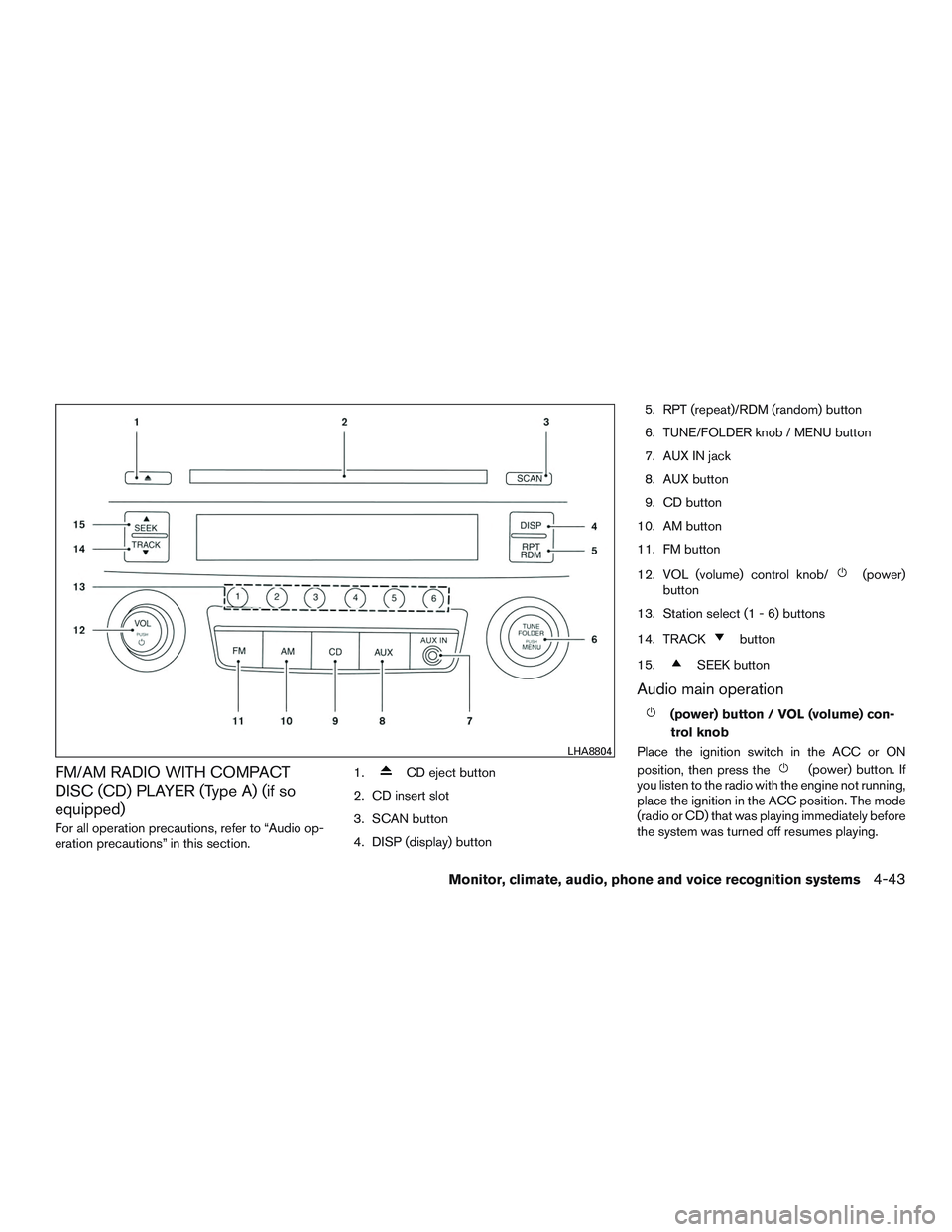
FM/AM RADIO WITH COMPACT
DISC (CD) PLAYER (Type A) (if so
equipped)
For all operation precautions, refer to “Audio op-
eration precautions” in this section.1.
CD eject button
2. CD insert slot
3. SCAN button
4. DISP (display) button 5. RPT (repeat)/RDM (random) button
6. TUNE/FOLDER knob / MENU button
7. AUX IN jack
8. AUX button
9. CD button
10. AM button
11. FM button
12. VOL (volume) control knob/
(power)
button
13. Station select (1 - 6) buttons
14. TRACK
button
15.
SEEK button
Audio main operation
(power) button / VOL (volume) con- trol knob
Place the ignition switch in the ACC or ON
position, then press the
(power) button. If
you listen to the radio with the engine not running,
place the ignition in the ACC position. The mode
(radio or CD) that was playing immediately before
the system was turned off resumes playing.
LHA8804
Monitor, climate, audio, phone and voice recognition systems4-43
Page 258 of 441
APPLICATION DOWNLOAD
Once connected, the NissanConnectSMMobile
Apps will search your phone to determine which
compatible applications are currently installed.
The vehicle will then download the in-vehicle
interface for each of these compatible applica-
tions. Once downloaded, the user can access
many smartphone Applications through the ve-
hicle touch-screen by pressing the INFO button
followed by touching the “My Apps” key. For
additional information on application availability
refer to the NissanConnect
SMwebsite
https://canada.nissanconnect.com or
www.nissanusa.com/connect/ or contact
NISSAN Customer Service. When installing a CB, ham radio or car phone in
your vehicle, be sure to observe the following
precautions; otherwise, the new equipment may
adversely affect the engine control system and
other electronic parts.
WARNING
●
A cellular phone should not be used for
any purpose while driving so full atten-
tion may be given to vehicle operation.
Some jurisdictions prohibit the use of
cellular phones while driving.
● If you must make a call while your ve-
hicle is in motion, the hands free cellu-
lar phone operational mode is highly
recommended. Exercise extreme cau-
tion at all times so full attention may be
given to vehicle operation.
● If you are unable to devote full attention
to vehicle operation while talking on
the phone, pull off the road to a safe
location and stop your vehicle.
CAUTION
●Keep the antenna as far away as pos-
sible from the electronic control
modules.
● Keep the antenna wire more than 8 in
(20 cm) away from the electronic control
system harnesses. Do not route the an-
tenna wire next to any harness.
● Adjust the antenna standing-wave ratio
as recommended by the manufacturer.
● Connect the ground wire from the CB
radio chassis to the body.
● For details, consult a NISSAN dealer.
CAR PHONE OR CB RADIO
4-84Monitor, climate, audio, phone and voice recognition systems
Page 259 of 441
WARNING
●Use a phone after stopping your vehicle
in a safe location. If you have to use a
phone while driving, exercise extreme
caution at all times so full attention may
be given to vehicle operation.
● If you are unable to devote full attention
to vehicle operation while talking on
the phone, pull off the road to a safe
location and stop your vehicle.
CAUTION
To avoid discharging the vehicle battery,
use a phone after starting the engine.
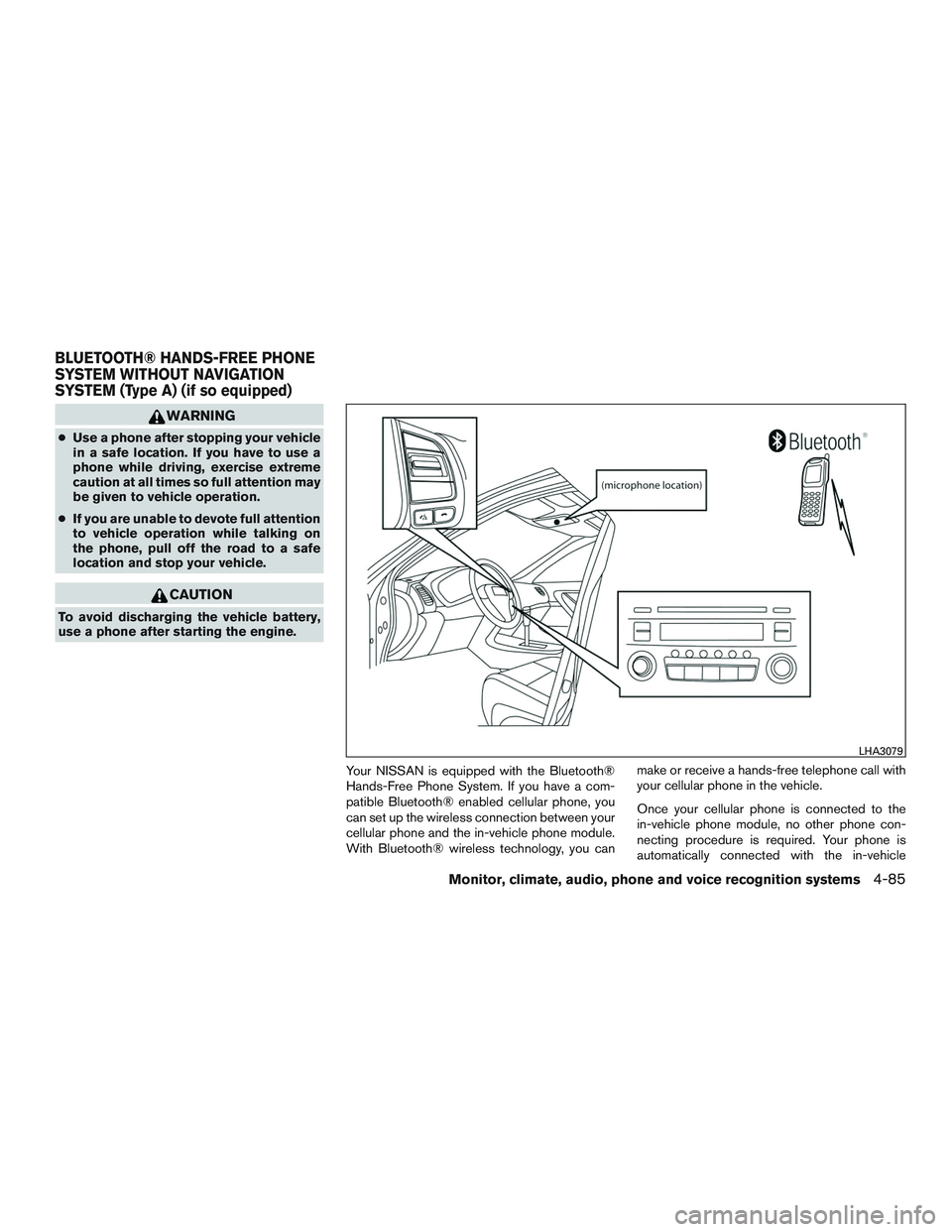
Your NISSAN is equipped with the Bluetooth®
Hands-Free Phone System. If you have a com-
patible Bluetooth® enabled cellular phone, you
can set up the wireless connection between your
cellular phone and the in-vehicle phone module.
With Bluetooth® wireless technology, you can make or receive a hands-free telephone call with
your cellular phone in the vehicle.
Once your cellular phone is connected to the
in-vehicle phone module, no other phone con-
necting procedure is required. Your phone is
automatically connected with the in-vehicle
LHA3079
BLUETOOTH® HANDS-FREE PHONE
SYSTEM WITHOUT NAVIGATION
SYSTEM (Type A) (if so equipped)
Monitor, climate, audio, phone and voice recognition systems4-85
Page 270 of 441
VOICE ADAPTATION (VA) MODE
Voice Adaptation allows up to two out-of-dialect
users to train the system to improve recognition
accuracy. By repeating a number of commands,
the users can create a voice model of their own
voice that is stored in the system. The system is
capable of storing a different voice adaptation
model for each connected phone.
Training procedure
The procedure for training a voice is as follows.1. Position the vehicle in a reasonably quiet outdoor location.
2. Sit in the driver’s seat with the engine run- ning, the parking brake on, and the transmis-
sion in P (Park) .
3. Press and hold the
button for more
than 5 seconds.
4. The system announces: “Press the PHONE/SEND (
) button for the
hands-free phone system to enter the voice
adaptation mode or press the PHONE/END
(
) button to select a different lan-
guage.” 5. Press the
button.
For additional information on selecting a dif-
ferent language, refer to “Choosing a lan-
guage” in this section.
6. Voice memory A or memory B is selected automatically. If both memory locations are
already in use, the system will prompt you to
overwrite one. Follow the instructions pro-
vided by the system.
7. When preparation is complete and you are ready to begin, press the
button.
8. The VA mode will be explained. Follow the instructions provided by the system.
9. When training is finished, the system will tell you an adequate number of phrases have
been recorded.
10. The system will announce that voice adap- tation has been completed and the system is
ready.
The VA mode will stop if:
● The
button is pressed for more than
5 seconds in VA mode.
● The vehicle begins moving during VA mode.
● The ignition switch is placed in the OFF or
LOCK position.
Training phrases
During the VA mode, the system instructs the
trainer to say the following phrases. The system
will prompt you for each phrase.
● phonebook transfer entry
● dial three oh four two nine
● delete call back number
● incoming
● transfer entry
● eight pause nine three two pause seven
● delete all entries
● call seven two four zero nine
● phonebook delete entry
● next entry
● dial star two one seven oh
● yes
● no
● select
● missed
● dial eight five six nine two
● Bluetooth on
4-96Monitor, climate, audio, phone and voice recognition systems
Page 273 of 441
WARNING
●Use a phone after stopping your vehicle
in a safe location. If you have to use a
phone while driving, exercise extreme
caution at all times so full attention may
be given to vehicle operation.
● If you are unable to devote full attention
to vehicle operation while talking on
the phone, pull off the road to a safe
location and stop your vehicle.
CAUTION
To avoid discharging the vehicle battery,
use a phone after starting the engine.
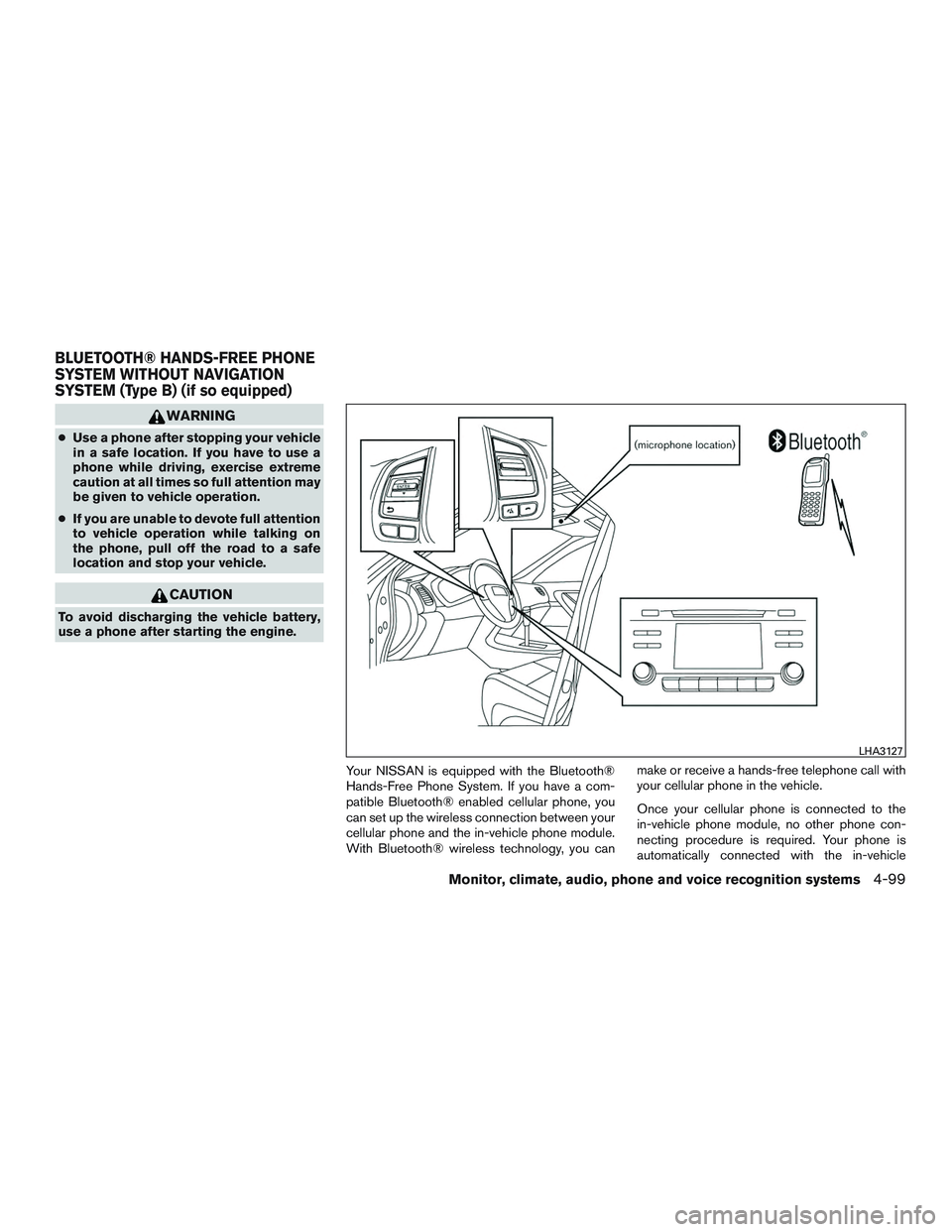
Your NISSAN is equipped with the Bluetooth®
Hands-Free Phone System. If you have a com-
patible Bluetooth® enabled cellular phone, you
can set up the wireless connection between your
cellular phone and the in-vehicle phone module.
With Bluetooth® wireless technology, you can make or receive a hands-free telephone call with
your cellular phone in the vehicle.
Once your cellular phone is connected to the
in-vehicle phone module, no other phone con-
necting procedure is required. Your phone is
automatically connected with the in-vehicle
LHA3127
BLUETOOTH® HANDS-FREE PHONE
SYSTEM WITHOUT NAVIGATION
SYSTEM (Type B) (if so equipped)
Monitor, climate, audio, phone and voice recognition systems4-99
Page 284 of 441
WARNING
●Use a phone after stopping your vehicle
in a safe location. If you have to use a
phone while driving, exercise extreme
caution at all times so full attention may
be given to vehicle operation.
● If you are unable to devote full attention
to vehicle operation while talking on
the phone, pull off the road to a safe
location and stop your vehicle.
CAUTION
To avoid discharging the vehicle battery,
use a phone after starting the engine.
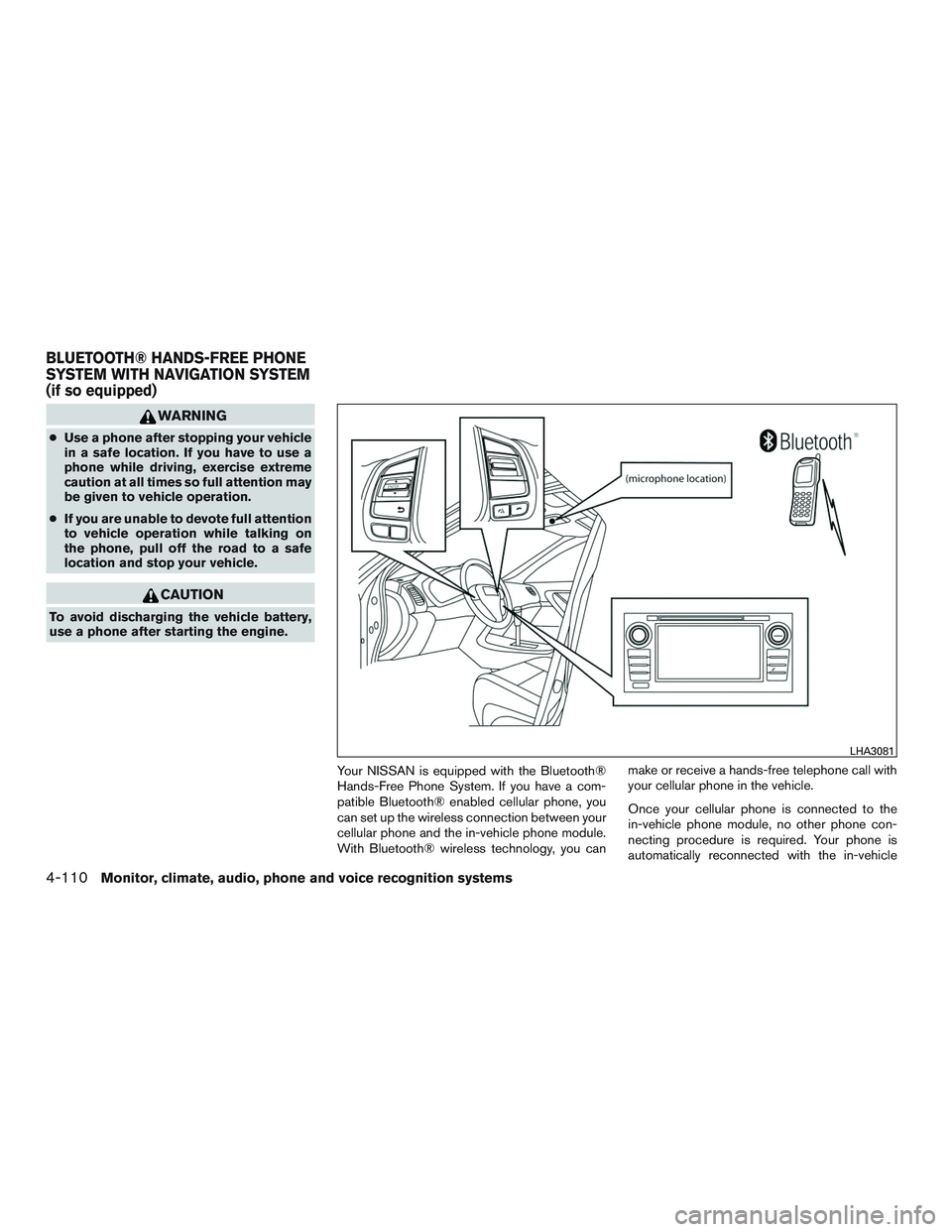
Your NISSAN is equipped with the Bluetooth®
Hands-Free Phone System. If you have a com-
patible Bluetooth® enabled cellular phone, you
can set up the wireless connection between your
cellular phone and the in-vehicle phone module.
With Bluetooth® wireless technology, you can make or receive a hands-free telephone call with
your cellular phone in the vehicle.
Once your cellular phone is connected to the
in-vehicle phone module, no other phone con-
necting procedure is required. Your phone is
automatically reconnected with the in-vehicle
LHA3081
BLUETOOTH® HANDS-FREE PHONE
SYSTEM WITH NAVIGATION SYSTEM
(if so equipped)
4-110Monitor, climate, audio, phone and voice recognition systems
Page 298 of 441
5 Starting and driving
Precautions when starting and driving................5-2
Exhaust gas (carbon monoxide) ..................5-2
Three-way catalyst ..............................5-2
Tire Pressure Monitoring System (TPMS) ..........5-3
Avoiding collision and rollover . . ..................5-6
Off-road recovery ...............................5-6
Rapid air pressure loss ..........................5-7
Drinking alcohol/drugs and driving ................5-7
Push-Button Ignition Switch ........................5-8
Operating range ................................5-9
Push-button ignition switch positions . . . ..........5-9
Emergency engine shut off .....................5-10
NISSAN Intelligent Key® battery discharge .......5-10
NISSAN Vehicle Immobilizer System .............5-11
Before starting the engine ......................... 5-11
Starting the engine ............................... 5-12
Remote start (if so equipped) ...................5-12
Driving the vehicle ................................ 5-13
Continuously Variable Transmission (CVT) ........5-13
Parking brake .................................... 5-19
Blind Spot Warning (BSW) System/Lane
Departure Warning (LDW) System (if so equipped) . . 5-19 BSW system operation ........................ 5-20BSW driving situations
......................... 5-22
LDW system operation ......................... 5-24
BSW/LDW temporary disabled status ...........5-26
BSW/LDW automatic deactivation ..............5-26
BSW/LDW malfunction ........................ 5-26
Camera unit maintenance ......................5-26
Cruise control (if so equipped) . . ...................5-27
Precautions on cruise control ...................5-27
Cruise control operations .......................5-27
Break-in schedule ................................ 5-28
Fuel efficient driving tips ........................... 5-29
Increasing fuel economy ........................... 5-30
Parking/parking on hills ............................ 5-30
Power steering ................................... 5-31
Brake system .................................... 5-32
Brake precautions ............................. 5-32
Anti-lock BrakingSystem
(ABS) ................. 5-32
Vehicle Dynamic Control (VDC) system .............5-34
Brake force distribution ........................ 5-35
Rear sonar system (RSS) (if so equipped) ...........5-36
Front And Rear Sonar System (if so equipped) .......5-37
System operation .............................. 5-38
Cold weather driving .............................. 5-39
Page 299 of 441
Freeing a frozen door lock......................5-39
Antifreeze ..................................... 5-39
Battery ....................................... 5-39
Draining of coolant water .......................5-39Tire equipment . .
.............................. 5-39
Special winter equipment .......................5-40
Driving on snow or ice ......................... 5-40
Engine block heater (if so equipped) .............5-40
Page 300 of 441
WARNING
●Do not leave children or adults who
would normally require the assistance
of others alone in your vehicle. Pets
should also not be left alone. They
could accidentally injure themselves or
others through inadvertent operation of
the vehicle. Also, on hot, sunny days,
temperatures in a closed vehicle could
quickly become high enough to cause
severe or possibly fatal injuries to
people or animals.
● Closely supervise children when they
are around cars to prevent them from
playing and becoming locked in the
trunk where they could be seriously in-
jured. Keep the car locked, with the rear
seatback and trunk lid securely latched
when not in use, and prevent children’s
access to car keys.
EXHAUST GAS (carbon monoxide)
WARNING
●Do not breathe exhaust gases; they
contain colorless and odorless carbon
monoxide. Carbon monoxide is danger-
ous. It can cause unconsciousness or
death. ●
If you suspect that exhaust fumes are
entering the vehicle, drive with all win-
dows fully open, and have the vehicle
inspected immediately.
● Do not run the engine in closed spaces
such as a garage.
● Do not park the vehicle with the engine
running for any extended length of time.
● Keep the rear vent windows, lift gates,
doors and trunk lids (if so equipped)
closed while driving, otherwise exhaust
gases could be drawn into the passen-
ger compartment. If you must drive with
one of these open, follow these
precautions:
1. Open all the windows.
2. Set the
air recirculation but-
ton to off and the fan control dial to
high to circulate the air.
● If electrical wiring or other cable con-
nections must pass to a trailer through
the seal on the trunk lid or the body,
follow the manufacturer’s recommen-
dation to prevent carbon monoxide en-
try into the vehicle. ●
The exhaust system and body should be
inspected by a qualified mechanic
whenever:
a. The vehicle is raised for service.
b. You suspect that exhaust fumes are entering into the passenger
compartment.
c. You notice a change in the sound of the exhaust system.
d. You have had an accident involving damage to the exhaust system, un-
derbody, or rear of the vehicle.
THREE-WAY CATALYST
The three-way catalyst is an emission control
device installed in the exhaust system. Exhaust
gases in the three-way catalyst are burned at
high temperatures to help reduce pollutants.
WARNING
●The exhaust gas and the exhaust sys-
tem are very hot. Keep people, animals
or flammable materials away from the
exhaust system components.
● Do not stop or park the vehicle over
flammable materials such as dry grass,
waste paper or rags. They may ignite
and cause a fire.
PRECAUTIONS WHEN STARTING
AND DRIVING
5-2Starting and driving