light NISSAN ALTIMA SEDAN 2017 Owners Manual
[x] Cancel search | Manufacturer: NISSAN, Model Year: 2017, Model line: ALTIMA SEDAN, Model: NISSAN ALTIMA SEDAN 2017Pages: 497, PDF Size: 5.51 MB
Page 313 of 497
●In the manual shift mode, the transmis-
sion may shift up automatically to a
higher range than selected if the en-
gine speed is too high. When the ve-
hicle speed decreases, the transmis-
sion automatically shifts down and
shifts to 1st gear before the vehicle
comes to a stop.
● CVT operation is limited to automatic drive
mode when CVT fluid temperature is ex-
tremely low even if manual shift mode is
selected. This is not a malfunction. When
CVT fluid warms up, manual mode can be
selected.
● When the CVT fluid temperature is high, the
shift range may upshift in lower rpm than
usual. This is not a malfunction.
Shift lock release
If the battery charge is low or discharged, the
shift lever may not be moved from the P (Park)
position even with the brake pedal depressed
and the shift lever button pushed.
It will be necessary to jump start or have your
battery charged. For additional information, refer
to “Jump starting” in the “In case of emergency”
section of this manual. Contact a NISSAN dealer
or a professional towing service.
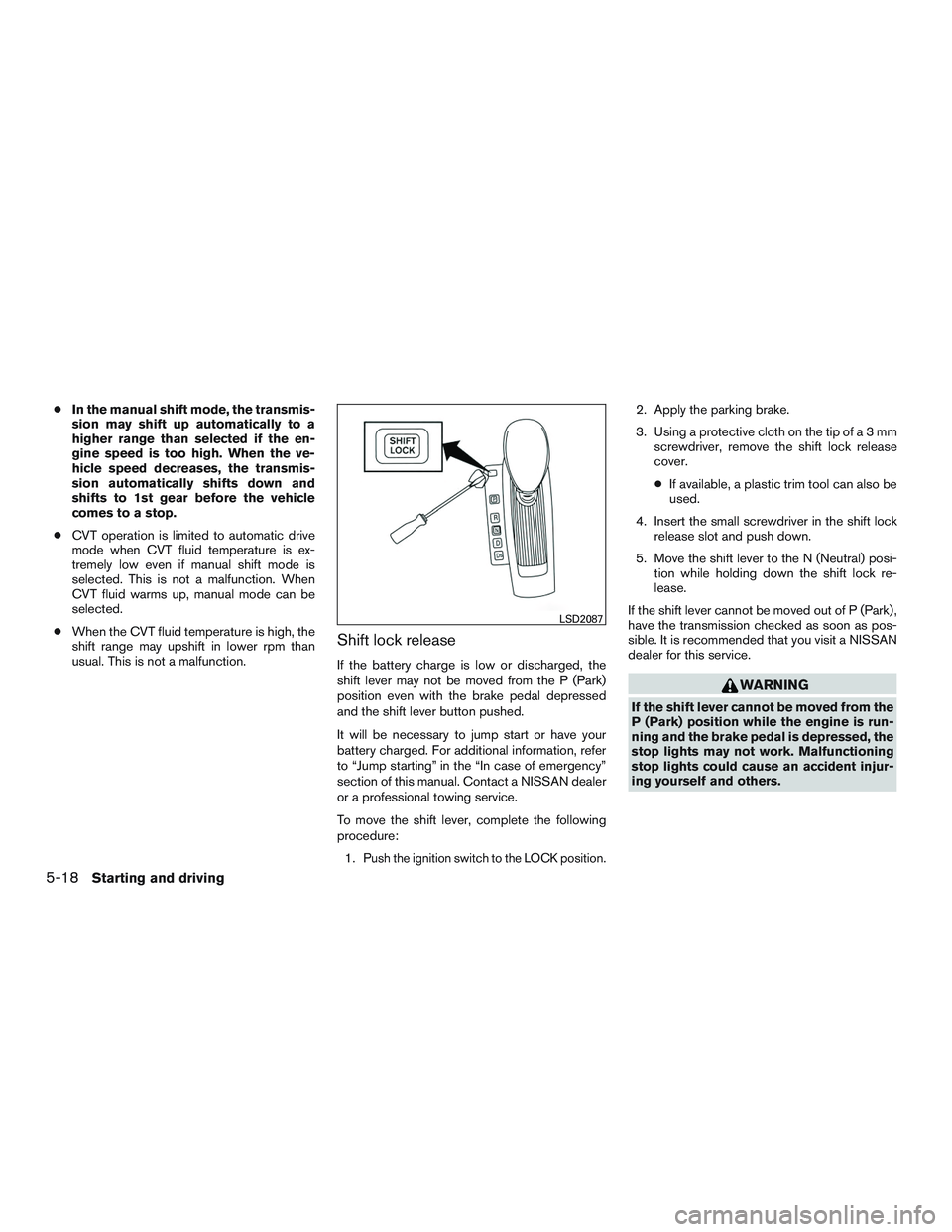
To move the shift lever, complete the following
procedure:
1.
Push the ignition switch to the LOCK position.
2. Apply the parking brake.
3. Using a protective cloth on the tip ofa3mm screwdriver, remove the shift lock release
cover.
● If available, a plastic trim tool can also be
used.
4. Insert the small screwdriver in the shift lock release slot and push down.
5. Move the shift lever to the N (Neutral) posi- tion while holding down the shift lock re-
lease.
If the shift lever cannot be moved out of P (Park) ,
have the transmission checked as soon as pos-
sible. It is recommended that you visit a NISSAN
dealer for this service.
WARNING
If the shift lever cannot be moved from the
P (Park) position while the engine is run-
ning and the brake pedal is depressed, the
stop lights may not work. Malfunctioning
stop lights could cause an accident injur-
ing yourself and others.
LSD2087
5-18Starting and driving
Page 314 of 497
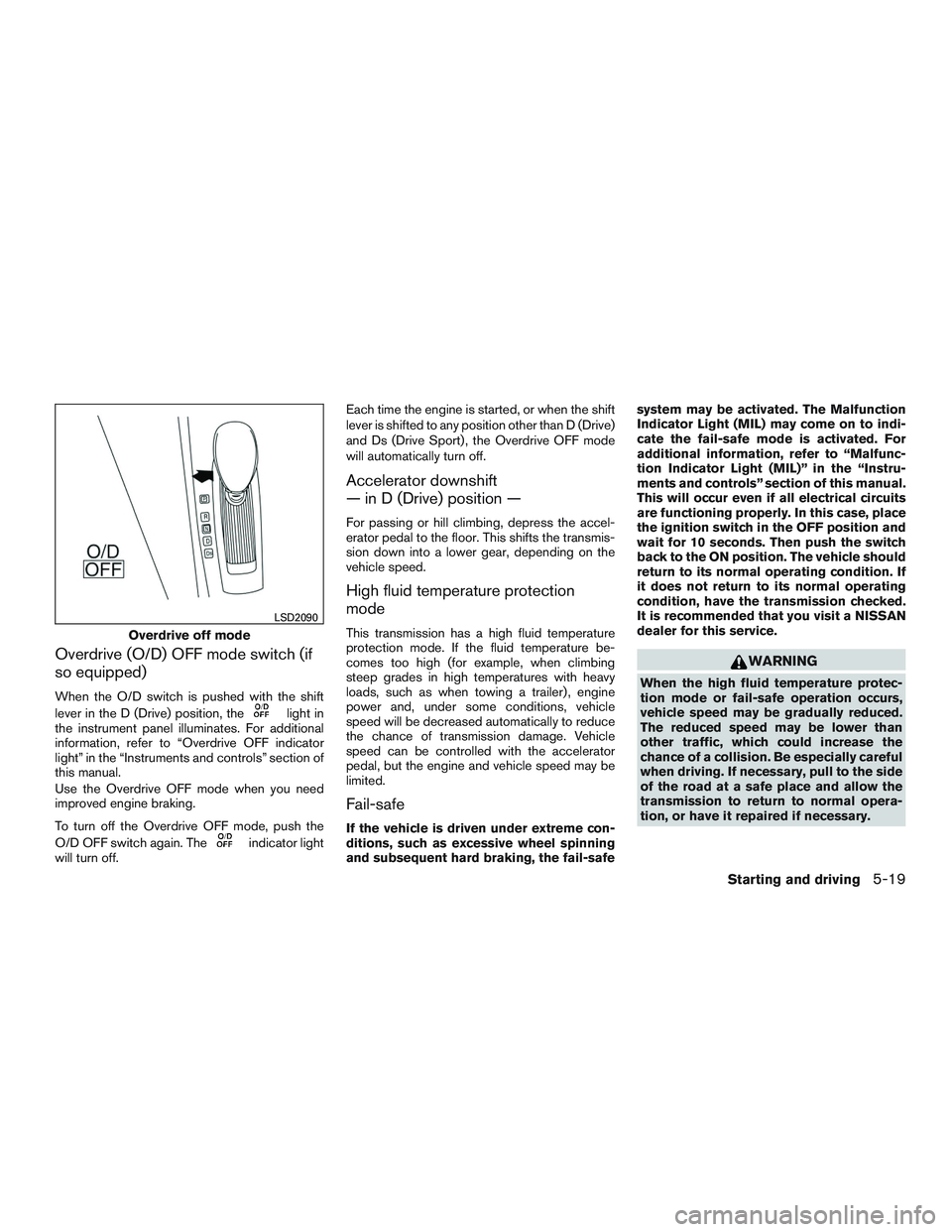
Overdrive (O/D) OFF mode switch (if
so equipped)
When the O/D switch is pushed with the shift
lever in the D (Drive) position, the
light in
the instrument panel illuminates. For additional
information, refer to “Overdrive OFF indicator
light” in the “Instruments and controls” section of
this manual.
Use the Overdrive OFF mode when you need
improved engine braking.
To turn off the Overdrive OFF mode, push the
O/D OFF switch again. The
indicator light
will turn off. Each time the engine is started, or when the shift
lever is shifted to any position other than D (Drive)
and Ds (Drive Sport) , the Overdrive OFF mode
will automatically turn off.
Accelerator downshift
— in D (Drive) position —
For passing or hill climbing, depress the accel-
erator pedal to the floor. This shifts the transmis-
sion down into a lower gear, depending on the
vehicle speed.
High fluid temperature protection
mode
This transmission has a high fluid temperature
protection mode. If the fluid temperature be-
comes too high (for example, when climbing
steep grades in high temperatures with heavy
loads, such as when towing a trailer) , engine
power and, under some conditions, vehicle
speed will be decreased automatically to reduce
the chance of transmission damage. Vehicle
speed can be controlled with the accelerator
pedal, but the engine and vehicle speed may be
limited.
Fail-safe
If the vehicle is driven under extreme con-
ditions, such as excessive wheel spinning
and subsequent hard braking, the fail-safesystem may be activated. The Malfunction
Indicator Light (MIL) may come on to indi-
cate the fail-safe mode is activated. For
additional information, refer to “Malfunc-
tion Indicator Light (MIL)” in the “Instru-
ments and controls” section of this manual.
This will occur even if all electrical circuits
are functioning properly. In this case, place
the ignition switch in the OFF position and
wait for 10 seconds. Then push the switch
back to the ON position. The vehicle should
return to its normal operating condition. If
it does not return to its normal operating
condition, have the transmission checked.
It is recommended that you visit a NISSAN
dealer for this service.
WARNING
When the high fluid temperature protec-
tion mode or fail-safe operation occurs,
vehicle speed may be gradually reduced.
The reduced speed may be lower than
other traffic, which could increase the
chance of a collision. Be especially careful
when driving. If necessary, pull to the side
of the road at a safe place and allow the
transmission to return to normal opera-
tion, or have it repaired if necessary.
Overdrive off mode
LSD2090
Starting and driving5-19
Page 315 of 497
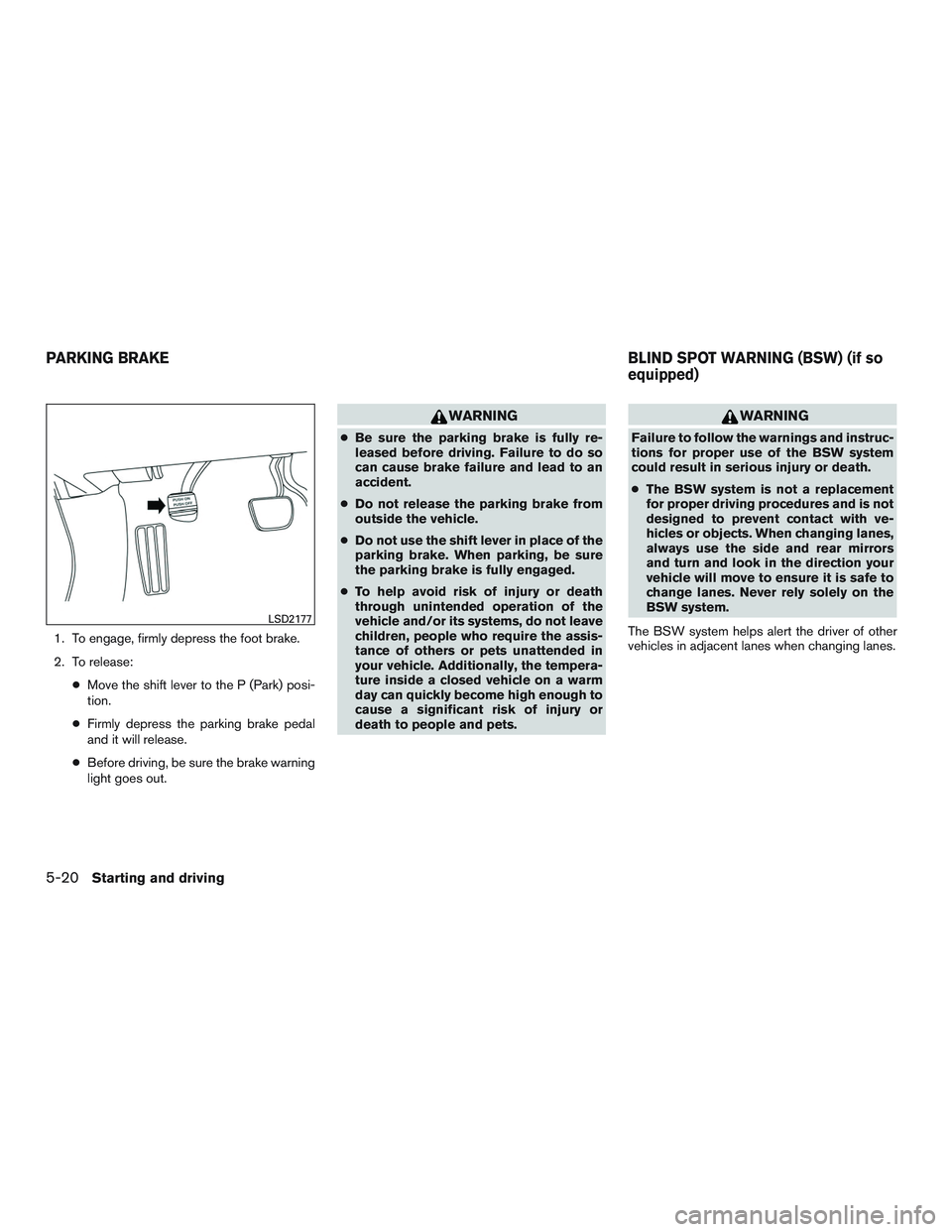
1. To engage, firmly depress the foot brake.
2. To release:●Move the shift lever to the P (Park) posi-
tion.
● Firmly depress the parking brake pedal
and it will release.
● Before driving, be sure the brake warning
light goes out.
WARNING
● Be sure the parking brake is fully re-
leased before driving. Failure to do so
can cause brake failure and lead to an
accident.
● Do not release the parking brake from
outside the vehicle.
● Do not use the shift lever in place of the
parking brake. When parking, be sure
the parking brake is fully engaged.
● To help avoid risk of injury or death
through unintended operation of the
vehicle and/or its systems, do not leave
children, people who require the assis-
tance of others or pets unattended in
your vehicle. Additionally, the tempera-
ture inside a closed vehicle on a warm
day can quickly become high enough to
cause a significant risk of injury or
death to people and pets.
WARNING
Failure to follow the warnings and instruc-
tions for proper use of the BSW system
could result in serious injury or death.
● The BSW system is not a replacement
for proper driving procedures and is not
designed to prevent contact with ve-
hicles or objects. When changing lanes,
always use the side and rear mirrors
and turn and look in the direction your
vehicle will move to ensure it is safe to
change lanes. Never rely solely on the
BSW system.
The BSW system helps alert the driver of other
vehicles in adjacent lanes when changing lanes.
LSD2177
PARKING BRAKE BLIND SPOT WARNING (BSW) (if so
equipped)
5-20Starting and driving
Page 317 of 497
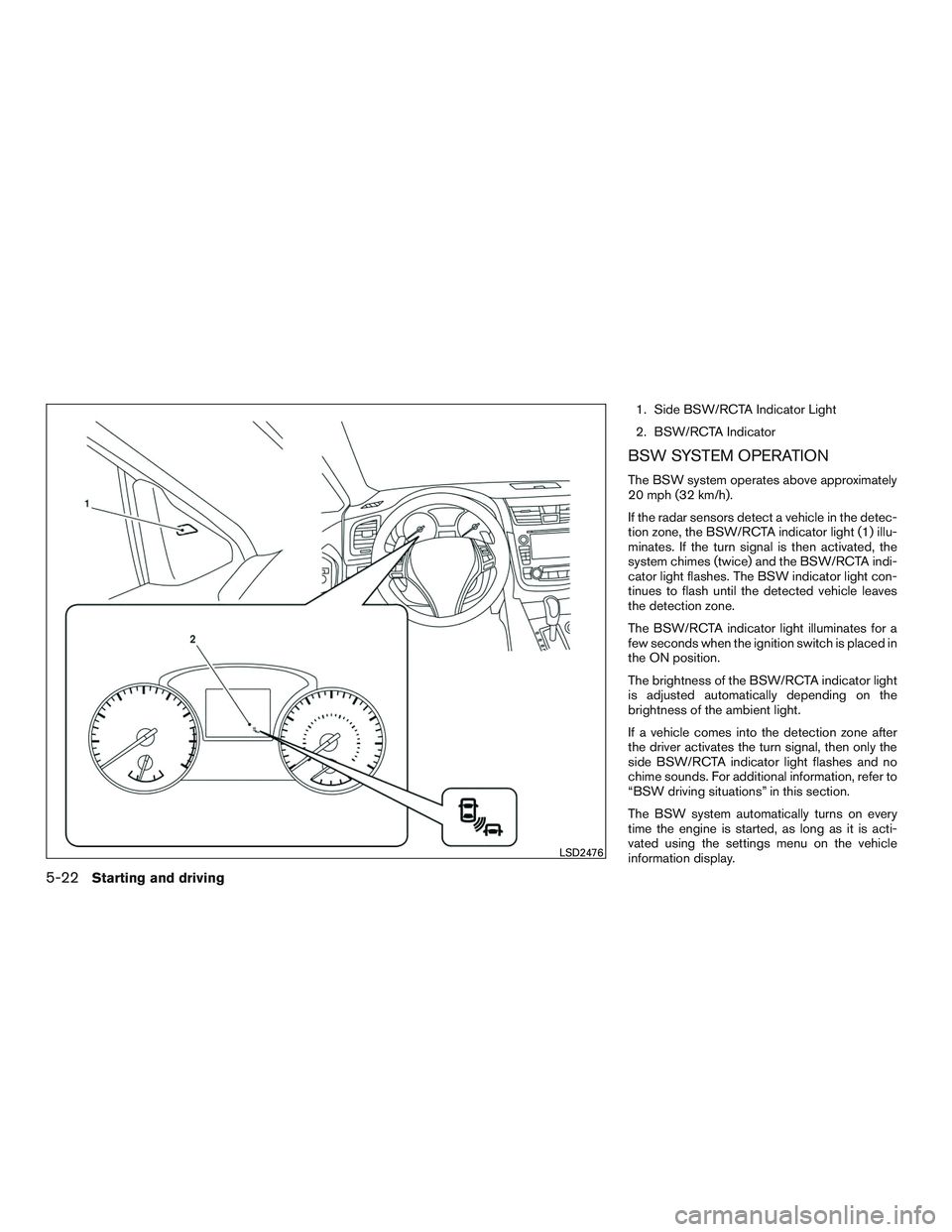
1. Side BSW/RCTA Indicator Light
2. BSW/RCTA Indicator
BSW SYSTEM OPERATION
The BSW system operates above approximately
20 mph (32 km/h).
If the radar sensors detect a vehicle in the detec-
tion zone, the BSW/RCTA indicator light (1) illu-
minates. If the turn signal is then activated, the
system chimes (twice) and the BSW/RCTA indi-
cator light flashes. The BSW indicator light con-
tinues to flash until the detected vehicle leaves
the detection zone.
The BSW/RCTA indicator light illuminates for a
few seconds when the ignition switch is placed in
the ON position.
The brightness of the BSW/RCTA indicator light
is adjusted automatically depending on the
brightness of the ambient light.
If a vehicle comes into the detection zone after
the driver activates the turn signal, then only the
side BSW/RCTA indicator light flashes and no
chime sounds. For additional information, refer to
“BSW driving situations” in this section.
The BSW system automatically turns on every
time the engine is started, as long as it is acti-
vated using the settings menu on the vehicle
information display.
LSD2476
5-22Starting and driving
Page 320 of 497
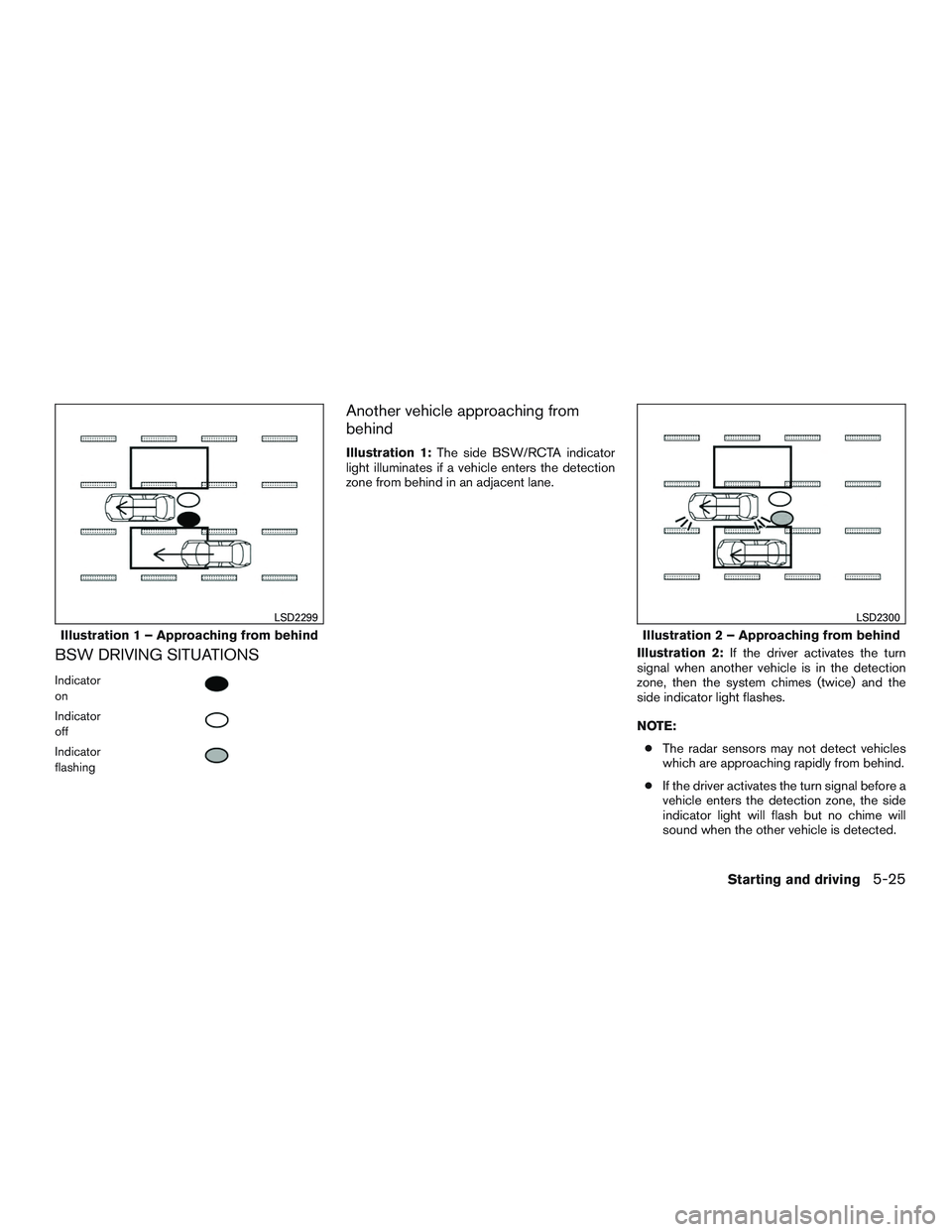
BSW DRIVING SITUATIONS
Indicator
on
Indicator
off
Indicator
flashing
Another vehicle approaching from
behind
Illustration 1:The side BSW/RCTA indicator
light illuminates if a vehicle enters the detection
zone from behind in an adjacent lane.
Illustration 2:If the driver activates the turn
signal when another vehicle is in the detection
zone, then the system chimes (twice) and the
side indicator light flashes.
NOTE:
● The radar sensors may not detect vehicles
which are approaching rapidly from behind.
● If the driver activates the turn signal before a
vehicle enters the detection zone, the side
indicator light will flash but no chime will
sound when the other vehicle is detected.
Illustration 1 – Approaching from behind
LSD2299
Illustration 2 – Approaching from behind
LSD2300
Starting and driving5-25
Page 321 of 497
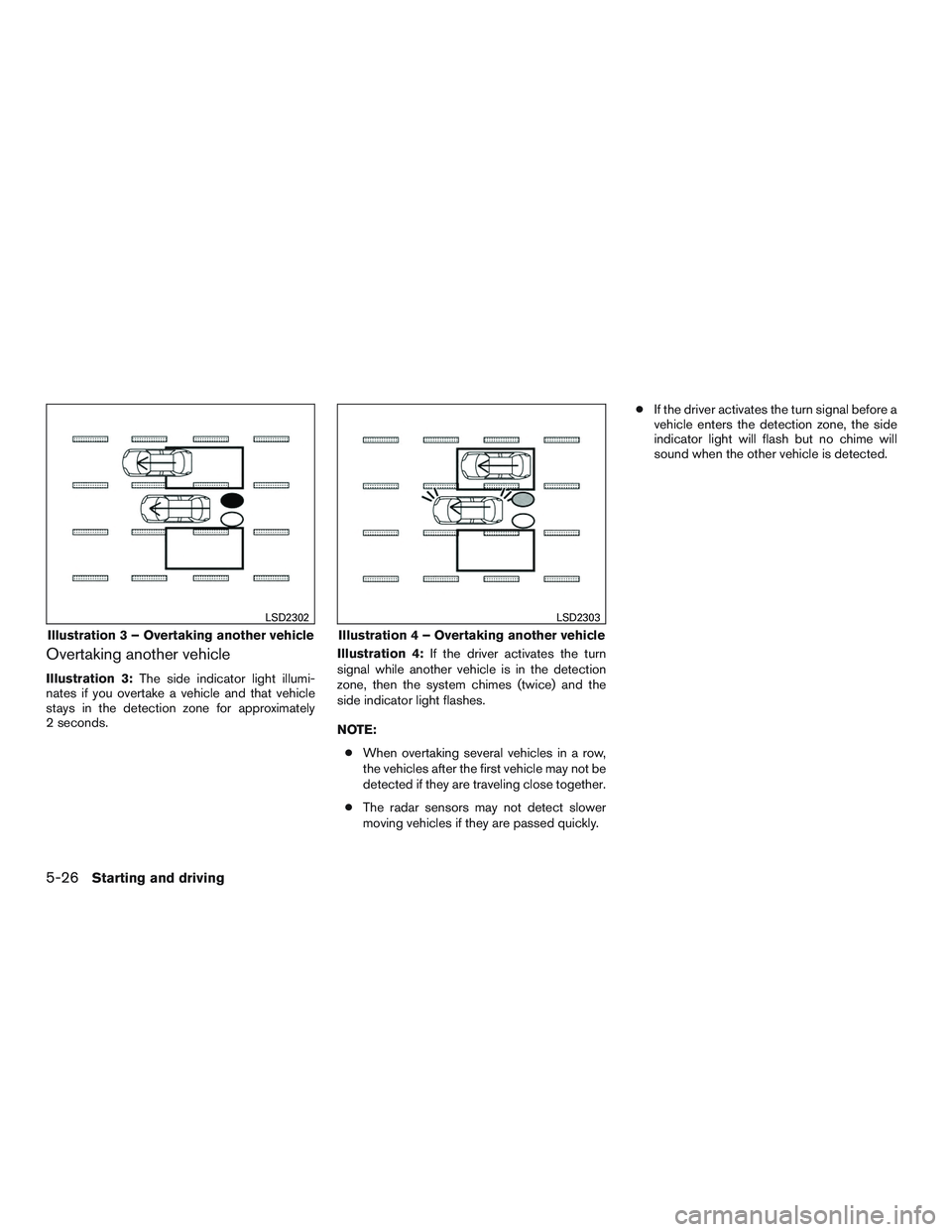
Overtaking another vehicle
Illustration 3:The side indicator light illumi-
nates if you overtake a vehicle and that vehicle
stays in the detection zone for approximately
2 seconds. Illustration 4:
If the driver activates the turn
signal while another vehicle is in the detection
zone, then the system chimes (twice) and the
side indicator light flashes.
NOTE:
● When overtaking several vehicles in a row,
the vehicles after the first vehicle may not be
detected if they are traveling close together.
● The radar sensors may not detect slower
moving vehicles if they are passed quickly. ●
If the driver activates the turn signal before a
vehicle enters the detection zone, the side
indicator light will flash but no chime will
sound when the other vehicle is detected.
Illustration 3 – Overtaking another vehicle
LSD2302
Illustration 4 – Overtaking another vehicle
LSD2303
5-26Starting and driving
Page 322 of 497
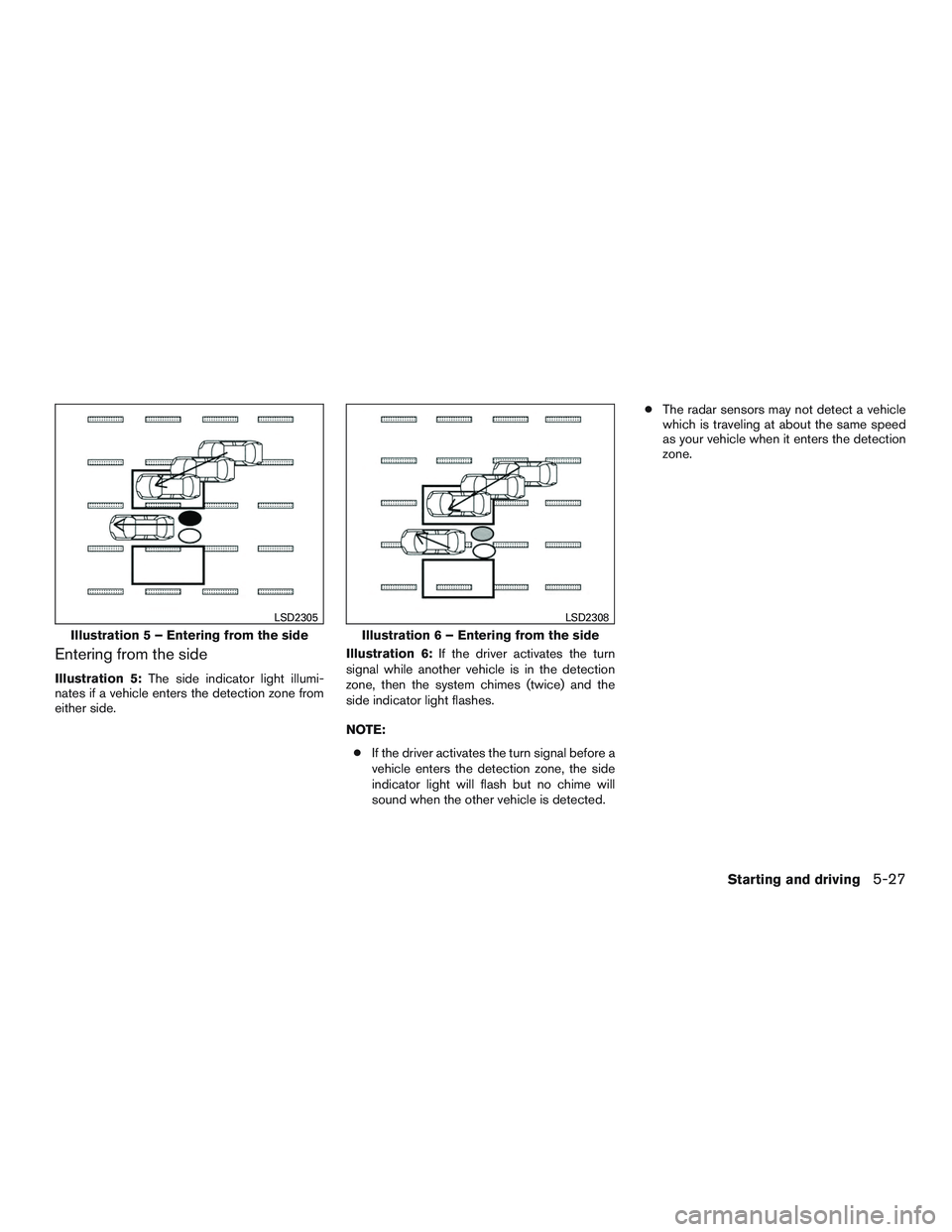
Entering from the side
Illustration 5:The side indicator light illumi-
nates if a vehicle enters the detection zone from
either side. Illustration 6:
If the driver activates the turn
signal while another vehicle is in the detection
zone, then the system chimes (twice) and the
side indicator light flashes.
NOTE:
● If the driver activates the turn signal before a
vehicle enters the detection zone, the side
indicator light will flash but no chime will
sound when the other vehicle is detected. ●
The radar sensors may not detect a vehicle
which is traveling at about the same speed
as your vehicle when it enters the detection
zone.
Illustration 5 – Entering from the side
LSD2305
Illustration 6 – Entering from the side
LSD2308
Starting and driving5-27
Page 326 of 497
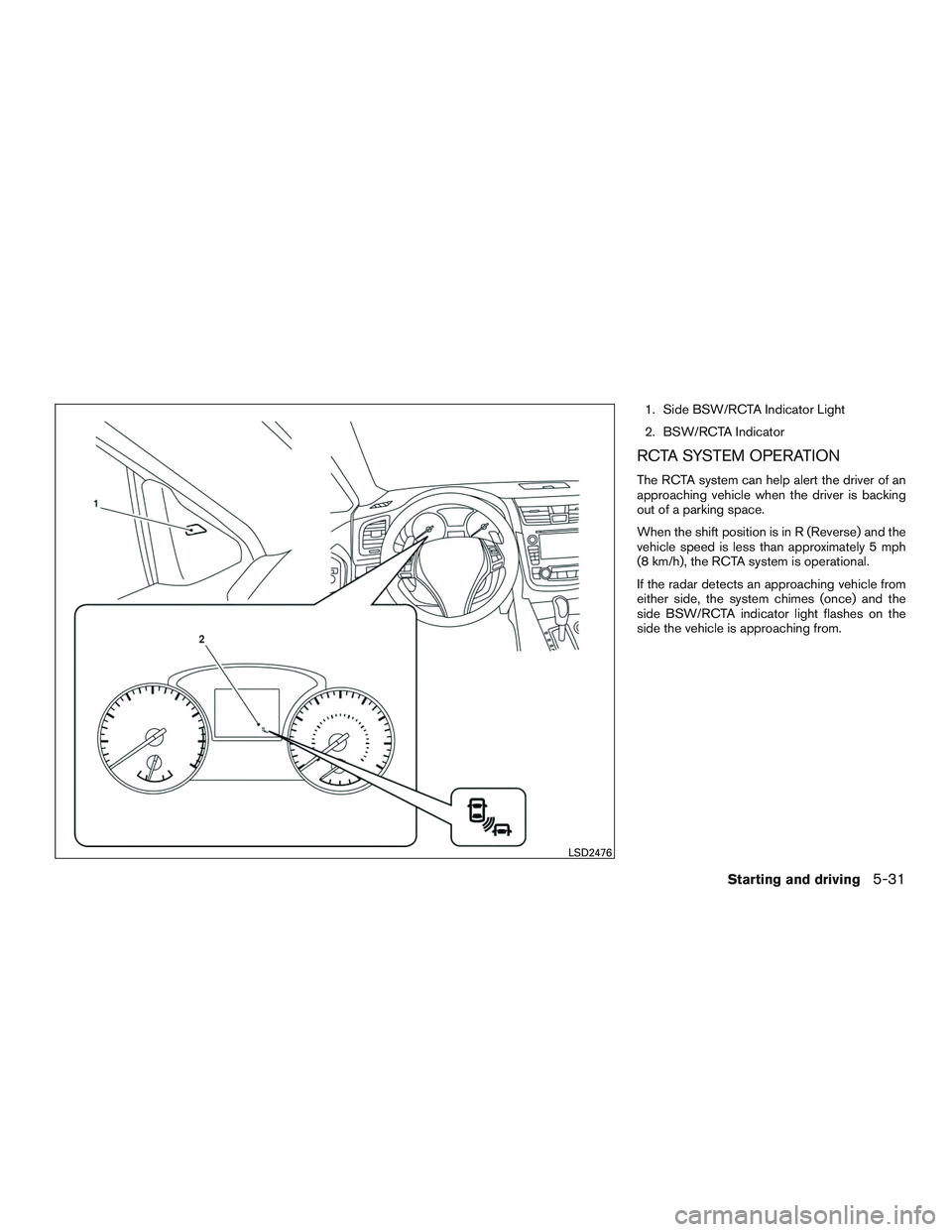
1. Side BSW/RCTA Indicator Light
2. BSW/RCTA Indicator
RCTA SYSTEM OPERATION
The RCTA system can help alert the driver of an
approaching vehicle when the driver is backing
out of a parking space.
When the shift position is in R (Reverse) and the
vehicle speed is less than approximately 5 mph
(8 km/h), the RCTA system is operational.
If the radar detects an approaching vehicle from
either side, the system chimes (once) and the
side BSW/RCTA indicator light flashes on the
side the vehicle is approaching from.
LSD2476
Starting and driving5-31
Page 334 of 497
This device complies with Industry Canada
licence-exempt RSS standard(s) . Opera-
tion is subject to the following two condi-
tions: (1) this device may not cause inter-
ference, and (2) this device must accept any
interference, including interference that
may cause undesired operation of the de-
vice.
Frequency bands: 24.05GHz – 24.25GHz
Output power: less than 20 milliwatts
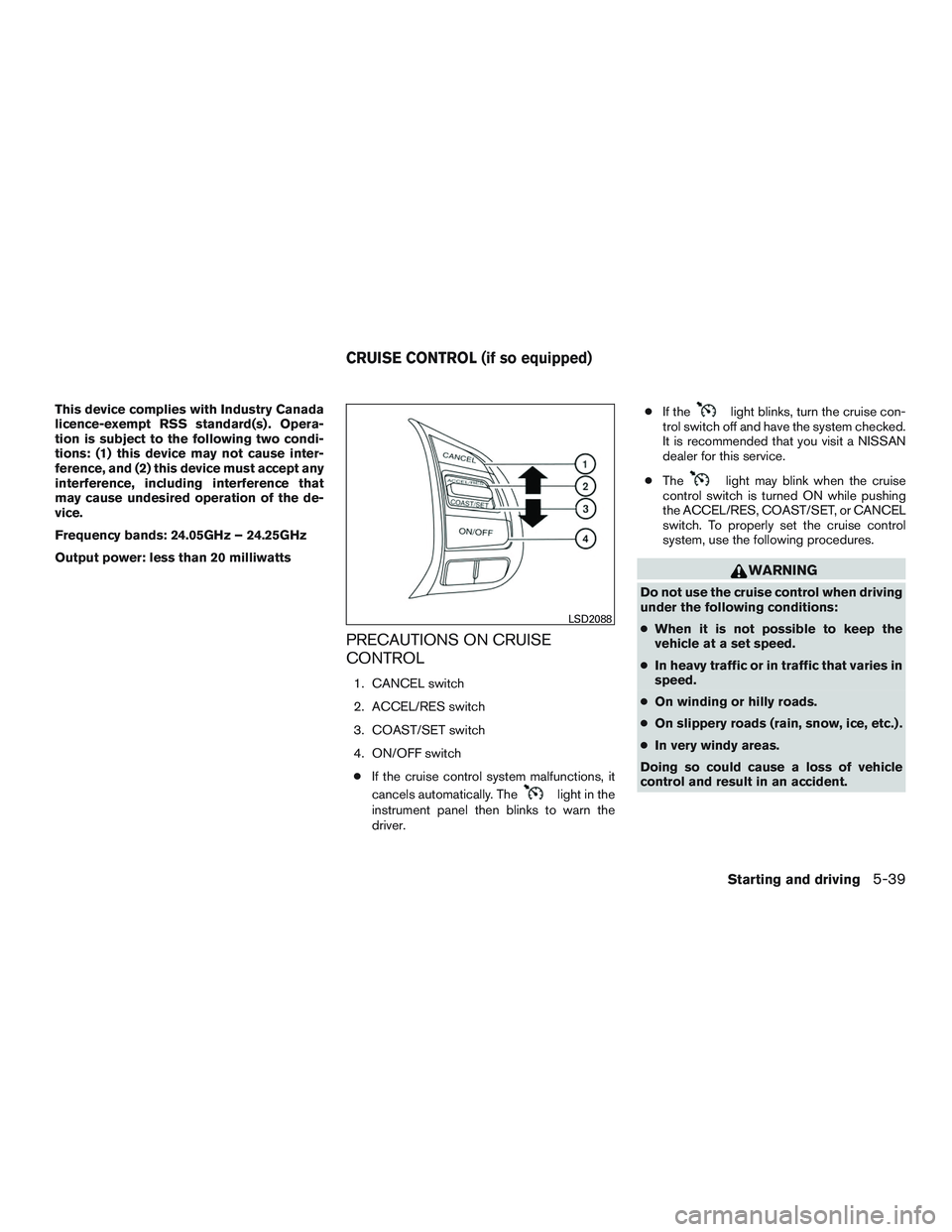
PRECAUTIONS ON CRUISE
CONTROL
1. CANCEL switch
2. ACCEL/RES switch
3. COAST/SET switch
4. ON/OFF switch● If the cruise control system malfunctions, it
cancels automatically. The
light in the
instrument panel then blinks to warn the
driver. ●
If the
light blinks, turn the cruise con-
trol switch off and have the system checked.
It is recommended that you visit a NISSAN
dealer for this service.
● The
light may blink when the cruise
control switch is turned ON while pushing
the ACCEL/RES, COAST/SET, or CANCEL
switch. To properly set the cruise control
system, use the following procedures.
WARNING
Do not use the cruise control when driving
under the following conditions:
● When it is not possible to keep the
vehicle at a set speed.
● In heavy traffic or in traffic that varies in
speed.
● On winding or hilly roads.
● On slippery roads (rain, snow, ice, etc.) .
● In very windy areas.
Doing so could cause a loss of vehicle
control and result in an accident.
LSD2088
CRUISE CONTROL (if so equipped)
Starting and driving5-39
Page 335 of 497
CRUISE CONTROL OPERATIONS
The cruise control allows driving at a speed be-
tween 25 - 89 mph (40 - 144 km/h) without
keeping your foot on the accelerator pedal.
To turn on the cruise control,push the
ON/OFF switch on. The
light in the instru-
ment panel will illuminate.
To set cruising speed, accelerate the vehicle to
the desired speed, push the COAST/SET switch
and release it. Take your foot off the accelerator
pedal. Your vehicle maintains the set speed.
● To pass another vehicle, depress the ac-
celerator pedal. When you release the
pedal, the vehicle returns to the previously
set speed.
● The vehicle may not maintain the set speed
when going up or down steep hills. If this
happens, drive without the cruise control.
To cancel the preset speed, use one of the
following three methods.
● Push the CANCEL button.
● Tap the brake pedal.
● Push the ON/OFF switch off. The
light
in the instrument panel goes out. The cruise control is automatically canceled if:
● you depress the brake pedal while pushing
the ACCEL/RES or SET/COAST switch.
The preset speed is deleted from memory.
● the vehicle slows down more than 8 mph
(13 km/h) below the set speed.
● you move the shift lever to N (Neutral) .
To reset at a faster cruising speed, use one of
the following three methods.
● Depress the accelerator pedal. When the
vehicle attains the desired speed, push and
release the COAST/SET switch.
● Push and hold the ACCEL/RES switch.
When the vehicle attains the speed you de-
sire, release the switch.
● Push and release the ACCEL/RES switch.
Each time you do this, the set speed in-
creases by about 1 mph (1.6 km/h).
To reset at a slower cruising speed, use one
of the following three methods.
● Lightly tap the brake pedal. When the ve-
hicle attains the desired speed, push the
COAST/SET switch and release it.
● Push and hold the COAST/SET switch. Re-
lease the switch when the vehicle slows to
the desired speed. ●
Push and release the COAST/SET switch.
Each time you do this, the set speed de-
creases by about 1 mph (1.6 km/h).
To resume the preset speed, push and re-
lease the ACCEL/RES switch. The vehicle re-
turns to the last set cruising speed when the
vehicle speed is over 25 mph (40 km/h).
To turn off the cruise control, use one of the
following three methods.
● Push the CANCEL button.
● Tap the brake pedal.
● Push the ON/OFF switch off. The
light in the instrument panel goes out.
5-40Starting and driving