navigation system NISSAN ALTIMA SEDAN 2017 User Guide
[x] Cancel search | Manufacturer: NISSAN, Model Year: 2017, Model line: ALTIMA SEDAN, Model: NISSAN ALTIMA SEDAN 2017Pages: 497, PDF Size: 5.51 MB
Page 182 of 497
During a call.................................. 4-97
Ending a call .................................. 4-97
Text messaging (if so equipped) .................4-97
Bluetooth® settings ........................... 4-99
Manual control ............................... 4-100
Bluetooth® Hands-Free Phone System with
Navigation System (if so equipped) ................4-101
Regulatory Information ........................ 4-103
Voice commands ............................. 4-103
Connecting Procedure ........................ 4-103
Vehicle phonebook ........................... 4-104
Making a call ................................. 4-104
Receiving a call .............................. 4-104
During a call ................................. 4-104
Ending a call ................................. 4-104
Text messaging (if so equipped) ................4-105 Bluetooth® settings
.......................... 4-107
Phone settings ............................... 4-108
Troubleshooting guide ........................ 4-109
NISSAN Voice Recognition System
(if so equipped) ................................. 4-110
Using the system ............................. 4-110
System features .............................. 4-111
Bluetooth® Hands-Free Phone System
voice commands ............................. 4-112
Navigation System voice commands ............4-113
Audio system voice commands .................4-113
Information voice commands ...................4-113
My Apps Voice Commands ....................4-113
Help voice commands ........................ 4-114
Troubleshooting guide ........................ 4-114
Page 183 of 497
WARNING
●Positioning of the heating or air condi-
tioning controls and display controls
should not be done while driving in or-
der that full attention may be given to
the driving operation.
● Do not disassemble or modify this sys-
tem. If you do, it may result in accidents,
fire, or electrical shock.
● Do not use this system if you notice any
abnormality, such as a frozen screen or
lack of sound. Continued use of the
system may result in accident, fire or
electric shock.
● In case you notice any foreign object in
the system hardware, spill liquid on it,
or notice smoke or smell coming from it,
stop using the system immediately. Ig-
noring such conditions may lead to ac-
cidents, fire or electrical shock. It is rec-
ommended that you visit a NISSAN
dealer for servicing.
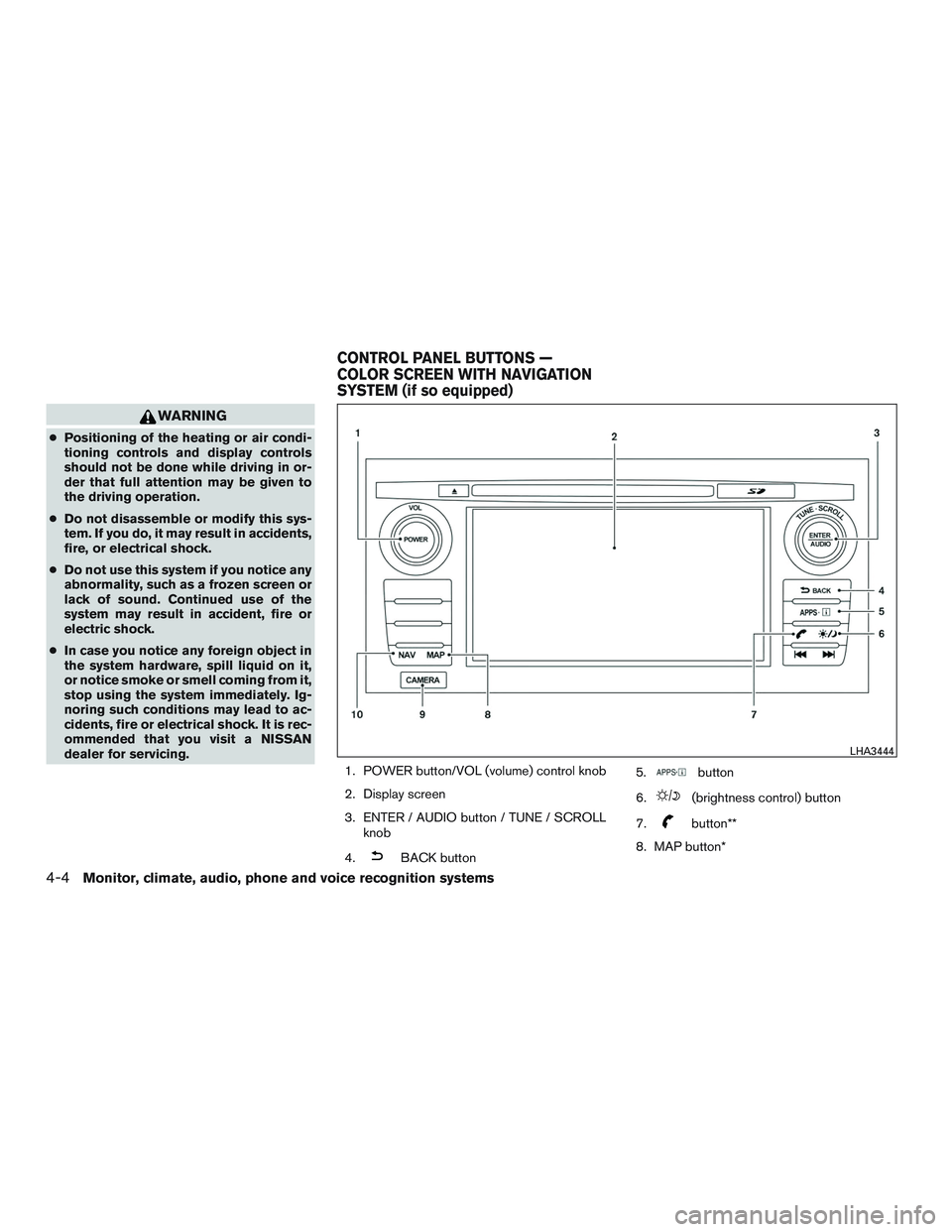
1. POWER button/VOL (volume) control knob
2. Display screen
3. ENTER / AUDIO button / TUNE / SCROLLknob
4.
BACK button 5.
button
6.
(brightness control) button
7.
button**
8. MAP button*
LHA3444
CONTROL PANEL BUTTONS —
COLOR SCREEN WITH NAVIGATION
SYSTEM (if so equipped)
4-4Monitor, climate, audio, phone and voice recognition systems
Page 184 of 497
9. CAMERA button
10. NAV button*
* For additional information regarding the Naviga-
tion system control buttons, refer to the separate
Navigation System Owner’s Manual.
** For additional information regarding the
Bluetooth® Hands-Free Phone System control
button, refer to “Bluetooth® Hands-Free Phone
System with Navigation System” in this section.
When you use this system, make sure the engine
is running.
If you use the system with the engine not
running (ignition ON or ACC) for a long
time, it will discharge the battery, and the
engine will not start.
Reference symbols:
“Example” — Words marked in quotes refer to a
key shown only on the display. These keys can be
selected by touching the screen.HOW TO USE THE TOUCH-
SCREEN
CAUTION
● The glass display screen may break if it
is hit with a hard or sharp object. If the
glass screen breaks, do not touch it.
Doing so could result in an injury.
● To clean the display, never use a rough
cloth, alcohol, benzine, thinner or any
kind of solvent or paper towel with a
chemical cleaning agent. They will
scratch or deteriorate the panel.
● Do not splash any liquid such as water
or car fragrance on the display. Contact
with liquid will cause the system to
malfunction.
To help ensure safe driving, some functions can-
not be operated while driving.
The on-screen functions that are not available
while driving will be “grayed out” or muted.
Park the vehicle in a safe location and then oper-
ate the navigation system.
WARNING
● ALWAYS give your full attention to
driving.
● Avoid using vehicle features that could
distract you. If distracted, you could
lose control of your vehicle and cause
an accident.
Monitor, climate, audio, phone and voice recognition systems4-5
Page 186 of 497
Touch-screen maintenance
If you clean the display screen, use a dry, soft
cloth. If additional cleaning is necessary, use a
small amount of neutral detergent with a soft
cloth. Never spray the screen with water or de-
tergent. Dampen the cloth first and then wipe the
screen.
HOW TO USE THEBACK
BUTTON
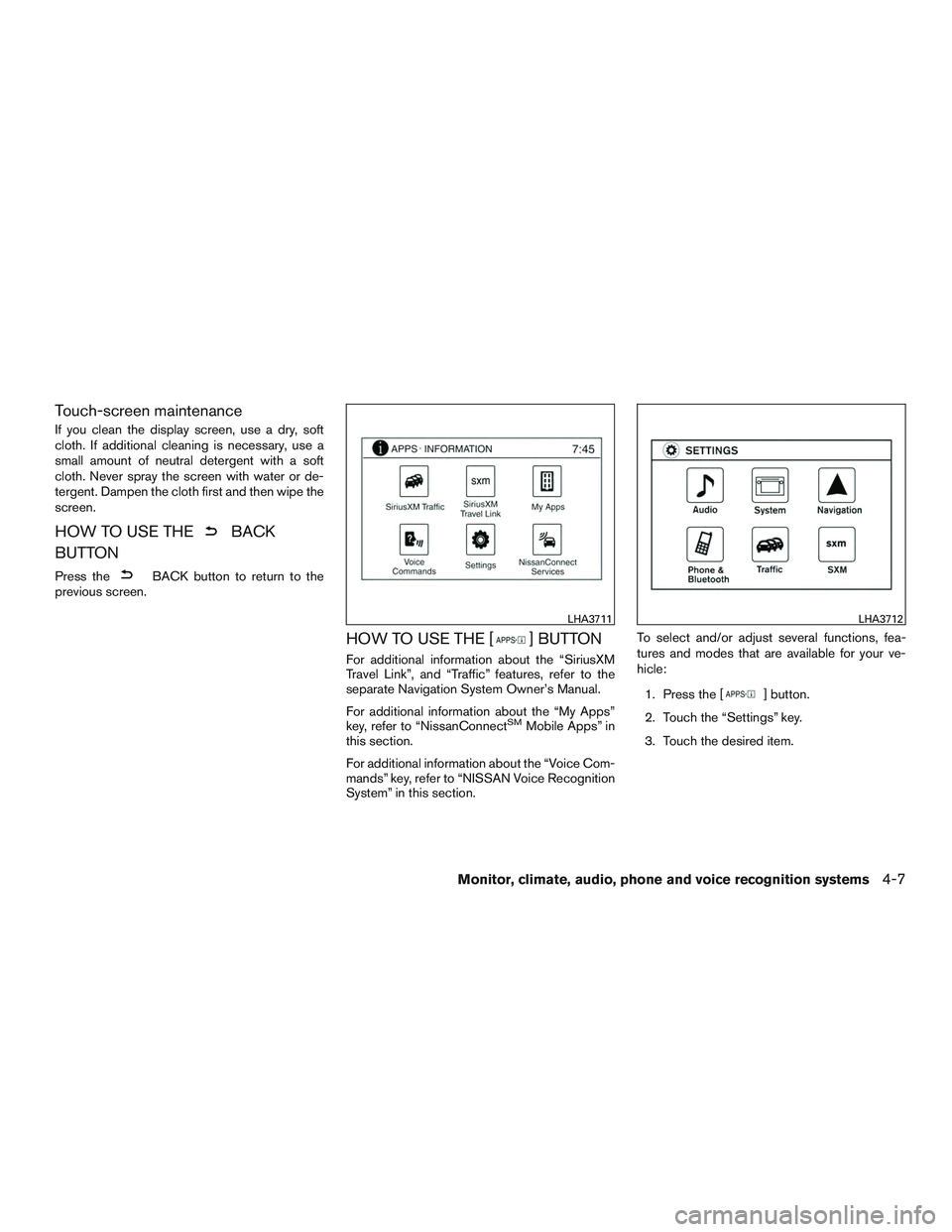
Press theBACK button to return to the
previous screen.
HOW TO USE THE [] BUTTON
For additional information about the “SiriusXM
Travel Link”, and “Traffic” features, refer to the
separate Navigation System Owner’s Manual.
For additional information about the “My Apps”
key, refer to “NissanConnect
SMMobile Apps” in
this section.
For additional information about the “Voice Com-
mands” key, refer to “NISSAN Voice Recognition
System” in this section. To select and/or adjust several functions, fea-
tures and modes that are available for your ve-
hicle:
1. Press the [
] button.
2. Touch the “Settings” key.
3. Touch the desired item.
LHA3711LHA3712
Monitor, climate, audio, phone and voice recognition systems4-7
Page 187 of 497
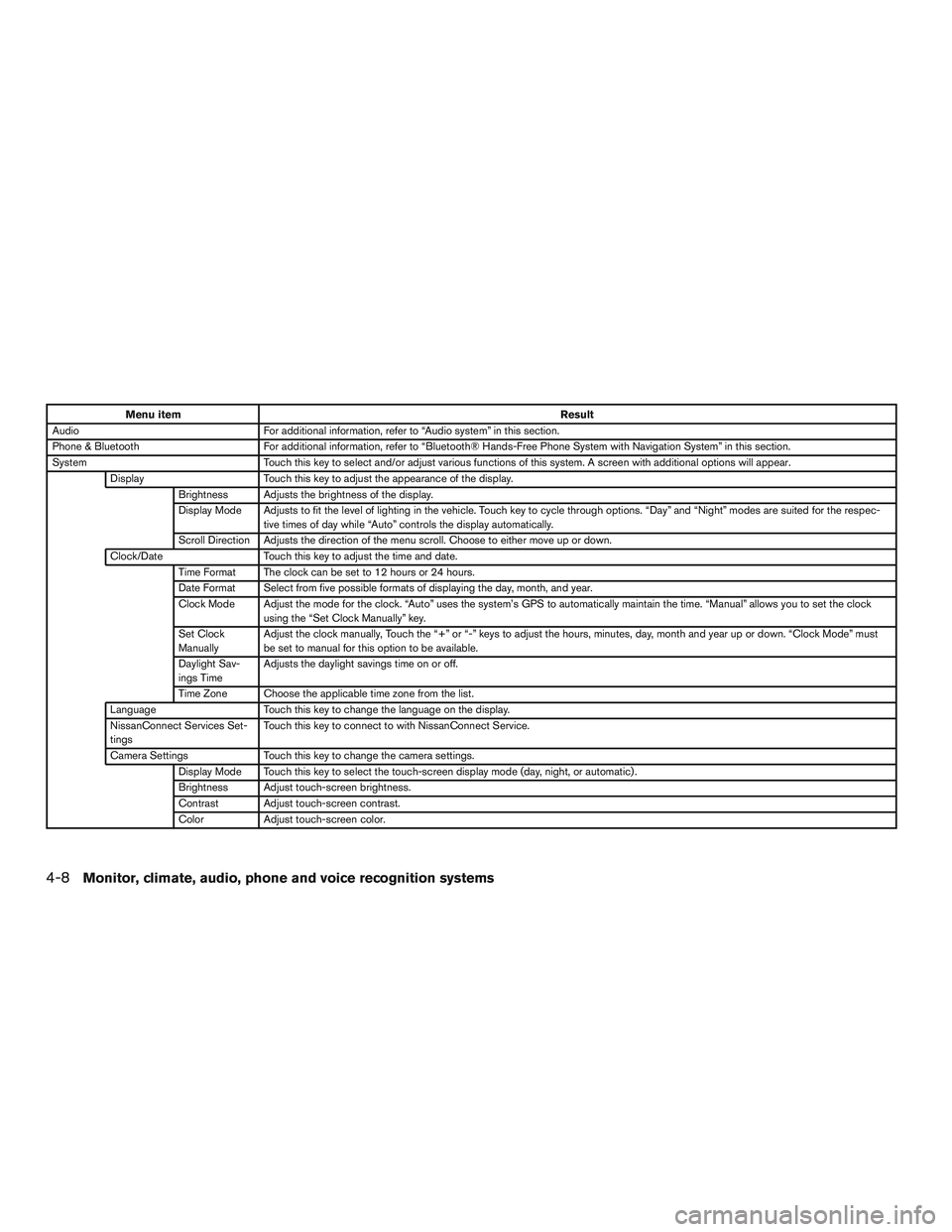
Menu itemResult
Audio For additional information, refer to “Audio system” in this section.
Phone & Bluetooth For additional information, refer to “Bluetooth® Hands-Free Phone System with Navigation System” in this section.
System Touch this key to select and/or adjust various functions of this system. A screen with additional options will appear.
Display Touch this key to adjust the appearance of the display.
Brightness Adjusts the brightness of the display.
Display Mode Adjusts to fit the level of lighting in the vehicle. Touch key to cycle through options. “Day” and “Night” modes are suited for the respec- tive times of day while “Auto” controls the display automatically.
Scroll Direction Adjusts the direction of the menu scroll. Choose to either move up or down.
Clock/Date Touch this key to adjust the time and date.
Time Format The clock can be set to 12 hours or 24 hours.
Date Format Select from five possible formats of displaying the day, month, and year.
Clock Mode Adjust the mode for the clock. “Auto” uses the system’s GPS to automatically maintain the time. “Manual” allows you to set the clock using the “Set Clock Manually” key.
Set Clock
Manually Adjust the clock manually, Touch the “+” or “-” keys to adjust the hours, minutes, day, month and year up or down. “Clock Mode” must
be set to manual for this option to be available.
Daylight Sav-
ings Time Adjusts the daylight savings time on or off.
Time Zone Choose the applicable time zone from the list.
Language Touch this key to change the language on the display.
NissanConnect Services Set-
tings Touch this key to connect to with NissanConnect Service.
Camera Settings Touch this key to change the camera settings.
Display Mode Touch this key to select the touch-screen display mode (day, night, or automatic) .
Brightness Adjust touch-screen brightness.
Contrast Adjust touch-screen contrast.
Color Adjust touch-screen color.
4-8Monitor, climate, audio, phone and voice recognition systems
Page 188 of 497
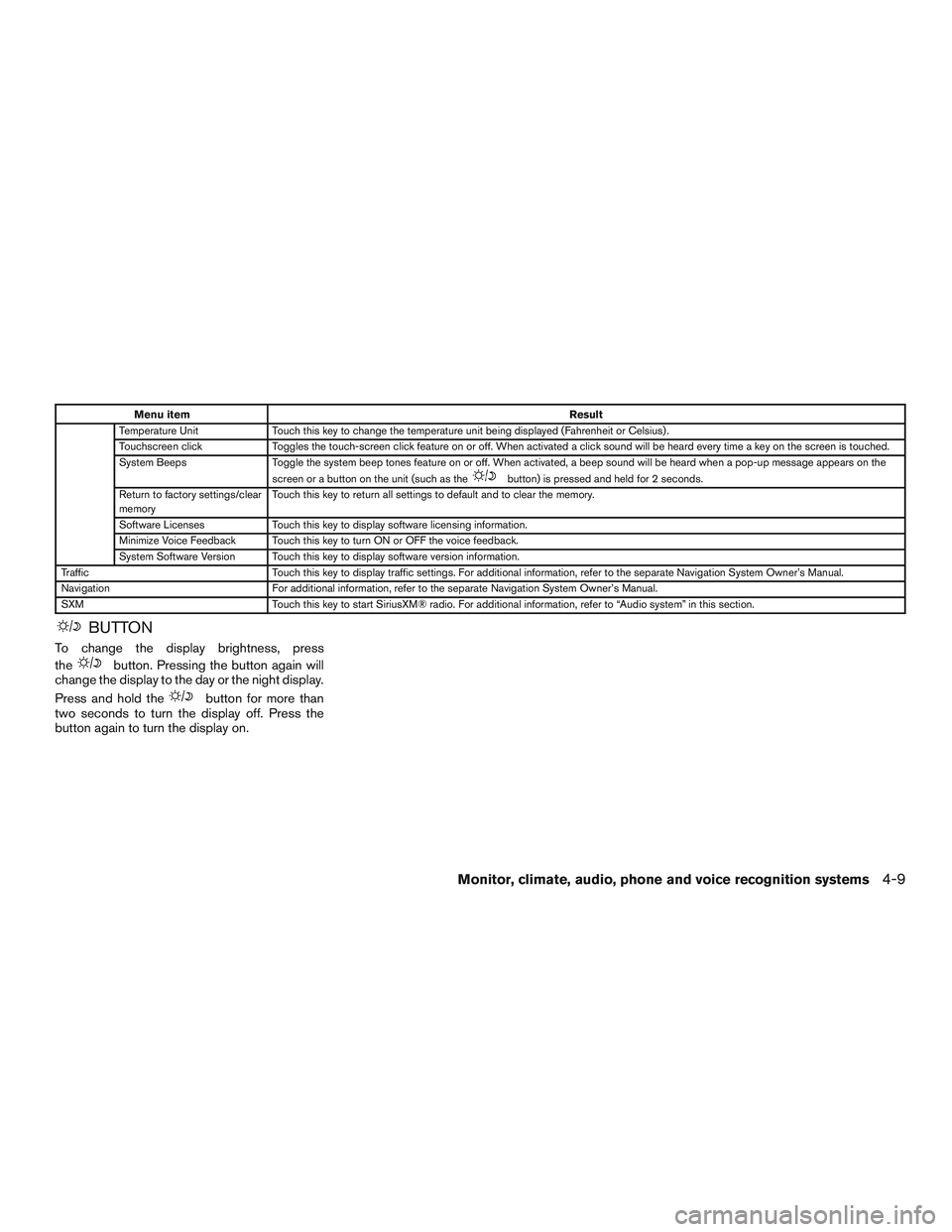
Menu itemResult
Temperature Unit Touch this key to change the temperature unit being displayed (Fahrenheit or Celsius) .
Touchscreen click Toggles the touch-screen click feature on or off. When activated a click sound will be heard every time a key on the screen is touched.
System Beeps Toggle the system beep tones feature on or off. When activated, a beep sound will be heard when a pop-up message appears on the
screen or a button on the unit (such as the
button) is pressed and held for 2 seconds.
Return to factory settings/clear
memory Touch this key to return all settings to default and to clear the memory.
Software Licenses Touch this key to display software licensing information.
Minimize Voice Feedback Touch this key to turn ON or OFF the voice feedback.
System Software Version Touch this key to display software version information.
Traffic Touch this key to display traffic settings. For additional information, refer to the separate Navigation System Owner’s Manual.
Navigation For additional information, refer to the separate Navigation System Owner’s Manual.
SXM Touch this key to start SiriusXM® radio. For additional information, refer to “Audio system” in this section.
BUTTON
To change the display brightness, press
the
button. Pressing the button again will
change the display to the day or the night display.
Press and hold the
button for more than
two seconds to turn the display off. Press the
button again to turn the display on.
Monitor, climate, audio, phone and voice recognition systems4-9
Page 193 of 497
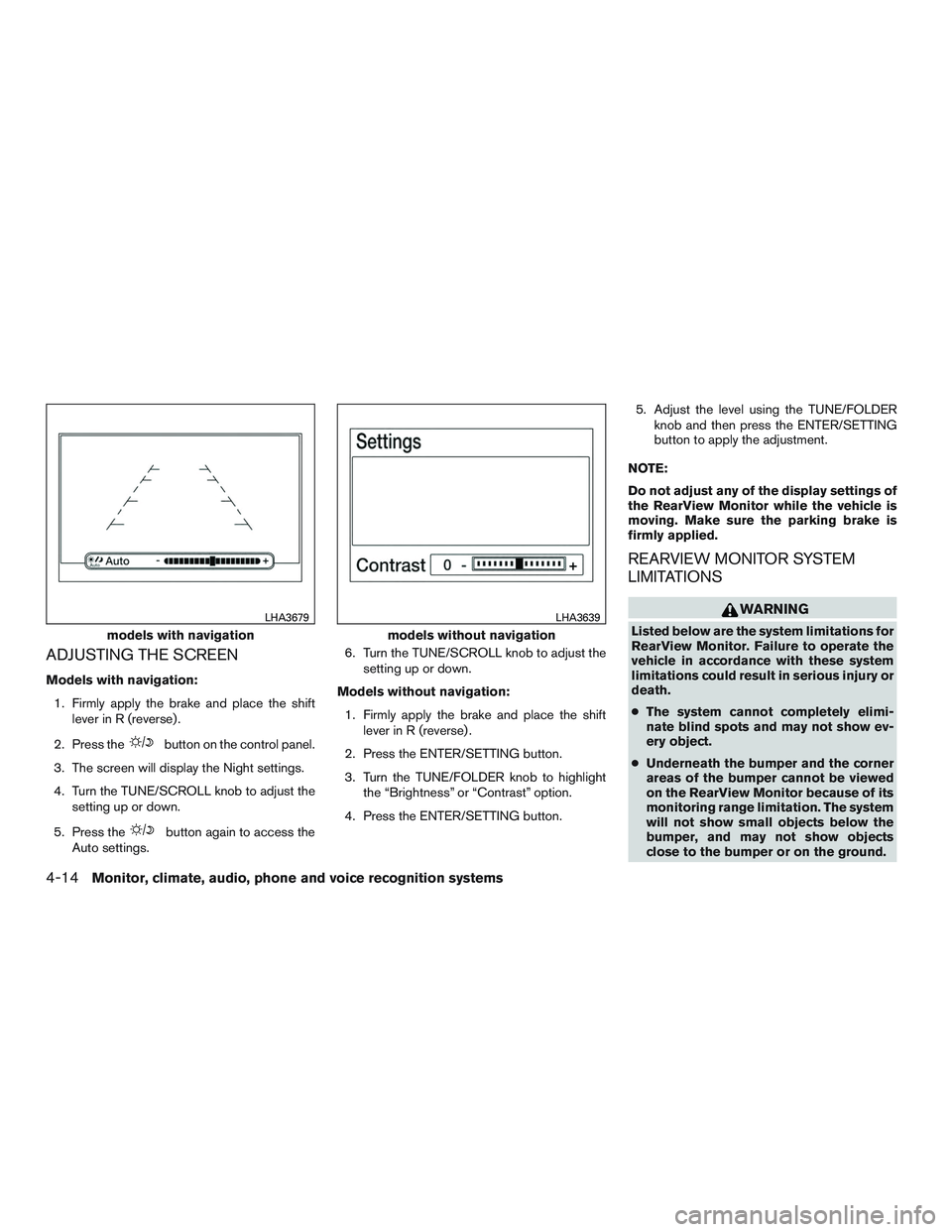
ADJUSTING THE SCREEN
Models with navigation:1. Firmly apply the brake and place the shift lever in R (reverse) .
2. Press the
button on the control panel.
3. The screen will display the Night settings.
4. Turn the TUNE/SCROLL knob to adjust the setting up or down.
5. Press the
button again to access the
Auto settings. 6. Turn the TUNE/SCROLL knob to adjust the
setting up or down.
Models without navigation: 1. Firmly apply the brake and place the shift lever in R (reverse) .
2. Press the ENTER/SETTING button.
3. Turn the TUNE/FOLDER knob to highlight the “Brightness” or “Contrast” option.
4. Press the ENTER/SETTING button. 5. Adjust the level using the TUNE/FOLDER
knob and then press the ENTER/SETTING
button to apply the adjustment.
NOTE:
Do not adjust any of the display settings of
the RearView Monitor while the vehicle is
moving. Make sure the parking brake is
firmly applied.
REARVIEW MONITOR SYSTEM
LIMITATIONS
WARNING
Listed below are the system limitations for
RearView Monitor. Failure to operate the
vehicle in accordance with these system
limitations could result in serious injury or
death.
● The system cannot completely elimi-
nate blind spots and may not show ev-
ery object.
● Underneath the bumper and the corner
areas of the bumper cannot be viewed
on the RearView Monitor because of its
monitoring range limitation. The system
will not show small objects below the
bumper, and may not show objects
close to the bumper or on the ground.models with navigation
LHA3679
models without navigation
LHA3639
4-14Monitor, climate, audio, phone and voice recognition systems
Page 217 of 497
(When the last track on the compact disc is
skipped, the first track is played.)
When the TRACK
button is pressed, the
track being played returns to the beginning.
Press the TRACK
button several times to
skip back several tracks. Each time the button is
pressed the CD moves back one track.
RPT (repeat)/RDM (random) button
Press the RPT/RDM button while a compact disc
is playing to change the play pattern as follows:
CD:
TRACK REPEAT →DISC RANDOM →DISC
REPEAT
MP3/WMA CD:
FOLDER REPEAT →TRACK REPEAT →DISC
RANDOM →FOLDER RANDOM →DISC RE-
PEAT
TRACK REPEAT: The track that is currently play-
ing will be repeated.
DISC RANDOM: The order of the tracks on the
disc will be mixed during play.
DISC REPEAT: The disc currently playing will be
repeated.
FOLDER REPEAT: The tracks in the current
folder will be repeated. FOLDER RANDOM: The order of the tracks in
the folder will be mixed during play.
SCAN (CDs) button
Press the SCAN button for less than 1.5 seconds
to scan all tracks of the current disc for 10 sec-
onds per track. The SCAN icon is flashed during
scan mode.
The scan mode is canceled once it scans through
all tracks on the disc, or if the SCAN button is
pressed during scan mode.
CD EJECT button
When the
CD eject button is pressed with
a compact disc loaded, the compact disc will
eject and the last source will be played.
When the
CD eject button is pressed
twice with a compact disc loaded, the compact
disc will be ejected further for easier CD removal.
If the disc is not removed within 20 seconds, the
disc will reload.
AUX (Auxiliary) button
The AUX IN jack is located on the CD player. The
AUX IN audio input jack accepts any standard
analog audio input such as from a portable cas-
sette tape/CD player, MP3 player or laptop com-
puters. Press the AUX button to play a compatible device
when it is plugged into the AUX IN jack.
Press the MENU button repeatedly until “AUX IN
Volume” appears on the screen to control the
incoming volume level of the auxiliary input de-
vice. Turn the TUNE/FOLDER knob to adjust the
level between 0 and +3.
Additional features
For additional information, refer to “Bluetooth®
streaming audio without Navigation System
(Type A)” in this section.
4-38Monitor, climate, audio, phone and voice recognition systems
Page 220 of 497
iPod MENU button
This button can only be used for iPod® opera-
tions. For additional information, refer to “iPod®
player operation (models without navigation sys-
tem)” in this section.
DISP (display) button
The DISP (display) button turns the display
screen on or off.
FM/AM radio operation
FM·AM button
Press the FM·AM button to change the band as
follows:
AM→FM1 →FM2 →AM
If another audio source is playing when the
FM·AM button is pressed, the audio source play-
ing will automatically be turned off and the last
radio station played will begin playing.
TUNE/FOLDER knob tuning
Turn the TUNE/FOLDER knob to the left or right
for manual tuning.
SEEK/TRACK tuning
Press the
SEEK button orTRACK
button to tune from low to high or high to low
frequencies and to stop at the next broadcasting
station.
SCAN tuning
Press the SCAN button to stop at each broad-
casting station for 5 seconds. SCAN will appear
on the screen while the radio is scan tuning.
Pressing the button again during this 5 second
period will stop SCAN tuning and the radio will
remain tuned to that station. If the SCAN button is
not pressed within 5 seconds, SCAN tuning
moves to the next station.
1 to 6 Station memory operations
Six stations can be set for the AM band. Twelve
stations can be set for the FM band (6 for FM1, 6
for FM2) .
1. Choose the radio band AM, FM1 or FM2 using the FM·AM select button.
2. Tune to the desired station using the
SEEK button or theTRACK
button. Press and hold any of the desired
station memory buttons (1 – 6) until the
preset number is updated on the display and
the sound is briefly muted. 3. The channel indicator will then come on and
the sound will resume. Programming is now
complete.
4. Other buttons can be set in the same man- ner.
If the battery cable is disconnected, or if the fuse
opens, the radio memory will be canceled. In that
case, reset the desired stations.
Compact disc (CD) player operation
If the radio is already operating, it automatically
turns off and the compact disc begins to play.
MEDIA button
With a CD loaded, press the MEDIA button until
the CD mode is displayed on the screen.
CD/MP3 display mode
While listening to an MP3/WMA CD, certain text
may be displayed on the screen if the CD has
been encoded with text information. Depending
on how the MP3/WMA CD is encoded, informa-
tion such as Artist, Song and Folder will be dis-
played.
The track number and the total number of tracks
in the current folder or on the current disc are
displayed on the screen as well.
Monitor, climate, audio, phone and voice recognition systems4-41
Page 222 of 497
Additional features
For additional information about the iPod® player
available with this system, refer to “iPod® player
operation without Navigation System” in this sec-
tion.
For additional information about the USB (Uni-
versal Serial Bus) connection port available with
this system, refer to “USB (Universal Serial Bus)
Connection Port (models without Navigation
System)” in this section.
For additional information about the Bluetooth®
audio interface available with this system, refer to
“Bluetooth® streaming audio without Navigation
System (Type B)” in this section.
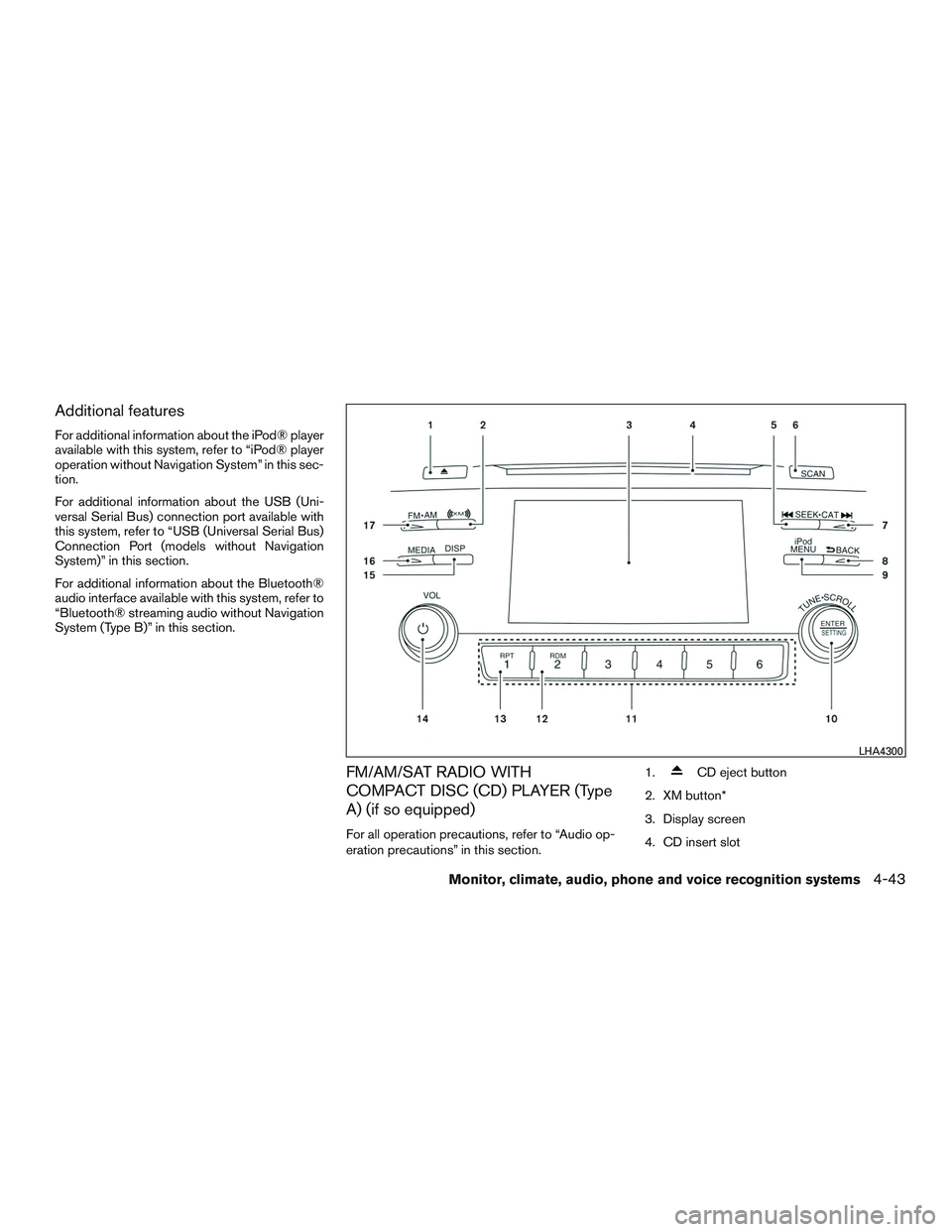
FM/AM/SAT RADIO WITH
COMPACT DISC (CD) PLAYER (Type
A) (if so equipped)
For all operation precautions, refer to “Audio op-
eration precautions” in this section.1.
CD eject button
2. XM button*
3. Display screen
4. CD insert slot
LHA4300
Monitor, climate, audio, phone and voice recognition systems4-43