lock NISSAN ALTIMA SEDAN 2017 Owner's Manual
[x] Cancel search | Manufacturer: NISSAN, Model Year: 2017, Model line: ALTIMA SEDAN, Model: NISSAN ALTIMA SEDAN 2017Pages: 497, PDF Size: 5.51 MB
Page 57 of 497
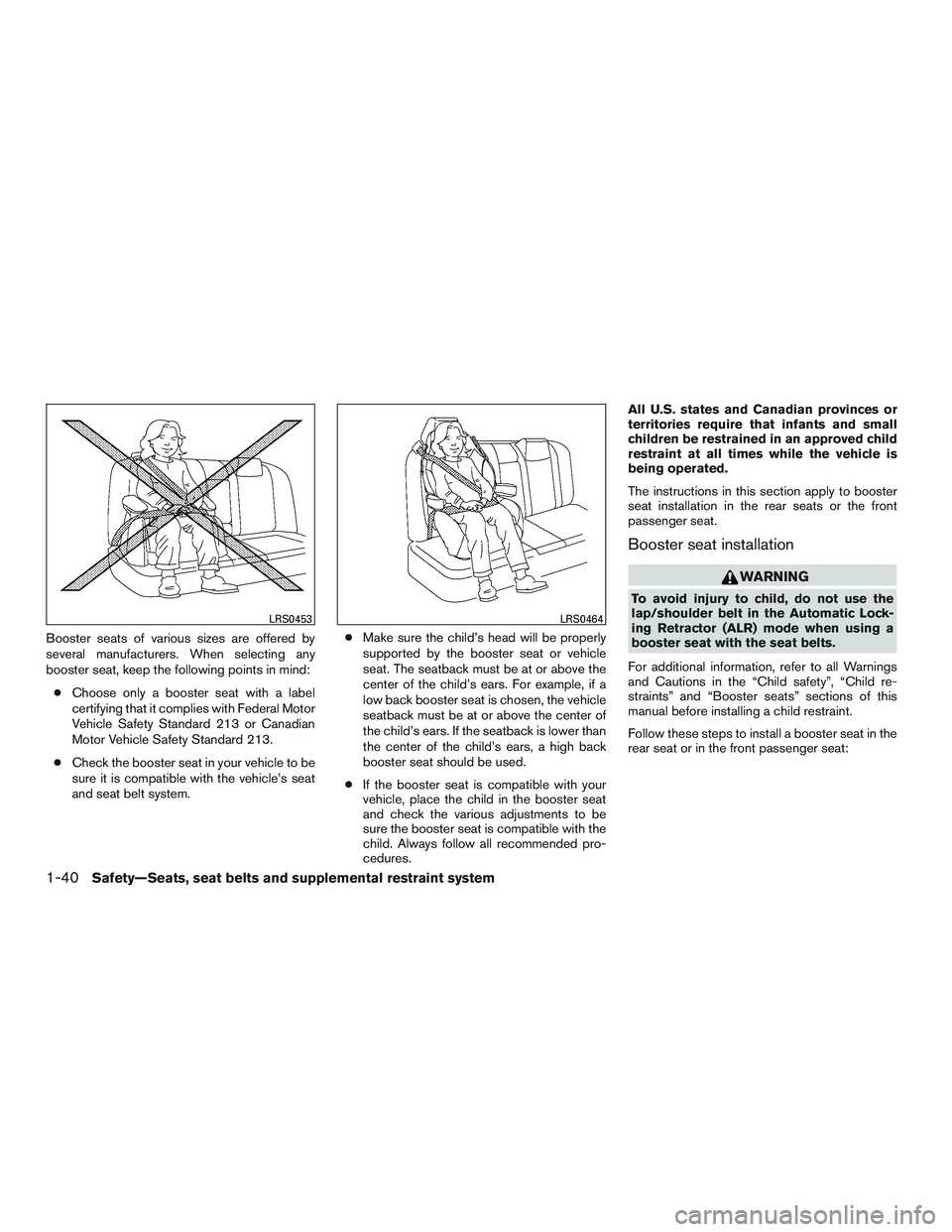
Booster seats of various sizes are offered by
several manufacturers. When selecting any
booster seat, keep the following points in mind:● Choose only a booster seat with a label
certifying that it complies with Federal Motor
Vehicle Safety Standard 213 or Canadian
Motor Vehicle Safety Standard 213.
● Check the booster seat in your vehicle to be
sure it is compatible with the vehicle’s seat
and seat belt system. ●
Make sure the child’s head will be properly
supported by the booster seat or vehicle
seat. The seatback must be at or above the
center of the child’s ears. For example, if a
low back booster seat is chosen, the vehicle
seatback must be at or above the center of
the child’s ears. If the seatback is lower than
the center of the child’s ears, a high back
booster seat should be used.
● If the booster seat is compatible with your
vehicle, place the child in the booster seat
and check the various adjustments to be
sure the booster seat is compatible with the
child. Always follow all recommended pro-
cedures. All U.S. states and Canadian provinces or
territories require that infants and small
children be restrained in an approved child
restraint at all times while the vehicle is
being operated.
The instructions in this section apply to booster
seat installation in the rear seats or the front
passenger seat.
Booster seat installation
WARNING
To avoid injury to child, do not use the
lap/shoulder belt in the Automatic Lock-
ing Retractor (ALR) mode when using a
booster seat with the seat belts.
For additional information, refer to all Warnings
and Cautions in the “Child safety”, “Child re-
straints” and “Booster seats” sections of this
manual before installing a child restraint.
Follow these steps to install a booster seat in the
rear seat or in the front passenger seat:
LRS0453LRS0464
1-40Safety—Seats, seat belts and supplemental restraint system
Page 71 of 497
2. Make sure there are no objects on your lap.
3. Fasten the seat belt as outlined in the “Seatbelts” section of this manual. Front passen-
ger seat belt buckle status is monitored by
the occupant classification system, and is
used as an input to determine occupancy
status. So, it is highly recommended that the
front passenger fasten their seat belt.
4. Remain in this position for 30 seconds al- lowing the system to classify the front pas-
senger before the vehicle is put into motion.
5. Ensure proper classification by checking the front passenger air bag status light.
NOTE:
This vehicle’s occupant classification sen-
sor system generally keeps the classifica-
tion locked during driving, so it is important
that you confirm that the front passenger is
properly classified prior to driving. How-
ever, the occupant classification sensor
may recalculate the weight of the occupant
under some conditions (both while driving
and when stopped) , so front passenger
seat occupants should continue to remain
seated as outlined above. Troubleshooting
If you think the front passenger air bag status light
is incorrect:
1. If the light is ON with an adult occupying the front passenger seat:
● Occupant is a small adult — the air bag light
is functioning as intended. The front passen-
ger air bag is suppressed.
However, if the occupant is not a small adult, then
this may be due to the following conditions that
may be interfering with the weight sensors: ● Occupant is not sitting upright, leaning
against the seatback, and centered on the
seat cushion with his/her feet comfortably
extended to the floor.
● A child restraint or other object pressing
against the rear of the seatback.
● A rear passenger pushing or pulling on the
back of the front passenger seat.
● Forcing the front seat or seatback against an
object on the seat or floor behind it.
● An object placed under the front passenger
seat.
● An object placed between the seat cushion
and center console or between the seat
cushion and the door. If the vehicle is moving, please come to a stop
when it is safe to do so. Check and correct any of
the above conditions. Restart the vehicle and
wait 1 minute.
NOTE:
A system check will be performed during
which the front passenger air bag status
light will remain lit for about 7 seconds
initially.
If the light is still ON after this, the person should
be advised not to ride in the front passenger seat
and the vehicle should be checked as soon as
possible. It is recommended that you visit a
NISSAN dealer for this service.
2. If the light is OFF with a small adult, child or child restraint occupying the front passen-
ger seat.
This may be due to the following conditions
that may be interfering with the weight sen-
sors:
● Small adult or child is not sitting upright,
leaning against the seatback, and centered
on the seat cushion with his/her feet com-
fortably extended to the floor.
● The child restraint is not properly installed,
as outlined in the “Child restraints” section of
this manual.
1-54Safety—Seats, seat belts and supplemental restraint system
Page 77 of 497
If any of the following conditions occur, the front
air bag, side air bag and curtain air bag and
pretensioner systems need servicing:● The supplemental air bag warning light re-
mains on after approximately 7 seconds.
● The supplemental air bag warning light
flashes intermittently.
● The supplemental air bag warning light does
not come on at all.
Under these conditions, the front air bag, side air
bag and curtain air bag or pretensioner systems
may not operate properly. They must be checked
and repaired. It is recommended that you visit a
NISSAN dealer for this service.
WARNING
If the supplemental air bag warning light
is on, it could mean that the front air bag,
side air bag, curtain air bag and/or preten-
sioner systems will not operate in an acci-
dent. To help avoid injury to yourself or
others, have your vehicle checked as soon
as possible. It is recommended that you
visit a NISSAN dealer for this service.
Repair and replacement procedure
The front air bags, side air bags, curtain air bags
and pretensioner(s) are designed to inflate on a
one-time-only basis. As a reminder, unless it is
damaged, the supplemental air bag warning light
remains illuminated after inflation has occurred.
These systems should be repaired and/or re-
placed as soon as possible. It is recommended
that you visit a NISSAN dealer for this service.
When maintenance work is required on the ve-
hicle, the front air bags, side air bags, curtain air
bags, pretensioner(s) and related parts should be
pointed out to the person performing the mainte-
nance. The ignition switch should always be
placed in the LOCK position when working under
the hood or inside the vehicle.
WARNING
● Once a front air bag, side air bag, or
curtain air bag has inflated, the air bag
module will not function again and
must be replaced. Additionally, the acti-
vated pretensioner(s) must also be re-
placed. The air bag module and preten-
sioner(s) should be replaced. It is
recommended that you visit a NISSAN
dealer for this service. However, the air
bag module and pretensioner(s) cannot
be repaired. ●
The front air bag, side air bag, curtain
air bag systems and the pretensioner
system should be inspected if there is
any damage to the front end or side
portion of the vehicle. It is recom-
mended that you visit a NISSAN dealer
for this service.
● If you need to dispose of the supple-
mental air bag or pretensioner systems
or scrap the vehicle, it is recommended
that you visit a NISSAN dealer. Incorrect
disposal procedures could cause per-
sonal injury.
● If there is an impact to your vehicle from
any direction, your Occupant Classifica-
tion Sensor (OCS) should be checked to
verify it is still functioning correctly. It is
recommended that you visit a NISSAN
dealer for this service. The OCS should
be checked even if no air bags deploy as
a result of the impact. Failure to verify
proper OCS function may result in an
improper air bag deployment resulting
in injury or death.
1-60Safety—Seats, seat belts and supplemental restraint system
Page 89 of 497
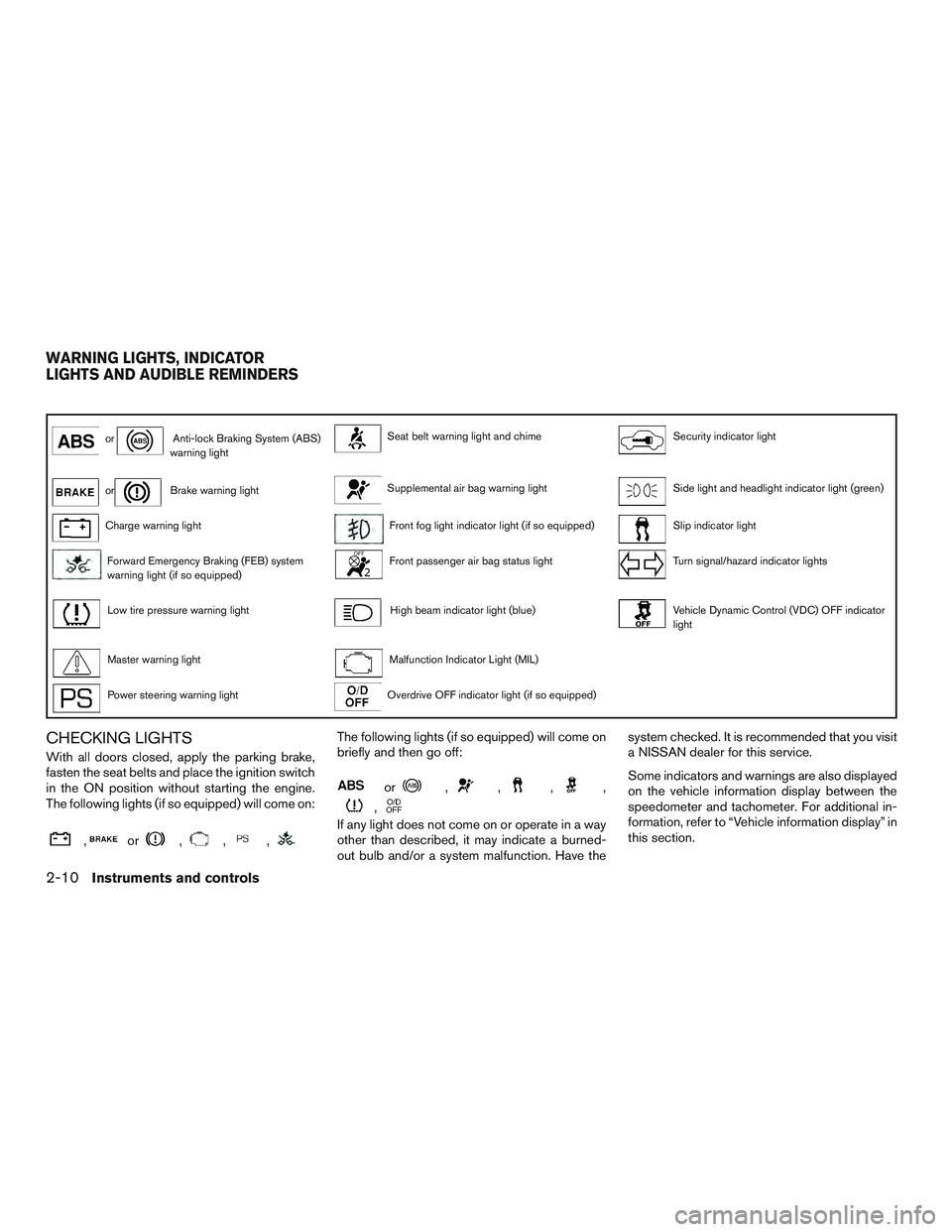
orAnti-lock Braking System (ABS)
warning lightSeat belt warning light and chimeSecurity indicator light
orBrake warning lightSupplemental air bag warning lightSide light and headlight indicator light (green)
Charge warning lightFront fog light indicator light (if so equipped)Slip indicator light
Forward Emergency Braking (FEB) system
warning light (if so equipped)Front passenger air bag status lightTurn signal/hazard indicator lights
Low tire pressure warning lightHigh beam indicator light (blue)Vehicle Dynamic Control (VDC) OFF indicator
light
Master warning lightMalfunction Indicator Light (MIL)
Power steering warning lightOverdrive OFF indicator light (if so equipped)
CHECKING LIGHTS
With all doors closed, apply the parking brake,
fasten the seat belts and place the ignition switch
in the ON position without starting the engine.
The following lights (if so equipped) will come on:
,or,,,
The following lights (if so equipped) will come on
briefly and then go off:
or,,,,
,
If any light does not come on or operate in a way
other than described, it may indicate a burned-
out bulb and/or a system malfunction. Have the system checked. It is recommended that you visit
a NISSAN dealer for this service.
Some indicators and warnings are also displayed
on the vehicle information display between the
speedometer and tachometer. For additional in-
formation, refer to “Vehicle information display” in
this section.
WARNING LIGHTS, INDICATOR
LIGHTS AND AUDIBLE REMINDERS
2-10Instruments and controls
Page 90 of 497
WARNING LIGHTS
For additional information on warnings and indi-
cators, refer to “Vehicle information display” in
this section.
orAnti-lock BrakingSystem (ABS)
warning light
When the ignition switch is placed in the ON
position, the ABS warning light illuminates and
then turns off. This indicates the ABS is opera-
tional.
If the ABS warning light illuminates while the
engine is running or while driving, it may indicate
the ABS is not functioning properly. Have the
system checked. It is recommended that you visit
a NISSAN dealer for this service.
If an ABS malfunction occurs, the anti-lock func-
tion is turned off. The brake system then operates
normally but without anti-lock assistance. For
additional information, refer to “Brake system” in
the “Starting and driving” section of this manual.
orBrake warning light
This light functions for both the parking brake and
the foot brake systems. Parking brake indicator
When the ignition switch is placed in the ON
position, the light comes on when the parking
brake is applied.
Low brake fluid warning light
When the ignition switch is placed in the ON
position, the light warns of a low brake fluid level.
If the light comes on while the engine is running,
with the parking brake not applied, stop the ve-
hicle and perform the following:
1. Check the brake fluid level. Add brake fluid as necessary. For additional information, re-
fer to “Brake fluid” in the “Do-it-yourself”
section of this manual.
2. If the brake fluid level is correct, have the warning system checked. It is recommended
that you visit a NISSAN dealer for this ser-
vice.
WARNING
●Your brake system may not be working
properly if the warning light is on. Driv-
ing could be dangerous. If you judge it
to be safe, drive carefully to the nearest
service station for repairs. Otherwise,
have your vehicle towed because driv-
ing it could be dangerous. ●
Pressing the brake pedal with the en-
gine stopped and/or a low brake fluid
level may increase your stopping dis-
tance and braking will require greater
pedal effort as well as pedal travel.
● If the brake fluid level is below the
MINIMUM or MIN mark on the brake
fluid reservoir, do not drive until the
brake system has been checked. It is
recommended that you visit a NISSAN
dealer for this service.
Anti-lock Braking System (ABS) warning
indicator
When the parking brake is released and the
brake fluid level is sufficient, if both the brake
warning light and the ABS warning light illumi-
nate, it may indicate the ABS is not functioning
properly. Have the brake system checked and, if
necessary, repaired. It is recommended that you
visit a NISSAN dealer for this service. Avoid
high-speed driving and abrupt braking. For addi-
tional information, refer to “Anti-lock Braking Sys-
tem (ABS) warning light” in this section.
Instruments and controls2-11
Page 95 of 497
●MIL blinking — An engine misfire has been
detected which may damage the emission
control system. To reduce or avoid emission
control system damage:
– do not drive at speeds above 45 mph (72 km/h).
– avoid hard acceleration or deceleration.
– avoid steep uphill grades.
– if possible, reduce the amount of cargo being hauled or towed.
The MIL may stop blinking and come on steady.
Have the vehicle inspected by a NISSAN dealer.
You do not need to have your vehicle towed to the
dealer.
CAUTION
Continued vehicle operation without hav-
ing the emission control system checked
and repaired as necessary could lead to
poor driveability, reduced fuel economy,
and possible damage to the emission con-
trol system.
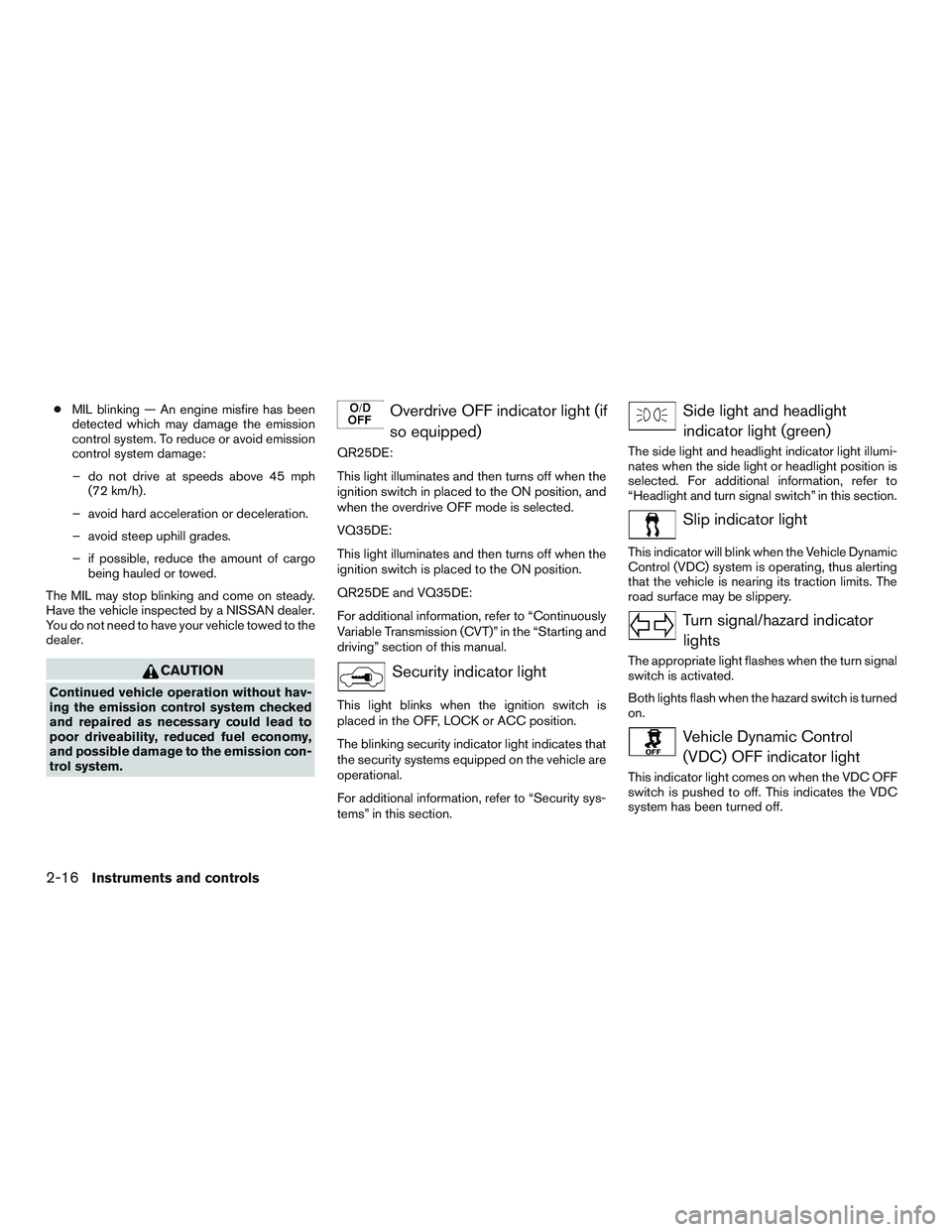
Overdrive OFF indicator light (if so equipped)
QR25DE:
This light illuminates and then turns off when the
ignition switch in placed to the ON position, and
when the overdrive OFF mode is selected.
VQ35DE:
This light illuminates and then turns off when the
ignition switch is placed to the ON position.
QR25DE and VQ35DE:
For additional information, refer to “Continuously
Variable Transmission (CVT)” in the “Starting and
driving” section of this manual.
Security indicator light
This light blinks when the ignition switch is
placed in the OFF, LOCK or ACC position.
The blinking security indicator light indicates that
the security systems equipped on the vehicle are
operational.
For additional information, refer to “Security sys-
tems” in this section.
Side light and headlightindicator light (green)
The side light and headlight indicator light illumi-
nates when the side light or headlight position is
selected. For additional information, refer to
“Headlight and turn signal switch” in this section.
Slip indicator light
This indicator will blink when the Vehicle Dynamic
Control (VDC) system is operating, thus alerting
that the vehicle is nearing its traction limits. The
road surface may be slippery.
Turn signal/hazard indicatorlights
The appropriate light flashes when the turn signal
switch is activated.
Both lights flash when the hazard switch is turned
on.
Vehicle Dynamic Control(VDC) OFF indicator light
This indicator light comes on when the VDC OFF
switch is pushed to off. This indicates the VDC
system has been turned off.
2-16Instruments and controls
Page 96 of 497
Push the VDC OFF switch again or restart the
engine and the system will operate normally. For
additional information, refer to “Vehicle Dynamic
Control (VDC) system” in the “Starting and driv-
ing” section of this manual.
The VDC indicator light also comes on when you
place the ignition switch in the ON position. The
light will turn off after about 2 seconds if the
system is operational. If the light stays on or
comes on along with the
indicator light
while you are driving, have the VDC system
checked. It is recommended that you visit a
NISSAN dealer for this service.
While the VDC system is operating, you might
feel a slight vibration or hear the system working
when starting the vehicle or accelerating, but this
is normal.
AUDIBLE REMINDERS
Brake pad wear warning
The disc brake pads have audible wear warnings.
When a disc brake pad requires replacement, it
makes a high pitched scraping sound when the
vehicle is in motion, whether or not the brake
pedal is depressed. Have the brakes checked as
soon as possible if the warning sound is heard.
Light reminder chime
With the ignition switch placed in the OFF posi-
tion, a chime sounds when the driver’s door is
opened if the headlights or parking lights are on.
Turn the headlight control switch off before leav-
ing the vehicle.
NISSAN Intelligent Key® door buzzer
The Intelligent Key door buzzer sounds if the
Intelligent Key is left inside the vehicle when
locking the doors. When the buzzer sounds, be
sure to check both the vehicle and the Intelligent
Key. For additional information, refer to “NISSAN
Intelligent Key®” in the “Pre-driving checks and
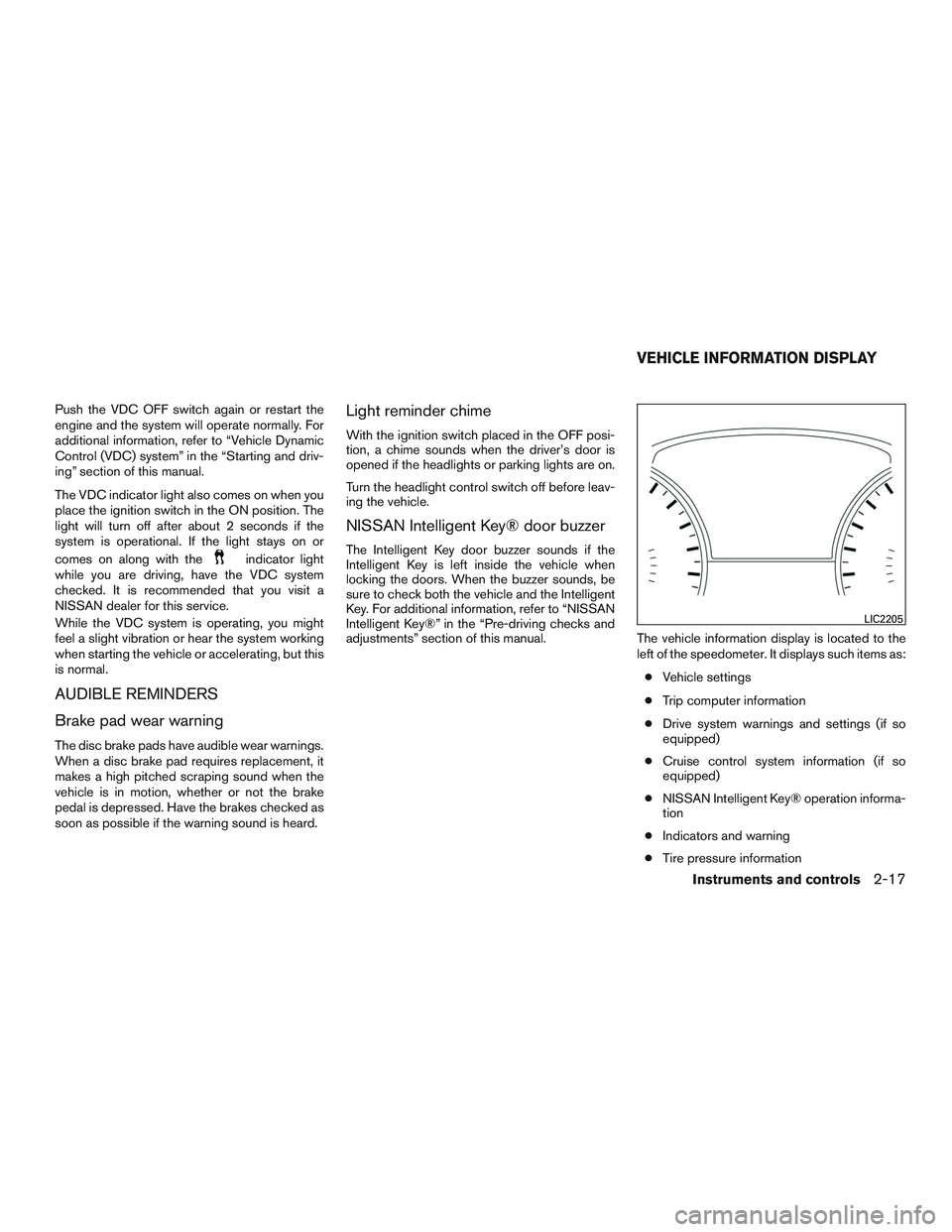
adjustments” section of this manual. The vehicle information display is located to the
left of the speedometer. It displays such items as:
● Vehicle settings
● Trip computer information
● Drive system warnings and settings (if so
equipped)
● Cruise control system information (if so
equipped)
● NISSAN Intelligent Key® operation informa-
tion
● Indicators and warning
● Tire pressure information
LIC2205
VEHICLE INFORMATION DISPLAY
Instruments and controls2-17
Page 99 of 497
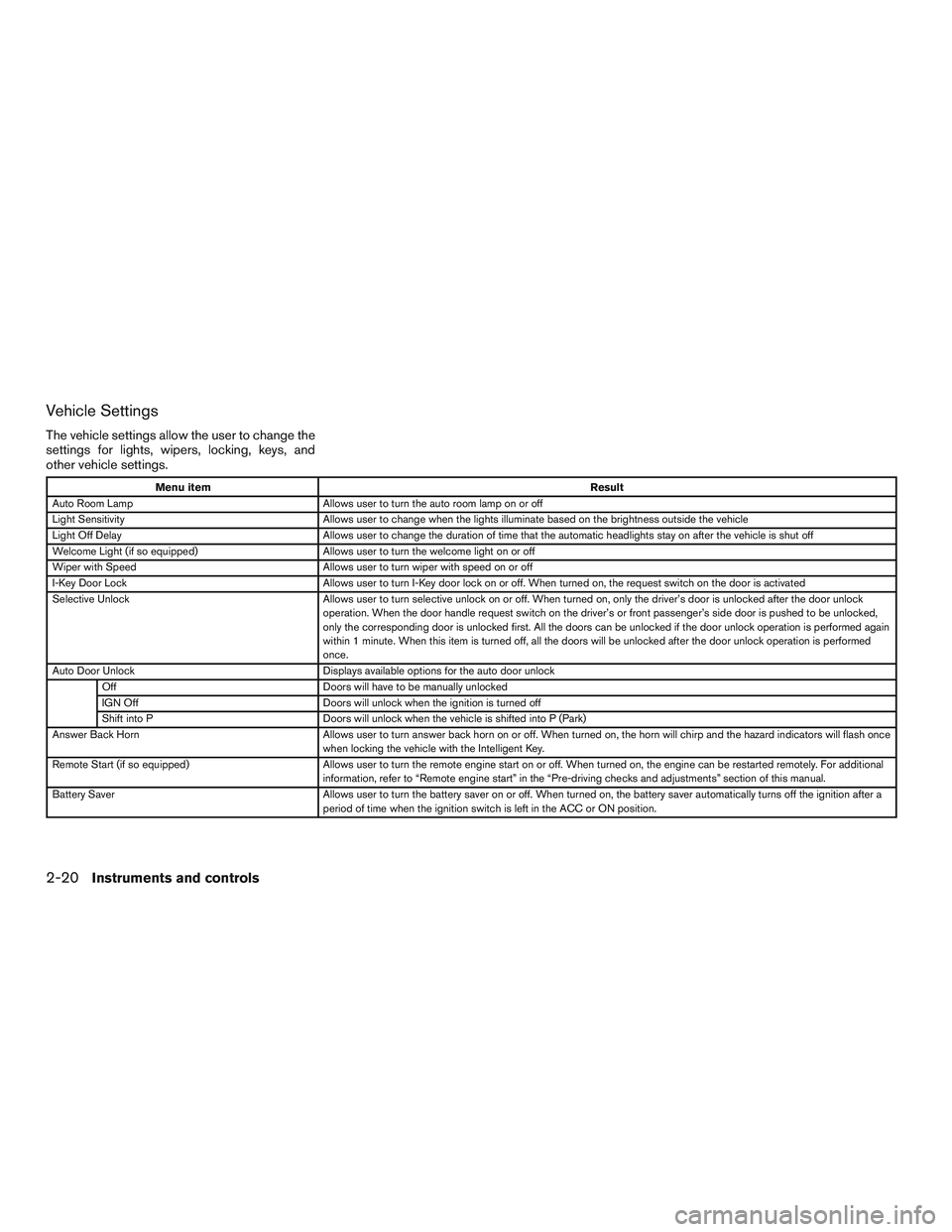
Vehicle Settings
The vehicle settings allow the user to change the
settings for lights, wipers, locking, keys, and
other vehicle settings.
Menu itemResult
Auto Room Lamp Allows user to turn the auto room lamp on or off
Light Sensitivity Allows user to change when the lights illuminate based on the brightness outside the vehicle
Light Off Delay Allows user to change the duration of time that the automatic headlights stay on after the vehicle is shut off
Welcome Light (if so equipped) Allows user to turn the welcome light on or off
Wiper with Speed Allows user to turn wiper with speed on or off
I-Key Door Lock Allows user to turn I-Key door lock on or off. When turned on, the request switch on the door is activated
Selective Unlock Allows user to turn selective unlock on or off. When turned on, only the driver’s door is unlocked after the door unlock
operation. When the door handle request switch on the driver’s or front passenger’s side door is pushed to be unlocked,
only the corresponding door is unlocked first. All the doors can be unlocked if the door unlock operation is performed again
within 1 minute. When this item is turned off, all the doors will be unlocked after the door unlock operation is performed
once.
Auto Door Unlock Displays available options for the auto door unlock
Off Doors will have to be manually unlocked
IGN Off Doors will unlock when the ignition is turned off
Shift into P Doors will unlock when the vehicle is shifted into P (Park)
Answer Back Horn Allows user to turn answer back horn on or off. When turned on, the horn will chirp and the hazard indicators will flash once
when locking the vehicle with the Intelligent Key.
Remote Start (if so equipped) Allows user to turn the remote engine start on or off. When turned on, the engine can be restarted remotely. For additional
information, refer to “Remote engine start” in the “Pre-driving checks and adjustments” section of this manual.
Battery Saver Allows user to turn the battery saver on or off. When turned on, the battery saver automatically turns off the ignition after a
period of time when the ignition switch is left in the ACC or ON position.
2-20Instruments and controls
Page 106 of 497
Shift to Park
This warning illuminates when the ignition switch
is in the ACC or OFF position and the shift lever
is not in the P (Park) position. Also, a chime
sounds when the ignition switch is in the ACC or
OFF position.
If this warning illuminates, move the shift lever to
the P (Park) position and start the engine.
Push Ignition to OFF
After the Push Ignition to OFF warning illumi-
nates, the warning will illuminate if the ignition
switch is placed in the ACC position when the
shift lever is moved to the P (Park) position.
To turn off the Push warning, place the ignition
switch in the ON position and then in the LOCK
position.
Push brake and start switch to drive
This indicator appears when the shift lever is in
the P (Park) position.
This indicator also appears when the vehicle has
been started using the remote engine start (if so
equipped) function.
This indicator means that the engine will start by
pushing the ignition switch with the brake pedal
depressed. You can start the engine from any
position of the ignition switch.Engine start operation for Intelligent Key
system (if I-Key battery level is low)
This indicator appears when the battery of the
Intelligent Key is low and when the Intelligent Key
system and the vehicle are not communicating
normally.
If this appears, touch the ignition switch with the
Intelligent Key while depressing the brake pedal.
For additional information, refer to “NISSAN In-
telligent Key® battery discharge” in the “Starting
and driving” section of this manual.
Release Parking Brake
This warning illuminates in the message area of
the vehicle information display when the parking
brake is set and the vehicle is driven.
Low Fuel
This warning illuminates when the fuel level in the
fuel tank is getting low. Refuel as soon as it is
convenient, preferably before the fuel gauge
reaches 0 (Empty) .
There will be a small re-
serve of fuel in the tank when the fuel
gauge needle reaches 0 (Empty) .
Loose Fuel Cap
This warning appears when the fuel-filler cap is
not tightened correctly after the vehicle has been
refueled. For additional information, refer to “Fuel-filler cap” in the “Pre-driving checks and
adjustments” section of this manual.
Low Oil Pressure: See Owner’s Manual
This warning appears in the message area of the
vehicle information display if low oil pressure is
detected. This gauge is not designed to indicate
low oil level.
The low oil pressure warning is
not designed to indicate a low oil level. Use
the dipstick to check the oil level. For additional
information, refer to “Engine oil” in the “Do-it-
yourself” section of this manual.
Low Washer Fluid
This warning illuminates when the windshield-
washer fluid is at a low level. Add windshield-
washer fluid as necessary. For additional informa-
tion, refer to “Windshield-washer fluid” in the
“Do-it-yourself” section of this manual.
Tire Pressure Low - Add Air
This warning appears when the low tire pressure
warning light in the meter illuminates and low tire
pressure is detected. The warning appears each
time the ignition switch is placed in the ON
position as long as the low tire pressure warning
light remains illuminated. If this warning appears,
stop the vehicle and adjust the tire pressures of
all four tires to the recommended COLD tire
pressure shown on the Tire and Loading Informa-
tion label. For additional information, refer to
Instruments and controls2-27
Page 108 of 497
Side Radar Obstruction (if so equipped)
This warning appears when there is radar block-
age detected. For additional information, refer to
“Blind Spot Warning (BSW)” in the “Starting and
driving” section of this manual.
Unavailable: Front Radar Obstruction (if
so equipped)
This message appears when the Intelligent
Cruise Control (ICC) system become unavailable
because the front radar is obstructed. For addi-
tional information, refer to “Intelligent Cruise
Control (ICC)” in the “Starting and driving” sec-
tion of this manual.
Cruise control indicator (if so equipped)
This indicator shows the cruise control system
status.
When cruise control is activated, a green circle
will illuminate to indicate it is set. The vehicle
information display will also display the speed the
cruise control was set at. If you accelerate past
the set speed, the speed will blink until you either
cancel cruise control or go back to the set speed.
If cruise control is on and canceled, the speed will
be displayed to show the speed the vehicle will
return to if the resume button is activated.Intelligent Cruise Control (ICC) indicator
(if so equipped)
This indicator shows the Intelligent Cruise Con-
trol (ICC) system status. The status is shown by
the color. For additional information, refer to “In-
telligent Cruise Control (ICC)” in the “Starting
and driving” section of this manual.
Shipping Mode On Push Storage Fuse
This warning may appear if the extended storage
switch is not pushed in. When this warning ap-
pears, push in the extended storage switch to
turn off the warning. For additional information,
refer to “Extended storage switch” in this section.
Transmission Shift Position indicator
This indicator shows the transmission shift posi-
tion.
CVT Error: See Owner’s Manual
This warning illuminates when there is a problem
with the CVT system. If this warning comes on,
have the system checked. It is recommended that
you visit a NISSAN dealer for this service.
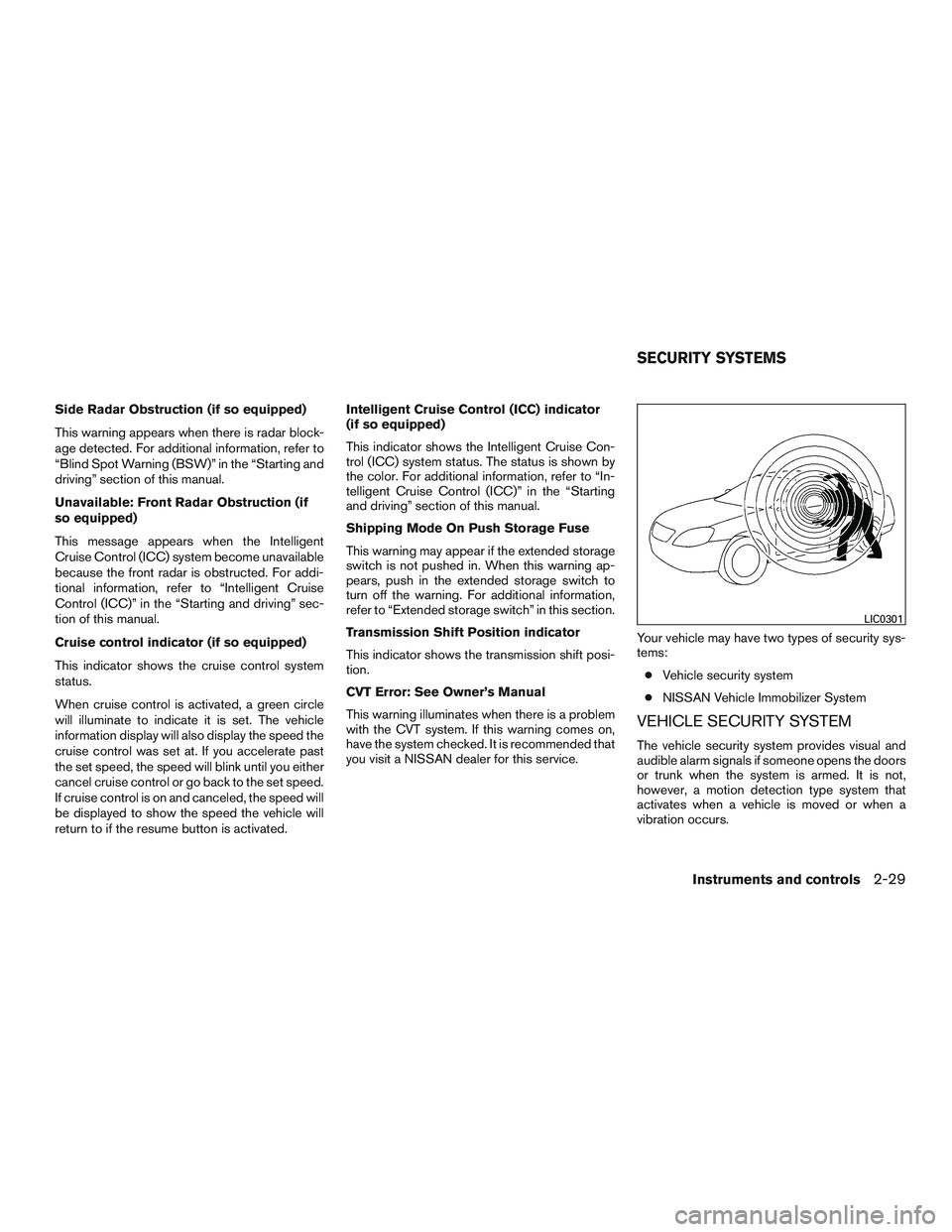
Your vehicle may have two types of security sys-
tems:
● Vehicle security system
● NISSAN Vehicle Immobilizer System
VEHICLE SECURITY SYSTEM
The vehicle security system provides visual and
audible alarm signals if someone opens the doors
or trunk when the system is armed. It is not,
however, a motion detection type system that
activates when a vehicle is moved or when a
vibration occurs.
LIC0301
SECURITY SYSTEMS
Instruments and controls2-29