engine coolant NISSAN ARMADA 2005 1.G Owner's Manual
[x] Cancel search | Manufacturer: NISSAN, Model Year: 2005, Model line: ARMADA, Model: NISSAN ARMADA 2005 1.GPages: 352, PDF Size: 6.46 MB
Page 275 of 352
The engine cooling system is filled at the factory
with Genuine NISSAN Long Life
Antifreeze/Coolant to provide year-round anti-
freeze and coolant protection.The anti-freeze so-
lution contains rust and corrosion inhibitors. Ad-
ditional engine cooling system additives are not
necessary.
WARNING
cNever remove the radiator or coolant
reservoir cap when the engine is hot.
Wait until the engine and radiator cool
down. Serious burns could be caused
by high pressure fluid escaping from
the radiator. See precautions in “If your
vehicle overheats” found in the “In case
of emergency” section of this manual.
cThe radiator is equipped with a pres-
sure type radiator cap. To prevent en-
gine damage, use only a genuine
NISSAN radiator cap.
Outside temperature
down toGenuine
NISSAN
Long Life
Antifreeze/
Coolant or
equivalentDemineral-
ized or dis-
tilled water
°C °F
-35 -30 50% 50%
CAUTION
When adding or replacing coolant, be sure
to use only a Genuine NISSAN Long Life
Antifreeze/Coolant (green) or equivalent
with the proper mixture ratio of 50% anti-
freeze and 50% demineralized or distilled
water. The use of other types of coolant
solutions or coolant colors, such as or-
ange, may damage the engine cooling
system.
CHECKING ENGINE COOLANT
LEVEL
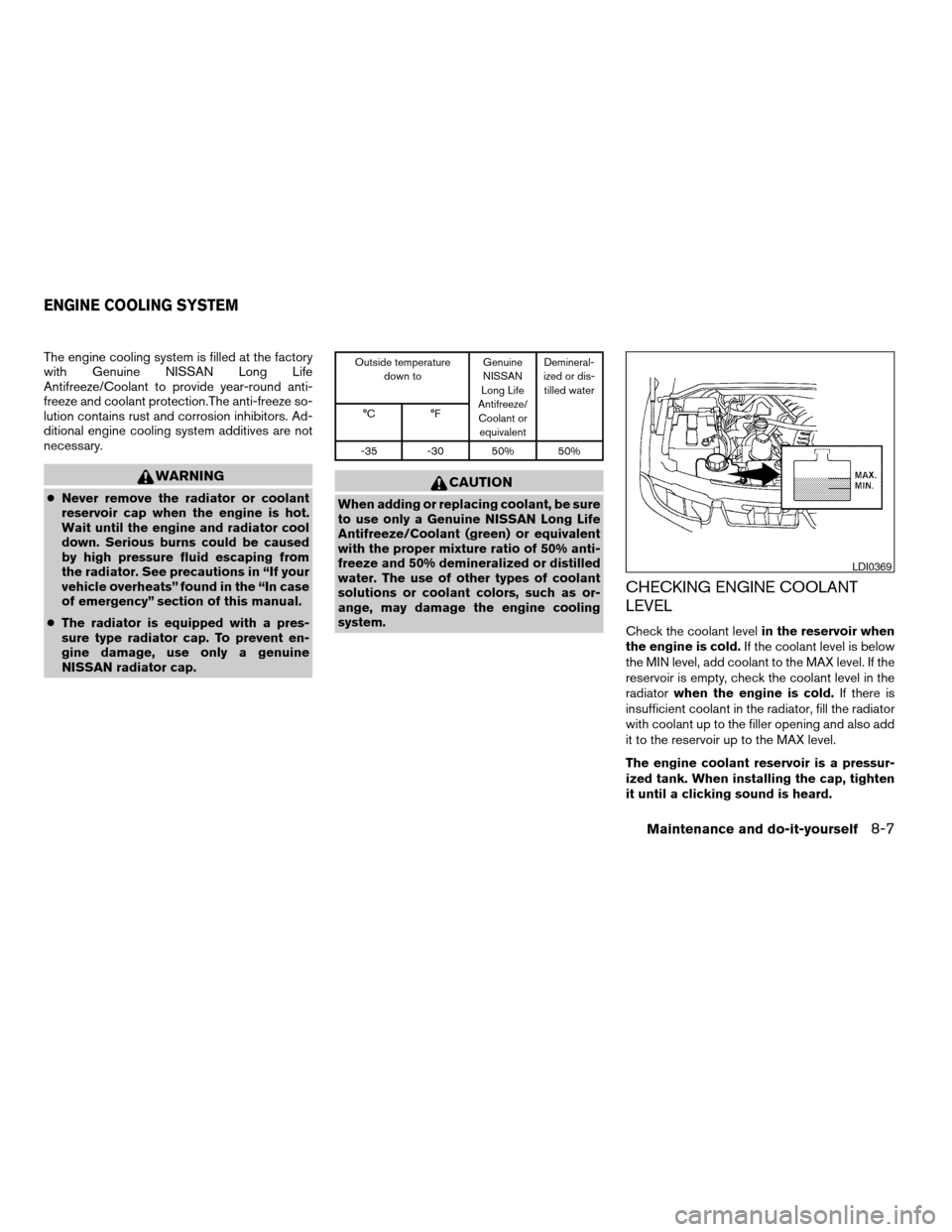
Check the coolant levelin the reservoir when
the engine is cold.If the coolant level is below
the MIN level, add coolant to the MAX level. If the
reservoir is empty, check the coolant level in the
radiatorwhen the engine is cold.If there is
insufficient coolant in the radiator, fill the radiator
with coolant up to the filler opening and also add
it to the reservoir up to the MAX level.
The engine coolant reservoir is a pressur-
ized tank. When installing the cap, tighten
it until a clicking sound is heard.
LDI0369
ENGINE COOLING SYSTEM
Maintenance and do-it-yourself8-7
ZREVIEW COPYÐ2005 Armada(wzw)
Owners ManualÐUSA_English(nna)
11/18/04Ðtbrooks
X
Page 276 of 352
If the cooling system frequently requires
coolant, have it checked by a NISSAN
dealer.
CHANGING ENGINE COOLANT
A NISSAN dealer can change the engine coolant.
The service procedure can be found in the
NISSAN Service Manual.
Improper servicing can result in reduced
heater performance and engine overheating.
WARNING
cTo avoid the danger of being scalded,
never change the coolant when the en-
gine is hot.
cNever remove the radiator or engine
coolant reservoir cap when the engine
is hot. Serious burns could be caused
by high pressure fluid escaping from
the radiator.
cAvoid direct skin contact with used
coolant. If skin contact is made, wash
thoroughly with soap or hand cleaner
as soon as possible.
cKeep coolant out of the reach of chil-
dren and pets.
Engine coolant must be disposed of properly.
Check your local regulations.
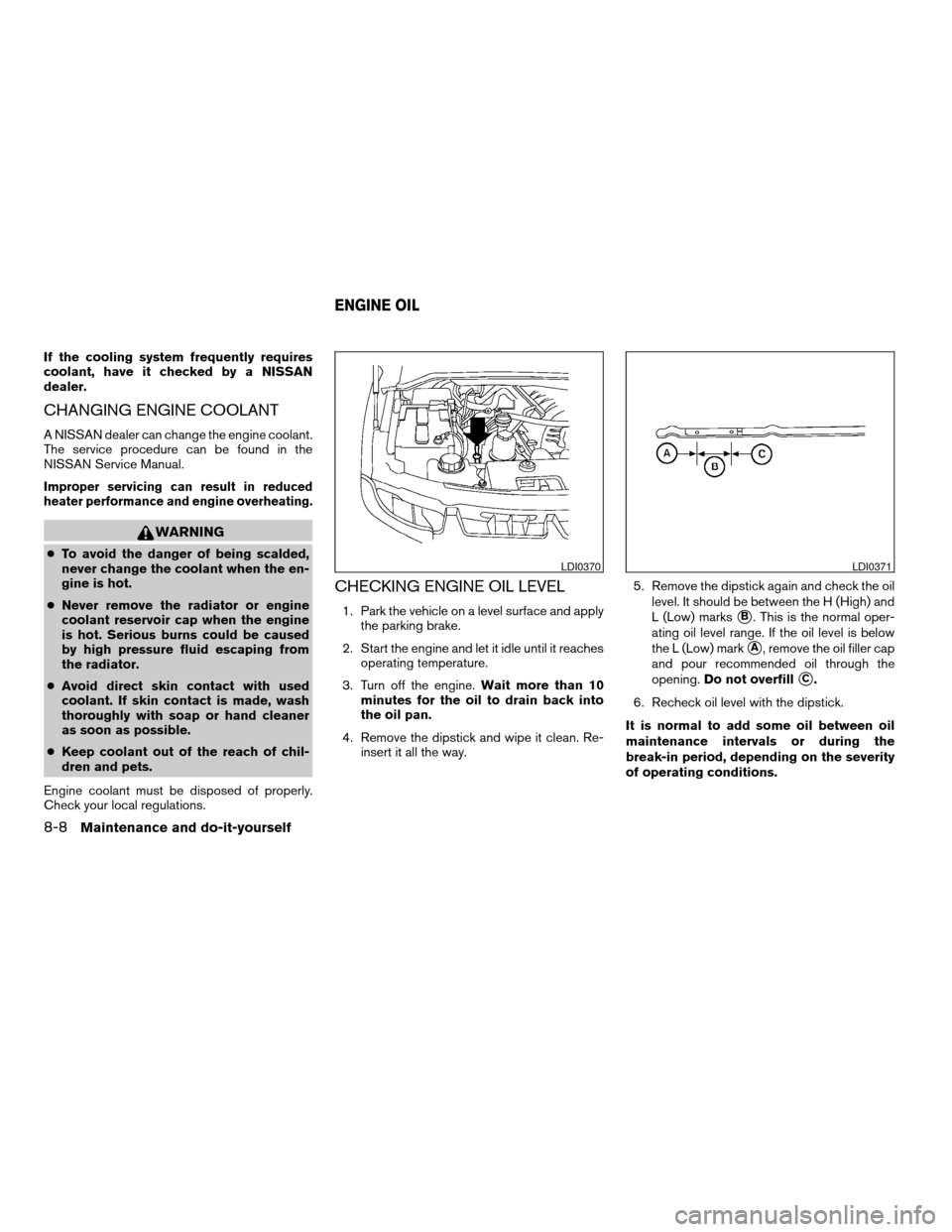
CHECKING ENGINE OIL LEVEL
1. Park the vehicle on a level surface and apply
the parking brake.
2. Start the engine and let it idle until it reaches
operating temperature.
3. Turn off the engine.Wait more than 10
minutes for the oil to drain back into
the oil pan.
4. Remove the dipstick and wipe it clean. Re-
insert it all the way.5. Remove the dipstick again and check the oil
level. It should be between the H (High) and
L (Low) markssB. This is the normal oper-
ating oil level range. If the oil level is below
the L (Low) mark
sA, remove the oil filler cap
and pour recommended oil through the
opening.Do not overfill
sC.
6. Recheck oil level with the dipstick.
It is normal to add some oil between oil
maintenance intervals or during the
break-in period, depending on the severity
of operating conditions.
LDI0370LDI0371
ENGINE OIL
8-8Maintenance and do-it-yourself
ZREVIEW COPYÐ2005 Armada(wzw)
Owners ManualÐUSA_English(nna)
11/18/04Ðtbrooks
X
Page 280 of 352
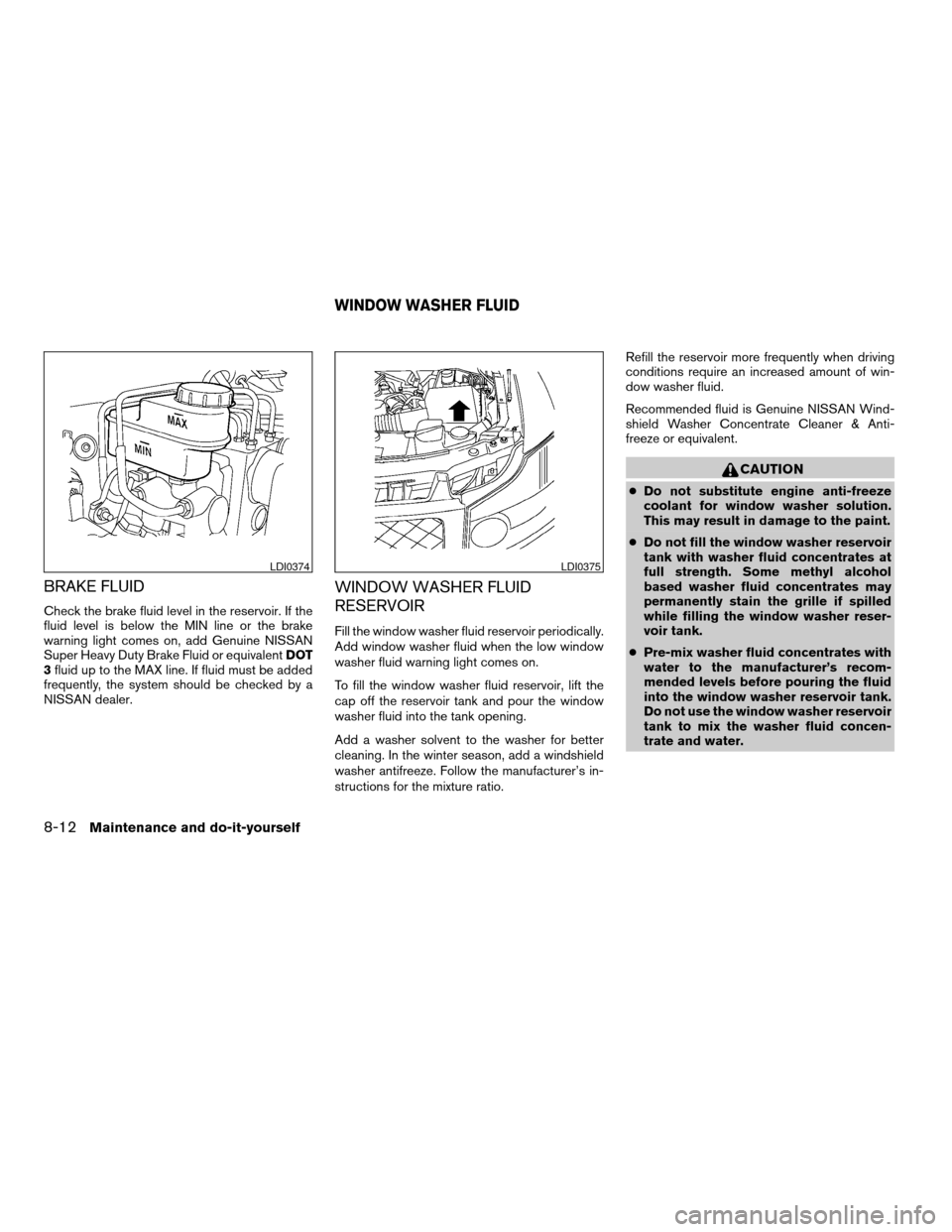
BRAKE FLUID
Check the brake fluid level in the reservoir. If the
fluid level is below the MIN line or the brake
warning light comes on, add Genuine NISSAN
Super Heavy Duty Brake Fluid or equivalentDOT
3fluid up to the MAX line. If fluid must be added
frequently, the system should be checked by a
NISSAN dealer.
WINDOW WASHER FLUID
RESERVOIR
Fill the window washer fluid reservoir periodically.
Add window washer fluid when the low window
washer fluid warning light comes on.
To fill the window washer fluid reservoir, lift the
cap off the reservoir tank and pour the window
washer fluid into the tank opening.
Add a washer solvent to the washer for better
cleaning. In the winter season, add a windshield
washer antifreeze. Follow the manufacturer’s in-
structions for the mixture ratio.Refill the reservoir more frequently when driving
conditions require an increased amount of win-
dow washer fluid.
Recommended fluid is Genuine NISSAN Wind-
shield Washer Concentrate Cleaner & Anti-
freeze or equivalent.
CAUTION
cDo not substitute engine anti-freeze
coolant for window washer solution.
This may result in damage to the paint.
cDo not fill the window washer reservoir
tank with washer fluid concentrates at
full strength. Some methyl alcohol
based washer fluid concentrates may
permanently stain the grille if spilled
while filling the window washer reser-
voir tank.
cPre-mix washer fluid concentrates with
water to the manufacturer’s recom-
mended levels before pouring the fluid
into the window washer reservoir tank.
Do not use the window washer reservoir
tank to mix the washer fluid concen-
trate and water.
LDI0374LDI0375
WINDOW WASHER FLUID
8-12Maintenance and do-it-yourself
ZREVIEW COPYÐ2005 Armada(wzw)
Owners ManualÐUSA_English(nna)
11/18/04Ðtbrooks
X
Page 312 of 352
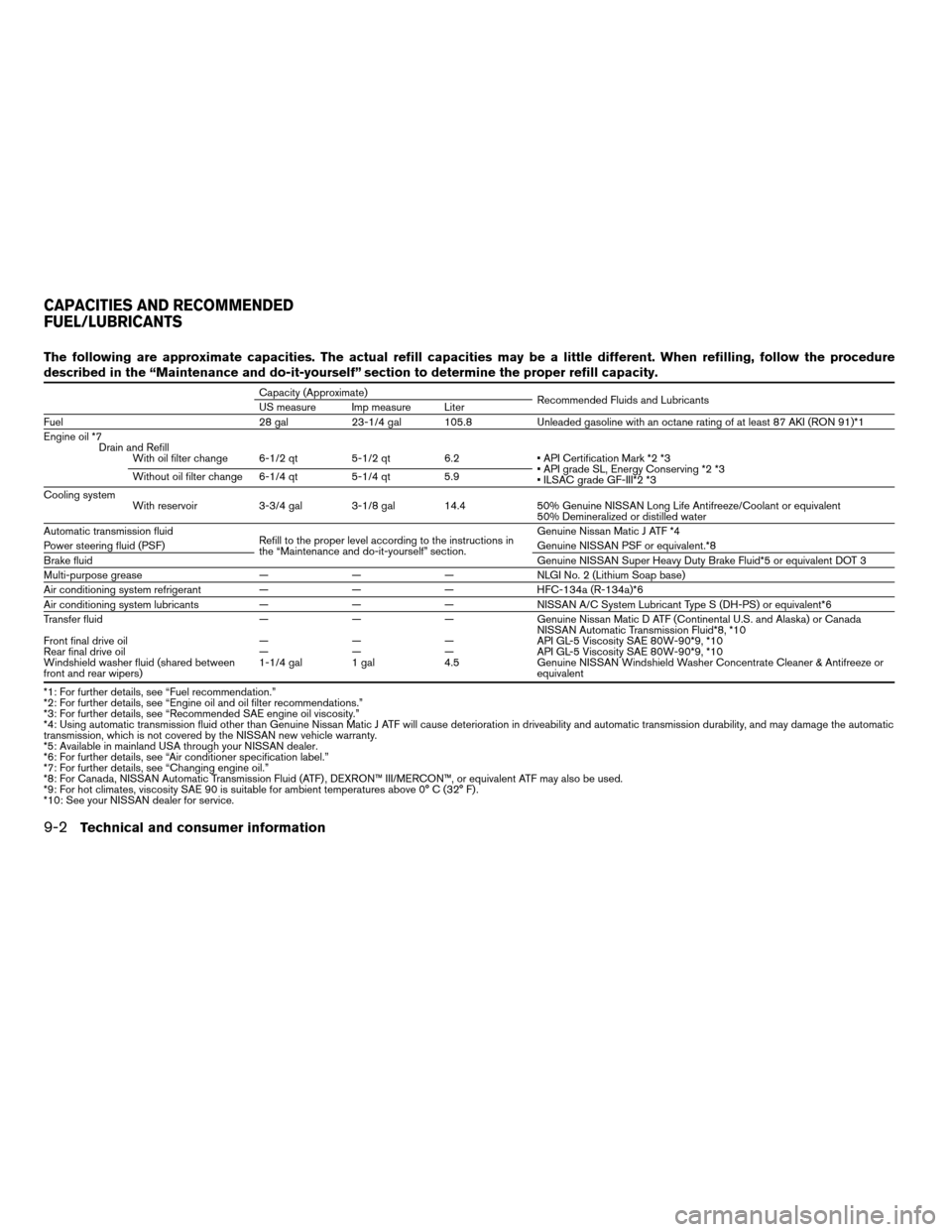
The following are approximate capacities. The actual refill capacities may be a little different. When refilling, follow the procedure
described in the “Maintenance and do-it-yourself” section to determine the proper refill capacity.
Capacity (Approximate)
Recommended Fluids and Lubricants
US measure Imp measure Liter
Fuel 28 gal 23-1/4 gal 105.8 Unleaded gasoline with an octane rating of at least 87 AKI (RON 91)*1
Engine oil *7
Drain and Refill
With oil filter change 6-1/2 qt 5-1/2 qt 6.2 • API Certification Mark *2 *3
• API grade SL, Energy Conserving *2 *3
• ILSAC grade GF-III*2 *3 Without oil filter change 6-1/4 qt 5-1/4 qt 5.9
Cooling system
With reservoir 3-3/4 gal 3-1/8 gal 14.4 50% Genuine NISSAN Long Life Antifreeze/Coolant or equivalent
50% Demineralized or distilled water
Automatic transmission fluid
Refill to the proper level according to the instructions in
the “Maintenance and do-it-yourself” section.Genuine Nissan Matic J ATF *4
Power steering fluid (PSF)Genuine NISSAN PSF or equivalent.*8
Brake fluidGenuine NISSAN Super Heavy Duty Brake Fluid*5 or equivalent DOT 3
Multi-purpose grease — — — NLGI No. 2 (Lithium Soap base)
Air conditioning system refrigerant — — — HFC-134a (R-134a)*6
Air conditioning system lubricants — — — NISSAN A/C System Lubricant Type S (DH-PS) or equivalent*6
Transfer fluid — — — Genuine Nissan Matic D ATF (Continental U.S. and Alaska) or Canada
NISSAN Automatic Transmission Fluid*8, *10
Front final drive oil — — — API GL-5 Viscosity SAE 80W-90*9, *10
Rear final drive oil — — — API GL-5 Viscosity SAE 80W-90*9, *10
Windshield washer fluid (shared between
front and rear wipers)1-1/4 gal 1 gal 4.5 Genuine NISSAN Windshield Washer Concentrate Cleaner & Antifreeze or
equivalent
*1: For further details, see “Fuel recommendation.”
*2: For further details, see “Engine oil and oil filter recommendations.”
*3: For further details, see “Recommended SAE engine oil viscosity.”
*4: Using automatic transmission fluid other than Genuine Nissan Matic J ATF will cause deterioration in driveability and automatic transmission durability, and may damage the automatic
transmission, which is not covered by the NISSAN new vehicle warranty.
*5: Available in mainland USA through your NISSAN dealer.
*6: For further details, see “Air conditioner specification label.”
*7: For further details, see “Changing engine oil.”
*8: For Canada, NISSAN Automatic Transmission Fluid (ATF) , DEXRON™ III/MERCON™, or equivalent ATF may also be used.
*9: For hot climates, viscosity SAE 90 is suitable for ambient temperatures above 0° C (32° F) .
*10: See your NISSAN dealer for service.
CAPACITIES AND RECOMMENDED
FUEL/LUBRICANTS
9-2Technical and consumer information
ZREVIEW COPYÐ2005 Armada(wzw)
Owners ManualÐUSA_English(nna)
11/18/04Ðtbrooks
X
Page 332 of 352

4. Peel off the tape and connect the jumper
harness to the connector
s2.
5. Release the parking brake.
6. Install the aftermarket electric trailer brake
controller according to the manufacturer’s
instructions.
Pre-towing tips
cBe certain your vehicle maintains a level
position when a loaded and/or unloaded
trailer is hitched. Do not drive the vehicle if it
has an abnormal nose-up or nose-down
condition; check for improper tongue load,
overload, worn suspension or other possible
causes of either condition.cAlways secure items in the trailer to prevent
load shift while driving.
cLoad the trailer so approximately 60% of the
trailer load is in the front half and 40% is in
the back half.
cCheck your hitch, trailer tire pressure, ve-
hicle tire pressure, trailer light operation, and
trailer wheel lug nuts every time you attach a
trailer to the vehicle.
cBe certain your rearview mirrors conform to
all federal, state or local regulations. If not,
install any mirrors required for towing before
driving the vehicle.
Trailer towing tips
In order to gain skill and an understanding of the
vehicle’s behavior, you should practice turning,
stopping and backing up in an area which is free
from traffic. Steering stability and braking perfor-
mance will be somewhat different than under
normal driving conditions.
cAlways secure items in the trailer to prevent
load shift while driving.
cAvoid abrupt starts, acceleration or stops.
cAvoid sharp turns or lane changes.
cAlways drive your vehicle at a moderate
speed.cWhen backing up, hold the bottom of the
steering wheel with one hand. Move your
hand in the direction in which you want the
trailer to go. Make small corrections and
back up slowly. If possible, have someone
guide you when you are backing up.
cAlways block the wheels on both vehicle and
trailer when parking. Parking on a slope is
not recommended; however, if you must do
so, first block the wheels and apply the park-
ing brake, and then move the transmission
shift selector lever into the P (Park) position.
If you move the shift selector lever to the P
(Park) position before blocking the wheels
and applying the parking brake, transmission
damage could occur.
cWhen going down a hill, shift into a lower
gear and use the engine braking effect.
When going up a long grade, downshift the
transmission to a lower gear and reduce
speed to reduce chances of engine over-
loading and/or overheating. However, for
long steep grades, do not stay in 1st gear
when driving above 35 MPH (56 km/h) or
2nd gear when driving above 58 MPH (93
km/h) .
cIf the engine coolant rises to an extremely
high temperature when the air conditioner
system is on, turn off the air conditioner.
LTI0116
9-22Technical and consumer information
ZREVIEW COPYÐ2005 Armada(wzw)
Owners ManualÐUSA_English(nna)
11/18/04Ðtbrooks
X
Page 333 of 352

Coolant heat can be additionally vented by
opening the windows, switching the fan
control to high and setting the temperature
control to the HOT position.
cTrailer towing requires more fuel than normal
circumstances.
cAvoid towing a trailer for your vehicle’s first
500 miles (805 km) .
cFor the first 500 miles (805 km) that you do
tow, do not drive over 50 MPH (80 km/h) .
cHave your vehicle serviced more often than
at intervals specified in the recommended
Maintenance Schedule in the “NISSAN Ser-
vice and Maintenance Guide”.
cWhen making a turn, your trailer wheels will
be closer to the inside of the turn than your
vehicle wheels. To compensate for this,
make a larger than normal turning radius
during the turn.
cCrosswinds and rough roads will adversely
affect vehicle/trailer handling, possibly caus-
ing vehicle sway. When being passed by
larger vehicles, be prepared for possible
changes in crosswinds that could affect ve-
hicle handling. If swaying does occur, firmly
grip the steering wheel, steer straight ahead,
and immediately (but gradually) reduce ve-
hicle speed. This combination will help sta-
bilize the vehicle. Never increase speed.cBe careful when passing other vehicles.
Passing while towing a trailer requires con-
siderably more distance than normal pass-
ing. Remember, the length of the trailer must
also pass the other vehicle before you can
safely change lanes.
cTo maintain engine braking efficiency and
electrical charging performance, do not use
overdrive.
cAvoid holding the brake pedal down too long
or too frequently. This could cause the
brakes to overheat, resulting in reduced
braking efficiency.
cIncrease your following distance to allow for
greater stopping distances while towing a
trailer. Anticipate stops and brake gradually
cDo not use cruise control while towing a
trailer.
cSome states or provinces have specific
speed limits for vehicles that are towing trail-
ers. Obey the local speed limits.
cCheck your hitch, trailer wiring harness con-
nections, and trailer wheel lug nuts after 50
miles (80 km) of travel and at every break.cWhen stopped in traffic for long periods of
time in hot weather, put the vehicle in the P
(Park) position.
When towing a trailer, final drive gear oil
should be replaced and transmission
oil/fluid should be changed more fre-
quently. For additional information, see the
“Maintenance and do-it-yourself” section
earlier in this manual.
Tow mode
Tow mode should be used when pulling a heavy
trailer or hauling a heavy load. Press the tow
button to activate the tow mode. The tow indica-
tor in the instrument panel illuminates when the
tow mode is selected. Press the Tow button
again to turn the tow mode OFF. The Tow mode is
automatically cancelled when the key is turned
OFF.
The Tow mode does the following:
cReduces transmissions shifts when pulling a
trailer or hauling a load.
cProvides similar shift feel to driver when the
vehicle is towing.
Technical and consumer information9-23
ZREVIEW COPYÐ2005 Armada(wzw)
Owners ManualÐUSA_English(nna)
11/18/04Ðtbrooks
X
Page 337 of 352
WARNING
Always drive the vehicle in a safe and
prudent manner according to traffic con-
ditions and obey all traffic laws.
1. Start the engine when the engine coolant
temperature gauge needle points to C. Al-
low the engine to idle until the gauge needle
points between the C and H (normal oper-
ating temperature) .
2. Accelerate the vehicle to 55 MPH (88
km/h) , then quickly release the accelerator
pedal completely and keep it released for at
least 10 seconds.
3. Quickly depress the accelerator pedal for a
moment, then drive the vehicle at a speed of
53 - 60 MPH (86 - 96 km/h) for at least 9
minutes.
4. Stop the vehicle.
5. Accelerate the vehicle to 35 MPH (55 km/h)
and maintain the speed for 20 seconds.
6. Repeat steps 4 through 5 at least 10 times.
7. Accelerate the vehicle to 55 MPH (88 km/h)
and maintain the speed for at least 3 min-
utes.8. Stop the vehicle. Place the transmission se-
lector lever in the P (Park) or N (Neutral)
position.
9. Turn the engine off.
10. Repeat steps1-8atleast one more time.
If steps 1 through 7 are interrupted, repeat the
preceding step. Any safe driving mode is accept-
able between steps. Do not stop the engine until
step 7 is completed.Your vehicle is equipped with a variety of comput-
ers that monitor and control a number of systems
to optimize performance and help service techni-
cians with diagnosis and repair. Depending on
the equipment on your vehicle, some of the com-
puters monitor emission control systems, braking
systems and air bag systems, just to name a few.
Some data about vehicle operation may be
stored in the computers for use during servicing.
Other data may be stored if a crash event occurs.
For example, air bag readiness, air bag perfor-
mance, and seat belt use by the driver or passen-
ger may be recorded, depending on vehicle
equipment. These types of systems are some-
times called Event Data Recorders.
Special equipment can be used to access the
electronic data that may be stored in the vehicle’s
computers (sounds are not recorded) . NISSAN
and NISSAN dealers have equipment to access
some of this data; others may also have this
equipment. The data may be retrieved during
routine vehicle servicing or for special research. It
might also be accessed with the consent of the
vehicle owner or lessee, in response to a request
by law enforcement, or as otherwise required or
permitted by law.
EVENT DATA RECORDERS
Technical and consumer information9-27
ZREVIEW COPYÐ2005 Armada(wzw)
Owners ManualÐUSA_English(nna)
11/18/04Ðtbrooks
X
Page 342 of 352

CD changer (See audio system)........4-34
Check engine indicator light
(See malfunction indicator lamp).......2-17
Child restraint with top tether strap......1-44
Child restraints.......1-17, 1-18, 1-25, 1-42
Precautions on child restraints . . .1-25, 1-50
Top tether strap anchor point locations . .1-45
Child safety rear door lock............3-5
Chimes, audible reminders...........2-19
Cigarette lighter.................2-32
Cleaning exterior and interior..........7-2
Clock......................4-32
(models with navigation system)......4-10
Clock set
Control panel buttons...........4-10
Cold weather driving..............5-28
Compass display.................2-8
Console box...............2-34, 2-40
Control panel buttons..............4-2
Controls
Audio controls (steering wheel)......4-37
Heater and air conditioner
controls................4-15, 4-24
Rear audio controls.............4-39
Rear seat air conditioner..........4-27
Coolant
Capacities and recommended
fuel/lubricants.................9-2
Changing engine coolant..........8-8
Checking engine coolant level........8-7
Engine coolant temperature gauge.....2-5
Corrosion protection...............7-5
Cruise control..................5-14
Cup holders...................2-38
Curtain side-impact and rollover air bag . . .1-68D
Daytime running light system
(Canada only)..................2-26
Defroster switch
Rear window and outside mirror defroster
switch....................2-24
Digital video disc DVD.............4-40
Dimensions and weights.............9-8
Display controls (see control panel buttons) . .4-2
Door locks....................3-3
Door open warning light............2-14
Drive belts....................8-14
Drive positioner, Automatic...........3-19
Driving
Cold weather driving............5-28
Driving with automatic transmission.....5-9
Precautions when starting and driving . . .5-2
E
Economy - fuel.................5-16
Emission control information label.......9-10
Emission control system warranty.......9-26
Engine
Before starting the engine..........5-8
Capacities and recommended
fuel/lubricants.................9-2
Changing engine coolant..........8-8
Changing engine oil.............8-9
Changing engine oil filter..........8-10
Checking engine coolant level........8-7
Checking engine oil level..........8-8
Engine compartment check locations. . . .8-7Engine coolant temperature gauge.....2-5
Engine cooling system............8-7
Engine oil...................8-8
Engine oil and oil filter recommendation . .9-4
Engine oil viscosity..............9-5
Engine serial number............9-10
Engine specifications.............9-7
Starting the engine..............5-9
Engine oil pressure gauge............2-6
English/Metric button..............4-10
Control panel buttons...........4-10
ENTER button..................4-2
Enter button
Control panel buttons............4-2
Event data recorders..............9-27
Exhaust gas (Carbon monoxide)........5-2
Eyeglass case..................2-35
F
Flashers
(See hazard warning flasher switch)......2-28
Flat tire......................6-2
Floor mat positioning aid.............7-4
Fluid
Brake fluid..................8-11
Capacities and recommended
fuel/lubricants.................9-2
Engine coolant................8-7
Engine oil...................8-8
Power steering fluid.............8-11
Window washer fluid............8-12
F.M.V.S.S. certification label..........9-10
Fog light switch.................2-28
10-2
ZREVIEW COPYÐ2005 Armada(wzw)
Owners ManualÐUSA_English(nna)
12/02/04Ðdebbie
X
Page 343 of 352

Front air bag system
(See supplemental restraint system).....1-63
Front seats....................1-2
Fuel
Capacities and recommended
fuel/lubricants.................9-2
Fuel economy................5-16
Fuel filler cap................3-14
Fuel filler lid.................3-14
Fuel filler lid and cap............3-14
Fuel gauge..................2-6
Fuel octane rating..............9-3
Fuel recommendation............9-3
FUEL ECON button...............4-4
Fuel Econ button
Control panel buttons............4-4
Fuses......................8-21
Fusible links...................8-23
G
Garage door opener, HomeLinkTUniversal
Transceiver...................2-52
Gascap.....................3-14
Gauge
Automatic transmission fluid temperature
gauge.....................2-7
Engine coolant temperature gauge.....2-5
Engine oil pressure gauge..........2-6
Fuel gauge..................2-6
Odometer...................2-4
Speedometer.................2-4
Tachometer..................2-5
Trip odometer.................2-4
Voltmeter...................2-7General maintenance..............8-2
Glass hatch...................3-14
Glove box....................2-35
H
Hazard warning flasher switch.........2-28
Head restraints..................1-8
Active head restraint.............1-9
Headlight and turn signal switch........2-24
Headphones (See NISSAN mobile
entertainment system).............4-43
Heated seats..................2-29
Heater
Heater and air conditioner
controls................4-15, 4-24
Heater operation...........4-16, 4-25
Rear seat air conditioner..........4-27
HomeLinkTUniversal Transceiver.......2-52
Hood release...................3-9
Hook
Luggage hook................2-42
Horn.......................2-29
I
Ignition switch..................5-7
Immobilizer system..........2-21, 3-2, 5-8
Important vehicle information label.......9-10
In-cabin microfilter...............8-16
Increasing fuel economy............5-16
Indicator lights and audible reminders
(See warning/indicator lights and audible
reminders)....................2-12Inside automatic anti-glare mirror.......3-18
Instrument brightness control.........2-27
Instrument panel..............0-6, 2-2
Interior light...................2-50
ISOFIX child restraints.............1-42
J
Jump starting...................6-7
K
Key ........................3-2
Keyless entry system
(See remote keyless entry system).......3-5
L
Labels
Air conditioner specification label.....9-11
Emission control information label.....9-10
Engine serial number............9-10
F.M.V.S.S. certification label........9-10
Vehicle identification number (VIN) plate . .9-9
Warning labels (for SRS)..........1-70
LATCH (Lower Anchors and Tethers for CHildren)
System......................1-42
License plate
Installing the license plate.........9-11
Light
Air bag warning light.........1-71, 2-16
Brake light (See stop light).........8-27
Bulb check/instrument panel........2-12
10-3
ZREVIEW COPYÐ2005 Armada(wzw)
Owners ManualÐUSA_English(nna)
12/02/04Ðdebbie
X
Page 346 of 352

Startup screen display..............4-3
Steering
Power steering fluid.............8-11
Power steering system...........5-24
Tilting steering wheel............3-16
Steering wheel audio control switch......4-37
Stop light....................8-27
Storage.....................2-33
Overhead storage compartment......2-37
Storage bin................2-37, 2-41
Storage tray...................2-33
Sun visors....................3-17
Sunglasses case................2-35
Sunglasses holder...............2-35
Sunroof.....................2-48
Supplemental air bag warning labels.....1-70
Supplemental air bag warning light . . .1-71, 2-16
Supplemental front impact air bag system . .1-63
Supplemental restraint system
Information and warning labels.......1-70
Precautions on supplemental restraint
system....................1-56
Supplemental restraint system
(Supplemental air bag system).........1-56
Switch
Autolight switch...............2-25
Automatic power window switch.....2-46
Fog light switch...............2-28
Hazard warning flasher switch.......2-28
Headlight and turn signal switch......2-24
Ignition switch................5-7
Power door lock switch...........3-4
Rear sonar system off switch.......2-30
Rear window and outside mirror defroster
switch....................2-24Rear window wiper and washer
switches...................2-23
Vehicle dynamic control (VDC) off
switch....................2-30
Windshield wiper and washer switch . . .2-22
T
Tachometer....................2-5
Temperature gauge
Engine coolant temperature gauge.....2-5
Theft (Nissan vehicle immobilizer system) ,
engine start..............2-21, 3-2, 5-8
Three-way catalyst................5-2
Tilting steering wheel..............3-16
Tire
Flat tire....................6-2
Spare tire...................6-3
Tire chains..................8-38
Tire placard.................9-11
Tire pressure................8-31
Tire rotation.................8-39
Types of tires................8-38
Uniform tire quality grading.........9-25
Wheels and tires..............8-31
Wheel/tire size................9-8
Tire pressure
Low tire pressure warning light......2-15
Tire pressure display...............4-6
Tire rotation maintenance reminder.......4-6
Top tether strap child restraint.........1-44
Tow mode switch................2-31
Towing
2-wheel drive models............6-11
4-wheel drive models............6-12Flat towing..................9-24
Tow truck towing..............6-10
Towing load/specification chart......9-17
Trailer towing................9-15
Transceiver
HomeLinkTUniversal Transceiver.....2-52
Transmission
Driving with automatic transmission.....5-9
Selector lever lock release.........5-13
Travel (See registering your vehicle in another
country)......................9-9
TRIP button....................4-4
Trip button
Control panel buttons............4-4
Trip odometer...................2-4
Turn signal switch (See headlight and
turn signal switch)............2-24, 2-27
U
Uniform tire quality grading...........9-25
V
Vanity mirror...................3-17
Vehicle dimensions and weights........9-8
Vehicle dynamic control (VDC) off switch. . .2-30
Vehicle dynamic control (VDC) system. . . .5-26
Vehicle electronic system............4-8
Vehicle identification...............9-9
Vehicle identification number (VIN)
(Chassis number).................9-9
Vehicle identification number (VIN) plate. . . .9-9
Vehicle loading information...........9-12
10-6
ZREVIEW COPYÐ2005 Armada(wzw)
Owners ManualÐUSA_English(nna)
12/02/04Ðdebbie
X