CD changer NISSAN ARMADA 2005 1.G Owners Manual
[x] Cancel search | Manufacturer: NISSAN, Model Year: 2005, Model line: ARMADA, Model: NISSAN ARMADA 2005 1.GPages: 352, PDF Size: 6.46 MB
Page 168 of 352

4 Display screen, heater, air conditioner
and audio systems
Control panel buttons (if so equipped)...............4-2
Names of the components.......................4-3
How to use joystick and “ENTER” button..........4-3
How to use “PREV” button......................4-3
Setting up the start-up screen...................4-3
How to use the “TRIP” button....................4-4
How to use the “SETTING” button................4-7
Setting the display (Audio or HVAC display):......4-7
button..................................4-12
Rearview monitor (if so equipped)..................4-12
How to read the displayed lines.................4-12
Adjusting the screen...........................4-13
Operating tips.................................4-13
Ventilators.......................................4-14
Heater and air conditioner (manual).................4-15
Controls......................................4-15
Heater operation..............................4-16
Air conditioner operation.......................4-18
Air flow charts.................................4-19
Heater and air conditioner (automatic)
(if so equipped)..................................4-24
Automatic operation...........................4-24
Manual operation..............................4-25Rear control button............................4-26
Operating tips.................................4-26
Rear seat air conditioner..........................4-27
Controls......................................4-27
Servicing air conditioner...........................4-27
Audio system....................................4-28
Radio........................................4-28
FM radio reception............................4-28
AM radio reception............................4-28
Satellite radio reception (if so equipped).........4-28
Audio operation precautions....................4-29
FM-AM-SAT radio with compact disc
changer (Type A and B) (if so equipped).........4-31
CD care and cleaning..........................4-37
Steering wheel switch for audio control
(if so equipped)...............................4-37
Rear audio controls (if so equipped).............4-39
Antenna......................................4-40
NISSAN mobile entertainment system (MES)
(if so equipped)..................................4-40
Digital video disc (DVD) player controls..........4-41
Remote control................................4-42
Flip-down screen..............................4-42
ZREVIEW COPYÐ2005 Armada(wzw)
Owners ManualÐUSA_English(nna)
11/18/04Ðtbrooks
X
Page 199 of 352

1. SEEK/TRACK change button
2. TUNE/REW/FF button
3. Display
4. PAUSE/MUTE button
5. PROG/RPT button6. H/M button (clock set buttons)
7. PRESET A-B-C select button
8. CD play button
9. RADIO button
10. AUX button11.
speaker control button
12. REAR AV button
13. LOAD button
14. CD insert slot
15. CD eject button
16. POWER/VOLUME control knob
17. Station and CD select buttons (1 - 6)
18. Tuning and AUDIO control knob
(BASS, MID, TREBLE, FADE and BAL-
ANCE)
FM-AM-SAT RADIO WITH
COMPACT DISC CHANGER (Type A
and B) (if so equipped)
No satellite radio reception is available and “NO
SAT” is displayed when the RADIO button is
pressed to access satellite radio stations unless
optional satellite receiver and antenna are in-
stalled (retrofit unavailable without factory satel-
lite radio pre-wiring) , and an XMTor SIRIUS™
satellite radio service subscription is active.
Audio main operation
POWER/VOLUME control:
Turn the ignition key to ACC or ON, and then
push the POWER/VOLUME control knob while
Type B
LHA0385
Display screen, heater, air conditioner and audio systems4-31
ZREVIEW COPYÐ2005 Armada(wzw)
Owners ManualÐUSA_English(nna)
11/18/04Ðtbrooks
X
Page 202 of 352
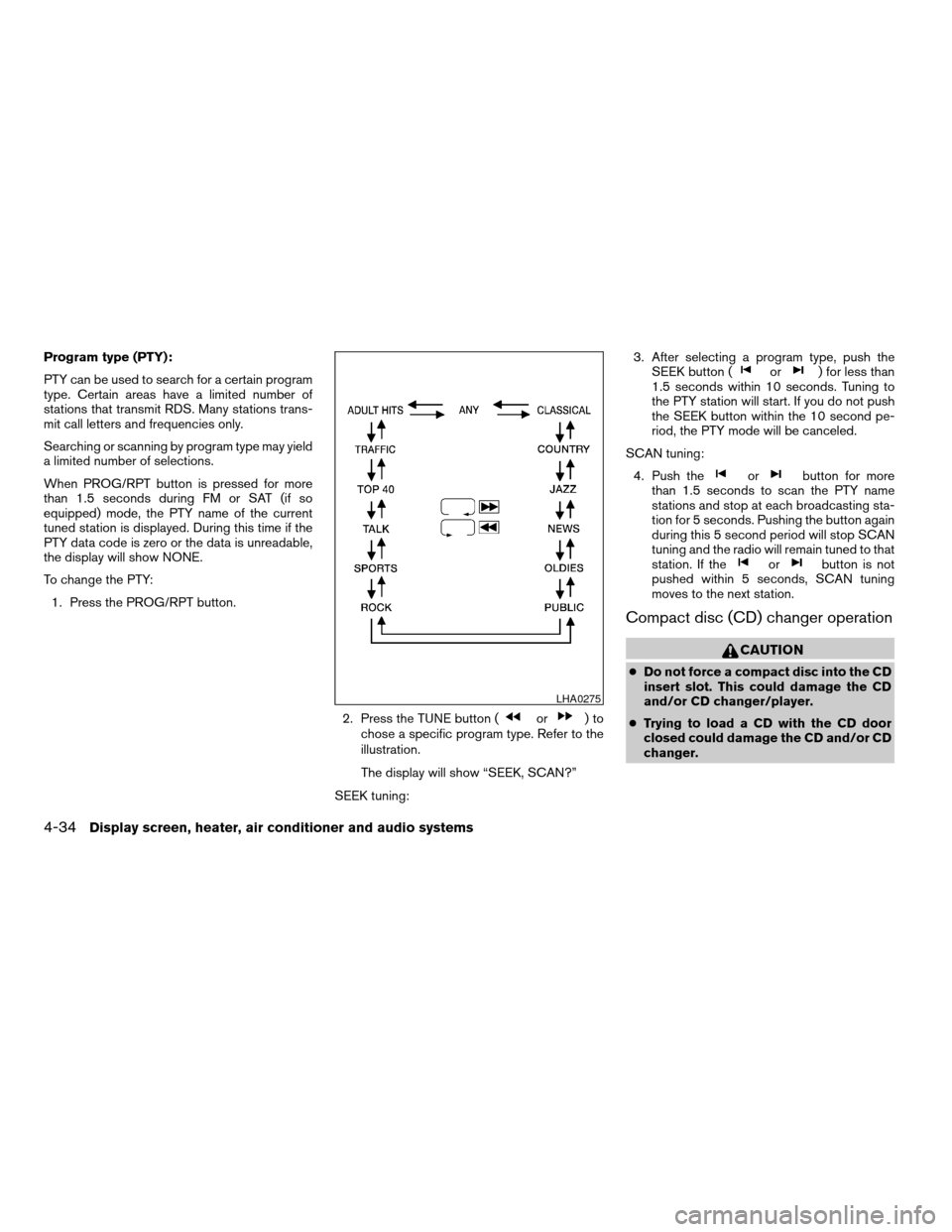
Program type (PTY):
PTY can be used to search for a certain program
type. Certain areas have a limited number of
stations that transmit RDS. Many stations trans-
mit call letters and frequencies only.
Searching or scanning by program type may yield
a limited number of selections.
When PROG/RPT button is pressed for more
than 1.5 seconds during FM or SAT (if so
equipped) mode, the PTY name of the current
tuned station is displayed. During this time if the
PTY data code is zero or the data is unreadable,
the display will show NONE.
To change the PTY:
1. Press the PROG/RPT button.
2. Press the TUNE button (
or)to
chose a specific program type. Refer to the
illustration.
The display will show “SEEK, SCAN?”
SEEK tuning:3. After selecting a program type, push the
SEEK button (
or) for less than
1.5 seconds within 10 seconds. Tuning to
the PTY station will start. If you do not push
the SEEK button within the 10 second pe-
riod, the PTY mode will be canceled.
SCAN tuning:
4. Push the
orbutton for more
than 1.5 seconds to scan the PTY name
stations and stop at each broadcasting sta-
tion for 5 seconds. Pushing the button again
during this 5 second period will stop SCAN
tuning and the radio will remain tuned to that
station. If the
orbutton is not
pushed within 5 seconds, SCAN tuning
moves to the next station.
Compact disc (CD) changer operation
CAUTION
cDo not force a compact disc into the CD
insert slot. This could damage the CD
and/or CD changer/player.
cTrying to load a CD with the CD door
closed could damage the CD and/or CD
changer.
LHA0275
4-34Display screen, heater, air conditioner and audio systems
ZREVIEW COPYÐ2005 Armada(wzw)
Owners ManualÐUSA_English(nna)
11/18/04Ðtbrooks
X
Page 203 of 352

Turn the ignition key to the ACC or ON position
and insert the compact disc into the slot with the
label side facing up. The compact disc will be
guided automatically into the slot and start play-
ing. To insert the disc, first push the LOAD button.
If the radio is already operating, it will automati-
cally turn off and the compact disc will play.
If the system has been turned off while the com-
pact disc was playing, pushing the
POWER/VOLUME control knob will start the
compact disc.
LOAD button:
To insert a CD in the CD changer, push the LOAD
button for less than 1.5 seconds. Select the
loading slot by pushing the CD insert select
button (1 – 6) , then insert the CD.
To insert 6 CDs to the CD changer, push the
LOAD button for more than 1.5 seconds.
The slot numbers (1 – 6) will illuminate on the
display when CDs are loaded into the changer.
CD button:
When the CD button is pushed with the system
off and the compact disc loaded, the system will
turn on and the compact disc will start to play.When the CD button is pushed with the compact
disc loaded with the radio playing, the radio will
automatically be turned off and the compact disc
will start to play.
REW (Rewind) , FF (Fast
Forward):
When the
(rewind) or(fast forward)
button is pushed while a compact disc is playing,
the compact disc will play while rewinding or fast
forwarding . When the button is released, the
compact disc will return to normal play speed.
When the CD button is pushed with the system
off and the compact disc loaded, the system will
turn on and the compact disc will start to play.
When the CD button is pushed with the compact
disc loaded with the tape or the radio playing, the
tape or radio will automatically be turned off and
the compact disc will start to play.
SEEK/TRACK:
When the
button is pushed for less than 1.5
seconds while a compact disc is playing, the
track being played returns to its beginning. Push
several times to skip back through tracks. The
compact disc will go back the number of times
the button is pushed.
When the
button is pushed for less than 1.5
seconds while the compact disc is playing, thenext track will start to play from its beginning.
Push several times to skip through tracks. The
compact disc will advance the number of times
the button is pushed. (When the last track on the
compact disc is skipped through, the first track
will be played.)
When pushing the
orbutton for more
than 1.5 seconds, each track will play for about
10 seconds. To stop playing, push
the
button again.
CD select buttons:
To play another CD that has been loaded, push a
CD select button (1 – 6) .
REPEAT (RPT):
When the PROG/RPT play button is pushed
while the compact disc is played, the play pattern
can be changed as follows:
ALL DISC RPT!1 DISC RPT!1 TRACK RPT
!ALL DISC RDM!1 DISC RDM!ALL DISC
RPT
ALL DISC RPT: All discs loaded will be repeated.
1 DISC RPT: The disc that is currently playing will
be repeated.
1 TRACK RPT: The track that is currently playing
will be repeated
ALL DISC RDM: Tracks from all discs will be
played randomly
Display screen, heater, air conditioner and audio systems4-35
ZREVIEW COPYÐ2005 Armada(wzw)
Owners ManualÐUSA_English(nna)
11/18/04Ðtbrooks
X
Page 204 of 352

1 DISC RDM: Tracks from the disc that is cur-
rently playing will be played randomly
REAR AV:
Pushing the REAR AV button for less than 1.5
seconds turns the rear seat audio controller on.
REAR CONT ON will display. Pushing it again
will turn the rear seat audio controller off. REAR
CONT OFF will display. If the vehicle is not
equipped with a rear seat audio controller, the
display will show “REAR AV N/A”.
If a DVD is loaded in the DVD entertainment
system (if so equipped) , pushing the REAR AV
button for more than 1.5 seconds will turn the
DVD player on.
When the REAR AV button is pushed for more
than 1.5 seconds with a DVD loaded and another
audio source playing, the other source will auto-
matically be turned off and the DVD will start to
play.
(SPEAKER CONTROL) button:
Push this button to turn the rear speakers off and
headphones on. Push this button again to turn
rear seat speakers back on and headphones off.
CD EJECT:
Current disc:
cPress the slot number (1 – 6) for the desired
disc, then press the
button. The com-
pact disc will be ejected. If the disc is not
removed within 15 seconds, the disc will
reload (except 3.1 in [8 cm] diameter com-
pact discs) .
All discs:
cPress and hold the
button for more
than 1.5 seconds. The compact discs will be
ejected one by one. If a disc is not removed
within 15 seconds, or the
button is
pressed again during the eject sequence,
the entire disc eject sequence will be can-
celed.
When this button is pushed while the compact
disc is being played, the compact disc will eject
and the last source will be played.
CD IN indicator:
The slot numbers (1 – 6) will illuminate if CDs
have been loaded into the changer.AUX jack (if so equipped)
The AUX jack
s1is located below the air condi-
tioner controls. The AUX audio input jack accepts
any standard analog audio input such as from a
portable cassette tape player, MP3 player or
laptop computers.
Press the AUX button to play a compatible device
when it is plugged into the AUX jack.
LHA0408
4-36Display screen, heater, air conditioner and audio systems
ZREVIEW COPYÐ2005 Armada(wzw)
Owners ManualÐUSA_English(nna)
11/18/04Ðtbrooks
X
Page 206 of 352

MODE select switch
Push the mode select switch to change the mode
in the following sequence: PRESET A, PRESET
B or PRESET C radio stations, CD and DVD (if so
equipped) .
Volume control switch
Push the volume control switch up or down to
increase or decrease the volume.
Tuning
Memory change (radio):
Push the tuning switch (
or) for less
than 1.5 seconds to change the radio frequency.
Seek tuning (radio):
Push the tuning switch (
or) for
more than 1.5 seconds to seek the next or previ-
ous radio station.
FF, REW:
Push the tuning switch (
or) for less
1.5 seconds to return to the beginning of the
present program or skip to the next program.
Push several times to skip back or skip through
programs.To stop the FF or REW function, press the
orbutton for less than 1.5 seconds again.
When playing a CD in the CD changer (if so
equipped) , push the tuning switch (
or) for more than 1.5 seconds to change
between discs when multiple CDs are loaded.
4-38Display screen, heater, air conditioner and audio systems
ZREVIEW COPYÐ2005 Armada(wzw)
Owners ManualÐUSA_English(nna)
11/18/04Ðtbrooks
X
Page 341 of 352
10 Index
4WD warning light...............2-15
A
Active head restraint...............1-9
Adjusting pedal position............3-16
Air bag (See supplemental restraint
system).....................1-56
Air bag system
Front (See supplemental front impact
air bag system)...............1-63
Air bag warning labels.............1-70
Air bag warning light...........1-71, 2-16
Air cleaner housing filter............8-16
Air conditioner
Air conditioner operation..........4-18
Air conditioner service...........4-27
Air conditioner specification label.....9-11
Air conditioner system refrigerant and
lubrication recommendations........9-6
Heater and air conditioner
controls................4-15, 4-24
Rear seat air conditioner..........4-27
Servicing air conditioner..........4-27
Air flow charts..................4-19
Alarm system
(See vehicle security system).........2-20
Anchor point locations.............1-45
Antenna.....................4-40
Anti-lock brake system (ABS).........5-25
Anti-lock brake warning light..........2-13Audible reminders................2-19
Audio system..................4-28
AM-FM-SAT radio with compact disc (CD)
changer...................4-31
Compact Disc (CD) changer.......4-34
Radio....................4-28
Rear audio controls.............4-39
Steering wheel audio control switch. . . .4-37
Autolight switch.................2-25
Automatic
Automatic drive positioner.........3-19
Automatic power window switch.....2-46
Automatic transmission position indicator
light.....................2-17
Driving with automatic transmission.....5-9
Transmission selector lever lock release. .5-13
Automatic anti-glare inside mirror.......3-18
Automatic transmission fluid temperature
gauge.......................2-7
AUX jack.....................4-36
B
Back door.....................3-9
Back door release...............3-12
Battery......................8-13
Charge warning light............2-14
Battery replacement
(See remote keyless entry system)......8-24
Before starting the engine............5-8
Belts (See drive belts).............8-14Booster seats..................1-50
Brake
Anti-lock brake system (ABS).......5-25
Brake booster................8-21
Brake fluid..................8-11
Brake light (See stop light).........8-27
Brake pedal.................8-20
Brake system................5-24
Brake warning light.............2-13
Brake wear indicators........2-19, 8-20
Parking brake check............8-20
Parking brake operation..........5-14
Self-adjusting brakes............8-20
Break-in schedule................5-16
Brightness control
Instrument panel..............2-27
Brightness/Contrast button..........4-12
Control panel buttons...........4-12
Bulb check/instrument panel..........2-12
Bulb replacement................8-27
C
Capacities and recommended
fuel/lubricants...................9-2
Captain’s chair adjustment (2nd row)......1-5
Car phone or CB radio.............4-50
Cargo light...................2-52
Cargo net....................2-43
Cargo (See vehicle loading information) . . .9-12
CD care and cleaning.............4-37
ZREVIEW COPYÐ2005 Armada(wzw)
Owners ManualÐUSA_English(nna)
12/02/04Ðdebbie
X
Page 342 of 352
CD changer (See audio system)........4-34
Check engine indicator light
(See malfunction indicator lamp).......2-17
Child restraint with top tether strap......1-44
Child restraints.......1-17, 1-18, 1-25, 1-42
Precautions on child restraints . . .1-25, 1-50
Top tether strap anchor point locations . .1-45
Child safety rear door lock............3-5
Chimes, audible reminders...........2-19
Cigarette lighter.................2-32
Cleaning exterior and interior..........7-2
Clock......................4-32
(models with navigation system)......4-10
Clock set
Control panel buttons...........4-10
Cold weather driving..............5-28
Compass display.................2-8
Console box...............2-34, 2-40
Control panel buttons..............4-2
Controls
Audio controls (steering wheel)......4-37
Heater and air conditioner
controls................4-15, 4-24
Rear audio controls.............4-39
Rear seat air conditioner..........4-27
Coolant
Capacities and recommended
fuel/lubricants.................9-2
Changing engine coolant..........8-8
Checking engine coolant level........8-7
Engine coolant temperature gauge.....2-5
Corrosion protection...............7-5
Cruise control..................5-14
Cup holders...................2-38
Curtain side-impact and rollover air bag . . .1-68D
Daytime running light system
(Canada only)..................2-26
Defroster switch
Rear window and outside mirror defroster
switch....................2-24
Digital video disc DVD.............4-40
Dimensions and weights.............9-8
Display controls (see control panel buttons) . .4-2
Door locks....................3-3
Door open warning light............2-14
Drive belts....................8-14
Drive positioner, Automatic...........3-19
Driving
Cold weather driving............5-28
Driving with automatic transmission.....5-9
Precautions when starting and driving . . .5-2
E
Economy - fuel.................5-16
Emission control information label.......9-10
Emission control system warranty.......9-26
Engine
Before starting the engine..........5-8
Capacities and recommended
fuel/lubricants.................9-2
Changing engine coolant..........8-8
Changing engine oil.............8-9
Changing engine oil filter..........8-10
Checking engine coolant level........8-7
Checking engine oil level..........8-8
Engine compartment check locations. . . .8-7Engine coolant temperature gauge.....2-5
Engine cooling system............8-7
Engine oil...................8-8
Engine oil and oil filter recommendation . .9-4
Engine oil viscosity..............9-5
Engine serial number............9-10
Engine specifications.............9-7
Starting the engine..............5-9
Engine oil pressure gauge............2-6
English/Metric button..............4-10
Control panel buttons...........4-10
ENTER button..................4-2
Enter button
Control panel buttons............4-2
Event data recorders..............9-27
Exhaust gas (Carbon monoxide)........5-2
Eyeglass case..................2-35
F
Flashers
(See hazard warning flasher switch)......2-28
Flat tire......................6-2
Floor mat positioning aid.............7-4
Fluid
Brake fluid..................8-11
Capacities and recommended
fuel/lubricants.................9-2
Engine coolant................8-7
Engine oil...................8-8
Power steering fluid.............8-11
Window washer fluid............8-12
F.M.V.S.S. certification label..........9-10
Fog light switch.................2-28
10-2
ZREVIEW COPYÐ2005 Armada(wzw)
Owners ManualÐUSA_English(nna)
12/02/04Ðdebbie
X
Page 345 of 352

Precautions
Maintenance precautions..........8-5
On-pavement and off-road driving
precautions..................5-3
Precautions on child restraints . . .1-25, 1-50
Precautions on seat belt usage......1-15
Precautions on supplemental restraint
system....................1-56
Precautions when starting and driving . . .5-2
Pre-tensioner seat belt system.........1-69
PREV button...................4-3
Prev button
Control panel buttons............4-3
Programmable features...........4-3, 4-7
Push starting...................6-9
R
Radio
Car phone or CB radio...........4-50
Compact Disc (CD) changer.......4-34
Rear audio controls.............4-39
Steering wheel audio control switch. . . .4-37
Readiness for inspection maintenance (I/M)
test........................9-26
Rear audio controls...............4-39
Rear center seat belt..............1-21
Rear power windows..............2-46
Rear seat air conditioner............4-27
Rear sonar system off switch.........2-30
Rear view monitor................4-12
Rear window and outside mirror defroster
switch......................2-24
Rear window wiper and washer switches . . .2-23Recorders
Event data..................9-27
Refrigerant recommendation..........9-6
Registering your vehicle in another country. . .9-9
Remote controller (See NISSAN mobile
entertainment system).............4-42
Remote keyless entry system..........3-5
Reporting safety defects (US only)......9-26
Roof rack....................2-44
S
Safety
Child safety rear door lock..........3-5
Child seat belts...........1-25, 1-50
Reporting safety defects (US only). . . .9-26
Screen (See NISSAN mobile entertainment
system).....................4-42
Seat adjustment
Front manual seat adjustment........1-2
Front power seat adjustment........1-4
Second row bench seats..........1-7
Second row captain’s chair.........1-5
Seat belt
Child safety.................1-17
Infants and small children.........1-18
Injured Person................1-19
Larger children...............1-18
Precautions on seat belt usage......1-15
Pregnant women..............1-19
Pre-tensioner seat belt system.......1-69
Rear center seat belt............1-21
Seat belt extenders.............1-24
Seat belt maintenance...........1-25
Seat belts..................1-15Shoulder belt height adjustment......1-24
Three-point type with retractor.......1-19
Seat belt warning light.............2-16
Seatback pockets................2-36
Seats
Adjustment..................1-2
Automatic drive positioner.........3-19
Front seats..................1-2
Heated seats................2-29
Manual front seat adjustment........1-2
Second row captain’s chair adjustment.....1-5
Security indicator light..........1-65, 2-18
Security system (Nissan vehicle immobilizer
system) , engine start.........2-21, 3-2, 5-8
Self-adjusting brakes..............8-20
Service manual order form...........9-28
Servicing air conditioner............4-27
Setting button
SETTING button...............4-7
Shift lock release................5-13
Shifting
Automatic transmission...........5-11
Shoulder belt height adjustment........1-24
Side air bag system (See supplemental side air
bag, curtain and rollover air bag systems). . .1-68
Spark plug replacement............8-15
Speedometer...................2-4
SRS warning label...............1-70
Starting
Before starting the engine..........5-8
Jump starting.................6-7
Precautions when starting and driving . . .5-2
Push starting.................6-9
Starting the engine..............5-9
Startup Screen
Control panel buttons............4-3
10-5
ZREVIEW COPYÐ2005 Armada(wzw)
Owners ManualÐUSA_English(nna)
12/02/04Ðdebbie
X