mirror NISSAN ARMADA 2008 1.G User Guide
[x] Cancel search | Manufacturer: NISSAN, Model Year: 2008, Model line: ARMADA, Model: NISSAN ARMADA 2008 1.GPages: 456, PDF Size: 5.89 MB
Page 178 of 456

3. Adjust the driver’s seat, accelerator and
brake pedals, and outside mirrors to the
desired positions by manually operating
each adjusting switch. For additional infor-
mation, see “Seats” in the “Safety—Seats,
seat belts and supplemental restraint sys-
tem” section and “Pedal position adjust-
ment” and “Outside mirrors” earlier in this
section.
During this step, do not turn the ignition to
any position other than ON.
4. Push the SET switch and, within 5 seconds,
push the memory switch (1 or 2) fully for at
least 1 second.
The indicator light for the pushed memory
switch will come on and stay on for approxi-
mately 5 seconds after pushing the switch.
After the indicator light goes off, the se-
lected positions are stored in the selected
memory (1 or 2) .
If a new memory is stored in the same memory
switch, the previous memory will be deleted.
Linking a keyfob to a stored memory
position
Each keyfob can be linked to a stored memory
position (memory switch 1 or 2) with the follow-
ing procedure.1. Follow the steps for storing a memory posi-
tion.
2. While the indicator light for the memory
switch being set is illuminated for 5 sec-
onds, press the
button on the keyfob.
The indicator light will blink. After the indica-
tor light goes off, the keyfob is linked to that
memory setting.
With the key removed from the ignition switch,
press the
button on the keyfob. The driv-
er’s seat, accelerator and brake pedals, and out-
side mirrors will move to the memorized position.
NOTE:
If a new memory position is saved to the
memory switch, the keyfob automatically
re-links.
Confirming memory storage
cTurn the ignition ON and push the SET
switch. If the main memory has not been
stored, the indicator light will come on for
approximately 0.5 seconds. When the
memory has stored the position, the indica-
tor light will stay on for approximately 5 sec-
onds.
cIf the battery cable is disconnected, or if the
fuse opens, the memory storage function will
be canceled and must be restarted before astored memory position can be set again.
Drive the vehicle over 25 MPH (40 km/h) to
restart the memory storage function. You
can also restart the memory storage function
using the following procedure.
1. Connect the battery cable or replace the
fuse.
2. Open and close the driver’s door more than
two times with the ignition key in the LOCK
position.
Once the memory storage function has been
restarted, you can store a memory position.
See “Memory storage function” earlier in this
section.
Selecting the memorized position
Set the automatic transmission selector lever to
the P (Park) position, then:
cWithin 45 seconds of opening the driver’s
door, push the memory switch (1 or 2) fully
for at least 1 second, or
cTurn the ignition switch to the ON position
and push the memory switch (1 or 2) fully for
at least 1 second.
The driver’s seat, accelerator and brake pedals,
and outside mirrors will move to the memorized
position with the indicator light blinking, and then
the light will stay on for approximately 5 seconds.
3-32Pre-driving checks and adjustments
ZREVIEW COPYÐ2008 Armada(wzw)
Owners ManualÐUSA_English(nna)
03/05/07Ðarosenma
X
Page 325 of 456

START: (4)
This position starts the engine. As soon as the
engine has started, release the key. It automati-
cally returns to the ON position.
NISSAN VEHICLE IMMOBILIZER
SYSTEM
The NISSAN Vehicle Immobilizer System will not
allow the engine to start without the use of the
registered key.
If the engine fails to start using a registered key
(for example, when interference is caused by
another registered key, an automated toll road
device or automatic payment device on the key
ring) , restart the engine using the following pro-
cedures:
1. Leave the ignition switch in the ON position
for approximately 5 seconds.
2.
Turn the ignition switch to the OFF or LOCK
position, and wait approximately 10 seconds.
3. Repeat steps 1 and 2.
4. Restart the engine while holding the device
(which may have caused the interference)
separate from the registered key.
If the no start condition re-occurs, NISSAN rec-
ommends placing the registered key on a separate
key ring to avoid interference from other devices.
cMake sure the area around the vehicle is
clear.
cCheck fluid levels such as engine oil, cool-
ant, brake fluid, and window washer fluid as
frequently as possible, or at least whenever
you refuel.
cCheck that all windows and lights are clean.
cVisually inspect tires for their appearance
and condition. Also check tires for proper
inflation.
cLock all doors.
cPosition seat and adjust head restraints.
cAdjust inside and outside mirrors.
cFasten seat belts and ask all passengers to
do likewise.
cCheck the operation of warning lights when
the key is turned to the ON (3) position. See
“Warning/indicator lights and audible re-
minders” in the “Instruments and controls”
section of this manual.1. Apply the parking brake.
2. Move the shift selector lever to P (Park) or N
(Neutral) . P (Park) is recommended.
The shift selector lever cannot be
moved out of P (Park) and into any of
the other gear positions if the ignition
key is turned to the OFF position or if
the key is removed from the ignition
switch.
The starter is designed not to operate if
the shift selector lever is in any of the
driving positions.
3. Crank the enginewith your foot off the
accelerator pedalby turning the ignition
key to START. Release the key when the
engine starts. If the engine starts, but fails to
run, repeat the above procedure.
cIf the engine is very hard to start in ex-
tremely cold weather or when restarting,
depress the accelerator pedal a little (ap-
proximately 1/3 to the floor) and hold it
and then crank the engine. Release the
key and the accelerator pedal when the
engine starts.
cIf the engine is very hard to start because
it is flooded, depress the accelerator
pedal all the way to the floor and hold it.
Crank the engine for 5-6 seconds. After
BEFORE STARTING THE ENGINE STARTING THE ENGINE
Starting and driving5-11
ZREVIEW COPYÐ2008 Armada(wzw)
Owners ManualÐUSA_English(nna)
03/05/07Ðarosenma
X
Page 398 of 456
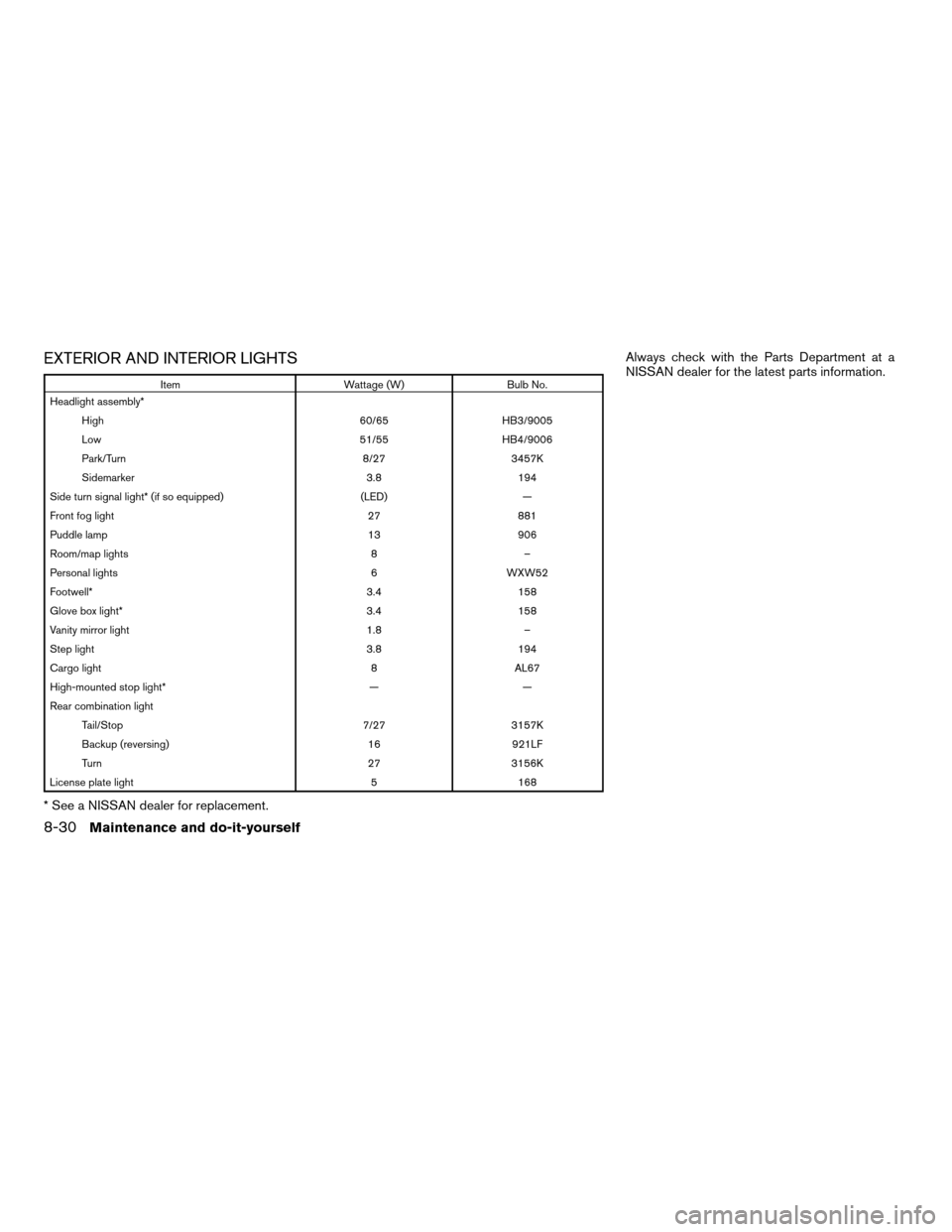
EXTERIOR AND INTERIOR LIGHTS
Item Wattage (W) Bulb No.
Headlight assembly*
High 60/65 HB3/9005
Low 51/55 HB4/9006
Park/Turn 8/27 3457K
Sidemarker 3.8 194
Side turn signal light* (if so equipped) (LED) —
Front fog light 27 881
Puddle lamp 13 906
Room/map lights 8 –
Personal lights 6 WXW52
Footwell* 3.4 158
Glove box light* 3.4 158
Vanity mirror light 1.8 –
Step light 3.8 194
Cargo light 8 AL67
High-mounted stop light* — —
Rear combination light
Tail/Stop 7/27 3157K
Backup (reversing) 16 921LF
Turn 27 3156K
License plate light 5 168
* See a NISSAN dealer for replacement.Always check with the Parts Department at a
NISSAN dealer for the latest parts information.
8-30Maintenance and do-it-yourself
ZREVIEW COPYÐ2008 Armada(wzw)
Owners ManualÐUSA_English(nna)
03/05/07Ðarosenma
X
Page 400 of 456

Use a cloths1to protect the housing.Use a cloth
s1to protect the housing. Use a cloths1to protect the housing.
Room/map lights
LDI0389
Personal lights
LDI0364
Vanity mirror
LDI0385
8-32Maintenance and do-it-yourself
ZREVIEW COPYÐ2008 Armada(wzw)
Owners ManualÐUSA_English(nna)
03/05/07Ðarosenma
X
Page 438 of 456
Pre-towing tips
cBe certain your vehicle maintains a level
position when a loaded and/or unloaded
trailer is hitched. Do not drive the vehicle if it
has an abnormal nose-up or nose-down
condition; check for improper tongue load,
overload, worn suspension or other possible
causes of either condition.
cAlways secure items in the trailer to prevent
load shift while driving.
cKeep the cargo load as low as possible in
the trailer to keep the trailer center of gravity
low.
cLoad the trailer so approximately 60% of the
trailer load is in the front half and 40% is in
the back half. Also make sure the load is
balanced side to side.
cCheck your hitch, trailer tire pressure, ve-
hicle tire pressure, trailer light operation, and
trailer wheel lug nuts every time you attach a
trailer to the vehicle.
cBe certain your rearview mirrors conform to
all federal, state or local regulations. If not,
install any mirrors required for towing before
driving the vehicle.cDetermine the overall height of the vehicle
and trailer so the required clearance is
known.
Trailer towing tips
In order to gain skill and an understanding of the
vehicle’s behavior, you should practice turning,
stopping and backing up in an area which is free
from traffic. Steering stability and braking perfor-
mance will be somewhat different than under
normal driving conditions.
cAlways secure items in the trailer to prevent
load shift while driving.
cLock the trailer hitch coupler with a pin or
lock to prevent the coupler from inadvert-
ently becoming unlatched.
cAvoid abrupt starts, acceleration or stops.
cAvoid sharp turns or lane changes.
cAlways drive your vehicle at a moderate
speed.
cWhen backing up, hold the bottom of the
steering wheel with one hand. Move your
hand in the direction in which you want the
trailer to go. Make small corrections and
back up slowly. If possible, have someone
guide you when you are backing up.Always block the wheels on both vehicle and
trailer when parking. Parking on a slope is not
recommended; however, if you must do so:
CAUTION
If you move the shift selector lever to the P
(Park) position before blocking the
wheels and applying the parking brake,
transmission damage could occur.
1. Apply and hold the brake pedal.
2. Have someone place blocks on the downhill
side of the vehicle and trailer wheels.
3. After the wheel blocks are in place, slowly
release the brake pedal until the blocks ab-
sorb the vehicle load.
4. Apply the parking brake.
5. Shift the transmission into P (Park) .
6. Make sure the
indicator light (if so
equipped) indicates the transfer case is in
4H, 4L, or 2H and that the ATP light is off. If
the
indicator light is flashing, or the
ATP light is ON, make sure the transmission
is in P (Park) (AT) and turn the 4WD switch
to 2WD or 4H. See9Automatic transmission
park warning light9in the9Instruments and
controls9section and9Using four wheel
drive9in the9Starting and driving9section.
7. Turn off the engine.
9-26Technical and consumer information
ZREVIEW COPYÐ2008 Armada(wzw)
Owners ManualÐUSA_English(nna)
03/05/07Ðarosenma
X
Page 447 of 456

10 Index
4WD warning light...............2-16
A
Active Head Restraint..............1-9
Adjusting pedal position............3-27
Air bag (See supplemental restraint
system).....................1-48
Air bag system
Front (See supplemental front impact
air bag system)...............1-55
Air bag warning labels.............1-63
Air bag warning light...........1-63, 2-18
Air cleaner housing filter............8-17
Air conditioner
Air conditioner service...........4-41
Air conditioner specification label.....9-12
Air conditioner system refrigerant and
oil recommendations.............9-7
Heater and air conditioner controls. . . .4-38
Rear seat air conditioner..........4-40
Servicing air conditioner..........4-41
Alarm system
(See vehicle security system).........2-27
Anchor point locations.............1-31
Antenna.....................4-77
Anti-lock brake warning light......2-13, 2-14
Anti-lock Braking System (ABS)........5-28
Audible reminders................2-20
Audio system..................4-41
Compact Disc (CD) changer.......4-52Compact disc (CD) player.........4-60
Audio System
CompactFlash (CF) player.........4-62
Audio system
FM/AM/SAT radio with compact disc (CD)
changer...................4-49
FM/AM/SAT radio with compact disc (CD)
player....................4-57
Audio System
Music Box hard-disk drive audio
system....................4-64
Audio system
Radio....................4-41
Rear audio controls.............4-77
Audio System
Settings................4-49, 4-57
Audio system
Steering wheel audio control switch. . . .4-75
Autolight switch.................2-33
Automatic
Automatic drive positioner.........3-31
Automatic power window switch.....2-55
Automatic transmission position indicator
light.....................2-27
Driving with automatic
transmission.............5-12, 5-13
Transmission selector lever lock
release....................5-15
Automatic anti-glare inside mirror.......3-29
Automatic transmission fluid temperature
gauge.......................2-8AUX jack.................4-55, 4-62
B
Battery......................8-13
Charge warning light............2-15
Before starting the engine...........5-11
Belt (See drive belt)..............8-15
Block heater
Engine....................5-34
BluetoothThands-free phone
system..................4-94, 4-108
Booster seats..................1-43
Brake
Anti-lock Braking System (ABS)......5-28
Brake fluid..................8-12
Brake light (See stop light).........8-30
Brake system................5-27
Brake warning light.............2-14
Brake wear indicators........2-20, 8-22
Parking brake operation..........5-16
Self-adjusting brakes............8-22
Brakes......................8-22
Break-in schedule................5-19
Brightness control
Instrument panel..............2-35
Brightness/contrast button.......4-16, 4-34
Bulb check/instrument panel..........2-13
Bulb replacement................8-30
ZREVIEW COPYÐ2008 Armada(wzw)
Owners ManualÐUSA_English(nna)
03/05/07Ðarosenma
X
Page 448 of 456

C
Capacities and recommended
fuel/lubricants...................9-2
Captain’s chair adjustment (2nd row)......1-5
Car phone or CB radio.............4-93
Cargo light...................2-60
Cargo (See vehicle loading information) . . .9-13
CD care and cleaning.............4-73
CD changer (See audio system)........4-52
CD player (See audio system).........4-60
Child restraint with top tether strap......1-31
Child restraints.......1-18, 1-19, 1-26, 1-28
Precautions on child
restraints............1-26, 1-37, 1-43
Top tether strap anchor point locations . .1-31
Child safety rear door lock............3-6
Chimes, audible reminders...........2-20
Cigarette lighter.................2-41
Cleaning exterior and interior..........7-2
Clock...................4-50, 4-58
(models with navigation system) . .4-11, 4-28
Clock set.................4-11, 4-28
C.M.V.S.S. certification label..........9-11
Cold weather driving..............5-32
Compact disc (CD) player...........4-60
CompactFlash (CF) player...........4-62
Compass display.................2-9
Console box...............2-42, 2-49
Control panel buttons
Brightness/contrast
button.............4-16, 4-17, 4-34
Enter button..............4-2, 4-17
Setting button.............4-9, 4-26
Startup screen...............4-20Without navigation system..........4-2
Controls
Audio controls (steering wheel)......4-75
Heater and air conditioner controls. . . .4-38
Rear audio controls.............4-77
Rear seat air conditioner..........4-40
Coolant
Capacities and recommended
fuel/lubricants.................9-2
Changing engine coolant..........8-8
Checking engine coolant level........8-7
Engine coolant temperature gauge.....2-6
Corrosion protection...............7-5
Cruise control..................5-17
Cup holders...................2-46
Curtain side-impact and rollover air bag . . .1-60
D
Daytime running light system
(Canada only)..................2-34
Defroster switch
Rear window and outside mirror defroster
switch....................2-31
Digital video disc DVD.............4-78
Dimensions and weights.............9-9
Dimmer switch for instrument panel......2-35
Display controls
(see control panel buttons)........4-2, 4-17
Distance to empty.............4-5, 4-21
Door locks....................3-4
Drive belt....................8-15
Drive positioner, Automatic...........3-31
Driving
Cold weather driving............5-32Driving with automatic
transmission.............5-12, 5-13
Precautions when starting and driving . . .5-2
E
Economy - fuel.................5-19
Emission control information label.......9-11
Emission control system warranty.......9-30
Engine
Before starting the engine.........5-11
Block heater.................5-34
Capacities and recommended
fuel/lubricants.................9-2
Changing engine coolant..........8-8
Changing engine oil.............8-9
Changing engine oil filter..........8-10
Checking engine coolant level........8-7
Checking engine oil level..........8-8
Engine compartment check locations. . . .8-6
Engine coolant temperature gauge.....2-6
Engine cooling system............8-7
Engine oil...................8-8
Engine oil and oil filter
recommendation...............9-6
Engine oil viscosity..............9-6
Engine serial number............9-11
Engine specifications.............9-8
Starting the engine.............5-11
Engine oil pressure gauge............2-7
Engine oil pressure low/engine coolant
temperature high warning light.........2-15
Enter button................4-2, 4-17
Event data recorders..............9-32
Exhaust gas (Carbon monoxide)........5-2
10-2
ZREVIEW COPYÐ2008 Armada(wzw)
Owners ManualÐUSA_English(nna)
03/05/07Ðarosenma
X
Page 449 of 456

Eyeglass case..................2-44
F
Flashers
(See hazard warning flasher switch)......2-36
Flat tire......................6-2
Floor mat positioning aid.............7-4
Fluid
Brake fluid..................8-12
Capacities and recommended
fuel/lubricants.................9-2
Engine coolant................8-7
Engine oil...................8-8
Power steering fluid.............8-11
Window washer fluid............8-12
F.M.V.S.S. certification label..........9-11
Fog light switch.................2-35
Front air bag system
(See supplemental restraint system).....1-55
Front seats....................1-2
Front sonar system............2-39, 5-31
Fuel
Capacities and recommended
fuel/lubricants.................9-2
Fuel economy................5-19
Fuel gauge..................2-7
Fuel octane rating..............9-4
Fuel recommendation............9-3
Fuel-filler door and cap...........3-25
Fuses......................8-22
Fusible links...................8-24G
Garage door opener, HomeLinkTUniversal
Transceiver...................2-60
Gascap.....................3-25
Gauge
Automatic transmission fluid temperature
gauge.....................2-8
Engine coolant temperature gauge.....2-6
Engine oil pressure gauge..........2-7
Fuel gauge..................2-7
Odometer...................2-5
Speedometer.................2-5
Tachometer..................2-6
Trip odometer.................2-5
Voltmeter...................2-8
General maintenance..............8-2
Glass hatch...................3-25
Glove box....................2-44
Glove box lock.................2-44
H
Hands-free phone system,
BluetoothT...............4-94, 4-108
Hazard warning flasher switch.........2-36
Head restraints..................1-8
Active Head Restraint............1-9
Headlight and turn signal switch........2-32
Headlight control switch............2-32
Headlights....................8-28
Headphones (See NISSAN mobile
entertainment system).............4-81
Heated seats..................2-37Heated steering wheel.............2-37
Heater
Heater and air conditioner controls. . . .4-38
Heater operation..............4-39
Rear seat air conditioner..........4-40
HomeLinkTUniversal Transceiver.......2-60
Hood release..................3-20
Hook
Luggage hook................2-50
Horn.......................2-36
I
Ignition switch..................5-8
Immobilizer system.........2-29, 3-3, 5-11
Important vehicle information label.......9-11
In-cabin microfilter...............8-17
Increasing fuel economy............5-19
Indicator lights and audible reminders
(See warning/indicator lights and audible
reminders)....................2-13
Inside automatic anti-glare mirror.......3-29
Instrument brightness control.........2-35
Instrument panel..............0-6, 2-2
Instrument panel dimmer switch........2-35
Intelligent Key system..............3-10
Key operating range............3-12
Key operation................3-13
Mechanical key................3-3
Remote keyless entry operation......3-16
Troubleshooting guide...........3-18
Warning signals...............3-18
Interior light...................2-58
ISOFIX child restraints.............1-28
10-3
ZREVIEW COPYÐ2008 Armada(wzw)
Owners ManualÐUSA_English(nna)
03/05/07Ðarosenma
X
Page 450 of 456

J
Jump starting...................6-8
K
Key ........................3-2
Keyfob battery replacement..........8-26
Keyless entry
With Intelligent Key system
(See Intelligent Key system)........3-16
Keyless entry system (See remote keyless
entry system)...................3-6
Keys, For Intelligent Key system.........3-2
L
Labels
Air conditioner specification label.....9-12
C.M.V.S.S. certification label........9-11
Emission control information label.....9-11
Engine serial number............9-11
F.M.V.S.S. certification label........9-11
Vehicle identification number (VIN)
plate.....................9-10
Warning labels (for SRS)..........1-63
LATCH (Lower Anchors and Tethers for
CHildren) System................1-28
License plate
Installing the license plate.........9-12
Lift gate.....................3-20
Lift gate release.................3-23Light
Air bag warning light.........1-63, 2-18
Brake light (See stop light).........8-30
Bulb check/instrument panel........2-13
Bulb replacement..............8-30
Charge warning light............2-15
Fog light switch...............2-35
Headlight and turn signal switch......2-32
Headlight control switch..........2-32
Headlights..................8-28
Interior light.................2-58
Light bulbs..................8-28
Low tire pressure warning light......2-16
Low washer fluid warning light.......2-26
Passenger air bag and status light.....1-57
Personal lights...............2-59
Security indicator light...........2-19
Warning/indicator lights and audible
reminders..................2-13
Lights
Map lights..................2-59
Lock
Child safety rear door lock..........3-6
Door locks..................3-4
Glove box lock...............2-44
Lift gate release...............3-23
Power door locks...............3-5
Low fuel warning light......2-16, 2-17, 2-26
Low tire pressure warning light........2-16
Low washer fluid warning light.........2-26
Luggage hook..................2-50
Luggage rack (see roof rack).........2-52
Luggage (See vehicle loading information) . .9-13
Luggage storage
(see vehicle loading information)........2-50M
Maintenance
Changing the maintenance
interval.................4-7, 4-24
Displaying the maintenance notice
reminder................4-8, 4-25
General maintenance............8-2
Inside the vehicle...............8-3
Maintenance precautions..........8-5
Outside the vehicle..............8-2
Resetting the maintenance interval . .4-8, 4-24
Seat belt maintenance...........1-26
Setting.................4-7, 4-24
Under the hood and vehicle.........8-4
Malfunction indicator light...........2-18
Manual front seat adjustment..........1-2
Manual vent windows..............2-56
Map lights....................2-59
Map pocket...................2-45
Meters and gauges................2-4
Instrument brightness control.......2-35
Mirror
Automatic anti-glare inside mirror.....3-29
Outside mirror control...........3-29
Outside mirrors...............3-29
Vanity mirror.................3-28
Music Box hard-disk drive audio system . . .4-64
N
NISSAN mobile entertainment system
(MES)......................4-78
10-4
ZREVIEW COPYÐ2008 Armada(wzw)
Owners ManualÐUSA_English(nna)
03/05/07Ðarosenma
X
Page 451 of 456

NISSAN vehicle immobilizer
system................2-29, 3-3, 5-11
NISSAN voice recognition system......4-117
O
Octane rating (See fuel octane rating).....9-4
Odometer.....................2-5
Oil
Capacities and recommended
fuel/lubricants.................9-2
Changing engine oil.............8-9
Changing engine oil filter..........8-10
Checking engine oil level..........8-8
Engine oil...................8-8
Engine oil and oil filter recommendation . .9-6
Engine oil pressure low/engine coolant
temperature high warning light.......2-15
Engine oil viscosity..............9-6
Outside mirror control.............3-29
Outside mirrors.................3-29
Overheat
If your vehicle overheats..........6-10
Owner’s manual order form..........9-33
Owner’s manual/service manual order
information....................9-33
P
Parking
Parking brake operation..........5-16
Parking/parking on hills...........5-26
Pedal position adjustment...........3-27
Personal lights.................2-59Phone, BluetoothThands-free
system..................4-94, 4-108
Power
Power door locks...............3-5
Power outlet.................2-40
Power rear windows............2-54
Power steering fluid.............8-11
Power steering system...........5-27
Power vent windows............2-55
Power windows...............2-53
Rear power windows............2-54
Precautions
Maintenance precautions..........8-5
On-pavement and off-road driving
precautions..................5-3
Precautions on child
restraints............1-26, 1-37, 1-43
Precautions on seat belt usage......1-16
Precautions on supplemental restraint
system....................1-48
Precautions when starting and driving . . .5-2
Pre-tensioner seat belt system.........1-62
Programmable features..........4-9, 4-26
Push starting..................6-10
R
Radio
Car phone or CB radio...........4-93
Compact Disc (CD) changer.......4-52
FM/AM/SAT radio with compact disc (CD)
changer...................4-49
FM/AM/SAT radio with compact disc (CD)
player....................4-57
Rear audio controls.............4-77Steering wheel audio control switch. . . .4-75
Readiness for inspection maintenance (I/M)
test........................9-31
Rear audio controls...............4-77
Rear center seat belt..............1-22
Rear power windows..............2-54
Rear seat air conditioner............4-40
Rear sonar system...............5-30
Rear sonar system off switch.........2-38
Rear view monitor................4-34
Rear window and outside mirror defroster
switch......................2-31
Rear window wiper and washer switches . . .2-31
Recorders
Event data..................9-32
Refrigerant recommendation..........9-7
Registering your vehicle in another country . .9-10
Remote controller (See NISSAN mobile
entertainment system).............4-80
Remote keyless entry system..........3-6
Reporting safety defects (US only)......9-31
Resetting the fuel economy........4-5, 4-22
Roof rack....................2-52
S
Safety
Child safety rear door lock..........3-6
Child seat belts........1-26, 1-37, 1-43
Reporting safety defects (US only). . . .9-31
Screen (See NISSAN mobile entertainment
system).....................4-80
Seat adjustment
Front manual seat adjustment........1-2
Front power seat adjustment........1-4
10-5
ZREVIEW COPYÐ2008 Armada(wzw)
Owners ManualÐUSA_English(nna)
03/05/07Ðarosenma
X