navigation system NISSAN ARMADA 2008 1.G Owner's Manual
[x] Cancel search | Manufacturer: NISSAN, Model Year: 2008, Model line: ARMADA, Model: NISSAN ARMADA 2008 1.GPages: 456, PDF Size: 5.89 MB
Page 269 of 456

NEXT CHAPTER/
PREVIOUS CHAPTER:
When the
(NEXT CHAPTER) button is
pressed while the DVD is being played, the pro-
gram next to the present one will start to play from
its beginning. Press several times to skip through
programs. The DVD will advance the number of
times the button is pressed. When the
(PREVIOUS CHAPTER) button is pressed, the
program being played returns to its beginning.
Press several times to skip back through pro-
grams. The DVD will go back the number of times
the button is pressed.
PAUSE:
When the
PAUSE button on the remote
control is pressed, the player will pause playing of
the media. In pause mode, the player will
show
on the upper left corner of the dis-
play until the player is changed to another mode.
STOP:
Press the STOP button once to stop playing the
media. The display will show
in the upper
left corner of the display for 4 seconds, and the
last disc position will be stored. When the PLAY
button is pressed again, it will resume at the
stored disc track and time position.If the STOP button is pressed again when the
player is already in Stop mode, it will reinitialize
the pointer to the beginning of the disc. In effect it
will ignore the last stored disc position and upon
receipt of the next play message it will begin at
the Title Menu, or at “the beginning of the disc”.
DISPLAY:
If the DISPLAY control is pressed for less than 2
seconds, the display menu will appear on the
screen.
cThe display menu will remain on the screen
for 10 seconds if no subsequent control
activations occur.
cUse NAVIGATION KEYS to navigate within
the display menu, and use ENTER to select
the item.
NAVIGATION KEYS:
If media is in activated MENU mode, the NAVI-
GATION KEYS will be used to navigate Up,
Down, Left, and Right within the menu.
If display control menu is on, the NAVIGATION
KEYS will be used to navigate Up, Down, Left,
and Right within the menu.
ENTER:
In MENU mode, press the ENTER button to se-
lect MENU items.In the display menu, press the ENTER button to
select items for modification, as per the on-
screen instructions.
MENU:
If the media is in PLAY mode and the MENU
button is pressed, the DVD menu will appear on
the screen. Use Navigation Keys to navigate
within the menu, and use ENTER to select the
item.
Press the MENU button again to return to PLAY
mode.
TITLE:
Press TITLE button to return the DVD media to
the “title” of the DVD.
Press TITLE button again to return to the previous
stop point and play.
BACK:
Press the BACK button to exit the current active
menu and return to the previous menu.
SUBTITLE:
Press the SUBTITLE button to call up subtitle
selection menu.
Repeatedly press the SUBTITLE button to cycle
through each available subtitle.
Monitor, climate, audio, phone and voice recognition systems4-89
ZREVIEW COPYÐ2008 Armada(wzw)
Owners ManualÐUSA_English(nna)
03/05/07Ðarosenma
X
Page 274 of 456
CAUTION
cKeep the antenna as far away as pos-
sible from the electronic control
modules.
cKeep the antenna wire more than 8 in
(20 cm) away from the electronic con-
trol system harnesses. Do not route the
antenna wire next to any harness.
cAdjust the antenna standing-wave ratio
as recommended by the manufacturer.
cConnect the ground wire from the CB
radio chassis to the body.
cFor details, consult a NISSAN dealer.
WARNING
cUse a phone after stopping your vehicle
in a safe location. If you have to use a
phone while driving, exercise extreme
caution at all times so full attention may
be given to vehicle operation.
cIf you are unable to devote full attention
to vehicle operation while talking on
the phone, pull off the road to a safe
location and stop your vehicle before
doing so.
CAUTION
To avoid discharging the vehicle battery,
use a phone after starting the engine.
BLUETOOTHTHANDS-FREE PHONE
SYSTEM WITHOUT NAVIGATION
SYSTEM (if so equipped)
4-94Monitor, climate, audio, phone and voice recognition systems
ZREVIEW COPYÐ2008 Armada(wzw)
Owners ManualÐUSA_English(nna)
03/05/07Ðarosenma
X
Page 288 of 456
WARNING
cUse a phone after stopping your vehicle
in a safe location. If you have to use a
phone while driving, exercise extreme
caution at all times so full attention may
be given to vehicle operation.
cIf you are unable to devote full attention
to vehicle operation while talking on
the phone, pull off the road to a safe
location and stop your vehicle before
doing so.
CAUTION
To avoid discharging the vehicle battery,
use a phone after starting the engine.
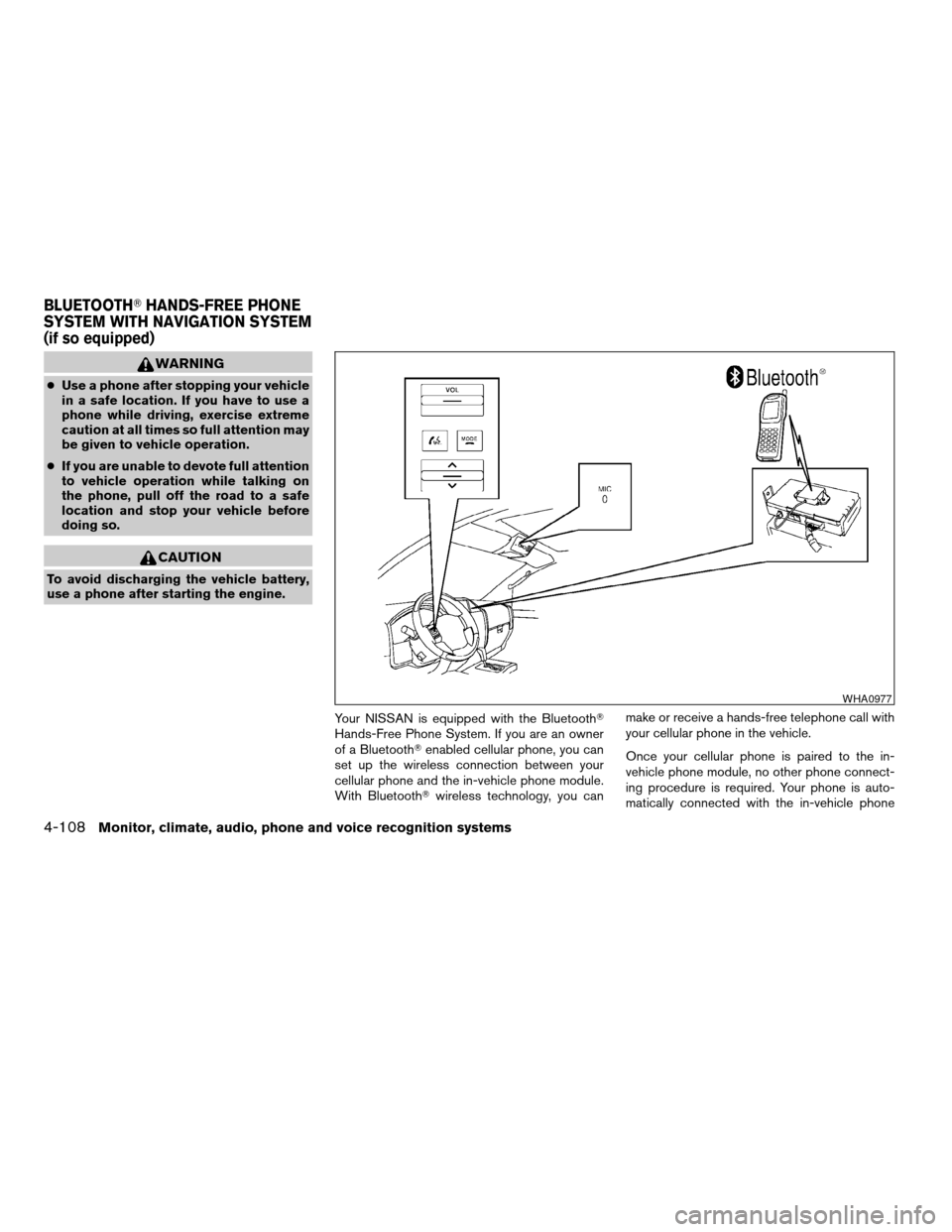
Your NISSAN is equipped with the BluetoothT
Hands-Free Phone System. If you are an owner
of a BluetoothTenabled cellular phone, you can
set up the wireless connection between your
cellular phone and the in-vehicle phone module.
With BluetoothTwireless technology, you canmake or receive a hands-free telephone call with
your cellular phone in the vehicle.
Once your cellular phone is paired to the in-
vehicle phone module, no other phone connect-
ing procedure is required. Your phone is auto-
matically connected with the in-vehicle phone
WHA0977
BLUETOOTHTHANDS-FREE PHONE
SYSTEM WITH NAVIGATION SYSTEM
(if so equipped)
4-108Monitor, climate, audio, phone and voice recognition systems
ZREVIEW COPYÐ2008 Armada(wzw)
Owners ManualÐUSA_English(nna)
03/05/07Ðarosenma
X
Page 289 of 456

module when the ignition switch is turned to the
ON position with the paired cellular phone turned
on and carried in the vehicle.
You can register up to 5 different BluetoothT
cellular phones to the in-vehicle phone module.
However, you can talk on only one cellular phone
at a time.
NISSAN Voice Recognition system supports the
phone commands, so dialing a phone number
using your voice is possible. For more details, see
“NISSAN Voice Recognition System” later in this
section.
Before using the BluetoothTHands-Free Phone
System, refer to the following notes.
cSet up the wireless connection between a
cellular phone and the in-vehicle phone
module before using the hands-free phone
system.
cSome BluetoothTenabled cellular phones
may not be recognized by the in-vehicle
phone module. Please visit
www.nissanusa.com/bluetooth for a recom-
mended phone list.
cYou will not be able to use a hands-free
phone under the following conditions:
– Your vehicle is outside of the cellular ser-
vice area.– Your vehicle is in an area where it is
difficult to receive cellular signal; such as
in a tunnel, in an underground parking
garage, near a tall building or in a moun-
tainous area.
– Your cellular phone is locked to prevent it
from being dialed.
cWhen the radio wave condition is not ideal
or ambient sound is too loud, it may be
difficult to hear the other person’s voice dur-
ing a call.
cImmediately after the ignition switch is
pushed to the ON position or the DVD-ROM
for the navigation system is inserted into the
player, it may be impossible to receive a call
for a short period of time.
cDo not place the cellular phone in an area
surrounded by metal or far away from the
in-vehicle phone module to prevent tone
quality degradation and wireless connection
disruption.
cWhile a cellular phone is connected through
the BluetoothTwireless connection, the bat-
tery power of the cellular phone may dis-
charge quicker than usual. The BluetoothT
Hands-Free Phone System cannot charge
cellular phones.cIf the hands-free phone system seems to be
malfunctioning, please refer to “Trouble-
shooting guide” later in this section. You can
also visit www.nissanusa.com/bluetooth for
troubleshooting help.
cRefer to the cellular phone owner’s manual
regarding the telephone charges, cellular
phone antenna and body, etc.
cThe signal strength display on the monitor
will not coincide with the signal strength
display of some cellular phones.
This device complies with Part 15 of the
FCC Rules. Operation is subject to the fol-
lowing two conditions: (1) this device may
not cause harmful interference, and (2) this
device must accept any interference re-
ceived, including interference that may
cause undesired operation.
FCC Radiation Exposure Statement:
This equipment complies with FCC radiation ex-
posure limits set forth for an uncontrolled envi-
ronment. This equipment should be installed and
operated with minimum distance of 8 inches (20
cm) between the radiator and your body. This
Transmitter must not be co-located or operating
in conjunction with any other antenna or transmit-
ter.
Monitor, climate, audio, phone and voice recognition systems4-109
ZREVIEW COPYÐ2008 Armada(wzw)
Owners ManualÐUSA_English(nna)
03/05/07Ðarosenma
X
Page 297 of 456

cBluetooth:
If this item is turned off, the connection be-
tween the cellular phone and the in-vehicle
phone module will be canceled.
cBluetooth Info:
Check information about the device name,
vehicle name, device address device PIN
and connection status.
cPair Phone:
See “Pairing Procedure” in this section.
cPriority Change
If multiple phones are registered to the sys-
tem, you can change the priority of the
phones on the shown list.cRemove Paired Phone:
Delete a registered cellular phone from the
paired list.
cPaired Phone List:
Up to 5 registered cellular phones are
shown on the list.
cEdit Phone Name:
If you would like to change the way your
phone’s name is displayed, select this key; a
character input screen will be displayed.The NISSAN Voice Recognition system allows
hands-free operation of the systems equipped on
this vehicle, such as the display, audio, climate
control, DVD, phone and navigation systems.
To operate NISSAN Voice Recognition, press
the
button located on the steering wheel.
Then speak the command for the system you
wish to activate. The command given is picked up
by the microphone, and it is performed when it is
properly recognized. At this time NISSAN Voice
Recognition will provide a voice and message (in
the center display) to inform you of the command
results.
COMMAND LIST
Displaying command list
If you are controlling the system by voice com-
mands for the first time or do not know the
appropriate voice command, perform the follow-
ing procedure for displaying the voice command
list and help list.
LHA0980LHA0989
NISSAN VOICE RECOGNITION
SYSTEM (if so equipped)
Monitor, climate, audio, phone and voice recognition systems4-117
ZREVIEW COPYÐ2008 Armada(wzw)
Owners ManualÐUSA_English(nna)
03/05/07Ðarosenma
X
Page 300 of 456

List of help commands
Navigation help:
See the separate Navigation System Owner’s
Manual for details.
Audio help:
cMusic Box
COMMANDACTION
Music Box Play Turns on the Music Box hard-disk drive audio system.
Play by Mood Plays the specified song matching your mood.
Relaxing Music Plays the specified relaxing music.
Lively Music Plays the specified lively music.
Slow Music Plays the specified slow music.
Upbeat Music Plays the specified upbeat music.
Play by Category Plays the specified song in the specified category.
My Favorites Plays your favorite song.
Hit Songs Plays the specified hit song.
Kids’ Songs Plays the specified song for children.
Rarely Played Plays a rarely played song.
Music Box OFF Turns off the Music Box.
4-120Monitor, climate, audio, phone and voice recognition systems
ZREVIEW COPYÐ2008 Armada(wzw)
Owners ManualÐUSA_English(nna)
03/05/07Ðarosenma
X
Page 306 of 456

Displaying the user guide
You can confirm how to use voice commands by
displaying a simplified User Guide or by display-
ing simulated voice command operations.
1. Press the INFO button on the instrument
panel.
2. Touch the “Others” key, then touch the
“Voice Recognition” key.
3. Touch the “User Guide” key.Available items:
cGetting Started
Displays the simplified User Guide describ-
ing how to operate the voice recognition
system.
cPlacing Calls
Simulates voice commands to make a phone
call by voice command operation.
cHelp on Speaking
Displays useful tips for how to correctly
speak commands in order for them to be
properly recognized by the system.cVoice Recognition Settings
Displays the description of voice recognition
settings.
cAdapting the System to Your Voice
Simulates an example of the operation to
adapt the system to your voice.
For the items “Using the Address Book” and
“Finding a Street Address”, refer to the separate
Navigation System Owner’s Manual for details.
For information on how to use the touch screen,
see “How to use the touch screen” earlier in this
section.
USING THE SYSTEM
Initialization
When the ignition switch is in the ON position,
NISSAN Voice Recognition is initialized, which
takes a few seconds. When completed, the sys-
tem is ready to accept voice commands. If
the
button is pressed before the initializa-
tion completes, the display will show the mes-
sage: “Phonetic data downloaded. Please wait.”
LHA0993LHA0994
4-126Monitor, climate, audio, phone and voice recognition systems
ZREVIEW COPYÐ2008 Armada(wzw)
Owners ManualÐUSA_English(nna)
03/05/07Ðarosenma
X
Page 308 of 456

cIf you want to cancel the command, press
and hold thebutton for 2 seconds
during feedback. The system will announce:
“Voice cancelled.”
cIf you want to adjust the volume of the voice
feedback, push the volume control
switch
or theon the steering
wheel while being provided with the feed-
back.
Operating tips
cVoice commands cannot be accepted when
the face icon in the display is gray.
cIf the command is not recognized, the sys-
tem announces, “Please say again”. Repeat
the command in a clear voice.
cPress the BACK button once to return to the
previous screen.
cIf you want to cancel the command, press
and hold the
TALK button for 1 sec-
ond. The message “Voice canceled” will be
announced.
cPress the
TALK button again to pause
the operation. Press theTALK button
to restart the operation.cIf you want to adjust the volume of the sys-
tem feedback, push the volume control
switch
oron the steering wheel
or use the audio system volume knob while
the system is making an announcement.
SYSTEM FEATURES
NISSAN Voice Recognition can activate the fol-
lowing systems:
cNavigation (if so equipped)
cAudio (radio and CD)
cDVD Mobile Entertainment System
cBluetoothTHands-Free Phone
cClimate Control
cVehicle Systems
For additional information on the navigation sys-
tem, see the separate Navigation System Own-
er’s Manual.
How to say numbers
NISSAN Voice Recognition requires a certain
way to speak numbers in voice commands. Refer
to the following examples.
General rule: Either “zero” or “oh” can be used for
“0”.Radio frequencies:
Speak radio frequencies according to the follow-
ing examples:
c930 kHz
– “Tune nine thirty AM”
– “Tune nine thirty”
c1000 kHz
– “Tune one thousand”
c1040 kHz
– “Tune ten forty”
c1710 kHz
– “Tune seventeen ten”
c97.9 MHz
– “Tune ninety seven point nine”
c100.5 MHz
– “Tune one hundred point five”
c101.1 MHz
– “Tune one oh one point one FM”
4-128Monitor, climate, audio, phone and voice recognition systems
ZREVIEW COPYÐ2008 Armada(wzw)
Owners ManualÐUSA_English(nna)
03/05/07Ðarosenma
X
Page 309 of 456

Temperatures (climate control):
Speak temperatures according to the following
examples:
c74°F
– “Temperature seventy four”
c21.5°C
– “Temperature twenty one point five”
– “Temperature twenty one and a half”
c19.0°C
– “Temperature nineteen point zero”
– “Temperature nineteen point oh.”
– “Temperature nineteen”
Phone numbers:
Speak phone numbers according to the following
examples:
c1-800-662-6200
csay “Dial” or “Phone dial” the system will
respond with “Please say the first group of
numbers”, then say:
– “one eight oh oh six six two six two oh oh”,
– “one eight hundred six six two six two oh
oh”, or– “one eight zero zero six six two six two oh
oh”.
Note 1: For the best voice recognition phone
dialing results, say phone numbers as single dig-
its.
Note 2: You cannot say 555-6000 as “five five
five six thousand”.
Personal vocabulary (voicetags)
NISSAN Voice Recognition provides the function
called “voicetags”, which can be associated with
the phone and the navigation system (if so
equipped) . Using your own voice, 40 voicetags
can be registered in the “Phonebook” (phone)
and 20 locations can be registered in the “Ad-
dress Book” (navigation system) .
For additional information, see “BluetoothT
Hands-Free Phone System” earlier in this section
and/or the separate Navigation System Owner’s
Manual (if so equipped) for the method of “voic-
etag” registration.
VOICE COMMAND LEARNING
FUNCTION
The voice recognition system has a function to
learn the user’s voice for better voice recognition
performance. The system can memorize the
voices of up to three persons.
LHA0884
Monitor, climate, audio, phone and voice recognition systems4-129
ZREVIEW COPYÐ2008 Armada(wzw)
Owners ManualÐUSA_English(nna)
03/05/07Ðarosenma
X
Page 448 of 456

C
Capacities and recommended
fuel/lubricants...................9-2
Captain’s chair adjustment (2nd row)......1-5
Car phone or CB radio.............4-93
Cargo light...................2-60
Cargo (See vehicle loading information) . . .9-13
CD care and cleaning.............4-73
CD changer (See audio system)........4-52
CD player (See audio system).........4-60
Child restraint with top tether strap......1-31
Child restraints.......1-18, 1-19, 1-26, 1-28
Precautions on child
restraints............1-26, 1-37, 1-43
Top tether strap anchor point locations . .1-31
Child safety rear door lock............3-6
Chimes, audible reminders...........2-20
Cigarette lighter.................2-41
Cleaning exterior and interior..........7-2
Clock...................4-50, 4-58
(models with navigation system) . .4-11, 4-28
Clock set.................4-11, 4-28
C.M.V.S.S. certification label..........9-11
Cold weather driving..............5-32
Compact disc (CD) player...........4-60
CompactFlash (CF) player...........4-62
Compass display.................2-9
Console box...............2-42, 2-49
Control panel buttons
Brightness/contrast
button.............4-16, 4-17, 4-34
Enter button..............4-2, 4-17
Setting button.............4-9, 4-26
Startup screen...............4-20Without navigation system..........4-2
Controls
Audio controls (steering wheel)......4-75
Heater and air conditioner controls. . . .4-38
Rear audio controls.............4-77
Rear seat air conditioner..........4-40
Coolant
Capacities and recommended
fuel/lubricants.................9-2
Changing engine coolant..........8-8
Checking engine coolant level........8-7
Engine coolant temperature gauge.....2-6
Corrosion protection...............7-5
Cruise control..................5-17
Cup holders...................2-46
Curtain side-impact and rollover air bag . . .1-60
D
Daytime running light system
(Canada only)..................2-34
Defroster switch
Rear window and outside mirror defroster
switch....................2-31
Digital video disc DVD.............4-78
Dimensions and weights.............9-9
Dimmer switch for instrument panel......2-35
Display controls
(see control panel buttons)........4-2, 4-17
Distance to empty.............4-5, 4-21
Door locks....................3-4
Drive belt....................8-15
Drive positioner, Automatic...........3-31
Driving
Cold weather driving............5-32Driving with automatic
transmission.............5-12, 5-13
Precautions when starting and driving . . .5-2
E
Economy - fuel.................5-19
Emission control information label.......9-11
Emission control system warranty.......9-30
Engine
Before starting the engine.........5-11
Block heater.................5-34
Capacities and recommended
fuel/lubricants.................9-2
Changing engine coolant..........8-8
Changing engine oil.............8-9
Changing engine oil filter..........8-10
Checking engine coolant level........8-7
Checking engine oil level..........8-8
Engine compartment check locations. . . .8-6
Engine coolant temperature gauge.....2-6
Engine cooling system............8-7
Engine oil...................8-8
Engine oil and oil filter
recommendation...............9-6
Engine oil viscosity..............9-6
Engine serial number............9-11
Engine specifications.............9-8
Starting the engine.............5-11
Engine oil pressure gauge............2-7
Engine oil pressure low/engine coolant
temperature high warning light.........2-15
Enter button................4-2, 4-17
Event data recorders..............9-32
Exhaust gas (Carbon monoxide)........5-2
10-2
ZREVIEW COPYÐ2008 Armada(wzw)
Owners ManualÐUSA_English(nna)
03/05/07Ðarosenma
X