ECU NISSAN ARMADA 2008 1.G Manual PDF
[x] Cancel search | Manufacturer: NISSAN, Model Year: 2008, Model line: ARMADA, Model: NISSAN ARMADA 2008 1.GPages: 456, PDF Size: 5.89 MB
Page 395 of 456

INTELLIGENT KEY BATTERY
Replace the battery in the Intelligent Key as fol-
lows:
1. Remove the mechanical key from the Intelli-
gent Key.
2. Insert a small screwdriver
sAinto the slitsB
of the corner and twist it to separate the
upper part from the lower part. Use a cloth to
protect the casing.
3. Replace the battery with a new one.
Recommended battery: CR2025 or equiva-
lent.
cDo not touch the internal circuit and elec-
tric terminals as doing so could cause a
malfunction.
cHold the battery by the edges. Holding
the battery across the contact points will
seriously deplete the storage capacity.
cMake sure that the + side faces the bot-
tom of the case.4. Close the lid securely as illustrated
sCsD.
5. Operate the buttons to check the operation.
See a NISSAN dealer if you need assistance for
replacement.
FCC Notice:
Changes or modifications not expressly ap-
proved by the party responsible for compli-
ance could void the user’s authority to op-
erate the equipment.
This device complies with Part 15 of the
FCC Rules and RSS-210 of Industry
Canada.
WDI0620
WDI0621
Maintenance and do-it-yourself8-27
ZREVIEW COPYÐ2008 Armada(wzw)
Owners ManualÐUSA_English(nna)
03/05/07Ðarosenma
X
Page 409 of 456

Use of tire chains may be prohibited according to
location. Check the local laws before installing
tire chains. When installing tire chains, make sure
they are the proper size for the tires on your
vehicle and are installed according to the chain
manufacturer’s suggestions.Use only SAE
class “S” chains.Class “S” chains are used on
vehicles with restricted tire to vehicle clearance.
Vehicles that can use Class “S” chains are de-
signed to meet the minimum clearances between
the tire and the closest vehicle suspension or
body component required to accommodate the
use of a winter traction device (tire chains or
cables) . The minimum clearances are determined
using the factory equipped tire size. Other types
may damage your vehicle. Use chain tensioners
when recommended by the tire chain manufac-
turer to ensure a tight fit. Loose end links of the
tire chain must be secured or removed to prevent
the possibility of whipping action damage to the
fenders or underbody. If possible, avoid fully load-
ing your vehicle when using tire chains. In addi-
tion, drive at a reduced speed. Otherwise, your
vehicle may be damaged and/or vehicle handling
and performance may be adversely affected.
Tire chains must be installed only on the
rear wheels and not on the front wheels.Do not use tire chains on dry roads. Driving with
chains in such conditions can cause damage to
the various mechanisms of the vehicle due to
some overstress.
Use only the 2WD range when driving on clear
paved roads.
CHANGING WHEELS AND TIRES
Tire rotation
NISSAN recommends rotating the tires
every 7,500 miles (12,000 km) .
See “Flat tire” in the “In case of emer-
gency” section in this manual for tire re-
placing procedures.
As soon as possible, tighten the
wheel nuts to the specified torque
with a torque wrench.
WDI0258
Maintenance and do-it-yourself8-41
ZREVIEW COPYÐ2008 Armada(wzw)
Owners ManualÐUSA_English(nna)
03/05/07Ðarosenma
X
Page 413 of 456

9 Technical and consumer information
Capacities and recommended fuel/lubricants.........9-2
Fuel recommendation
(without Flexible Fuel Vehicle option)..............9-3
Flexible fuel vehicle (FFV) fuel
recommendation (if so equipped).................9-4
Engine oil and oil filter recommendations..........9-6
Air conditioner system refrigerant and oil
recommendations..............................9-7
Specifications.....................................9-8
Engine........................................9-8
Wheels and tires...............................9-9
Dimensions and weights........................9-9
When traveling or registering your vehicle in
another country..................................9-10
Vehicle identification..............................9-10
Vehicle identification number (VIN) plate.........9-10
Vehicle identification number
(chassis number)..............................9-10
Engine serial number...........................9-11
F.M.V.S.S./C.M.V.S.S. certification label..........9-11
Emission control information label...............9-11
Tire and loading information label................9-12Air conditioner specification label................9-12
Installing front license plate........................9-12
Vehicle loading information........................9-13
Terms........................................9-13
Vehicle load capacity..........................9-13
Securing the load..............................9-15
Loading tips..................................9-16
Measurement of weights.......................9-16
Towing a trailer...................................9-17
Maximum load limits...........................9-17
Towing load/specification.......................9-20
Towing safety.................................9-21
Flat towing....................................9-28
Snow plow......................................9-29
Uniform tire quality grading........................9-29
Emission control system warranty..................9-30
Reporting safety defects (US only).................9-31
Readiness for inspection/maintenance (I/M) test.....9-31
Event data recorders..............................9-32
Owner’s Manual/Service Manual order information . . . 9-33
In the event of a collision.......................9-33
ZREVIEW COPYÐ2008 Armada(wzw)
Owners ManualÐUSA_English(nna)
03/05/07Ðarosenma
X
Page 427 of 456
5. Determine the combined weight of
luggage and cargo being loaded on
the vehicle. That weight may not
safely exceed the available cargo and
luggage load capacity calculated in
Step 4.
6. If your vehicle will be towing a trailer,
load from your trailer will be trans-
ferred to your vehicle. Consult this
manual to determine how this re-
duces the available cargo and lug-
gage load capacity of your vehicle.
Before driving a loaded vehicle, confirm
that you do not exceed the Gross Vehicle
Weight Rating (GVWR) or the Gross Axle
Weight Rating (GAWR) for your vehicle.
See “Measurement of Weights” later in
this section.
Also check tires for proper inflation pres-
sures. See the Tire and Loading Informa-
tion label.
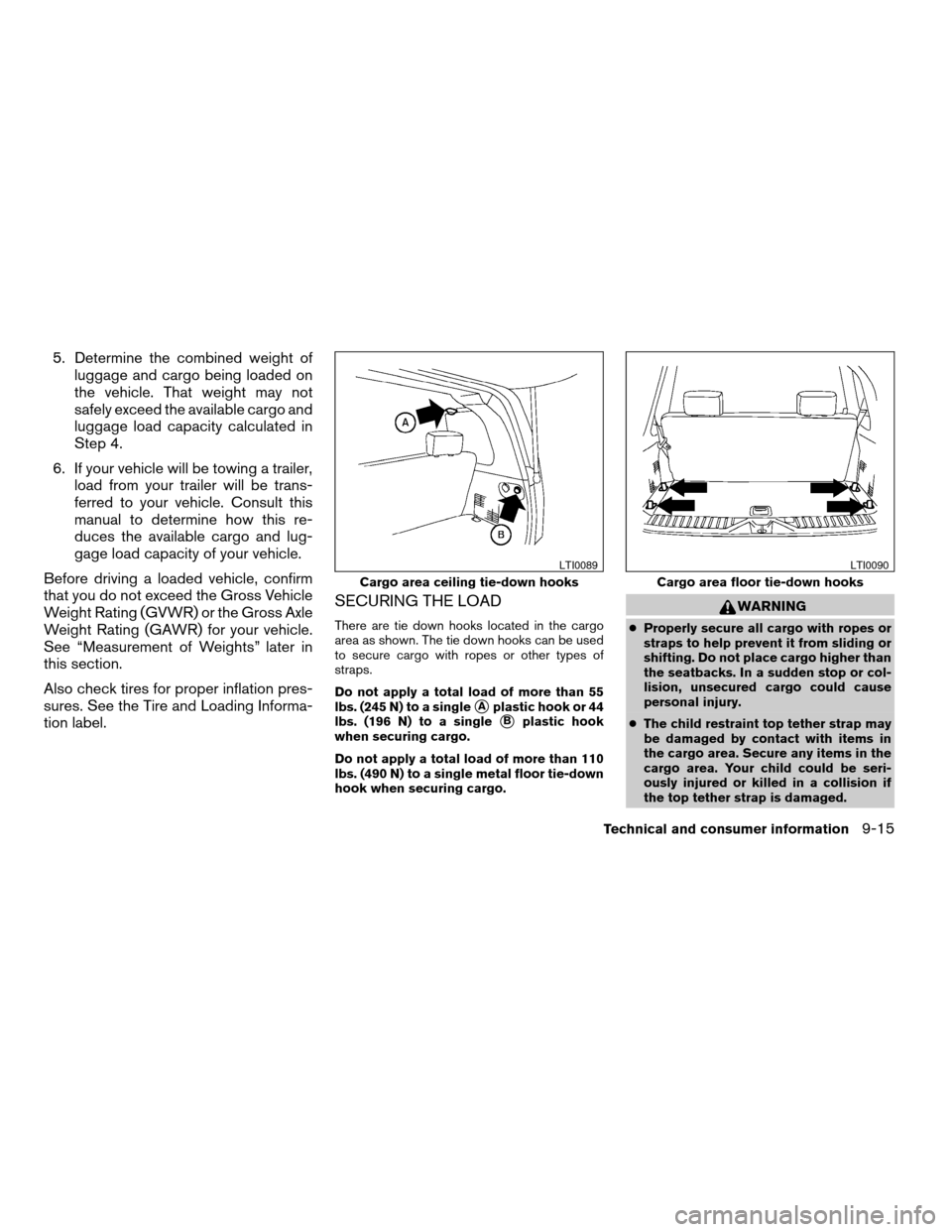
SECURING THE LOAD
There are tie down hooks located in the cargo
area as shown. The tie down hooks can be used
to secure cargo with ropes or other types of
straps.
Do not apply a total load of more than 55
lbs. (245 N) to a single
sAplastic hook or 44
lbs. (196 N) to a single
sBplastic hook
when securing cargo.
Do not apply a total load of more than 110
lbs. (490 N) to a single metal floor tie-down
hook when securing cargo.
WARNING
cProperly secure all cargo with ropes or
straps to help prevent it from sliding or
shifting. Do not place cargo higher than
the seatbacks. In a sudden stop or col-
lision, unsecured cargo could cause
personal injury.
cThe child restraint top tether strap may
be damaged by contact with items in
the cargo area. Secure any items in the
cargo area. Your child could be seri-
ously injured or killed in a collision if
the top tether strap is damaged.
Cargo area ceiling tie-down hooks
LTI0089
Cargo area floor tie-down hooks
LTI0090
Technical and consumer information9-15
ZREVIEW COPYÐ2008 Armada(wzw)
Owners ManualÐUSA_English(nna)
03/05/07Ðarosenma
X
Page 428 of 456
cDo not load your vehicle any heavier
than the GVWR or the maximum front
and rear GAWRs. If you do, parts of your
vehicle can break, tire damage could
occur, or it can change the way your
vehicle handles. This could result in
loss of control and cause personal
injury.
LOADING TIPS
cThe GVW must not exceed GVWR
or GAWR as specified on the
F.M.V.S.S./C.M.V.S.S. certification
label.
cDo not load the front and rear axle to
the GAWR. Doing so will exceed the
GVWR.
WARNING
cProperly secure all cargo with
ropes or straps to help prevent it
from sliding or shifting. Do not
place cargo higher than the seat-
backs. In a sudden stop or colli-
sion, unsecured cargo could
cause personal injury.cDo not load your vehicle any
heavier than the GVWR or the
maximum front and rear GAWRs.
If you do, parts of your vehicle
can break, tire damage could oc-
cur, or it can change the way your
vehicle handles. This could result
in loss of control and cause per-
sonal injury.
cOverloading not only can shorten
the life of your vehicle and the
tire, but can also cause unsafe
vehicle handling and longer brak-
ing distances. This may cause a
premature tire failure which
could result in a serious accident
and personal injury. Failures
caused by overloading are not
covered by the vehicle’s
warranty.
MEASUREMENT OF WEIGHTS
Secure loose items to prevent weight
shifts that could affect the balance of your
vehicle. When the vehicle is loaded, drive
to a scale and weigh the front and the rear
wheels separately to determine axle
loads. Individual axle loads should not ex-ceed either of the gross axle weight rat-
ings (GAWR) . The total of the axle loads
should not exceed the gross vehicle
weight rating (GVWR) . These ratings are
given on the vehicle certification label. If
weight ratings are exceeded, move or re-
move items to bring all weights below the
ratings.
9-16
Technical and consumer information
ZREVIEW COPYÐ2008 Armada(wzw)
Owners ManualÐUSA_English(nna)
03/05/07Ðarosenma
X
Page 433 of 456
TOWING SAFETY
Trailer hitch
Your vehicle may be equipped with an optional
trailer tow package. The trailer tow package in-
cludes a receiver-type frame mounted hitch. This
hitch is rated for the maximum towing capacity of
this vehicle when the proper towing equipment is
used. Choose a proper ball mount and hitch ball
that is rated for the trailer to be towed. Genuine
Nissan ball mounts and hitch balls are available
from your NISSAN dealer.
If your vehicle is not equipped with the optional
trailer tow package, check the towing capacity of
your bumper hitch or receiver-type frame
mounted hitch. Choose a proper hitch for your
vehicle and trailer. A genuine Nissan trailer hitch
is available from your NISSAN dealer. Make sure
the trailer hitch is securely attached to the vehicle
to help avoid personal injury or property damage
due to sway caused by crosswinds, rough road
surfaces or passing trucks.
WARNING
Trailer hitch components have specific
weight ratings. Your vehicle may be ca-
pable of towing a trailer heavier than the
weight rating of the hitch components.
Never exceed the weight rating of the
hitch components. Doing so can cause
serious personal injury or property
damage.
Hitch ball
Choose a hitch ball of the proper size and weight
rating for your trailer:
cThe required hitch ball size is stamped on
most trailer couplers. Most hitch balls also
have the size printed on the top of the ball.
cChoose the proper class hitch ball based on
the trailer weight.
cThe diameter of the threaded shank of the
hitch ball must be matched to the ball mount
hole diameter. The hitch ball shank should
be no more than 1/16” smaller than the hole
in the ball mount.
cThe threaded shank of the hitch ball must be
long enough to be properly secured to the
ball mount. There should be at least 2
threads showing beyond the lock washer
and nut.
Ball mount
The hitch ball is attached to the ball mount and
the ball mount is inserted into the hitch receiver.
Choose a proper class ball mount based on the
trailer weight. Additionally, the ball mount should
be chosen to keep the trailer tongue level with the
ground.
Weight carrying hitches
A weight carrying or9dead weight9ball mount is
one that is designed to carry the whole amount of
tongue weight and gross weight directly on the
ball mount and on the receiver.
Weight distribution hitch
This type of hitch is also called a “load-leveling” or
“equalizing” hitch. A set of bars attach to the ball
mount and to the trailer to distribute the tongue
weight (hitch weight) of your trailer. Many ve-
hicles can’t carry the full tongue weight of a given
trailer, and need some of the tongue weight
transferred through the frame and pushing down
on the front wheels. This gives stability to the tow
vehicle.
Another reason to have a weight distributing ball
mount is to comply with the rating on your re-
ceiver. Most receivers have a weight carrying
rating of 5,000 lbs. gross weight, 500 lbs. tongue
weight and a weight distribution rating of 10,000
Technical and consumer information9-21
ZREVIEW COPYÐ2008 Armada(wzw)
Owners ManualÐUSA_English(nna)
03/05/07Ðarosenma
X
Page 435 of 456
CAUTION
cSpecial hitches which include frame re-
inforcements are required for towing
above 2,000 lb (907 kg) . Suitable genu-
ine NISSAN hitches, ball mounts and
hitch balls for pickup trucks and sport
utility vehicles are available at a
NISSAN dealer.
cThe hitch should not be attached to or
affect the operation of the impact-
absorbing bumper.
cDo not use axle-mounted hitches.
cDo not modify the vehicle exhaust sys-
tem, brake system, etc. to install a
trailer hitch.
cTo reduce the possibility of additional
damage if your vehicle is struck from
the rear, where practical, remove the
receiver when not in use.
cRegularly check that all trailer hitch
mounting bolts are securely mounted.
cWhen towing with the hitch ball
mounted to the rear bumper, do not
make sharp turns. The trailer may con-
tact the bumper and cause damage to
the bumper or trailer.
Tire pressures
cWhen towing a trailer, inflate the ve-
hicle tires to the recommended cold
tire pressure indicated on the tire
placard.
cTrailer tire condition, size, load rating
and proper inflation pressure should
be in accordance with the trailer and
tire manufacturer’s specifications.
Safety chains
Always use suitable safety chains between your
vehicle and the trailer. The safety chains should
be crossed and should be attached to the hitch,
not to the vehicle bumper or axle. The safety
chains can be attached to the bumper if the hitch
ball is mounted to the bumper. Be sure to leave
enough slack in the chains to permit turning
corners.
Trailer lights
CAUTION
When splicing into the vehicle electrical
system, a commercially available power-
type module/converter must be used to
provide power for all trailer lighting. This
unit uses the vehicle battery as a direct
power source for all trailer lights while
using the vehicle tail light, stoplight and
turn signal circuits as a signal source. The
module/converter must draw no more
that 15 milliamps from the stop and tail
lamp circuits. Using a module/converter
that exceeds these power requirements
may damage the vehicle’s electrical sys-
tem. See a reputable trailer dealer to ob-
tain the proper equipment and to have it
installed.
Trailer lights should comply with federal and/or
local regulations. For assistance in hooking up
trailer lights, contact a NISSAN dealer or repu-
table trailer dealer. Vehicles equipped with the
optional trailer tow package are equipped with a
7-pin trailer harness connector. If your trailer is
equipped with a flat 4-pin connector, an adapter
will be needed to connect the trailer lights to the
vehicle. Adapters are available at NISSAN deal-
ers as well as auto parts stores and hitch retail-
ers.
Technical and consumer information9-23
ZREVIEW COPYÐ2008 Armada(wzw)
Owners ManualÐUSA_English(nna)
03/05/07Ðarosenma
X
Page 438 of 456
Pre-towing tips
cBe certain your vehicle maintains a level
position when a loaded and/or unloaded
trailer is hitched. Do not drive the vehicle if it
has an abnormal nose-up or nose-down
condition; check for improper tongue load,
overload, worn suspension or other possible
causes of either condition.
cAlways secure items in the trailer to prevent
load shift while driving.
cKeep the cargo load as low as possible in
the trailer to keep the trailer center of gravity
low.
cLoad the trailer so approximately 60% of the
trailer load is in the front half and 40% is in
the back half. Also make sure the load is
balanced side to side.
cCheck your hitch, trailer tire pressure, ve-
hicle tire pressure, trailer light operation, and
trailer wheel lug nuts every time you attach a
trailer to the vehicle.
cBe certain your rearview mirrors conform to
all federal, state or local regulations. If not,
install any mirrors required for towing before
driving the vehicle.cDetermine the overall height of the vehicle
and trailer so the required clearance is
known.
Trailer towing tips
In order to gain skill and an understanding of the
vehicle’s behavior, you should practice turning,
stopping and backing up in an area which is free
from traffic. Steering stability and braking perfor-
mance will be somewhat different than under
normal driving conditions.
cAlways secure items in the trailer to prevent
load shift while driving.
cLock the trailer hitch coupler with a pin or
lock to prevent the coupler from inadvert-
ently becoming unlatched.
cAvoid abrupt starts, acceleration or stops.
cAvoid sharp turns or lane changes.
cAlways drive your vehicle at a moderate
speed.
cWhen backing up, hold the bottom of the
steering wheel with one hand. Move your
hand in the direction in which you want the
trailer to go. Make small corrections and
back up slowly. If possible, have someone
guide you when you are backing up.Always block the wheels on both vehicle and
trailer when parking. Parking on a slope is not
recommended; however, if you must do so:
CAUTION
If you move the shift selector lever to the P
(Park) position before blocking the
wheels and applying the parking brake,
transmission damage could occur.
1. Apply and hold the brake pedal.
2. Have someone place blocks on the downhill
side of the vehicle and trailer wheels.
3. After the wheel blocks are in place, slowly
release the brake pedal until the blocks ab-
sorb the vehicle load.
4. Apply the parking brake.
5. Shift the transmission into P (Park) .
6. Make sure the
indicator light (if so
equipped) indicates the transfer case is in
4H, 4L, or 2H and that the ATP light is off. If
the
indicator light is flashing, or the
ATP light is ON, make sure the transmission
is in P (Park) (AT) and turn the 4WD switch
to 2WD or 4H. See9Automatic transmission
park warning light9in the9Instruments and
controls9section and9Using four wheel
drive9in the9Starting and driving9section.
7. Turn off the engine.
9-26Technical and consumer information
ZREVIEW COPYÐ2008 Armada(wzw)
Owners ManualÐUSA_English(nna)
03/05/07Ðarosenma
X
Page 447 of 456

10 Index
4WD warning light...............2-16
A
Active Head Restraint..............1-9
Adjusting pedal position............3-27
Air bag (See supplemental restraint
system).....................1-48
Air bag system
Front (See supplemental front impact
air bag system)...............1-55
Air bag warning labels.............1-63
Air bag warning light...........1-63, 2-18
Air cleaner housing filter............8-17
Air conditioner
Air conditioner service...........4-41
Air conditioner specification label.....9-12
Air conditioner system refrigerant and
oil recommendations.............9-7
Heater and air conditioner controls. . . .4-38
Rear seat air conditioner..........4-40
Servicing air conditioner..........4-41
Alarm system
(See vehicle security system).........2-27
Anchor point locations.............1-31
Antenna.....................4-77
Anti-lock brake warning light......2-13, 2-14
Anti-lock Braking System (ABS)........5-28
Audible reminders................2-20
Audio system..................4-41
Compact Disc (CD) changer.......4-52Compact disc (CD) player.........4-60
Audio System
CompactFlash (CF) player.........4-62
Audio system
FM/AM/SAT radio with compact disc (CD)
changer...................4-49
FM/AM/SAT radio with compact disc (CD)
player....................4-57
Audio System
Music Box hard-disk drive audio
system....................4-64
Audio system
Radio....................4-41
Rear audio controls.............4-77
Audio System
Settings................4-49, 4-57
Audio system
Steering wheel audio control switch. . . .4-75
Autolight switch.................2-33
Automatic
Automatic drive positioner.........3-31
Automatic power window switch.....2-55
Automatic transmission position indicator
light.....................2-27
Driving with automatic
transmission.............5-12, 5-13
Transmission selector lever lock
release....................5-15
Automatic anti-glare inside mirror.......3-29
Automatic transmission fluid temperature
gauge.......................2-8AUX jack.................4-55, 4-62
B
Battery......................8-13
Charge warning light............2-15
Before starting the engine...........5-11
Belt (See drive belt)..............8-15
Block heater
Engine....................5-34
BluetoothThands-free phone
system..................4-94, 4-108
Booster seats..................1-43
Brake
Anti-lock Braking System (ABS)......5-28
Brake fluid..................8-12
Brake light (See stop light).........8-30
Brake system................5-27
Brake warning light.............2-14
Brake wear indicators........2-20, 8-22
Parking brake operation..........5-16
Self-adjusting brakes............8-22
Brakes......................8-22
Break-in schedule................5-19
Brightness control
Instrument panel..............2-35
Brightness/contrast button.......4-16, 4-34
Bulb check/instrument panel..........2-13
Bulb replacement................8-30
ZREVIEW COPYÐ2008 Armada(wzw)
Owners ManualÐUSA_English(nna)
03/05/07Ðarosenma
X
Page 450 of 456

J
Jump starting...................6-8
K
Key ........................3-2
Keyfob battery replacement..........8-26
Keyless entry
With Intelligent Key system
(See Intelligent Key system)........3-16
Keyless entry system (See remote keyless
entry system)...................3-6
Keys, For Intelligent Key system.........3-2
L
Labels
Air conditioner specification label.....9-12
C.M.V.S.S. certification label........9-11
Emission control information label.....9-11
Engine serial number............9-11
F.M.V.S.S. certification label........9-11
Vehicle identification number (VIN)
plate.....................9-10
Warning labels (for SRS)..........1-63
LATCH (Lower Anchors and Tethers for
CHildren) System................1-28
License plate
Installing the license plate.........9-12
Lift gate.....................3-20
Lift gate release.................3-23Light
Air bag warning light.........1-63, 2-18
Brake light (See stop light).........8-30
Bulb check/instrument panel........2-13
Bulb replacement..............8-30
Charge warning light............2-15
Fog light switch...............2-35
Headlight and turn signal switch......2-32
Headlight control switch..........2-32
Headlights..................8-28
Interior light.................2-58
Light bulbs..................8-28
Low tire pressure warning light......2-16
Low washer fluid warning light.......2-26
Passenger air bag and status light.....1-57
Personal lights...............2-59
Security indicator light...........2-19
Warning/indicator lights and audible
reminders..................2-13
Lights
Map lights..................2-59
Lock
Child safety rear door lock..........3-6
Door locks..................3-4
Glove box lock...............2-44
Lift gate release...............3-23
Power door locks...............3-5
Low fuel warning light......2-16, 2-17, 2-26
Low tire pressure warning light........2-16
Low washer fluid warning light.........2-26
Luggage hook..................2-50
Luggage rack (see roof rack).........2-52
Luggage (See vehicle loading information) . .9-13
Luggage storage
(see vehicle loading information)........2-50M
Maintenance
Changing the maintenance
interval.................4-7, 4-24
Displaying the maintenance notice
reminder................4-8, 4-25
General maintenance............8-2
Inside the vehicle...............8-3
Maintenance precautions..........8-5
Outside the vehicle..............8-2
Resetting the maintenance interval . .4-8, 4-24
Seat belt maintenance...........1-26
Setting.................4-7, 4-24
Under the hood and vehicle.........8-4
Malfunction indicator light...........2-18
Manual front seat adjustment..........1-2
Manual vent windows..............2-56
Map lights....................2-59
Map pocket...................2-45
Meters and gauges................2-4
Instrument brightness control.......2-35
Mirror
Automatic anti-glare inside mirror.....3-29
Outside mirror control...........3-29
Outside mirrors...............3-29
Vanity mirror.................3-28
Music Box hard-disk drive audio system . . .4-64
N
NISSAN mobile entertainment system
(MES)......................4-78
10-4
ZREVIEW COPYÐ2008 Armada(wzw)
Owners ManualÐUSA_English(nna)
03/05/07Ðarosenma
X