display NISSAN ARMADA 2009 Manual Online
[x] Cancel search | Manufacturer: NISSAN, Model Year: 2009, Model line: ARMADA, Model: NISSAN ARMADA 2009Pages: 465, PDF Size: 6.33 MB
Page 241 of 465
DISC/AUX button:
When the DISC/AUX button is pressed with the
system off and the CF card inserted, the system
will turn on. If another audio source is playing and
a CF card is inserted, press the DISC/AUX but-
ton repeatedly until the center display changes to
the CompactFlash™ mode.
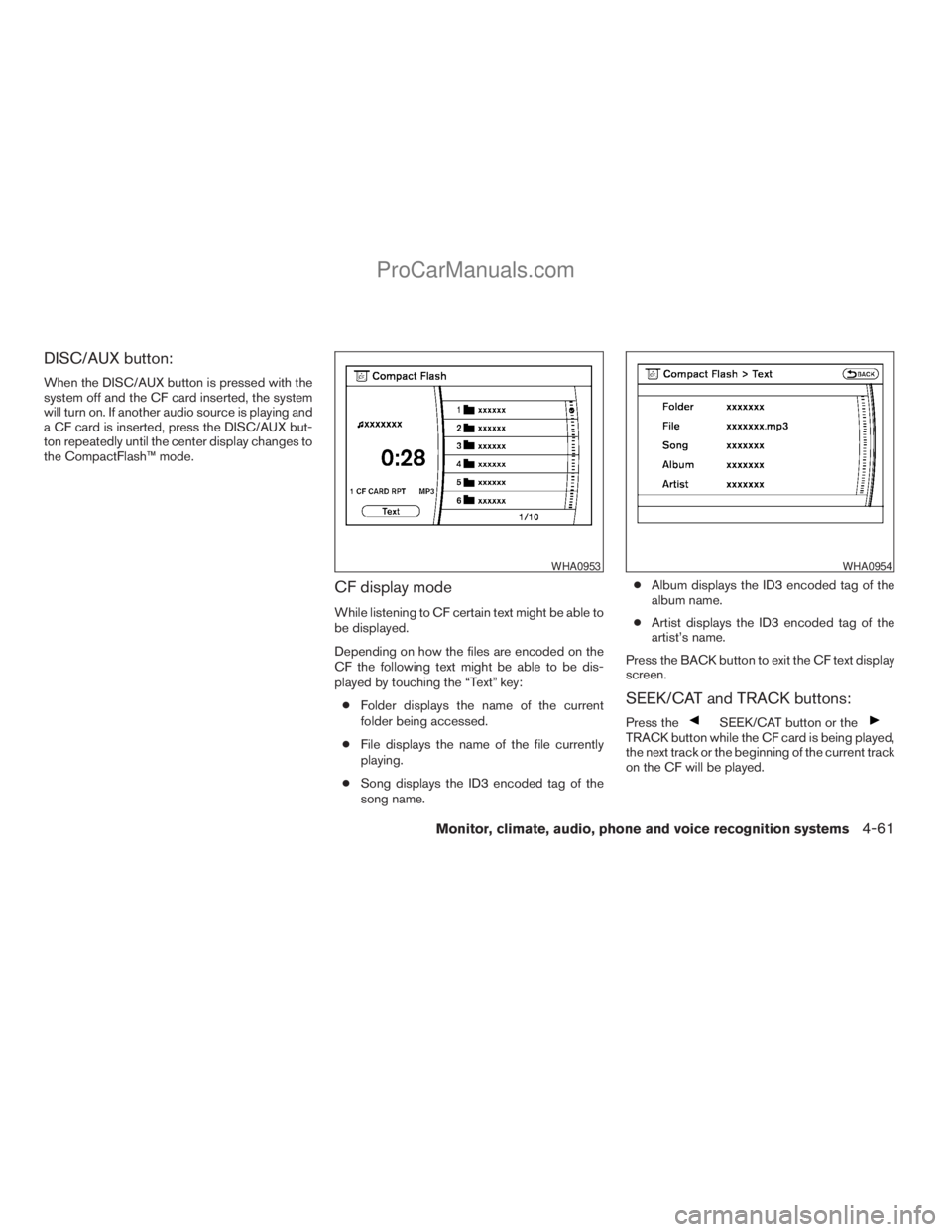
CF display mode
While listening to CF certain text might be able to
be displayed.
Depending on how the files are encoded on the
CF the following text might be able to be dis-
played by touching the “Text” key:
cFolder displays the name of the current
folder being accessed.
cFile displays the name of the file currently
playing.
cSong displays the ID3 encoded tag of the
song name.cAlbum displays the ID3 encoded tag of the
album name.
cArtist displays the ID3 encoded tag of the
artist’s name.
Press the BACK button to exit the CF text display
screen.
SEEK/CAT and TRACK buttons:
Press theSEEK/CAT button or theTRACK button while the CF card is being played,
the next track or the beginning of the current track
on the CF will be played.
WHA0953WHA0954
Monitor, climate, audio, phone and voice recognition systems4-61
ZREVIEW COPYÐ2009 Armada(wzw)
Owners ManualÐUSA_English(nna)
02/26/08Ðdebbie
X
ProCarManuals.com
Page 242 of 465
Press and hold theSEEK/CAT (rewind)
button or theTRACK (fast forward) button
for more than approximately 1.5 seconds, the CF
card will play while rewinding or fast forwarding.
When the
SEEK/CAT (rewind) button or
theTRACK (fast forward) button is re-
leased, the CF card will return to the normal
playing speed.
The NISSAN controller can also be used to se-
lect tracks when the CF card is being played.
For more information on how to use the NISSAN
controller, see “How to use the NISSAN control-
ler” earlier in this section.
Folder selection:
To change to another folder in the CF card either:
cTurn the TUNE/FLDR knob right or left.
cTouch the desired folder key on screen.
cUse the NISSAN controller.
SCAN·RPT button:
Pressing the SCAN·RPT button while the CF
card is playing, the play pattern can be changed
as follows:
1 CF CARD RPT!1 FOLDER RPT!1 TRK
RPT!1 CF CARD RDM!1 FOLDER RDM!
1 CF CARD RPT1 CF CARD RPT: the entire CF card will be
repeated.
1 FOLDER RPT: the folder currently being ac-
cessed will be repeated.
1 TRK RPT: the current track playing will be
repeated.
1 CF CARD RDM: all the tracks on the CF card
will be played randomly.
1 FOLDER RDM: the tracks in the current folder
being accessed will be played randomly.
CF eject:
Press the knob next to the CF slot while a CF
card is inserted, the CF card will be ejected.
Troubleshooting messages:
The following messages will be displayed under
certain conditions:
cReading CompactFlash™
The system is reading the CF card inserted
in the slot.
cNo CompactFlash™ card
A CF card is not inserted in the slot.
cCompactFlash™ read error
The system cannot read the CF card.
cUnplayable file
The system cannot play a music file.cNo audio file
The CF card inserted in the slot or its folder
does not contain any music files.
Compatibility with other media:
If a commercially available CompactFlash™
adapter is inserted into the slot, other memory
media can also be used.
MUSIC BOX HARD-DISK DRIVE
AUDIO SYSTEM (if so equipped)
The Music Box hard-disk drive audio system can
store songs from CDs being played. The system
has a 9.3 gigabyte (GB) storage capacity and
can record up to 200 hours (approximately 2,900
songs) .
The following CDs can be recorded in the Music
Box hard-disk drive audio system:
cCDs without MP3/WMA files.
cHybrid Compact Disc Digital Audio (Hybrid
CD-DA) specification in Super Audio CDs.
cCompact Disc Digital Audio (CD-DA) speci-
fication in CD-Extras.
cFirst session of multisession disc.
Extreme temperature conditions [below24°F
(220°C) and above 158°F (70°C)] could affect
the performance of the hard disk.
4-62Monitor, climate, audio, phone and voice recognition systems
ZREVIEW COPYÐ2009 Armada(wzw)
Owners ManualÐUSA_English(nna)
02/26/08Ðdebbie
X
ProCarManuals.com
Page 243 of 465
NOTE:
If the hard disk needs to be replaced due to
a malfunction, all stored music data will be
erased.
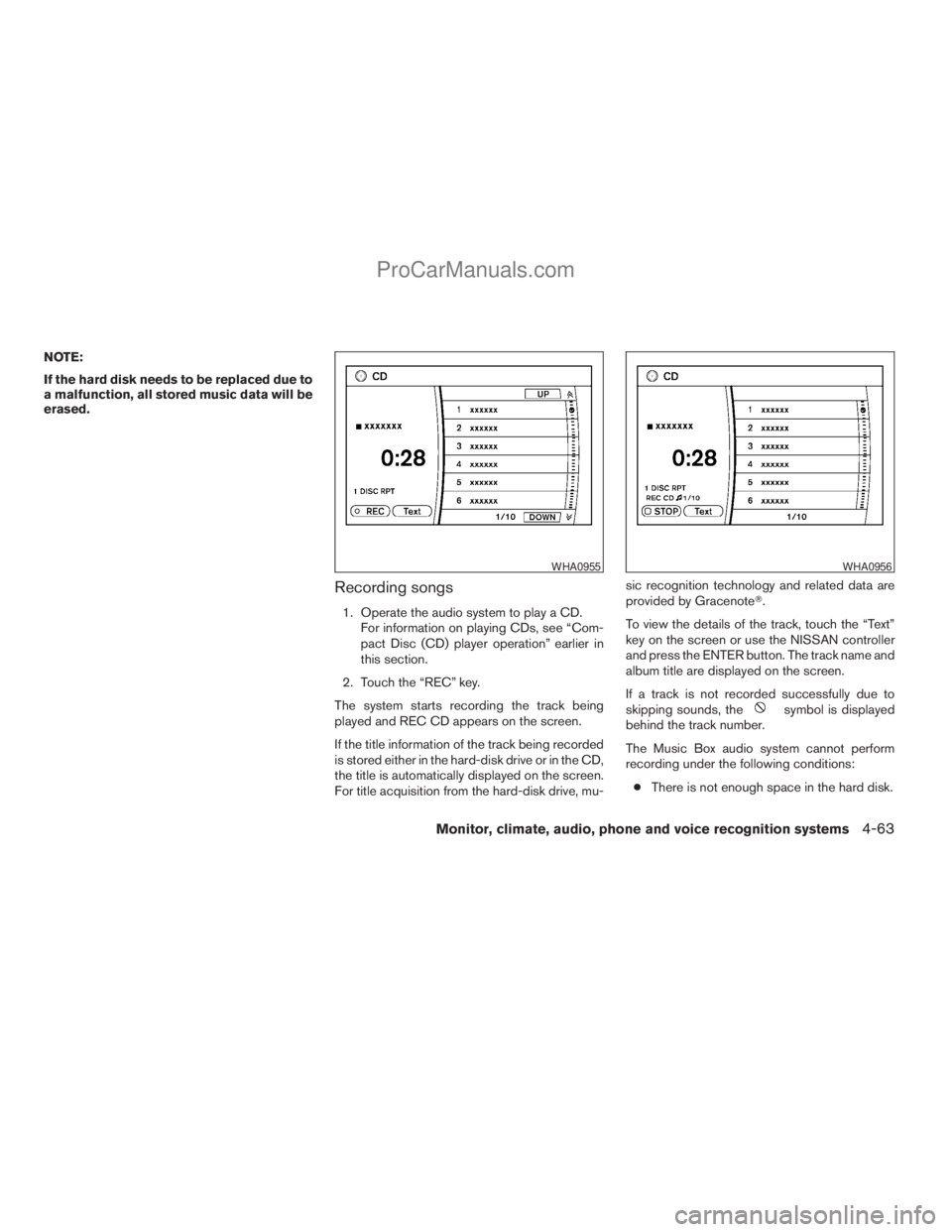
Recording songs
1. Operate the audio system to play a CD.
For information on playing CDs, see “Com-
pact Disc (CD) player operation” earlier in
this section.
2. Touch the “REC” key.
The system starts recording the track being
played and REC CD appears on the screen.
If the title information of the track being recorded
is stored either in the hard-disk drive or in the CD,
the title is automatically displayed on the screen.
For title acquisition from the hard-disk drive, mu-sic recognition technology and related data are
provided by GracenoteT.
To view the details of the track, touch the “Text”
key on the screen or use the NISSAN controller
and press the ENTER button. The track name and
album title are displayed on the screen.
If a track is not recorded successfully due to
skipping sounds, the
symbol is displayed
behind the track number.
The Music Box audio system cannot perform
recording under the following conditions:
cThere is not enough space in the hard disk.
WHA0955WHA0956
Monitor, climate, audio, phone and voice recognition systems4-63
ZREVIEW COPYÐ2009 Armada(wzw)
Owners ManualÐUSA_English(nna)
02/26/08Ðdebbie
X
ProCarManuals.com
Page 245 of 465
6SCAN·RPT button:
Pressing the SCAN·RPT button while a track is
playing, the play pattern can be changed as fol-
lows:
ALL Playlist RPT!1 Playlist RPT!1 TRK RPT
!ALL Playlist RDM!1 Playlist RDM!ALL
Playlist RPT
ALL Playlist RPT: the entire playlist will be re-
peated.
1 Playlist RPT: the playlist currently being played
will be repeated.
1 TRK RPT: the current track playing will be
repeated.
ALL Playlist RDM: all the tracks in the playlist will
be played randomly.
1 Playlist RDM: the tracks in the current playlist
will be played randomly.Music Box menu
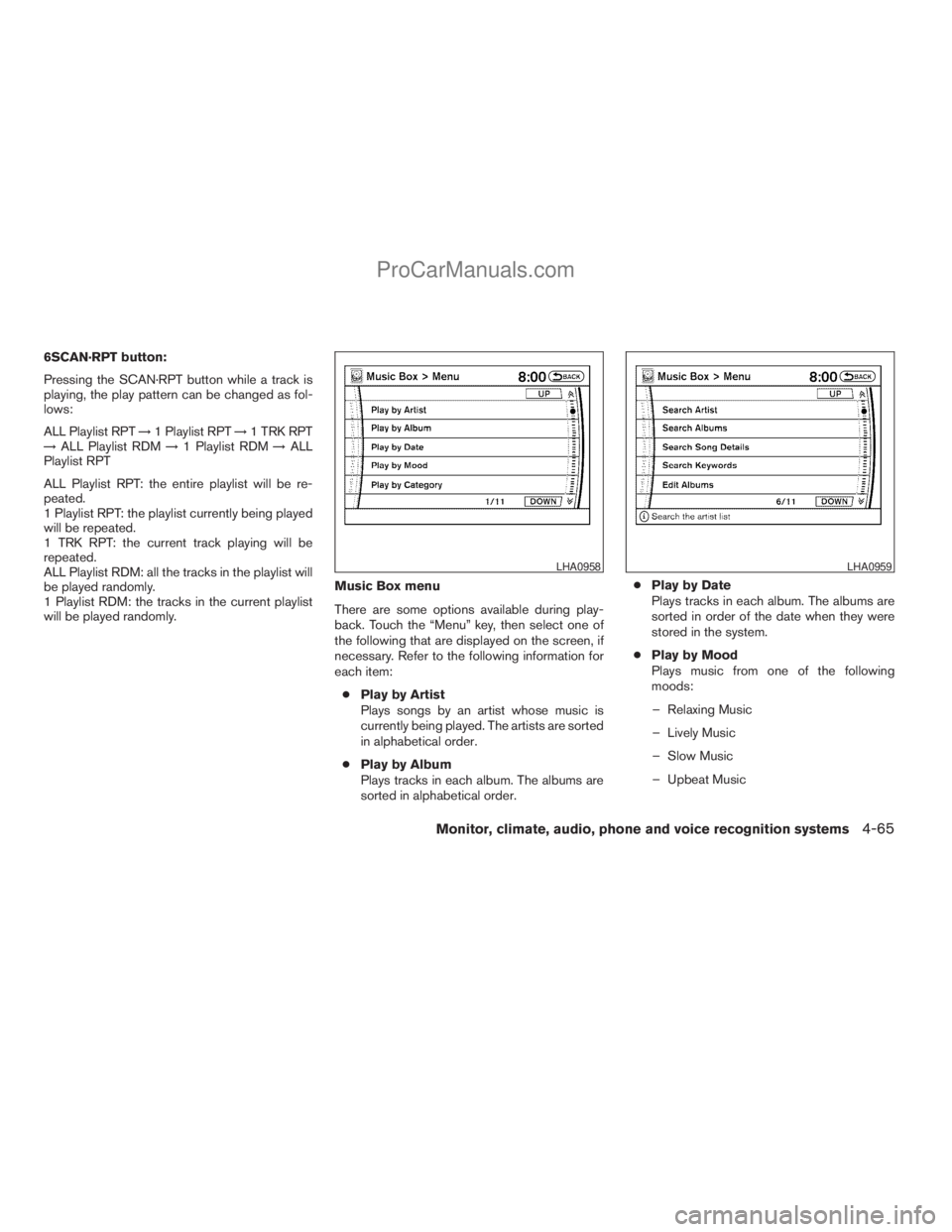
There are some options available during play-
back. Touch the “Menu” key, then select one of
the following that are displayed on the screen, if
necessary. Refer to the following information for
each item:
cPlay by Artist
Plays songs by an artist whose music is
currently being played. The artists are sorted
in alphabetical order.
cPlay by Album
Plays tracks in each album. The albums are
sorted in alphabetical order.cPlay by Date
Plays tracks in each album. The albums are
sorted in order of the date when they were
stored in the system.
cPlay by Mood
Plays music from one of the following
moods:
– Relaxing Music
– Lively Music
– Slow Music
– Upbeat Music
LHA0958LHA0959
Monitor, climate, audio, phone and voice recognition systems4-65
ZREVIEW COPYÐ2009 Armada(wzw)
Owners ManualÐUSA_English(nna)
02/26/08Ðdebbie
X
ProCarManuals.com
Page 246 of 465
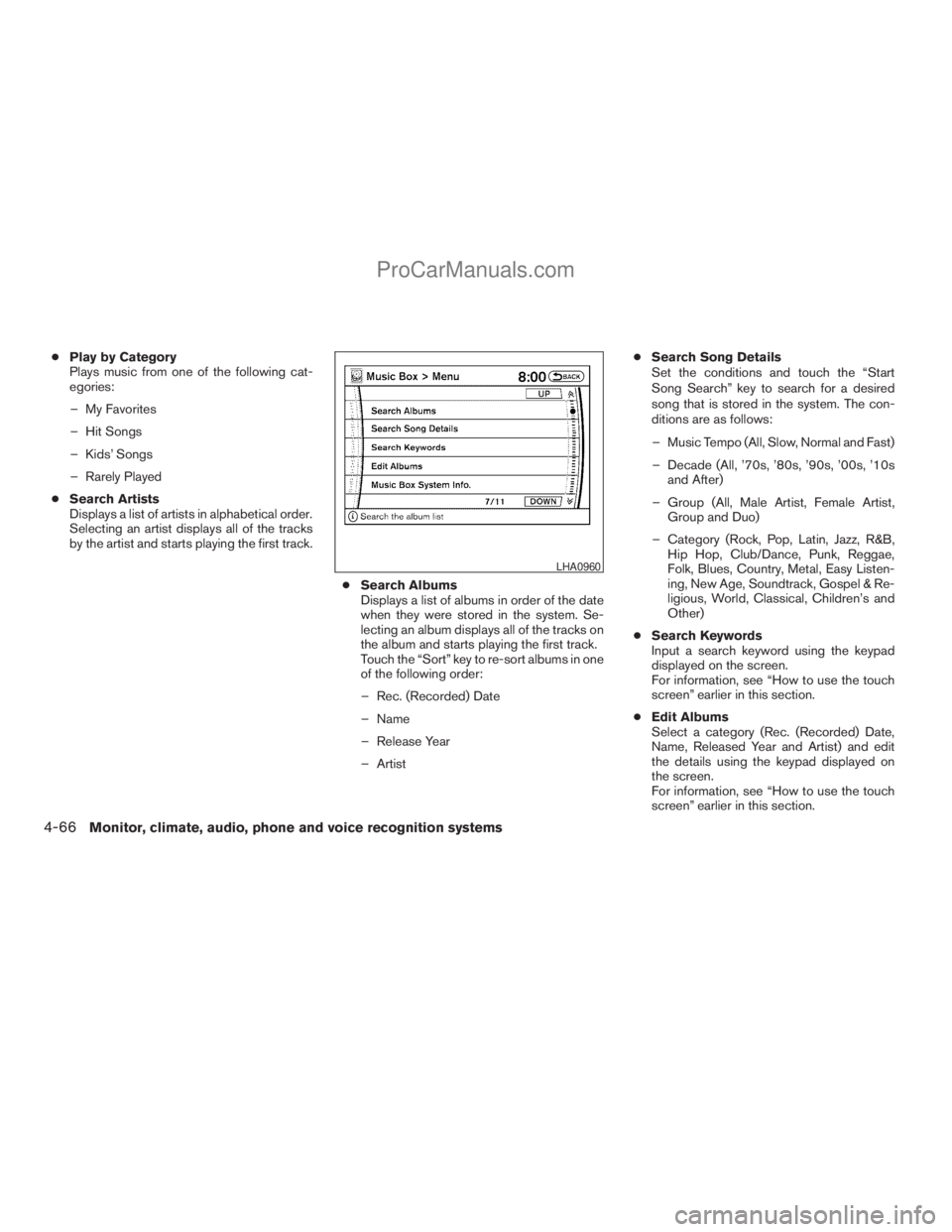
cPlay by Category
Plays music from one of the following cat-
egories:
– My Favorites
– Hit Songs
– Kids’ Songs
– Rarely Played
cSearch Artists
Displays a list of artists in alphabetical order.
Selecting an artist displays all of the tracks
by the artist and starts playing the first track.
cSearch Albums
Displays a list of albums in order of the date
when they were stored in the system. Se-
lecting an album displays all of the tracks on
the album and starts playing the first track.
Touch the “Sort” key to re-sort albums in one
of the following order:
– Rec. (Recorded) Date
– Name
– Release Year
– ArtistcSearch Song Details
Set the conditions and touch the “Start
Song Search” key to search for a desired
song that is stored in the system. The con-
ditions are as follows:
– Music Tempo (All, Slow, Normal and Fast)
– Decade (All, ’70s, ’80s, ’90s, ’00s, ’10s
and After)
– Group (All, Male Artist, Female Artist,
Group and Duo)
– Category (Rock, Pop, Latin, Jazz, R&B,
Hip Hop, Club/Dance, Punk, Reggae,
Folk, Blues, Country, Metal, Easy Listen-
ing, New Age, Soundtrack, Gospel & Re-
ligious, World, Classical, Children’s and
Other)
cSearch Keywords
Input a search keyword using the keypad
displayed on the screen.
For information, see “How to use the touch
screen” earlier in this section.
cEdit Albums
Select a category (Rec. (Recorded) Date,
Name, Released Year and Artist) and edit
the details using the keypad displayed on
the screen.
For information, see “How to use the touch
screen” earlier in this section.
LHA0960
4-66Monitor, climate, audio, phone and voice recognition systems
ZREVIEW COPYÐ2009 Armada(wzw)
Owners ManualÐUSA_English(nna)
02/26/08Ðdebbie
X
ProCarManuals.com
Page 247 of 465
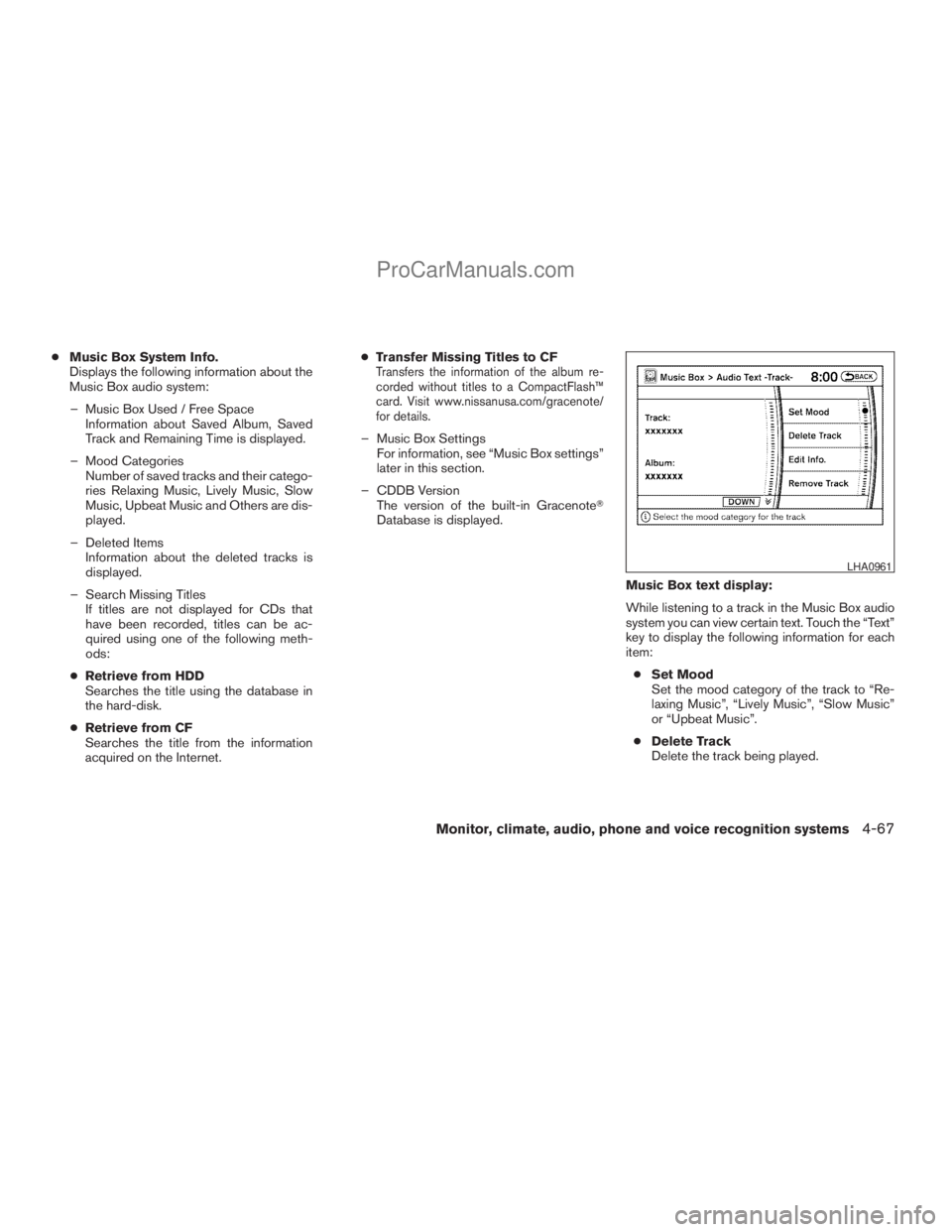
cMusic Box System Info.
Displays the following information about the
Music Box audio system:
– Music Box Used / Free Space
Information about Saved Album, Saved
Track and Remaining Time is displayed.
– Mood Categories
Number of saved tracks and their catego-
ries Relaxing Music, Lively Music, Slow
Music, Upbeat Music and Others are dis-
played.
– Deleted Items
Information about the deleted tracks is
displayed.
– Search Missing Titles
If titles are not displayed for CDs that
have been recorded, titles can be ac-
quired using one of the following meth-
ods:
cRetrieve from HDD
Searches the title using the database in
the hard-disk.
cRetrieve from CF
Searches the title from the information
acquired on the Internet.cTransfer Missing Titles to CFTransfers the information of the album re-
corded without titles to a CompactFlash™
card. Visit www.nissanusa.com/gracenote/
for details.
– Music Box Settings
For information, see “Music Box settings”
later in this section.
– CDDB Version
The version of the built-in GracenoteT
Database is displayed.
Music Box text display:
While listening to a track in the Music Box audio
system you can view certain text. Touch the “Text”
key to display the following information for each
item:
cSet Mood
Set the mood category of the track to “Re-
laxing Music”, “Lively Music”, “Slow Music”
or “Upbeat Music”.
cDelete Track
Delete the track being played.
LHA0961
Monitor, climate, audio, phone and voice recognition systems4-67
ZREVIEW COPYÐ2009 Armada(wzw)
Owners ManualÐUSA_English(nna)
02/27/08Ðtbrooks
X
ProCarManuals.com
Page 248 of 465
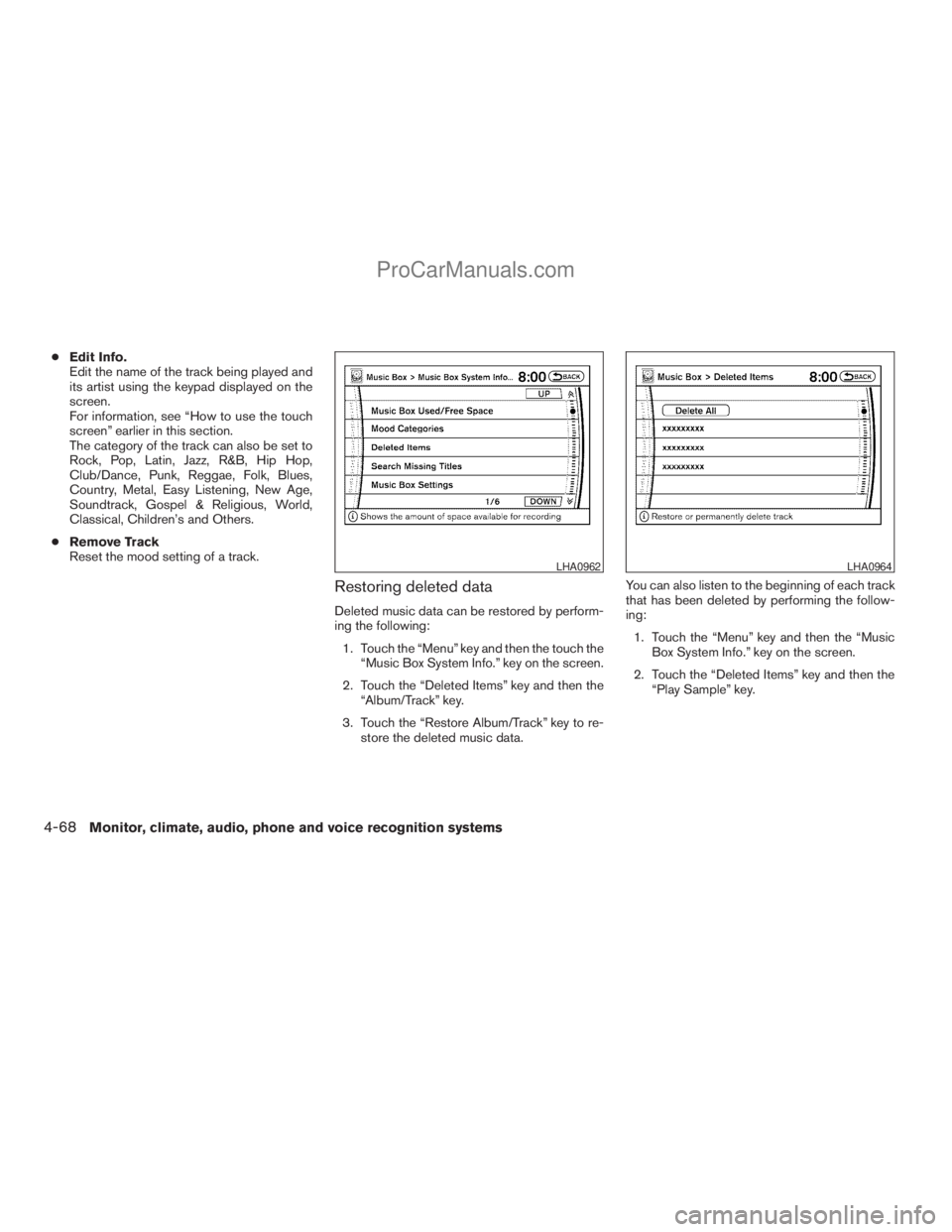
cEdit Info.
Edit the name of the track being played and
its artist using the keypad displayed on the
screen.
For information, see “How to use the touch
screen” earlier in this section.
The category of the track can also be set to
Rock, Pop, Latin, Jazz, R&B, Hip Hop,
Club/Dance, Punk, Reggae, Folk, Blues,
Country, Metal, Easy Listening, New Age,
Soundtrack, Gospel & Religious, World,
Classical, Children’s and Others.
cRemove Track
Reset the mood setting of a track.
Restoring deleted data
Deleted music data can be restored by perform-
ing the following:
1. Touch the “Menu” key and then the touch the
“Music Box System Info.” key on the screen.
2. Touch the “Deleted Items” key and then the
“Album/Track” key.
3. Touch the “Restore Album/Track” key to re-
store the deleted music data.You can also listen to the beginning of each track
that has been deleted by performing the follow-
ing:
1. Touch the “Menu” key and then the “Music
Box System Info.” key on the screen.
2. Touch the “Deleted Items” key and then the
“Play Sample” key.
LHA0962LHA0964
4-68Monitor, climate, audio, phone and voice recognition systems
ZREVIEW COPYÐ2009 Armada(wzw)
Owners ManualÐUSA_English(nna)
02/26/08Ðdebbie
X
ProCarManuals.com
Page 254 of 465
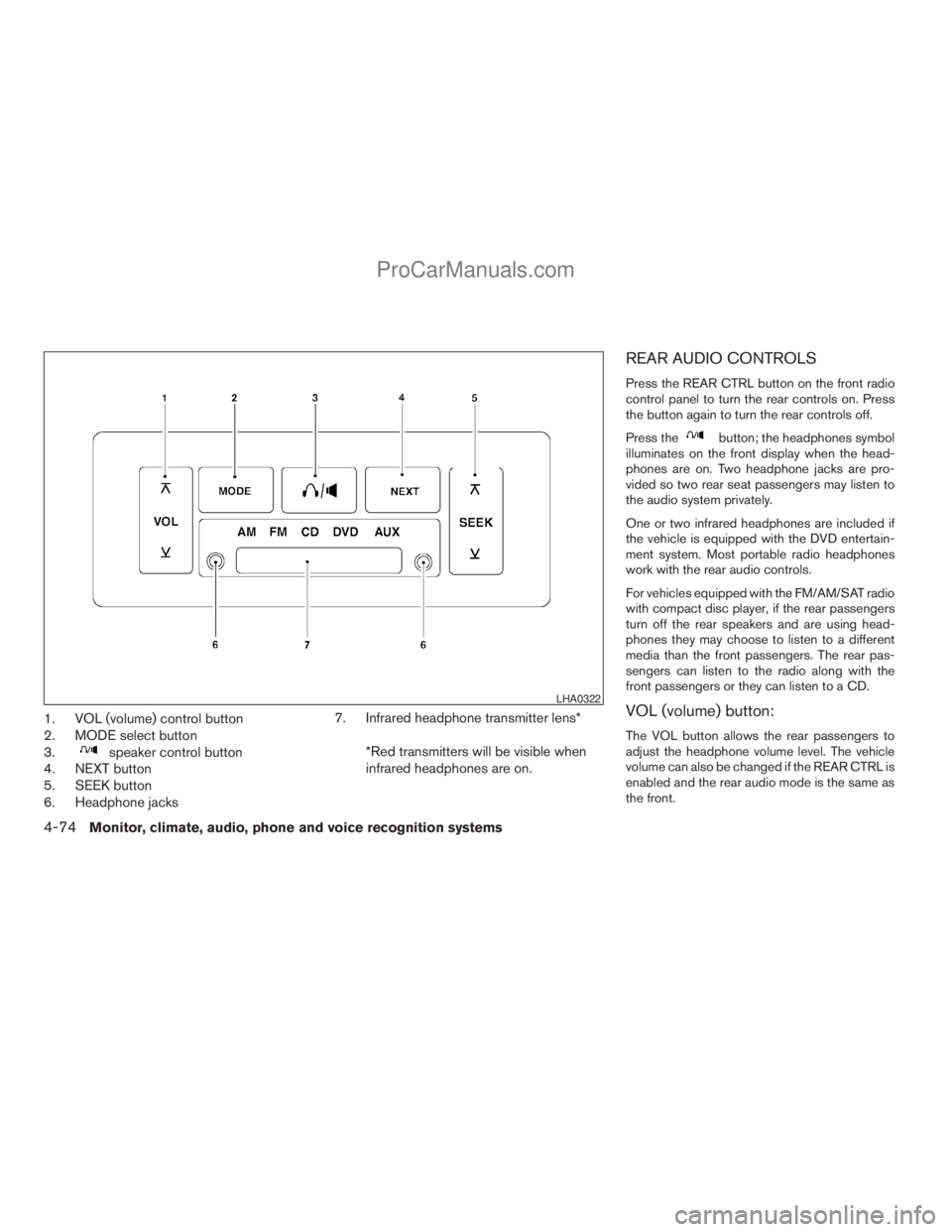
1. VOL (volume) control button
2. MODE select button
3.
speaker control button
4. NEXT button
5. SEEK button
6. Headphone jacks7. Infrared headphone transmitter lens*
*Red transmitters will be visible when
infrared headphones are on.
REAR AUDIO CONTROLS
Press the REAR CTRL button on the front radio
control panel to turn the rear controls on. Press
the button again to turn the rear controls off.
Press the
button; the headphones symbol
illuminates on the front display when the head-
phones are on. Two headphone jacks are pro-
vided so two rear seat passengers may listen to
the audio system privately.
One or two infrared headphones are included if
the vehicle is equipped with the DVD entertain-
ment system. Most portable radio headphones
work with the rear audio controls.
For vehicles equipped with the FM/AM/SAT radio
with compact disc player, if the rear passengers
turn off the rear speakers and are using head-
phones they may choose to listen to a different
media than the front passengers. The rear pas-
sengers can listen to the radio along with the
front passengers or they can listen to a CD.
VOL (volume) button:
The VOL button allows the rear passengers to
adjust the headphone volume level. The vehicle
volume can also be changed if the REAR CTRL is
enabled and the rear audio mode is the same as
the front.
LHA0322
4-74Monitor, climate, audio, phone and voice recognition systems
ZREVIEW COPYÐ2009 Armada(wzw)
Owners ManualÐUSA_English(nna)
02/26/08Ðdebbie
X
ProCarManuals.com
Page 256 of 465
WARNING
cThe driver must not attempt to operate
or view the Mobile Entertainment Sys-
tem while the vehicle is in motion so
that full attention may be given to ve-
hicle operation.
cDo not attempt to modify the system to
display a movie on the front screen
while the vehicle is being driven. Doing
so may distract the driver and may
cause a collision and serious personal
injury or death.
CAUTION
cThe glass screen on the liquid crystal
display may break if hit with a hard or
sharp object. If the glass breaks, do not
touch the liquid crystalline material,
which contains a small amount of mer-
cury. In case of contact with skin, wash
immediately with soap and water.
cUse a damp, soft cloth when cleaning
the Mobile Entertainment System com-
ponents. Do not use solvents or clean-
ing solutions.
Do not attempt to use the system in extreme
temperature conditions [below -4°F (-20°C) or
above 158°F (70°C)].To avoid discharging the vehicle battery, do not
operate the system more than 15 minutes without
starting the engine.
Movies will not be shown on the front display
while the vehicle is in any drive position to reduce
driver distraction. Audio is available when a movie
is played. To view movies in the front display, stop
the vehicle in a safe location, move the shift
selector lever to the P (Park) position and apply
the parking brake.
4-76Monitor, climate, audio, phone and voice recognition systems
ZREVIEW COPYÐ2009 Armada(wzw)
Owners ManualÐUSA_English(nna)
02/26/08Ðdebbie
X
ProCarManuals.com
Page 257 of 465
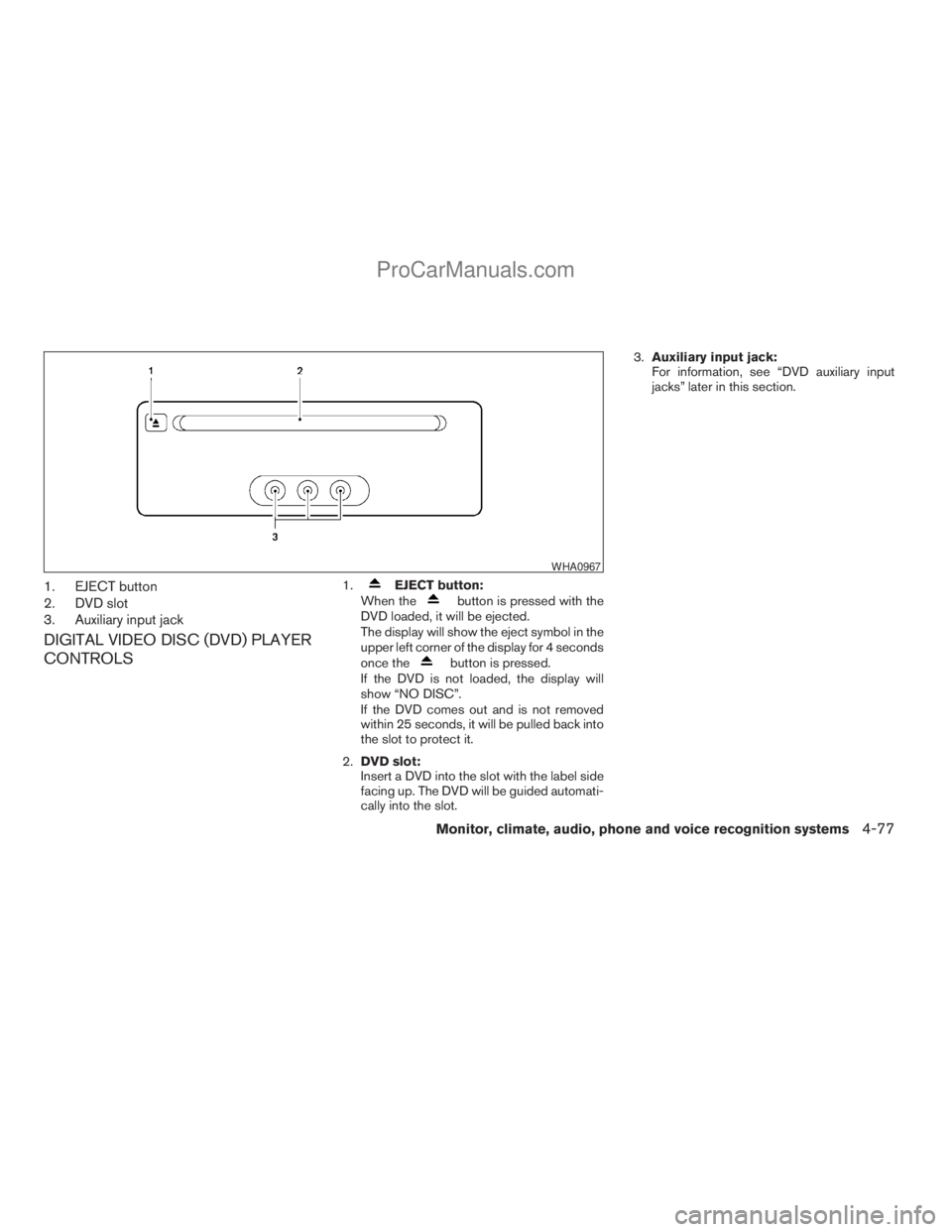
1. EJECT button
2. DVD slot
3. Auxiliary input jack
DIGITAL VIDEO DISC (DVD) PLAYER
CONTROLS
1.EJECT button:
When thebutton is pressed with the
DVD loaded, it will be ejected.
The display will show the eject symbol in the
upper left corner of the display for 4 seconds
once the
button is pressed.
If the DVD is not loaded, the display will
show “NO DISC”.
If the DVD comes out and is not removed
within 25 seconds, it will be pulled back into
the slot to protect it.
2.DVD slot:
Insert a DVD into the slot with the label side
facing up. The DVD will be guided automati-
cally into the slot.3.Auxiliary input jack:
For information, see “DVD auxiliary input
jacks” later in this section.
WHA0967
Monitor, climate, audio, phone and voice recognition systems4-77
ZREVIEW COPYÐ2009 Armada(wzw)
Owners ManualÐUSA_English(nna)
02/26/08Ðdebbie
X
ProCarManuals.com