phone NISSAN ARMADA 2012 1.G 06IT Navigation Manual
[x] Cancel search | Manufacturer: NISSAN, Model Year: 2012, Model line: ARMADA, Model: NISSAN ARMADA 2012 1.GPages: 235, PDF Size: 5.14 MB
Page 36 of 235
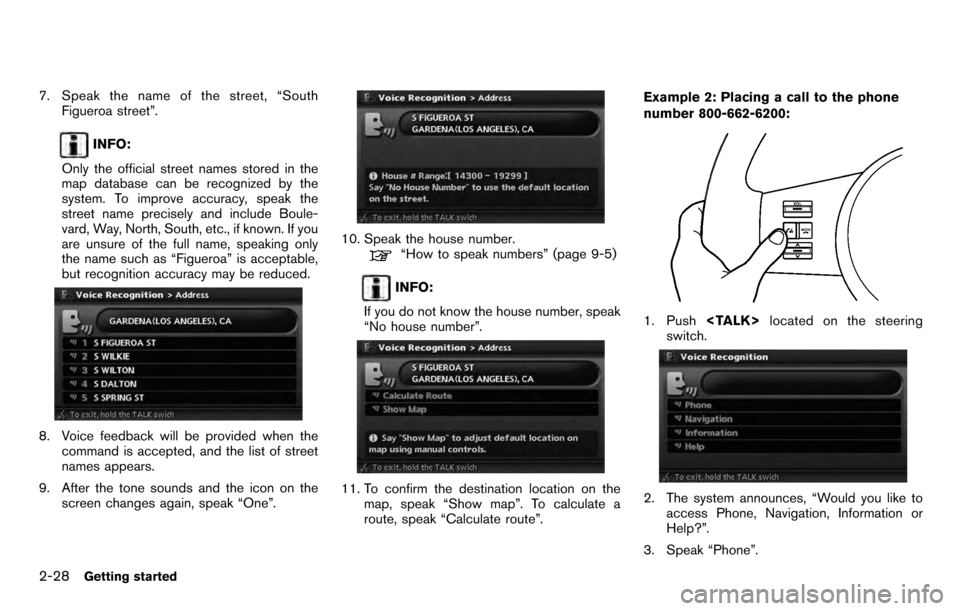
7. Speak the name of the street, “SouthFigueroa street”.
INFO:
Only the official street names stored in the
map database can be recognized by the
system. To improve accuracy, speak the
street name precisely and include Boule-
vard, Way, North, South, etc., if known. If you
are unsure of the full name, speaking only
the name such as “Figueroa” is acceptable,
but recognition accuracy may be reduced.
8. Voice feedback will be provided when the command is accepted, and the list of street
names appears.
9. After the tone sounds and the icon on the screen changes again, speak “One”.
10. Speak the house number.“How to speak numbers” (page 9-5)
INFO:
If you do not know the house number, speak
“No house number”.
11. To confirm the destination location on the map, speak “Show map”. To calculate a
route, speak “Calculate route”. Example 2: Placing a call to the phone
number 800-662-6200:
1. Push
switch.
2. The system announces, “Would you like to access Phone, Navigation, Information or
Help?”.
3. Speak “Phone”.
2-28Getting started
Page 37 of 235
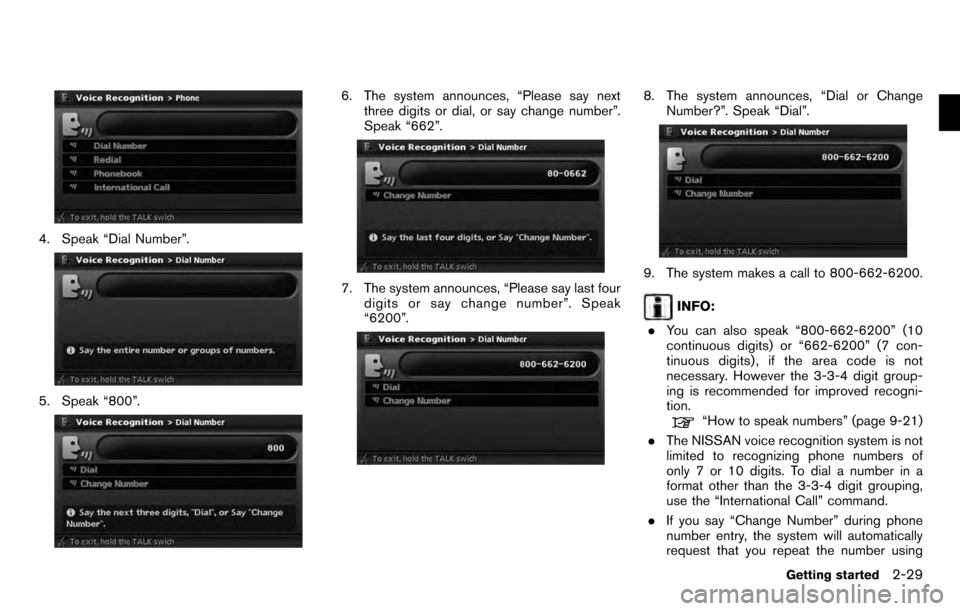
4. Speak “Dial Number”.
5. Speak “800”.
6. The system announces, “Please say nextthree digits or dial, or say change number”.
Speak “662”.
7. The system announces, “Please say last fourdigits or say change number”. Speak
“6200”.
8. The system announces, “Dial or Change
Number?”. Speak “Dial”.
9. The system makes a call to 800-662-6200.
INFO:
. You can also speak “800-662-6200” (10
continuous digits) or “662-6200” (7 con-
tinuous digits) , if the area code is not
necessary. However the 3-3-4 digit group-
ing is recommended for improved recogni-
tion.
“How to speak numbers” (page 9-21)
. The NISSAN voice recognition system is not
limited to recognizing phone numbers of
only 7 or 10 digits. To dial a number in a
format other than the 3-3-4 digit grouping,
use the “International Call” command.
. If you say “Change Number” during phone
number entry, the system will automatically
request that you repeat the number using
Getting started2-29
Page 38 of 235
the 3-3-4 format. In this case please say the
area code first and then follow the prompts.
. Do not add a “1” in front of the area code
when speaking phone numbers.
. If the system does not recognize your
command, please try repeating the com-
mand using a natural voice. Speaking too
slow or too loudly may further decrease
recognition performance.
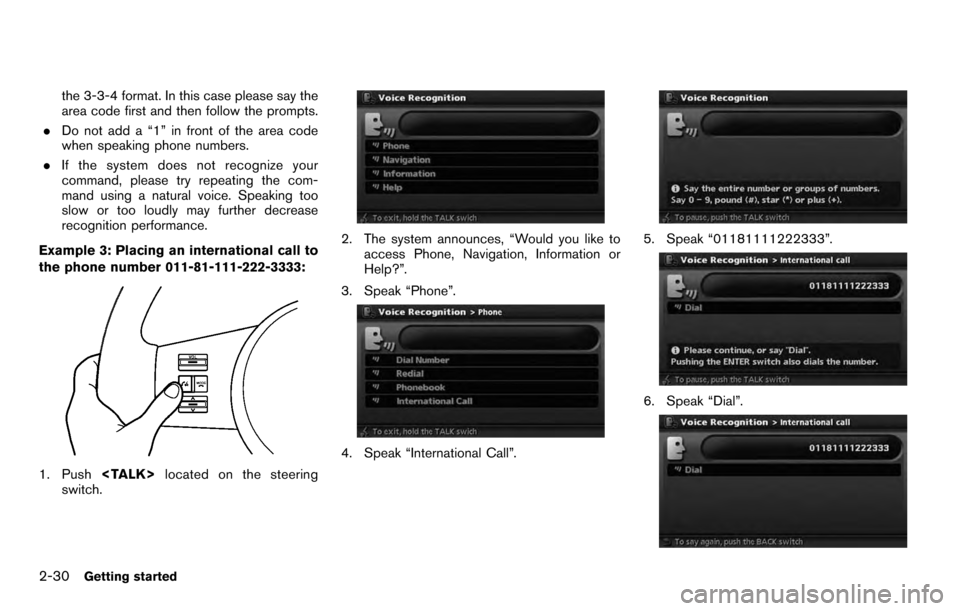
Example 3: Placing an international call to
the phone number 011-81-111-222-3333:
1. Push
switch.
2. The system announces, “Would you like to access Phone, Navigation, Information or
Help?”.
3. Speak “Phone”.
4. Speak “International Call”.
5. Speak “01181111222333”.
6. Speak “Dial”.
2-30Getting started
Page 65 of 235

4 Setting a destination
Destination screen.............................................. 4-2
Basic operation ............................................. 4-2
Changing the region ....................................... 4-3
Setting a Street Address ................................. 4-4
Setting a point of interest ................................. 4-5
Setting your home ........................................ 4-13
Setting from Address Book ............................4-13
Setting a nearby place .................................. 4-14
Setting a previous destination .........................4-16
Setting the previous starting point ....................4-17
Setting from stored routes ..............................4-18
Setting by phone number ...............................4-18Setting a freeway entrance/exit
........................4-20
Setting an Intersection .................................. 4-21
Setting a City Center .................................... 4-22
Setting from map ......................................... 4-23
Operations after setting a destination ....................4-24
Available setting items ................................... 4-25
Adjusting the location of the destination ............4-25
Adding additional destinations to a route ...........4-26
Storing a location ......................................... 4-26
Viewing information about the searched
location ...................................................... 4-26
Page 66 of 235
There are several methods you can use to set
your destination. Understand the advantages of
each method and select the best method for
finding and setting your destination.
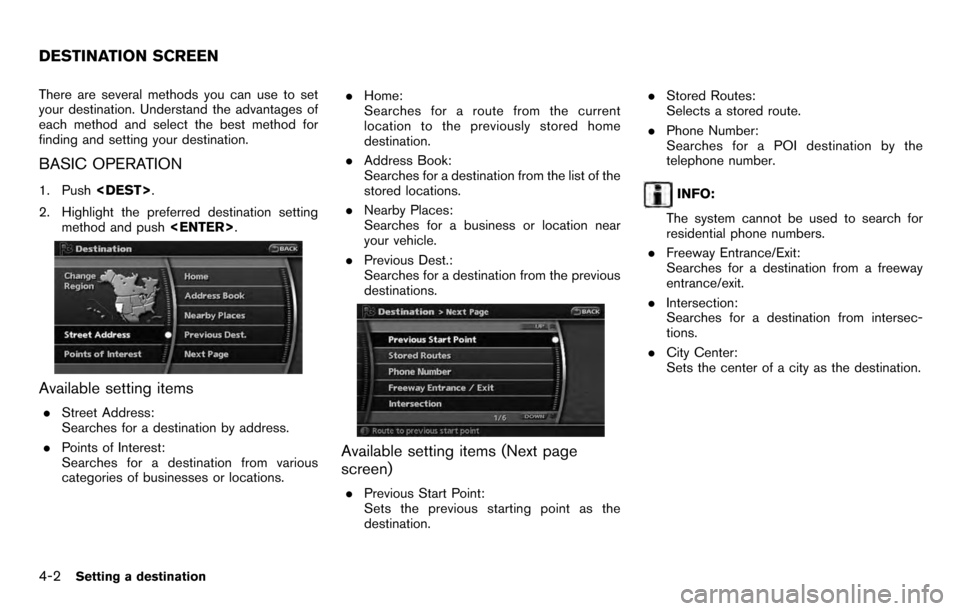
BASIC OPERATION
1. Push
2. Highlight the preferred destination setting method and push
Available setting items
.Street Address:
Searches for a destination by address.
. Points of Interest:
Searches for a destination from various
categories of businesses or locations. .
Home:
Searches for a route from the current
location to the previously stored home
destination.
. Address Book:
Searches for a destination from the list of the
stored locations.
. Nearby Places:
Searches for a business or location near
your vehicle.
. Previous Dest.:
Searches for a destination from the previous
destinations.
Available setting items (Next page
screen)
.Previous Start Point:
Sets the previous starting point as the
destination. .
Stored Routes:
Selects a stored route.
. Phone Number:
Searches for a POI destination by the
telephone number.
INFO:
The system cannot be used to search for
residential phone numbers.
. Freeway Entrance/Exit:
Searches for a destination from a freeway
entrance/exit.
. Intersection:
Searches for a destination from intersec-
tions.
. City Center:
Sets the center of a city as the destination.
DESTINATION SCREEN
4-2Setting a destination
Page 82 of 235
![NISSAN ARMADA 2012 1.G 06IT Navigation Manual SETTING FROM STORED ROUTES
You can select a preferred route from the stored
routes.
1. Push<DEST>.
2. Highlight [Next Page] and push <ENTER>.
3. Highlight [Stored Routes] and push
<ENTER> . A list scr](/img/5/280/w960_280-81.png "NISSAN ARMADA 2012 1.G 06IT Navigation Manual SETTING FROM STORED ROUTES
You can select a preferred route from the stored
routes.
1. Push<DEST>.
2. Highlight [Next Page] and push <ENTER>.
3. Highlight [Stored Routes] and push
<ENTER> . A list scr")
SETTING FROM STORED ROUTES
You can select a preferred route from the stored
routes.
1. Push
2. Highlight [Next Page] and push
3. Highlight [Stored Routes] and push
4. Highlight the preferred route from the list
and push
destination is set.
5. The selected destination is displayed at the
center of the map. Highlight [Start] after
confirming the location of the displayed
destination, and push
system sets the destination to the selected
location and starts calculating a route.
INFO:
. Even after setting a destination, you can
adjust the location of the destination, store
the location, etc.
“OPERATIONS AFTER SETTING A
DESTINATION” (page 4-24)
. The stored route includes only locations
(destination and waypoints) and route cal-
culation conditions, not the route itself.
Therefore, when the destination is set using
a stored route, a different route may be
suggested if the current vehicle location is
different from the one when the route was
stored.
SETTING BY PHONE NUMBER
If you know the telephone number of the facility,
use this to find the facility by entering the
number, and then have the system calculate a
route.
INFO:
. Telephone numbers that were stored for
stored destinations can also be used.
. If the area code of the specified telephone
number does not exist in the map data, the
system will not search for the location.
. Only the locations included in the database
4-18Setting a destination
Page 83 of 235
![NISSAN ARMADA 2012 1.G 06IT Navigation Manual in the map data can be searched by the
phone number. Residential phone numbers
cannot be used to search for a location.
1. Push<DEST>.
2. Highlight [Next Page] and push <ENTER>.
3. Highlight [Phone Nu](/img/5/280/w960_280-82.png "NISSAN ARMADA 2012 1.G 06IT Navigation Manual in the map data can be searched by the
phone number. Residential phone numbers
cannot be used to search for a location.
1. Push<DEST>.
2. Highlight [Next Page] and push <ENTER>.
3. Highlight [Phone Nu")
in the map data can be searched by the
phone number. Residential phone numbers
cannot be used to search for a location.
1. Push
2. Highlight [Next Page] and push
3. Highlight [Phone Number] and push
screen is displayed.
4. Enter the telephone number including the
area code.
5. After finishing the entry, highlight [Map] and push
“PHONE NUMBER INPUT SCREEN”
(page 2-22)
6. Displays a list screen if there are two or
more search results. Highlight the preferred
destination from the list and push
7. The selected destination is displayed at the
center of the map. Highlight [Start] after
confirming the location of the displayed
destination, and push
system sets the destination to the selected
location and starts calculating a route.
INFO:
Even after setting a destination, you can adjust
the location of the destination, store the route,
etc.
“OPERATIONS AFTER SETTING A
DESTINATION” (page 4-24)
Setting a destination4-19
Page 90 of 235
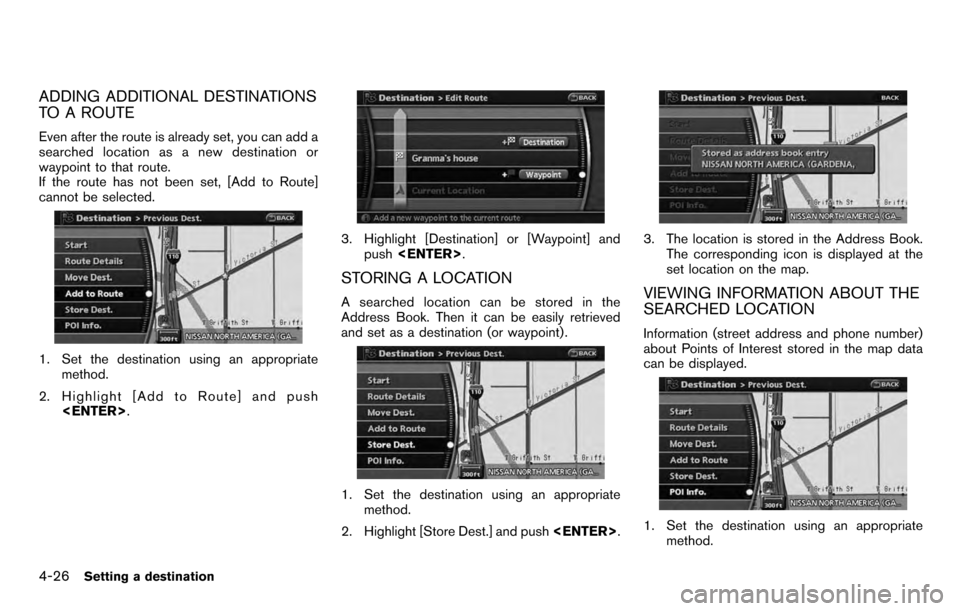
ADDING ADDITIONAL DESTINATIONS
TO A ROUTE
Even after the route is already set, you can add a
searched location as a new destination or
waypoint to that route.
If the route has not been set, [Add to Route]
cannot be selected.
1. Set the destination using an appropriatemethod.
2. Highlight [Add to Route] and push
3. Highlight [Destination] or [Waypoint] and
push
STORING A LOCATION
A searched location can be stored in the
Address Book. Then it can be easily retrieved
and set as a destination (or waypoint) .
1. Set the destination using an appropriate
method.
2. Highlight [Store Dest.] and push
3. The location is stored in the Address Book.
The corresponding icon is displayed at the
set location on the map.
VIEWING INFORMATION ABOUT THE
SEARCHED LOCATION
Information (street address and phone number)
about Points of Interest stored in the map data
can be displayed.
1. Set the destination using an appropriatemethod.
4-26Setting a destination
Page 128 of 235
![NISSAN ARMADA 2012 1.G 06IT Navigation Manual MINOR ADJUSTMENT OF THE HOME
OR STORED LOCATIONS
When you select [Edit], you can edit the
following items of the home or stored location.. Show Icon on Map
. Name (only for stored locations)
. Icon
.](/img/5/280/w960_280-127.png "NISSAN ARMADA 2012 1.G 06IT Navigation Manual MINOR ADJUSTMENT OF THE HOME
OR STORED LOCATIONS
When you select [Edit], you can edit the
following items of the home or stored location.. Show Icon on Map
. Name (only for stored locations)
. Icon
.")
MINOR ADJUSTMENT OF THE HOME
OR STORED LOCATIONS
When you select [Edit], you can edit the
following items of the home or stored location.. Show Icon on Map
. Name (only for stored locations)
. Icon
. Sound
. Direction
. Distance
. Phone No.
. Group (only for stored locations)
. Entry Number (only for stored locations)
Show Icon on Map
Displays the home icon or the stored location
icon on the map.
1. Highlight [Edit] and push
3. The indicator illuminates when the item is set. Then the system displays the icon on
the map.
Name (only for stored locations)
Changes the name of a stored location.
1. Highlight [Edit] and push
2. Highlight [Name] and push
A character input screen is displayed.
3. Enter the preferred name for the stored
location.
“CHARACTER (letter and number)
INPUT SCREEN” (page 2-21)
4. Highlight [OK] and push
The name is stored.
Icon
Changes the icon of the home or stored location
to the preferred one. By changing the icons, you
can utilize the [By Icon] option of the sort
function more effectively.
1. Highlight [Edit] and push
2. Highlight [Icon] and push
A list of icons is displayed.
6-10Storing a location/route
Page 132 of 235
![NISSAN ARMADA 2012 1.G 06IT Navigation Manual INFO:
. While setting the direction, you can change
the map scale.
. After the direction is set, if you highlight
[Direction] and push <ENTER>once again,
a confirmation message is displayed. Con-
firm](/img/5/280/w960_280-131.png "NISSAN ARMADA 2012 1.G 06IT Navigation Manual INFO:
. While setting the direction, you can change
the map scale.
. After the direction is set, if you highlight
[Direction] and push <ENTER>once again,
a confirmation message is displayed. Con-
firm")
INFO:
. While setting the direction, you can change
the map scale.
. After the direction is set, if you highlight
[Direction] and push
a confirmation message is displayed. Con-
firm the contents of the message, highlight
[Yes] and push
is cancelled.
Distance
Sets the alarm to sound when reaching a
specific distance to the home or stored location.
1. Highlight [Edit] and push
2. Highlight [Distance] and push
3. Highlight the preferred distance option and
push
selected distance illuminates.
Available distance options: . 150 feet (50 m)
. 300 feet (100 m)
. 1000 feet (300 m)
. 1500 feet (500 m)
INFO:
Once you set the direction and distance to
sound an alarm, the system will sound the alarm
when the vehicle icon passes a half circle outline
on the map, as shown in the figure.
Example: Set to 300 feet (100 m) distance,
upward direction
&1Stored location icon
&2Vehicle icon
&3Setting range
Phone No.
Stores the telephone number of the home or a
stored location.
1. Highlight [Edit] and push
2. Highlight [Phone No.] and push
The telephone number entry screen is
6-14Storing a location/route