ECO mode NISSAN ARMADA 2015 1.G Owners Manual
[x] Cancel search | Manufacturer: NISSAN, Model Year: 2015, Model line: ARMADA, Model: NISSAN ARMADA 2015 1.GPages: 510, PDF Size: 4.18 MB
Page 353 of 510
5 Starting and driving
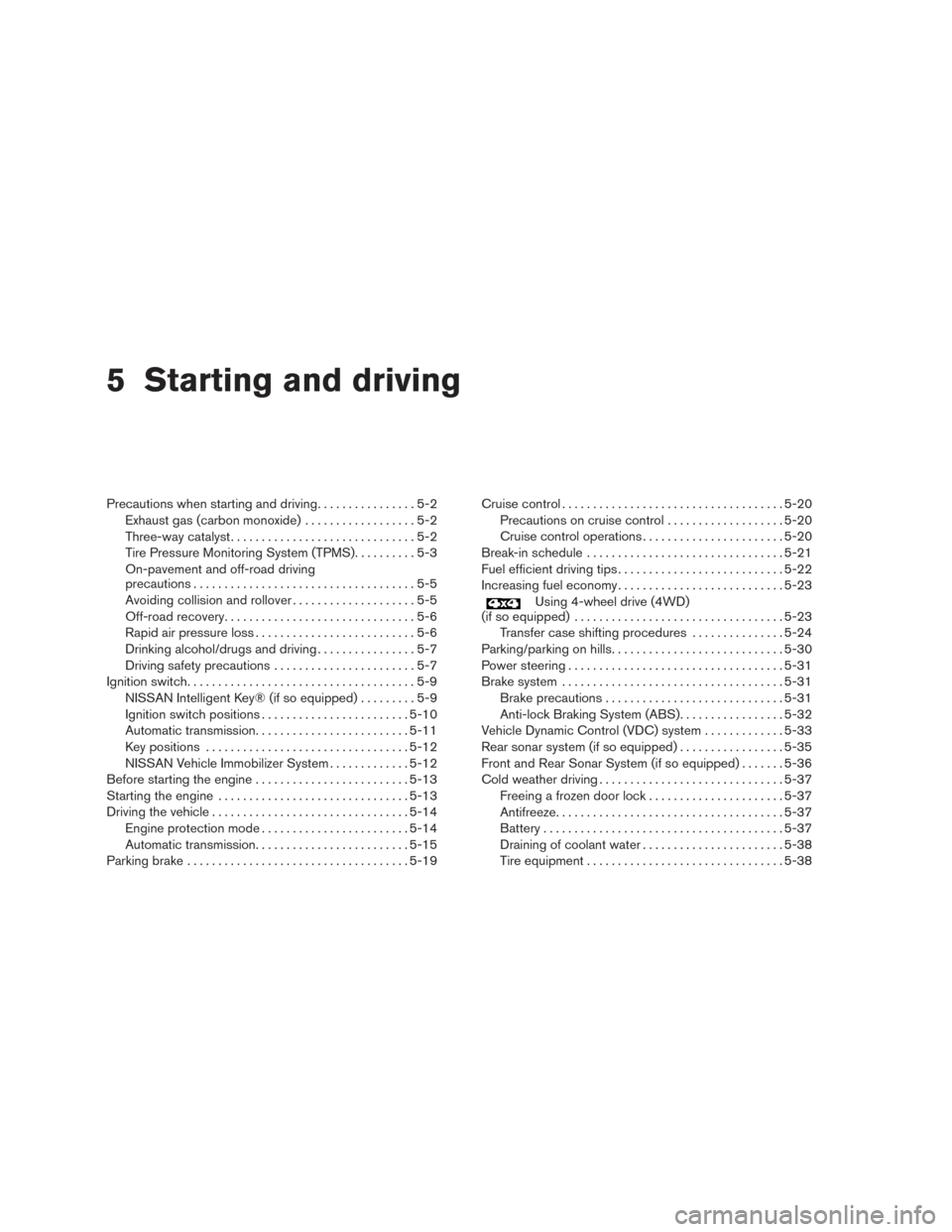
Precautions when starting and driving................5-2
Exhaust gas (carbon monoxide) ..................5-2
Three-way catalyst ..............................5-2
Tire Pressure Monitoring System (TPMS) ..........5-3
On-pavement and off-road driving
precautions ....................................5-5
Avoiding collision and rollover . . ..................5-5
Off-road recovery ...............................5-6
Rapid air pressure loss ..........................5-6
Drinking alcohol/drugs and driving ................5-7
Driving safety precautions .......................5-7
Ignition switch .....................................5-9
NISSAN Intelligent Key® (if so equipped) .........5-9
Ignition switch positions ........................ 5-10
Automatic transmission ......................... 5-11
Key positions ................................. 5-12
NISSAN Vehicle Immobilizer System .............5-12
Before starting the engine ......................... 5-13
Starting the engine ............................... 5-13
Driving the vehicle ................................ 5-14
Engine protection mode ........................ 5-14
Automatic transmission ......................... 5-15
Parking brake .................................... 5-19Cruise control
.................................... 5-20
Precautions on cruise control ...................5-20
Cruise control operations .......................5-20
Break-in schedule ................................ 5-21
Fuel efficient driving tips ........................... 5-22
Increasing fuel economy ........................... 5-23
Using 4-wheel drive (4WD)
(if so equipped) .................................. 5-23
Transfer case shifting procedures . . .............5-24
Parking/parking on hills ............................ 5-30
Power steering ................................... 5-31
Brake system .................................... 5-31
Brake precautions ............................. 5-31
Anti-lock Braking System (ABS) .................5-32
Vehicle Dynamic Control (VDC) system .............5-33
Rear sonar system (if so equipped) .................5-35
Front and Rear Sonar System (if so equipped) .......5-36
Cold weather driving .............................. 5-37
Freeing a frozen door lock ......................5-37
Antifreeze ..................................... 5-37
Battery ....................................... 5-37
Draining of coolant water .......................5-38
Tire equipment ................................ 5-38
Page 365 of 510
There is an OFF position between the
LOCK and ON positions. The OFF position
is indicated by a “1” on the ignition switch.
For models without NISSAN vehicle immo-
bilizer system: when the ignition switch is
in the OFF position, the steering wheel is
not locked.
In order for the steering wheel to be locked, it
must be turned about 1/8 of a turn clockwise
from the straight up position.
To lock the steering wheel, turn the ignition
to the LOCK position. Remove the key. To
unlock the steering wheel, insert the key
and turn it gently while rotating the steer-
ing wheel slightly right and left.
If the key will not turn from the LOCK posi-
tion, turn the steering wheel to the left or
right while turning the key to unlock the key
cylinder.
KEY POSITIONS
LOCK: Normal parking position (0)
OFF: (Not used) (1)
ACC: (Accessories) (2)
This position activates electrical accessories
such as the radio when the engine is not running.ON: Normal operating position (3)
This position turns on the ignition system and the
electrical accessories.
START: (4)
This position starts the engine. As soon as the
engine has started, release the key. It automati-
cally returns to the ON position.
NISSAN VEHICLE IMMOBILIZER
SYSTEM
The NISSAN Vehicle Immobilizer System will not
allow the engine to start without the use of the
registered key.
If the engine fails to start using a registered key
(for example, when interference is caused by
another registered key, an automated toll road
device or automatic payment device on the key
ring) , restart the engine using the following pro-
cedure:
1. Leave the ignition switch in the ON position for approximately 5 seconds.
2. Place the ignition switch in the OFF or LOCK position, and wait approximately
10 seconds.
3. Repeat steps 1 and 2. 4. Restart the engine while holding the device
(which may have caused the interference)
separate from the registered key.
If the no start condition re-occurs, NISSAN rec-
ommends placing the registered key on a sepa-
rate key ring to avoid interference from other
devices.
5-12Starting and driving
Page 366 of 510
●Make sure the area around the vehicle is
clear.
● Check fluid levels such as engine oil, cool-
ant, brake fluid, and windshield-washer fluid
as frequently as possible, or at least when-
ever you refuel.
● Check that all windows and lights are clean.
● Visually inspect tires for their appearance
and condition. Also check tires for proper
inflation.
● Check that all doors are closed.
● Position seat and adjust head
restraints/headrests.
● Adjust inside and outside mirrors.
● Fasten seat belts and ask all passengers to
do likewise.
● Check the operation of warning lights when
the ignition switch is placed in the ON posi-
tion. For additional information, refer to
“Warning lights, indicator lights and audible
reminders” in the “Instruments and controls”
section of this manual. 1. Apply the parking brake.
2. Move the shift lever to P (Park) or N (Neu-
tral) . P (Park) is recommended.
The shift lever cannot be moved out of
P (Park) and into any of the other gear
positions if the ignition switch is
turned to the OFF position or if the key
is removed from the ignition switch.
The starter is designed not to operate if
the shift lever is in any of the driving
positions.
3. Crank the engine with your foot off the
accelerator pedal by placing the ignition
switch in the START position. Release the
key when the engine starts. If the engine
starts, but fails to run, repeat the above
procedure.
● If the engine is very hard to start in ex-
tremely cold weather or when restarting,
depress the accelerator pedal a little (ap-
proximately 1/3 to the floor) and hold it
and then crank the engine. Release the
key and the accelerator pedal when the
engine starts. ●
If the engine is very hard to start because
it is flooded, depress the accelerator
pedal all the way to the floor and hold it.
Crank the engine for 5–6 seconds. After
cranking the engine, release the accel-
erator pedal. Crank the engine with your
foot off the accelerator pedal by turn-
ing the ignition key to START. Release the
key when the engine starts. If the engine
starts, but fails to run, repeat the above
procedure.
CAUTION
Do not operate the starter for more than
15 seconds at a time. If the engine does
not start, turn the key off and wait 10 sec-
onds before cranking again, otherwise the
starter could be damaged.
4. Allow the engine to idle for at least 30 sec- onds after starting. Do not race the engine
while warming it up. Drive at moderate
speed for a short distance first, especially in
cold weather.
In cold weather, keep the engine running for
a minimum of 2–3 minutes before shutting it
off. Starting and stopping the engine over a
short period of time may make the vehicle
more difficult to start.
BEFORE STARTING THE ENGINE STARTING THE ENGINE
Starting and driving5-13
Page 367 of 510
NOTE:
Care should be taken to avoid situations
that can lead to potential battery discharge
and potential no-start conditions such as:1. Installation or extended use of electronic accessories that consume battery power
when the engine is not running (Phone char-
gers, GPS, DVD players, etc.)
2. Vehicle is not driven regularly and/or only driven short distances. In these cases, the
battery may need to be charged to maintain
battery health.ENGINE PROTECTION MODE
The engine has an engine protection mode to
reduce the chance of damage if the coolant tem-
perature becomes too high (for example, when
climbing steep grades in high temperature with
heavy loads, such as when towing a trailer) .
When the engine temperature reaches a certain
level:
● The engine coolant temperature gauge will
move toward the H position.
● Engine power may be reduced.
● The air conditioning cooling function may be
automatically turned OFF for a short time
(the blower will continue to operate) .
Engine power and, under some conditions, ve-
hicle speed will decrease. Vehicle speed can be
controlled with the accelerator pedal, but the
vehicle may not accelerate at the desired speed.
The transmission will downshift or upshift as it
reaches prescribed shift points. You can also
shift manually.
As driving conditions change and engine coolant
temperature is reduced, vehicle speed can be
increased using the accelerator pedal, and air
conditioning cooling function will automatically
be turned back ON. If:
1. The engine coolant temperature is not re- duced.
2. The air conditioning cooling function does not turn back ON.
3. The engine oil pressure warning/engine coolant temperature high indicator
il-
luminates, this may indicate a malfunction.
Move the vehicle off the road in a safe area
and allow the engine to cool. If after check-
ing the oil and coolant, the
remains
on, do not continue to drive and call a
NISSAN dealer.
The MIL may also come ON. If onlyit remains on,
you do not need to have your vehicle towed, but
have it inspected soon by a NISSAN dealer. For
additional information, refer to “Malfunction Indi-
cator Light (MIL)” in the “Instruments and con-
trols” section of this manual.
DRIVING THE VEHICLE
5-14Starting and driving
Page 370 of 510
Apply the parking brake. When parking on a hill,
apply the parking brake first, then move the shift
lever into the P (Park) position.
R (Reverse)
CAUTION
To prevent transmission damage, use the
R (Reverse) position only when the vehicle
is completely stopped.
Use the R (Reverse) position to back up. Make
sure the vehicle is completely stopped before
selecting the R (Reverse) position. The brake
pedal must be depressed to move the shift
lever from P (Park) , N (Neutral) or any drive
position to R (Reverse) .
N (Neutral)
Neither forward nor reverse gear is engaged. The
engine can be started in this position. You may
shift to N (Neutral) and restart a stalled engine
while the vehicle is moving.
D (Drive)
Use this position for all normal forward driving.
4 (Fourth gear)
Use this position for driving up and down long
slopes where engine braking would be advanta-
geous. Do not downshift into the 4 position at speeds
over the following and do not exceed the follow-
ing speeds in the 4 position.
4H:62 MPH (100 km/h)
4LO: 31 MPH (50 km/h)
3 (Third gear)
Use this position for driving up and down long
slopes where engine braking would be advanta-
geous.
2 (Second gear):
Use this position for hill climbing or engine brak-
ing on downhill grades.
Do not downshift into the 2 position at speeds
over the following and do not exceed the follow-
ing speeds in the 2 position. 2WD and AUTO:71 MPH (115 km/h) without tow mode
62 MPH (100 km/h) with tow mode
4H: 62 MPH (100 km/h) without tow mode
62 MPH (100 km/h) with tow mode 4LO:
31 MPH (50 km/h) without tow mode
27 MPH (44 km/h) with tow mode
1 (Low gear):
Use this position when climbing steep hills slowly
or slow driving through deep snow, sand or mud,
or for maximum engine braking on steep downhill
grades.
Do not downshift into the 1 position at speeds
over the following and do not exceed the follow-
ing speeds in the 1 position. 2WD and AUTO:43 MPH (70 km/h) without tow mode
37 MPH (60 km/h) with tow mode
4H: 43 MPH (70 km/h) without tow mode
37 MPH (60 km/h) with tow mode
4LO: 19 MPH (30 km/h) without tow mode
16 MPH (27 km/h) with tow mode
Starting and driving5-17
Page 377 of 510
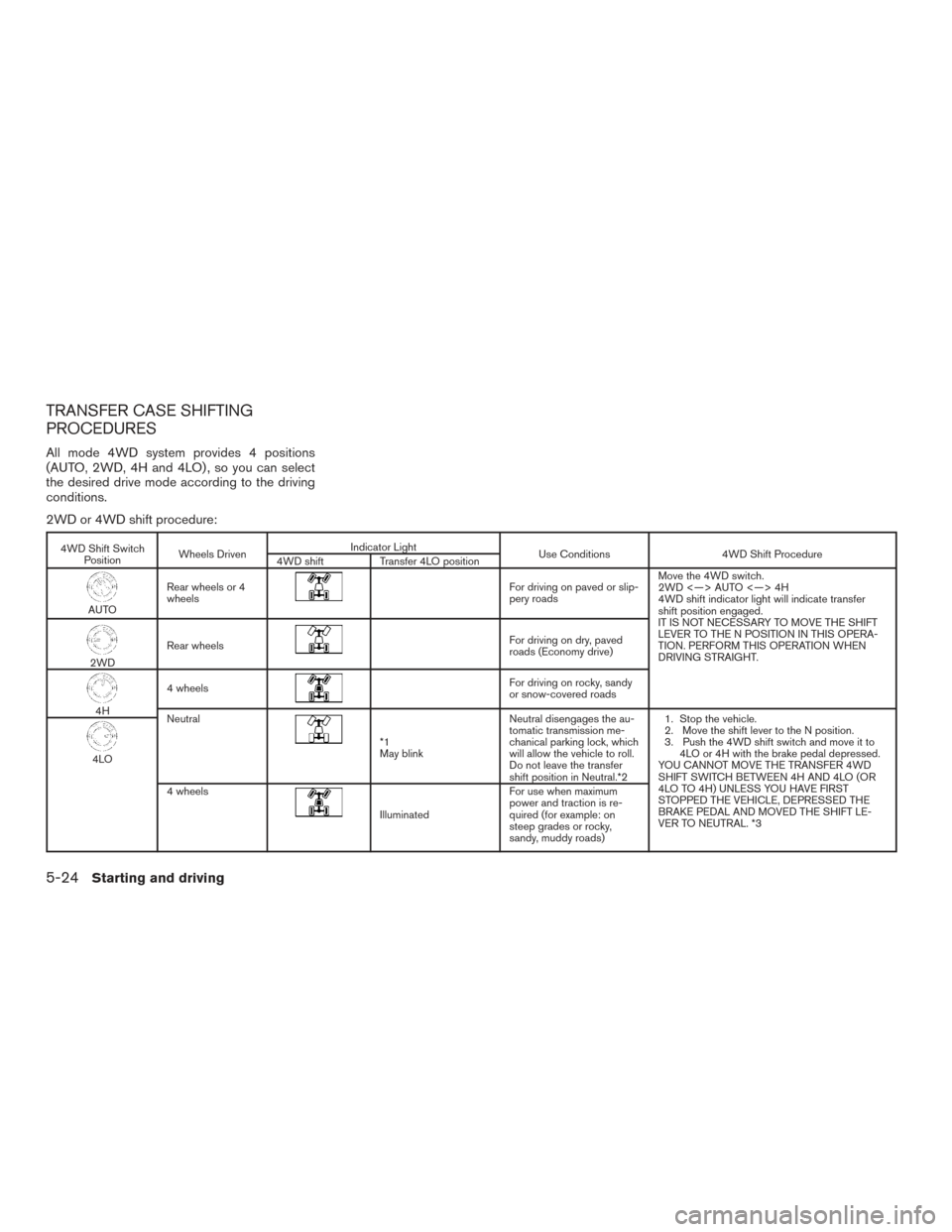
TRANSFER CASE SHIFTING
PROCEDURES
All mode 4WD system provides 4 positions
(AUTO, 2WD, 4H and 4LO) , so you can select
the desired drive mode according to the driving
conditions.
2WD or 4WD shift procedure:
4WD Shift SwitchPosition Wheels Driven Indicator Light
Use Conditions4WD Shift Procedure
4WD shift Transfer 4LO position
AUTORear wheels or 4
wheels
For driving on paved or slip-
pery roads Move the 4WD switch.
2WD <—> AUTO <—> 4H
4WD shift indicator light will indicate transfer
shift position engaged.
IT IS NOT NECESSARY TO MOVE THE SHIFT
LEVER TO THE N POSITION IN THIS OPERA-
TION. PERFORM THIS OPERATION WHEN
DRIVING STRAIGHT.
2WD
Rear wheels
For driving on dry, paved
roads (Economy drive)
4H4 wheels
For driving on rocky, sandy
or snow-covered roads
Neutral
*1
May blink Neutral disengages the au-
tomatic transmission me-
chanical parking lock, which
will allow the vehicle to roll.
Do not leave the transfer
shift position in Neutral.*2 1. Stop the vehicle.
2. Move the shift lever to the N position.
3. Push the 4WD shift switch and move it to
4LO or 4H with the brake pedal depressed.
YOU CANNOT MOVE THE TRANSFER 4WD
SHIFT SWITCH BETWEEN 4H AND 4LO (OR
4LO TO 4H) UNLESS YOU HAVE FIRST
STOPPED THE VEHICLE, DEPRESSED THE
BRAKE PEDAL AND MOVED THE SHIFT LE-
VER TO NEUTRAL. *3
4LO
4 wheels
Illuminated For use when maximum
power and traction is re-
quired (for example: on
steep grades or rocky,
sandy, muddy roads)
5-24Starting and driving
Page 379 of 510
The 4WD shift switch electronically controls the
transfer case operation. Rotate the switch to
move between each mode, 2WD, AUTO, 4H and
4LO.
You must push the switch in to select 4LO,
and the vehicle MUST be stationary and the
shift lever in the N position when changing
into or out of 4LO.
WARNING
When parking, apply the parking brake
before stopping the engine and make sure
that the 4WD shift indicator light is on and
the ATP warning light goes off. Otherwise,
the vehicle could unexpectedly move even
if the automatic transmission is in the P
position.
CAUTION
●Never shift the 4WD shift switch be-
tween 4LO and 4H while driving.
● The 4H position provides greater trac-
tion. Avoid excessive speed, as it will
cause increased fuel consumption and
higher oil temperatures, and could
damage drivetrain components, Speeds
over 62 MPH (100 km/h) in 4H is not
recommended. ●
The 4LO position provides maximum
power and traction. Avoid raising vehicle
speed excessively, as the maximum speed
is approximately 31 MPH (50 km/h).
● When driving straight, shift the 4WD
shift switch to the 2WD, AUTO or 4H
position. Do not move the 4WD shift
switch when making a turn or reversing.
●
Do not shift the 4WD shift switch (be-
tween 2WD, AUTO and 4H) while driving
on steep downhill grades. Use the engine
brake and low automatic transmission
gears (D1 or D2) for engine braking.
● Do not operate the 4WD shift switch
(between 2WD, AUTO and 4H) with the
rear wheels spinning.
●
Do not drive on dry hard surface roads in
the 4H or 4LO position. Driving on dry
hard surfaces in 4H or 4LO may cause
unnecessary noise and tire wear. NISSAN
recommends driving in the 2WD or AUTO
position under these conditions.
●The 4WD transfer case may not be shifted
between 4H and 4LO at low ambient tem-
peratures and the transfer 4LO position
indicator light may blink even when the
4WD shift switch is shifted. After driving
for a while you can change the 4WD
transfer case between 4H and 4LO.
When driving on rough roads,
● Set the 4WD shift switch to AUTO, 4H or
4LO.
● Drive carefully according to the road surface
conditions.
When the vehicle is stuck, ● Set the 4WD shift switch to 4H or 4LO.
● If it is difficult to free the vehicle, repeat
forward and backward movement to in-
crease the movement.
● If the vehicle is stuck deep in mud, place
stones or wooden blocks under the tires.
Then try the recovery procedures above. Tire
chains may be effective.
CAUTION
● Do not spin the tires excessively. Tires
will sink deep into the mud, making it
difficult to free the vehicle.
● Avoid shifting gears with the engine
running at high speeds as this may
cause malfunction.
5-26Starting and driving
Page 381 of 510
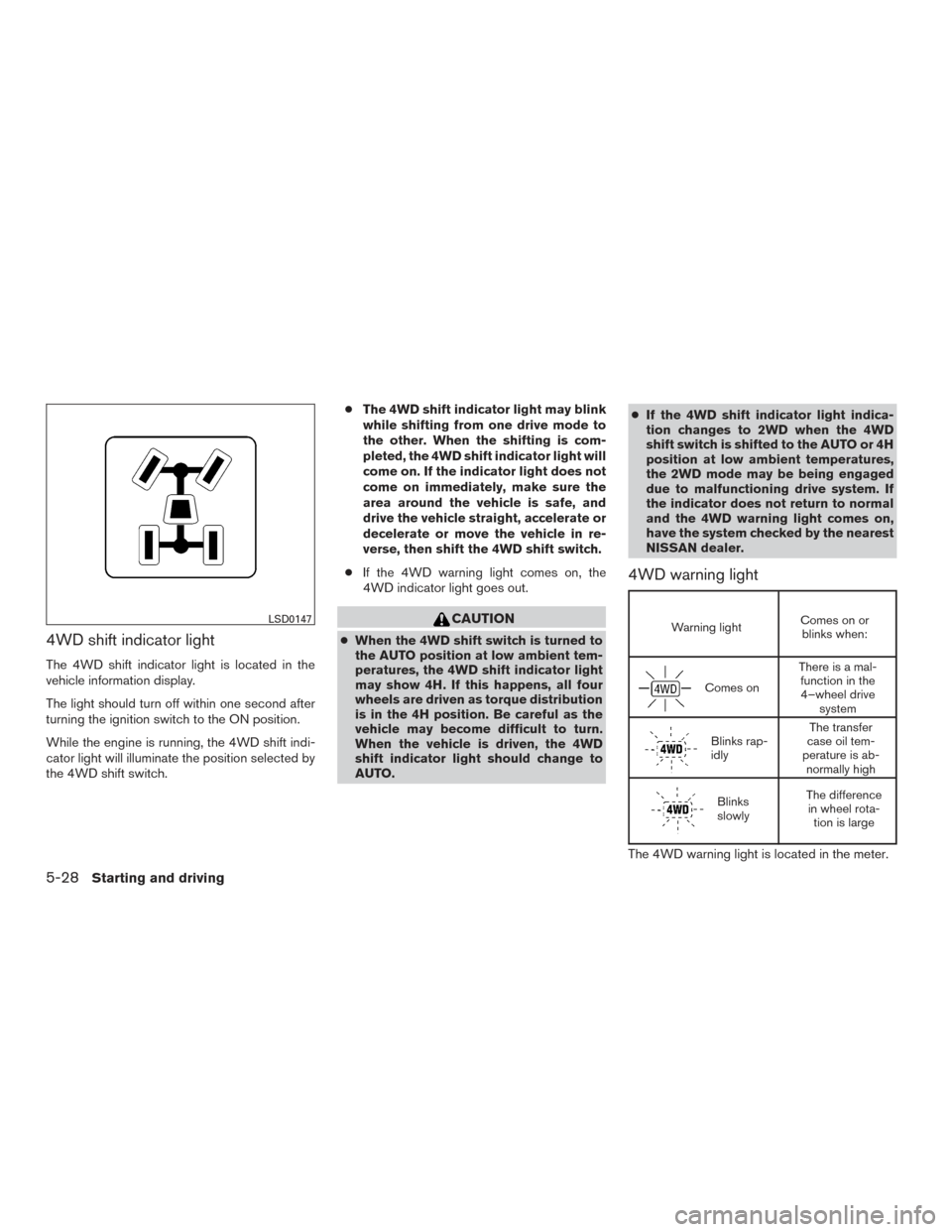
4WD shift indicator light
The 4WD shift indicator light is located in the
vehicle information display.
The light should turn off within one second after
turning the ignition switch to the ON position.
While the engine is running, the 4WD shift indi-
cator light will illuminate the position selected by
the 4WD shift switch.●
The 4WD shift indicator light may blink
while shifting from one drive mode to
the other. When the shifting is com-
pleted, the 4WD shift indicator light will
come on. If the indicator light does not
come on immediately, make sure the
area around the vehicle is safe, and
drive the vehicle straight, accelerate or
decelerate or move the vehicle in re-
verse, then shift the 4WD shift switch.
● If the 4WD warning light comes on, the
4WD indicator light goes out.
CAUTION
● When the 4WD shift switch is turned to
the AUTO position at low ambient tem-
peratures, the 4WD shift indicator light
may show 4H. If this happens, all four
wheels are driven as torque distribution
is in the 4H position. Be careful as the
vehicle may become difficult to turn.
When the vehicle is driven, the 4WD
shift indicator light should change to
AUTO. ●
If the 4WD shift indicator light indica-
tion changes to 2WD when the 4WD
shift switch is shifted to the AUTO or 4H
position at low ambient temperatures,
the 2WD mode may be being engaged
due to malfunctioning drive system. If
the indicator does not return to normal
and the 4WD warning light comes on,
have the system checked by the nearest
NISSAN dealer.
4WD warning light
Warning light Comes on or
blinks when:
Comes on There is a mal-
function in the4–wheel drive system
Blinks rap-
idly The transfer
case oil tem-
perature is ab- normally high
Blinks
slowly The difference
in wheel rota- tion is large
The 4WD warning light is located in the meter.
LSD0147
5-28Starting and driving
Page 382 of 510
The 4WD warning light comes on when the igni-
tion switch is turned to ON. It turns off soon after
the engine is started.
If any malfunction occurs in the 4WD system
when the ignition switch is ON, the warning light
will either remain illuminated or blink.
If the 4WD warning light comes on, the 4WD
shift indicator light goes out.
High-temperature transfer case oil makes the
warning light blink rapidly (about twice per sec-
ond) . If the warning light blinks rapidly during
operation, stop the vehicle in a safe place imme-
diately. Then if the light goes off after a while, you
can continue driving.
A large difference between the diameters of front
and rear wheels will make the warning light blink
slowly (about once per two seconds) . Change
the 4WD shift switch into 2WD and do not drive
fast.
CAUTION
●If the warning light comes on or blinks
slowly during operation or rapidly after
stopping the vehicle for a while, have
your vehicle checked by a NISSAN
dealer as soon as possible. ●
Shifting between 4H and 4LO is not
recommended when the 4WD warning
light turns on.
● When the warning light comes on, the
2WD mode may be engaged even if the
4WD shift switch is in AUTO or 4H. Be
especially careful when driving. If corre-
sponding parts are malfunctioning, the
4WD mode will not be engaged even if
the 4WD shift switch is shifted.
● Do not drive the vehicle in the 4H or 4LO
position on dry hard surface roads. Driv-
ing on dry, hard surfaces in 4H or 4LO
may cause unnecessary noise, tire wear
and increased fuel consumption.
If the 4WD warning light turns on when
you are driving on dry hard surface
roads:
– in the AUTO or 4H position, shift the 4WD shift switch to 2WD.
– in the 4LO position, stop the vehicle, move the shift lever to the N position
with the brake pedal depressed, and
shift the 4WD shift switch to 2WD. ●
If the warning light is still on after the
above operation, have your vehicle
checked by a NISSAN dealer as soon as
possible.
● The transfer case may be damaged if
you continue driving with the warning
light blinking.
Starting and driving5-29
Page 400 of 510
Always refer to the illustration for the correct
placement and jack-up points for your specific
vehicle model and jack type.
Carefully read the caution label attached to
the jack body and the following instruc-
tions.1. Loosen each wheel nut one or two turns by
turning counterclockwise with the wheel nut
wrench. Do not remove the wheel nuts
until the tire is off the ground. NOTE:
Before jacking up the vehicle, make sure
the ignition switch is placed in the OFF
position. If the vehicle is lifted up with the
ignition switch placed in the ON position
the auto-leveling suspension (if so
equipped) will become disabled after
60 seconds. To reset the auto-leveling sus-
pension, cycle the ignition switch ON/OFF
one time.
2. Place the jack directly under the jack-up point as illustrated so the top of the jack
contacts the vehicle at the jack-up point. The
jack-up points are indicated by stamped ar-
rows on the side of the frame.
The jack should be used on firm and
level ground.
WCE0139
In case of emergency6-7